CONTENTS
 ABSTRACT
 EXISTENCE(DISADVANTAGES)
 PROPOSAL(ADVANTAGES)
 DIAGRAMS
 HARDWARE REQUIREMENTS
 EVOLUTION
 CONCLUSION
 REFERENCES
ABSTRACT
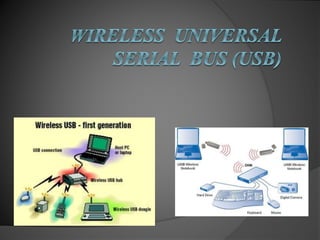
Wireless USB is a short-range, high-bandwidth wireless radio communication
protocol.
It is based on the WiMedia Alliance's Ultra-Wide Band (UWB) common radio
platform.
W-USB is defined as a bus, albeit logical and not physical, which can
simultaneously connect a host with a number of peripherals.
It has the capability of sending frames at 480 Mb/s at distances up to 3 metres
and 110 Mb/s at up to 10 metres.
The host divides the available bandwidth through a time-division multiple
access (TDMA) strategy.
Disadvantages
 Size
 Being to small leaves some
devices to be easily misplaced
 It breaks its gone
 Compared to some CD’s that
can be repaired once
scratched to retrieve data
USB’s once they fail they
fail.
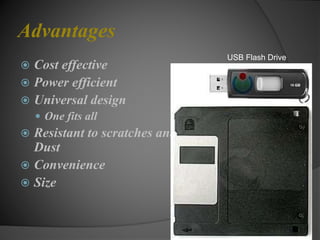
Advantages
 Cost effective
 Power efficient
 Universal design
 One fits all
 Resistant to scratches and
Dust
 Convenience
 Size
USB Flash Drive
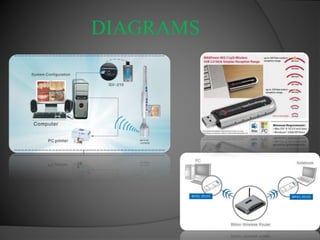
DIAGRAMS
HARDWARE REQUIREMENTS
 Think of wireless USB as an additional way in which to connect devices to a
computer. Thus, traditional USB ports are here to stay, at least for the foreseeable
future. All of your current USB peripherals will still utilize the wired connection
they always have.
 Wireless USB, however, opens up a variety of new types of devices. Wireless USB
hubs, or bridging devices, will allow you to plug wired USB peripherals into the
hub, but the hub itself will enjoy a wireless connection to the computer. In this
way, you can experience the convenience of wireless connectivity without
replacing all your USB peripherals with wireless versions.
 To aid in the transition from a world with only wired USB to one where Certified
Wireless USB will one day be supported natively on the motherboard of new
computers, the concept of Device Wire Adapters (DWA) and Host Wire Adapters
(HWA) was created. HWAs are essentially “dongles” that physically connect to
the computer via USB 2.0 or a laptop’s CardBus or ExpressCard interface, and
provide Wireless USB host capability to any number of WUSB devices. DWAs, or
“Wireless USB hubs”, allow existing wired USB devices to be used wirelessly with
a WUSB host.
 Over time, the industry will move towards more integrated solutions where any
required hardware is built-in to the computer and adapters will not be necessary.
Of course, you would need a computer so-equipped to enjoy wireless USB built-
Evolution
 Super-Speed USB or USB 3.0
 predicted speeds of 5 gbps
 Soon to be released.
Wireless USB
 connections you will have the same
personal security of wired USB 2.0
CONCLUSION
 A simple system was built to solve the problem of
decoding standard R/C car transmitter/receiver
pair servo signals into something the PIC
microcontroller could use and decode so that
intelligent output could be passed to other devices,
based on the input from the transmitter. As
complicated as all that sounds the system itsself
was just a PIC and the R/C car transmitter
receiver. The real conclusion to be made here is
that, while wireless can be complicated,
 “Driven by the global trend towards the wireless
connectivity, WUSB Devices will reach to 11.02
million units in volume sales by 2018”
REFERENCES
 USB Today. Intel, retrieved March 11, 2010, from
http://www.intel.com/technology/usb/
 About Us, USB-IF, retrieved March 11, 2010, from
http://www.usb.org/about
 USB Flash Drive. Wikipedia, retrieved 17, 2010
http://en.wikipedia.org/wiki/USB_flash_drive
 Usblyzer. http://www.usblyzer.com/brief-usb-overview-and-
history.htm
 Super Speed. Ars technical, retrieved March 11, 2010,
http://arstechnica.com/hardware/guides/2009/08/super-speed-a-
brief-history-of-usb-30.ars
 The USB Process. How Stuff Works, retrieved April 2, 2010,
http://computer.howstuffworks.com/usb3.htm
 USB Games. Shocking Fun, retrieved March 10, 2010
http://www.shockingfun.com/category_s/210.htm
 Akaipro. Retrieved March 10, 2010 http://www.akaipro.com/ewiusb
Wireless usb

Wireless usb

  • 2.
    CONTENTS  ABSTRACT  EXISTENCE(DISADVANTAGES) PROPOSAL(ADVANTAGES)  DIAGRAMS  HARDWARE REQUIREMENTS  EVOLUTION  CONCLUSION  REFERENCES
  • 3.
    ABSTRACT Wireless USB isa short-range, high-bandwidth wireless radio communication protocol. It is based on the WiMedia Alliance's Ultra-Wide Band (UWB) common radio platform. W-USB is defined as a bus, albeit logical and not physical, which can simultaneously connect a host with a number of peripherals. It has the capability of sending frames at 480 Mb/s at distances up to 3 metres and 110 Mb/s at up to 10 metres. The host divides the available bandwidth through a time-division multiple access (TDMA) strategy.
  • 4.
    Disadvantages  Size  Beingto small leaves some devices to be easily misplaced  It breaks its gone  Compared to some CD’s that can be repaired once scratched to retrieve data USB’s once they fail they fail.
  • 5.
    Advantages  Cost effective Power efficient  Universal design  One fits all  Resistant to scratches and Dust  Convenience  Size USB Flash Drive
  • 6.
  • 7.
    HARDWARE REQUIREMENTS  Thinkof wireless USB as an additional way in which to connect devices to a computer. Thus, traditional USB ports are here to stay, at least for the foreseeable future. All of your current USB peripherals will still utilize the wired connection they always have.  Wireless USB, however, opens up a variety of new types of devices. Wireless USB hubs, or bridging devices, will allow you to plug wired USB peripherals into the hub, but the hub itself will enjoy a wireless connection to the computer. In this way, you can experience the convenience of wireless connectivity without replacing all your USB peripherals with wireless versions.  To aid in the transition from a world with only wired USB to one where Certified Wireless USB will one day be supported natively on the motherboard of new computers, the concept of Device Wire Adapters (DWA) and Host Wire Adapters (HWA) was created. HWAs are essentially “dongles” that physically connect to the computer via USB 2.0 or a laptop’s CardBus or ExpressCard interface, and provide Wireless USB host capability to any number of WUSB devices. DWAs, or “Wireless USB hubs”, allow existing wired USB devices to be used wirelessly with a WUSB host.  Over time, the industry will move towards more integrated solutions where any required hardware is built-in to the computer and adapters will not be necessary. Of course, you would need a computer so-equipped to enjoy wireless USB built-
  • 8.
    Evolution  Super-Speed USBor USB 3.0  predicted speeds of 5 gbps  Soon to be released.
  • 9.
    Wireless USB  connectionsyou will have the same personal security of wired USB 2.0
  • 10.
    CONCLUSION  A simplesystem was built to solve the problem of decoding standard R/C car transmitter/receiver pair servo signals into something the PIC microcontroller could use and decode so that intelligent output could be passed to other devices, based on the input from the transmitter. As complicated as all that sounds the system itsself was just a PIC and the R/C car transmitter receiver. The real conclusion to be made here is that, while wireless can be complicated,  “Driven by the global trend towards the wireless connectivity, WUSB Devices will reach to 11.02 million units in volume sales by 2018”
  • 11.
    REFERENCES  USB Today.Intel, retrieved March 11, 2010, from http://www.intel.com/technology/usb/  About Us, USB-IF, retrieved March 11, 2010, from http://www.usb.org/about  USB Flash Drive. Wikipedia, retrieved 17, 2010 http://en.wikipedia.org/wiki/USB_flash_drive  Usblyzer. http://www.usblyzer.com/brief-usb-overview-and- history.htm  Super Speed. Ars technical, retrieved March 11, 2010, http://arstechnica.com/hardware/guides/2009/08/super-speed-a- brief-history-of-usb-30.ars  The USB Process. How Stuff Works, retrieved April 2, 2010, http://computer.howstuffworks.com/usb3.htm  USB Games. Shocking Fun, retrieved March 10, 2010 http://www.shockingfun.com/category_s/210.htm  Akaipro. Retrieved March 10, 2010 http://www.akaipro.com/ewiusb