CLOUD COMPUTING
What Is Cloud Computing ?
• Cloud computing is Internet-based computing,
whereby shared resources, software and information
are provided to computers and other devices on-
demand, like the electricity grid.
• Cloud Computing is a general term used to describe a
new class of network based computing that takes place
over the Internet,
– basically a step on from Utility Computing
– a collection/group of integrated and networked
hardware, software and Internet infrastructure (called
a platform).
– Using the Internet for communication and transport
provides hardware, software and networking services
to clients
• These platforms hide the complexity and
details of the underlying infrastructure from
users and applications by providing very
simple graphical interface or API (Applications
Programming Interface).
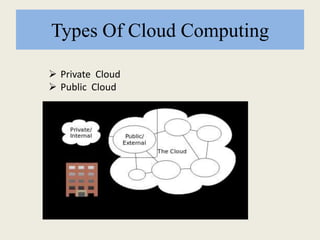
Types Of Cloud Computing
 Private Cloud
 Public Cloud
 Public cloud:
A cloud is called a 'Public cloud' when the services
are rendered over a network that is open for public
use.
 Private cloud:
Private cloud is cloud infrastructure operated solely
for a single organization, whether managed internally
or by a third-party and hosted internally or externally.
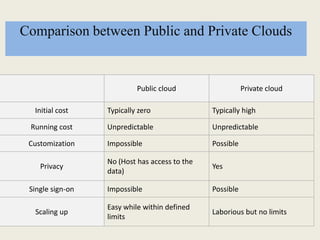
Comparison between Public and Private Clouds
Public cloud Private cloud
Initial cost Typically zero Typically high
Running cost Unpredictable Unpredictable
Customization Impossible Possible
Privacy
No (Host has access to the
data)
Yes
Single sign-on Impossible Possible
Scaling up
Easy while within defined
limits
Laborious but no limits
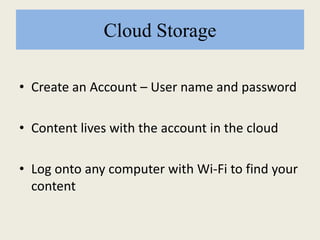
Cloud Storage
• Create an Account – User name and password
• Content lives with the account in the cloud
• Log onto any computer with Wi-Fi to find your
content
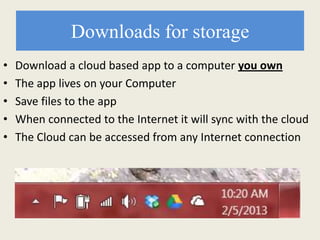
Downloads for storage
• Download a cloud based app to a computer you own
• The app lives on your Computer
• Save files to the app
• When connected to the Internet it will sync with the cloud
• The Cloud can be accessed from any Internet connection
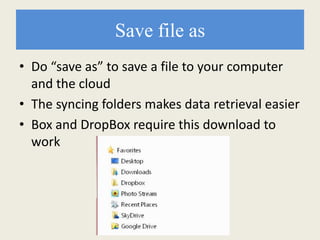
Save file as
• Do “save as” to save a file to your computer
and the cloud
• The syncing folders makes data retrieval easier
• Box and DropBox require this download to
work
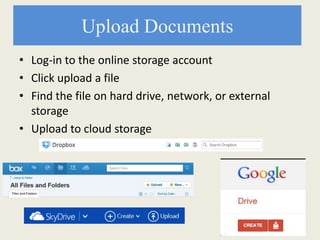
Upload Documents
• Log-in to the online storage account
• Click upload a file
• Find the file on hard drive, network, or external
storage
• Upload to cloud storage
More than Storage
Software and applications
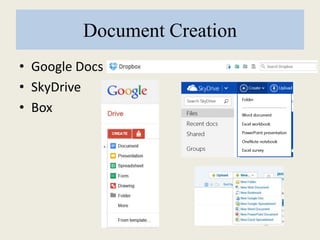
Document Creation
• Google Docs
• SkyDrive
• Box
Internet is required
• Creation is happening in the cloud
• Saving is going to the cloud
• To retrieve files, must return to the cloud
Implications
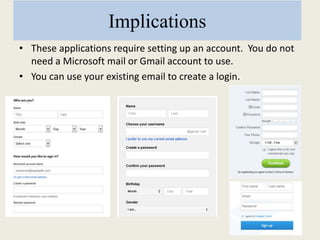
• These applications require setting up an account. You do not
need a Microsoft mail or Gmail account to use.
• You can use your existing email to create a login.
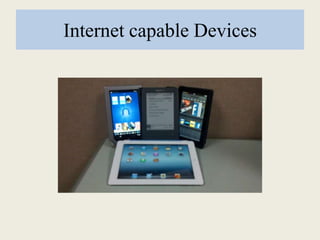
Internet capable Devices
Benefits
• Saving Large Files
• Multiple file types – Photos, videos,
presentations, docs
• Back-up of stored files
• File Sharing
• Access from devices
• Nothing to forget (thumb drive, cd)
• Project collaboration
File Sharing
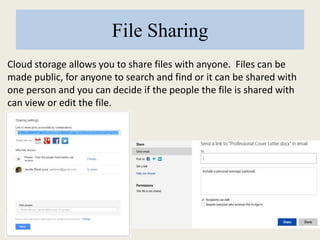
Cloud storage allows you to share files with anyone. Files can be
made public, for anyone to search and find or it can be shared with
one person and you can decide if the people the file is shared with
can view or edit the file.
Other Software services
• Photo editing software
• Online banking apps
• Social media apps
• Communication
Library Specific Services
• WorldCat
• MSC
• Ebsco
• Discover It
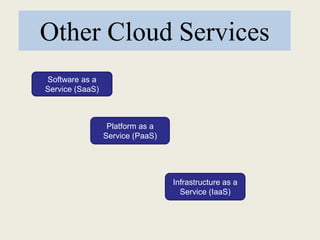
Other Cloud Services
Software as a
Service (SaaS)
Platform as a
Service (PaaS)
Infrastructure as a
Service (IaaS)
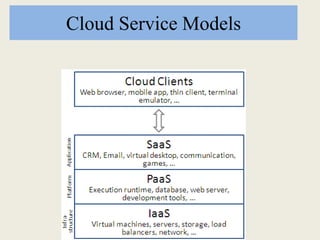
Cloud Service Models
Software as a Service (SaaS)
• SaaS is a model of software deployment
where an application is hosted as a service
provided to customers across the Internet.
Platform as a Service (PaaS)
• In the PaaS model, cloud providers deliver
a computing platform, typically including
operating system, programming language
execution environment, database, and web
server.
Infrastructure as a Service (IaaS)
• is a provision model in which an organization
outsources the equipment used to support
operations, including storage, hardware,
servers and networking components.
Advantages of Cloud Computing
• Lower computer costs
You do not need a high-powered and high-priced computer
to run cloud computing's web-based applications.
• Improved performance:
Computers in a cloud computing system boot and run faster
because they have fewer programs and processes loaded into
memory
• Reduced software costs:
Instead of purchasing expensive software applications, you
can get most of what you need for free-ish!
• Instant software updates:
– Another advantage to cloud computing is that you are no longer faced with
choosing between obsolete software and high upgrade costs.
• Improved document format compatibility.
– You do not have to worry about the documents you create on your machine
being compatible with other users' applications
• Unlimited storage capacity:
– Cloud computing offers virtually limitless storage.
• Increased data reliability:
– Unlike desktop computing, in which if a hard disk crashes and
destroy all your valuable data, a computer crashing in the cloud
should not affect the storage of your data.
• Universal document access:
– That is not a problem with cloud computing, because you do not
take your documents with you.
• Latest version availability:
- The cloud always hosts the latest version of your documents
Disadvantages of Cloud Computing
• Requires a constant Internet connection:
– Cloud computing is impossible if you cannot connect to the
Internet.
• Does not work well with low-speed connections:
– Similarly, a low-speed Internet connection, such as that
found with dial-up services, makes cloud computing
painful at best and often impossible.
• Features might be limited:
– This situation is bound to change, but today many web-
based applications simply are not as full-featured as their
desktop-based applications.
• Can be slow:
– Even with a fast connection, web-based applications can
sometimes be slower than accessing a similar software
program on your desktop PC.
• Stored data might not be secure:
- Can unauthorized users gain access to your confidential
data
• Stored data can be lost:
– Theoretically, data stored in the cloud is safe, replicated across
multiple machines.
Thank You
Made By-
 FCOG11136 Manjiri P. Parab
 FCOG11138 Ankita M. Patel
 FCOW11146 Ashwini A. Pingale
 FCOG11152 Neha N. Shinde

Cloud computing

  • 1.
  • 3.
    What Is CloudComputing ? • Cloud computing is Internet-based computing, whereby shared resources, software and information are provided to computers and other devices on- demand, like the electricity grid.
  • 4.
    • Cloud Computingis a general term used to describe a new class of network based computing that takes place over the Internet, – basically a step on from Utility Computing – a collection/group of integrated and networked hardware, software and Internet infrastructure (called a platform). – Using the Internet for communication and transport provides hardware, software and networking services to clients
  • 5.
    • These platformshide the complexity and details of the underlying infrastructure from users and applications by providing very simple graphical interface or API (Applications Programming Interface).
  • 6.
    Types Of CloudComputing  Private Cloud  Public Cloud
  • 7.
     Public cloud: Acloud is called a 'Public cloud' when the services are rendered over a network that is open for public use.  Private cloud: Private cloud is cloud infrastructure operated solely for a single organization, whether managed internally or by a third-party and hosted internally or externally.
  • 8.
    Comparison between Publicand Private Clouds Public cloud Private cloud Initial cost Typically zero Typically high Running cost Unpredictable Unpredictable Customization Impossible Possible Privacy No (Host has access to the data) Yes Single sign-on Impossible Possible Scaling up Easy while within defined limits Laborious but no limits
  • 9.
    Cloud Storage • Createan Account – User name and password • Content lives with the account in the cloud • Log onto any computer with Wi-Fi to find your content
  • 10.
    Downloads for storage •Download a cloud based app to a computer you own • The app lives on your Computer • Save files to the app • When connected to the Internet it will sync with the cloud • The Cloud can be accessed from any Internet connection
  • 11.
    Save file as •Do “save as” to save a file to your computer and the cloud • The syncing folders makes data retrieval easier • Box and DropBox require this download to work
  • 12.
    Upload Documents • Log-into the online storage account • Click upload a file • Find the file on hard drive, network, or external storage • Upload to cloud storage
  • 13.
  • 14.
    Document Creation • GoogleDocs • SkyDrive • Box
  • 15.
    Internet is required •Creation is happening in the cloud • Saving is going to the cloud • To retrieve files, must return to the cloud
  • 16.
    Implications • These applicationsrequire setting up an account. You do not need a Microsoft mail or Gmail account to use. • You can use your existing email to create a login.
  • 17.
  • 18.
    Benefits • Saving LargeFiles • Multiple file types – Photos, videos, presentations, docs • Back-up of stored files • File Sharing • Access from devices • Nothing to forget (thumb drive, cd) • Project collaboration
  • 19.
    File Sharing Cloud storageallows you to share files with anyone. Files can be made public, for anyone to search and find or it can be shared with one person and you can decide if the people the file is shared with can view or edit the file.
  • 20.
    Other Software services •Photo editing software • Online banking apps • Social media apps • Communication
  • 21.
    Library Specific Services •WorldCat • MSC • Ebsco • Discover It
  • 22.
    Other Cloud Services Softwareas a Service (SaaS) Platform as a Service (PaaS) Infrastructure as a Service (IaaS)
  • 23.
  • 24.
    Software as aService (SaaS) • SaaS is a model of software deployment where an application is hosted as a service provided to customers across the Internet.
  • 25.
    Platform as aService (PaaS) • In the PaaS model, cloud providers deliver a computing platform, typically including operating system, programming language execution environment, database, and web server.
  • 26.
    Infrastructure as aService (IaaS) • is a provision model in which an organization outsources the equipment used to support operations, including storage, hardware, servers and networking components.
  • 27.
    Advantages of CloudComputing • Lower computer costs You do not need a high-powered and high-priced computer to run cloud computing's web-based applications. • Improved performance: Computers in a cloud computing system boot and run faster because they have fewer programs and processes loaded into memory • Reduced software costs: Instead of purchasing expensive software applications, you can get most of what you need for free-ish!
  • 28.
    • Instant softwareupdates: – Another advantage to cloud computing is that you are no longer faced with choosing between obsolete software and high upgrade costs. • Improved document format compatibility. – You do not have to worry about the documents you create on your machine being compatible with other users' applications • Unlimited storage capacity: – Cloud computing offers virtually limitless storage.
  • 29.
    • Increased datareliability: – Unlike desktop computing, in which if a hard disk crashes and destroy all your valuable data, a computer crashing in the cloud should not affect the storage of your data. • Universal document access: – That is not a problem with cloud computing, because you do not take your documents with you. • Latest version availability: - The cloud always hosts the latest version of your documents
  • 30.
    Disadvantages of CloudComputing • Requires a constant Internet connection: – Cloud computing is impossible if you cannot connect to the Internet. • Does not work well with low-speed connections: – Similarly, a low-speed Internet connection, such as that found with dial-up services, makes cloud computing painful at best and often impossible.
  • 31.
    • Features mightbe limited: – This situation is bound to change, but today many web- based applications simply are not as full-featured as their desktop-based applications. • Can be slow: – Even with a fast connection, web-based applications can sometimes be slower than accessing a similar software program on your desktop PC.
  • 32.
    • Stored datamight not be secure: - Can unauthorized users gain access to your confidential data • Stored data can be lost: – Theoretically, data stored in the cloud is safe, replicated across multiple machines.
  • 33.
    Thank You Made By- FCOG11136 Manjiri P. Parab  FCOG11138 Ankita M. Patel  FCOW11146 Ashwini A. Pingale  FCOG11152 Neha N. Shinde