CLOUD
COMPUTING
M. Sai sasidhar
221FA18091
What is Cloud Computing?
Computing is a general term used to describe a new class of network based
computing that takes place over the Internet,
 Basically a step on from Utility Computing
 A collection/group of integrated and networked hardware, software and Internet
infrastructure (called a platform).
 Using the Internet for communication and transport provides hardware,software
and networking services to clients.
These platforms hide the complexity and details of the underlying infrastructure
from users and applications by providing very simple graphical interface or API
(Applications Programming Interface).
What is cloud computing?
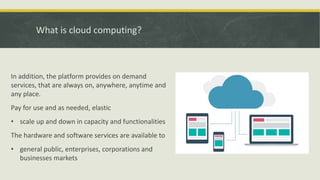
In addition, the platform provides on demand
services, that are always on, anywhere, anytime and
any place.
Pay for use and as needed, elastic
• scale up and down in capacity and functionalities
The hardware and software services are available to
• general public, enterprises, corporations and
businesses markets
Many companies are delivering services from the
cloud. Some notable examples include the
following:
• Google -- Has a private cloud that it uses for
delivering Google Docs and many other services
to its users, including email access, document
applications, text translations, maps, web
analytics, and much more.
• Microsoft -- Has Microsoft Office 365 online
service that allows for content and business
intelligence tools to be moved into the cloud,
and Microsoft currently makes its office
applications available in a cloud.
• Salesforce.com -- Runs its application set for its
customers in a cloud, and its Force.com and
Vmforce.com products provide developers with
platforms to build customized cloud services.
Basic concepts
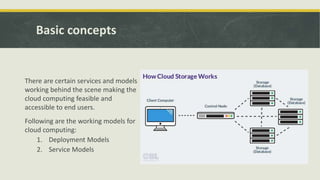
There are certain services and models
working behind the scene making the
cloud computing feasible and
accessible to end users.
Following are the working models for
cloud computing:
1. Deployment Models
2. Service Models
Deployment Models
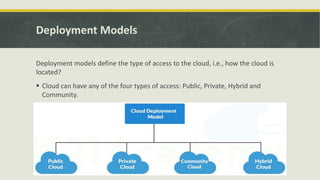
Deployment models define the type of access to the cloud, i.e., how the cloud is
located?
 Cloud can have any of the four types of access: Public, Private, Hybrid and
Community.
Deployment Models
PUBLIC CLOUD: The Public Cloud allows systems and services to be easily
accessible to the general public. Public cloud may be less secure because of its
openness, e.g., e-mail.
PRIVATE CLOUD: The Private Cloud allows systems and services to be accessible
within an organization. It offers increased security because of its private nature.
COMMUNITY CLOUD: The Community Cloud allows systems and services to be
accessible by group of organizations.
HYBRID CLOUD: The Hybrid Cloud is mixture of public and private cloud. However,
the critical activities are performed using private cloud while the non critical
activities are performed using public cloud.
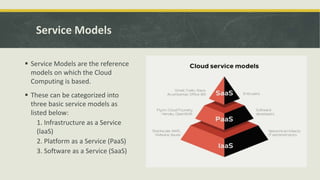
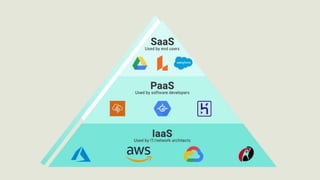
Service Models
 Service Models are the reference
models on which the Cloud
Computing is based.
 These can be categorized into
three basic service models as
listed below:
1. Infrastructure as a Service
(laaS)
2. Platform as a Service (PaaS)
3. Software as a Service (SaaS)
Infrastructure as a service
 laas is the delivery of technology
infrastructure as an on demand scalable
service. laaS provides access to
fundamental resources such as physical
machines, virtual machines, virtual
storage, etc.
 Usually billed based on usage.
 Usually multi tenant virtualized
environment.
 Can be coupled with Managed Services
for OS and application support
Platform as a Service
PaaS provides the runtime environment for applications, development & deployment tools,
etc. PaaS provides all of the facilities required to support the complete life cycle of building
and delivering web applications and services entirely from the Internet.
Typically applications must be developed with a particular platform in mind.
 Multi tenant environments
 Highly scalable multi tier architecture
Software as a Service
SaaS model allows to use software applications as a service to end users. SaaS is a
software delivery methodology that provides licensed multi-tenant access to
software and its functions remotely as a Web-based service.
 Usually billed based on usage.
 Usually multi tenant environment.
 Highly scalable architecture
Advantages of Cloud Computing
 Cost Savings - Companies can reduce their capital expenditures and use operational expenditures
for increasing their computing capabilities. This is a lower barrier to entry and also requires fewer
in-house IT resources to provide system support.
 Scalability/Flexibility - Companies can start with a small deployment and grow to a large
deployment fairly rapidly, and then scale back if necessary. Also, the flexibility of cloud computing
allows companies to use extra resources at peak times, enabling them to satisfy consumer
demands.
 Reliability Services- using multiple redundant sites can support business continuity and disaster
recovery Maintenance Cloud service providers do the system maintenance, and access is through
APIs that do not require application installations onto PCs, thus further reducing maintenance
requirements
 Mobile Accessible - Mobile workers have increased productivity due to systems accessible in
frastructure available from anywhere.
Disadvantage of Cloude Computing
Requires a constant Internet connection:
 Cloud computing is impossible if you cannot connect to the Internet.
 Since you use the Internet to connect to both your applications and documents, if you do not have an
Internet connection you cannot access anything, even your own documents.
Stored data might not be secure:
 With cloud computing, all your data is stored on the cloud.The questions is How secure is the cloud?
 Can unauthorised users gain access to your confidential data?
Stored data can be lost:
 Theoretically, data stored in the cloud is safe, replicated across multiple machines.But on the off chance
that your data goes missing, you have no physical or local backup.Put simply, relying on the cloud puts you
at risk if the cloud lets you down.
Statistical Graph
THANK YOU

CLOUD COMPUTING.pptx

  • 1.
  • 2.
    What is CloudComputing? Computing is a general term used to describe a new class of network based computing that takes place over the Internet,  Basically a step on from Utility Computing  A collection/group of integrated and networked hardware, software and Internet infrastructure (called a platform).  Using the Internet for communication and transport provides hardware,software and networking services to clients. These platforms hide the complexity and details of the underlying infrastructure from users and applications by providing very simple graphical interface or API (Applications Programming Interface).
  • 3.
    What is cloudcomputing? In addition, the platform provides on demand services, that are always on, anywhere, anytime and any place. Pay for use and as needed, elastic • scale up and down in capacity and functionalities The hardware and software services are available to • general public, enterprises, corporations and businesses markets
  • 4.
    Many companies aredelivering services from the cloud. Some notable examples include the following: • Google -- Has a private cloud that it uses for delivering Google Docs and many other services to its users, including email access, document applications, text translations, maps, web analytics, and much more. • Microsoft -- Has Microsoft Office 365 online service that allows for content and business intelligence tools to be moved into the cloud, and Microsoft currently makes its office applications available in a cloud. • Salesforce.com -- Runs its application set for its customers in a cloud, and its Force.com and Vmforce.com products provide developers with platforms to build customized cloud services.
  • 5.
    Basic concepts There arecertain services and models working behind the scene making the cloud computing feasible and accessible to end users. Following are the working models for cloud computing: 1. Deployment Models 2. Service Models
  • 6.
    Deployment Models Deployment modelsdefine the type of access to the cloud, i.e., how the cloud is located?  Cloud can have any of the four types of access: Public, Private, Hybrid and Community.
  • 7.
    Deployment Models PUBLIC CLOUD:The Public Cloud allows systems and services to be easily accessible to the general public. Public cloud may be less secure because of its openness, e.g., e-mail. PRIVATE CLOUD: The Private Cloud allows systems and services to be accessible within an organization. It offers increased security because of its private nature. COMMUNITY CLOUD: The Community Cloud allows systems and services to be accessible by group of organizations. HYBRID CLOUD: The Hybrid Cloud is mixture of public and private cloud. However, the critical activities are performed using private cloud while the non critical activities are performed using public cloud.
  • 8.
    Service Models  ServiceModels are the reference models on which the Cloud Computing is based.  These can be categorized into three basic service models as listed below: 1. Infrastructure as a Service (laaS) 2. Platform as a Service (PaaS) 3. Software as a Service (SaaS)
  • 9.
    Infrastructure as aservice  laas is the delivery of technology infrastructure as an on demand scalable service. laaS provides access to fundamental resources such as physical machines, virtual machines, virtual storage, etc.  Usually billed based on usage.  Usually multi tenant virtualized environment.  Can be coupled with Managed Services for OS and application support
  • 10.
    Platform as aService PaaS provides the runtime environment for applications, development & deployment tools, etc. PaaS provides all of the facilities required to support the complete life cycle of building and delivering web applications and services entirely from the Internet. Typically applications must be developed with a particular platform in mind.  Multi tenant environments  Highly scalable multi tier architecture
  • 11.
    Software as aService SaaS model allows to use software applications as a service to end users. SaaS is a software delivery methodology that provides licensed multi-tenant access to software and its functions remotely as a Web-based service.  Usually billed based on usage.  Usually multi tenant environment.  Highly scalable architecture
  • 13.
    Advantages of CloudComputing  Cost Savings - Companies can reduce their capital expenditures and use operational expenditures for increasing their computing capabilities. This is a lower barrier to entry and also requires fewer in-house IT resources to provide system support.  Scalability/Flexibility - Companies can start with a small deployment and grow to a large deployment fairly rapidly, and then scale back if necessary. Also, the flexibility of cloud computing allows companies to use extra resources at peak times, enabling them to satisfy consumer demands.  Reliability Services- using multiple redundant sites can support business continuity and disaster recovery Maintenance Cloud service providers do the system maintenance, and access is through APIs that do not require application installations onto PCs, thus further reducing maintenance requirements  Mobile Accessible - Mobile workers have increased productivity due to systems accessible in frastructure available from anywhere.
  • 14.
    Disadvantage of CloudeComputing Requires a constant Internet connection:  Cloud computing is impossible if you cannot connect to the Internet.  Since you use the Internet to connect to both your applications and documents, if you do not have an Internet connection you cannot access anything, even your own documents. Stored data might not be secure:  With cloud computing, all your data is stored on the cloud.The questions is How secure is the cloud?  Can unauthorised users gain access to your confidential data? Stored data can be lost:  Theoretically, data stored in the cloud is safe, replicated across multiple machines.But on the off chance that your data goes missing, you have no physical or local backup.Put simply, relying on the cloud puts you at risk if the cloud lets you down.
  • 15.
  • 17.