Satyanarayana Swamy Gurram 19-05-2011
GUIDELINES What is Cloud Computing? Why Cloud computing?  Cloud Anatomy Cloud computing technology Cloud computing products and market Cloud computing Advantages & Disadvantages Cloud computing Risks. Ways to Reduce I.T Spend with cloud computing.
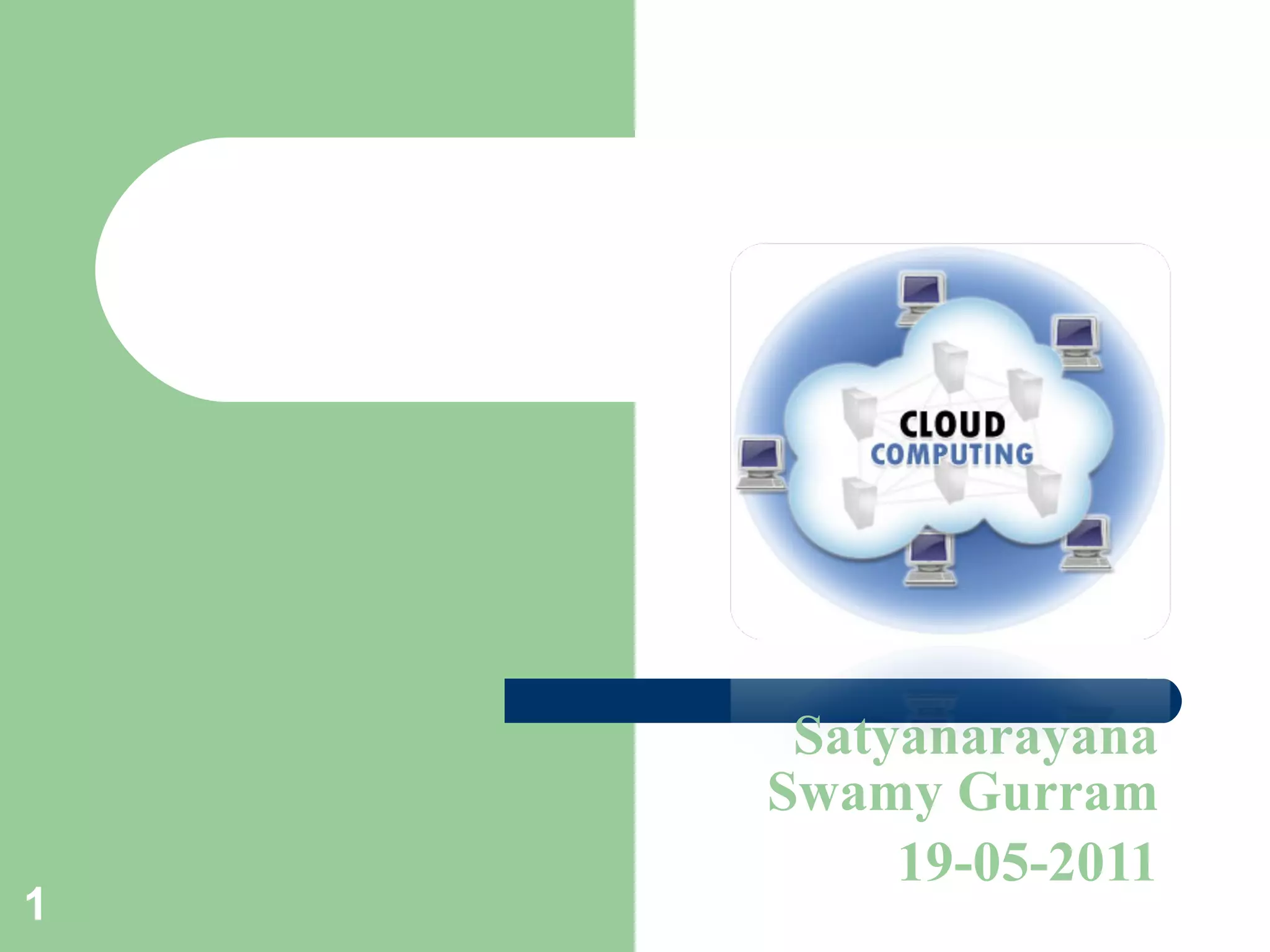
What is Cloud Computing? Definitions:   “ Cloud computing  is a general term for anything that involves delivering hosted services over the internet.” – Wikipedia “ Cloud computing  is Internet-based computing, whereby shared resources, software, and information are provided to computers and other devices on demand, like the electricity grid.”- Wikipedia  Basically a cloud is a virtualization of resources that manages and maintains itself.
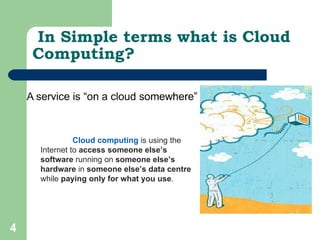
In Simple terms what is Cloud Computing? Cloud computing   is using the Internet to  access someone else’s software  running on  someone else’s hardware  in  someone else’s data centre  while  paying only for what you use .
In Simple terms what is Cloud Computing? A simple example of cloud computing is Yahoo email or Gmail etc. You don’t need a software or a server to use them. All a consumer would need is just an internet connection and you can start sending emails. The server and email management software is all on the cloud  ( internet) and is totally managed by the cloud service provider like Yahoo , Google etc.
The consumer gets to use the software alone and enjoy the benefits. The analogy is , ' If you only need milk , would you buy a cow ?'  All the users or consumers need is to get the benefits of using the software or hardware of the computer like sending emails etc. Just to get this benefit (milk) why should a consumer buy a (cow) software /hardware ?
Why the rush to the cloud? There are valid and significant business and IT reasons for the cloud computing paradigm shift. The fundamentals of outsourcing as a solution apply.  Reduced cost:  Cloud computing can reduce both capital expense (CapEx) and operating expense (OpEx) costs because resources are only acquired when needed and are only paid for when used.  Refined usage of personnel:  Using cloud computing frees valuable personnel allowing them to focus on delivering value rather than maintaining hardware and software.  Robust scalability:  Cloud computing allows for immediate scaling, either up or down, at any time without long-term commitment.
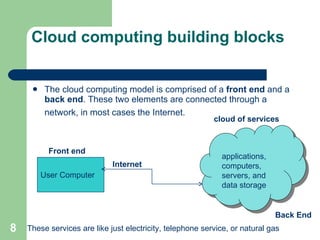
Cloud computing building blocks The cloud computing model is comprised of a  front end  and a  back end . These two elements are connected through a network, in most cases the Internet.  User Computer Internet applications, computers, servers, and data storage cloud of services Back End These services are like just electricity, telephone service, or natural gas  Front end
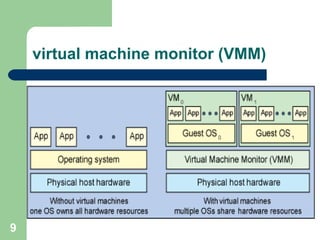
virtual machine monitor (VMM)
  How the Virtual Machine Monitor works VMM is a program on a host system that lets one computer support multiple, identical execution environments. From the user's point of view, the system is a self-contained computer which is isolated from other users. In reality, every user is being served by the same machine.
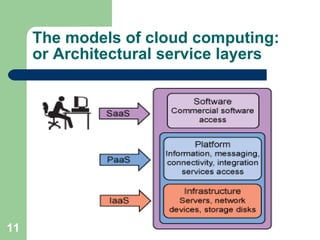
The models of cloud computing: or Architectural service layers
Software as a Service (SaaS): In the software-as-a-service cloud model, the vendor supplies the hardware infrastructure, the software product and interacts withthe user through a front-end portal.  SaaS is a very broad market.Services can be anything from Web-based email to inventory control and  database processing. Because the service provider hosts both the application and the data, the end user is free to use the service from anywhere. There are several successful SaaS model running all over the web. Examples:- Gmail, GoogleCalender Salesforce.com, Gmail, Facebook Payroll, HR, CRM etc Sugarm, CRM, IBM Lotus Live
Platform-as-a-service in the cloud is defined as a set of software and  product development tools hosted on the provider’s infrastructure. Developers create applications on the provider’s platform over the  Internet. PaaS providers may use APIs, website portals or gateway software installed on the customer’s computer . Examples:- SalesForce.com,Google Apps Platform as a Service (PaaS):
Cloud Infrastructure as Service (IaaS):   Cloud infrastructure services or "Infrastructure as a Service (IaaS)" delivers computer infrastructure, typically a platform virtualization environment as a service. Rather than purchasing servers, software, data center space or network equipment, clients instead buy those resources as a fully outsourced service. Examples:  Amazon AWS, Joyent, Mosso, Nirvanix ,IBM Blue house, VMWare, Amazon EC2, Microsoft Azure Platform, Sun Parascale and more Benefits to the clients:   1. Stop worrying about heavy traffic and bandwidth requirements.   2. Pay as you go.   3. No need to buy high configuration servers from day one.   4. Low maintenance.
Public Cloud Private Cloud Hybrid Cloud Types Of Clouds
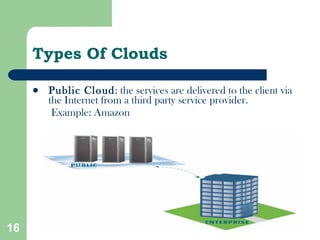
Types Of Clouds Public Cloud : the services are delivered to the client via the Internet from a third party service provider. Example: Amazon
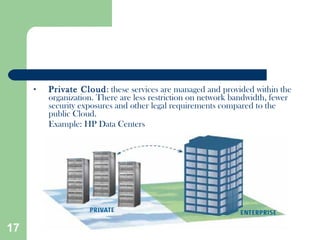
Private Cloud : these services are managed and provided within the organization. There are less restriction on network bandwidth, fewer security exposures and other legal requirements compared to the public Cloud. Example: HP Data Centers
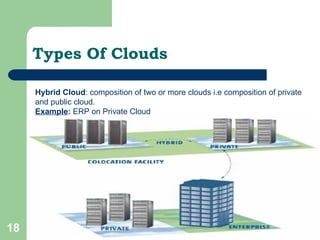
Types Of Clouds Hybrid Cloud : composition of two or more clouds i.e composition of private and public cloud.  Example :  ERP on Private Cloud
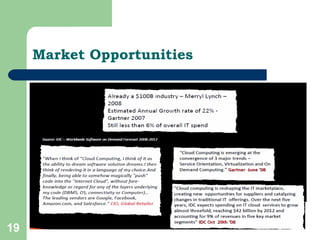
Market Opportunities
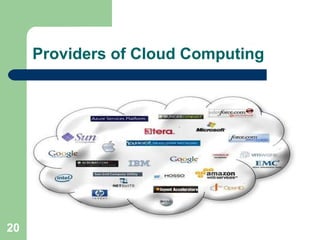
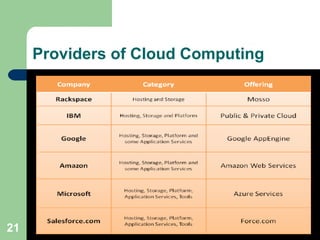
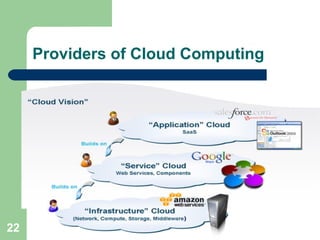
Providers of Cloud Computing
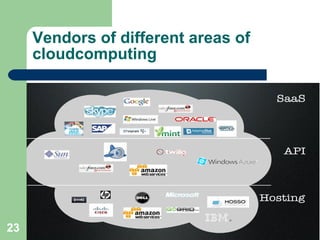
Vendors of different areas of cloudcomputing
Advantages / Disadvantages
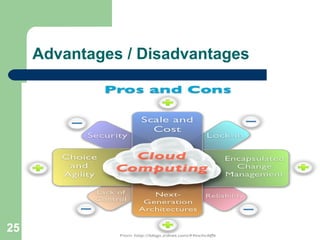
CloudComputing Advantages Extremely cost efficient Device and location independence  Scalability  Unlimited storage capacity  Flexibility  Reduced software maintenance  Increased data reliability
CloudComputing Disadvantages Requires a constant internet connection Doesn’t work well with low speed connection Can be slow Data stored might not be secure Stored data can be lost
  Risk in cloud computing Regulatory compliance  : when outsourcing to a provider , customer are responsible for the security & integrity of their own data, even when it is held by third party Data segmentation/user access  : finding ways to make sure employees receive adequate access Recovery  : Data segmentation makes back-ups more difficult Logging & Investigative Support : Harder to know who altered the data and where they came from
WAYS TO REDUCE I.T. SPEND WITH   CLOUD COMPUTING (A smart way to reduce IT cost, CO2 footprint and provide services anywhere, anytime)
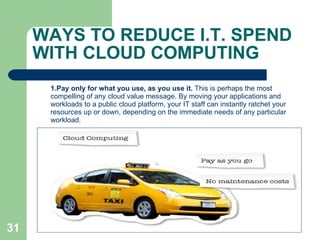
1.Pay only for what you use, as you use it.  This is perhaps the most compelling of any cloud value message. By moving your applications and workloads to a public cloud platform, your IT staff can instantly ratchet your resources up or down, depending on the immediate needs of any particular workload. WAYS TO REDUCE I.T. SPEND WITH CLOUD COMPUTING
2. Reduce data center facility costs.  Fewer servers mean a smaller data center footprint. That translates to direct savings on real estate, power, and cooling. It also translates to indirect savings on business continuity and facilities maintenance. Even though these savings extend to the private cloud model, the public cloud model offers small and medium-size businescenter.ses the possibility of eliminating the need for a data
3. Decrease IT management costs via virtualization.  Scaling infrastructure to meet new workload demands, maintaining physical security, and software deployment and patching are just a few examples of costly IT management tasks that are decreased significantly by running a virtualized infrastructure. 4.  Decrease IT management further with IT as a Service.  With private or hosted private clouds, your users will be able to provision many IT services on their own through self-service portals that can take direct action across a virtualized infrastructure. This can mean a significant savings on common help desk calls and other IT management tasks like procurement and server configuration. Specialized staffers are then free to concentrate their talents on tasks specific to your business rather than on general technical problems.


Cloudcomputing

  • 1.
  • 2.
    GUIDELINES What isCloud Computing? Why Cloud computing? Cloud Anatomy Cloud computing technology Cloud computing products and market Cloud computing Advantages & Disadvantages Cloud computing Risks. Ways to Reduce I.T Spend with cloud computing.
  • 3.
    What is CloudComputing? Definitions: “ Cloud computing is a general term for anything that involves delivering hosted services over the internet.” – Wikipedia “ Cloud computing is Internet-based computing, whereby shared resources, software, and information are provided to computers and other devices on demand, like the electricity grid.”- Wikipedia Basically a cloud is a virtualization of resources that manages and maintains itself.
  • 4.
    In Simple termswhat is Cloud Computing? Cloud computing is using the Internet to access someone else’s software running on someone else’s hardware in someone else’s data centre while paying only for what you use .
  • 5.
    In Simple termswhat is Cloud Computing? A simple example of cloud computing is Yahoo email or Gmail etc. You don’t need a software or a server to use them. All a consumer would need is just an internet connection and you can start sending emails. The server and email management software is all on the cloud ( internet) and is totally managed by the cloud service provider like Yahoo , Google etc.
  • 6.
    The consumer getsto use the software alone and enjoy the benefits. The analogy is , ' If you only need milk , would you buy a cow ?' All the users or consumers need is to get the benefits of using the software or hardware of the computer like sending emails etc. Just to get this benefit (milk) why should a consumer buy a (cow) software /hardware ?
  • 7.
    Why the rushto the cloud? There are valid and significant business and IT reasons for the cloud computing paradigm shift. The fundamentals of outsourcing as a solution apply. Reduced cost: Cloud computing can reduce both capital expense (CapEx) and operating expense (OpEx) costs because resources are only acquired when needed and are only paid for when used. Refined usage of personnel: Using cloud computing frees valuable personnel allowing them to focus on delivering value rather than maintaining hardware and software. Robust scalability: Cloud computing allows for immediate scaling, either up or down, at any time without long-term commitment.
  • 8.
    Cloud computing buildingblocks The cloud computing model is comprised of a front end and a back end . These two elements are connected through a network, in most cases the Internet. User Computer Internet applications, computers, servers, and data storage cloud of services Back End These services are like just electricity, telephone service, or natural gas Front end
  • 9.
  • 10.
    Howthe Virtual Machine Monitor works VMM is a program on a host system that lets one computer support multiple, identical execution environments. From the user's point of view, the system is a self-contained computer which is isolated from other users. In reality, every user is being served by the same machine.
  • 11.
    The models ofcloud computing: or Architectural service layers
  • 12.
    Software as aService (SaaS): In the software-as-a-service cloud model, the vendor supplies the hardware infrastructure, the software product and interacts withthe user through a front-end portal. SaaS is a very broad market.Services can be anything from Web-based email to inventory control and database processing. Because the service provider hosts both the application and the data, the end user is free to use the service from anywhere. There are several successful SaaS model running all over the web. Examples:- Gmail, GoogleCalender Salesforce.com, Gmail, Facebook Payroll, HR, CRM etc Sugarm, CRM, IBM Lotus Live
  • 13.
    Platform-as-a-service in thecloud is defined as a set of software and product development tools hosted on the provider’s infrastructure. Developers create applications on the provider’s platform over the Internet. PaaS providers may use APIs, website portals or gateway software installed on the customer’s computer . Examples:- SalesForce.com,Google Apps Platform as a Service (PaaS):
  • 14.
    Cloud Infrastructure asService (IaaS): Cloud infrastructure services or "Infrastructure as a Service (IaaS)" delivers computer infrastructure, typically a platform virtualization environment as a service. Rather than purchasing servers, software, data center space or network equipment, clients instead buy those resources as a fully outsourced service. Examples: Amazon AWS, Joyent, Mosso, Nirvanix ,IBM Blue house, VMWare, Amazon EC2, Microsoft Azure Platform, Sun Parascale and more Benefits to the clients:  1. Stop worrying about heavy traffic and bandwidth requirements.  2. Pay as you go.  3. No need to buy high configuration servers from day one.  4. Low maintenance.
  • 15.
    Public Cloud PrivateCloud Hybrid Cloud Types Of Clouds
  • 16.
    Types Of CloudsPublic Cloud : the services are delivered to the client via the Internet from a third party service provider. Example: Amazon
  • 17.
    Private Cloud :these services are managed and provided within the organization. There are less restriction on network bandwidth, fewer security exposures and other legal requirements compared to the public Cloud. Example: HP Data Centers
  • 18.
    Types Of CloudsHybrid Cloud : composition of two or more clouds i.e composition of private and public cloud. Example : ERP on Private Cloud
  • 19.
  • 20.
  • 21.
  • 22.
  • 23.
    Vendors of differentareas of cloudcomputing
  • 25.
  • 26.
    CloudComputing Advantages Extremelycost efficient Device and location independence Scalability Unlimited storage capacity Flexibility Reduced software maintenance Increased data reliability
  • 27.
    CloudComputing Disadvantages Requiresa constant internet connection Doesn’t work well with low speed connection Can be slow Data stored might not be secure Stored data can be lost
  • 29.
      Risk incloud computing Regulatory compliance : when outsourcing to a provider , customer are responsible for the security & integrity of their own data, even when it is held by third party Data segmentation/user access : finding ways to make sure employees receive adequate access Recovery : Data segmentation makes back-ups more difficult Logging & Investigative Support : Harder to know who altered the data and where they came from
  • 30.
    WAYS TO REDUCEI.T. SPEND WITH CLOUD COMPUTING (A smart way to reduce IT cost, CO2 footprint and provide services anywhere, anytime)
  • 31.
    1.Pay only forwhat you use, as you use it. This is perhaps the most compelling of any cloud value message. By moving your applications and workloads to a public cloud platform, your IT staff can instantly ratchet your resources up or down, depending on the immediate needs of any particular workload. WAYS TO REDUCE I.T. SPEND WITH CLOUD COMPUTING
  • 32.
    2. Reduce datacenter facility costs. Fewer servers mean a smaller data center footprint. That translates to direct savings on real estate, power, and cooling. It also translates to indirect savings on business continuity and facilities maintenance. Even though these savings extend to the private cloud model, the public cloud model offers small and medium-size businescenter.ses the possibility of eliminating the need for a data
  • 33.
    3. Decrease ITmanagement costs via virtualization. Scaling infrastructure to meet new workload demands, maintaining physical security, and software deployment and patching are just a few examples of costly IT management tasks that are decreased significantly by running a virtualized infrastructure. 4. Decrease IT management further with IT as a Service. With private or hosted private clouds, your users will be able to provision many IT services on their own through self-service portals that can take direct action across a virtualized infrastructure. This can mean a significant savings on common help desk calls and other IT management tasks like procurement and server configuration. Specialized staffers are then free to concentrate their talents on tasks specific to your business rather than on general technical problems.
  • 35.
  • 36.