CENG3430 Rapid Prototyping of Digital Systems
Lecture 06:
Use of Clock Sources and
Peripheral Modules on ZedBoard
Ming-Chang YANG
mcyang@cse.cuhk.edu.hk
Outline
• Clock Sources of ZedBoard
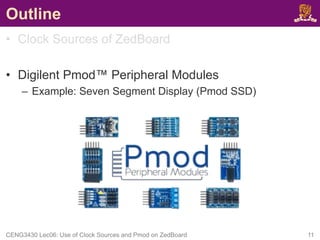
• Digilent Pmod™ Peripheral Modules
– Example: Seven Segment Display (Pmod SSD)
CENG3430 Lec06: Use of Clock Sources and Pmod on ZedBoard 2
Recall: What we have done in Lab04
• Serial-in-parallel-out Shift Register
CENG3430 Lec06: Use of Clock Sources and Pmod on ZedBoard 3
SW0: din
BTNC: clk
BTNR: rst
LD0~LD7: dout
How to use “real” clock resource(s) on ZedBoard?
Clock Sources on ZedBoard (1/2)
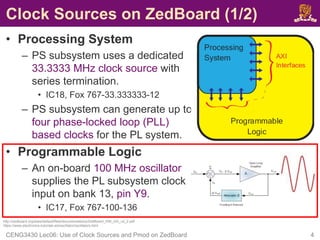
• Processing System
– PS subsystem uses a dedicated
33.3333 MHz clock source with
series termination.
• IC18, Fox 767-33.333333-12
– PS subsystem can generate up to
four phase-locked loop (PLL)
based clocks for the PL system.
• Programmable Logic
– An on-board 100 MHz oscillator
supplies the PL subsystem clock
input on bank 13, pin Y9.
• IC17, Fox 767-100-136
CENG3430 Lec06: Use of Clock Sources and Pmod on ZedBoard 4
http://zedboard.org/sites/default/files/documentations/ZedBoard_HW_UG_v2_2.pdf
https://www.electronics-tutorials.ws/oscillator/oscillators.html
Clock Sources on ZedBoard (2/2)
• To use the on-board 100 MHz clock input on bank 13,
pin Y9, you need to include the following in your XDC
constraint file:
set_property IOSTANDARD LVCMOS33 [get_ports clk]
set_property PACKAGE_PIN Y9 [get_ports clk]
create_clock -period 10 [get_ports clk]
Note:
• The constraint -period 10 is only used to inform the tool that clock
period is 10 ns (i.e., 100 MHz).
• The constraint -period 10 is NOT used specify or generate a
different clock period from a given clock source.
CENG3430 Lec06: Use of Clock Sources and Pmod on ZedBoard 5
http://zedboard.org/content/changing-frequency-clock-using-createclock
Clocks of Different Frequencies (1/2)
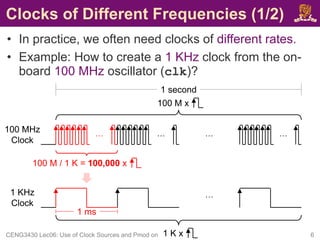
• In practice, we often need clocks of different rates.
• Example: How to create a 1 KHz clock from the on-
board 100 MHz oscillator (clk)?
CENG3430 Lec06: Use of Clock Sources and Pmod on ZedBoard 6
… … …
…
100 MHz
Clock
1 second
100 M x
100 M / 1 K = 100,000 x
1 ms
…
1 KHz
Clock
1 K x
Clocks of Different Frequencies (2/2)
• Trick: If we make a counter (count) that counts n
cycles, then we can generate a pulse (ms_pulse)
when the counter is at any particular value n.
CENG3430 Lec06: Use of Clock Sources and Pmod on ZedBoard 7
signal ms_pulse: STD_LOGIC:='0';
signal count: integer:=0;
process(clk)
begin
if rising_edge(clk) then
if (count = (50000-1)) then
ms_pulse <= not ms_pulse;
count <= 0; -- reset count
else
count <= count + 1;
end if;
end if;
end process;
…
100 MHz
Clock
1 ms
1 KHz
Clock
100 M / 1 K = 100,000 x
ms_pulse
Class Exercise 6.1
• Write the code to create a 50 Hz clock from the on-
board 100 MHz oscillator (clk).
CENG3430 Lec06: Use of Clock Sources and Pmod on ZedBoard 8
Student ID:
Name:
Date:
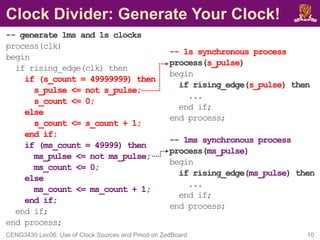
Clock Divider: Generate Your Clock!
-- generate 1ms and 1s clocks
process(clk)
begin
if rising_edge(clk) then
if (s_count = 49999999) then
s_pulse <= not s_pulse;
s_count <= 0;
else
s_count <= s_count + 1;
end if;
if (ms_count = 49999) then
ms_pulse <= not ms_pulse;
ms_count <= 0;
else
ms_count <= ms_count + 1;
end if;
end if;
end process;
CENG3430 Lec06: Use of Clock Sources and Pmod on ZedBoard 10
-- 1s synchronous process
process(s_pulse)
begin
if rising_edge(s_pulse) then
...
end if;
end process;
-- 1ms synchronous process
process(ms_pulse)
begin
if rising_edge(ms_pulse) then
...
end if;
end process;
Outline
• Clock Sources of ZedBoard
• Digilent Pmod™ Peripheral Modules
– Example: Seven Segment Display (Pmod SSD)
CENG3430 Lec06: Use of Clock Sources and Pmod on ZedBoard 11
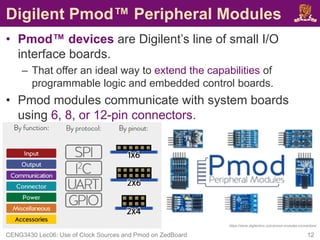
Digilent Pmod™ Peripheral Modules
• Pmod™ devices are Digilent’s line of small I/O
interface boards.
– That offer an ideal way to extend the capabilities of
programmable logic and embedded control boards.
• Pmod modules communicate with system boards
using 6, 8, or 12-pin connectors.
CENG3430 Lec06: Use of Clock Sources and Pmod on ZedBoard 12
https://store.digilentinc.com/pmod-modules-connectors/
Pmod Ports on ZedBoard (1/3)
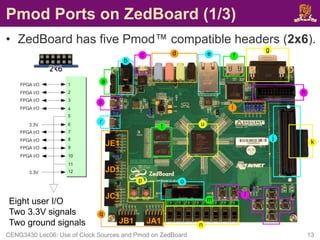
• ZedBoard has five Pmod™ compatible headers (2x6).
CENG3430 Lec06: Use of Clock Sources and Pmod on ZedBoard 13
JA1
JB1
JC1
JD1
JE1
Eight user I/O
Two 3.3V signals
Two ground signals
Pmod Ports on ZedBoard (2/3)
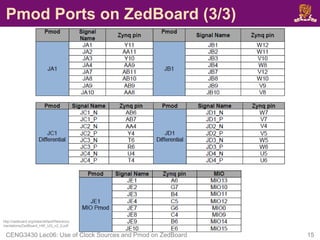
• Four Pmod connectors (JA1, JB1, JC1
and JD1) interface to the PL-side of
the Zynq-7000 AP SoC.
– JA1~JD1 connect to Bank 13 (3.3V).
– JA1~JD1 are placed in adjacent pairs on
the board edge.
• The clearance between JA1 and JB1 and
between JC1 and JD1 are both 10mm.
– JC1 and JD1 are aligned in a dual
configuration and routed differentially.
• To support LVDS running at 525Mbs.
• Pmod (JE1) connects to the PS-side
on MIO pins [0,9-15] in MIO Bank
0/500 (3.3V).
CENG3430 Lec06: Use of Clock Sources and Pmod on ZedBoard 14
JA1
JB1
JC1
JD1
JE1
10mm
10mm
Pmod Ports on ZedBoard (3/3)
CENG3430 Lec06: Use of Clock Sources and Pmod on ZedBoard 15
http://zedboard.org/sites/default/files/docu
mentations/ZedBoard_HW_UG_v2_2.pdf
Example: Pmod Seven Segment Display
• Product Description
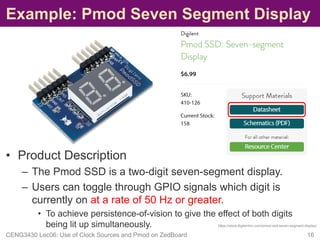
– The Pmod SSD is a two-digit seven-segment display.
– Users can toggle through GPIO signals which digit is
currently on at a rate of 50 Hz or greater.
• To achieve persistence-of-vision to give the effect of both digits
being lit up simultaneously.
CENG3430 Lec06: Use of Clock Sources and Pmod on ZedBoard 16
https://store.digilentinc.com/pmod-ssd-seven-segment-display/
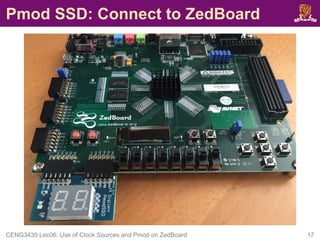
Pmod SSD: Connect to ZedBoard
CENG3430 Lec06: Use of Clock Sources and Pmod on ZedBoard 17
Pmod SSD: Time Multiplexing
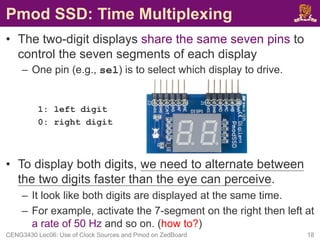
• The two-digit displays share the same seven pins to
control the seven segments of each display
– One pin (e.g., sel) is to select which display to drive.
1: left digit
0: right digit
• To display both digits, we need to alternate between
the two digits faster than the eye can perceive.
– It look like both digits are displayed at the same time.
– For example, activate the 7-segment on the right then left at
a rate of 50 Hz and so on. (how to?)
CENG3430 Lec06: Use of Clock Sources and Pmod on ZedBoard 18
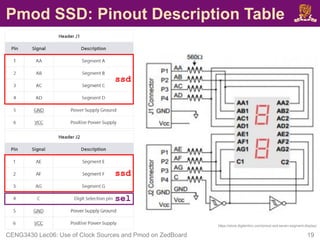
Pmod SSD: Pinout Description Table
CENG3430 Lec06: Use of Clock Sources and Pmod on ZedBoard 19
https://store.digilentinc.com/pmod-ssd-seven-segment-display/
ssd
ssd
sel
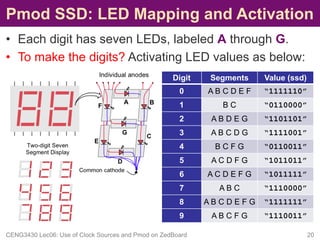
Pmod SSD: LED Mapping and Activation
• Each digit has seven LEDs, labeled A through G.
• To make the digits? Activating LED values as below:
CENG3430 Lec06: Use of Clock Sources and Pmod on ZedBoard 20
Digit Segments Value (ssd)
0 A B C D E F “1111110”
1 B C “0110000”
2 A B D E G “1101101”
3 A B C D G “1111001”
4 B C F G “0110011”
5 A C D F G “1011011”
6 A C D E F G “1011111”
7 A B C “1110000”
8 A B C D E F G “1111111”
9 A B C F G “1110011”
Pmod SSD: XDC Constraint File
• To drive the Pmod SSD, you also need the following:
set_property IOSTANDARD LVCMOS33 [get_ports ssd]
set_property PACKAGE_PIN Y11 [get_ports {ssd[6]}]
set_property PACKAGE_PIN AA11 [get_ports {ssd[5]}]
set_property PACKAGE_PIN Y10 [get_ports {ssd[4]}]
set_property PACKAGE_PIN AA9 [get_ports {ssd[3]}]
set_property PACKAGE_PIN W12 [get_ports {ssd[2]}]
set_property PACKAGE_PIN W11 [get_ports {ssd[1]}]
set_property PACKAGE_PIN V10 [get_ports {ssd[0]}]
set_property IOSTANDARD LVCMOS33 [get_ports sel]
set_property PACKAGE_PIN W8 [get_ports sel]
CENG3430 Lec06: Use of Clock Sources and Pmod on ZedBoard 21
Digit
Selection
(sel)
Seven
Segments
(ssd)
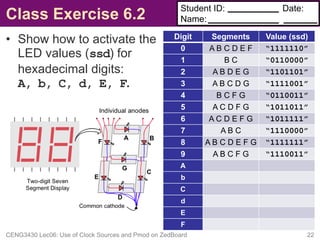
Class Exercise 6.2
• Show how to activate the
LED values (ssd) for
hexadecimal digits:
A, b, C, d, E, F.
CENG3430 Lec06: Use of Clock Sources and Pmod on ZedBoard 22
Student ID:
Name:
Date:
Digit Segments Value (ssd)
0 A B C D E F “1111110”
1 B C “0110000”
2 A B D E G “1101101”
3 A B C D G “1111001”
4 B C F G “0110011”
5 A C D F G “1011011”
6 A C D E F G “1011111”
7 A B C “1110000”
8 A B C D E F G “1111111”
9 A B C F G “1110011”
A
b
C
d
E
F
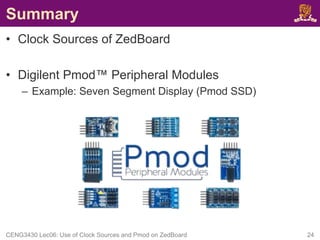
Summary
• Clock Sources of ZedBoard
• Digilent Pmod™ Peripheral Modules
– Example: Seven Segment Display (Pmod SSD)
CENG3430 Lec06: Use of Clock Sources and Pmod on ZedBoard 24

Clock Sources on ZedBoard.pdf

  • 1.
    CENG3430 Rapid Prototypingof Digital Systems Lecture 06: Use of Clock Sources and Peripheral Modules on ZedBoard Ming-Chang YANG mcyang@cse.cuhk.edu.hk
  • 2.
    Outline • Clock Sourcesof ZedBoard • Digilent Pmod™ Peripheral Modules – Example: Seven Segment Display (Pmod SSD) CENG3430 Lec06: Use of Clock Sources and Pmod on ZedBoard 2
  • 3.
    Recall: What wehave done in Lab04 • Serial-in-parallel-out Shift Register CENG3430 Lec06: Use of Clock Sources and Pmod on ZedBoard 3 SW0: din BTNC: clk BTNR: rst LD0~LD7: dout How to use “real” clock resource(s) on ZedBoard?
  • 4.
    Clock Sources onZedBoard (1/2) • Processing System – PS subsystem uses a dedicated 33.3333 MHz clock source with series termination. • IC18, Fox 767-33.333333-12 – PS subsystem can generate up to four phase-locked loop (PLL) based clocks for the PL system. • Programmable Logic – An on-board 100 MHz oscillator supplies the PL subsystem clock input on bank 13, pin Y9. • IC17, Fox 767-100-136 CENG3430 Lec06: Use of Clock Sources and Pmod on ZedBoard 4 http://zedboard.org/sites/default/files/documentations/ZedBoard_HW_UG_v2_2.pdf https://www.electronics-tutorials.ws/oscillator/oscillators.html
  • 5.
    Clock Sources onZedBoard (2/2) • To use the on-board 100 MHz clock input on bank 13, pin Y9, you need to include the following in your XDC constraint file: set_property IOSTANDARD LVCMOS33 [get_ports clk] set_property PACKAGE_PIN Y9 [get_ports clk] create_clock -period 10 [get_ports clk] Note: • The constraint -period 10 is only used to inform the tool that clock period is 10 ns (i.e., 100 MHz). • The constraint -period 10 is NOT used specify or generate a different clock period from a given clock source. CENG3430 Lec06: Use of Clock Sources and Pmod on ZedBoard 5 http://zedboard.org/content/changing-frequency-clock-using-createclock
  • 6.
    Clocks of DifferentFrequencies (1/2) • In practice, we often need clocks of different rates. • Example: How to create a 1 KHz clock from the on- board 100 MHz oscillator (clk)? CENG3430 Lec06: Use of Clock Sources and Pmod on ZedBoard 6 … … … … 100 MHz Clock 1 second 100 M x 100 M / 1 K = 100,000 x 1 ms … 1 KHz Clock 1 K x
  • 7.
    Clocks of DifferentFrequencies (2/2) • Trick: If we make a counter (count) that counts n cycles, then we can generate a pulse (ms_pulse) when the counter is at any particular value n. CENG3430 Lec06: Use of Clock Sources and Pmod on ZedBoard 7 signal ms_pulse: STD_LOGIC:='0'; signal count: integer:=0; process(clk) begin if rising_edge(clk) then if (count = (50000-1)) then ms_pulse <= not ms_pulse; count <= 0; -- reset count else count <= count + 1; end if; end if; end process; … 100 MHz Clock 1 ms 1 KHz Clock 100 M / 1 K = 100,000 x ms_pulse
  • 8.
    Class Exercise 6.1 •Write the code to create a 50 Hz clock from the on- board 100 MHz oscillator (clk). CENG3430 Lec06: Use of Clock Sources and Pmod on ZedBoard 8 Student ID: Name: Date:
  • 9.
    Clock Divider: GenerateYour Clock! -- generate 1ms and 1s clocks process(clk) begin if rising_edge(clk) then if (s_count = 49999999) then s_pulse <= not s_pulse; s_count <= 0; else s_count <= s_count + 1; end if; if (ms_count = 49999) then ms_pulse <= not ms_pulse; ms_count <= 0; else ms_count <= ms_count + 1; end if; end if; end process; CENG3430 Lec06: Use of Clock Sources and Pmod on ZedBoard 10 -- 1s synchronous process process(s_pulse) begin if rising_edge(s_pulse) then ... end if; end process; -- 1ms synchronous process process(ms_pulse) begin if rising_edge(ms_pulse) then ... end if; end process;
  • 10.
    Outline • Clock Sourcesof ZedBoard • Digilent Pmod™ Peripheral Modules – Example: Seven Segment Display (Pmod SSD) CENG3430 Lec06: Use of Clock Sources and Pmod on ZedBoard 11
  • 11.
    Digilent Pmod™ PeripheralModules • Pmod™ devices are Digilent’s line of small I/O interface boards. – That offer an ideal way to extend the capabilities of programmable logic and embedded control boards. • Pmod modules communicate with system boards using 6, 8, or 12-pin connectors. CENG3430 Lec06: Use of Clock Sources and Pmod on ZedBoard 12 https://store.digilentinc.com/pmod-modules-connectors/
  • 12.
    Pmod Ports onZedBoard (1/3) • ZedBoard has five Pmod™ compatible headers (2x6). CENG3430 Lec06: Use of Clock Sources and Pmod on ZedBoard 13 JA1 JB1 JC1 JD1 JE1 Eight user I/O Two 3.3V signals Two ground signals
  • 13.
    Pmod Ports onZedBoard (2/3) • Four Pmod connectors (JA1, JB1, JC1 and JD1) interface to the PL-side of the Zynq-7000 AP SoC. – JA1~JD1 connect to Bank 13 (3.3V). – JA1~JD1 are placed in adjacent pairs on the board edge. • The clearance between JA1 and JB1 and between JC1 and JD1 are both 10mm. – JC1 and JD1 are aligned in a dual configuration and routed differentially. • To support LVDS running at 525Mbs. • Pmod (JE1) connects to the PS-side on MIO pins [0,9-15] in MIO Bank 0/500 (3.3V). CENG3430 Lec06: Use of Clock Sources and Pmod on ZedBoard 14 JA1 JB1 JC1 JD1 JE1 10mm 10mm
  • 14.
    Pmod Ports onZedBoard (3/3) CENG3430 Lec06: Use of Clock Sources and Pmod on ZedBoard 15 http://zedboard.org/sites/default/files/docu mentations/ZedBoard_HW_UG_v2_2.pdf
  • 15.
    Example: Pmod SevenSegment Display • Product Description – The Pmod SSD is a two-digit seven-segment display. – Users can toggle through GPIO signals which digit is currently on at a rate of 50 Hz or greater. • To achieve persistence-of-vision to give the effect of both digits being lit up simultaneously. CENG3430 Lec06: Use of Clock Sources and Pmod on ZedBoard 16 https://store.digilentinc.com/pmod-ssd-seven-segment-display/
  • 16.
    Pmod SSD: Connectto ZedBoard CENG3430 Lec06: Use of Clock Sources and Pmod on ZedBoard 17
  • 17.
    Pmod SSD: TimeMultiplexing • The two-digit displays share the same seven pins to control the seven segments of each display – One pin (e.g., sel) is to select which display to drive. 1: left digit 0: right digit • To display both digits, we need to alternate between the two digits faster than the eye can perceive. – It look like both digits are displayed at the same time. – For example, activate the 7-segment on the right then left at a rate of 50 Hz and so on. (how to?) CENG3430 Lec06: Use of Clock Sources and Pmod on ZedBoard 18
  • 18.
    Pmod SSD: PinoutDescription Table CENG3430 Lec06: Use of Clock Sources and Pmod on ZedBoard 19 https://store.digilentinc.com/pmod-ssd-seven-segment-display/ ssd ssd sel
  • 19.
    Pmod SSD: LEDMapping and Activation • Each digit has seven LEDs, labeled A through G. • To make the digits? Activating LED values as below: CENG3430 Lec06: Use of Clock Sources and Pmod on ZedBoard 20 Digit Segments Value (ssd) 0 A B C D E F “1111110” 1 B C “0110000” 2 A B D E G “1101101” 3 A B C D G “1111001” 4 B C F G “0110011” 5 A C D F G “1011011” 6 A C D E F G “1011111” 7 A B C “1110000” 8 A B C D E F G “1111111” 9 A B C F G “1110011”
  • 20.
    Pmod SSD: XDCConstraint File • To drive the Pmod SSD, you also need the following: set_property IOSTANDARD LVCMOS33 [get_ports ssd] set_property PACKAGE_PIN Y11 [get_ports {ssd[6]}] set_property PACKAGE_PIN AA11 [get_ports {ssd[5]}] set_property PACKAGE_PIN Y10 [get_ports {ssd[4]}] set_property PACKAGE_PIN AA9 [get_ports {ssd[3]}] set_property PACKAGE_PIN W12 [get_ports {ssd[2]}] set_property PACKAGE_PIN W11 [get_ports {ssd[1]}] set_property PACKAGE_PIN V10 [get_ports {ssd[0]}] set_property IOSTANDARD LVCMOS33 [get_ports sel] set_property PACKAGE_PIN W8 [get_ports sel] CENG3430 Lec06: Use of Clock Sources and Pmod on ZedBoard 21 Digit Selection (sel) Seven Segments (ssd)
  • 21.
    Class Exercise 6.2 •Show how to activate the LED values (ssd) for hexadecimal digits: A, b, C, d, E, F. CENG3430 Lec06: Use of Clock Sources and Pmod on ZedBoard 22 Student ID: Name: Date: Digit Segments Value (ssd) 0 A B C D E F “1111110” 1 B C “0110000” 2 A B D E G “1101101” 3 A B C D G “1111001” 4 B C F G “0110011” 5 A C D F G “1011011” 6 A C D E F G “1011111” 7 A B C “1110000” 8 A B C D E F G “1111111” 9 A B C F G “1110011” A b C d E F
  • 22.
    Summary • Clock Sourcesof ZedBoard • Digilent Pmod™ Peripheral Modules – Example: Seven Segment Display (Pmod SSD) CENG3430 Lec06: Use of Clock Sources and Pmod on ZedBoard 24