BECOME
A
T
H
O
U
G
H
T
LEADER
CLIENT LOVE GUIDE
“Client love - it doesn’t have to be a physical object...
it’s the thought that counts”- Dennis Yu
By: Alex Houg, Max Darby, Dennis Yu
Portage Facebook.com/PortageCo Portage.Co 4000 Winnetka Avenue North, Suite 360, New Hope, MN 55427 Guide Title V#
CLIENTLOVEPROCESS
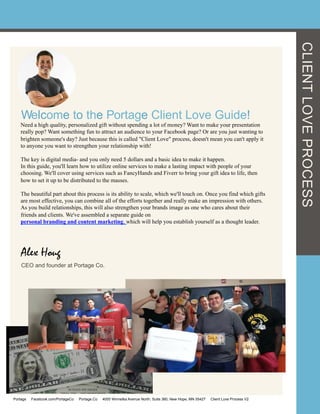
Welcome to the Portage Client Love Guide!
Need a high quality, personalized gift without spending a lot of money? Want to make your presentation
really pop? Want something fun to attract an audience to your Facebook page? Or are you just wanting to
brighten someone's day? Just because this is called "Client Love" process, doesn't mean you can't apply it
to anyone you want to strengthen your relationship with!
The key is digital media- and you only need 5 dollars and a basic idea to make it happen.
In this guide, you'll learn how to utilize online services to make a lasting impact with people of your
choosing. We'll cover using services such as FancyHands and Fiverr to bring your gift idea to life, then
how to set it up to be distributed to the masses.
The beautiful part about this process is its ability to scale, which we'll touch on. Once you find which gifts
are most effective, you can combine all of the efforts together and really make an impression with others.
As you build relationships, this will also strengthen your brands image as one who cares about their
friends and clients. We've assembled a separate guide on
personal branding and content marketing, which will help you establish yourself as a thought leader.


Alex Houg
CEO and founder at Portage Co.
Portage Facebook.com/PortageCo Portage.Co 4000 Winnetka Avenue North, Suite 360, New Hope, MN 55427 Client Love Process V2
CLIENTLOVEPROCESS
Are you showing your clients
you care?Contents
Client	
  Love	
  Checklist	
  …………………………………………………………...............2	
  
	
  Step	
  1:	
  Form	
  your	
  gi<	
  strategy………………………………….................4	
  
	
  Step	
  2:	
  Use	
  Fiverr	
  of	
  FancyHands	
  to	
  create	
  a	
  personalized	
  gi<…5	
  
	
  Step	
  3:	
  Come	
  up	
  with	
  personal	
  creaGve	
  involving	
  who	
  it’s	
  for	
  …6	
  
	
  Step	
  4:	
  Gather	
  your	
  media……………………………………………………....6	
  
	
  Step	
  5:	
  Update	
  your	
  gig/request……………………………………………...7	
  
	
  Step	
  6:	
  Take	
  it	
  a	
  step	
  further	
  and	
  compliment	
  it	
  with	
  a	
  picture….7	
  
	
  Step	
  7:	
  Upload	
  audio	
  file	
  to	
  sound	
  cloud……………………………………9	
  
	
  Step	
  8:	
  Bring	
  it	
  together	
  in	
  a	
  Facebook	
  tab………………………………12	
  
	
  Step	
  9:	
  Making	
  a	
  tab	
  and	
  publishing………………………………………..20	
  
	
  Step	
  10:	
  Expand	
  your	
  gi<	
  repertoire,	
  then	
  use	
  it	
  for	
  
	
  everything!..................................................................................26	
  
	
  Step	
  11:	
  Using	
  micro-­‐targeted	
  ads	
  for	
  the	
  element	
  of	
  	
  surprise	
  
(or	
  just	
  promoGon)	
  …………………………………………………………………….…31	
  
	
  Some	
  more	
  ideas	
  for	
  Client	
  Love……………………………………..…...38	


  Reacquaint	
  them	
  with	
  their	
  first	
  tweet………………………....38	


Portage Facebook.com/PortageCo Portage.Co 4000 Winnetka Avenue North, Suite 360, New Hope, MN 55427 Client Love Process V2
CLIENTLOVEPROCESS
Print this checklist and mark them off as you complete each task.
Choose your gift recipient. (page 2)
Determine what kind of gift you want to deliver, either digital or physical. (page 3)
Decide on a deliver method. (Via social ad, phone call or gift delivery) (Page 3)
Create/ Assemble your gift creative (page 4-9)
Amplify your gift using tabs/ social media (pages 10-35)
Successfully deliver your gift to the recipient
See that was simple!
Client Love Checklist
Portage Facebook.com/PortageCo Portage.Co 4000 Winnetka Avenue North, Suite 360, New Hope, MN 55427 Client Love Process V2
CLIENTLOVEPROCESS
1 Form Your Gift Strategy
Before you break out the glitter paint, you must first form a strategy. Consider the
following:
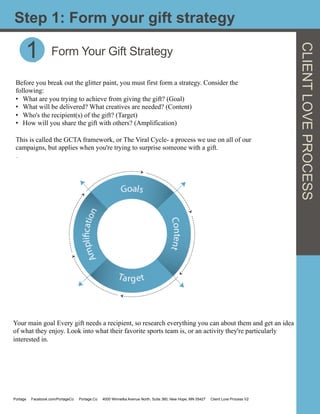
•  What are you trying to achieve from giving the gift? (Goal)
•  What will be delivered? What creatives are needed? (Content)
•  Who's the recipient(s) of the gift? (Target)
•  How will you share the gift with others? (Amplification)
This is called the GCTA framework, or The Viral Cycle- a process we use on all of our
campaigns, but applies when you're trying to surprise someone with a gift.
.
Step 1: Form your gift strategy
1
Your main goal Every gift needs a recipient, so research everything you can about them and get an idea
of what they enjoy. Look into what their favorite sports team is, or an activity they're particularly
interested in.
Portage Facebook.com/PortageCo Portage.Co 4000 Winnetka Avenue North, Suite 360, New Hope, MN 55427 Client Love Process V2
Form Your Gift Strategy
Define your goals by what you want to happen when the recipient receives the gift. Do you want
them to share it with others and promote you? Are you making a statement, or simply showing some
love? This will help you form what content is required, and how you'll deliver it.
When building content, keep it simple / easy to prototype. You'll be using the help of others who
will need a general idea of what you're trying to achieve, so the simpler the required creative, the
better. Think about what can be achieved digitally- like sketches, songs, videos. You also have web
stores like Amazon at your disposal, so brainstorm a few small trinket gift ideas.
It helps to know how to write succinctly and know the inner workings of content marketing to
efficiently spread your message. See our Content Marketing+Personal Branding guide to learn how.
.
Targeting is both fun but tricky- Do you want it to only reach a specific individual? How do you
want to announce the gift to them? You can use social ads to target their newsfeed, have a physical
gift delivered to their home or business, or have FancyHands call them with a personal message. We
cover each of these later on.
Amplification is crucial to delivery and promotion of your gift. You can use this stage to deliver it
to your target, and then place it for others to see and interact with. It can be daunting if you're
unfamiliar with social advertising, so make sure you understand microtargeting before you begin.
	
  
CLIENTLOVEPROCESS
2
By delegating the creation process to a job board such as Fiverr or FancyHands, allowing
you to quickly brainstorm ideas, then have others assemble the end product for you. This
frees you up to be productive, and utilize professional skills for cheap.
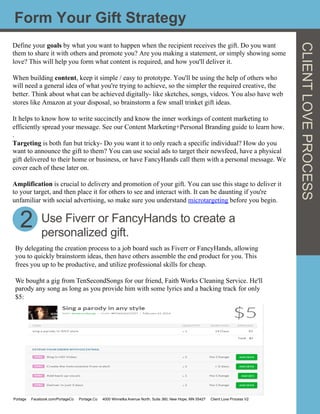
We bought a gig from TenSecondSongs for our friend, Faith Works Cleaning Service. He'll
parody any song as long as you provide him with some lyrics and a backing track for only
$5:
Use Fiverr or FancyHands to create a
personalized gift.
Portage Facebook.com/PortageCo Portage.Co 4000 Winnetka Avenue North, Suite 360, New Hope, MN 55427 Client Love Process V2
CLIENTLOVEPROCESS
Step 3: Creative for your recipient
3 Come up with personal creative involving who
the gift is for .
Since her name is Faith, I decided to parody a classic everyone's heard, George Michael - Faith.
Coming up with lyrics was easy, just needed to have a little fun with it. Here's what I came up with:
	
  
"Oh but you
Need some time off from those dishes
Time to your stuff up off the floor
But you just don't have it, well Shes devoted.
Cause it takes a strong maid baby.
You gotta call Faith.
763-923-3050."
	
  
4
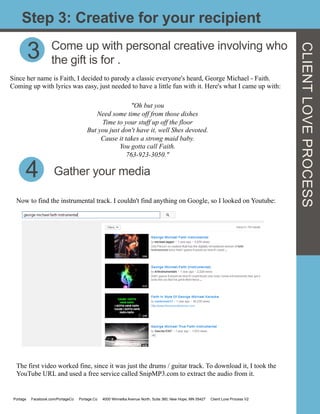
Now to find the instrumental track. I couldn't find anything on Google, so I looked on Youtube:
	
  
Gather your media
The first video worked fine, since it was just the drums / guitar track. To download it, I took the
YouTube URL and used a free service called SnipMP3.com to extract the audio from it.
Portage Facebook.com/PortageCo Portage.Co 4000 Winnetka Avenue North, Suite 360, New Hope, MN 55427 Client Love Process V2
Step 5: Update your gig/request
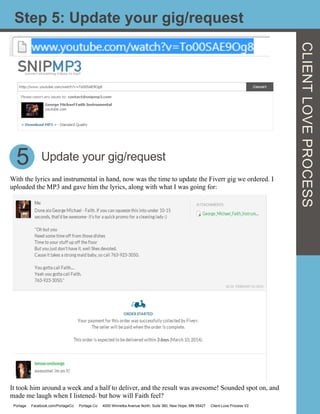
With the lyrics and instrumental in hand, now was the time to update the Fiverr gig we ordered. I
uploaded the MP3 and gave him the lyrics, along with what I was going for:
5
It took him around a week and a half to deliver, and the result was awesome! Sounded spot on, and
made me laugh when I listened- but how will Faith feel?
Update your gig/request
CLIENTLOVEPROCESS
Portage Facebook.com/PortageCo Portage.Co 4000 Winnetka Avenue North, Suite 360, New Hope, MN 55427 Client Love Process V2
Step 6: Compliment your gift with a picture
CLIENTLOVEPROCESS
6 Take it a step further and compliment with a
picture.
The trick to a good gift is presentation. We could send it to her right now- but where's the fun in that?
Since Faith is new to Facebook, let's show her the power of what you can do, delight her, and promote
her business at the same time. We'll be making a Facebook tab, so we'll need something visual to
compliment our little jingle.
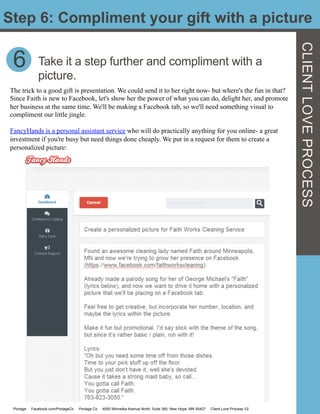
FancyHands is a personal assistant service who will do practically anything for you online- a great
investment if you're busy but need things done cheaply. We put in a request for them to create a
personalized picture:
Portage Facebook.com/PortageCo Portage.Co 4000 Winnetka Avenue North, Suite 360, New Hope, MN 55427 Client Love Process V2
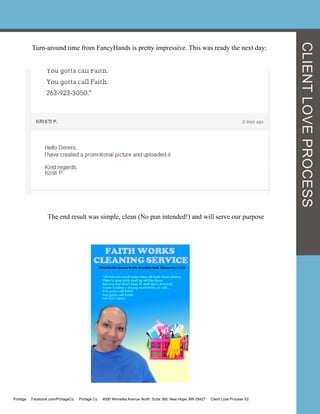
Turn-around time from FancyHands is pretty impressive. This was ready the next day:
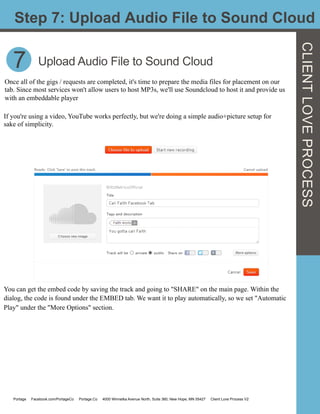
The end result was simple, clean (No pun intended!) and will serve our purpose
CLIENTLOVEPROCESS
Portage Facebook.com/PortageCo Portage.Co 4000 Winnetka Avenue North, Suite 360, New Hope, MN 55427 Client Love Process V2
7
Step 7: Upload Audio File to Sound Cloud
CLIENTLOVEPROCESS
Once all of the gigs / requests are completed, it's time to prepare the media files for placement on our
tab. Since most services won't allow users to host MP3s, we'll use Soundcloud to host it and provide us
with an embeddable player
Upload Audio File to Sound Cloud
If you're using a video, YouTube works perfectly, but we're doing a simple audio+picture setup for
sake of simplicity.
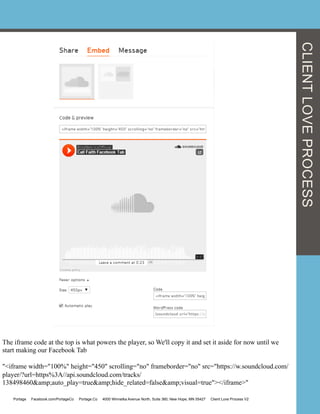
You can get the embed code by saving the track and going to "SHARE" on the main page. Within the
dialog, the code is found under the EMBED tab. We want it to play automatically, so we set "Automatic
Play" under the "More Options" section.
Portage Facebook.com/PortageCo Portage.Co 4000 Winnetka Avenue North, Suite 360, New Hope, MN 55427 Client Love Process V2
The iframe code at the top is what powers the player, so We'll copy it and set it aside for now until we
start making our Facebook Tab
"<iframe width="100%" height="450" scrolling="no" frameborder="no" src="https://w.soundcloud.com/
player/?url=https%3A//api.soundcloud.com/tracks/
138498460&amp;auto_play=true&amp;hide_related=false&amp;visual=true"></iframe>"
CLIENTLOVEPROCESS
Portage Facebook.com/PortageCo Portage.Co 4000 Winnetka Avenue North, Suite 360, New Hope, MN 55427 Client Love Process V2
Step 8: Pull all together on a Facebook Page
CLIENTLOVEPROCESS
8 Bring it all together on a Facebook Page
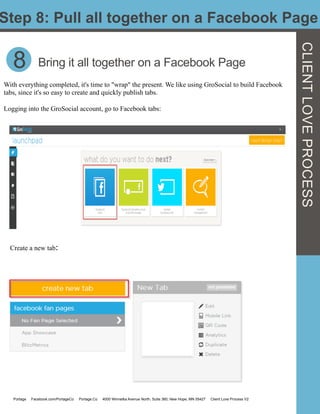
With everything completed, it's time to "wrap" the present. We like using GroSocial to build Facebook
tabs, since it's so easy to create and quickly publish tabs.
Logging into the GroSocial account, go to Facebook tabs:
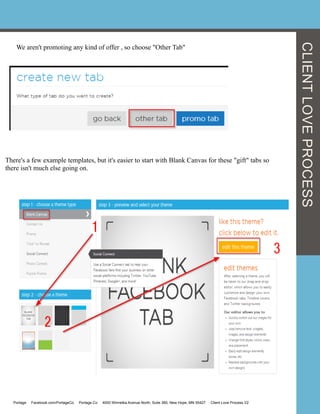
Create a new tab:	
  	
  
Portage Facebook.com/PortageCo Portage.Co 4000 Winnetka Avenue North, Suite 360, New Hope, MN 55427 Client Love Process V2
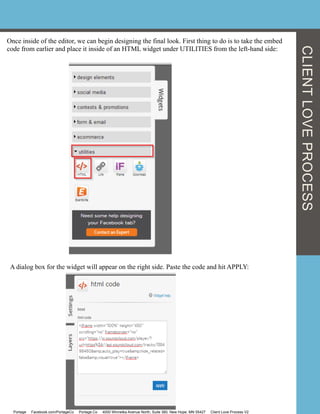
We aren't promoting any kind of offer , so choose "Other Tab"
CLIENTLOVEPROCESS
There's a few example templates, but it's easier to start with Blank Canvas for these "gift" tabs so
there isn't much else going on.
Portage Facebook.com/PortageCo Portage.Co 4000 Winnetka Avenue North, Suite 360, New Hope, MN 55427 Client Love Process V2
CLIENTLOVEPROCESS
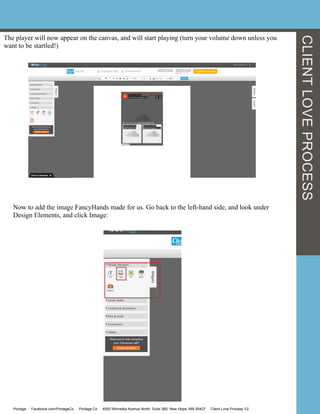
Once inside of the editor, we can begin designing the final look. First thing to do is to take the embed
code from earlier and place it inside of an HTML widget under UTILITIES from the left-hand side:
A dialog box for the widget will appear on the right side. Paste the code and hit APPLY:
Portage Facebook.com/PortageCo Portage.Co 4000 Winnetka Avenue North, Suite 360, New Hope, MN 55427 Client Love Process V2
The player will now appear on the canvas, and will start playing (turn your volume down unless you
want to be startled!)
Now to add the image FancyHands made for us. Go back to the left-hand side, and look under
Design Elements, and click Image:
CLIENTLOVEPROCESS
Portage Facebook.com/PortageCo Portage.Co 4000 Winnetka Avenue North, Suite 360, New Hope, MN 55427 Client Love Process V2
CLIENTLOVEPROCESS
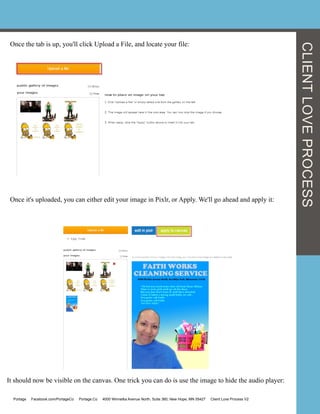
Once the tab is up, you'll click Upload a File, and locate your file:
Once it's uploaded, you can either edit your image in Pixlr, or Apply. We'll go ahead and apply it:


It should now be visible on the canvas. One trick you can do is use the image to hide the audio player:
Portage Facebook.com/PortageCo Portage.Co 4000 Winnetka Avenue North, Suite 360, New Hope, MN 55427 Client Love Process V2
CLIENTLOVEPROCESS
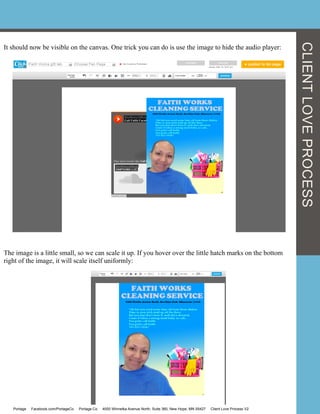
It should now be visible on the canvas. One trick you can do is use the image to hide the audio player:
The image is a little small, so we can scale it up. If you hover over the little hatch marks on the bottom
right of the image, it will scale itself uniformly:
Portage Facebook.com/PortageCo Portage.Co 4000 Winnetka Avenue North, Suite 360, New Hope, MN 55427 Client Love Process V2
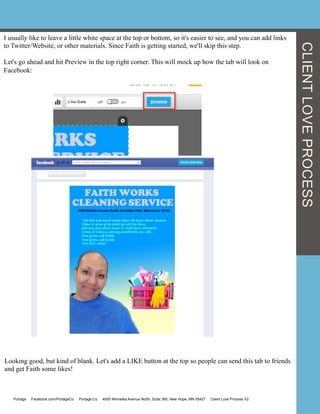
I usually like to leave a little white space at the top or bottom, so it's easier to see, and you can add links
to Twitter/Website, or other materials. Since Faith is getting started, we'll skip this step.
Let's go ahead and hit Preview in the top right corner. This will mock up how the tab will look on
Facebook:
Looking good, but kind of blank. Let's add a LIKE button at the top so people can send this tab to friends
and get Faith some likes!
CLIENTLOVEPROCESS
Portage Facebook.com/PortageCo Portage.Co 4000 Winnetka Avenue North, Suite 360, New Hope, MN 55427 Client Love Process V2
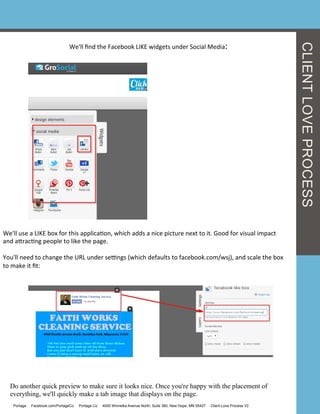
We'll	
  find	
  the	
  Facebook	
  LIKE	
  widgets	
  under	
  Social	
  Media:	
  
We'll	
  use	
  a	
  LIKE	
  box	
  for	
  this	
  applicaGon,	
  which	
  adds	
  a	
  nice	
  picture	
  next	
  to	
  it.	
  Good	
  for	
  visual	
  impact	
  
and	
  acracGng	
  people	
  to	
  like	
  the	
  page.	


You'll	
  need	
  to	
  change	
  the	
  URL	
  under	
  seengs	
  (which	
  defaults	
  to	
  facebook.com/wsj),	
  and	
  scale	
  the	
  box	
  
to	
  make	
  it	
  fit:	
  
Do another quick preview to make sure it looks nice. Once you're happy with the placement of
everything, we'll quickly make a tab image that displays on the page.
CLIENTLOVEPROCESS
Portage Facebook.com/PortageCo Portage.Co 4000 Winnetka Avenue North, Suite 360, New Hope, MN 55427 Client Love Process V2
Step 9: Making a tab image and publishing
CLIENTLOVEPROCESS
9
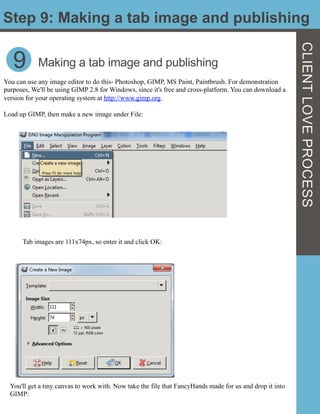
You can use any image editor to do this- Photoshop, GIMP, MS Paint, Paintbrush. For demonstration
purposes, We'll be using GIMP 2.8 for Windows, since it's free and cross-platform. You can download a
version for your operating system at http://www.gimp.org.
Load up GIMP, then make a new image under File:
Making a tab image and publishing
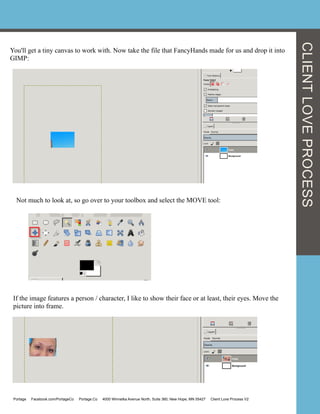
Tab images are 111x74px, so enter it and click OK:
You'll get a tiny canvas to work with. Now take the file that FancyHands made for us and drop it into
GIMP:
You'll get a tiny canvas to work with. Now take the file that FancyHands made for us and drop it into
GIMP:
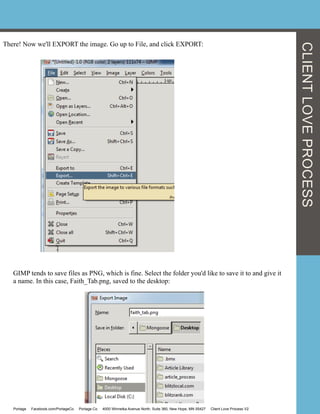
Not much to look at, so go over to your toolbox and select the MOVE tool:
If the image features a person / character, I like to show their face or at least, their eyes. Move the
picture into frame.
CLIENTLOVEPROCESS
Portage Facebook.com/PortageCo Portage.Co 4000 Winnetka Avenue North, Suite 360, New Hope, MN 55427 Client Love Process V2
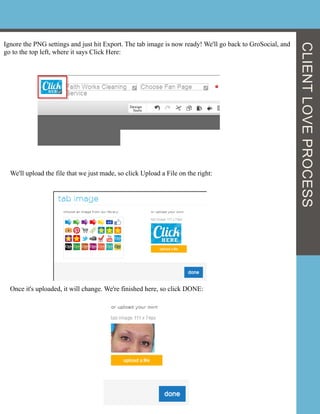
There! Now we'll EXPORT the image. Go up to File, and click EXPORT:
GIMP tends to save files as PNG, which is fine. Select the folder you'd like to save it to and give it
a name. In this case, Faith_Tab.png, saved to the desktop:
CLIENTLOVEPROCESS
Portage Facebook.com/PortageCo Portage.Co 4000 Winnetka Avenue North, Suite 360, New Hope, MN 55427 Client Love Process V2
Ignore the PNG settings and just hit Export. The tab image is now ready! We'll go back to GroSocial, and
go to the top left, where it says Click Here:
We'll upload the file that we just made, so click Upload a File on the right:
Once it's uploaded, it will change. We're finished here, so click DONE:
CLIENTLOVEPROCESS
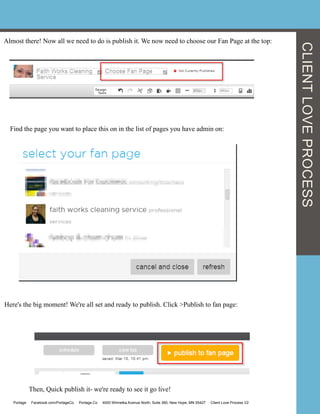
Almost there! Now all we need to do is publish it. We now need to choose our Fan Page at the top:
Find the page you want to place this on in the list of pages you have admin on:
Here's the big moment! We're all set and ready to publish. Click >Publish to fan page:
Then, Quick publish it- we're ready to see it go live!
CLIENTLOVEPROCESS
Portage Facebook.com/PortageCo Portage.Co 4000 Winnetka Avenue North, Suite 360, New Hope, MN 55427 Client Love Process V2
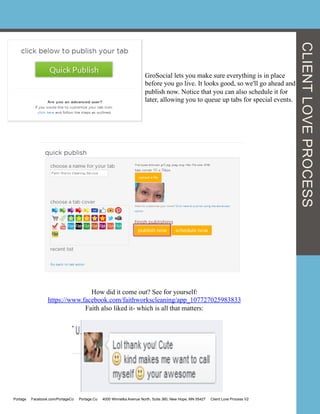
GroSocial lets you make sure everything is in place
before you go live. It looks good, so we'll go ahead and
publish now. Notice that you can also schedule it for
later, allowing you to queue up tabs for special events.
How did it come out? See for yourself:
https://www.facebook.com/faithworkscleaning/app_107727025983833
Faith also liked it- which is all that matters:
CLIENTLOVEPROCESS
Portage Facebook.com/PortageCo Portage.Co 4000 Winnetka Avenue North, Suite 360, New Hope, MN 55427 Client Love Process V2
10
Step 10: Expand your gift repertoire
Expand your gift repertoire, then use it for
everything!
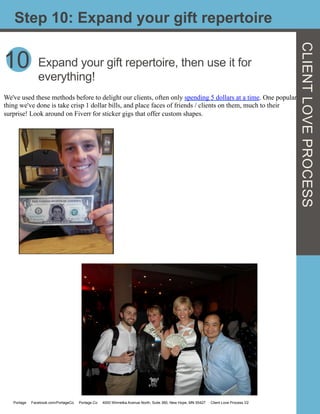
We've used these methods before to delight our clients, often only spending 5 dollars at a time. One popular
thing we've done is take crisp 1 dollar bills, and place faces of friends / clients on them, much to their
surprise! Look around on Fiverr for sticker gigs that offer custom shapes.
Portage Facebook.com/PortageCo Portage.Co 4000 Winnetka Avenue North, Suite 360, New Hope, MN 55427 Client Love Process V2
CLIENTLOVEPROCESS
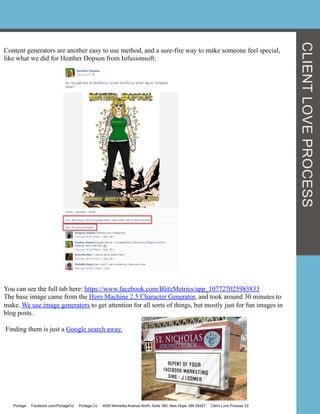
Content generators are another easy to use method, and a sure-fire way to make someone feel special,
like what we did for Heather Dopson from Infusionsoft:
You can see the full tab here: https://www.facebook.com/BlitzMetrics/app_107727025983833
The base image came from the Hero Machine 2.5 Character Generator, and took around 30 minutes to
make. We use image generators to get attention for all sorts of things, but mostly just for fun images in
blog posts.
Finding them is just a Google search away.
Portage Facebook.com/PortageCo Portage.Co 4000 Winnetka Avenue North, Suite 360, New Hope, MN 55427 Client Love Process V2
CLIENTLOVEPROCESS
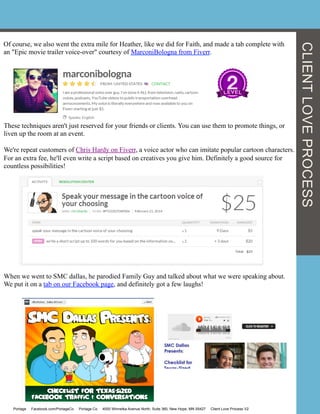
Of course, we also went the extra mile for Heather, like we did for Faith, and made a tab complete with
an "Epic movie trailer voice-over" courtesy of MarconiBologna from Fiverr.
These techniques aren't just reserved for your friends or clients. You can use them to promote things, or
liven up the room at an event.
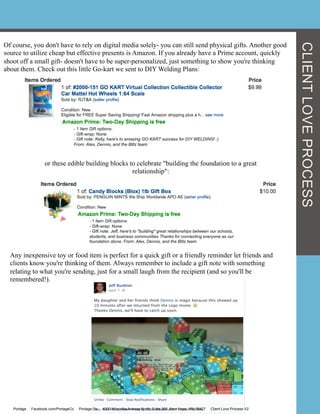
We're repeat customers of Chris Hardy on Fiverr, a voice actor who can imitate popular cartoon characters.
For an extra fee, he'll even write a script based on creatives you give him. Definitely a good source for
countless possibilities!
When we went to SMC dallas, he parodied Family Guy and talked about what we were speaking about.
We put it on a tab on our Facebook page, and definitely got a few laughs!
Portage Facebook.com/PortageCo Portage.Co 4000 Winnetka Avenue North, Suite 360, New Hope, MN 55427 Client Love Process V2
CLIENTLOVEPROCESS
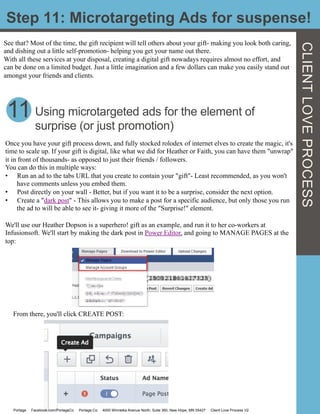
Of course, you don't have to rely on digital media solely- you can still send physical gifts. Another good
source to utilize cheap but effective presents is Amazon. If you already have a Prime account, quickly
shoot off a small gift- doesn't have to be super-personalized, just something to show you're thinking
about them. Check out this little Go-kart we sent to DIY Welding Plans:
or these edible building blocks to celebrate "building the foundation to a great
relationship":
Any inexpensive toy or food item is perfect for a quick gift or a friendly reminder let friends and
clients know you're thinking of them. Always remember to include a gift note with something
relating to what you're sending, just for a small laugh from the recipient (and so you'll be
remembered!).
Portage Facebook.com/PortageCo Portage.Co 4000 Winnetka Avenue North, Suite 360, New Hope, MN 55427 Client Love Process V2
CLIENTLOVEPROCESS
Step 11: Microtargeting Ads for suspense!
See that? Most of the time, the gift recipient will tell others about your gift- making you look both caring,
and dishing out a little self-promotion- helping you get your name out there.
With all these services at your disposal, creating a digital gift nowadays requires almost no effort, and
can be done on a limited budget. Just a little imagination and a few dollars can make you easily stand out
amongst your friends and clients.
11 Using microtargeted ads for the element of
surprise (or just promotion)
Once you have your gift process down, and fully stocked rolodex of internet elves to create the magic, it's
time to scale up. If your gift is digital, like what we did for Heather or Faith, you can have them "unwrap"
it in front of thousands- as opposed to just their friends / followers.
You can do this in multiple ways:
•  Run an ad to the tabs URL that you create to contain your "gift"- Least recommended, as you won't
have comments unless you embed them.
•  Post directly on your wall - Better, but if you want it to be a surprise, consider the next option.
•  Create a "dark post" - This allows you to make a post for a specific audience, but only those you run
the ad to will be able to see it- giving it more of the "Surprise!" element.
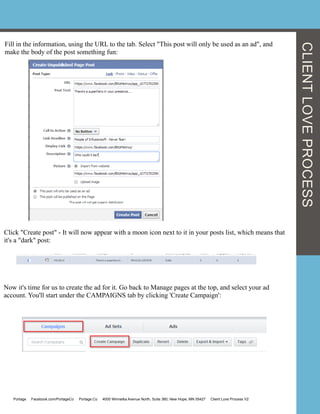
We'll use our Heather Dopson is a superhero! gift as an example, and run it to her co-workers at
Infusionsoft. We'll start by making the dark post in Power Editor, and going to MANAGE PAGES at the
top:
From there, you'll click CREATE POST:


Portage Facebook.com/PortageCo Portage.Co 4000 Winnetka Avenue North, Suite 360, New Hope, MN 55427 Client Love Process V2
CLIENTLOVEPROCESS
Fill in the information, using the URL to the tab. Select "This post will only be used as an ad", and
make the body of the post something fun:
Click "Create post" - It will now appear with a moon icon next to it in your posts list, which means that
it's a "dark" post:
Now it's time for us to create the ad for it. Go back to Manage pages at the top, and select your ad
account. You'll start under the CAMPAIGNS tab by clicking 'Create Campaign':
Portage Facebook.com/PortageCo Portage.Co 4000 Winnetka Avenue North, Suite 360, New Hope, MN 55427 Client Love Process V2
CLIENTLOVEPROCESS
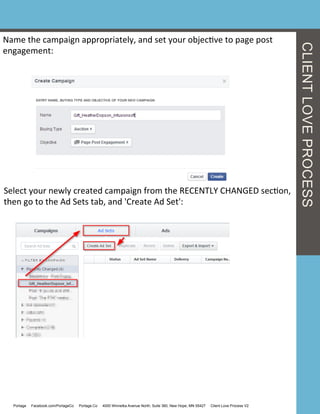
Name	
  the	
  campaign	
  appropriately,	
  and	
  set	
  your	
  objecGve	
  to	
  page	
  post	
  
engagement:	
  
Select	
  your	
  newly	
  created	
  campaign	
  from	
  the	
  RECENTLY	
  CHANGED	
  secGon,	
  
then	
  go	
  to	
  the	
  Ad	
  Sets	
  tab,	
  and	
  'Create	
  Ad	
  Set':	
  
Portage Facebook.com/PortageCo Portage.Co 4000 Winnetka Avenue North, Suite 360, New Hope, MN 55427 Client Love Process V2
CLIENTLOVEPROCESS
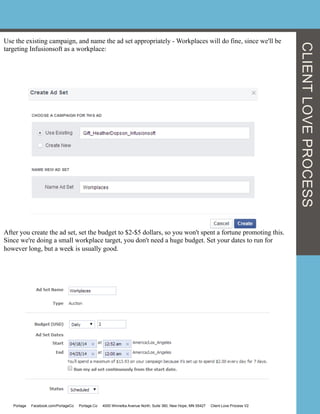
Use the existing campaign, and name the ad set appropriately - Workplaces will do fine, since we'll be
targeting Infusionsoft as a workplace:
After you create the ad set, set the budget to $2-$5 dollars, so you won't spent a fortune promoting this.
Since we're doing a small workplace target, you don't need a huge budget. Set your dates to run for
however long, but a week is usually good.
Portage Facebook.com/PortageCo Portage.Co 4000 Winnetka Avenue North, Suite 360, New Hope, MN 55427 Client Love Process V2
CLIENTLOVEPROCESS
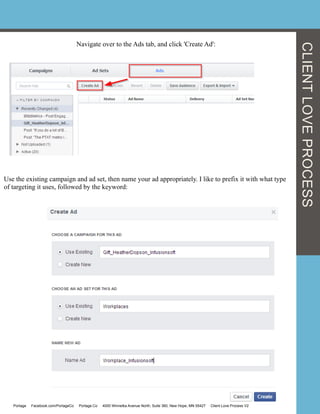
Navigate over to the Ads tab, and click 'Create Ad':


Use the existing campaign and ad set, then name your ad appropriately. I like to prefix it with what type
of targeting it uses, followed by the keyword:
Portage Facebook.com/PortageCo Portage.Co 4000 Winnetka Avenue North, Suite 360, New Hope, MN 55427 Client Love Process V2
CLIENTLOVEPROCESS
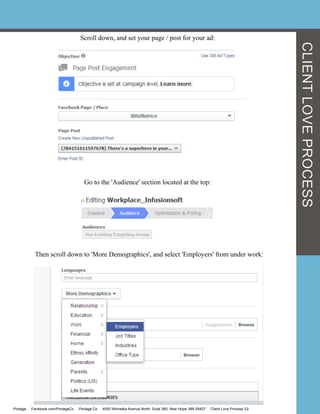
Scroll down, and set your page / post for your ad:
Go to the 'Audience' section located at the top:
Then scroll down to 'More Demographics', and select 'Employers' from under work:
Portage Facebook.com/PortageCo Portage.Co 4000 Winnetka Avenue North, Suite 360, New Hope, MN 55427 Client Love Process V2
CLIENTLOVEPROCESS
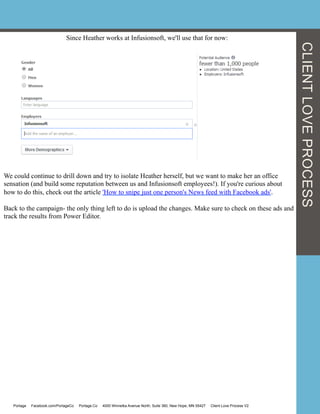
Since Heather works at Infusionsoft, we'll use that for now:
We could continue to drill down and try to isolate Heather herself, but we want to make her an office
sensation (and build some reputation between us and Infusionsoft employees!). If you're curious about
how to do this, check out the article 'How to snipe just one person's News feed with Facebook ads'.
Back to the campaign- the only thing left to do is upload the changes. Make sure to check on these ads and
track the results from Power Editor.
Portage Facebook.com/PortageCo Portage.Co 4000 Winnetka Avenue North, Suite 360, New Hope, MN 55427 Client Love Process V2
CLIENTLOVEPROCESS
Some Other Ideas for Client Love
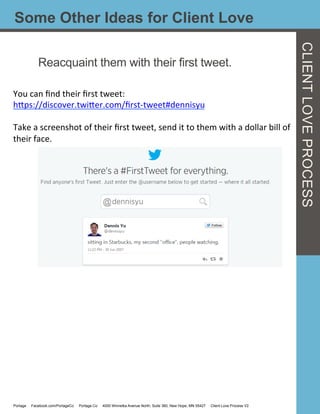
Reacquaint them with their first tweet.
You	
  can	
  find	
  their	
  first	
  tweet:	
  
hcps://discover.twicer.com/first-­‐tweet#dennisyu	


Take	
  a	
  screenshot	
  of	
  their	
  first	
  tweet,	
  send	
  it	
  to	
  them	
  with	
  a	
  dollar	
  bill	
  of	
  
their	
  face.	
  
Portage Facebook.com/PortageCo Portage.Co 4000 Winnetka Avenue North, Suite 360, New Hope, MN 55427 Client Love Process V2
CLIENTLOVEPROCESS
Here’s a quick guide to the links we mentioned in this article.
How to snipe just one person's News feed with Facebook ads'.
Dark Posts-http://www.insidefacebook.com/2013/06/25/dennis-yu-
unpublished-posts/
Power Editor
MarconiBologna from Fiverr.
https://www.facebook.com/BlitzMetrics app_107727025983833
Hero Machine 2.5 Character Generator
Image Generator
Fiverr-spending 5 dollars at a time.
Faith Cleaning-
https://www.facebook.com/faithworkscleaning/app_107727025983833
See our other guides:
The links we love
CLIENTLOVEPROCESS
Personal Branding Guide 
Portage Facebook.com/PortageCo Portage.Co 4000 Winnetka Avenue North, Suite 360, New Hope, MN 55427 Client Love Process V2
Max Darby
Content Marketing
Manager
Josh Hamby
Media & PR
Specialist
Dennis Yu
Chief Technology
Officer
Christine Brewer
Director of
Operations
Tyler Doyle
Analyst
Nick Wainwright
Analyst
Mason Pelt
Analyst Ming Chao
Data Mining
Specialist
ThePortageCrew
Alex Houg
Chief Executive Officer
Alex	
  Houg	
  is	
  the	
  Founder	
  and	
  Chief	
  ExecuGve	
  Officer	
  (CEO)	
  of	
  
Portage.	
  He	
  has	
  been	
  called	
  the	
  young	
  Steve	
  Jobs,	
  selling	
  his	
  first	
  
business	
  at	
  the	
  age	
  of	
  15.	


Alex	
  is	
  a	
  frequent	
  contributor	
  on	
  Inside	
  Facebook,	
  Social	
  Fresh,	
  
and	
  FBPPC.	
  His	
  textbook,	
  Facebook	
  NaGon,	
  is	
  being	
  taught	
  at	
  469	
  
universiGes.	
  He	
  is	
  an	
  expert	
  in	
  Facebook	
  adverGsing,	
  social	
  
analyGcs,	
  content	
  markeGng,	
  and	
  search	
  engine	
  opGmizaGon.	
  Mr.	
  
Houg	
  has	
  worked	
  with	
  the	
  Golden	
  State	
  Warriors,	
  Infusionso<,	
  
Adidas,	
  Miva	
  Merchant,	
  and	
  Jack	
  Daniels.	


He	
  has	
  been	
  featured	
  in	
  USA	
  Today,	
  Search	
  Engine	
  Journal,	
  
Business	
  2	
  Community,	
  Inside	
  Facebook,	
  and	
  other	
  publicaGons.	
  
He	
  is	
  an	
  Eagle	
  Scout	
  and	
  has	
  a	
  passion	
  to	
  teach.	
  You	
  can	
  reach	
  out	
  
to	
  him	
  at	
  alex@portage.co,	
  his	
  blog	
  or	
  on	
  Facebook.	


Client love process v2 100614

  • 1.
    BECOME A T H O U G H T LEADER CLIENT LOVE GUIDE “Clientlove - it doesn’t have to be a physical object... it’s the thought that counts”- Dennis Yu By: Alex Houg, Max Darby, Dennis Yu Portage Facebook.com/PortageCo Portage.Co 4000 Winnetka Avenue North, Suite 360, New Hope, MN 55427 Guide Title V#
  • 2.
    CLIENTLOVEPROCESS Welcome to thePortage Client Love Guide! Need a high quality, personalized gift without spending a lot of money? Want to make your presentation really pop? Want something fun to attract an audience to your Facebook page? Or are you just wanting to brighten someone's day? Just because this is called "Client Love" process, doesn't mean you can't apply it to anyone you want to strengthen your relationship with! The key is digital media- and you only need 5 dollars and a basic idea to make it happen. In this guide, you'll learn how to utilize online services to make a lasting impact with people of your choosing. We'll cover using services such as FancyHands and Fiverr to bring your gift idea to life, then how to set it up to be distributed to the masses. The beautiful part about this process is its ability to scale, which we'll touch on. Once you find which gifts are most effective, you can combine all of the efforts together and really make an impression with others. As you build relationships, this will also strengthen your brands image as one who cares about their friends and clients. We've assembled a separate guide on personal branding and content marketing, which will help you establish yourself as a thought leader.       Alex Houg CEO and founder at Portage Co. Portage Facebook.com/PortageCo Portage.Co 4000 Winnetka Avenue North, Suite 360, New Hope, MN 55427 Client Love Process V2
  • 3.
    CLIENTLOVEPROCESS Are you showingyour clients you care?Contents Client  Love  Checklist  …………………………………………………………...............2    Step  1:  Form  your  gi<  strategy………………………………….................4    Step  2:  Use  Fiverr  of  FancyHands  to  create  a  personalized  gi<…5    Step  3:  Come  up  with  personal  creaGve  involving  who  it’s  for  …6    Step  4:  Gather  your  media……………………………………………………....6    Step  5:  Update  your  gig/request……………………………………………...7    Step  6:  Take  it  a  step  further  and  compliment  it  with  a  picture….7    Step  7:  Upload  audio  file  to  sound  cloud……………………………………9    Step  8:  Bring  it  together  in  a  Facebook  tab………………………………12    Step  9:  Making  a  tab  and  publishing………………………………………..20    Step  10:  Expand  your  gi<  repertoire,  then  use  it  for    everything!..................................................................................26    Step  11:  Using  micro-­‐targeted  ads  for  the  element  of    surprise   (or  just  promoGon)  …………………………………………………………………….…31    Some  more  ideas  for  Client  Love……………………………………..…...38      Reacquaint  them  with  their  first  tweet………………………....38     Portage Facebook.com/PortageCo Portage.Co 4000 Winnetka Avenue North, Suite 360, New Hope, MN 55427 Client Love Process V2
  • 4.
    CLIENTLOVEPROCESS Print this checklistand mark them off as you complete each task. Choose your gift recipient. (page 2) Determine what kind of gift you want to deliver, either digital or physical. (page 3) Decide on a deliver method. (Via social ad, phone call or gift delivery) (Page 3) Create/ Assemble your gift creative (page 4-9) Amplify your gift using tabs/ social media (pages 10-35) Successfully deliver your gift to the recipient See that was simple! Client Love Checklist Portage Facebook.com/PortageCo Portage.Co 4000 Winnetka Avenue North, Suite 360, New Hope, MN 55427 Client Love Process V2
  • 5.
    CLIENTLOVEPROCESS 1 Form YourGift Strategy Before you break out the glitter paint, you must first form a strategy. Consider the following: •  What are you trying to achieve from giving the gift? (Goal) •  What will be delivered? What creatives are needed? (Content) •  Who's the recipient(s) of the gift? (Target) •  How will you share the gift with others? (Amplification) This is called the GCTA framework, or The Viral Cycle- a process we use on all of our campaigns, but applies when you're trying to surprise someone with a gift. . Step 1: Form your gift strategy 1 Your main goal Every gift needs a recipient, so research everything you can about them and get an idea of what they enjoy. Look into what their favorite sports team is, or an activity they're particularly interested in. Portage Facebook.com/PortageCo Portage.Co 4000 Winnetka Avenue North, Suite 360, New Hope, MN 55427 Client Love Process V2
  • 6.
    Form Your GiftStrategy Define your goals by what you want to happen when the recipient receives the gift. Do you want them to share it with others and promote you? Are you making a statement, or simply showing some love? This will help you form what content is required, and how you'll deliver it. When building content, keep it simple / easy to prototype. You'll be using the help of others who will need a general idea of what you're trying to achieve, so the simpler the required creative, the better. Think about what can be achieved digitally- like sketches, songs, videos. You also have web stores like Amazon at your disposal, so brainstorm a few small trinket gift ideas. It helps to know how to write succinctly and know the inner workings of content marketing to efficiently spread your message. See our Content Marketing+Personal Branding guide to learn how. . Targeting is both fun but tricky- Do you want it to only reach a specific individual? How do you want to announce the gift to them? You can use social ads to target their newsfeed, have a physical gift delivered to their home or business, or have FancyHands call them with a personal message. We cover each of these later on. Amplification is crucial to delivery and promotion of your gift. You can use this stage to deliver it to your target, and then place it for others to see and interact with. It can be daunting if you're unfamiliar with social advertising, so make sure you understand microtargeting before you begin.   CLIENTLOVEPROCESS 2 By delegating the creation process to a job board such as Fiverr or FancyHands, allowing you to quickly brainstorm ideas, then have others assemble the end product for you. This frees you up to be productive, and utilize professional skills for cheap. We bought a gig from TenSecondSongs for our friend, Faith Works Cleaning Service. He'll parody any song as long as you provide him with some lyrics and a backing track for only $5: Use Fiverr or FancyHands to create a personalized gift. Portage Facebook.com/PortageCo Portage.Co 4000 Winnetka Avenue North, Suite 360, New Hope, MN 55427 Client Love Process V2
  • 7.
    CLIENTLOVEPROCESS Step 3: Creativefor your recipient 3 Come up with personal creative involving who the gift is for . Since her name is Faith, I decided to parody a classic everyone's heard, George Michael - Faith. Coming up with lyrics was easy, just needed to have a little fun with it. Here's what I came up with:   "Oh but you Need some time off from those dishes Time to your stuff up off the floor But you just don't have it, well Shes devoted. Cause it takes a strong maid baby. You gotta call Faith. 763-923-3050."   4 Now to find the instrumental track. I couldn't find anything on Google, so I looked on Youtube:   Gather your media The first video worked fine, since it was just the drums / guitar track. To download it, I took the YouTube URL and used a free service called SnipMP3.com to extract the audio from it. Portage Facebook.com/PortageCo Portage.Co 4000 Winnetka Avenue North, Suite 360, New Hope, MN 55427 Client Love Process V2
  • 8.
    Step 5: Updateyour gig/request With the lyrics and instrumental in hand, now was the time to update the Fiverr gig we ordered. I uploaded the MP3 and gave him the lyrics, along with what I was going for: 5 It took him around a week and a half to deliver, and the result was awesome! Sounded spot on, and made me laugh when I listened- but how will Faith feel? Update your gig/request CLIENTLOVEPROCESS Portage Facebook.com/PortageCo Portage.Co 4000 Winnetka Avenue North, Suite 360, New Hope, MN 55427 Client Love Process V2
  • 9.
    Step 6: Complimentyour gift with a picture CLIENTLOVEPROCESS 6 Take it a step further and compliment with a picture. The trick to a good gift is presentation. We could send it to her right now- but where's the fun in that? Since Faith is new to Facebook, let's show her the power of what you can do, delight her, and promote her business at the same time. We'll be making a Facebook tab, so we'll need something visual to compliment our little jingle. FancyHands is a personal assistant service who will do practically anything for you online- a great investment if you're busy but need things done cheaply. We put in a request for them to create a personalized picture: Portage Facebook.com/PortageCo Portage.Co 4000 Winnetka Avenue North, Suite 360, New Hope, MN 55427 Client Love Process V2
  • 10.
    Turn-around time fromFancyHands is pretty impressive. This was ready the next day: The end result was simple, clean (No pun intended!) and will serve our purpose CLIENTLOVEPROCESS Portage Facebook.com/PortageCo Portage.Co 4000 Winnetka Avenue North, Suite 360, New Hope, MN 55427 Client Love Process V2
  • 11.
    7 Step 7: UploadAudio File to Sound Cloud CLIENTLOVEPROCESS Once all of the gigs / requests are completed, it's time to prepare the media files for placement on our tab. Since most services won't allow users to host MP3s, we'll use Soundcloud to host it and provide us with an embeddable player Upload Audio File to Sound Cloud If you're using a video, YouTube works perfectly, but we're doing a simple audio+picture setup for sake of simplicity. You can get the embed code by saving the track and going to "SHARE" on the main page. Within the dialog, the code is found under the EMBED tab. We want it to play automatically, so we set "Automatic Play" under the "More Options" section. Portage Facebook.com/PortageCo Portage.Co 4000 Winnetka Avenue North, Suite 360, New Hope, MN 55427 Client Love Process V2
  • 12.
    The iframe codeat the top is what powers the player, so We'll copy it and set it aside for now until we start making our Facebook Tab "<iframe width="100%" height="450" scrolling="no" frameborder="no" src="https://w.soundcloud.com/ player/?url=https%3A//api.soundcloud.com/tracks/ 138498460&amp;auto_play=true&amp;hide_related=false&amp;visual=true"></iframe>" CLIENTLOVEPROCESS Portage Facebook.com/PortageCo Portage.Co 4000 Winnetka Avenue North, Suite 360, New Hope, MN 55427 Client Love Process V2
  • 13.
    Step 8: Pullall together on a Facebook Page CLIENTLOVEPROCESS 8 Bring it all together on a Facebook Page With everything completed, it's time to "wrap" the present. We like using GroSocial to build Facebook tabs, since it's so easy to create and quickly publish tabs. Logging into the GroSocial account, go to Facebook tabs: Create a new tab:     Portage Facebook.com/PortageCo Portage.Co 4000 Winnetka Avenue North, Suite 360, New Hope, MN 55427 Client Love Process V2
  • 14.
    We aren't promotingany kind of offer , so choose "Other Tab" CLIENTLOVEPROCESS There's a few example templates, but it's easier to start with Blank Canvas for these "gift" tabs so there isn't much else going on. Portage Facebook.com/PortageCo Portage.Co 4000 Winnetka Avenue North, Suite 360, New Hope, MN 55427 Client Love Process V2
  • 15.
    CLIENTLOVEPROCESS Once inside ofthe editor, we can begin designing the final look. First thing to do is to take the embed code from earlier and place it inside of an HTML widget under UTILITIES from the left-hand side: A dialog box for the widget will appear on the right side. Paste the code and hit APPLY: Portage Facebook.com/PortageCo Portage.Co 4000 Winnetka Avenue North, Suite 360, New Hope, MN 55427 Client Love Process V2
  • 16.
    The player willnow appear on the canvas, and will start playing (turn your volume down unless you want to be startled!) Now to add the image FancyHands made for us. Go back to the left-hand side, and look under Design Elements, and click Image: CLIENTLOVEPROCESS Portage Facebook.com/PortageCo Portage.Co 4000 Winnetka Avenue North, Suite 360, New Hope, MN 55427 Client Love Process V2
  • 17.
    CLIENTLOVEPROCESS Once the tabis up, you'll click Upload a File, and locate your file: Once it's uploaded, you can either edit your image in Pixlr, or Apply. We'll go ahead and apply it:     It should now be visible on the canvas. One trick you can do is use the image to hide the audio player: Portage Facebook.com/PortageCo Portage.Co 4000 Winnetka Avenue North, Suite 360, New Hope, MN 55427 Client Love Process V2
  • 18.
    CLIENTLOVEPROCESS It should nowbe visible on the canvas. One trick you can do is use the image to hide the audio player: The image is a little small, so we can scale it up. If you hover over the little hatch marks on the bottom right of the image, it will scale itself uniformly: Portage Facebook.com/PortageCo Portage.Co 4000 Winnetka Avenue North, Suite 360, New Hope, MN 55427 Client Love Process V2
  • 19.
    I usually liketo leave a little white space at the top or bottom, so it's easier to see, and you can add links to Twitter/Website, or other materials. Since Faith is getting started, we'll skip this step. Let's go ahead and hit Preview in the top right corner. This will mock up how the tab will look on Facebook: Looking good, but kind of blank. Let's add a LIKE button at the top so people can send this tab to friends and get Faith some likes! CLIENTLOVEPROCESS Portage Facebook.com/PortageCo Portage.Co 4000 Winnetka Avenue North, Suite 360, New Hope, MN 55427 Client Love Process V2
  • 20.
    We'll  find  the  Facebook  LIKE  widgets  under  Social  Media:   We'll  use  a  LIKE  box  for  this  applicaGon,  which  adds  a  nice  picture  next  to  it.  Good  for  visual  impact   and  acracGng  people  to  like  the  page.     You'll  need  to  change  the  URL  under  seengs  (which  defaults  to  facebook.com/wsj),  and  scale  the  box   to  make  it  fit:   Do another quick preview to make sure it looks nice. Once you're happy with the placement of everything, we'll quickly make a tab image that displays on the page. CLIENTLOVEPROCESS Portage Facebook.com/PortageCo Portage.Co 4000 Winnetka Avenue North, Suite 360, New Hope, MN 55427 Client Love Process V2
  • 21.
    Step 9: Makinga tab image and publishing CLIENTLOVEPROCESS 9 You can use any image editor to do this- Photoshop, GIMP, MS Paint, Paintbrush. For demonstration purposes, We'll be using GIMP 2.8 for Windows, since it's free and cross-platform. You can download a version for your operating system at http://www.gimp.org. Load up GIMP, then make a new image under File: Making a tab image and publishing Tab images are 111x74px, so enter it and click OK: You'll get a tiny canvas to work with. Now take the file that FancyHands made for us and drop it into GIMP:
  • 22.
    You'll get atiny canvas to work with. Now take the file that FancyHands made for us and drop it into GIMP: Not much to look at, so go over to your toolbox and select the MOVE tool: If the image features a person / character, I like to show their face or at least, their eyes. Move the picture into frame. CLIENTLOVEPROCESS Portage Facebook.com/PortageCo Portage.Co 4000 Winnetka Avenue North, Suite 360, New Hope, MN 55427 Client Love Process V2
  • 23.
    There! Now we'llEXPORT the image. Go up to File, and click EXPORT: GIMP tends to save files as PNG, which is fine. Select the folder you'd like to save it to and give it a name. In this case, Faith_Tab.png, saved to the desktop: CLIENTLOVEPROCESS Portage Facebook.com/PortageCo Portage.Co 4000 Winnetka Avenue North, Suite 360, New Hope, MN 55427 Client Love Process V2
  • 24.
    Ignore the PNGsettings and just hit Export. The tab image is now ready! We'll go back to GroSocial, and go to the top left, where it says Click Here: We'll upload the file that we just made, so click Upload a File on the right: Once it's uploaded, it will change. We're finished here, so click DONE: CLIENTLOVEPROCESS
  • 25.
    Almost there! Nowall we need to do is publish it. We now need to choose our Fan Page at the top: Find the page you want to place this on in the list of pages you have admin on: Here's the big moment! We're all set and ready to publish. Click >Publish to fan page: Then, Quick publish it- we're ready to see it go live! CLIENTLOVEPROCESS Portage Facebook.com/PortageCo Portage.Co 4000 Winnetka Avenue North, Suite 360, New Hope, MN 55427 Client Love Process V2
  • 26.
    GroSocial lets youmake sure everything is in place before you go live. It looks good, so we'll go ahead and publish now. Notice that you can also schedule it for later, allowing you to queue up tabs for special events. How did it come out? See for yourself: https://www.facebook.com/faithworkscleaning/app_107727025983833 Faith also liked it- which is all that matters: CLIENTLOVEPROCESS Portage Facebook.com/PortageCo Portage.Co 4000 Winnetka Avenue North, Suite 360, New Hope, MN 55427 Client Love Process V2
  • 27.
    10 Step 10: Expandyour gift repertoire Expand your gift repertoire, then use it for everything! We've used these methods before to delight our clients, often only spending 5 dollars at a time. One popular thing we've done is take crisp 1 dollar bills, and place faces of friends / clients on them, much to their surprise! Look around on Fiverr for sticker gigs that offer custom shapes. Portage Facebook.com/PortageCo Portage.Co 4000 Winnetka Avenue North, Suite 360, New Hope, MN 55427 Client Love Process V2 CLIENTLOVEPROCESS
  • 28.
    Content generators areanother easy to use method, and a sure-fire way to make someone feel special, like what we did for Heather Dopson from Infusionsoft: You can see the full tab here: https://www.facebook.com/BlitzMetrics/app_107727025983833 The base image came from the Hero Machine 2.5 Character Generator, and took around 30 minutes to make. We use image generators to get attention for all sorts of things, but mostly just for fun images in blog posts. Finding them is just a Google search away. Portage Facebook.com/PortageCo Portage.Co 4000 Winnetka Avenue North, Suite 360, New Hope, MN 55427 Client Love Process V2 CLIENTLOVEPROCESS
  • 29.
    Of course, wealso went the extra mile for Heather, like we did for Faith, and made a tab complete with an "Epic movie trailer voice-over" courtesy of MarconiBologna from Fiverr. These techniques aren't just reserved for your friends or clients. You can use them to promote things, or liven up the room at an event. We're repeat customers of Chris Hardy on Fiverr, a voice actor who can imitate popular cartoon characters. For an extra fee, he'll even write a script based on creatives you give him. Definitely a good source for countless possibilities! When we went to SMC dallas, he parodied Family Guy and talked about what we were speaking about. We put it on a tab on our Facebook page, and definitely got a few laughs! Portage Facebook.com/PortageCo Portage.Co 4000 Winnetka Avenue North, Suite 360, New Hope, MN 55427 Client Love Process V2 CLIENTLOVEPROCESS
  • 30.
    Of course, youdon't have to rely on digital media solely- you can still send physical gifts. Another good source to utilize cheap but effective presents is Amazon. If you already have a Prime account, quickly shoot off a small gift- doesn't have to be super-personalized, just something to show you're thinking about them. Check out this little Go-kart we sent to DIY Welding Plans: or these edible building blocks to celebrate "building the foundation to a great relationship": Any inexpensive toy or food item is perfect for a quick gift or a friendly reminder let friends and clients know you're thinking of them. Always remember to include a gift note with something relating to what you're sending, just for a small laugh from the recipient (and so you'll be remembered!). Portage Facebook.com/PortageCo Portage.Co 4000 Winnetka Avenue North, Suite 360, New Hope, MN 55427 Client Love Process V2 CLIENTLOVEPROCESS
  • 31.
    Step 11: MicrotargetingAds for suspense! See that? Most of the time, the gift recipient will tell others about your gift- making you look both caring, and dishing out a little self-promotion- helping you get your name out there. With all these services at your disposal, creating a digital gift nowadays requires almost no effort, and can be done on a limited budget. Just a little imagination and a few dollars can make you easily stand out amongst your friends and clients. 11 Using microtargeted ads for the element of surprise (or just promotion) Once you have your gift process down, and fully stocked rolodex of internet elves to create the magic, it's time to scale up. If your gift is digital, like what we did for Heather or Faith, you can have them "unwrap" it in front of thousands- as opposed to just their friends / followers. You can do this in multiple ways: •  Run an ad to the tabs URL that you create to contain your "gift"- Least recommended, as you won't have comments unless you embed them. •  Post directly on your wall - Better, but if you want it to be a surprise, consider the next option. •  Create a "dark post" - This allows you to make a post for a specific audience, but only those you run the ad to will be able to see it- giving it more of the "Surprise!" element. We'll use our Heather Dopson is a superhero! gift as an example, and run it to her co-workers at Infusionsoft. We'll start by making the dark post in Power Editor, and going to MANAGE PAGES at the top: From there, you'll click CREATE POST:     Portage Facebook.com/PortageCo Portage.Co 4000 Winnetka Avenue North, Suite 360, New Hope, MN 55427 Client Love Process V2 CLIENTLOVEPROCESS
  • 32.
    Fill in theinformation, using the URL to the tab. Select "This post will only be used as an ad", and make the body of the post something fun: Click "Create post" - It will now appear with a moon icon next to it in your posts list, which means that it's a "dark" post: Now it's time for us to create the ad for it. Go back to Manage pages at the top, and select your ad account. You'll start under the CAMPAIGNS tab by clicking 'Create Campaign': Portage Facebook.com/PortageCo Portage.Co 4000 Winnetka Avenue North, Suite 360, New Hope, MN 55427 Client Love Process V2 CLIENTLOVEPROCESS
  • 33.
    Name  the  campaign  appropriately,  and  set  your  objecGve  to  page  post   engagement:   Select  your  newly  created  campaign  from  the  RECENTLY  CHANGED  secGon,   then  go  to  the  Ad  Sets  tab,  and  'Create  Ad  Set':   Portage Facebook.com/PortageCo Portage.Co 4000 Winnetka Avenue North, Suite 360, New Hope, MN 55427 Client Love Process V2 CLIENTLOVEPROCESS
  • 34.
    Use the existingcampaign, and name the ad set appropriately - Workplaces will do fine, since we'll be targeting Infusionsoft as a workplace: After you create the ad set, set the budget to $2-$5 dollars, so you won't spent a fortune promoting this. Since we're doing a small workplace target, you don't need a huge budget. Set your dates to run for however long, but a week is usually good. Portage Facebook.com/PortageCo Portage.Co 4000 Winnetka Avenue North, Suite 360, New Hope, MN 55427 Client Love Process V2 CLIENTLOVEPROCESS
  • 35.
    Navigate over tothe Ads tab, and click 'Create Ad':     Use the existing campaign and ad set, then name your ad appropriately. I like to prefix it with what type of targeting it uses, followed by the keyword: Portage Facebook.com/PortageCo Portage.Co 4000 Winnetka Avenue North, Suite 360, New Hope, MN 55427 Client Love Process V2 CLIENTLOVEPROCESS
  • 36.
    Scroll down, andset your page / post for your ad: Go to the 'Audience' section located at the top: Then scroll down to 'More Demographics', and select 'Employers' from under work: Portage Facebook.com/PortageCo Portage.Co 4000 Winnetka Avenue North, Suite 360, New Hope, MN 55427 Client Love Process V2 CLIENTLOVEPROCESS
  • 37.
    Since Heather worksat Infusionsoft, we'll use that for now: We could continue to drill down and try to isolate Heather herself, but we want to make her an office sensation (and build some reputation between us and Infusionsoft employees!). If you're curious about how to do this, check out the article 'How to snipe just one person's News feed with Facebook ads'. Back to the campaign- the only thing left to do is upload the changes. Make sure to check on these ads and track the results from Power Editor. Portage Facebook.com/PortageCo Portage.Co 4000 Winnetka Avenue North, Suite 360, New Hope, MN 55427 Client Love Process V2 CLIENTLOVEPROCESS
  • 38.
    Some Other Ideasfor Client Love Reacquaint them with their first tweet. You  can  find  their  first  tweet:   hcps://discover.twicer.com/first-­‐tweet#dennisyu     Take  a  screenshot  of  their  first  tweet,  send  it  to  them  with  a  dollar  bill  of   their  face.   Portage Facebook.com/PortageCo Portage.Co 4000 Winnetka Avenue North, Suite 360, New Hope, MN 55427 Client Love Process V2 CLIENTLOVEPROCESS
  • 39.
    Here’s a quickguide to the links we mentioned in this article. How to snipe just one person's News feed with Facebook ads'. Dark Posts-http://www.insidefacebook.com/2013/06/25/dennis-yu- unpublished-posts/ Power Editor MarconiBologna from Fiverr. https://www.facebook.com/BlitzMetrics app_107727025983833 Hero Machine 2.5 Character Generator Image Generator Fiverr-spending 5 dollars at a time. Faith Cleaning- https://www.facebook.com/faithworkscleaning/app_107727025983833 See our other guides: The links we love CLIENTLOVEPROCESS Personal Branding Guide Portage Facebook.com/PortageCo Portage.Co 4000 Winnetka Avenue North, Suite 360, New Hope, MN 55427 Client Love Process V2
  • 40.
    Max Darby Content Marketing Manager JoshHamby Media & PR Specialist Dennis Yu Chief Technology Officer Christine Brewer Director of Operations Tyler Doyle Analyst Nick Wainwright Analyst Mason Pelt Analyst Ming Chao Data Mining Specialist ThePortageCrew Alex Houg Chief Executive Officer Alex  Houg  is  the  Founder  and  Chief  ExecuGve  Officer  (CEO)  of   Portage.  He  has  been  called  the  young  Steve  Jobs,  selling  his  first   business  at  the  age  of  15.       Alex  is  a  frequent  contributor  on  Inside  Facebook,  Social  Fresh,   and  FBPPC.  His  textbook,  Facebook  NaGon,  is  being  taught  at  469   universiGes.  He  is  an  expert  in  Facebook  adverGsing,  social   analyGcs,  content  markeGng,  and  search  engine  opGmizaGon.  Mr.   Houg  has  worked  with  the  Golden  State  Warriors,  Infusionso<,   Adidas,  Miva  Merchant,  and  Jack  Daniels.         He  has  been  featured  in  USA  Today,  Search  Engine  Journal,   Business  2  Community,  Inside  Facebook,  and  other  publicaGons.   He  is  an  Eagle  Scout  and  has  a  passion  to  teach.  You  can  reach  out   to  him  at  alex@portage.co,  his  blog  or  on  Facebook.