Classroom
One of the newest tools in the
Google Apps of Education Suite
No ads – Free for schools
https://www.google.com/edu/training/get-trained/
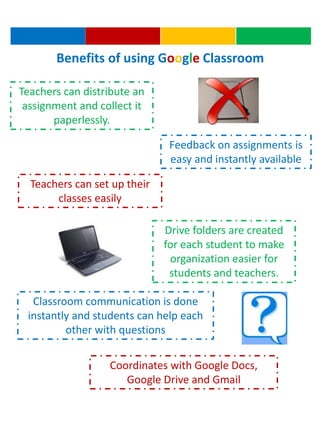
Teachers can distribute an
assignment and collect it
paperlessly.
Feedback on assignments is
easy and instantly available
Teachers can set up their
classes easily
Drive folders are created
for each student to make
organization easier for
students and teachers.
Classroom communication is done
instantly and students can help each
other with questions
Coordinates with Google Docs,
Google Drive and Gmail
Benefits of using Google Classroom
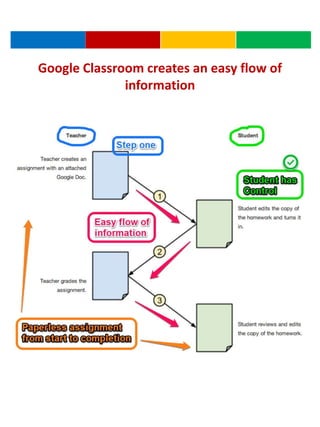
Google Classroom creates an easy flow of
information
Steps for using Classroom
1. Teacher uses Google Classroom to create a “class” for
each class they teach. Students are added to each
“class” or students can join using a code.
2. Students “join” their class in Classroom.
3. Teacher can add an announcement or an assignment to
each class individually.
4. Teacher creates a worksheet using Google Docs.
5. Teacher attaches the worksheet to the assignment and
enters in a due date and time.
6. Students complete the worksheet and turn it in online.
7. Teacher can see when each worksheet is turned in and
who has work left to be completed.
8. The assignment is graded and returned to the student
within Classroom.
9. If edit rights are given, a student may make changes to
the graded assignment to be re-submitted.
10. All steps have been completed without using a single
sheet of paper.
ISTE Standards for Teachers
2. Design and develop digital age
learning experiences and assessments
Teachers design, develop, and evaluate
authentic learning experiences and assessments
incorporating contemporary tools and resources
to maximize content learning in context and
to develop the knowledge, skills, and attitudes
identified in the Standards
3. Model digital age work and learning
Teachers exhibit knowledge, skills, and work
processes representative of an innovative
professional in a global and digital society.
ISTE Standards for Students
2. Communication and collaboration
Students use digital media and environments to
communicate and work collaboratively, including
at a distance, to support individual learning and
contribute to the learning of others.
References
Google for Education: Google in your classroom. (n.d.).
Retrieved February 1, 2015, from
http://www.google.com/edu/training/get-trained
ISTE Standards. (n.d.). Retrieved February 1, 2015, from
http://www.iste.org/standards

Classroom ppt

  • 1.
    Classroom One of thenewest tools in the Google Apps of Education Suite No ads – Free for schools https://www.google.com/edu/training/get-trained/
  • 2.
    Teachers can distributean assignment and collect it paperlessly. Feedback on assignments is easy and instantly available Teachers can set up their classes easily Drive folders are created for each student to make organization easier for students and teachers. Classroom communication is done instantly and students can help each other with questions Coordinates with Google Docs, Google Drive and Gmail Benefits of using Google Classroom
  • 3.
    Google Classroom createsan easy flow of information
  • 4.
    Steps for usingClassroom 1. Teacher uses Google Classroom to create a “class” for each class they teach. Students are added to each “class” or students can join using a code. 2. Students “join” their class in Classroom. 3. Teacher can add an announcement or an assignment to each class individually. 4. Teacher creates a worksheet using Google Docs. 5. Teacher attaches the worksheet to the assignment and enters in a due date and time. 6. Students complete the worksheet and turn it in online. 7. Teacher can see when each worksheet is turned in and who has work left to be completed. 8. The assignment is graded and returned to the student within Classroom. 9. If edit rights are given, a student may make changes to the graded assignment to be re-submitted. 10. All steps have been completed without using a single sheet of paper.
  • 5.
    ISTE Standards forTeachers 2. Design and develop digital age learning experiences and assessments Teachers design, develop, and evaluate authentic learning experiences and assessments incorporating contemporary tools and resources to maximize content learning in context and to develop the knowledge, skills, and attitudes identified in the Standards 3. Model digital age work and learning Teachers exhibit knowledge, skills, and work processes representative of an innovative professional in a global and digital society. ISTE Standards for Students 2. Communication and collaboration Students use digital media and environments to communicate and work collaboratively, including at a distance, to support individual learning and contribute to the learning of others.
  • 6.
    References Google for Education:Google in your classroom. (n.d.). Retrieved February 1, 2015, from http://www.google.com/edu/training/get-trained ISTE Standards. (n.d.). Retrieved February 1, 2015, from http://www.iste.org/standards

Editor's Notes

  • #3 https://www.google.com/edu/training/get-trained/
  • #4 Annotated with Skitch
  • #6 http://www.iste.org/standards