

UNIX - sed


       Non-Interactive
       Stream Editor


             Presentation By

                       Nihar R Paital
Introduction

   Developer       : Lee E. McMahon

   Developed during: 1973-1974

   Developed at    : Bell Labs

   Category        : UNIX Utility

   Supported by    : All UNIX flavors

                                         Nihar R Paital
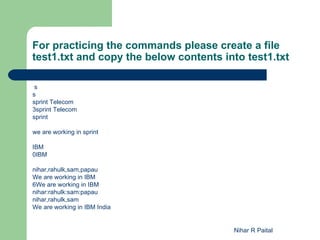
For practicing the commands please create a file
test1.txt and copy the below contents into test1.txt

 s
s
sprint Telecom
3sprint Telecom
sprint

we are working in sprint

IBM
0IBM

nihar,rahulk,sam,papau
We are working in IBM
6We are working in IBM
nihar:rahulk:sam:papau
nihar,rahulk,sam
We are working in IBM India


                                        Nihar R Paital
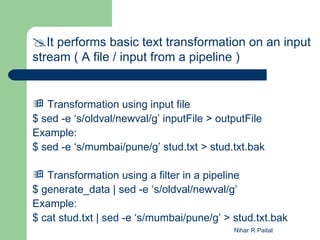
It performs basic text transformation on an input
stream ( A file / input from a pipeline )


 Transformation using input file
$ sed -e ‘s/oldval/newval/g’ inputFile > outputFile
Example:
$ sed -e ‘s/mumbai/pune/g’ stud.txt > stud.txt.bak

 Transformation using a filter in a pipeline
$ generate_data | sed -e ‘s/oldval/newval/g’
Example:
$ cat stud.txt | sed -e ‘s/mumbai/pune/g’ > stud.txt.bak
                                            Nihar R Paital
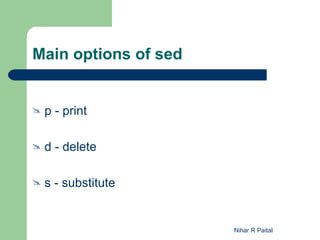
Main options of sed


   p - print

   d - delete

   s - substitute


                      Nihar R Paital
Below special characters have vital role using sed


  Character    Description

     ^        Matches the beginning of the line.
     $        Matches the end of the line.
     .        Matches any single character.
     *        Will match zero or more occurrences of
               the previous character.
     []       Matches all the characters inside the [ ].
                                           Nihar R Paital
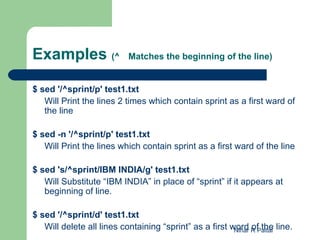
Examples (^                Matches the beginning of the line)


$ sed '/^sprint/p' test1.txt
   Will Print the lines 2 times which contain sprint as a first ward of
   the line

$ sed -n '/^sprint/p' test1.txt
   Will Print the lines which contain sprint as a first ward of the line

$ sed 's/^sprint/IBM INDIA/g' test1.txt
   Will Substitute “IBM INDIA” in place of “sprint” if it appears at
   beginning of line.

$ sed '/^sprint/d' test1.txt
   Will delete all lines containing “sprint” as a first word R Paital line.
                                                         Nihar of the
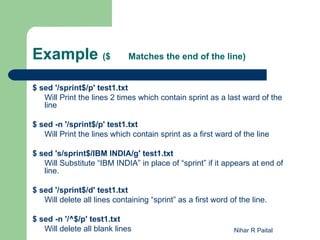
Example ($                   Matches the end of the line)


$ sed '/sprint$/p' test1.txt
   Will Print the lines 2 times which contain sprint as a last ward of the
   line

$ sed -n '/sprint$/p' test1.txt
   Will Print the lines which contain sprint as a first ward of the line

$ sed 's/sprint$/IBM INDIA/g' test1.txt
   Will Substitute “IBM INDIA” in place of “sprint” if it appears at end of
   line.

$ sed '/sprint$/d' test1.txt
   Will delete all lines containing “sprint” as a first word of the line.

$ sed -n '/^$/p' test1.txt
   Will delete all blank lines                                Nihar R Paital
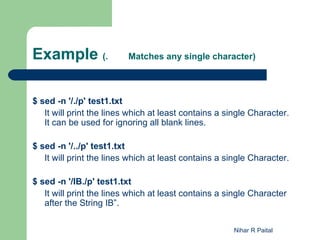
Example (.                Matches any single character)


$ sed -n '/./p' test1.txt
   It will print the lines which at least contains a single Character.
   It can be used for ignoring all blank lines.

$ sed -n '/../p' test1.txt
   It will print the lines which at least contains a single Character.

$ sed -n '/IB./p' test1.txt
   It will print the lines which at least contains a single Character
   after the String IB”.

                                                      Nihar R Paital
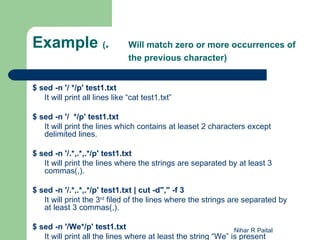
Example (*                      Will match zero or more occurrences of
                                the previous character)


$ sed -n '/ */p' test1.txt
   It will print all lines like “cat test1.txt”

$ sed -n '/ */p' test1.txt
   It will print the lines which contains at leaset 2 characters except
   delimited lines.

$ sed -n '/.*,.*,.*/p' test1.txt
   It will print the lines where the strings are separated by at least 3
   commas(,).

$ sed -n '/.*,.*,.*/p' test1.txt | cut -d"," -f 3
   It will print the 3rd filed of the lines where the strings are separated by
   at least 3 commas(,).

$ sed -n '/We*/p' test1.txt                                    Nihar R Paital
   It will print all the lines where at least the string “We” is present
Example ([ ]              Matches all the characters inside
                          the [ ])

$ sed -n '/[abc]/p' test1.txt
   This will print all the lines which contains either a or b or c as
   part of the line.

$ sed -n '/^[0-9]/p' test1.txt
   This will print all the lines which contains the digit 0 to 9 as part
   of line

$ sed -n '/^[^0-9]/p' test1.tx
   This will print all the lines which does not contains the digit 0 to
   9 as part of line

$ sed 's/[abc]/we/g' test1.txt
   This will replace the string “WE” where either a or b or c is
   present as part of the line.                      Nihar R Paital
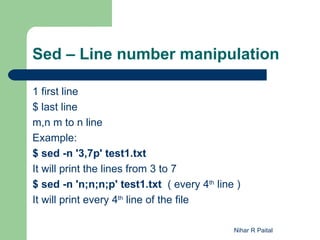
Sed – Line number manipulation

1 first line
$ last line
m,n m to n line
Example:
$ sed -n '3,7p' test1.txt
It will print the lines from 3 to 7
$ sed -n 'n;n;n;p' test1.txt ( every 4th line )
It will print every 4th line of the file

                                             Nihar R Paital
Nihar R Paital

UNIX - Class6 - sed - Detail

  • 1.
    UNIX - sed Non-Interactive Stream Editor Presentation By Nihar R Paital
  • 2.
    Introduction  Developer : Lee E. McMahon  Developed during: 1973-1974  Developed at : Bell Labs  Category : UNIX Utility  Supported by : All UNIX flavors Nihar R Paital
  • 3.
    For practicing thecommands please create a file test1.txt and copy the below contents into test1.txt s s sprint Telecom 3sprint Telecom sprint we are working in sprint IBM 0IBM nihar,rahulk,sam,papau We are working in IBM 6We are working in IBM nihar:rahulk:sam:papau nihar,rahulk,sam We are working in IBM India Nihar R Paital
  • 4.
    It performs basictext transformation on an input stream ( A file / input from a pipeline )  Transformation using input file $ sed -e ‘s/oldval/newval/g’ inputFile > outputFile Example: $ sed -e ‘s/mumbai/pune/g’ stud.txt > stud.txt.bak  Transformation using a filter in a pipeline $ generate_data | sed -e ‘s/oldval/newval/g’ Example: $ cat stud.txt | sed -e ‘s/mumbai/pune/g’ > stud.txt.bak Nihar R Paital
  • 5.
    Main options ofsed  p - print  d - delete  s - substitute Nihar R Paital
  • 6.
    Below special charactershave vital role using sed Character Description  ^ Matches the beginning of the line.  $ Matches the end of the line.  . Matches any single character.  * Will match zero or more occurrences of the previous character.  [] Matches all the characters inside the [ ]. Nihar R Paital
  • 7.
    Examples (^ Matches the beginning of the line) $ sed '/^sprint/p' test1.txt Will Print the lines 2 times which contain sprint as a first ward of the line $ sed -n '/^sprint/p' test1.txt Will Print the lines which contain sprint as a first ward of the line $ sed 's/^sprint/IBM INDIA/g' test1.txt Will Substitute “IBM INDIA” in place of “sprint” if it appears at beginning of line. $ sed '/^sprint/d' test1.txt Will delete all lines containing “sprint” as a first word R Paital line. Nihar of the
  • 8.
    Example ($ Matches the end of the line) $ sed '/sprint$/p' test1.txt Will Print the lines 2 times which contain sprint as a last ward of the line $ sed -n '/sprint$/p' test1.txt Will Print the lines which contain sprint as a first ward of the line $ sed 's/sprint$/IBM INDIA/g' test1.txt Will Substitute “IBM INDIA” in place of “sprint” if it appears at end of line. $ sed '/sprint$/d' test1.txt Will delete all lines containing “sprint” as a first word of the line. $ sed -n '/^$/p' test1.txt Will delete all blank lines Nihar R Paital
  • 9.
    Example (. Matches any single character) $ sed -n '/./p' test1.txt It will print the lines which at least contains a single Character. It can be used for ignoring all blank lines. $ sed -n '/../p' test1.txt It will print the lines which at least contains a single Character. $ sed -n '/IB./p' test1.txt It will print the lines which at least contains a single Character after the String IB”. Nihar R Paital
  • 10.
    Example (* Will match zero or more occurrences of the previous character) $ sed -n '/ */p' test1.txt It will print all lines like “cat test1.txt” $ sed -n '/ */p' test1.txt It will print the lines which contains at leaset 2 characters except delimited lines. $ sed -n '/.*,.*,.*/p' test1.txt It will print the lines where the strings are separated by at least 3 commas(,). $ sed -n '/.*,.*,.*/p' test1.txt | cut -d"," -f 3 It will print the 3rd filed of the lines where the strings are separated by at least 3 commas(,). $ sed -n '/We*/p' test1.txt Nihar R Paital It will print all the lines where at least the string “We” is present
  • 11.
    Example ([ ] Matches all the characters inside the [ ]) $ sed -n '/[abc]/p' test1.txt This will print all the lines which contains either a or b or c as part of the line. $ sed -n '/^[0-9]/p' test1.txt This will print all the lines which contains the digit 0 to 9 as part of line $ sed -n '/^[^0-9]/p' test1.tx This will print all the lines which does not contains the digit 0 to 9 as part of line $ sed 's/[abc]/we/g' test1.txt This will replace the string “WE” where either a or b or c is present as part of the line. Nihar R Paital
  • 12.
    Sed – Linenumber manipulation 1 first line $ last line m,n m to n line Example: $ sed -n '3,7p' test1.txt It will print the lines from 3 to 7 $ sed -n 'n;n;n;p' test1.txt ( every 4th line ) It will print every 4th line of the file Nihar R Paital
  • 13.