UNIX


  vi Editor


              Presentation By

                        Nihar R Paital
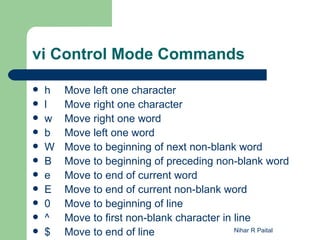
vi Control Mode Commands

   h   Move left one character
   l   Move right one character
   w   Move right one word
   b   Move left one word
   W   Move to beginning of next non-blank word
   B   Move to beginning of preceding non-blank word
   e   Move to end of current word
   E   Move to end of current non-blank word
   0   Move to beginning of line
   ^   Move to first non-blank character in line
   $   Move to end of line                  Nihar R Paital
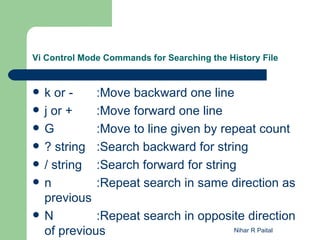
Vi Control Mode Commands for Searching the History File


   k or -    :Move backward one line
   j or +    :Move forward one line
   G         :Move to line given by repeat count
   ? string :Search backward for string
   / string :Search forward for string
   n         :Repeat search in same direction as
    previous
   N         :Repeat search in opposite direction
    of previous                        Nihar R Paital
Entering and Changing Text

   i Text inserted before current character
    (insert)
   a Text inserted after current character
    (append)
   I Text inserted at beginning of line
   A Text inserted at end of line
   R Text overwrites existing text
   o Text inserted at the next new line.

                                     Nihar R Paital
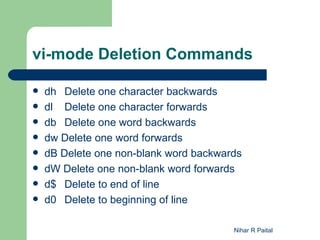
vi-mode Deletion Commands

   dh Delete one character backwards
   dl Delete one character forwards
   db Delete one word backwards
   dw Delete one word forwards
   dB Delete one non-blank word backwards
   dW Delete one non-blank word forwards
   d$ Delete to end of line
   d0 Delete to beginning of line

                                        Nihar R Paital
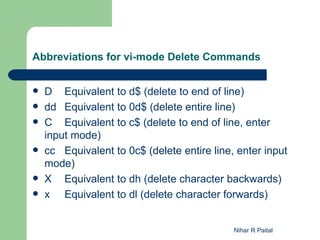
Abbreviations for vi-mode Delete Commands


   D Equivalent to d$ (delete to end of line)
   dd Equivalent to 0d$ (delete entire line)
   C Equivalent to c$ (delete to end of line, enter
    input mode)
   cc Equivalent to 0c$ (delete entire line, enter input
    mode)
   X Equivalent to dh (delete character backwards)
   x Equivalent to dl (delete character forwards)


                                             Nihar R Paital
Vi-mode Character-finding Commands

   fx Move right to next occurrence of x
   Fx Move left to previous occurrence of x
   tx Move right to next occurrence of x , then back
    one space
   Tx Move left to previous occurrence of x , then
    forward one space
   ;   Redo last character-finding command
   ,   Redo last character-finding command in
    opposite direction


                                           Nihar R Paital
Thank You!


             Nihar R Paital

UNIX - Class2 - vi Editor

  • 1.
    UNIX viEditor Presentation By Nihar R Paital
  • 2.
    vi Control ModeCommands  h Move left one character  l Move right one character  w Move right one word  b Move left one word  W Move to beginning of next non-blank word  B Move to beginning of preceding non-blank word  e Move to end of current word  E Move to end of current non-blank word  0 Move to beginning of line  ^ Move to first non-blank character in line  $ Move to end of line Nihar R Paital
  • 3.
    Vi Control ModeCommands for Searching the History File  k or - :Move backward one line  j or + :Move forward one line  G :Move to line given by repeat count  ? string :Search backward for string  / string :Search forward for string  n :Repeat search in same direction as previous  N :Repeat search in opposite direction of previous Nihar R Paital
  • 4.
    Entering and ChangingText  i Text inserted before current character (insert)  a Text inserted after current character (append)  I Text inserted at beginning of line  A Text inserted at end of line  R Text overwrites existing text  o Text inserted at the next new line. Nihar R Paital
  • 5.
    vi-mode Deletion Commands  dh Delete one character backwards  dl Delete one character forwards  db Delete one word backwards  dw Delete one word forwards  dB Delete one non-blank word backwards  dW Delete one non-blank word forwards  d$ Delete to end of line  d0 Delete to beginning of line Nihar R Paital
  • 6.
    Abbreviations for vi-modeDelete Commands  D Equivalent to d$ (delete to end of line)  dd Equivalent to 0d$ (delete entire line)  C Equivalent to c$ (delete to end of line, enter input mode)  cc Equivalent to 0c$ (delete entire line, enter input mode)  X Equivalent to dh (delete character backwards)  x Equivalent to dl (delete character forwards) Nihar R Paital
  • 7.
    Vi-mode Character-finding Commands  fx Move right to next occurrence of x  Fx Move left to previous occurrence of x  tx Move right to next occurrence of x , then back one space  Tx Move left to previous occurrence of x , then forward one space  ; Redo last character-finding command  , Redo last character-finding command in opposite direction Nihar R Paital
  • 8.
    Thank You! Nihar R Paital