1ARULKUMAR V AP/CSE SECE
 To learn how to create strings (§8.2.1).
 To use the len, min, and max functions to obtain the length of a
string or the smallest or largest element in a string (§8.2.2).
 To access string elements by using the index operator ([])(§8.2.3).
 To get a substring from a larger string by using the slicing
str[start:end] operator (§8.2.4).
 To concatenate strings by using the + operator and to duplicate
strings by using the * operator (§8.2.5).
 To use the in and not in operators to determine whether a string is
contained within another string (§8.2.6).
 To compare strings by using comparison operators (==, !=, <,
<=, >, and >=) (§8.2.7).
 To iterate characters in a string by using a foreach loop (§8.2.8).
 To test strings by using the methods isalnum, isalpha, isdigit,
isidentifier, islower, isupper, and isspace (§8.2.9).
 To search for substrings by using the methods endswith,
startswith, find, rfind, and count (§8.2.10).
 To convert strings by using the methods capitalize, lower, upper,
title, swapcase, and replace (§8.2.11).
2ARULKUMAR V AP/CSE SECE
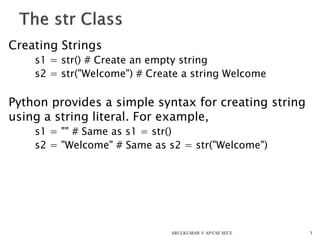
Creating Strings
s1 = str() # Create an empty string
s2 = str("Welcome") # Create a string Welcome
Python provides a simple syntax for creating string
using a string literal. For example,
s1 = "" # Same as s1 = str()
s2 = "Welcome" # Same as s2 = str("Welcome")
3ARULKUMAR V AP/CSE SECE
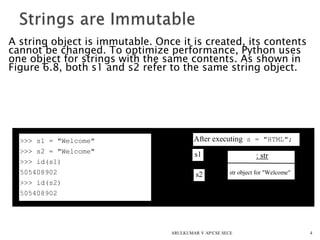
A string object is immutable. Once it is created, its contents
cannot be changed. To optimize performance, Python uses
one object for strings with the same contents. As shown in
Figure 6.8, both s1 and s2 refer to the same string object.
4
>>> s1 = "Welcome"
>>> s2 = "Welcome"
>>> id(s1)
505408902
>>> id(s2)
505408902
After executing s = "HTML";
: str
str object for "Welcome"
s1
s2
ARULKUMAR V AP/CSE SECE
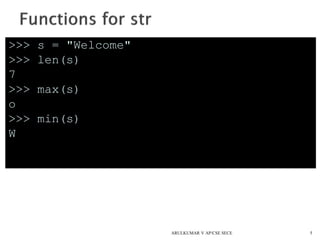
>>> s = "Welcome"
>>> len(s)
7
>>> max(s)
o
>>> min(s)
W
5ARULKUMAR V AP/CSE SECE
6
P r o g r a m m i n
i
g
i
0 1 2 3 4 5 6 7 8 9
i
10
i
s
s[0] s[1] s[10]
ARULKUMAR V AP/CSE SECE
>>> s1 = "Welcome"
>>> s2 = "Python"
>>> s3 = s1 + " to " + s2
>>> s3
’Welcome to Python’
>>> s4 = 2 * s1
>>> s4
’WelcomeWelcome’
>>> s1[3 : 6]
’com’
>>> 'W' in s1
True
>>> 'X' in s1
False
7ARULKUMAR V AP/CSE SECE
>>> s1 = "Welcome"
>>> s1[-1]
‘e’
>>> s1[-3 : -1]
‘me’
8ARULKUMAR V AP/CSE SECE
>>> s1 = "Welcome"
>>> "come" in s1
True
>>> "come" not in s1
False
>>>
9ARULKUMAR V AP/CSE SECE
10
for ch in string:
print(ch)
for i in range(0, len(s), 2):
print(s[i])
ARULKUMAR V AP/CSE SECE
11
>>> s1 = "green"
>>> s2 = "glow"
>>> s1 == s2
False
>>> s1 != s2
True
>>> s1 > s2
True
>>> s1 >= s2
True
>>> s1 < s2
False
>>> s1 <= s2
False
ARULKUMAR V AP/CSE SECE
12
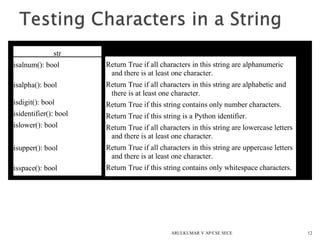
str
isalnum(): bool
isalpha(): bool
isdigit(): bool
isidentifier(): bool
islower(): bool
isupper(): bool
isspace(): bool
Return True if all characters in this string are alphanumeric
and there is at least one character.
Return True if all characters in this string are alphabetic and
there is at least one character.
Return True if this string contains only number characters.
Return True if this string is a Python identifier.
Return True if all characters in this string are lowercase letters
and there is at least one character.
Return True if all characters in this string are uppercase letters
and there is at least one character.
Return True if this string contains only whitespace characters.
ARULKUMAR V AP/CSE SECE
13
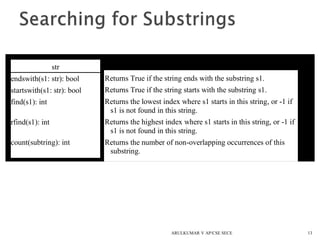
str
endswith(s1: str): bool
startswith(s1: str): bool
find(s1): int
rfind(s1): int
count(subtring): int
Returns True if the string ends with the substring s1.
Returns True if the string starts with the substring s1.
Returns the lowest index where s1 starts in this string, or -1 if
s1 is not found in this string.
Returns the highest index where s1 starts in this string, or -1 if
s1 is not found in this string.
Returns the number of non-overlapping occurrences of this
substring.
ARULKUMAR V AP/CSE SECE
14
str
capitalize(): str
lower(): str
upper(): str
title(): str
swapcase(): str
replace(old, new): str
Returns a copy of this string with only the first character capitalized.
Returns a copy of this string with all characters converted to lowercase.
Returns a copy of this string with all characters converted to uppercase.
Returns a copy of this string with the first letter capitalized in each word.
Returns a copy of this string in which lowercase letters are converted to
uppercase and uppercase to lowercase.
Returns a new string that replaces all the occurrence of the old string with a
new string.
ARULKUMAR V AP/CSE SECE
15
str
lstrip(): str
rstrip(): str
strip(): str
Returns a string with the leading whitespace characters removed.
Returns a string with the trailing whitespace characters removed.
Returns a string with the starting and trailing whitespace characters
removed.
ARULKUMAR V AP/CSE SECE
16
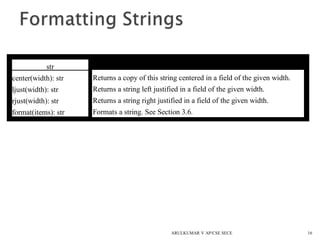
str
center(width): str
ljust(width): str
rjust(width): str
format(items): str
Returns a copy of this string centered in a field of the given width.
Returns a string left justified in a field of the given width.
Returns a string right justified in a field of the given width.
Formats a string. See Section 3.6.
ARULKUMAR V AP/CSE SECE
 Objective: Checking whether a
string is a palindrome: a string
that reads the same forward
and backward.
17
CheckPalindrome Run
ARULKUMAR V AP/CSE SECE
18
HexToDecimalConversion Run
ARULKUMAR V AP/CSE SECE
Defining methods for operators is called operator
overloading. Operator overloading allows the
programmer to use the built-in operators for
user-defined methods. These methods are
named in a special way for Python to recognize
the association.
19ARULKUMAR V AP/CSE SECE
20
Operator Method
+
*
-
/
%
<
<=
==
!=
>
>=
[index]
in
len
__add__(self, other)
__mul__(self, other)
__sub__(self, other)
__div__(self, other)
__mod__(self, other)
__lt__(self, other)
__le__(self, other)
__eq__(self, other)
__ne__(self, other)
__gt__(self, other)
__ge__(self, other)
__getitem__(self, index)
__contains__(self, value)
__len__(self)
ARULKUMAR V AP/CSE SECE
2121
Rational RunTestRationalClass
Rational
-numerator: int
-denominator: int
Rational(numerator = 0: int,
denominator = 1: int)
__add__(secondRational:
Rational): Rational
__sub__(secondRational:
Rational): Rational
__mul__(secondRational:
Rational): Rational
__div__(secondRational:
Rational): Rational
__lt__ (secondRational:
Rational): bool
Also __le__, __eq__, __ne__,
__gt__, __ge__ are supported
__int__(): int
__float__(): float
__str()__: str
__getitem(i)__
The numerator of this rational number.
The denominator of this rational number.
Creates a rational number with specified numerator (default 0) and
denominator (default 1).
Returns the addition of this rational with another.
Returns the subtraction of this rational with another.
Returns the multiplication of this rational with another.
Returns the division of this rational with another.
Compare this rational number with another.
Returns the numerator / denominator as an integer.
Returns the numerator / denominator.
Returns a string in the form “numerator / denominator.” Returns
numerator if denominator is 1.
[0] for numerator and [1] for denominator.
ARULKUMAR V AP/CSE SECE

5. string

  • 1.
  • 2.
     To learnhow to create strings (§8.2.1).  To use the len, min, and max functions to obtain the length of a string or the smallest or largest element in a string (§8.2.2).  To access string elements by using the index operator ([])(§8.2.3).  To get a substring from a larger string by using the slicing str[start:end] operator (§8.2.4).  To concatenate strings by using the + operator and to duplicate strings by using the * operator (§8.2.5).  To use the in and not in operators to determine whether a string is contained within another string (§8.2.6).  To compare strings by using comparison operators (==, !=, <, <=, >, and >=) (§8.2.7).  To iterate characters in a string by using a foreach loop (§8.2.8).  To test strings by using the methods isalnum, isalpha, isdigit, isidentifier, islower, isupper, and isspace (§8.2.9).  To search for substrings by using the methods endswith, startswith, find, rfind, and count (§8.2.10).  To convert strings by using the methods capitalize, lower, upper, title, swapcase, and replace (§8.2.11). 2ARULKUMAR V AP/CSE SECE
  • 3.
    Creating Strings s1 =str() # Create an empty string s2 = str("Welcome") # Create a string Welcome Python provides a simple syntax for creating string using a string literal. For example, s1 = "" # Same as s1 = str() s2 = "Welcome" # Same as s2 = str("Welcome") 3ARULKUMAR V AP/CSE SECE
  • 4.
    A string objectis immutable. Once it is created, its contents cannot be changed. To optimize performance, Python uses one object for strings with the same contents. As shown in Figure 6.8, both s1 and s2 refer to the same string object. 4 >>> s1 = "Welcome" >>> s2 = "Welcome" >>> id(s1) 505408902 >>> id(s2) 505408902 After executing s = "HTML"; : str str object for "Welcome" s1 s2 ARULKUMAR V AP/CSE SECE
  • 5.
    >>> s ="Welcome" >>> len(s) 7 >>> max(s) o >>> min(s) W 5ARULKUMAR V AP/CSE SECE
  • 6.
    6 P r og r a m m i n i g i 0 1 2 3 4 5 6 7 8 9 i 10 i s s[0] s[1] s[10] ARULKUMAR V AP/CSE SECE
  • 7.
    >>> s1 ="Welcome" >>> s2 = "Python" >>> s3 = s1 + " to " + s2 >>> s3 ’Welcome to Python’ >>> s4 = 2 * s1 >>> s4 ’WelcomeWelcome’ >>> s1[3 : 6] ’com’ >>> 'W' in s1 True >>> 'X' in s1 False 7ARULKUMAR V AP/CSE SECE
  • 8.
    >>> s1 ="Welcome" >>> s1[-1] ‘e’ >>> s1[-3 : -1] ‘me’ 8ARULKUMAR V AP/CSE SECE
  • 9.
    >>> s1 ="Welcome" >>> "come" in s1 True >>> "come" not in s1 False >>> 9ARULKUMAR V AP/CSE SECE
  • 10.
    10 for ch instring: print(ch) for i in range(0, len(s), 2): print(s[i]) ARULKUMAR V AP/CSE SECE
  • 11.
    11 >>> s1 ="green" >>> s2 = "glow" >>> s1 == s2 False >>> s1 != s2 True >>> s1 > s2 True >>> s1 >= s2 True >>> s1 < s2 False >>> s1 <= s2 False ARULKUMAR V AP/CSE SECE
  • 12.
    12 str isalnum(): bool isalpha(): bool isdigit():bool isidentifier(): bool islower(): bool isupper(): bool isspace(): bool Return True if all characters in this string are alphanumeric and there is at least one character. Return True if all characters in this string are alphabetic and there is at least one character. Return True if this string contains only number characters. Return True if this string is a Python identifier. Return True if all characters in this string are lowercase letters and there is at least one character. Return True if all characters in this string are uppercase letters and there is at least one character. Return True if this string contains only whitespace characters. ARULKUMAR V AP/CSE SECE
  • 13.
    13 str endswith(s1: str): bool startswith(s1:str): bool find(s1): int rfind(s1): int count(subtring): int Returns True if the string ends with the substring s1. Returns True if the string starts with the substring s1. Returns the lowest index where s1 starts in this string, or -1 if s1 is not found in this string. Returns the highest index where s1 starts in this string, or -1 if s1 is not found in this string. Returns the number of non-overlapping occurrences of this substring. ARULKUMAR V AP/CSE SECE
  • 14.
    14 str capitalize(): str lower(): str upper():str title(): str swapcase(): str replace(old, new): str Returns a copy of this string with only the first character capitalized. Returns a copy of this string with all characters converted to lowercase. Returns a copy of this string with all characters converted to uppercase. Returns a copy of this string with the first letter capitalized in each word. Returns a copy of this string in which lowercase letters are converted to uppercase and uppercase to lowercase. Returns a new string that replaces all the occurrence of the old string with a new string. ARULKUMAR V AP/CSE SECE
  • 15.
    15 str lstrip(): str rstrip(): str strip():str Returns a string with the leading whitespace characters removed. Returns a string with the trailing whitespace characters removed. Returns a string with the starting and trailing whitespace characters removed. ARULKUMAR V AP/CSE SECE
  • 16.
    16 str center(width): str ljust(width): str rjust(width):str format(items): str Returns a copy of this string centered in a field of the given width. Returns a string left justified in a field of the given width. Returns a string right justified in a field of the given width. Formats a string. See Section 3.6. ARULKUMAR V AP/CSE SECE
  • 17.
     Objective: Checkingwhether a string is a palindrome: a string that reads the same forward and backward. 17 CheckPalindrome Run ARULKUMAR V AP/CSE SECE
  • 18.
  • 19.
    Defining methods foroperators is called operator overloading. Operator overloading allows the programmer to use the built-in operators for user-defined methods. These methods are named in a special way for Python to recognize the association. 19ARULKUMAR V AP/CSE SECE
  • 20.
    20 Operator Method + * - / % < <= == != > >= [index] in len __add__(self, other) __mul__(self,other) __sub__(self, other) __div__(self, other) __mod__(self, other) __lt__(self, other) __le__(self, other) __eq__(self, other) __ne__(self, other) __gt__(self, other) __ge__(self, other) __getitem__(self, index) __contains__(self, value) __len__(self) ARULKUMAR V AP/CSE SECE
  • 21.
    2121 Rational RunTestRationalClass Rational -numerator: int -denominator:int Rational(numerator = 0: int, denominator = 1: int) __add__(secondRational: Rational): Rational __sub__(secondRational: Rational): Rational __mul__(secondRational: Rational): Rational __div__(secondRational: Rational): Rational __lt__ (secondRational: Rational): bool Also __le__, __eq__, __ne__, __gt__, __ge__ are supported __int__(): int __float__(): float __str()__: str __getitem(i)__ The numerator of this rational number. The denominator of this rational number. Creates a rational number with specified numerator (default 0) and denominator (default 1). Returns the addition of this rational with another. Returns the subtraction of this rational with another. Returns the multiplication of this rational with another. Returns the division of this rational with another. Compare this rational number with another. Returns the numerator / denominator as an integer. Returns the numerator / denominator. Returns a string in the form “numerator / denominator.” Returns numerator if denominator is 1. [0] for numerator and [1] for denominator. ARULKUMAR V AP/CSE SECE