Massive open online course
 From Wikipedia, the free encyclopedia
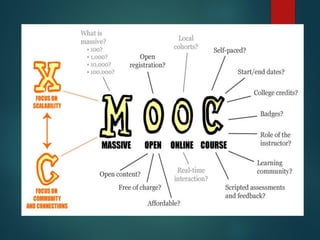
 A Massive Open Online Course (MOOC; /muːk/) is
an online course with unlimited participation and
open access in the web. In addition to traditional
course materials such as videos, readings,
and problem sets, MOOCs provide interactive
user forums that help build a community for
students, professors, and teaching assistants (TAs).
MOOCs are a recent development in distance
education which began to emerge in 2012.
 Although early MOOCs often emphasized open access
features, such as connectives and open licensing of content,
structure, and learning goals, to promote the reuse and
remixing of resources, some notable newer MOOCs use closed
licenses for their course materials, while maintaining free
access for students
Practice
Visits three MOOCs and make a Screencasts talking
about each one of them, tell the university or
institution that is offering them and talk about each
one. You can choose any of the tools listed below
to do it and upload your Screencasts to your Block.
Screencast
 From Wikipedia, the free encyclopedia
 A screencast is a digital recording
of computer screen output, also known as
a video screen capture, often containing
audio narration. The term screencast compares
with the related term screenshot; whereas
screenshot generates a single picture of a
computer screen, a screencast is essentially a
movie of the changes over time that a user sees
on a computer screen, enhanced with audio
narration.
Screencast Uses
 Screencasts can help demonstrate and teach the
use of software features. Creating a screencast
helps software developers show off their work.
Educators may also use screencasts as another
means of integrating technology into the
curriculum.[8] Students can record video and
audio as they demonstrate the proper procedure
to solve a problem on an interactive whiteboard.
Screencast Uses
 Screencasts are useful tools for ordinary software
users as well: They help filing report bugs in which the
screencasts take the place of potentially unclear
written explanations; they help showing others how
a given task is accomplished in a specific software
environment.
 Organizers of seminars may choose to routinely
record complete seminars and make them
available to all attendees for future reference
and/or sell these recordings to people who cannot
afford the fee of the live seminar or do not have the
time to attend it. This will generate an additional
revenue stream for the organizers and makes the
knowledge available to a broader audience.
The best screencasting software
In this post I’m going to recommend
the screencasting tool that I think are
the best
 1. Microsoft Community Clips
 2. Camtasia Studio
 3. Adobe Captivate
 4. Screenflow

Clase no.. 6 mooc, screencast

  • 1.
    Massive open onlinecourse  From Wikipedia, the free encyclopedia  A Massive Open Online Course (MOOC; /muːk/) is an online course with unlimited participation and open access in the web. In addition to traditional course materials such as videos, readings, and problem sets, MOOCs provide interactive user forums that help build a community for students, professors, and teaching assistants (TAs). MOOCs are a recent development in distance education which began to emerge in 2012.
  • 2.
     Although earlyMOOCs often emphasized open access features, such as connectives and open licensing of content, structure, and learning goals, to promote the reuse and remixing of resources, some notable newer MOOCs use closed licenses for their course materials, while maintaining free access for students
  • 4.
    Practice Visits three MOOCsand make a Screencasts talking about each one of them, tell the university or institution that is offering them and talk about each one. You can choose any of the tools listed below to do it and upload your Screencasts to your Block.
  • 5.
    Screencast  From Wikipedia,the free encyclopedia  A screencast is a digital recording of computer screen output, also known as a video screen capture, often containing audio narration. The term screencast compares with the related term screenshot; whereas screenshot generates a single picture of a computer screen, a screencast is essentially a movie of the changes over time that a user sees on a computer screen, enhanced with audio narration.
  • 6.
    Screencast Uses  Screencastscan help demonstrate and teach the use of software features. Creating a screencast helps software developers show off their work. Educators may also use screencasts as another means of integrating technology into the curriculum.[8] Students can record video and audio as they demonstrate the proper procedure to solve a problem on an interactive whiteboard.
  • 7.
    Screencast Uses  Screencastsare useful tools for ordinary software users as well: They help filing report bugs in which the screencasts take the place of potentially unclear written explanations; they help showing others how a given task is accomplished in a specific software environment.  Organizers of seminars may choose to routinely record complete seminars and make them available to all attendees for future reference and/or sell these recordings to people who cannot afford the fee of the live seminar or do not have the time to attend it. This will generate an additional revenue stream for the organizers and makes the knowledge available to a broader audience.
  • 8.
    The best screencastingsoftware In this post I’m going to recommend the screencasting tool that I think are the best  1. Microsoft Community Clips  2. Camtasia Studio  3. Adobe Captivate  4. Screenflow