EAS-SEC

Alexander Polyakov
CTO ERPScan
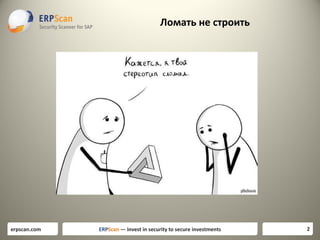
Ломать не строить

erpscan.com

ERPScan — invest in security to secure investments

2
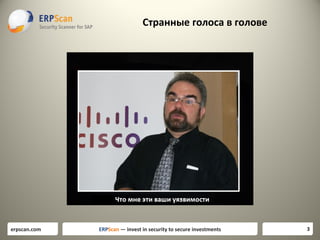
Странные голоса в голове

erpscan.com

ERPScan — invest in security to secure investments

3
SAP Security

2. Compliance
2. Compliance

erpscan.com

ERPScan — invest in security to secure investments

4
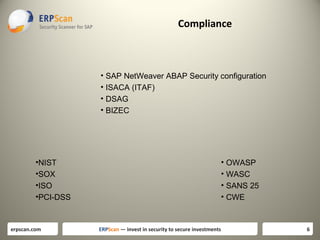
Compliance

• С чего начать

erpscan.com

ERPScan — invest in security to secure investments

5
Compliance

• SAP NetWeaver ABAP Security configuration
• ISACA (ITAF)
• DSAG
• BIZEC

•NIST
•SOX
•ISO
•PCI-DSS

erpscan.com

• OWASP
• WASC
• SANS 25
• CWE

ERPScan — invest in security to secure investments

6
SAP Security Guidelines
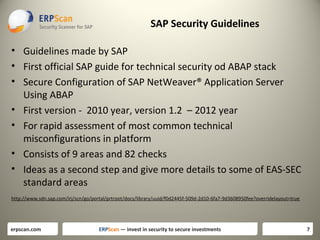
• Guidelines made by SAP
• First official SAP guide for technical security od ABAP stack
• Secure Configuration of SAP NetWeaver® Application Server
Using ABAP
• First version - 2010 year, version 1.2 – 2012 year
• For rapid assessment of most common technical
misconfigurations in platform
• Consists of 9 areas and 82 checks
• Ideas as a second step and give more details to some of EAS-SEC
standard areas
http://www.sdn.sap.com/irj/scn/go/portal/prtroot/docs/library/uuid/f0d2445f-509d-2d10-6fa7-9d3608950fee?overridelayout=true

erpscan.com

ERPScan — invest in security to secure investments

7
SAP Security Guidelines

•
•
•
•
•
•
•
•
•

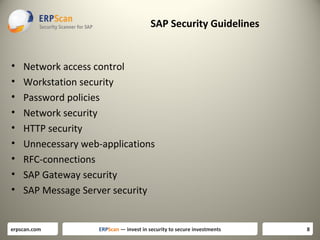
Network access control
Workstation security
Password policies
Network security
HTTP security
Unnecessary web-applications
RFC-connections
SAP Gateway security
SAP Message Server security

erpscan.com

ERPScan — invest in security to secure investments

8
ISACA Assurance (ITAFF)
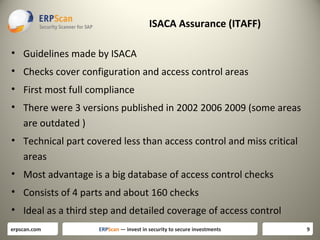
• Guidelines made by ISACA
• Checks cover configuration and access control areas
• First most full compliance
• There were 3 versions published in 2002 2006 2009 (some areas
are outdated )
• Technical part covered less than access control and miss critical
areas
• Most advantage is a big database of access control checks
• Consists of 4 parts and about 160 checks
• Ideal as a third step and detailed coverage of access control
erpscan.com

ERPScan — invest in security to secure investments

9
DSAG
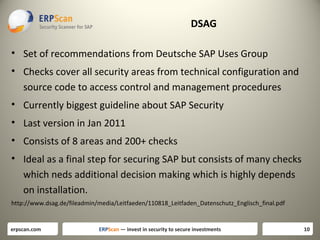
• Set of recommendations from Deutsche SAP Uses Group
• Checks cover all security areas from technical configuration and
source code to access control and management procedures
• Currently biggest guideline about SAP Security
• Last version in Jan 2011
• Consists of 8 areas and 200+ checks
• Ideal as a final step for securing SAP but consists of many checks
which neds additional decision making which is highly depends
on installation.
http://www.dsag.de/fileadmin/media/Leitfaeden/110818_Leitfaden_Datenschutz_Englisch_final.pdf

erpscan.com

ERPScan — invest in security to secure investments

10
Итого
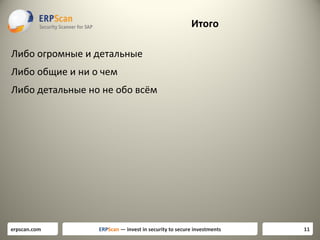
Либо огромные и детальные
Либо общие и ни о чем
Либо детальные но не обо всём

erpscan.com

ERPScan — invest in security to secure investments

11
EAS-SEC for NetWeaver (EASAI-NA)
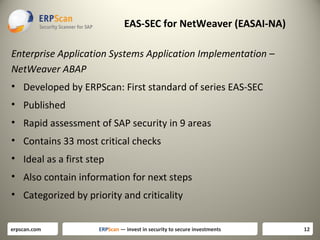
Enterprise Application Systems Application Implementation –
NetWeaver ABAP
• Developed by ERPScan: First standard of series EAS-SEC
• Published
• Rapid assessment of SAP security in 9 areas
• Contains 33 most critical checks
• Ideal as a first step
• Also contain information for next steps
• Categorized by priority and criticality
erpscan.com

ERPScan — invest in security to secure investments

12
EASAI-NA-2013
Access

Criticality

% of

exploit

EASAI-NA

Easy to

vulnerable
systems

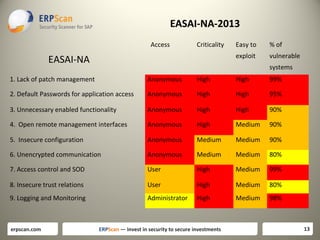
1. Lack of patch management

Anonymous

High

High

99%

2. Default Passwords for application access

Anonymous

High

High

95%

3. Unnecessary enabled functionality

Anonymous

High

High

90%

4. Open remote management interfaces

Anonymous

High

Medium

90%

5. Insecure configuration

Anonymous

Medium

Medium

90%

6. Unencrypted communication

Anonymous

Medium

Medium

80%

7. Access control and SOD

User

High

Medium

99%

8. Insecure trust relations

User

High

Medium

80%

9. Logging and Monitoring

Administrator

High

Medium

98%

erpscan.com

ERPScan — invest in security to secure investments

13
Lack of patch management
• [EASAI-NA-01] Component updates
• [EASAI-NA-02] Kernel updated

What next: Other components should be be updated separately –
SAP Router, SAP Gui, SAP NetWEaver J2EE, SAP BusinessObjects.
And also OS and Database.

erpscan.com

ERPScan — invest in security to secure investments

14
Default passwords
•
•
•
•
•

[EASAI-NA-03] Default password check for user SAP*
[EASAI-NA-04] Default password check for user DDIC
[EASAI-NA-05] Default password check for user SAPCPIC
[EASAI-NA-06] Default password check for user MSADM
[EASAI-NA-07] Default password check for user EARLYWATCH

What next: Couple of additional SAP components also use their own
default passwords. For example services SAP SDM and SAP ITS in
their old versions has default passwords. After you check all
default passwords you can start with bruteforcing for simple
passwords.
erpscan.com

ERPScan — invest in security to secure investments

15
Unnecessary enabled functionality
• [EASAI-NA-08] Access to RFC-functions using SOAP interface
• [EASAI-NA-09] Access to RFC-functions using FORM interface
• [EASAI-NA-10] Access to XI service using SOAP interface

What next: You should analyze about 1500 other services which are
remotely enabled if they are really needed and also disable
unused transactions, programs and reports.
erpscan.com

ERPScan — invest in security to secure investments

16
Open remote management interfaces
•
•
•
•

[EASAI-NA-11] Unauthorized access to SAPControl service
[EASAI-NA-12] Unauthorized access to SAPHostControl service
[EASAI-NA-13] Unauthorized access to Message Server service
[EASAI-NA-14] Unauthorized access to Oracle database

What next: Full list of SAP services you can get from document
TCP/IP Ports Used by SAP Applications .Also you should take care
about 3rd party services which can be enabled on this server.
erpscan.com

ERPScan — invest in security to secure investments

17
Insecure configuration
•
•
•
•
•

[EASAI-NA-15] Minimum password length
[EASAI-NA-16] User locking policy
[EASAI-NA-17] Password compliance to current standards
[EASAI-NA-18] Access control to RFC (reginfo.dat)
[EASAI-NA-19] Access control to RFC (secinfo.dat)

What next: First of all you can look at (Secure Configuration of SAP
NetWeaver® Application Server Using ABAP) document for
detailed configuration checks. Afterwards you can pass throught
detailed documents for each and every SAP service and module
http://help.sap.com/saphelp_nw70/helpdata/en/8c/2ec59131d7
f84ea514a67d628925a9/frameset.htm

erpscan.com

ERPScan — invest in security to secure investments

18
Access control and SOD conflicts
•
•
•
•
•

[EASAI-NA-20] Users with SAP_ALL profile
[EASAI-NA-21] Users which can run any program
[EASAI-NA-22] Users which can modify critical table USR02
[EASAI-NA-23] Users which can execute any OS command
[EASAI-NA-24] Disabled authorization checks

What next: There are at leas about 100 critical transactions only in
BASIS and approximately the same number in each other module.
Detailed information can be found in ISACA guidelines . After that
you can start with Segregation of Duties.
erpscan.com

ERPScan — invest in security to secure investments

19
Unencrypted connections
• [EASAI-NA-25] Use of SSL for securing HTTP connections
• [EASAI-NA-26] Use of SNC for securing SAP Gui connections
• [EASAI-NA-27] Use of SNC for securing RFC connections

What next: Even if you use encryption you should check how is it
configured for every type of encryption and for every service
because there are different complex configurations for each of
encryption type. For example latest attacks on SSL like BEAST and
CRIME require companies to use more complex SSL configuration.

erpscan.com

ERPScan — invest in security to secure investments

20
Insecure trusted connections
• [EASAI-NA-28] RFC connections with stored authentication data
• [EASAI-NA-29] Trusted systems with lower security

What next: Check other ways to get access to trusted systems such
as database links o use of the same OS user or just use of the
same passwords for different systems.
erpscan.com

ERPScan — invest in security to secure investments

21
Logging and Monitoring
•
•
•
•

[EASAI-NA-30] Logging of security events
[EASAI-NA-31] Logging of HTTP requests
[EASAI-NA-32] Logging of table changes
[EASAI-NA-33] Logging of access to Gateway

What next: There are about 30 different types of log files in SAP. The next
step after properly enabling main of them you should properly configure
complex options such as what exact tables to monitor for changes, what
kind of events to analyze in security events log, what types of Gateway
attacks should be collected and so on. Next step is to enable their
centralized collection and storage and then add other log events.

erpscan.com

ERPScan — invest in security to secure investments

22
Дальше
• Создана общая структура
• Написан пилотный Compliance для ABAP
• В планах выпустить подобные Compliance для других бизнесприложений
• Распространить информацию
• Перевести ресурс на отдельную платформу
• Привлечь больше контрибьютеров
• Особенно по тем приложениям которые мы мало знаем

erpscan.com

ERPScan — invest in security to secure investments

23
Source code security

erpscan.com

ERPScan — invest in security to secure investments

24
Ничего не забыли?
•
•
•
•

Бизнес-приложения постоянно дорабатываются
Нельзя смотреть только на конфигурацию
Необходим анализ доработок
То есть анализ исходного кода

• Что искать?

erpscan.com

ERPScan — invest in security to secure investments

25
Развитие идеи

• OWASP – только веб, тока 10
• WASC – только веб
• CWE – слишком мудрёно
• BIZEC – вот, вот, почти то, но, нет.
– потому что только ABAP, и только уязвимости но не категории

• EAS-SEC (EASAD) – похоже на то что надо

erpscan.com

ERPScan — invest in security to secure investments

26
Source code review

• EASAD-9
• Enterprise Application Systems Application Development
• 9 areas or source code issues for business languages
• Universal categories for different languages and systems
(SAP,Oracle,Dynamix,1C,Any other)
• Categorized based on criticality and probability of
exploitation

erpscan.com

ERPScan — invest in security to secure investments

27
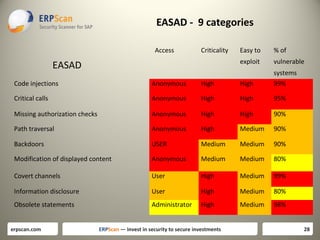
EASAD - 9 categories
Access

Criticality

% of

exploit

EASAD

Easy to

vulnerable

Code injections

Anonymous

High

High

systems
99%

Critical calls

Anonymous

High

High

95%

Missing authorization checks

Anonymous

High

High

90%

Path traversal

Anonymous

High

Medium

90%

Backdoors

USER

Medium

Medium

90%

Modification of displayed content

Anonymous

Medium

Medium

80%

Covert channels

User

High

Medium

99%

Information disclosure

User

High

Medium

80%

Obsolete statements

Administrator

High

Medium

98%

erpscan.com

ERPScan — invest in security to secure investments

28
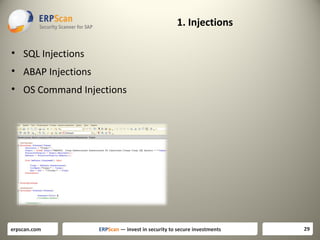
1. Injections
• SQL Injections
• ABAP Injections
• OS Command Injections

erpscan.com

ERPScan — invest in security to secure investments

29
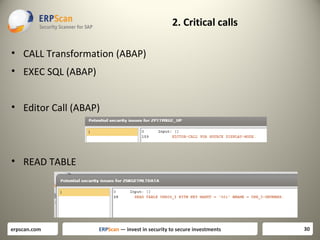
2. Critical calls
• CALL Transformation (ABAP)
• EXEC SQL (ABAP)
• Editor Call (ABAP)

• READ TABLE

erpscan.com

ERPScan — invest in security to secure investments

30
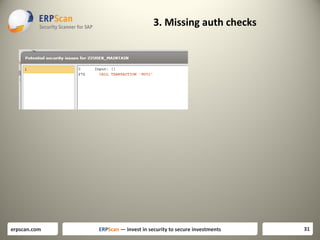
3. Missing auth checks

erpscan.com

ERPScan — invest in security to secure investments

31
4. Path Traversal (ABAP)
• ????? Open datdaset

erpscan.com

ERPScan — invest in security to secure investments

32
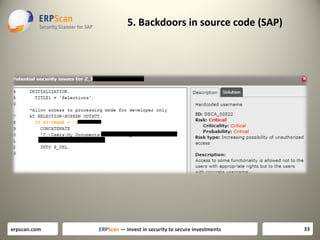
5. Backdoors in source code (SAP)

erpscan.com

ERPScan — invest in security to secure investments

33
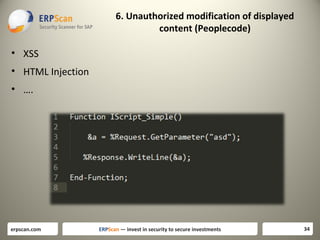
6. Unauthorized modification of displayed
content (Peoplecode)

• XSS
• HTML Injection
• ….

erpscan.com

ERPScan — invest in security to secure investments

34
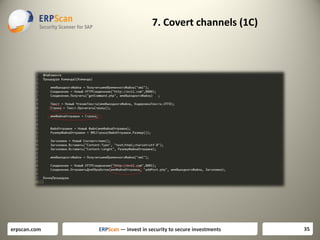
7. Covert channels (1C)

erpscan.com

ERPScan — invest in security to secure investments

35
Преимущества
• Любое сомописное приложение
• На любом языке
• Под любую платформу
• Легко мапится на перечисленные категории
•

Которые отсортированы по критичности

erpscan.com

ERPScan — invest in security to secure investments

36

ciso-platform-annual-summit-2013-New Framework for ERP Security

  • 1.
  • 2.
    Ломать не строить erpscan.com ERPScan— invest in security to secure investments 2
  • 3.
    Странные голоса вголове erpscan.com ERPScan — invest in security to secure investments 3
  • 4.
    SAP Security 2. Compliance 2.Compliance erpscan.com ERPScan — invest in security to secure investments 4
  • 5.
    Compliance • С чегоначать erpscan.com ERPScan — invest in security to secure investments 5
  • 6.
    Compliance • SAP NetWeaverABAP Security configuration • ISACA (ITAF) • DSAG • BIZEC •NIST •SOX •ISO •PCI-DSS erpscan.com • OWASP • WASC • SANS 25 • CWE ERPScan — invest in security to secure investments 6
  • 7.
    SAP Security Guidelines •Guidelines made by SAP • First official SAP guide for technical security od ABAP stack • Secure Configuration of SAP NetWeaver® Application Server Using ABAP • First version - 2010 year, version 1.2 – 2012 year • For rapid assessment of most common technical misconfigurations in platform • Consists of 9 areas and 82 checks • Ideas as a second step and give more details to some of EAS-SEC standard areas http://www.sdn.sap.com/irj/scn/go/portal/prtroot/docs/library/uuid/f0d2445f-509d-2d10-6fa7-9d3608950fee?overridelayout=true erpscan.com ERPScan — invest in security to secure investments 7
  • 8.
    SAP Security Guidelines • • • • • • • • • Networkaccess control Workstation security Password policies Network security HTTP security Unnecessary web-applications RFC-connections SAP Gateway security SAP Message Server security erpscan.com ERPScan — invest in security to secure investments 8
  • 9.
    ISACA Assurance (ITAFF) •Guidelines made by ISACA • Checks cover configuration and access control areas • First most full compliance • There were 3 versions published in 2002 2006 2009 (some areas are outdated ) • Technical part covered less than access control and miss critical areas • Most advantage is a big database of access control checks • Consists of 4 parts and about 160 checks • Ideal as a third step and detailed coverage of access control erpscan.com ERPScan — invest in security to secure investments 9
  • 10.
    DSAG • Set ofrecommendations from Deutsche SAP Uses Group • Checks cover all security areas from technical configuration and source code to access control and management procedures • Currently biggest guideline about SAP Security • Last version in Jan 2011 • Consists of 8 areas and 200+ checks • Ideal as a final step for securing SAP but consists of many checks which neds additional decision making which is highly depends on installation. http://www.dsag.de/fileadmin/media/Leitfaeden/110818_Leitfaden_Datenschutz_Englisch_final.pdf erpscan.com ERPScan — invest in security to secure investments 10
  • 11.
    Итого Либо огромные идетальные Либо общие и ни о чем Либо детальные но не обо всём erpscan.com ERPScan — invest in security to secure investments 11
  • 12.
    EAS-SEC for NetWeaver(EASAI-NA) Enterprise Application Systems Application Implementation – NetWeaver ABAP • Developed by ERPScan: First standard of series EAS-SEC • Published • Rapid assessment of SAP security in 9 areas • Contains 33 most critical checks • Ideal as a first step • Also contain information for next steps • Categorized by priority and criticality erpscan.com ERPScan — invest in security to secure investments 12
  • 13.
    EASAI-NA-2013 Access Criticality % of exploit EASAI-NA Easy to vulnerable systems 1.Lack of patch management Anonymous High High 99% 2. Default Passwords for application access Anonymous High High 95% 3. Unnecessary enabled functionality Anonymous High High 90% 4. Open remote management interfaces Anonymous High Medium 90% 5. Insecure configuration Anonymous Medium Medium 90% 6. Unencrypted communication Anonymous Medium Medium 80% 7. Access control and SOD User High Medium 99% 8. Insecure trust relations User High Medium 80% 9. Logging and Monitoring Administrator High Medium 98% erpscan.com ERPScan — invest in security to secure investments 13
  • 14.
    Lack of patchmanagement • [EASAI-NA-01] Component updates • [EASAI-NA-02] Kernel updated What next: Other components should be be updated separately – SAP Router, SAP Gui, SAP NetWEaver J2EE, SAP BusinessObjects. And also OS and Database. erpscan.com ERPScan — invest in security to secure investments 14
  • 15.
    Default passwords • • • • • [EASAI-NA-03] Defaultpassword check for user SAP* [EASAI-NA-04] Default password check for user DDIC [EASAI-NA-05] Default password check for user SAPCPIC [EASAI-NA-06] Default password check for user MSADM [EASAI-NA-07] Default password check for user EARLYWATCH What next: Couple of additional SAP components also use their own default passwords. For example services SAP SDM and SAP ITS in their old versions has default passwords. After you check all default passwords you can start with bruteforcing for simple passwords. erpscan.com ERPScan — invest in security to secure investments 15
  • 16.
    Unnecessary enabled functionality •[EASAI-NA-08] Access to RFC-functions using SOAP interface • [EASAI-NA-09] Access to RFC-functions using FORM interface • [EASAI-NA-10] Access to XI service using SOAP interface What next: You should analyze about 1500 other services which are remotely enabled if they are really needed and also disable unused transactions, programs and reports. erpscan.com ERPScan — invest in security to secure investments 16
  • 17.
    Open remote managementinterfaces • • • • [EASAI-NA-11] Unauthorized access to SAPControl service [EASAI-NA-12] Unauthorized access to SAPHostControl service [EASAI-NA-13] Unauthorized access to Message Server service [EASAI-NA-14] Unauthorized access to Oracle database What next: Full list of SAP services you can get from document TCP/IP Ports Used by SAP Applications .Also you should take care about 3rd party services which can be enabled on this server. erpscan.com ERPScan — invest in security to secure investments 17
  • 18.
    Insecure configuration • • • • • [EASAI-NA-15] Minimumpassword length [EASAI-NA-16] User locking policy [EASAI-NA-17] Password compliance to current standards [EASAI-NA-18] Access control to RFC (reginfo.dat) [EASAI-NA-19] Access control to RFC (secinfo.dat) What next: First of all you can look at (Secure Configuration of SAP NetWeaver® Application Server Using ABAP) document for detailed configuration checks. Afterwards you can pass throught detailed documents for each and every SAP service and module http://help.sap.com/saphelp_nw70/helpdata/en/8c/2ec59131d7 f84ea514a67d628925a9/frameset.htm erpscan.com ERPScan — invest in security to secure investments 18
  • 19.
    Access control andSOD conflicts • • • • • [EASAI-NA-20] Users with SAP_ALL profile [EASAI-NA-21] Users which can run any program [EASAI-NA-22] Users which can modify critical table USR02 [EASAI-NA-23] Users which can execute any OS command [EASAI-NA-24] Disabled authorization checks What next: There are at leas about 100 critical transactions only in BASIS and approximately the same number in each other module. Detailed information can be found in ISACA guidelines . After that you can start with Segregation of Duties. erpscan.com ERPScan — invest in security to secure investments 19
  • 20.
    Unencrypted connections • [EASAI-NA-25]Use of SSL for securing HTTP connections • [EASAI-NA-26] Use of SNC for securing SAP Gui connections • [EASAI-NA-27] Use of SNC for securing RFC connections What next: Even if you use encryption you should check how is it configured for every type of encryption and for every service because there are different complex configurations for each of encryption type. For example latest attacks on SSL like BEAST and CRIME require companies to use more complex SSL configuration. erpscan.com ERPScan — invest in security to secure investments 20
  • 21.
    Insecure trusted connections •[EASAI-NA-28] RFC connections with stored authentication data • [EASAI-NA-29] Trusted systems with lower security What next: Check other ways to get access to trusted systems such as database links o use of the same OS user or just use of the same passwords for different systems. erpscan.com ERPScan — invest in security to secure investments 21
  • 22.
    Logging and Monitoring • • • • [EASAI-NA-30]Logging of security events [EASAI-NA-31] Logging of HTTP requests [EASAI-NA-32] Logging of table changes [EASAI-NA-33] Logging of access to Gateway What next: There are about 30 different types of log files in SAP. The next step after properly enabling main of them you should properly configure complex options such as what exact tables to monitor for changes, what kind of events to analyze in security events log, what types of Gateway attacks should be collected and so on. Next step is to enable their centralized collection and storage and then add other log events. erpscan.com ERPScan — invest in security to secure investments 22
  • 23.
    Дальше • Создана общаяструктура • Написан пилотный Compliance для ABAP • В планах выпустить подобные Compliance для других бизнесприложений • Распространить информацию • Перевести ресурс на отдельную платформу • Привлечь больше контрибьютеров • Особенно по тем приложениям которые мы мало знаем erpscan.com ERPScan — invest in security to secure investments 23
  • 24.
    Source code security Sourcecode security erpscan.com ERPScan — invest in security to secure investments 24
  • 25.
    Ничего не забыли? • • • • Бизнес-приложенияпостоянно дорабатываются Нельзя смотреть только на конфигурацию Необходим анализ доработок То есть анализ исходного кода • Что искать? erpscan.com ERPScan — invest in security to secure investments 25
  • 26.
    Развитие идеи • OWASP– только веб, тока 10 • WASC – только веб • CWE – слишком мудрёно • BIZEC – вот, вот, почти то, но, нет. – потому что только ABAP, и только уязвимости но не категории • EAS-SEC (EASAD) – похоже на то что надо erpscan.com ERPScan — invest in security to secure investments 26
  • 27.
    Source code review •EASAD-9 • Enterprise Application Systems Application Development • 9 areas or source code issues for business languages • Universal categories for different languages and systems (SAP,Oracle,Dynamix,1C,Any other) • Categorized based on criticality and probability of exploitation erpscan.com ERPScan — invest in security to secure investments 27
  • 28.
    EASAD - 9categories Access Criticality % of exploit EASAD Easy to vulnerable Code injections Anonymous High High systems 99% Critical calls Anonymous High High 95% Missing authorization checks Anonymous High High 90% Path traversal Anonymous High Medium 90% Backdoors USER Medium Medium 90% Modification of displayed content Anonymous Medium Medium 80% Covert channels User High Medium 99% Information disclosure User High Medium 80% Obsolete statements Administrator High Medium 98% erpscan.com ERPScan — invest in security to secure investments 28
  • 29.
    1. Injections • SQLInjections • ABAP Injections • OS Command Injections erpscan.com ERPScan — invest in security to secure investments 29
  • 30.
    2. Critical calls •CALL Transformation (ABAP) • EXEC SQL (ABAP) • Editor Call (ABAP) • READ TABLE erpscan.com ERPScan — invest in security to secure investments 30
  • 31.
    3. Missing authchecks erpscan.com ERPScan — invest in security to secure investments 31
  • 32.
    4. Path Traversal(ABAP) • ????? Open datdaset erpscan.com ERPScan — invest in security to secure investments 32
  • 33.
    5. Backdoors insource code (SAP) erpscan.com ERPScan — invest in security to secure investments 33
  • 34.
    6. Unauthorized modificationof displayed content (Peoplecode) • XSS • HTML Injection • …. erpscan.com ERPScan — invest in security to secure investments 34
  • 35.
    7. Covert channels(1C) erpscan.com ERPScan — invest in security to secure investments 35
  • 36.
    Преимущества • Любое сомописноеприложение • На любом языке • Под любую платформу • Легко мапится на перечисленные категории • Которые отсортированы по критичности erpscan.com ERPScan — invest in security to secure investments 36

Editor's Notes

  • #3 Тут тоже картинка в виде пирамидыобрушивающейся на компанию
  • #4 Тут тоже картинка в виде пирамидыобрушивающейся на компанию
  • #5 Тут тоже картинка в виде пирамидыобрушивающейся на компанию
  • #6 Тут тоже картинка в виде пирамидыобрушивающейся на компанию
  • #7 Тут тоже картинка в виде пирамидыобрушивающейся на компанию
  • #8 Тут тоже картинка в виде пирамидыобрушивающейся на компанию
  • #9 Тут тоже картинка в виде пирамидыобрушивающейся на компанию
  • #10 Тут тоже картинка в виде пирамидыобрушивающейся на компанию
  • #11 Тут тоже картинка в виде пирамидыобрушивающейся на компанию
  • #12 Тут тоже картинка в виде пирамидыобрушивающейся на компанию
  • #13 Тут тоже картинка в виде пирамидыобрушивающейся на компанию
  • #14 Тут тоже картинка в виде пирамидыобрушивающейся на компанию
  • #15 Тут тоже картинка в виде пирамидыобрушивающейся на компанию
  • #16 Тут тоже картинка в виде пирамидыобрушивающейся на компанию
  • #17 Тут тоже картинка в виде пирамидыобрушивающейся на компанию
  • #18 Тут тоже картинка в виде пирамидыобрушивающейся на компанию
  • #19 Тут тоже картинка в виде пирамидыобрушивающейся на компанию
  • #20 Тут тоже картинка в виде пирамидыобрушивающейся на компанию
  • #21 Тут тоже картинка в виде пирамидыобрушивающейся на компанию
  • #22 Тут тоже картинка в виде пирамидыобрушивающейся на компанию
  • #23 Тут тоже картинка в виде пирамидыобрушивающейся на компанию
  • #24 Тут тоже картинка в виде пирамидыобрушивающейся на компанию
  • #25 Тут тоже картинка в виде пирамидыобрушивающейся на компанию
  • #26 Тут тоже картинка в виде пирамидыобрушивающейся на компанию
  • #27 Тут тоже картинка в виде пирамидыобрушивающейся на компанию
  • #28 Тут тоже картинка в виде пирамидыобрушивающейся на компанию
  • #29 Тут тоже картинка в виде пирамидыобрушивающейся на компанию
  • #30 Тут тоже картинка в виде пирамидыобрушивающейся на компанию
  • #31 Тут тоже картинка в виде пирамидыобрушивающейся на компанию
  • #32 Тут тоже картинка в виде пирамидыобрушивающейся на компанию
  • #33 Тут тоже картинка в виде пирамидыобрушивающейся на компанию
  • #34 Тут тоже картинка в виде пирамидыобрушивающейся на компанию
  • #35 Тут тоже картинка в виде пирамидыобрушивающейся на компанию
  • #36 Тут тоже картинка в виде пирамидыобрушивающейся на компанию
  • #37 Тут тоже картинка в виде пирамидыобрушивающейся на компанию