Automated testing
Android
Dependency Injection and Dagger
Dependency Injection
Dagger
Live Coding Sample 1
Live Coding Sample 2
The Business Goal
Why not automated tests on mobile?
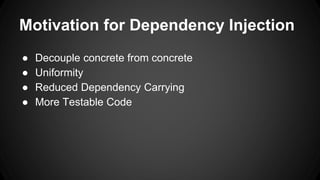
Motivation for Dependency Injection
● Decouple concrete from concrete
● Uniformity
● Reduced Dependency Carrying
● More Testable Code
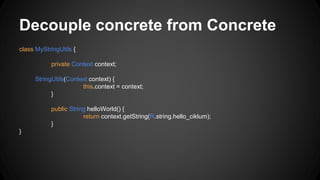
Decouple concrete from Concrete
class MyStringUtils {
private Context context;
StringUtils(Context context) {
this.context = context;
}
public String helloWorld() {
return context.getString(R.string.hello_ciklum);
}
}
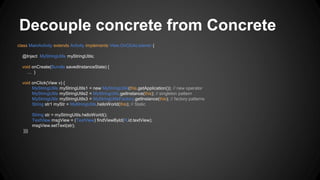
Decouple concrete from Concrete
class MainActivity extends Activity implements View.OnClickListener {
@Inject MyStringUtils myStringUtils;
void onCreate(Bundle savedInstanceState) {
… }
void onClick(View v) {
MyStringUtils myStringUtils1 = new MyStringUtils(this.getApplication()); // new operator
MyStringUtils myStringUtils2 = MyStringUtils.getInstance(this); // singleton pattern
MyStringUtils myStringUtils3 = MyStringUtilsFactory.getInstance(this); // factory patterns
String str1 myStr = MyStringUtils.helloWorld(this); // Static
String str = myStringUtils.helloWorld();
TextView msgView = (TextView) findViewById(R.id.textView);
msgView.setText(str);
}}}
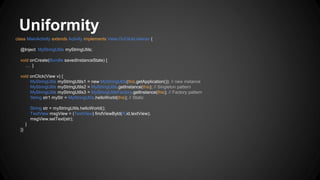
Uniformity
class MainActivity extends Activity implements View.OnClickListener {
@Inject MyStringUtils myStringUtils;
void onCreate(Bundle savedInstanceState) {
… }
void onClick(View v) {
MyStringUtils myStringUtils1 = new MyStringUtils(this.getApplication()); // new instance
MyStringUtils myStringUtils2 = MyStringUtils.getInstance(this); // Singleton pattern
MyStringUtils myStringUtils3 = MyStringUtilsFactory.getInstance(this); // Factory pattern
String str1 myStr = MyStringUtils.helloWorld(this); // Static
String str = myStringUtils.helloWorld();
TextView msgView = (TextView) findViewById(R.id.textView);
msgView.setText(str);
}
}}
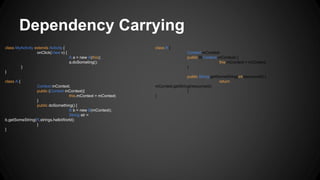
Dependency Carrying
class MyActivity extends Activity {
onClick(View v) {
A a = new A(this);
a.doSometing();
}
}
class A {
Context mContext;
public (Context mContext){
this.mContext = mContext;
}
public doSomething() {
B b = new B(mContext);
String str =
b.getSomeString(R.strings.helloWorld);
}
}
class B {
Context mContext;
public B(Context mContext) {
this.mContext = mContext;
}
public String getSomeString(int resourceId) {
return
mContext.getString(resourceId);
}
}
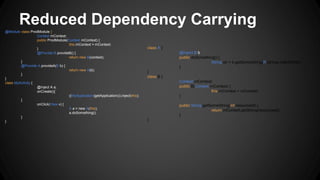
Reduced Dependency Carrying
@Module class ProdModule {
Context mContext;
public ProdModule(Context mContext) {
this.mContext = mContext;
}
@Provide B provideB() {
return new B(context);
}
@Provide A provideA(B b) {
return new A(b);
}
}
class MyActivity {
@Inject A a;
onCreate(){
((MyApplication)getApplication()).inject(this);
}
onClick(View v) {
A a = new A(this);
a.doSomething();
}
}
class A {
@Inject B b;
public doSomething() {
String str = b.getSomeString(R.strings.helloWorld);
}
}
class B {
Context mContext;
public B(Context mContext) {
this.mContext = mContext;
}
public String getSomeString(int resourceId) {
return mContext.getString(resourceId);
}
}
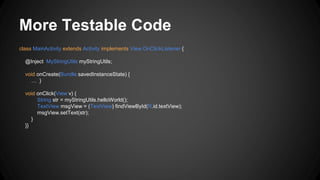
More Testable Code
class MainActivity extends Activity implements View.OnClickListener {
@Inject MyStringUtils myStringUtils;
void onCreate(Bundle savedInstanceState) {
… }
void onClick(View v) {
String str = myStringUtils.helloWorld();
TextView msgView = (TextView) findViewById(R.id.textView);
msgView.setText(str);
}
}}
Other advantages
● More Reusable Code
● More Readable Code
● Reduced Dependencies
Dependency Injection
Dagger
Live Coding Sample 1
Live Coding Sample 2
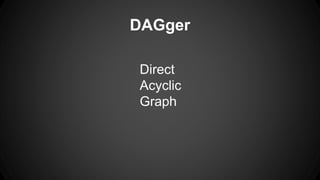
DAGger
Direct
Acyclic
Graph
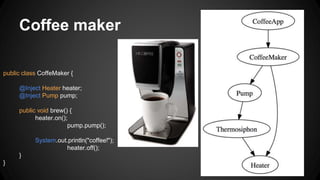
Coffee maker
public class CoffeMaker {
@Inject Heater heater;
@Inject Pump pump;
public void brew() {
heater.on();
pump.pump();
System.out.println("coffee!");
heater.off();
}
}
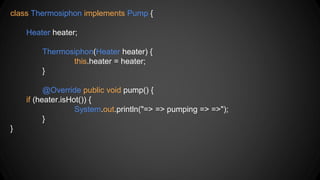
class Thermosiphon implements Pump {
Heater heater;
Thermosiphon(Heater heater) {
this.heater = heater;
}
@Override public void pump() {
if (heater.isHot()) {
System.out.println("=> => pumping => =>");
}
}
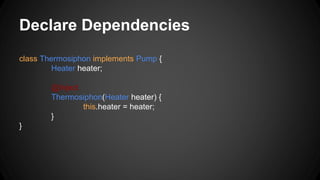
Declare Dependencies
class Thermosiphon implements Pump {
Heater heater;
@Inject
Thermosiphon(Heater heater) {
this.heater = heater;
}
}
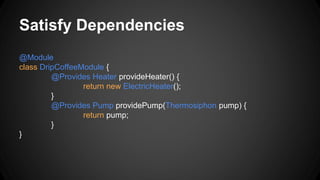
Satisfy Dependencies
@Module
class DripCoffeeModule {
@Provides Heater provideHeater() {
return new ElectricHeater();
}
@Provides Pump providePump(Thermosiphon pump) {
return pump;
}
}
Build the Graph
class CoffeeApp {
public static void main(String[] args) {
ObjectGraph objectGraph = ObjectGraph.create(new
DripCoffeeModule());
CoffeeMaker coffeeMaker = objectGraph.get(CoffeeMaker.class);
coffeeMaker.brew();
} }
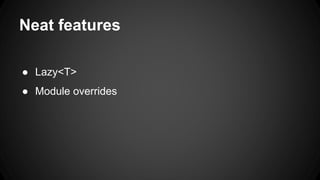
Neat features
● Lazy<T>
● Module overrides
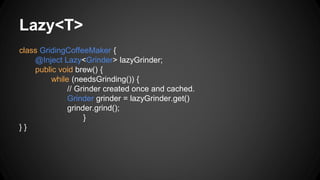
Lazy<T>
class GridingCoffeeMaker {
@Inject Lazy<Grinder> lazyGrinder;
public void brew() {
while (needsGrinding()) {
// Grinder created once and cached.
Grinder grinder = lazyGrinder.get()
grinder.grind();
}
} }
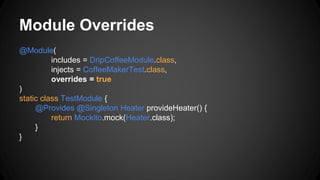
Module Overrides
@Module(
includes = DripCoffeeModule.class,
injects = CoffeeMakerTest.class,
overrides = true
)
static class TestModule {
@Provides @Singleton Heater provideHeater() {
return Mockito.mock(Heater.class);
}
}
Dependency Injection
Dagger
Live Coding Sample 1
Live Coding Sample 2
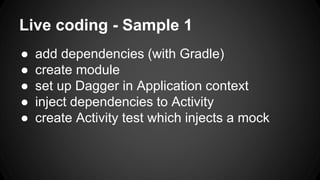
Live coding - Sample 1
● add dependencies (with Gradle)
● create module
● set up Dagger in Application context
● inject dependencies to Activity
● create Activity test which injects a mock
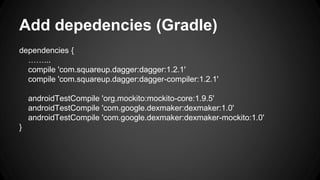
Add depedencies (Gradle)
dependencies {
……...
compile 'com.squareup.dagger:dagger:1.2.1'
compile 'com.squareup.dagger:dagger-compiler:1.2.1'
androidTestCompile 'org.mockito:mockito-core:1.9.5'
androidTestCompile 'com.google.dexmaker:dexmaker:1.0'
androidTestCompile 'com.google.dexmaker:dexmaker-mockito:1.0'
}
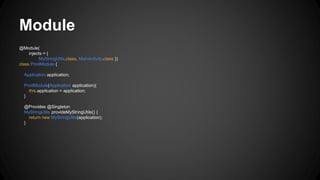
Module
@Module(
injects = {
MyStringUtils.class, MainActivity.class })
class ProdModule {
Application application;
ProdModule(Application application){
this.application = application;
}
@Provides @Singleton
MyStringUtils provideMyStringUtils() {
return new MyStringUtils(application);
}
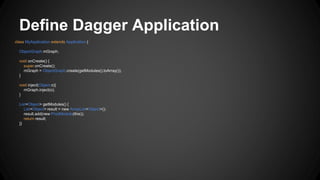
Define Dagger Application
class MyApplication extends Application {
ObjectGraph mGraph;
void onCreate() {
super.onCreate();
mGraph = ObjectGraph.create(getModules().toArray());
}
void inject(Object o){
mGraph.inject(o);
}
List<Object> getModules() {
List<Object> result = new ArrayList<Object>();
result.add(new ProdModule(this));
return result;
}}
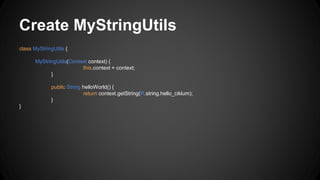
Create MyStringUtils
class MyStringUtils {
MyStringUtils(Context context) {
this.context = context;
}
public String helloWorld() {
return context.getString(R.string.hello_ciklum);
}
}
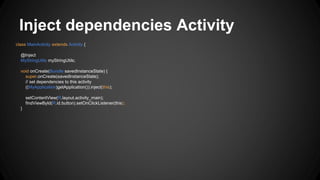
Inject dependencies Activity
class MainActivity extends Activity {
@Inject
MyStringUtils myStringUtils;
void onCreate(Bundle savedInstanceState) {
super.onCreate(savedInstanceState);
// set dependencies to this activity
((MyApplication)getApplication()).inject(this);
setContentView(R.layout.activity_main);
findViewById(R.id.button).setOnClickListener(this);
}
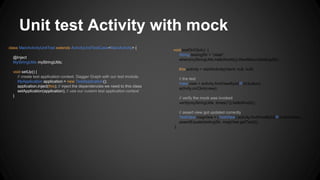
Unit test Activity with mock
class MainActivityUnitTest extends ActivityUnitTestCase<MainActivity> {
@Inject
MyStringUtils myStringUtils;
void setUp() {
// create test application context, Dagger Graph with our test module.
MyApplication application = new TestApplication();
application.inject(this); // inject the dependencies we need to this class
setApplication(application); // use our custom test application context
}
void testOnClick() {
String testingStr = "olala";
when(myStringUtils.helloWorld()).thenReturn(testingStr);
this.activity = startActivity(intent, null, null);
// the test
View view = activity.findViewById(R.id.button);
activity.onClick(view);
// verify the mock was invoked
verify(myStringUtils, times(1)).helloWorld();
// assert view got updated correctly
TextView msgView = (TextView) activity.findViewById(R.id.textView);
assertEquals(testingStr, msgView.getText());
}
Dependency Injection
Dagger
Live Coding Sample 1
Live Coding Sample 2
Sample app 2
● Threads
● HTTP mocks
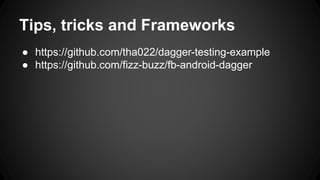
Tips, tricks and Frameworks
● https://github.com/tha022/dagger-testing-example
● https://github.com/fizz-buzz/fb-android-dagger

Dependency Injection for Android @ Ciklum speakers corner Kiev 29. May 2014

  • 1.
  • 2.
    Dependency Injection Dagger Live CodingSample 1 Live Coding Sample 2
  • 3.
  • 4.
    Why not automatedtests on mobile?
  • 5.
    Motivation for DependencyInjection ● Decouple concrete from concrete ● Uniformity ● Reduced Dependency Carrying ● More Testable Code
  • 6.
    Decouple concrete fromConcrete class MyStringUtils { private Context context; StringUtils(Context context) { this.context = context; } public String helloWorld() { return context.getString(R.string.hello_ciklum); } }
  • 7.
    Decouple concrete fromConcrete class MainActivity extends Activity implements View.OnClickListener { @Inject MyStringUtils myStringUtils; void onCreate(Bundle savedInstanceState) { … } void onClick(View v) { MyStringUtils myStringUtils1 = new MyStringUtils(this.getApplication()); // new operator MyStringUtils myStringUtils2 = MyStringUtils.getInstance(this); // singleton pattern MyStringUtils myStringUtils3 = MyStringUtilsFactory.getInstance(this); // factory patterns String str1 myStr = MyStringUtils.helloWorld(this); // Static String str = myStringUtils.helloWorld(); TextView msgView = (TextView) findViewById(R.id.textView); msgView.setText(str); }}}
  • 8.
    Uniformity class MainActivity extendsActivity implements View.OnClickListener { @Inject MyStringUtils myStringUtils; void onCreate(Bundle savedInstanceState) { … } void onClick(View v) { MyStringUtils myStringUtils1 = new MyStringUtils(this.getApplication()); // new instance MyStringUtils myStringUtils2 = MyStringUtils.getInstance(this); // Singleton pattern MyStringUtils myStringUtils3 = MyStringUtilsFactory.getInstance(this); // Factory pattern String str1 myStr = MyStringUtils.helloWorld(this); // Static String str = myStringUtils.helloWorld(); TextView msgView = (TextView) findViewById(R.id.textView); msgView.setText(str); } }}
  • 9.
    Dependency Carrying class MyActivityextends Activity { onClick(View v) { A a = new A(this); a.doSometing(); } } class A { Context mContext; public (Context mContext){ this.mContext = mContext; } public doSomething() { B b = new B(mContext); String str = b.getSomeString(R.strings.helloWorld); } } class B { Context mContext; public B(Context mContext) { this.mContext = mContext; } public String getSomeString(int resourceId) { return mContext.getString(resourceId); } }
  • 10.
    Reduced Dependency Carrying @Moduleclass ProdModule { Context mContext; public ProdModule(Context mContext) { this.mContext = mContext; } @Provide B provideB() { return new B(context); } @Provide A provideA(B b) { return new A(b); } } class MyActivity { @Inject A a; onCreate(){ ((MyApplication)getApplication()).inject(this); } onClick(View v) { A a = new A(this); a.doSomething(); } } class A { @Inject B b; public doSomething() { String str = b.getSomeString(R.strings.helloWorld); } } class B { Context mContext; public B(Context mContext) { this.mContext = mContext; } public String getSomeString(int resourceId) { return mContext.getString(resourceId); } }
  • 11.
    More Testable Code classMainActivity extends Activity implements View.OnClickListener { @Inject MyStringUtils myStringUtils; void onCreate(Bundle savedInstanceState) { … } void onClick(View v) { String str = myStringUtils.helloWorld(); TextView msgView = (TextView) findViewById(R.id.textView); msgView.setText(str); } }}
  • 12.
    Other advantages ● MoreReusable Code ● More Readable Code ● Reduced Dependencies
  • 13.
    Dependency Injection Dagger Live CodingSample 1 Live Coding Sample 2
  • 14.
  • 15.
    Coffee maker public classCoffeMaker { @Inject Heater heater; @Inject Pump pump; public void brew() { heater.on(); pump.pump(); System.out.println("coffee!"); heater.off(); } }
  • 16.
    class Thermosiphon implementsPump { Heater heater; Thermosiphon(Heater heater) { this.heater = heater; } @Override public void pump() { if (heater.isHot()) { System.out.println("=> => pumping => =>"); } }
  • 17.
    Declare Dependencies class Thermosiphonimplements Pump { Heater heater; @Inject Thermosiphon(Heater heater) { this.heater = heater; } }
  • 18.
    Satisfy Dependencies @Module class DripCoffeeModule{ @Provides Heater provideHeater() { return new ElectricHeater(); } @Provides Pump providePump(Thermosiphon pump) { return pump; } }
  • 19.
    Build the Graph classCoffeeApp { public static void main(String[] args) { ObjectGraph objectGraph = ObjectGraph.create(new DripCoffeeModule()); CoffeeMaker coffeeMaker = objectGraph.get(CoffeeMaker.class); coffeeMaker.brew(); } }
  • 20.
  • 21.
    Lazy<T> class GridingCoffeeMaker { @InjectLazy<Grinder> lazyGrinder; public void brew() { while (needsGrinding()) { // Grinder created once and cached. Grinder grinder = lazyGrinder.get() grinder.grind(); } } }
  • 22.
    Module Overrides @Module( includes =DripCoffeeModule.class, injects = CoffeeMakerTest.class, overrides = true ) static class TestModule { @Provides @Singleton Heater provideHeater() { return Mockito.mock(Heater.class); } }
  • 23.
    Dependency Injection Dagger Live CodingSample 1 Live Coding Sample 2
  • 24.
    Live coding -Sample 1 ● add dependencies (with Gradle) ● create module ● set up Dagger in Application context ● inject dependencies to Activity ● create Activity test which injects a mock
  • 25.
    Add depedencies (Gradle) dependencies{ ……... compile 'com.squareup.dagger:dagger:1.2.1' compile 'com.squareup.dagger:dagger-compiler:1.2.1' androidTestCompile 'org.mockito:mockito-core:1.9.5' androidTestCompile 'com.google.dexmaker:dexmaker:1.0' androidTestCompile 'com.google.dexmaker:dexmaker-mockito:1.0' }
  • 26.
    Module @Module( injects = { MyStringUtils.class,MainActivity.class }) class ProdModule { Application application; ProdModule(Application application){ this.application = application; } @Provides @Singleton MyStringUtils provideMyStringUtils() { return new MyStringUtils(application); }
  • 27.
    Define Dagger Application classMyApplication extends Application { ObjectGraph mGraph; void onCreate() { super.onCreate(); mGraph = ObjectGraph.create(getModules().toArray()); } void inject(Object o){ mGraph.inject(o); } List<Object> getModules() { List<Object> result = new ArrayList<Object>(); result.add(new ProdModule(this)); return result; }}
  • 28.
    Create MyStringUtils class MyStringUtils{ MyStringUtils(Context context) { this.context = context; } public String helloWorld() { return context.getString(R.string.hello_ciklum); } }
  • 29.
    Inject dependencies Activity classMainActivity extends Activity { @Inject MyStringUtils myStringUtils; void onCreate(Bundle savedInstanceState) { super.onCreate(savedInstanceState); // set dependencies to this activity ((MyApplication)getApplication()).inject(this); setContentView(R.layout.activity_main); findViewById(R.id.button).setOnClickListener(this); }
  • 30.
    Unit test Activitywith mock class MainActivityUnitTest extends ActivityUnitTestCase<MainActivity> { @Inject MyStringUtils myStringUtils; void setUp() { // create test application context, Dagger Graph with our test module. MyApplication application = new TestApplication(); application.inject(this); // inject the dependencies we need to this class setApplication(application); // use our custom test application context } void testOnClick() { String testingStr = "olala"; when(myStringUtils.helloWorld()).thenReturn(testingStr); this.activity = startActivity(intent, null, null); // the test View view = activity.findViewById(R.id.button); activity.onClick(view); // verify the mock was invoked verify(myStringUtils, times(1)).helloWorld(); // assert view got updated correctly TextView msgView = (TextView) activity.findViewById(R.id.textView); assertEquals(testingStr, msgView.getText()); }
  • 31.
    Dependency Injection Dagger Live CodingSample 1 Live Coding Sample 2
  • 32.
    Sample app 2 ●Threads ● HTTP mocks
  • 33.
    Tips, tricks andFrameworks ● https://github.com/tha022/dagger-testing-example ● https://github.com/fizz-buzz/fb-android-dagger

Editor's Notes

  • #28 So we gonna build a sample app which shows: 1) how to set up the object graph in Application context. 2) how inject dependencies into an Activity 3) when clicking button, spin off a background thread which makes an HTTP request and show the request in view 4) build test module which mocks the HTTP client 5) create ActivityUnitTest which loads the Test module and injects the HTTP client