GWT - RPC
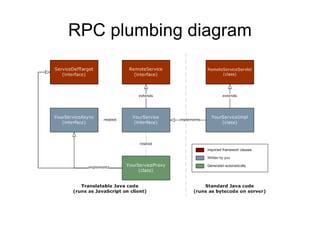
The Objects com.google.gwt.user.client.rpc.RemoteService com.google.gwt.user.client.rpc.AsyncCallback com.google.gwt.user.client.rpc.ServiceDefTarget com.google.gwt.user.server.rpc.RemoteServiceServlet
RPC plumbing diagram
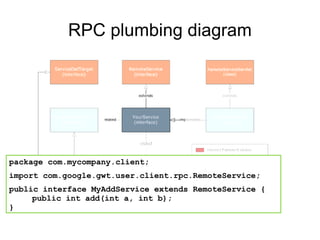
RPC plumbing diagram package com.mycompany.client; import com.google.gwt.user.client.rpc.RemoteService; public interface MyAddService extends RemoteService { public int add(int a, int b); }
RPC plumbing diagram package com.mycompany.server; import com.google.gwt.user.server.rpc.RemoteServiceServlet; import com.mycompany.client.MyAddService; public class MyAddServiceImpl  extends RemoteServiceServlet implements MyAddService{ public int add(int a, int b) { int z = a + b; return z; } }
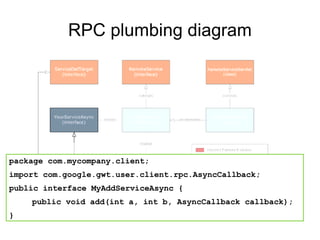
RPC plumbing diagram package com.mycompany.client; import com.google.gwt.user.client.rpc.AsyncCallback; public interface MyAddServiceAsync { public void add(int a, int b, AsyncCallback callback); }
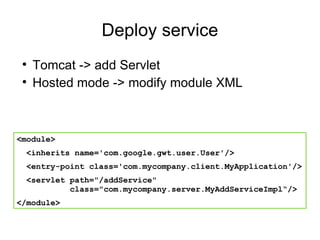
Deploy service Tomcat -> add Servlet Hosted mode -> modify module XML <module> <inherits name='com.google.gwt.user.User'/> <entry-point class='com.mycompany.client.MyApplication'/> <servlet path=&quot;/addService&quot;    class=&quot;com.mycompany.server.MyAddServiceImpl“/> </module>
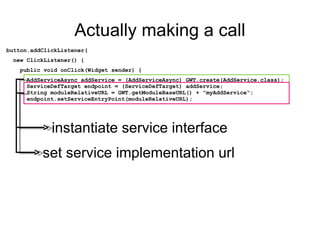
Actually making a call button.addClickListener( new ClickListener() { public void onClick(Widget sender) { AddServiceAsync addService = (AddServiceAsync) GWT.create(AddService.class);   ServiceDefTarget endpoint = (ServiceDefTarget) addService;   String moduleRelativeURL = GWT.getModuleBaseURL() + &quot;myAddService“;   endpoint.setServiceEntryPoint(moduleRelativeURL); instantiate service interface set service implementation url
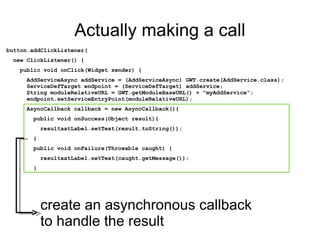
Actually making a call button.addClickListener( new ClickListener() { public void onClick(Widget sender) { AddServiceAsync addService = (AddServiceAsync) GWT.create(AddService.class);   ServiceDefTarget endpoint = (ServiceDefTarget) addService;   String moduleRelativeURL = GWT.getModuleBaseURL() + &quot;myAddService“;   endpoint.setServiceEntryPoint(moduleRelativeURL); AsyncCallback callback = new AsyncCallback(){ public void onSuccess(Object result){ resultaatLabel.setText(result.toString()); } public void onFailure(Throwable caught) { resultaatLabel.setText(caught.getMessage()); } create an asynchronous callback to handle the result
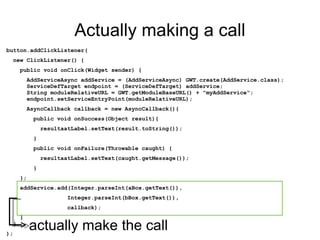
Actually making a call button.addClickListener( new ClickListener() { public void onClick(Widget sender) { AddServiceAsync addService = (AddServiceAsync) GWT.create(AddService.class);   ServiceDefTarget endpoint = (ServiceDefTarget) addService;   String moduleRelativeURL = GWT.getModuleBaseURL() + &quot;myAddService“;   endpoint.setServiceEntryPoint(moduleRelativeURL); AsyncCallback callback = new AsyncCallback(){ public void onSuccess(Object result){ resultaatLabel.setText(result.toString()); } public void onFailure(Throwable caught) { resultaatLabel.setText(caught.getMessage()); } }; addService.add(Integer.parseInt(aBox.getText()),  Integer.parseInt(bBox.getText()),  callback); }    } ); actually make the call
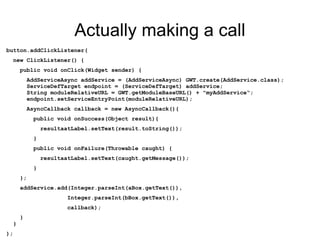
Actually making a call button.addClickListener( new ClickListener() { public void onClick(Widget sender) { AddServiceAsync addService = (AddServiceAsync) GWT.create(AddService.class);   ServiceDefTarget endpoint = (ServiceDefTarget) addService;   String moduleRelativeURL = GWT.getModuleBaseURL() + &quot;myAddService“;   endpoint.setServiceEntryPoint(moduleRelativeURL); AsyncCallback callback = new AsyncCallback(){ public void onSuccess(Object result){ resultaatLabel.setText(result.toString()); } public void onFailure(Throwable caught) { resultaatLabel.setText(caught.getMessage()); } }; addService.add(Integer.parseInt(aBox.getText()),  Integer.parseInt(bBox.getText()),  callback); }    } );
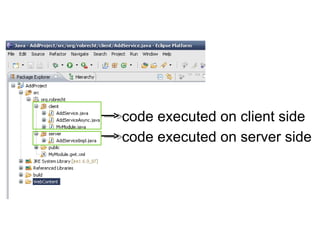
code executed on client side code executed on server side
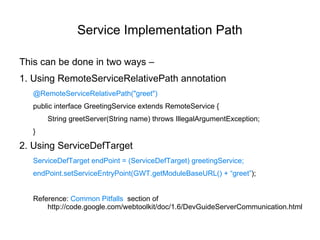
Service Implementation Path This can be done in two ways – 1. Using RemoteServiceRelativePath annotation @RemoteServiceRelativePath(&quot;greet&quot;) public interface GreetingService extends RemoteService { String greetServer(String name) throws IllegalArgumentException; } 2. Using ServiceDefTarget ServiceDefTarget endPoint = (ServiceDefTarget) greetingService; endPoint.setServiceEntryPoint(GWT.getModuleBaseURL() + “greet” ); Reference:  Common Pitfalls  section of h ttp://code.google.com/webtoolkit/doc/1.6/DevGuideServerCommunication.html
Servlet Mapping GWT modules may declare one or more <servlet> tags. These define Java Servlets that implement the server-side component of a GWT-enabled web application. Prior to GWT 1.6, these GWT module servlet tags controlled the set of servlets were actually instantiated during hosted mode. But as of GWT 1.6, this is no longer true. Instead, the web application's WEB-INF/web.xml configuration file controls what servlets are instantiated. A GWT module specifies only what servlets are  expected .  During hosted mode startup, the set of expected servlets (from GWT module <servlet> tags) is validated against the set of actual servlets (from the WEB-INF/web.xml) and a warning is issued for each expected servlet which does not match an actual servlet.  Reference:  gwt-2.0.3/doc/helpInfo/servletMappings.html
More info http://code.google.com/webtoolkit/doc/latest/DevGuideServerCommunication.html
…  and explore more by practice Thanking You Mahesh Babu M

Gwt RPC

  • 1.
  • 2.
    The Objects com.google.gwt.user.client.rpc.RemoteServicecom.google.gwt.user.client.rpc.AsyncCallback com.google.gwt.user.client.rpc.ServiceDefTarget com.google.gwt.user.server.rpc.RemoteServiceServlet
  • 3.
  • 4.
    RPC plumbing diagrampackage com.mycompany.client; import com.google.gwt.user.client.rpc.RemoteService; public interface MyAddService extends RemoteService { public int add(int a, int b); }
  • 5.
    RPC plumbing diagrampackage com.mycompany.server; import com.google.gwt.user.server.rpc.RemoteServiceServlet; import com.mycompany.client.MyAddService; public class MyAddServiceImpl extends RemoteServiceServlet implements MyAddService{ public int add(int a, int b) { int z = a + b; return z; } }
  • 6.
    RPC plumbing diagrampackage com.mycompany.client; import com.google.gwt.user.client.rpc.AsyncCallback; public interface MyAddServiceAsync { public void add(int a, int b, AsyncCallback callback); }
  • 7.
    Deploy service Tomcat-> add Servlet Hosted mode -> modify module XML <module> <inherits name='com.google.gwt.user.User'/> <entry-point class='com.mycompany.client.MyApplication'/> <servlet path=&quot;/addService&quot; class=&quot;com.mycompany.server.MyAddServiceImpl“/> </module>
  • 8.
    Actually making acall button.addClickListener( new ClickListener() { public void onClick(Widget sender) { AddServiceAsync addService = (AddServiceAsync) GWT.create(AddService.class); ServiceDefTarget endpoint = (ServiceDefTarget) addService; String moduleRelativeURL = GWT.getModuleBaseURL() + &quot;myAddService“; endpoint.setServiceEntryPoint(moduleRelativeURL); instantiate service interface set service implementation url
  • 9.
    Actually making acall button.addClickListener( new ClickListener() { public void onClick(Widget sender) { AddServiceAsync addService = (AddServiceAsync) GWT.create(AddService.class); ServiceDefTarget endpoint = (ServiceDefTarget) addService; String moduleRelativeURL = GWT.getModuleBaseURL() + &quot;myAddService“; endpoint.setServiceEntryPoint(moduleRelativeURL); AsyncCallback callback = new AsyncCallback(){ public void onSuccess(Object result){ resultaatLabel.setText(result.toString()); } public void onFailure(Throwable caught) { resultaatLabel.setText(caught.getMessage()); } create an asynchronous callback to handle the result
  • 10.
    Actually making acall button.addClickListener( new ClickListener() { public void onClick(Widget sender) { AddServiceAsync addService = (AddServiceAsync) GWT.create(AddService.class); ServiceDefTarget endpoint = (ServiceDefTarget) addService; String moduleRelativeURL = GWT.getModuleBaseURL() + &quot;myAddService“; endpoint.setServiceEntryPoint(moduleRelativeURL); AsyncCallback callback = new AsyncCallback(){ public void onSuccess(Object result){ resultaatLabel.setText(result.toString()); } public void onFailure(Throwable caught) { resultaatLabel.setText(caught.getMessage()); } }; addService.add(Integer.parseInt(aBox.getText()), Integer.parseInt(bBox.getText()), callback); } } ); actually make the call
  • 11.
    Actually making acall button.addClickListener( new ClickListener() { public void onClick(Widget sender) { AddServiceAsync addService = (AddServiceAsync) GWT.create(AddService.class); ServiceDefTarget endpoint = (ServiceDefTarget) addService; String moduleRelativeURL = GWT.getModuleBaseURL() + &quot;myAddService“; endpoint.setServiceEntryPoint(moduleRelativeURL); AsyncCallback callback = new AsyncCallback(){ public void onSuccess(Object result){ resultaatLabel.setText(result.toString()); } public void onFailure(Throwable caught) { resultaatLabel.setText(caught.getMessage()); } }; addService.add(Integer.parseInt(aBox.getText()), Integer.parseInt(bBox.getText()), callback); } } );
  • 12.
    code executed onclient side code executed on server side
  • 13.
    Service Implementation PathThis can be done in two ways – 1. Using RemoteServiceRelativePath annotation @RemoteServiceRelativePath(&quot;greet&quot;) public interface GreetingService extends RemoteService { String greetServer(String name) throws IllegalArgumentException; } 2. Using ServiceDefTarget ServiceDefTarget endPoint = (ServiceDefTarget) greetingService; endPoint.setServiceEntryPoint(GWT.getModuleBaseURL() + “greet” ); Reference: Common Pitfalls section of h ttp://code.google.com/webtoolkit/doc/1.6/DevGuideServerCommunication.html
  • 14.
    Servlet Mapping GWTmodules may declare one or more <servlet> tags. These define Java Servlets that implement the server-side component of a GWT-enabled web application. Prior to GWT 1.6, these GWT module servlet tags controlled the set of servlets were actually instantiated during hosted mode. But as of GWT 1.6, this is no longer true. Instead, the web application's WEB-INF/web.xml configuration file controls what servlets are instantiated. A GWT module specifies only what servlets are expected . During hosted mode startup, the set of expected servlets (from GWT module <servlet> tags) is validated against the set of actual servlets (from the WEB-INF/web.xml) and a warning is issued for each expected servlet which does not match an actual servlet. Reference: gwt-2.0.3/doc/helpInfo/servletMappings.html
  • 15.
  • 16.
    … andexplore more by practice Thanking You Mahesh Babu M