Dependency Injection with Dagger2
M.Javad Hashemi
Dependency Injection
● A style of creation in which an object are created by an external entity or technique
whereby one object supplies the dependencies of another object.
● IoC ( Inversion of Control)
○ The modules of top levels shouldn’t depend on modules of the lower levels. The modules of all
levels should depend on abstractions.
○ The abstractions shouldn’t depend on details. The details should depend on abstractions.
Dependency Injection
Benefits of DI ?
● Test
● Maintenance
● Reusable code
Dependency Injection
class CoffeeMaker {
private final Heater heater;
private final Pump pump;
public CoffeeMaker() {
heater = new ElectricHeater();
pump = new Thermpsiphon(heater);
}
Coffee makeCaffee(){ /* ... */ }
}
class CoffeeMain {
public static void main(String[] args){
Coffee coffee = new CoffeeMaker().makeCaffee();
}
}
Dependency Injection
class CoffeeMaker {
private final Heater heater;
private final Pump pump;
public CoffeeMaker(Heater heater, Pump pump) {
this.heater = heater;
this.pump = pump;
}
Coffee makeCaffee(){ /* ... */ }
}
class CoffeeMain {
public static void main(String[] args){
Heater heater = new ElectricHeater();
Pump pump = new Thermosiphon(heater)
Coffee coffee = new CoffeeMaker(heater, pump).makeCaffee();
}
}
Dagger2
● Generate all the dependency injection boilerplate codes based on
annotation processing
● Base elements:
○ @Inject
○ @Module/@Provide
○ @Component
○ @Scope
○ @Named/@Qualifier
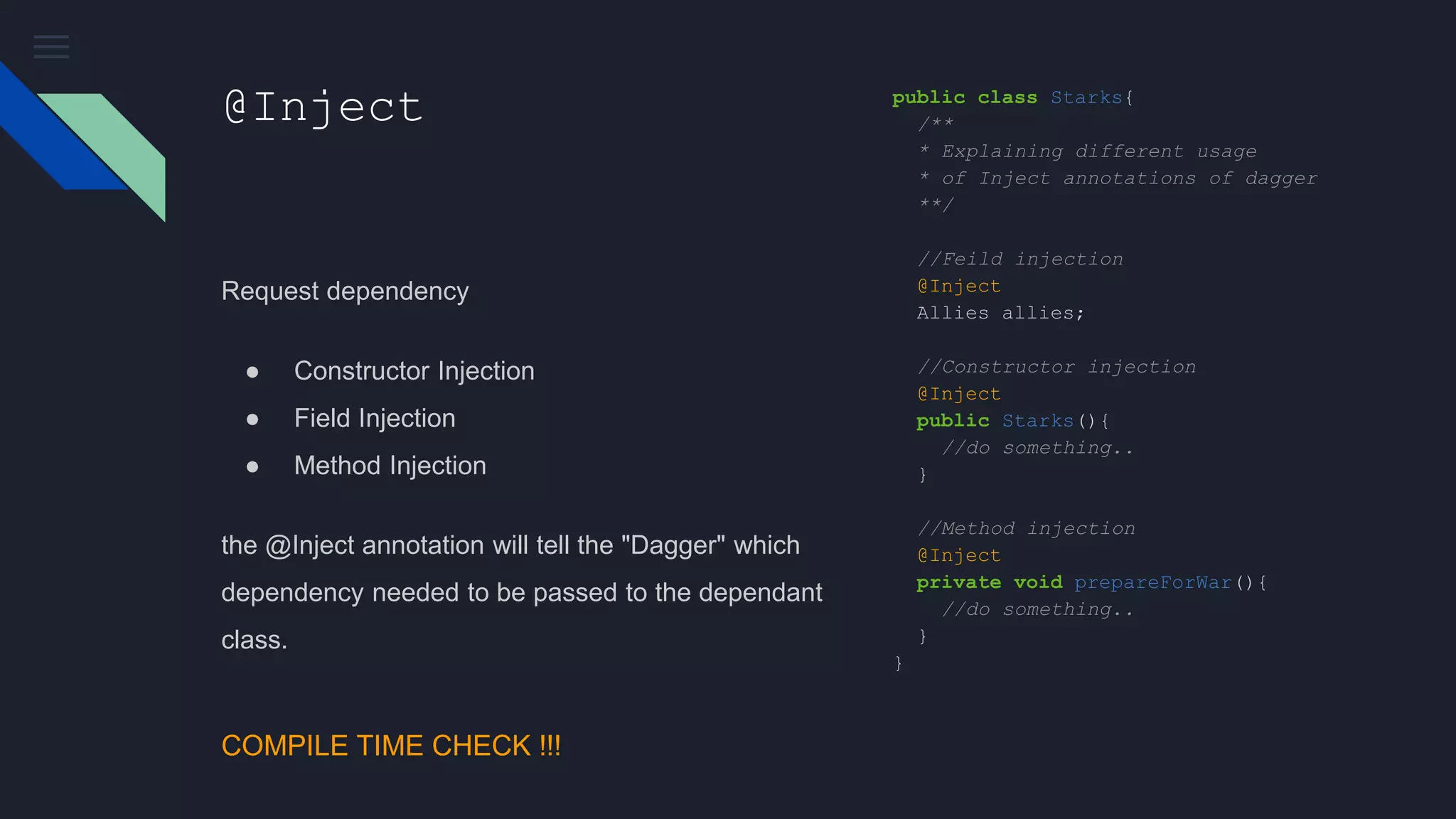
@Inject
Request dependency
● Constructor Injection
● Field Injection
● Method Injection
the @Inject annotation will tell the "Dagger" which
dependency needed to be passed to the dependant
class.
public class Starks{
/**
* Explaining different usage
* of Inject annotations of dagger
**/
//Feild injection
@Inject
Allies allies;
//Constructor injection
@Inject
public Starks(){
//do something..
}
//Method injection
@Inject
private void prepareForWar(){
//do something..
}
}
COMPILE TIME CHECK !!!
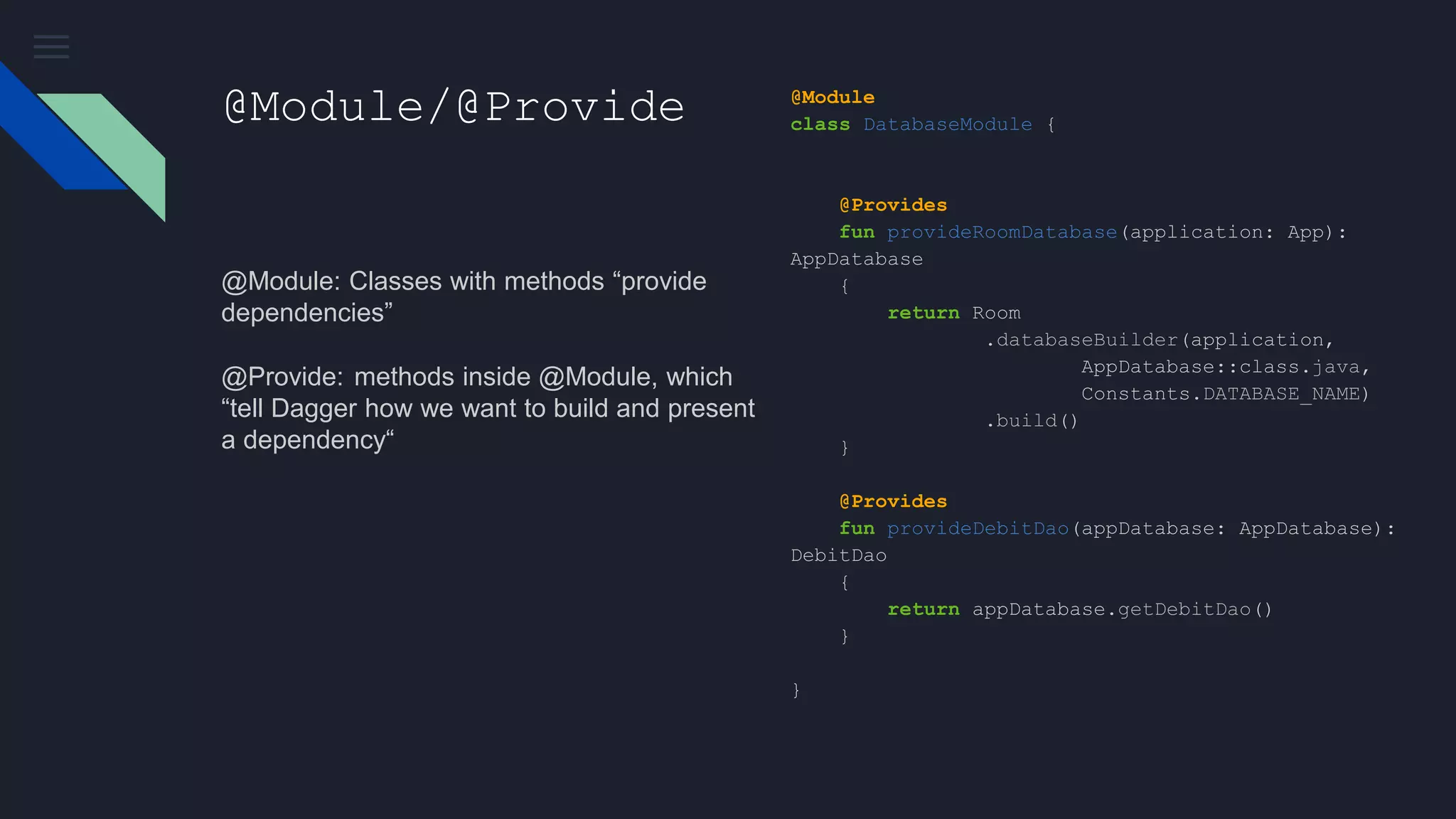
@Module/@Provide
@Module: Classes with methods “provide
dependencies”
@Provide:  methods inside @Module, which
“tell Dagger how we want to build and present
a dependency“
@Module
class DatabaseModule {
@Provides
fun provideRoomDatabase(application: App):
AppDatabase
{
return Room
.databaseBuilder(application,
AppDatabase::class.java,
Constants.DATABASE_NAME)
.build()
}
@Provides
fun provideDebitDao(appDatabase: AppDatabase):
DebitDao
{
return appDatabase.getDebitDao()
}
}
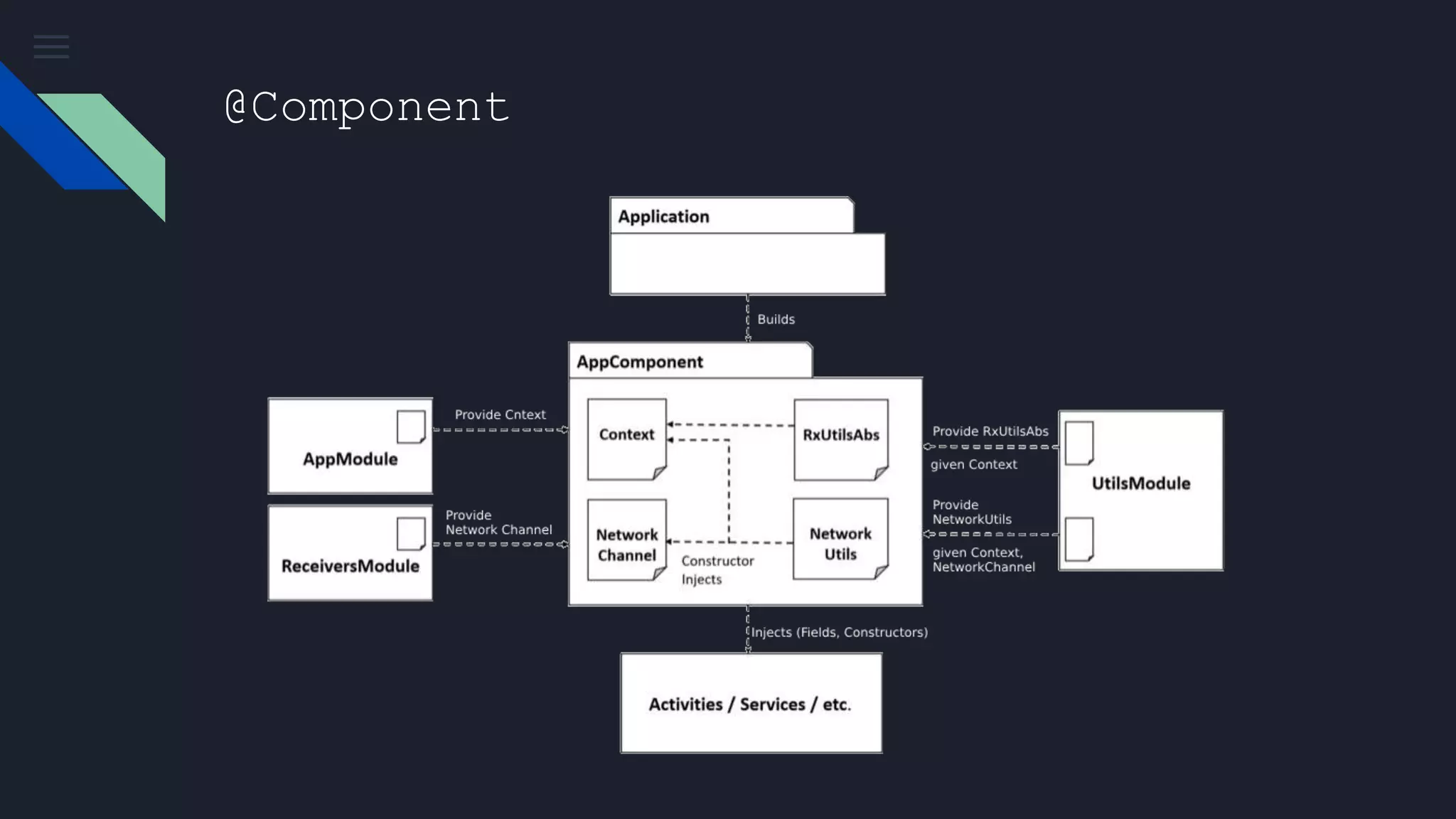
@Component
bridge between @Inject and @Module.
@Component(
modules = [
AndroidSupportInjectionModule::class,
DatabaseModule::class,
]
)
interface AppComponent : AndroidInjector<App> {
@Component.Builder
abstract class Builder :
AndroidInjector.Builder<App>()
}
class App : Application() {
override fun onCreate() {
super.onCreate()
DaggerAppComponent.builder().create(this)
}
}
@Component
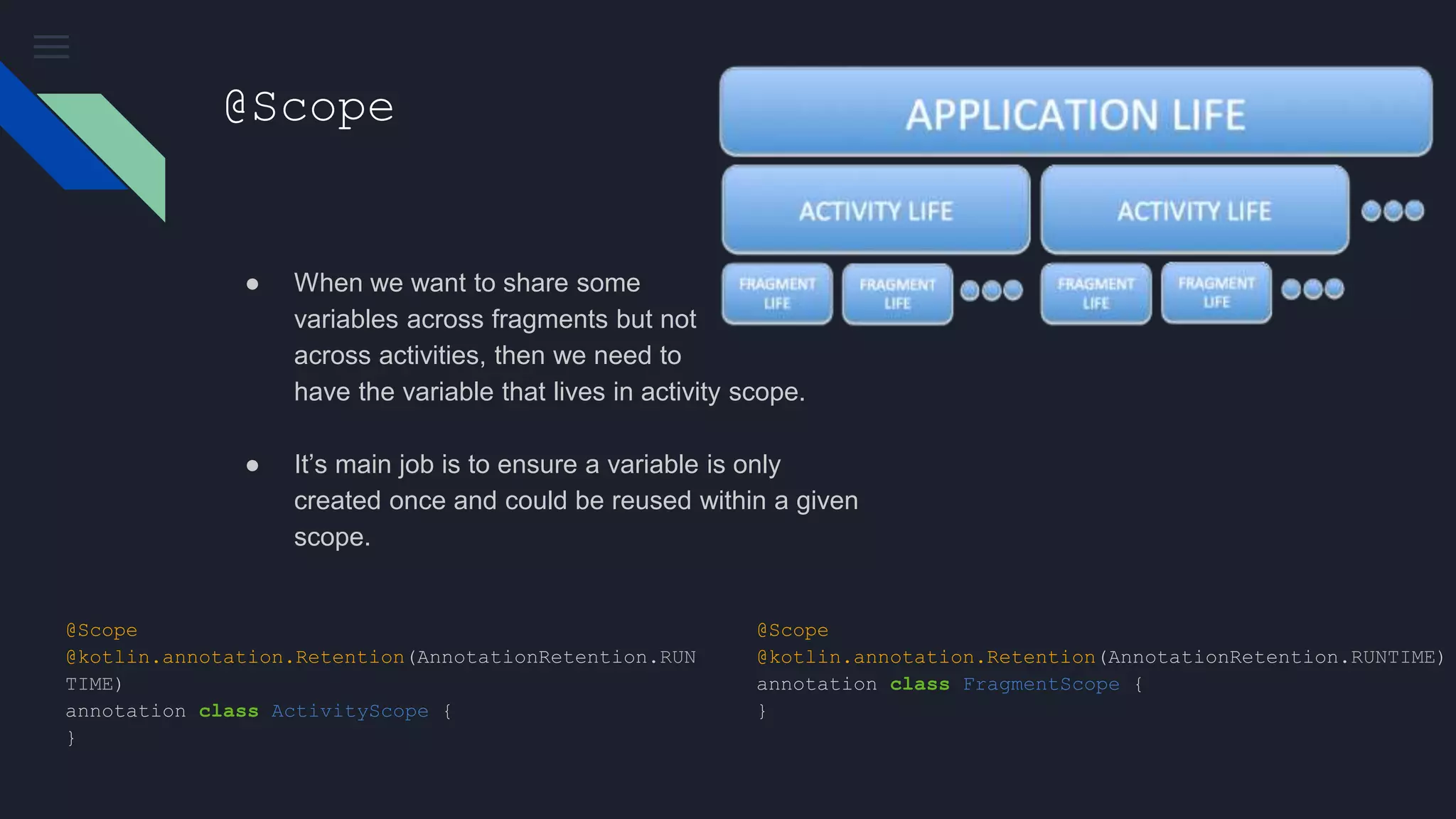
@Scope
● When we want to share some
variables across fragments but not
across activities, then we need to
have the variable that lives in activity scope.
● It’s main job is to ensure a variable is only
created once and could be reused within a given
scope.
@Scope
@kotlin.annotation.Retention(AnnotationRetention.RUNTIME)
annotation class FragmentScope {
}
@Scope
@kotlin.annotation.Retention(AnnotationRetention.RUN
TIME)
annotation class ActivityScope {
}
@Named/@Qualifier
● We can’t provide two methods which returned
the same Object
● So, how can do that ?
@Module
class CatModule {
@Provides
fun provideGarfield(): Cat =
Cat("Garfield")
@Provides
fun provideHelloKitty(): Cat =
Cat("Hello Kitty")
}
error: [Dagger/DuplicateBindings]
packagename.something.something.Cat is bound
multiple times:
@Named/@Qualifier
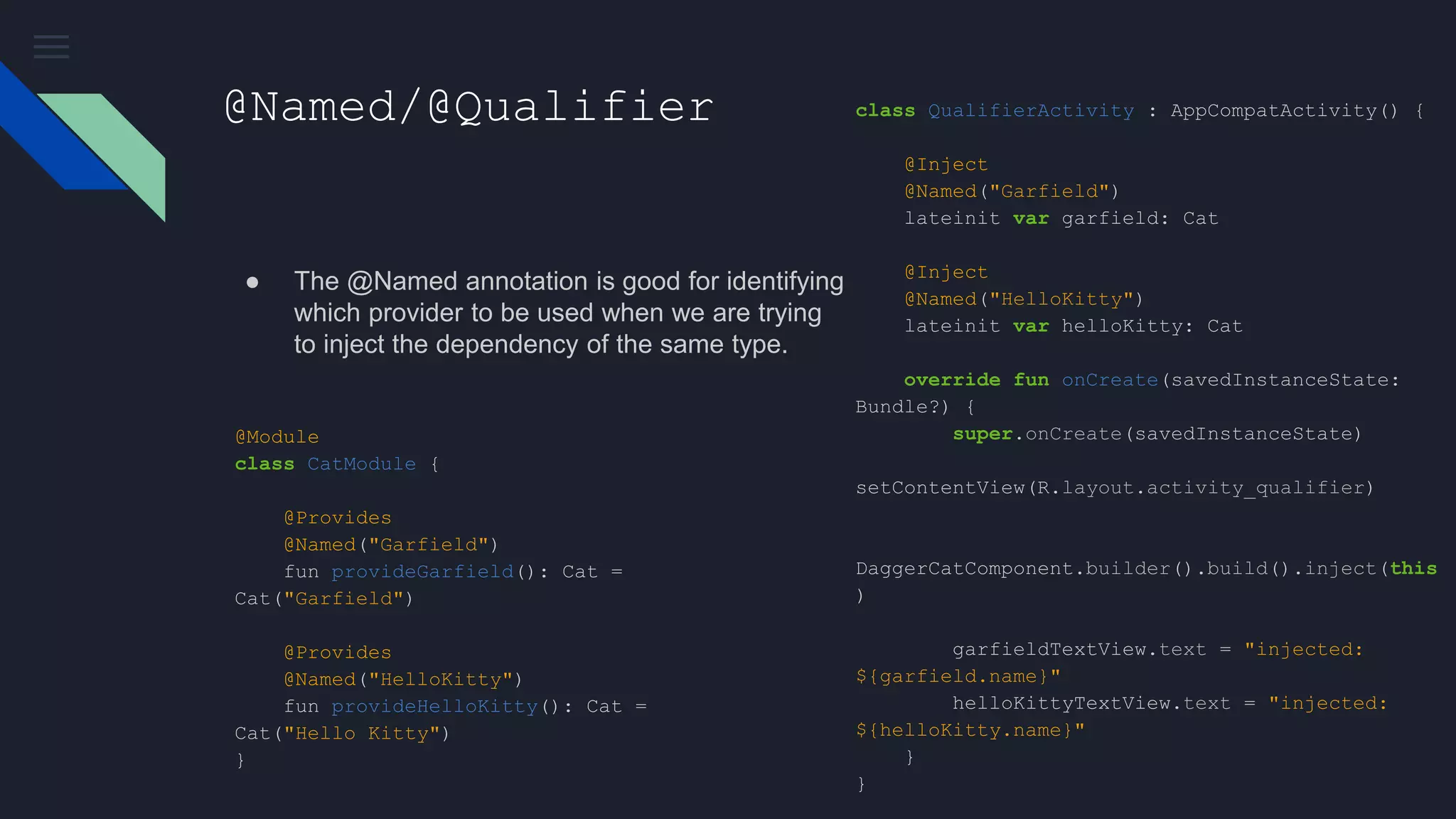
● The @Named annotation is good for identifying
which provider to be used when we are trying
to inject the dependency of the same type.
@Module
class CatModule {
@Provides
@Named("Garfield")
fun provideGarfield(): Cat =
Cat("Garfield")
@Provides
@Named("HelloKitty")
fun provideHelloKitty(): Cat =
Cat("Hello Kitty")
}
class QualifierActivity : AppCompatActivity() {
@Inject
@Named("Garfield")
lateinit var garfield: Cat
@Inject
@Named("HelloKitty")
lateinit var helloKitty: Cat
override fun onCreate(savedInstanceState:
Bundle?) {
super.onCreate(savedInstanceState)
setContentView(R.layout.activity_qualifier)
DaggerCatComponent.builder().build().inject(this
)
garfieldTextView.text = "injected:
${garfield.name}"
helloKittyTextView.text = "injected:
${helloKitty.name}"
}
}
@Named/@Qualifier
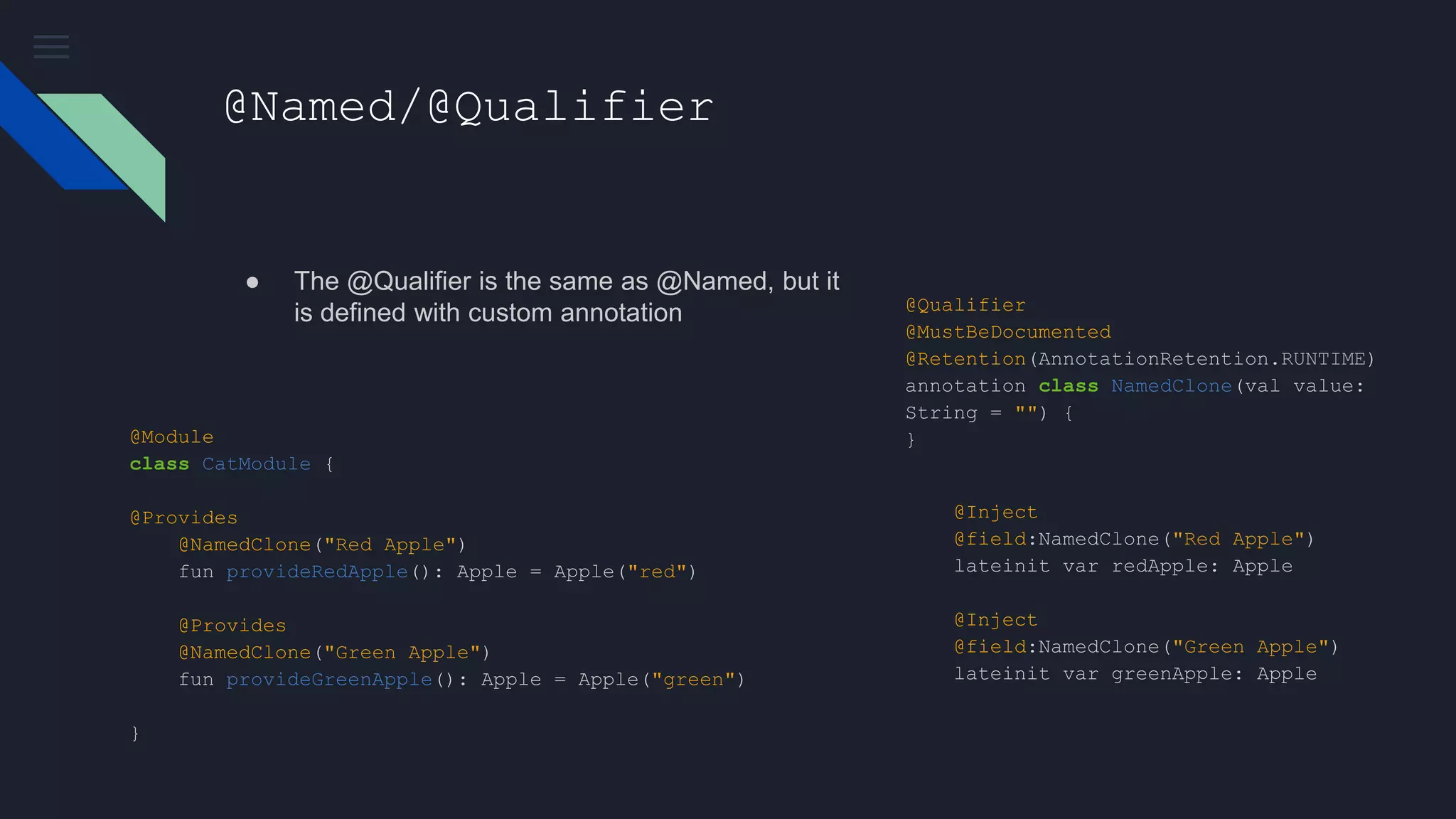
● The @Qualifier is the same as @Named, but it
is defined with custom annotation
@Module
class CatModule {
@Provides
@NamedClone("Red Apple")
fun provideRedApple(): Apple = Apple("red")
@Provides
@NamedClone("Green Apple")
fun provideGreenApple(): Apple = Apple("green")
}
@Qualifier
@MustBeDocumented
@Retention(AnnotationRetention.RUNTIME)
annotation class NamedClone(val value:
String = "") {
}
@Inject
@field:NamedClone("Red Apple")
lateinit var redApple: Apple
@Inject
@field:NamedClone("Green Apple")
lateinit var greenApple: Apple
Is it the end?
Not Yet !!!
We Implement all dagger parts but
something missing. Did you find it?
Android-Dagger
● Android Framework Components, like activity, fragment,... have no constructor injection
support
● It is done by 4 steps:
Android-Dagger
1- AndroidInjectionModule
An internal class from dagger 2.10 which provides our activities and fragments. That is why we
have used it in Component modules:
@Component(
modules = [
AndroidInjectionModule::class,
DatabaseModule::class,
]
)
interface AppComponent : AndroidInjector<App> {
@Component.Builder
abstract class Builder :
AndroidInjector.Builder<App>()
}
Android-Dagger
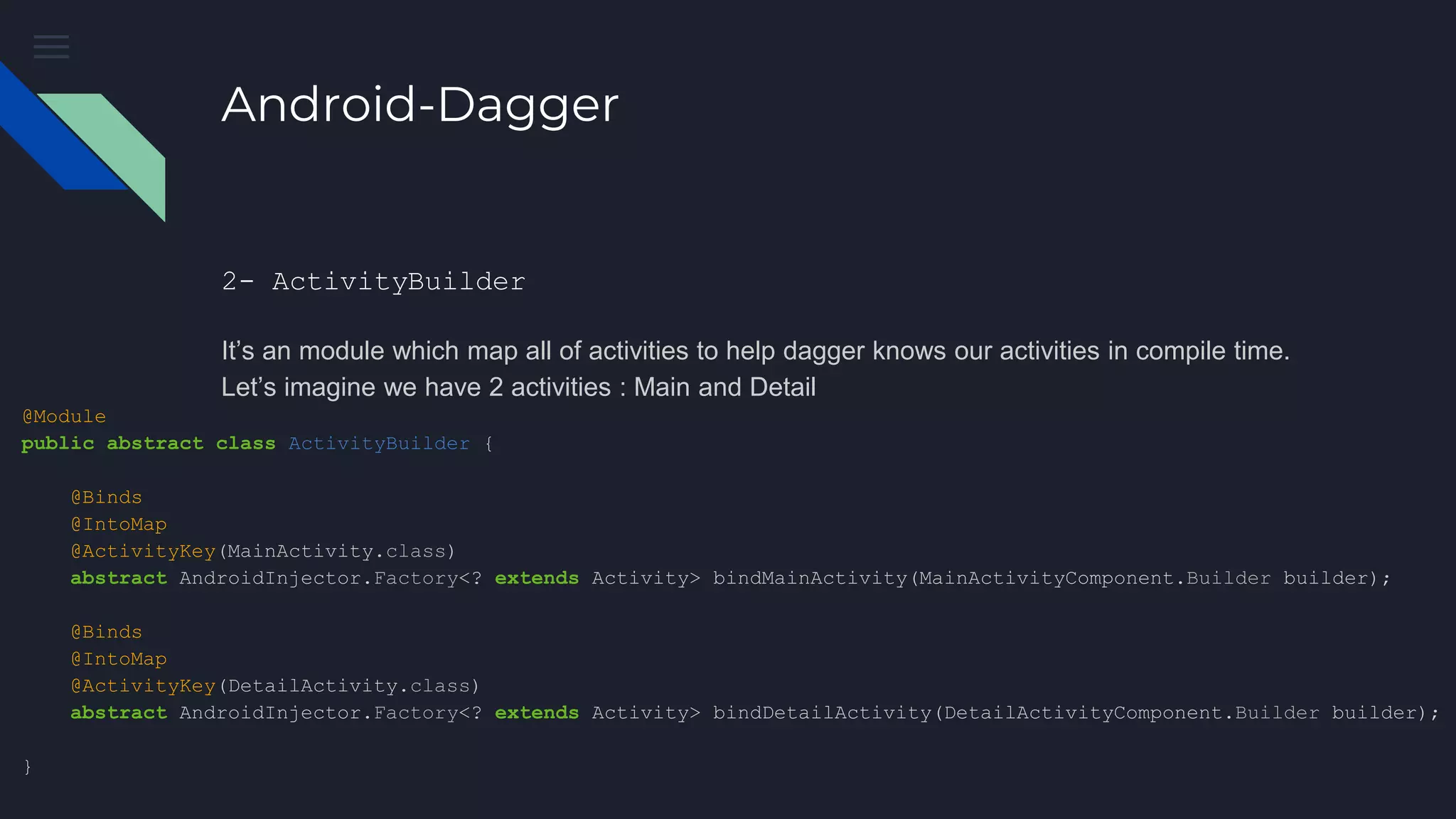
2- ActivityBuilder
It’s an module which map all of activities to help dagger knows our activities in compile time.
Let’s imagine we have 2 activities : Main and Detail
@Module
public abstract class ActivityBuilder {
@Binds
@IntoMap
@ActivityKey(MainActivity.class)
abstract AndroidInjector.Factory<? extends Activity> bindMainActivity(MainActivityComponent.Builder builder);
@Binds
@IntoMap
@ActivityKey(DetailActivity.class)
abstract AndroidInjector.Factory<? extends Activity> bindDetailActivity(DetailActivityComponent.Builder builder);
}
Android-Dagger
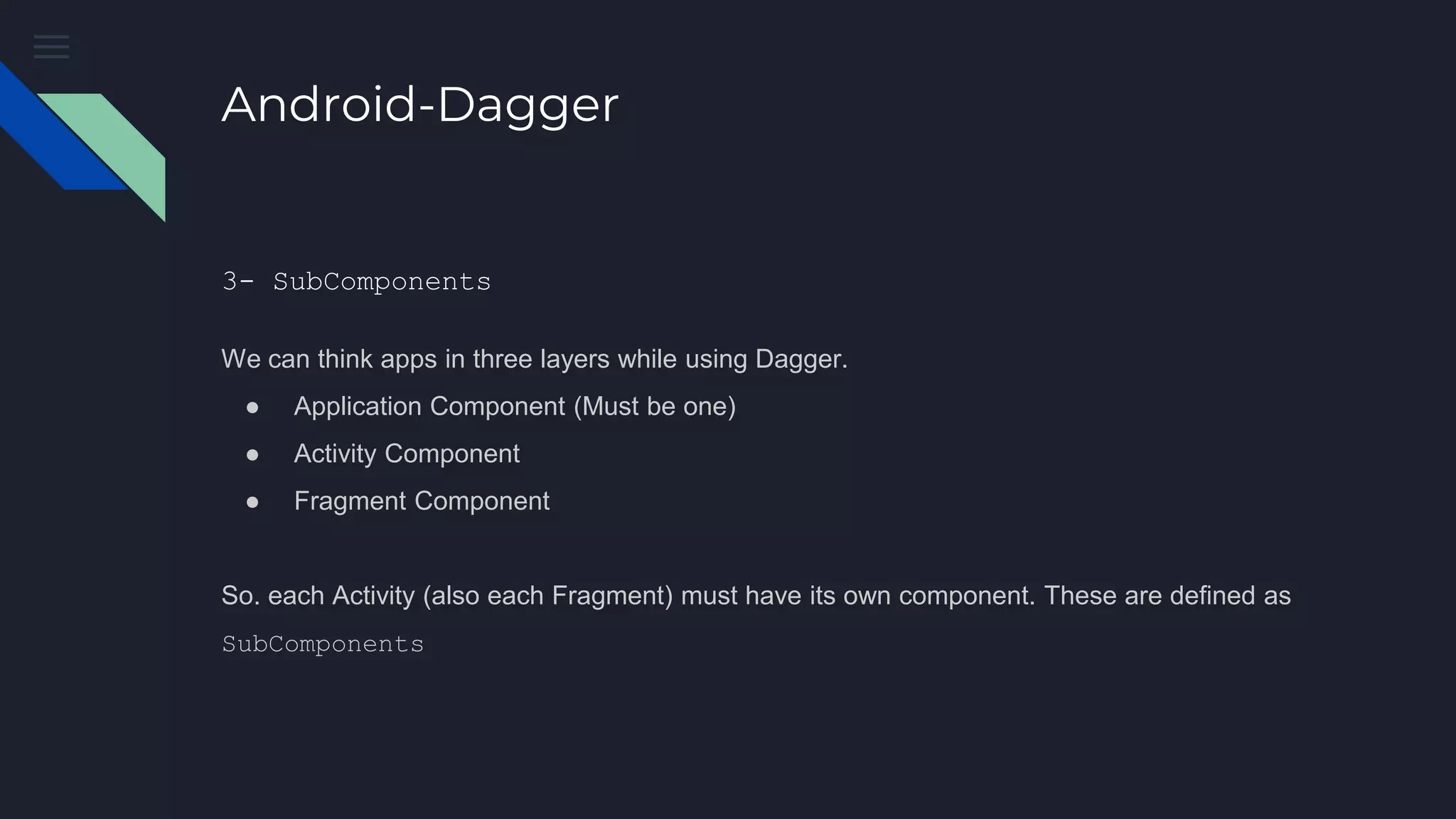
3- SubComponents
We can think apps in three layers while using Dagger.
● Application Component (Must be one)
● Activity Component
● Fragment Component
So. each Activity (also each Fragment) must have its own component. These are defined as
SubComponents
Android-Dagger
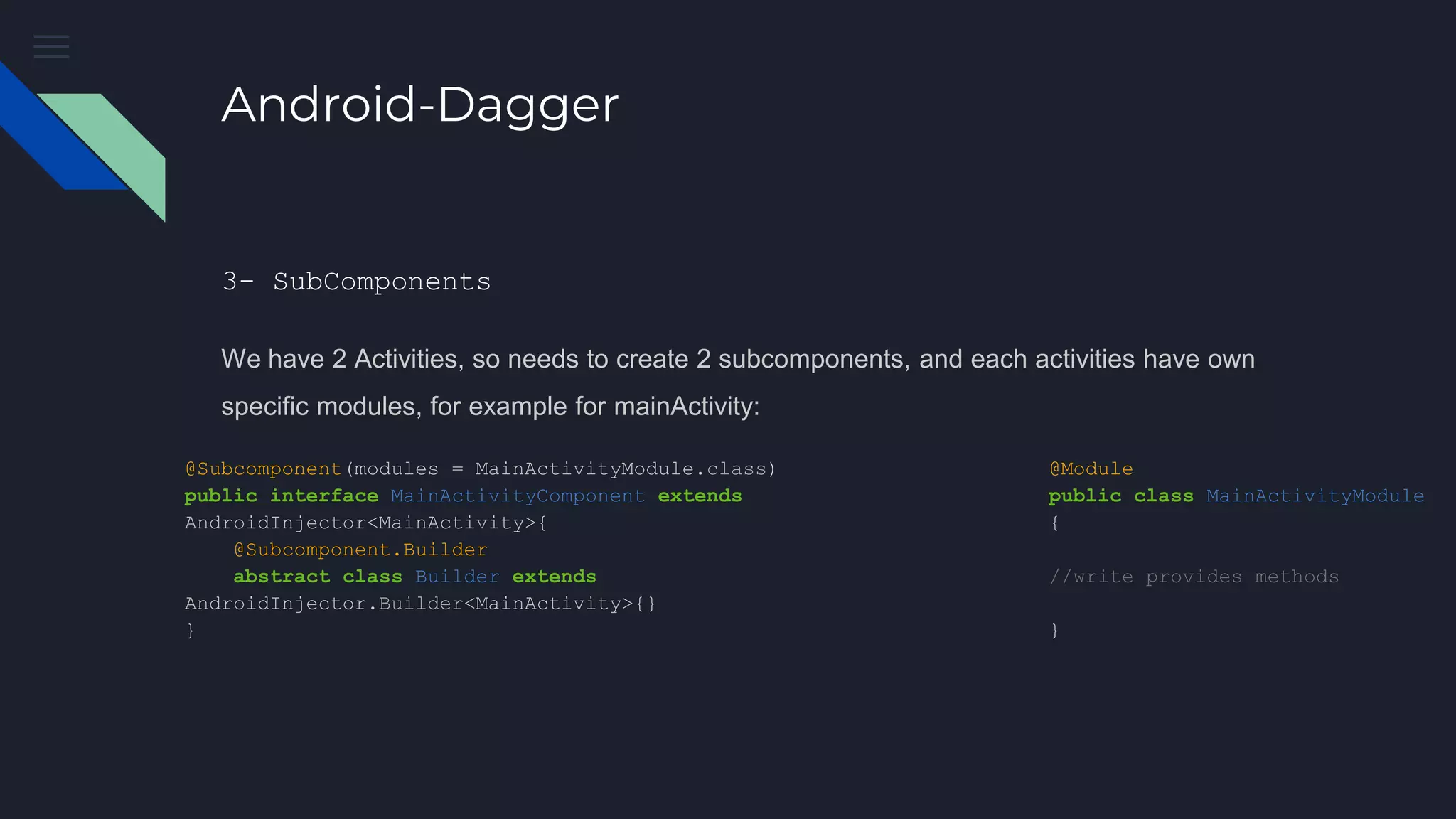
3- SubComponents
We have 2 Activities, so needs to create 2 subcomponents, and each activities have own
specific modules, for example for mainActivity:
@Subcomponent(modules = MainActivityModule.class)
public interface MainActivityComponent extends
AndroidInjector<MainActivity>{
@Subcomponent.Builder
abstract class Builder extends
AndroidInjector.Builder<MainActivity>{}
}
@Module
public class MainActivityModule
{
//write provides methods
}
Android-Dagger
3- SubComponents
next , links subcomponent to the main components through appModule:
@Module(subcomponents = [
MainActivityComponent::class,
DetailActivityComponent::class])
class AppModule {
@Provides
@Singleton
fun provideContext(Application application) : Context = return
application
}
Android-Dagger
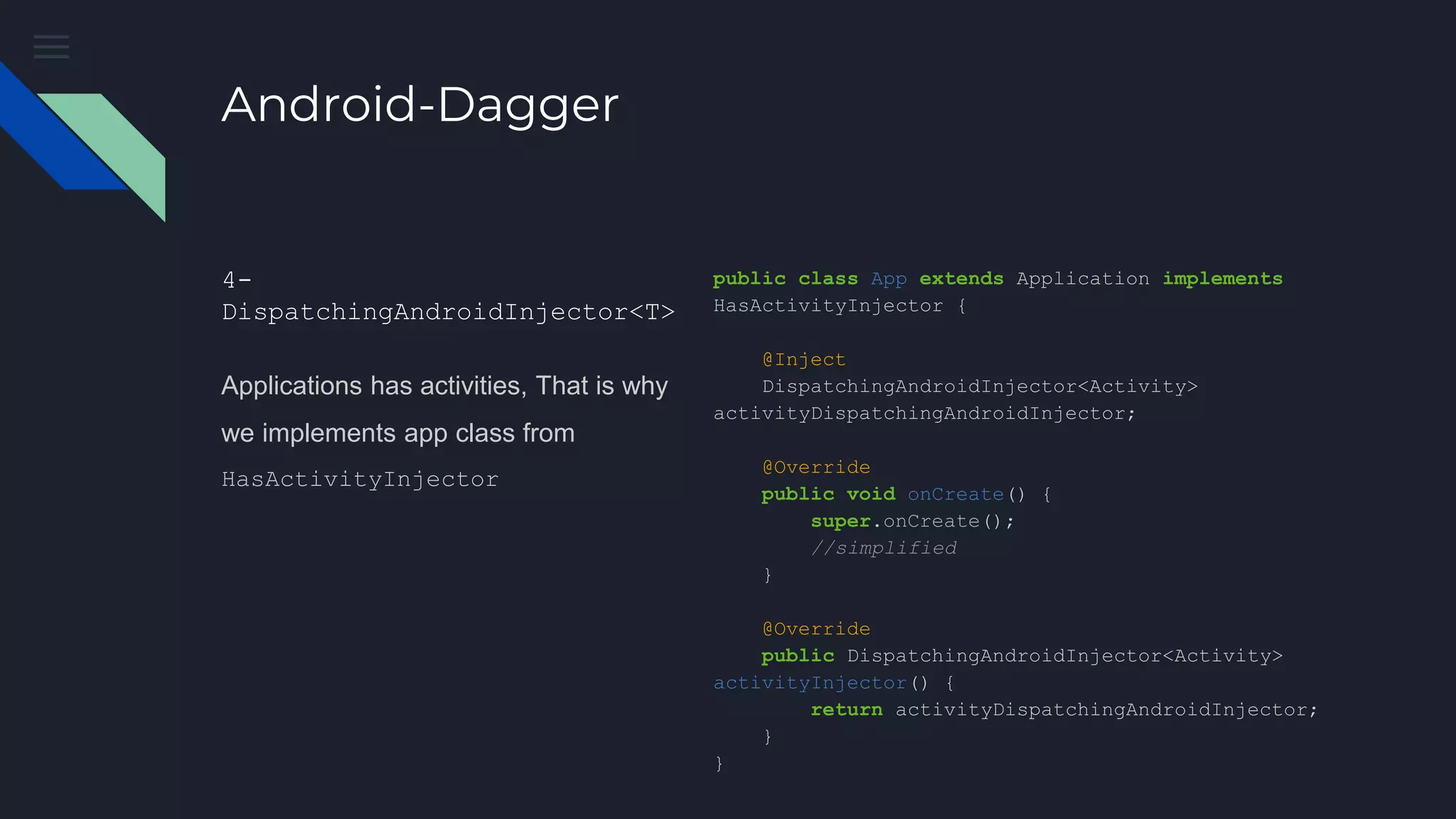
4-
DispatchingAndroidInjector<T>
Applications has activities, That is why
we implements app class from
HasActivityInjector
public class App extends Application implements
HasActivityInjector {
@Inject
DispatchingAndroidInjector<Activity>
activityDispatchingAndroidInjector;
@Override
public void onCreate() {
super.onCreate();
//simplified
}
@Override
public DispatchingAndroidInjector<Activity>
activityInjector() {
return activityDispatchingAndroidInjector;
}
}
Android-Dagger
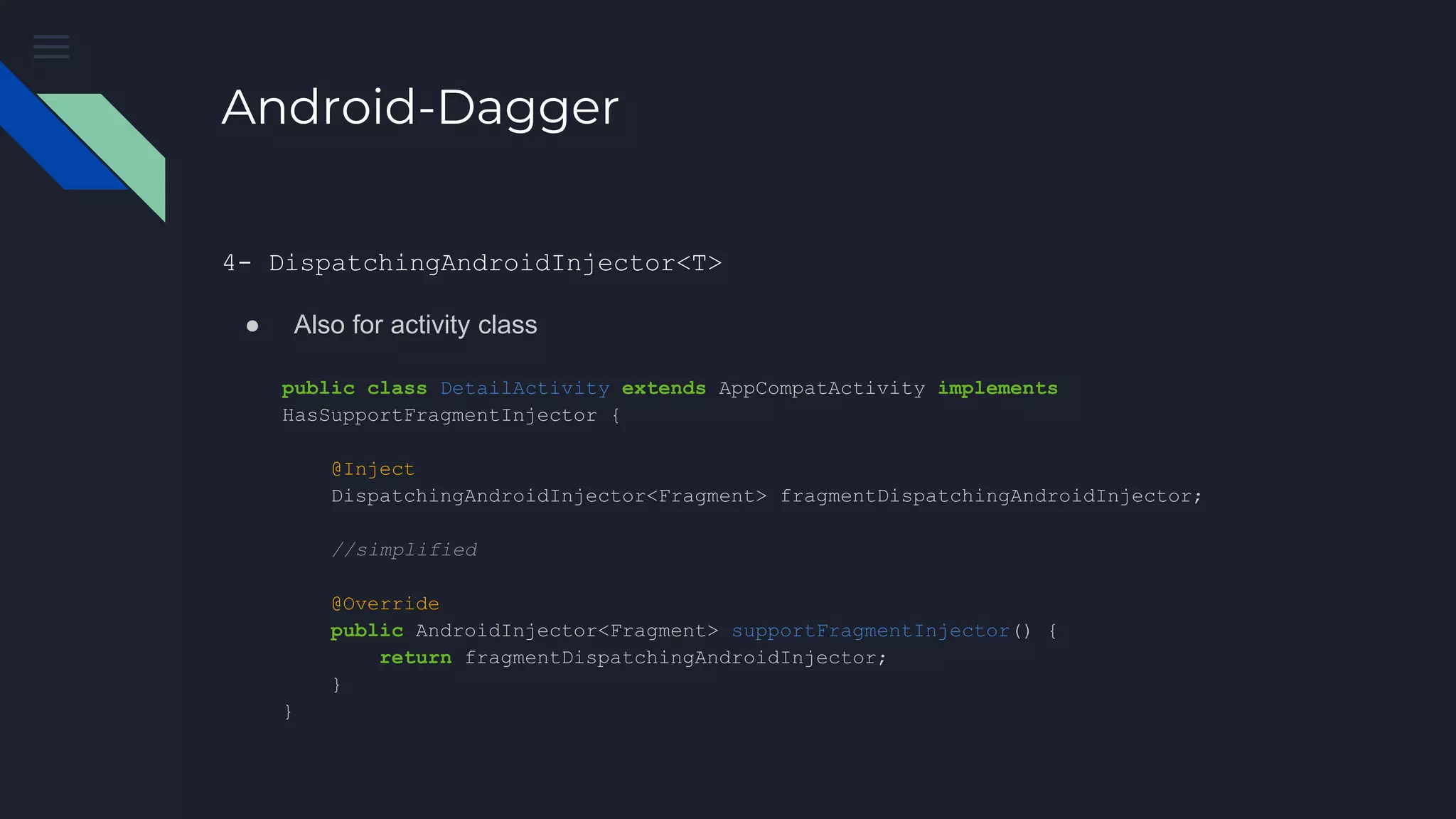
public class DetailActivity extends AppCompatActivity implements
HasSupportFragmentInjector {
@Inject
DispatchingAndroidInjector<Fragment> fragmentDispatchingAndroidInjector;
//simplified
@Override
public AndroidInjector<Fragment> supportFragmentInjector() {
return fragmentDispatchingAndroidInjector;
}
}
4- DispatchingAndroidInjector<T>
● Also for activity class
Android-Dagger
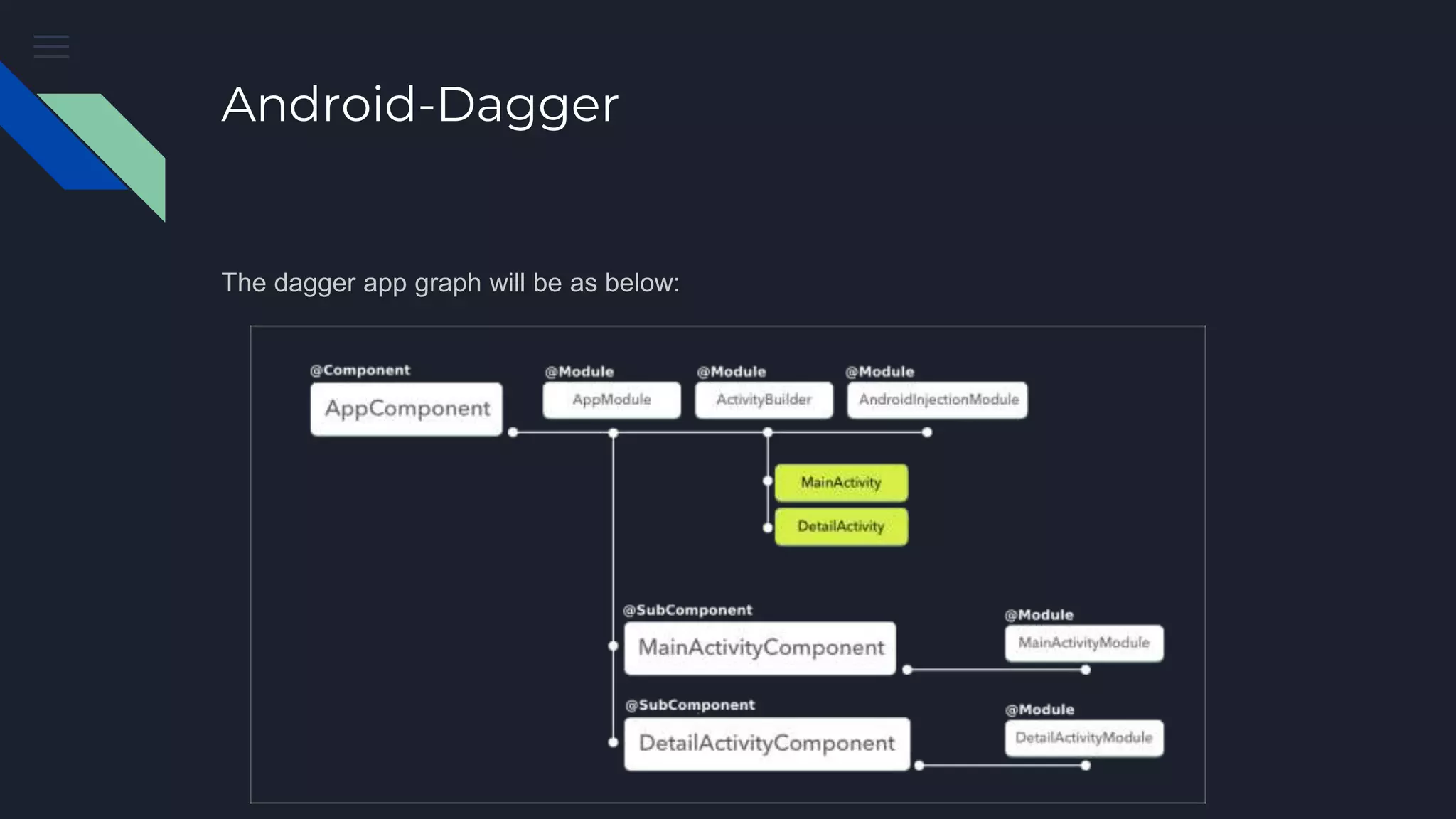
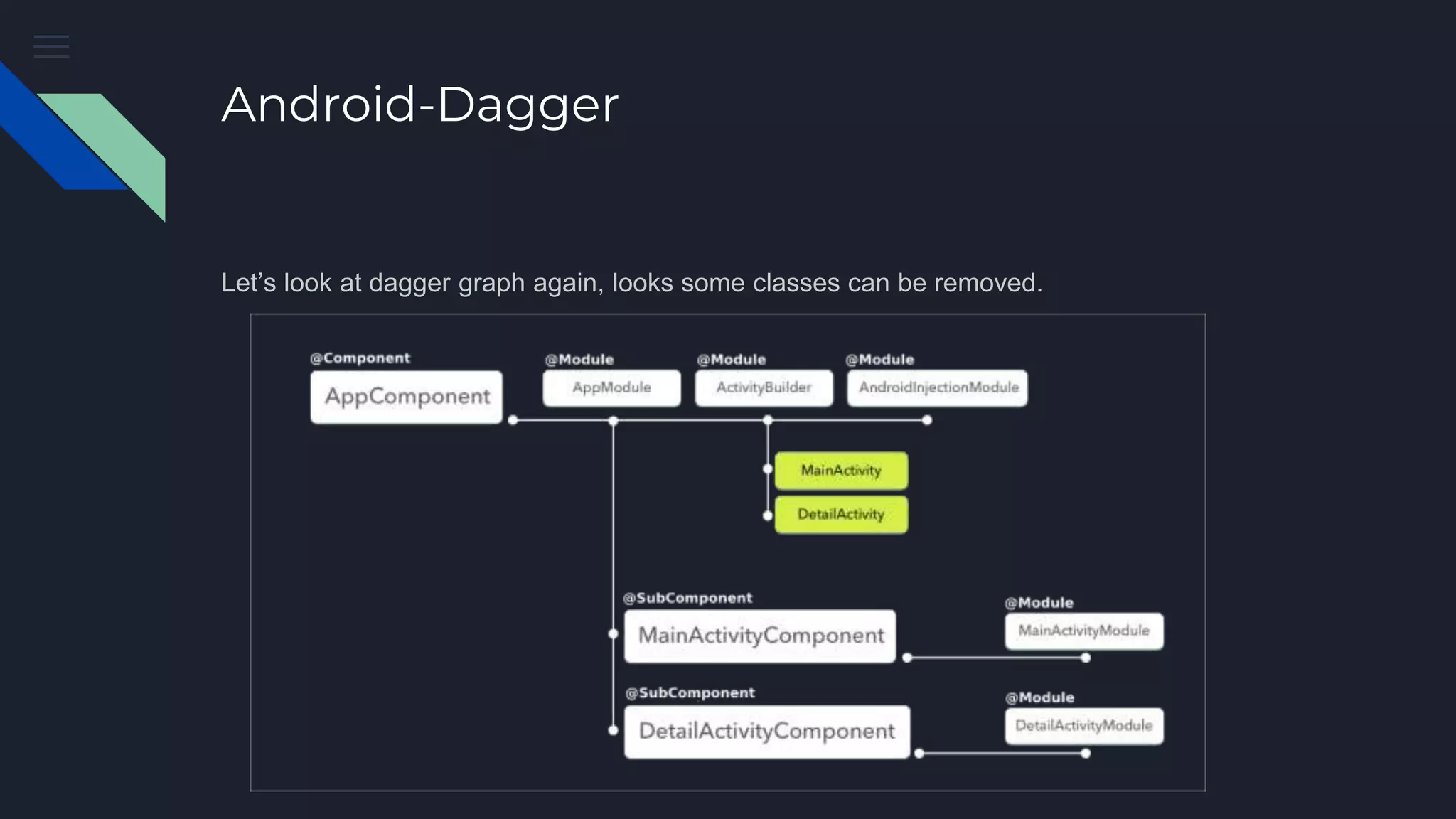
The dagger app graph will be as below:
Android-Dagger
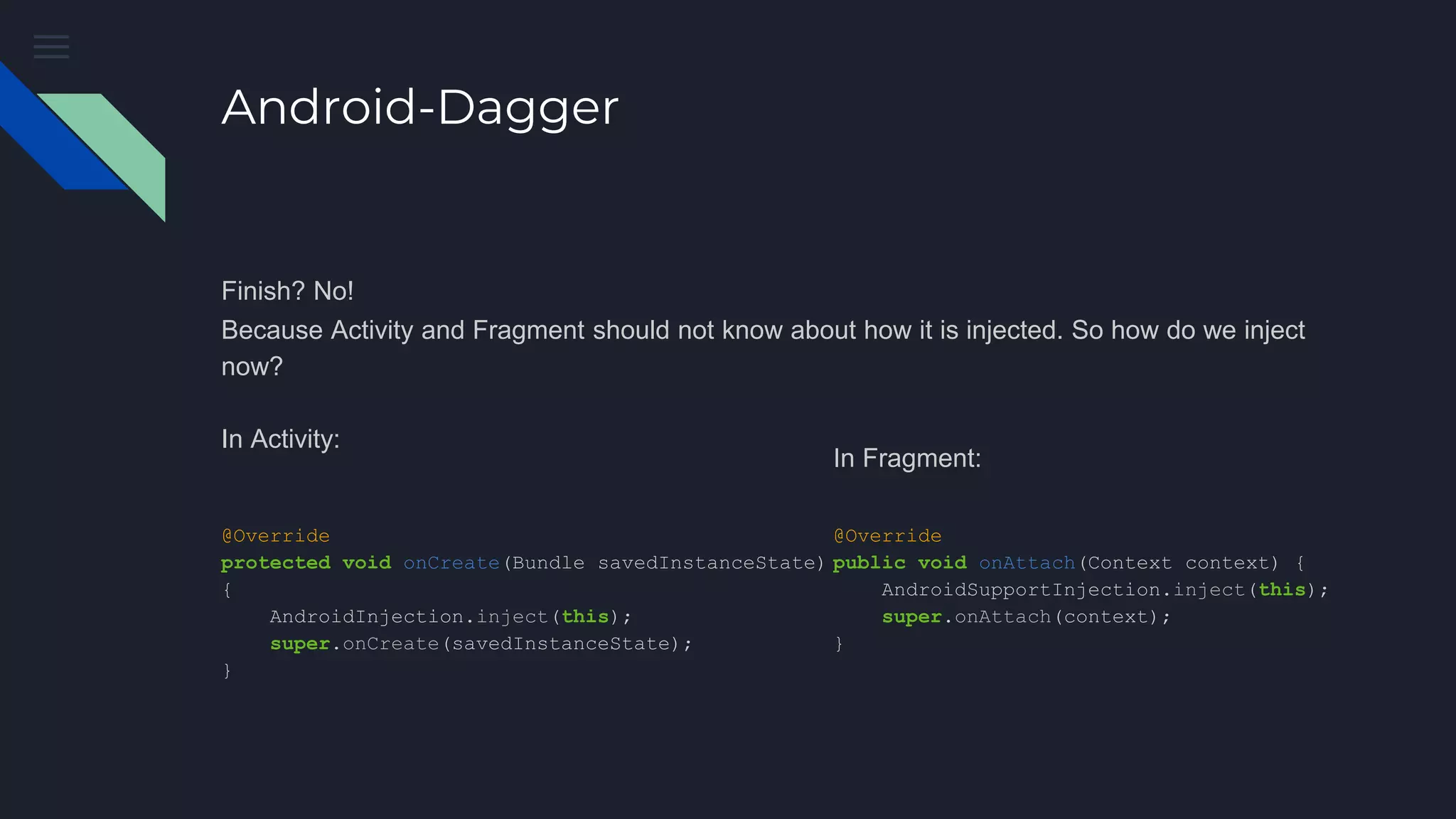
Finish? No!
Because Activity and Fragment should not know about how it is injected. So how do we inject
now?
In Activity:
@Override
protected void onCreate(Bundle savedInstanceState)
{
AndroidInjection.inject(this);
super.onCreate(savedInstanceState);
}
In Fragment:
@Override
public void onAttach(Context context) {
AndroidSupportInjection.inject(this);
super.onAttach(context);
}
Is it too hard??
Let’s Simplified it
Android-Dagger
Let’s look at dagger graph again, looks some classes can be removed.
Android-Dagger
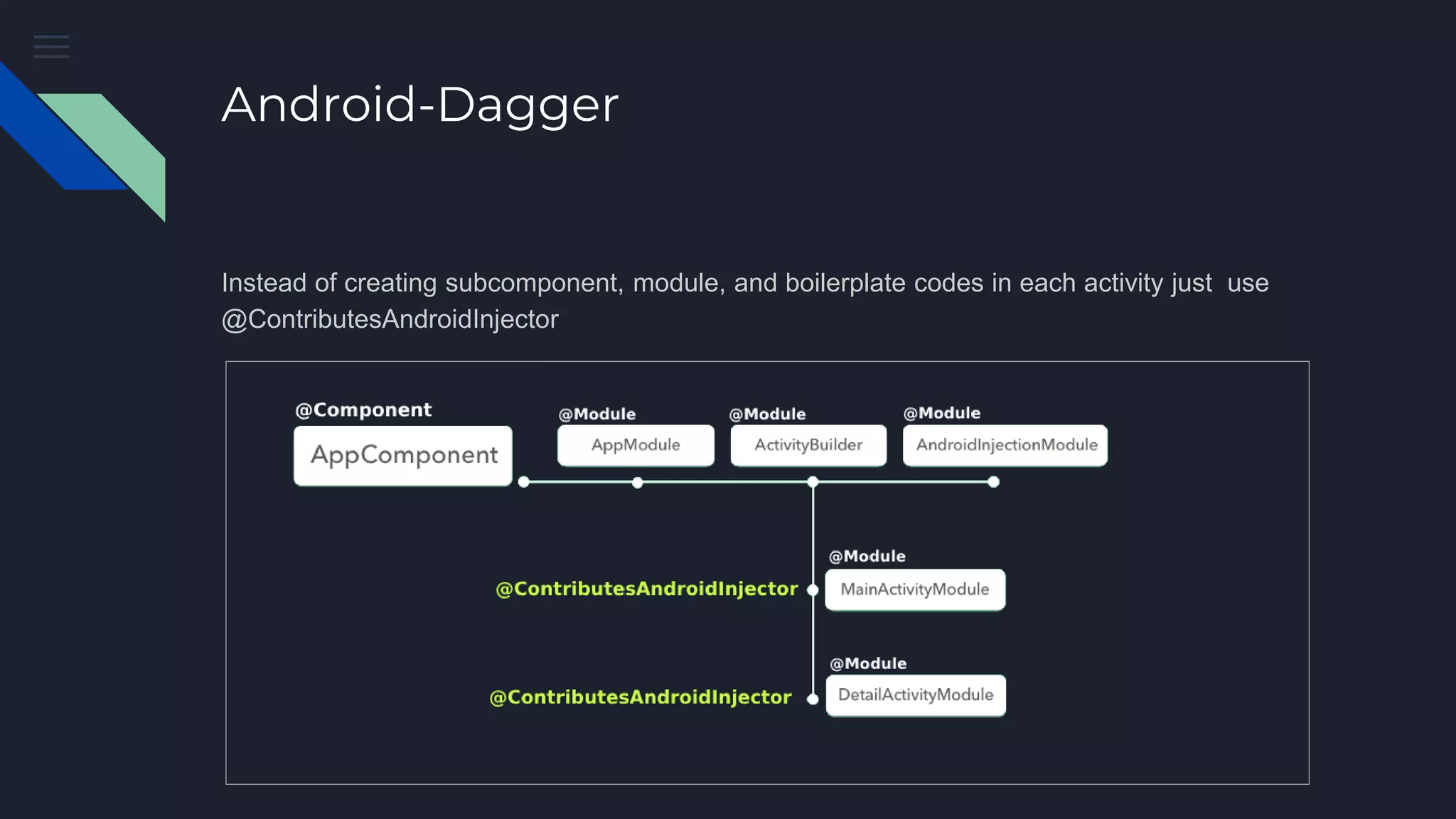
Instead of creating subcomponent, module, and boilerplate codes in each activity just use
@ContributesAndroidInjector
Android-Dagger
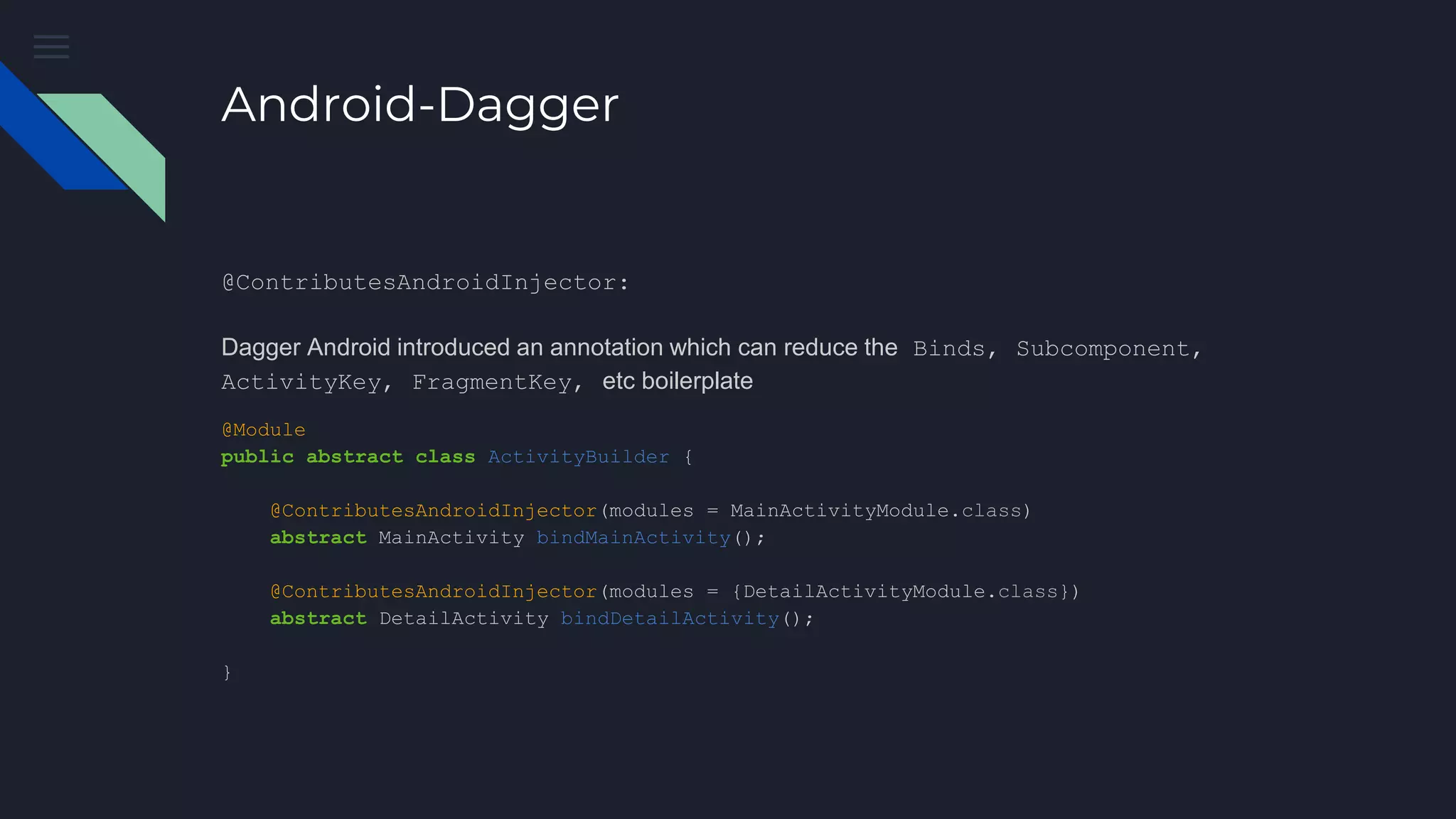
@ContributesAndroidInjector:
Dagger Android introduced an annotation which can reduce the Binds, Subcomponent,
ActivityKey, FragmentKey, etc boilerplate
@Module
public abstract class ActivityBuilder {
@ContributesAndroidInjector(modules = MainActivityModule.class)
abstract MainActivity bindMainActivity();
@ContributesAndroidInjector(modules = {DetailActivityModule.class})
abstract DetailActivity bindDetailActivity();
}
Android-Dagger
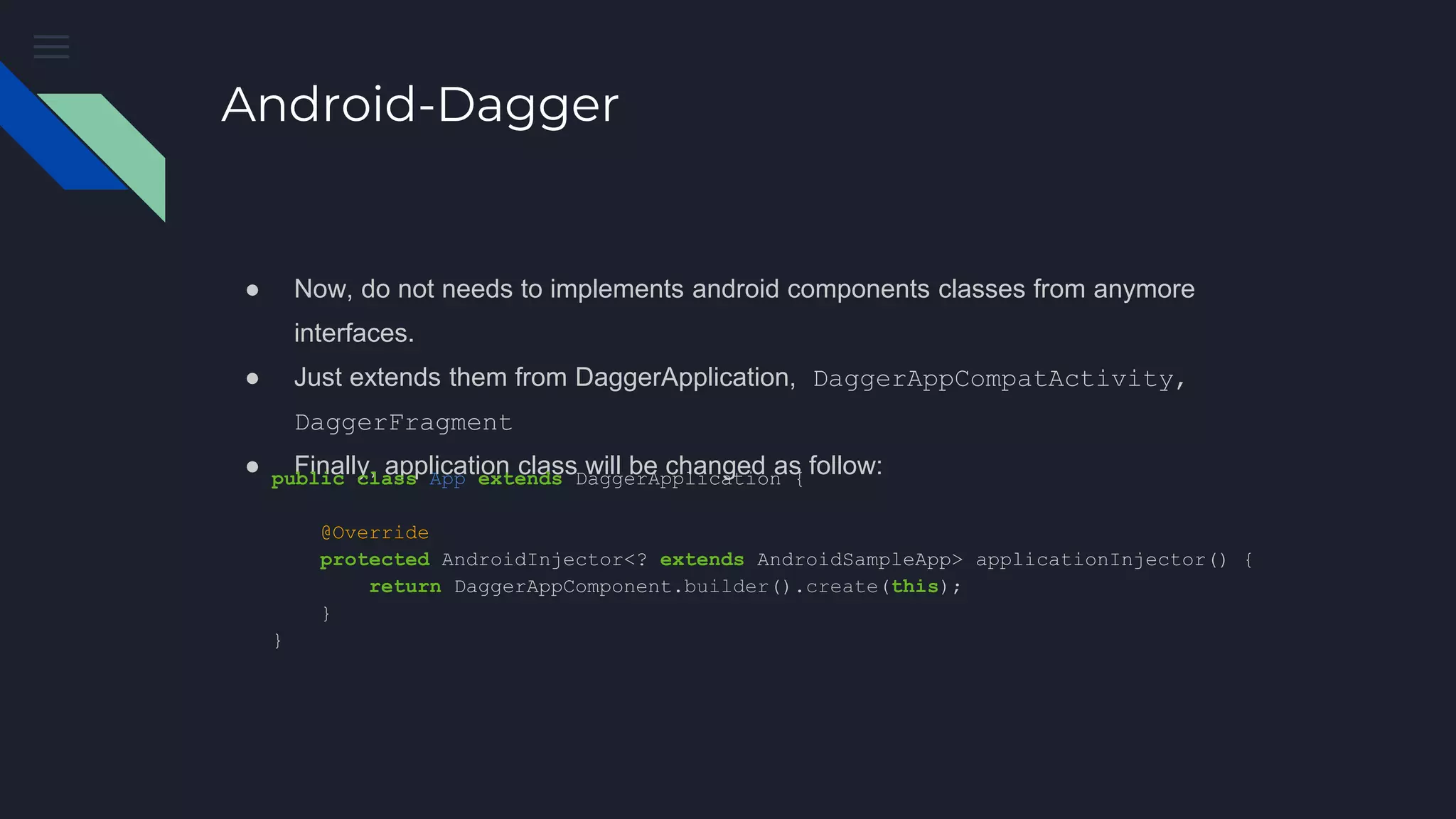
● Now, do not needs to implements android components classes from anymore
interfaces.
● Just extends them from DaggerApplication, DaggerAppCompatActivity,
DaggerFragment
● Finally, application class will be changed as follow:public class App extends DaggerApplication {
@Override
protected AndroidInjector<? extends AndroidSampleApp> applicationInjector() {
return DaggerAppComponent.builder().create(this);
}
}
Thank you!
Let’s try it in a real
project!

Dependency injection using dagger2

  • 1.
    Dependency Injection withDagger2 M.Javad Hashemi
  • 2.
    Dependency Injection ● Astyle of creation in which an object are created by an external entity or technique whereby one object supplies the dependencies of another object. ● IoC ( Inversion of Control) ○ The modules of top levels shouldn’t depend on modules of the lower levels. The modules of all levels should depend on abstractions. ○ The abstractions shouldn’t depend on details. The details should depend on abstractions.
  • 3.
    Dependency Injection Benefits ofDI ? ● Test ● Maintenance ● Reusable code
  • 4.
    Dependency Injection class CoffeeMaker{ private final Heater heater; private final Pump pump; public CoffeeMaker() { heater = new ElectricHeater(); pump = new Thermpsiphon(heater); } Coffee makeCaffee(){ /* ... */ } } class CoffeeMain { public static void main(String[] args){ Coffee coffee = new CoffeeMaker().makeCaffee(); } }
  • 5.
    Dependency Injection class CoffeeMaker{ private final Heater heater; private final Pump pump; public CoffeeMaker(Heater heater, Pump pump) { this.heater = heater; this.pump = pump; } Coffee makeCaffee(){ /* ... */ } } class CoffeeMain { public static void main(String[] args){ Heater heater = new ElectricHeater(); Pump pump = new Thermosiphon(heater) Coffee coffee = new CoffeeMaker(heater, pump).makeCaffee(); } }
  • 6.
    Dagger2 ● Generate allthe dependency injection boilerplate codes based on annotation processing ● Base elements: ○ @Inject ○ @Module/@Provide ○ @Component ○ @Scope ○ @Named/@Qualifier
  • 7.
    @Inject Request dependency ● ConstructorInjection ● Field Injection ● Method Injection the @Inject annotation will tell the "Dagger" which dependency needed to be passed to the dependant class. public class Starks{ /** * Explaining different usage * of Inject annotations of dagger **/ //Feild injection @Inject Allies allies; //Constructor injection @Inject public Starks(){ //do something.. } //Method injection @Inject private void prepareForWar(){ //do something.. } } COMPILE TIME CHECK !!!
  • 8.
    @Module/@Provide @Module: Classes withmethods “provide dependencies” @Provide:  methods inside @Module, which “tell Dagger how we want to build and present a dependency“ @Module class DatabaseModule { @Provides fun provideRoomDatabase(application: App): AppDatabase { return Room .databaseBuilder(application, AppDatabase::class.java, Constants.DATABASE_NAME) .build() } @Provides fun provideDebitDao(appDatabase: AppDatabase): DebitDao { return appDatabase.getDebitDao() } }
  • 9.
    @Component bridge between @Injectand @Module. @Component( modules = [ AndroidSupportInjectionModule::class, DatabaseModule::class, ] ) interface AppComponent : AndroidInjector<App> { @Component.Builder abstract class Builder : AndroidInjector.Builder<App>() } class App : Application() { override fun onCreate() { super.onCreate() DaggerAppComponent.builder().create(this) } }
  • 10.
  • 11.
    @Scope ● When wewant to share some variables across fragments but not across activities, then we need to have the variable that lives in activity scope. ● It’s main job is to ensure a variable is only created once and could be reused within a given scope. @Scope @kotlin.annotation.Retention(AnnotationRetention.RUNTIME) annotation class FragmentScope { } @Scope @kotlin.annotation.Retention(AnnotationRetention.RUN TIME) annotation class ActivityScope { }
  • 12.
    @Named/@Qualifier ● We can’tprovide two methods which returned the same Object ● So, how can do that ? @Module class CatModule { @Provides fun provideGarfield(): Cat = Cat("Garfield") @Provides fun provideHelloKitty(): Cat = Cat("Hello Kitty") } error: [Dagger/DuplicateBindings] packagename.something.something.Cat is bound multiple times:
  • 13.
    @Named/@Qualifier ● The @Namedannotation is good for identifying which provider to be used when we are trying to inject the dependency of the same type. @Module class CatModule { @Provides @Named("Garfield") fun provideGarfield(): Cat = Cat("Garfield") @Provides @Named("HelloKitty") fun provideHelloKitty(): Cat = Cat("Hello Kitty") } class QualifierActivity : AppCompatActivity() { @Inject @Named("Garfield") lateinit var garfield: Cat @Inject @Named("HelloKitty") lateinit var helloKitty: Cat override fun onCreate(savedInstanceState: Bundle?) { super.onCreate(savedInstanceState) setContentView(R.layout.activity_qualifier) DaggerCatComponent.builder().build().inject(this ) garfieldTextView.text = "injected: ${garfield.name}" helloKittyTextView.text = "injected: ${helloKitty.name}" } }
  • 14.
    @Named/@Qualifier ● The @Qualifieris the same as @Named, but it is defined with custom annotation @Module class CatModule { @Provides @NamedClone("Red Apple") fun provideRedApple(): Apple = Apple("red") @Provides @NamedClone("Green Apple") fun provideGreenApple(): Apple = Apple("green") } @Qualifier @MustBeDocumented @Retention(AnnotationRetention.RUNTIME) annotation class NamedClone(val value: String = "") { } @Inject @field:NamedClone("Red Apple") lateinit var redApple: Apple @Inject @field:NamedClone("Green Apple") lateinit var greenApple: Apple
  • 15.
    Is it theend? Not Yet !!! We Implement all dagger parts but something missing. Did you find it?
  • 16.
    Android-Dagger ● Android FrameworkComponents, like activity, fragment,... have no constructor injection support ● It is done by 4 steps:
  • 17.
    Android-Dagger 1- AndroidInjectionModule An internalclass from dagger 2.10 which provides our activities and fragments. That is why we have used it in Component modules: @Component( modules = [ AndroidInjectionModule::class, DatabaseModule::class, ] ) interface AppComponent : AndroidInjector<App> { @Component.Builder abstract class Builder : AndroidInjector.Builder<App>() }
  • 18.
    Android-Dagger 2- ActivityBuilder It’s anmodule which map all of activities to help dagger knows our activities in compile time. Let’s imagine we have 2 activities : Main and Detail @Module public abstract class ActivityBuilder { @Binds @IntoMap @ActivityKey(MainActivity.class) abstract AndroidInjector.Factory<? extends Activity> bindMainActivity(MainActivityComponent.Builder builder); @Binds @IntoMap @ActivityKey(DetailActivity.class) abstract AndroidInjector.Factory<? extends Activity> bindDetailActivity(DetailActivityComponent.Builder builder); }
  • 19.
    Android-Dagger 3- SubComponents We canthink apps in three layers while using Dagger. ● Application Component (Must be one) ● Activity Component ● Fragment Component So. each Activity (also each Fragment) must have its own component. These are defined as SubComponents
  • 20.
    Android-Dagger 3- SubComponents We have2 Activities, so needs to create 2 subcomponents, and each activities have own specific modules, for example for mainActivity: @Subcomponent(modules = MainActivityModule.class) public interface MainActivityComponent extends AndroidInjector<MainActivity>{ @Subcomponent.Builder abstract class Builder extends AndroidInjector.Builder<MainActivity>{} } @Module public class MainActivityModule { //write provides methods }
  • 21.
    Android-Dagger 3- SubComponents next ,links subcomponent to the main components through appModule: @Module(subcomponents = [ MainActivityComponent::class, DetailActivityComponent::class]) class AppModule { @Provides @Singleton fun provideContext(Application application) : Context = return application }
  • 22.
    Android-Dagger 4- DispatchingAndroidInjector<T> Applications has activities,That is why we implements app class from HasActivityInjector public class App extends Application implements HasActivityInjector { @Inject DispatchingAndroidInjector<Activity> activityDispatchingAndroidInjector; @Override public void onCreate() { super.onCreate(); //simplified } @Override public DispatchingAndroidInjector<Activity> activityInjector() { return activityDispatchingAndroidInjector; } }
  • 23.
    Android-Dagger public class DetailActivityextends AppCompatActivity implements HasSupportFragmentInjector { @Inject DispatchingAndroidInjector<Fragment> fragmentDispatchingAndroidInjector; //simplified @Override public AndroidInjector<Fragment> supportFragmentInjector() { return fragmentDispatchingAndroidInjector; } } 4- DispatchingAndroidInjector<T> ● Also for activity class
  • 24.
    Android-Dagger The dagger appgraph will be as below:
  • 25.
    Android-Dagger Finish? No! Because Activityand Fragment should not know about how it is injected. So how do we inject now? In Activity: @Override protected void onCreate(Bundle savedInstanceState) { AndroidInjection.inject(this); super.onCreate(savedInstanceState); } In Fragment: @Override public void onAttach(Context context) { AndroidSupportInjection.inject(this); super.onAttach(context); }
  • 26.
    Is it toohard?? Let’s Simplified it
  • 27.
    Android-Dagger Let’s look atdagger graph again, looks some classes can be removed.
  • 28.
    Android-Dagger Instead of creatingsubcomponent, module, and boilerplate codes in each activity just use @ContributesAndroidInjector
  • 29.
    Android-Dagger @ContributesAndroidInjector: Dagger Android introducedan annotation which can reduce the Binds, Subcomponent, ActivityKey, FragmentKey, etc boilerplate @Module public abstract class ActivityBuilder { @ContributesAndroidInjector(modules = MainActivityModule.class) abstract MainActivity bindMainActivity(); @ContributesAndroidInjector(modules = {DetailActivityModule.class}) abstract DetailActivity bindDetailActivity(); }
  • 30.
    Android-Dagger ● Now, donot needs to implements android components classes from anymore interfaces. ● Just extends them from DaggerApplication, DaggerAppCompatActivity, DaggerFragment ● Finally, application class will be changed as follow:public class App extends DaggerApplication { @Override protected AndroidInjector<? extends AndroidSampleApp> applicationInjector() { return DaggerAppComponent.builder().create(this); } }
  • 31.
    Thank you! Let’s tryit in a real project!

Editor's Notes