
Instructional Design and Content
     Development Workshop
Topics

Chunking defined
Why We Chunk Content
Chunking Information for e-content
Four Steps to Chunking Information
What if you have lots of unrelated information?
What is an eLearning storyboard?
Is storyboarding important?
How do you go about creating a storyboard?
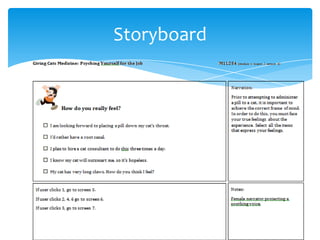
What do you put into the storyboard template?
How do you fill in the template?
Producing a storyboard for a lesson.
Chunking Defined


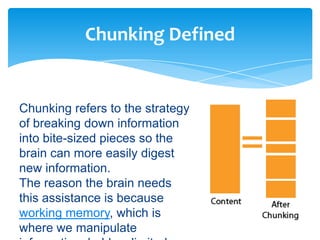
Chunking refers to the strategy
of breaking down information
into bite-sized pieces so the
brain can more easily digest
new information.
The reason the brain needs
this assistance is because
working memory, which is
where we manipulate
Why We Chunk Content


Cognitive researchers now know that the capacity
of working memory depends on the type of
information, the features of the information and the
abilities of the person under experimentation.
The pearl of wisdom here is that if a learner’s
working memory is full, the excess information will
just drop out—as in disappear. That’s a big
challenge for a course designer. It means that if
you are explaining something complex and the
Chunking Information for eLearning


Chunking information is particularly important for
online learning.
Without an instructor to answer questions and to
guide the learning process, eLearning content has
to be organized in a logical and progressive way
through chunking.
Chunking doesn’t only work for your typical linear
instruction, it also works for learning objects, for
non-linear approaches to learning as well as
Four Steps to Chunking Information
   Step 1: Start at the highest level.


what strategies can eLearning designers
implement to overcome this?
Step 1: Start at the highest level.
Use a chunking strategy while determining the
content hierarchy of a course. Determine how
modules, lessons and topics will be organized into
a logical and progressive order.
Start with large chunks of conceptually related
content and use these as your modules. There are
numerous organizational strategies, such as simple
Four Steps to Chunking Information
Step 2: Modules into lessons into topics.


what strategies can eLearning designers
implement to overcome this?
Step 2: Modules into lessons into topics.
Divide modules into smaller related chunks and
these will become your lessons. Continue with this
process until content is broken down to the topic
level. As you become more familiar with the
content, fine tune the internal structure.
Four Steps to Chunking Information
  Step 3: Chunk at the screen level.


what strategies can eLearning designers
implement to overcome this?
Step 3: Chunk at the screen level.
When you have a solid module-lesson-topic
structure, organize the content so each screen
consists of one chunk of related information.
Depending on how you design, this could be at the
topic level, at the detailed learning objective level
or at the concept level. As a guiding rule, avoid
Four Steps to Chunking Information
     Step 4: Do a working memory
                check.

what strategies can eLearning designers
implement to overcome this?
Step 4: Do a working memory check.
Throughout the process, think in terms of working
memory. Do you really need to include all the
content you have in front of you? If not, get rid of
extraneous content. Less is more.
Will the chunk of content require the learner to hold
more than a few things in memory at one time in
What if you have lots of unrelated
            information?

• Turn Bits into Chunks. If you have lots of
unrelated facts, it’s possible that this is extraneous
content and you don’t need it. If you are certain
these unrelated facts need to be included, find
some way that they relate to each other and
connect them.
• In this situation, you have to chunk information in
the opposite direction. Use a strategy that turns
individual bits of information into meaningful
What is an eLearning storyboard?


A storyboard for eLearning is a
document that specifies the
visual elements, text elements,
audio elements, interactions
and branching (where the
system or user will go next) of
every screen in an online
course. Many people also add
the learning objectives to the
Is storyboarding important?


The storyboard specifies what
the graphic designer will
create, what the illustrator will
draw, what the narrator will say
and the interactions that the
programmer will produce. The
storyboard is usually reviewed
by the subject matter expert.
It’s the central document of
How do you go about creating a
           storyboard?


Storyboard could be in a visual approach or in text
approach, which be quicker but may not be as
informative.

You can think of four main ways to go about
creating a visual storyboard.
• Create a template in Word and let each page
  represent one screen.
• Create a template in PowerPoint and let each
What do you put into the storyboard
               template?

Create an area for the storyboard title.
Then create the following labeled boxes or regions
in your template:
1) A box to represent the screen number in your
    numbering scheme.
2) A box to represent the screen itself, meaning
    the visual components of the course.
3) An area for the on-screen text.
4) An area for the audio.
5) An area for the interactions.
6) An area to describe branching.
How do you fill in the template?


Title Area: Add the unit, module, lesson or topic
name.
Screen Number Area: Enter a unique identifier for
each screen. Something like “m1l2s3″ for module 1,
lesson 2, screen3.
Visual Area: Describe in words, sketch or show the
visual, such as the graphic, video clip, etc. You can
include the text that will be on the screen or make
another area for text.
Continue>> Then how do you fill in the
               template?

Interaction Area: Describe the interactions that occur
on each screen. Take advantage of the medium and
provide lots of activities. Specifying these can be tricky
and it often helps to write it out in the logic of
programming. For example, “If button 1 is clicked, go to
screen m1l24″ or “If choice 1 is dragged to correct target,
display this response.”
Branching Area: Define all the system branching that
might occur. Branching differs from interactions, as it
refers to navigating the whole system. There are
standard navigation events, such as Next and Back, as
Storyboard
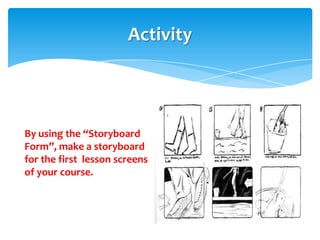
Activity


By using the “Storyboard
Form”, make a storyboard
for the first lesson screens
of your course.
http://www.youtube.com/watch?v=jEcjw9gm7JQ&feature=pl
  cp

  http://www.youtube.com/watch?v=go6HG3Xwo-
  o&feature=plcp

  http://www.youtube.com/watch?v=VCXSwWyTOyw&feature=
  plcp

Introduction to storyboard
  http://elearn.unisim.edu.sg/etp_11/Introduction%20to%20Story
  boarding/
Chunking and storyboarding

Chunking and storyboarding

  • 1.
    Instructional Design andContent Development Workshop
  • 2.
    Topics Chunking defined Why WeChunk Content Chunking Information for e-content Four Steps to Chunking Information What if you have lots of unrelated information? What is an eLearning storyboard? Is storyboarding important? How do you go about creating a storyboard? What do you put into the storyboard template? How do you fill in the template? Producing a storyboard for a lesson.
  • 3.
    Chunking Defined Chunking refersto the strategy of breaking down information into bite-sized pieces so the brain can more easily digest new information. The reason the brain needs this assistance is because working memory, which is where we manipulate
  • 4.
    Why We ChunkContent Cognitive researchers now know that the capacity of working memory depends on the type of information, the features of the information and the abilities of the person under experimentation. The pearl of wisdom here is that if a learner’s working memory is full, the excess information will just drop out—as in disappear. That’s a big challenge for a course designer. It means that if you are explaining something complex and the
  • 5.
    Chunking Information foreLearning Chunking information is particularly important for online learning. Without an instructor to answer questions and to guide the learning process, eLearning content has to be organized in a logical and progressive way through chunking. Chunking doesn’t only work for your typical linear instruction, it also works for learning objects, for non-linear approaches to learning as well as
  • 6.
    Four Steps toChunking Information Step 1: Start at the highest level. what strategies can eLearning designers implement to overcome this? Step 1: Start at the highest level. Use a chunking strategy while determining the content hierarchy of a course. Determine how modules, lessons and topics will be organized into a logical and progressive order. Start with large chunks of conceptually related content and use these as your modules. There are numerous organizational strategies, such as simple
  • 7.
    Four Steps toChunking Information Step 2: Modules into lessons into topics. what strategies can eLearning designers implement to overcome this? Step 2: Modules into lessons into topics. Divide modules into smaller related chunks and these will become your lessons. Continue with this process until content is broken down to the topic level. As you become more familiar with the content, fine tune the internal structure.
  • 8.
    Four Steps toChunking Information Step 3: Chunk at the screen level. what strategies can eLearning designers implement to overcome this? Step 3: Chunk at the screen level. When you have a solid module-lesson-topic structure, organize the content so each screen consists of one chunk of related information. Depending on how you design, this could be at the topic level, at the detailed learning objective level or at the concept level. As a guiding rule, avoid
  • 9.
    Four Steps toChunking Information Step 4: Do a working memory check. what strategies can eLearning designers implement to overcome this? Step 4: Do a working memory check. Throughout the process, think in terms of working memory. Do you really need to include all the content you have in front of you? If not, get rid of extraneous content. Less is more. Will the chunk of content require the learner to hold more than a few things in memory at one time in
  • 10.
    What if youhave lots of unrelated information? • Turn Bits into Chunks. If you have lots of unrelated facts, it’s possible that this is extraneous content and you don’t need it. If you are certain these unrelated facts need to be included, find some way that they relate to each other and connect them. • In this situation, you have to chunk information in the opposite direction. Use a strategy that turns individual bits of information into meaningful
  • 12.
    What is aneLearning storyboard? A storyboard for eLearning is a document that specifies the visual elements, text elements, audio elements, interactions and branching (where the system or user will go next) of every screen in an online course. Many people also add the learning objectives to the
  • 13.
    Is storyboarding important? Thestoryboard specifies what the graphic designer will create, what the illustrator will draw, what the narrator will say and the interactions that the programmer will produce. The storyboard is usually reviewed by the subject matter expert. It’s the central document of
  • 14.
    How do yougo about creating a storyboard? Storyboard could be in a visual approach or in text approach, which be quicker but may not be as informative. You can think of four main ways to go about creating a visual storyboard. • Create a template in Word and let each page represent one screen. • Create a template in PowerPoint and let each
  • 15.
    What do youput into the storyboard template? Create an area for the storyboard title. Then create the following labeled boxes or regions in your template: 1) A box to represent the screen number in your numbering scheme. 2) A box to represent the screen itself, meaning the visual components of the course. 3) An area for the on-screen text. 4) An area for the audio. 5) An area for the interactions. 6) An area to describe branching.
  • 16.
    How do youfill in the template? Title Area: Add the unit, module, lesson or topic name. Screen Number Area: Enter a unique identifier for each screen. Something like “m1l2s3″ for module 1, lesson 2, screen3. Visual Area: Describe in words, sketch or show the visual, such as the graphic, video clip, etc. You can include the text that will be on the screen or make another area for text.
  • 17.
    Continue>> Then howdo you fill in the template? Interaction Area: Describe the interactions that occur on each screen. Take advantage of the medium and provide lots of activities. Specifying these can be tricky and it often helps to write it out in the logic of programming. For example, “If button 1 is clicked, go to screen m1l24″ or “If choice 1 is dragged to correct target, display this response.” Branching Area: Define all the system branching that might occur. Branching differs from interactions, as it refers to navigating the whole system. There are standard navigation events, such as Next and Back, as
  • 18.
  • 19.
    Activity By using the“Storyboard Form”, make a storyboard for the first lesson screens of your course.
  • 20.
    http://www.youtube.com/watch?v=jEcjw9gm7JQ&feature=pl cp http://www.youtube.com/watch?v=go6HG3Xwo- o&feature=plcp http://www.youtube.com/watch?v=VCXSwWyTOyw&feature= plcp Introduction to storyboard http://elearn.unisim.edu.sg/etp_11/Introduction%20to%20Story boarding/