What is
Chunking?
Why chunk
content?

How to
Chunk?
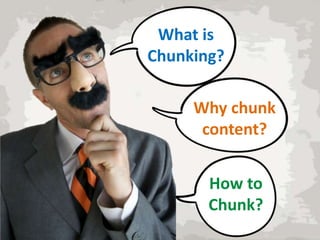
Breaking up Bite-size
content
pieces
Easy to
Shorter Manage

What is
Chunking?

Easier to
remember
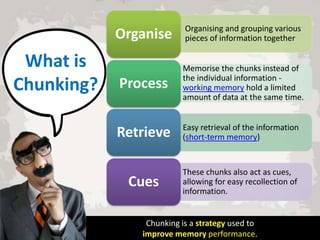
Organise

What is
Chunking?

Organising and grouping various
pieces of information together

Process

Memorise the chunks instead of
the individual information working memory hold a limited
amount of data at the same time.

Retrieve

Easy retrieval of the information
(short-term memory)

Cues

These chunks also act as cues,
allowing for easy recollection of
information.

Chunking is a strategy used to
improve memory performance.
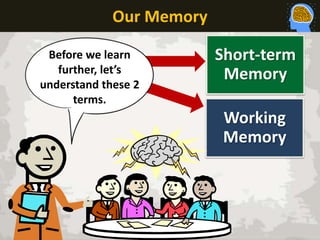
Our Memory
Before we learn
further, let’s
understand these 2
terms.

Short-term
Memory
Working
Memory
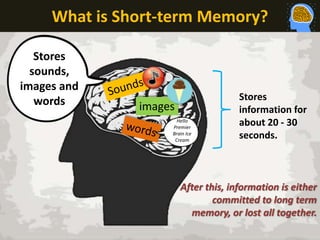
What is Short-term Memory?
Stores
sounds,
images and
words

images
Hello
Premier
Brain Ice
Cream

Stores
information for
about 20 - 30
seconds.

After this, information is either
committed to long term
memory, or lost all together.
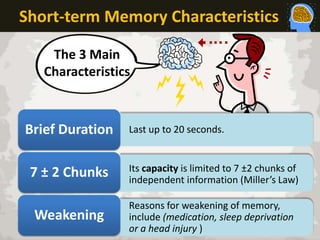
Short-term Memory Characteristics
The 3 Main
Characteristics

Brief Duration

Last up to 20 seconds.

7 ± 2 Chunks

Its capacity is limited to 7 ±2 chunks of
independent information (Miller’s Law)

Weakening

Reasons for weakening of memory,
include (medication, sleep deprivation
or a head injury )
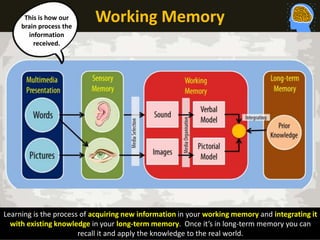
This is how our
brain process the
information
received.

Working Memory

Learning is the process of acquiring new information in your working memory and integrating it
with existing knowledge in your long-term memory. Once it’s in long-term memory you can
recall it and apply the knowledge to the real world.
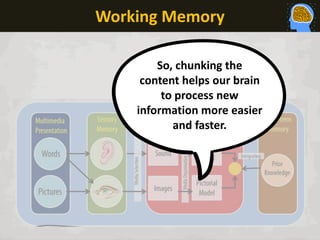
Working Memory
So, chunking the
content helps our brain
to process new
information more easier
and faster.
OK, now we
learn how to
chunk The
Content

HAIYA!!!
But, why chunk
content?

It helps you present
information in a way
that makes it easy for
your audience to
understand and
remember.
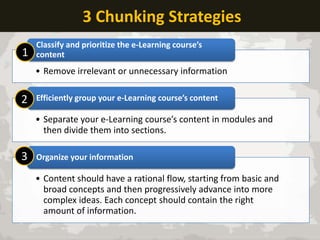
3 Chunking Strategies
1

Classify and prioritize the e-Learning course’s
content

• Remove irrelevant or unnecessary information

2

Efficiently group your e-Learning course’s content

• Separate your e-Learning course’s content in modules and
then divide them into sections.

3

Organize your information

• Content should have a rational flow, starting from basic and
broad concepts and then progressively advance into more
complex ideas. Each concept should contain the right
amount of information.
Learning is acquiring new, or modifying and
reinforcing, existing knowledge, behaviors, skills,
values, or preferences and may involve synthesizing
different types of information. The ability to learn is
possessed by humans, animals and some machines.
Progress over time tends to follow learning curves.
Learning is not compulsory; it is contextual. It does not
happen all at once, but builds upon and is shaped by
what we already know. To that end, learning may be
viewed as a process, rather than a collection of factual
and procedural knowledge. Learning produces changes
in the organism and the changes produced are
relatively permanent

How to Chunk
Content?
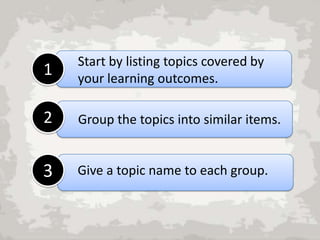
1

Start by listing topics covered by
your learning outcomes.

2

Group the topics into similar items.

3

Give a topic name to each group.
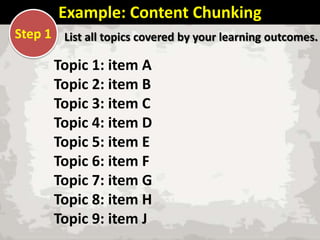
Example: Content Chunking
Step 1 List all topics covered by your learning outcomes.

Topic 1: item A
Topic 2: item B
Topic 3: item C
Topic 4: item D
Topic 5: item E
Topic 6: item F
Topic 7: item G
Topic 8: item H
Topic 9: item J
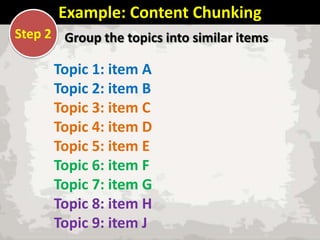
Example: Content Chunking
Step 2 Group the topics into similar items

Topic 1: item A
Topic 2: item B
Topic 3: item C
Topic 4: item D
Topic 5: item E
Topic 6: item F
Topic 7: item G
Topic 8: item H
Topic 9: item J
Example: Content Chunking
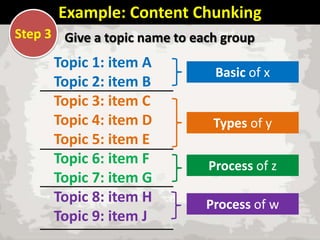
Step 3 Give a topic name to each group

Topic 1: item A
Topic 2: item B
Topic 3: item C
Topic 4: item D
Topic 5: item E
Topic 6: item F
Topic 7: item G
Topic 8: item H
Topic 9: item J

Basic of x

Types of y
Process of z
Process of w
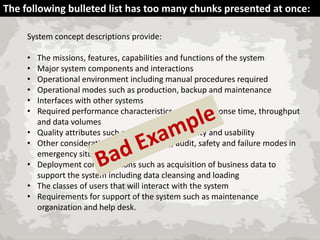
The following bulleted list has too many chunks presented at once:
System concept descriptions provide:
•
•
•
•
•
•
•
•
•
•
•

The missions, features, capabilities and functions of the system
Major system components and interactions
Operational environment including manual procedures required
Operational modes such as production, backup and maintenance
Interfaces with other systems
Required performance characteristics such as response time, throughput
and data volumes
Quality attributes such as availability, reliability and usability
Other considerations such as security, audit, safety and failure modes in
emergency situations
Deployment considerations such as acquisition of business data to
support the system including data cleansing and loading
The classes of users that will interact with the system
Requirements for support of the system such as maintenance
organization and help desk.
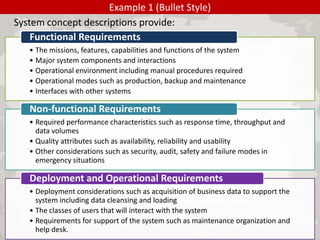
Example 1 (Bullet Style)
System concept descriptions provide:
Functional Requirements
• The missions, features, capabilities and functions of the system
• Major system components and interactions
• Operational environment including manual procedures required
• Operational modes such as production, backup and maintenance
• Interfaces with other systems

Non-functional Requirements
• Required performance characteristics such as response time, throughput and
data volumes
• Quality attributes such as availability, reliability and usability
• Other considerations such as security, audit, safety and failure modes in
emergency situations

Deployment and Operational Requirements
• Deployment considerations such as acquisition of business data to support the
system including data cleansing and loading
• The classes of users that will interact with the system
• Requirements for support of the system such as maintenance organization and
help desk.
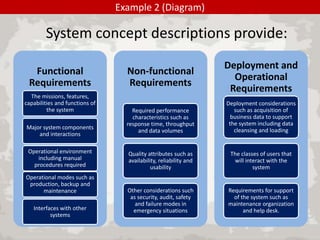
Example 2 (Diagram)

System concept descriptions provide:
Functional
Requirements
The missions, features,
capabilities and functions of
the system
Major system components
and interactions
Operational environment
including manual
procedures required
Operational modes such as
production, backup and
maintenance
Interfaces with other
systems

Non-functional
Requirements

Deployment and
Operational
Requirements

Required performance
characteristics such as
response time, throughput
and data volumes

Deployment considerations
such as acquisition of
business data to support
the system including data
cleansing and loading

Quality attributes such as
availability, reliability and
usability

The classes of users that
will interact with the
system

Other considerations such
as security, audit, safety
and failure modes in
emergency situations

Requirements for support
of the system such as
maintenance organization
and help desk.
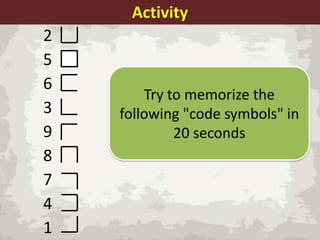
Activity
2
5
6
3
9
8
7
4
1

Try to memorize the
following "code symbols" in
20 seconds
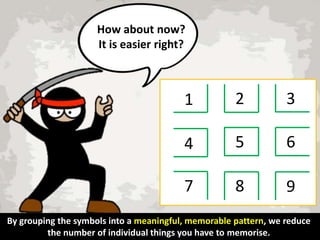
How about now?
It is easier right?

1

2

3

4

5

6

7

8

9

By grouping the symbols into a meaningful, memorable pattern, we reduce
the number of individual things you have to memorise.
Summary

Yeah! It has
Improved my
memory
performance!
References
1

3 Chunking Strategies

http://elearningindustry.com/3-chunking-strategiesthat-every-instructional-designer-should-know

2

Chunking Psychology

http://en.wikipedia.org/wiki/Chunking_%28psychol
ogy%29

3

Effective Memory Strategy

https://k12teacherstaffdevelopment.com/tlb/howcan-i-use-chunking-as-an-effective-memorystrategy-in-the-classroom/

4

4 Tips for Content Chunking

http://elearningindustry.com/4-tips-for-contentchunking-in-e-learning
Fareeza Marican Abu Backer Maricar
Senior Learning Designer

E-mail : fareeza_marican@imu.edu.my
Slides : www.slideshare.net/FareezaM
Twitter: http://twitter.com/fareeza81
IMU : http://www.imu.edu.my

Basics of Content Chunking

  • 2.
  • 3.
    Breaking up Bite-size content pieces Easyto Shorter Manage What is Chunking? Easier to remember
  • 4.
    Organise What is Chunking? Organising andgrouping various pieces of information together Process Memorise the chunks instead of the individual information working memory hold a limited amount of data at the same time. Retrieve Easy retrieval of the information (short-term memory) Cues These chunks also act as cues, allowing for easy recollection of information. Chunking is a strategy used to improve memory performance.
  • 5.
    Our Memory Before welearn further, let’s understand these 2 terms. Short-term Memory Working Memory
  • 6.
    What is Short-termMemory? Stores sounds, images and words images Hello Premier Brain Ice Cream Stores information for about 20 - 30 seconds. After this, information is either committed to long term memory, or lost all together.
  • 7.
    Short-term Memory Characteristics The3 Main Characteristics Brief Duration Last up to 20 seconds. 7 ± 2 Chunks Its capacity is limited to 7 ±2 chunks of independent information (Miller’s Law) Weakening Reasons for weakening of memory, include (medication, sleep deprivation or a head injury )
  • 8.
    This is howour brain process the information received. Working Memory Learning is the process of acquiring new information in your working memory and integrating it with existing knowledge in your long-term memory. Once it’s in long-term memory you can recall it and apply the knowledge to the real world.
  • 9.
    Working Memory So, chunkingthe content helps our brain to process new information more easier and faster.
  • 10.
    OK, now we learnhow to chunk The Content HAIYA!!!
  • 11.
    But, why chunk content? Ithelps you present information in a way that makes it easy for your audience to understand and remember.
  • 12.
    3 Chunking Strategies 1 Classifyand prioritize the e-Learning course’s content • Remove irrelevant or unnecessary information 2 Efficiently group your e-Learning course’s content • Separate your e-Learning course’s content in modules and then divide them into sections. 3 Organize your information • Content should have a rational flow, starting from basic and broad concepts and then progressively advance into more complex ideas. Each concept should contain the right amount of information.
  • 13.
    Learning is acquiringnew, or modifying and reinforcing, existing knowledge, behaviors, skills, values, or preferences and may involve synthesizing different types of information. The ability to learn is possessed by humans, animals and some machines. Progress over time tends to follow learning curves. Learning is not compulsory; it is contextual. It does not happen all at once, but builds upon and is shaped by what we already know. To that end, learning may be viewed as a process, rather than a collection of factual and procedural knowledge. Learning produces changes in the organism and the changes produced are relatively permanent How to Chunk Content?
  • 14.
    1 Start by listingtopics covered by your learning outcomes. 2 Group the topics into similar items. 3 Give a topic name to each group.
  • 15.
    Example: Content Chunking Step1 List all topics covered by your learning outcomes. Topic 1: item A Topic 2: item B Topic 3: item C Topic 4: item D Topic 5: item E Topic 6: item F Topic 7: item G Topic 8: item H Topic 9: item J
  • 16.
    Example: Content Chunking Step2 Group the topics into similar items Topic 1: item A Topic 2: item B Topic 3: item C Topic 4: item D Topic 5: item E Topic 6: item F Topic 7: item G Topic 8: item H Topic 9: item J
  • 17.
    Example: Content Chunking Step3 Give a topic name to each group Topic 1: item A Topic 2: item B Topic 3: item C Topic 4: item D Topic 5: item E Topic 6: item F Topic 7: item G Topic 8: item H Topic 9: item J Basic of x Types of y Process of z Process of w
  • 18.
    The following bulletedlist has too many chunks presented at once: System concept descriptions provide: • • • • • • • • • • • The missions, features, capabilities and functions of the system Major system components and interactions Operational environment including manual procedures required Operational modes such as production, backup and maintenance Interfaces with other systems Required performance characteristics such as response time, throughput and data volumes Quality attributes such as availability, reliability and usability Other considerations such as security, audit, safety and failure modes in emergency situations Deployment considerations such as acquisition of business data to support the system including data cleansing and loading The classes of users that will interact with the system Requirements for support of the system such as maintenance organization and help desk.
  • 19.
    Example 1 (BulletStyle) System concept descriptions provide: Functional Requirements • The missions, features, capabilities and functions of the system • Major system components and interactions • Operational environment including manual procedures required • Operational modes such as production, backup and maintenance • Interfaces with other systems Non-functional Requirements • Required performance characteristics such as response time, throughput and data volumes • Quality attributes such as availability, reliability and usability • Other considerations such as security, audit, safety and failure modes in emergency situations Deployment and Operational Requirements • Deployment considerations such as acquisition of business data to support the system including data cleansing and loading • The classes of users that will interact with the system • Requirements for support of the system such as maintenance organization and help desk.
  • 20.
    Example 2 (Diagram) Systemconcept descriptions provide: Functional Requirements The missions, features, capabilities and functions of the system Major system components and interactions Operational environment including manual procedures required Operational modes such as production, backup and maintenance Interfaces with other systems Non-functional Requirements Deployment and Operational Requirements Required performance characteristics such as response time, throughput and data volumes Deployment considerations such as acquisition of business data to support the system including data cleansing and loading Quality attributes such as availability, reliability and usability The classes of users that will interact with the system Other considerations such as security, audit, safety and failure modes in emergency situations Requirements for support of the system such as maintenance organization and help desk.
  • 21.
    Activity 2 5 6 3 9 8 7 4 1 Try to memorizethe following "code symbols" in 20 seconds
  • 22.
    How about now? Itis easier right? 1 2 3 4 5 6 7 8 9 By grouping the symbols into a meaningful, memorable pattern, we reduce the number of individual things you have to memorise.
  • 23.
    Summary Yeah! It has Improvedmy memory performance!
  • 24.
    References 1 3 Chunking Strategies http://elearningindustry.com/3-chunking-strategiesthat-every-instructional-designer-should-know 2 ChunkingPsychology http://en.wikipedia.org/wiki/Chunking_%28psychol ogy%29 3 Effective Memory Strategy https://k12teacherstaffdevelopment.com/tlb/howcan-i-use-chunking-as-an-effective-memorystrategy-in-the-classroom/ 4 4 Tips for Content Chunking http://elearningindustry.com/4-tips-for-contentchunking-in-e-learning
  • 25.
    Fareeza Marican AbuBacker Maricar Senior Learning Designer E-mail : fareeza_marican@imu.edu.my Slides : www.slideshare.net/FareezaM Twitter: http://twitter.com/fareeza81 IMU : http://www.imu.edu.my

Editor's Notes

  • #4 Presenting lecture style content items in an online course frequently involves paragraph after paragraph of plain text. Students often first scroll through a page to see how intense the reading will be and get discouraged before they begin to focus on the content. Effective instructional tables provide course authors with yet another tool to break content into more reader-friendly chunks which ultimately leads to improved comprehension.
  • #15 There are several ways to chunk information. Chunking techniques include grouping, finding patterns, and organizing. The technique you use to chunk will depend on the information you are chunking. Sometimes more than one technique will be possible but with some practice and insight it will be possible to determine which technique will work best for you.
  • #20 The chunking principle requires you to classify the items into groups to reduce the information overload
  • #21 Another example: You may use this format for your lecture slides since you are able to use bigger font for the learners to see and read.
  • #23 by grouping the symbols into a meaningful, memorable pattern, we reduce the number of individual things you have to memorize, and increase the chances.