ABSTRACT
Now a days the chance of missing childrens are going in rampant. So in order to reduce this problem, we
are presenting a paper on Child Tracking System Using Arduino Uno and Google Map. This system is
used for tracking the information of the lost child using Google Map along with the position and location
of that child through GPS. This process operate simply by keeping the “tracking system device” into the
bag of that particular child, who is going to school or outside world and now if in case that child is lost or
missed then the parents of that particular child can simply track him/her by hit a button and call send
to the parents. In this way the parents get the real time location by receiving the exact position of the
child along with the longitude and latitude of that place then it will be copied into the Google map and
the locationof that lostchildcan easilybe accessed.
https://technoelectronics44.blogspot.com/
CHAPTER-1
INTRODUCTION TO EMBEDDED SYSTEMS
An embedded system is a special-purpose computer system designed to perform one or a
few dedicated functions, often with real-time computing constraints. It is usually embedded as
part of a complete device including hardware and mechanical parts. In contrast, a general-
purpose computer, such as a personal computer, can do many different tasks depending on
programming. Embedded systems control many of the common devices in use today .Since the
embedded system is dedicated to specific tasks; design engineers can optimize it, reducing the
size and cost of the product, or increasing the reliability and performance. Some embedded
systems are mass-produced, benefiting from economies of scale.
Physically, embedded systems range from portable devices such as digital watches and
MP3 players, to large stationary installations like traffic lights, factory controllers, or the systems
controlling nuclear power plants. Complexity varies from low, with a single microcontroller
chip, to very high with multiple units, peripherals and networks mounted inside a large chassis or
enclosure
In general, "embedded system" is not an exactly defined term, as many systems have
some element of programmability. For example, Handheld computers share some elements with
embedded systems — such as the operating systems and microprocessors which power them —
but are not truly embedded systems, because they allow different applicationsto be loaded and
peripherals to be connected. Embedded systems span all aspects of modern life and there are
many examples of their use. Telecommunications systems employ numerous embedded systems
from telephone switches for the network to mobile phones at the end-user. Computer networking
uses dedicated routers and network bridges to route data.
Characteristics:
1. Embedded systems are designed to do some specific task, rather than be a general-
purpose computer for multiple tasks. Some also have real-time performance constraints
that must be met, for reasons such as safety and usability; others may have low or no
performance requirements, allowing the system hardware to be simplified to reduce costs.
2. Embedded systems are not always standalone devices. Many embedded systems consist
of small, computerized parts within a larger device that serves a more general purpose.
For example, the Gibson Robot Guitar features an embedded system for tuning the
strings, but the overall purpose of the Robot Guitar is, of course, to play music. Similarly,
an embedded system in an automobile provides a specific function as a subsystem of the
car itself.
3. The software written for embedded systems is often called firmware, and is usually stored
in read-only memory or Flash memory chips rather than a disk drive. It often runs with
limited computer hardware resources: small or no keyboard, screen, and little memory.
CPU Platforms:
Embedded processors can be broken into two broad categories: ordinary microprocessors
(μP) and microcontrollers (μC), which have many more peripherals on chip, reducing cost and
size. Contrasting to the personal computer and server markets, a fairly large number of basic
CPU architectures are used; there are Von Neumann as well as various degrees of Harvard
architectures, RISC as well as non-RISC and VLIW; word lengths vary from 4-bit to 64-bits and
beyond (mainly in DSP processors) although the most typical remain 8/16-bit. Most architecture
comes in a large number of different variants and shapes, many of which are also manufactured
by several different companies.
ASIC and FPGA solutions:
A common configuration for very-high-volume embedded systems is the system on a
chip (SoC), an application-specific integrated circuit (ASIC), for which the CPU core was
purchased and added as part of the chip design. A related scheme is to use a field-programmable
gate array (FPGA), and program it with all the logic, including the CPU.
Peripherals: Embedded Systems talk with
the outside world via peripherals, such as
 Serial Communication Interfaces (SCI): RS-232, RS-422, RS-485etc
 Synchronous Serial Communication Interface: I2C, JTAG, SPI, SSC and ESSI
 Universal Serial Bus (USB)
 Networks: Ethernet, Controller Area Network, LAN networks, etc
 Timers: PLL(s), Capture/Compare and Time Processing Units
 Discrete IO: aka General Purpose Input/output (GPIO)
 Analog to Digital/Digital to Analog (ADC/DAC)
Tools:
As for other software, embedded system designers use compilers, assemblers, and debuggers
to develop embedded system software. However, they may also use some more specific tools:
 In circuit debuggers or emulators
 Utilities to add a checksum or CRC to a program, so the embedded system can check if
the program is valid.
 For systems using digital signal processing, developers may use a math workbench such
as MATLAB, Simulink, MathCad, or Mathematica to simulate the mathematics. They
might also use libraries for both the host and target which eliminates developing DSP
routines as done in DSPnano RTOS and Unison Operating System.
 Custom compilers and linkers may be used to improve optimization for the particular
hardware.
 An embedded system may have its own special language or design tool, or add
enhancements to an existing language such as Forth or Basic.
 Another alternative is to add a Real-time operating system or Embedded operating
system, which may have DSP capabilities like DSP nano RTOS.
Software tools can come from several sources:
 Software companies that specialize in the embedded market
 Ported from the GNU software development tools
 Sometimes, development tools for a personal computer can be used if the embedded
processor is a close relative to a common PC processor
As the complexity of embedded systems grows, higher level tools and operating systems are
migrating into machinery where it makes sense. For example, cell phones, personal digital
assistants and other consumer computers often need significant software that is purchased or
provided by a person other than the manufacturer of the electronics. In these systems, an open
programming environment such as Linux, NetBSD, OSGi or Embedded Java is required so that
the third-party software provider can sell to a large market.
CHAPTER-2
PROJECT OVER VIEW
INTRODUCTION:
Now a day’s child tracking system is widely used all over in the word and it gives the assurance
to the parents that their child is safe from suspicious action. In this paper we will show the system
requirement for tracking the child and describe the implementation feature. To implement such system
a GPS with high accuracy is required, if the low accuracy GPS is used in this system,. System may give
some error of that child location . In this system we send the message name TRACK to the device and
the GPS of that device send the longitude and latitude to the IOT module , IOT module receive the
information about longitude and latitude of that child location , further this message will be send to the
user for tracking the location of that lost child. The Ardunio is a small micro controller which is used for
controlling whole process in this system .This paper provides the concept for developing a low cost ,
high accuracy and user friendly system by using Google map . Google map can improve the accuracy of
GPS. This paper presents research that applies Google map to describe the Child Tracking System.
Improvementsare provedbyGoogle mapthatmake highaccuracy
EXISTING SYSTEM:
Existing System The research paper of 2016 child has been tracked but system is complex due to use of
ARM controller . And in 2013 the paper GPS and IOT child tracking system using smart phone, But it is
not necessary to child have the with him. Now, we design Arduino based child tracking system using GPS
and IOT which is economical. There are various researches in improving the accuracy of GPS point . Now
we can simply find the child location by using the Google Map. Google Map Web mapping service
developed by Jens Eilstrup Rasmussen. It provides turn by turn navigation along dedicated parking
assistance feature.Itisprimarilyavailableonthe mobile.
PROPOSED SYSTEM:
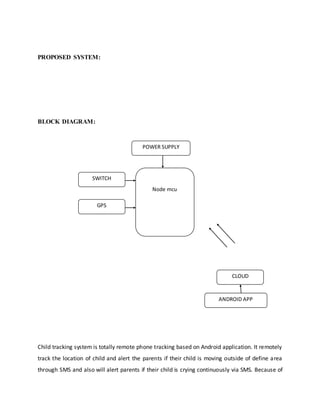
BLOCK DIAGRAM:
Child tracking system is totally remote phone tracking based on Android application. It remotely
track the location of child and alert the parents if their child is moving outside of define area
through SMS and also will alert parents if their child is crying continuously via SMS. Because of
POWER SUPPLY
Node mcu
SWITCH
CLOUD
ANDROID APP
GPS
this parents will have a powerful tool to keep the observation on their child even when they
can’t physically see them.
By using following techniques child activity can be tracked.
 SMS tracking- To alert the parents when child is hit the button and if he moved away from
define area.
 GPS tracking- To provide current location of child to parents and also define the boundary
area.
 Tracking/blocking- Parents can track and update the new location and call from particular
number if necessary, in case of cell phone tracking system.
Alternatively Android app will be developed which will also show the location of child,
for this android app received message will consist of latitude and longitude value. But for this
android phone is necessarily required. This alert message will be send until child come back into
define area or till system is shutdown. Because of this continuous monitoring of child will not
be required. Even after this if parents want to see the current location of child they can send
the message to child module and obtained the location of child.
CHAPTER-3
ARDUINO
Arduino interface boards provide the engineers, artists, designers, hobbyists and
anyone who tinker with technology with a low-cost, easy-to-use technology to create their
creative, interactive objects, useful projects etc., A whole new breed of projects can now be built
that can be controlTRANSMITTER from a computer.
1.1 WHAT IS ARDUINO?
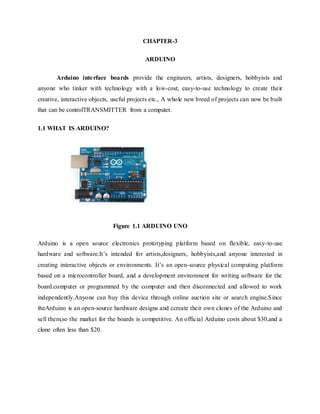
Figure 1.1 ARDUINO UNO
Arduino is a open source electronics prototyping platform based on flexible, easy-to-use
hardware and software.It’s intended for artists,designers, hobbyists,and anyone interested in
creating interactive objects or environments. It’s an open-source physical computing platform
based on a microcontroller board, and a development environment for writing software for the
board.computer or programmed by the computer and then disconnected and allowed to work
independently.Anyone can buy this device through online auction site or search engine.Since
theArduino is an open-source hardware designs and ccreate their own clones of the Arduino and
sell them,so the market for the boards is competitive. An official Arduino costs about $30,and a
clone often less than $20.
The name “Arduino” is reserved by the original makers. However, clone Arduino designs
often have the letters “duino” on the end of their name, for example, Freeduino or DFRduino.
The software for programming your Arduino is easy to use and also freely available for
Windows, Mac, and LINUX computers at no cost.
1.1.1 MICROCONTROLLER
Microcontroller can be described as a computer embedded on a rather small circuit board.To
describe the function of a microcontroller more precisely,it is a single chip that can perform
various calculations and tasks,and send/receive signals from other devices via the available pins.
Precisely what tasks and communication with the world it does, is what is governed by what
instructions we give to the Microcontroller. It is this job of telling the chip what to do, is what we
refer to as programming on it.
However, the uC by itself, cannot accomplish much; it needs several external inputs:
power, for one; a steady clock signal, for another. Also, the job of programming it has to be
accomplished by an external circuit. So typically, auC is used along with a circuit which
provides these things to it; this combination is calTRANSMITTER a microcontroller board. The
Arduino Uno that you have recieved, is one such microcontroller board. The actual
microcontroller at its heart is the chip calTRANSMITTER Atmega328. The advantages that
Arduino offers over other microcontroller boards are largely in terms of reliability of the circuit
hardware as well as the ease of programming and using it.
1.1.2 OPEN-SOURCE HARDWARE
Open-source hardware shares much of the principles and approach of free and open-
source software.The founders of Arduino wanted people to study their hardware,to understand
how it works,make changes to it,and share those changes with the world.To facilitate this,they
release all of the original design files(Eagle CAD)for the Arduinohardware.These files are
licensed under a Creative Common Attribution Share-Alike license,which allows for both
personal and commercial derivative works,as long as they(people) credit Arduino and release
their designs under the same license.
The Arduino software is also oen-source.The source code for the Java environment is released
under the GPL and the C/C++ microcontroller libraries are under the LGPL
1.2 HISTORY OF ARDUINO
While teaching a physical computing class at the Interaction Design Institute Ivrea in 2005,
Massimo Banzi’s students were unwilling to spend the 76 euros for the BASIC Stamp
microcontrollers commonly used in such applications. Banzi and his collegues looked for
alternatives, finally settling on the wiring platform developed by one of Banzi’s students. In his
own words:
“…we started to figure out how could we make the whole platform even simpler, even cheaper,
even easier to use. And then we started to essentially reimplement the whole thing as an open
source project.”
Once they had a prototype, a student wrote the software that would allow wiring programs to run
on the new platform. Upon seeing the project, visiting professor Casey Reas suggested that there
might be wider applications than just design schools for the new product. The prototype was
redesigned for mass production and a test run of 200 boards was made. Orders began coming in
from other design schools and the students looking for Arduinos, and the Arduino project was
born and MassimoBanzi and David Cuartielles became its founders.”ARDUINO” is an Italian
word,meaning “STRONG FRIEND”.The English version of the name is “Hardwin”. As of May
2011,more than 300,000 Arduino units are “in the wild”.
1.2.1 DesignGoals
 Work with a Mac (as most design students use one)
 USB connectivity (MacBooks don’t have serial ports
 Look nice
 Cheap (about 20 euros, the cost of going out for pizza in Europe)
 More powerful than a BASIC stamp
 Something you could build/fix yourself
Simple and easy to use by someone without formal electronics training
1.2.2 Business Models
Since the entire project is open source, anyone can build and sell Arduino-compatible devices.
So in this sense, the Arduino project relies heavily on its branding for it’s financial success .
Other projects manufacture compatible and cheaper boards, however people are loyal to the
Arduino branded boards because they associate quality and a certain image to the final product .
1.2.2.1 By the Numbers
Year Units Sold
2005 200
2006 10 000
2010 120 000
2011 300 000
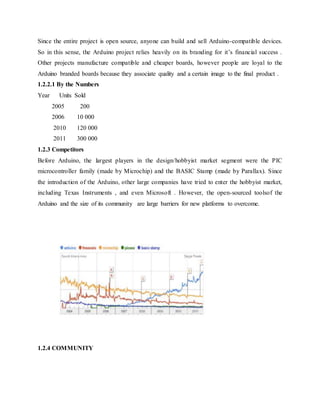
1.2.3 Competitors
Before Arduino, the largest players in the design/hobbyist market segment were the PIC
microcontroller family (made by Microchip) and the BASIC Stamp (made by Parallax). Since
the introduction of the Arduino, other large companies have tried to enter the hobbyist market,
including Texas Instruments , and even Microsoft . However, the open-sourced toolsof the
Arduino and the size of its community are large barriers for new platforms to overcome.
1.2.4 COMMUNITY
Figure 3.1GOOGLE trends comparing ARDUINO with its biggest competitors
As the project is aimed at students and hobbyists who may not have any formal electronics
background, there are many excellent guides online covering everything from making a light
blink to creating a laser harp. The official forum has almost 60 000 registered users, and along
with helping users with their projects, is extremely active in developing new libraries to extend
the functionality of the Arduino . The open-source share and share alike sentiment is very strong,
and the vast majority of users freely publish the code to their projects.
1.3 PHYSICAL COMPUTING
Physical Computing is an approach to learn how humans communicate through computers that
starts by considering how humans express themselves physically.
PLATFORM DESIGN FOR ARUINO
2.1 HARDWARE
2.1.1 ARDUINO Board Layout
Figure 2.2: ARDUINO board layout
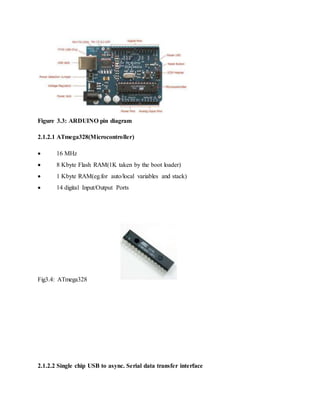
2.1.2 ARDUINO pin diagram
Figure 3.3: ARDUINO pin diagram
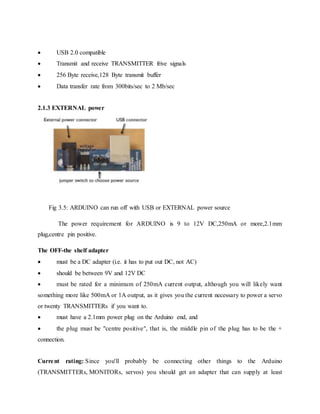
2.1.2.1 ATmega328(Microcontroller)
 16 MHz
 8 Kbyte Flash RAM(1K taken by the boot loader)
 1 Kbyte RAM(eg.for auto/local variables and stack)
 14 digital Input/Output Ports
Fig3.4: ATmega328
2.1.2.2 Single chip USB to async. Serial data transfer interface
 USB 2.0 compatible
 Transmit and receive TRANSMITTER frive signals
 256 Byte receive,128 Byte transmit buffer
 Data transfer rate from 300bits/sec to 2 Mb/sec
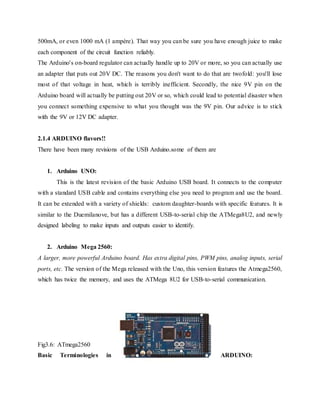
2.1.3 EXTERNAL power
Fig 3.5: ARDUINO can run off with USB or EXTERNAL power source
The power requirement for ARDUINO is 9 to 12V DC,250mA or more,2.1mm
plug,centre pin positive.
The OFF-the shelf adapter
 must be a DC adapter (i.e. it has to put out DC, not AC)
 should be between 9V and 12V DC
 must be rated for a minimum of 250mA current output, although you will likely want
something more like 500mA or 1A output, as it gives you the current necessary to power a servo
or twenty TRANSMITTERs if you want to.
 must have a 2.1mm power plug on the Arduino end, and
 the plug must be "centre positive", that is, the middle pin of the plug has to be the +
connection.
Current rating: Since you'll probably be connecting other things to the Arduino
(TRANSMITTERs, MONITORs, servos) you should get an adapter that can supply at least
500mA, or even 1000 mA (1 ampère). That way you can be sure you have enough juice to make
each component of the circuit function reliably.
The Arduino's on-board regulator can actually handle up to 20V or more, so you can actually use
an adapter that puts out 20V DC. The reasons you don't want to do that are twofold: you'll lose
most of that voltage in heat, which is terribly inefficient. Secondly, the nice 9V pin on the
Arduino board will actually be putting out 20V or so, which could lead to potential disaster when
you connect something expensive to what you thought was the 9V pin. Our advice is to stick
with the 9V or 12V DC adapter.
2.1.4 ARDUINO flavors!!
There have been many revisions of the USB Arduino.some of them are
1. Arduino UNO:
This is the latest revision of the basic Arduino USB board. It connects to the computer
with a standard USB cable and contains everything else you need to program and use the board.
It can be extended with a variety of shields: custom daughter-boards with specific features. It is
similar to the Duemilanove, but has a different USB-to-serial chip the ATMega8U2, and newly
designed labeling to make inputs and outputs easier to identify.
2. Arduino Mega 2560:
A larger, more powerful Arduino board. Has extra digital pins, PWM pins, analog inputs, serial
ports, etc. The version of the Mega released with the Uno, this version features the Atmega2560,
which has twice the memory, and uses the ATMega 8U2 for USB-to-serial communication.
Fig3.6: ATmega2560
Basic Terminologies in ARDUINO:
1.Analog to digital converter(ADC)
The process of Analog to digital conversion is shown in figure.
The Arduino has 10 bits of Resolution when reading analog signals.
2 power 10=1024 increments
2.Pulse width modulation (PWM)
The Arduino has 8bit of resolution,when outputting a signal using PWM.The range of output
voltage is from 0 to 5 Volts
2power 8=255 Increments
Average of on/off(digital signals to make an average voltage),Duty cycle in 100% of 5Volts.
2.3 LANGUAGE REFERENCES:
The Microcontroller on the board is programmed using the Arduino programming
language(based on wiring) and the arduino development environment(based on processing).
2.3.1 Arduino Programming Language(APL)(based on wiring)
The Arduino programming language is an implementation of Wiring, a similar physical
computing platform, which is based on the Processing multimedia programming environment.
2.3.1.1 Wiring
Wiring is an open-source programming framework for microcontrollers. Wiring allows writing
cross-platform software to control devices attached to a wide range of microcontroller boards to
create all kinds of creative coding, interactive objects, spaces or physical experiences. The
framework is thoughtfully created with designers and artists in mind to encourage a community
where beginners through experts from around the world share ideas, knowTRANSMITTERge
and their collective experience. There are thousands of students, artists, designers, researchers,
and hobbyists who use Wiring for learning, prototyping, and finished professional work
production.
2.3.2 Arduino development environment(based on processing)
2.3.2.1 Processing
Processing is an open source programming language and environment for people who want to
create images, animations, and interactions. Initially developed to serve as a software sketchbook
and to teach fundamentals of computer programming within a visual context, Processing also has
evolved into a tool for generating finished professional work. Today, there are tens of thousands
of students, artists, designers, researchers, and hobbyists who use Processing for learning,
prototyping, and production.
APPLICATIONS OF ARDUINO
Arduino was basically designes to make the process of using electronics in multidisciplinary
projects more accessible.It is intended for artists,designers,hobbyists,and anyone interested in
creating interactive objects or environments.Arduino can sense the environment by receiving
input from a variety of sensors and can affect its surroundings by controlling lights,motors,and
other actuators.because of these features,arduino finds extensive application in various
fields.Arduino projects can be stand-alone or they can communicate with software running on a
computer.
Arduino received anHonarary Mention in Digital Communication section of the 2006 Ars
Electronica Prix
Arduino is used by all class of people in a different way.some students use it in their
projects,some using arduino for fun,some went out to become entreupreuners.This only shows
how useful is this tiny device.
ARDUINO is spreading rapidly across the globe. Arduino is actually an open source
hardware project that can be pro grammed to read temperatures, control a motor, and sense
touch.theArduino is both a cute, blue micro controller platform that fits nicely in the palm of
your hand and an expanding community of developers who support it, distributed across two
dozen coun tries, four continents, and counting.
The Arduino board is for anyone who wants to build a basic level of intelligence into an object.
Once programmed, it can read sensors, make simple decisions, and control myriad devices in the
real world. Using it is a snap: first, hook up a few sensors and output devices to the Arduino,
then program it using the free developer’s software. Next, debug your code and disconnect the
Arduino.Then,the little blue Arduino becomes a standalone computer.
The original intention of the Arduino project was to see what would happen if community
support were substituted for the corporate support that is usually required for electronics
development. The first developers — Massimo Banzi, David Cuartielles, David Mellis, and
Nicholas Zambetti — ran a series of workshops on assembling the Arduino, giving away the
board to stimulate development.
Thousands of projects have been done worldwide using this tiny little device.some of which to
mention are:
 Simple room temperature readout
 Interactive real-time auditory feedback system
 GPS receiver Module
 Ultrasonic Sensor
 Infrared detectors
 SONAR
 Various sensor projects like
 Keypad security code
 Sensor tube for heart monitor
 Pulse rate monitor
 Various light projects like
 Multicolor light display
 Seven-segment TRANSMITTER display
 Double seven-segment TRANSMITTER dice
 TRANSMITTER array
 MONITOR module
 Various sound projects like
 Oscilloscope
 Light harp
 VU meter
 Various power projects like
 MONITOR Thermostat
 Computer controlTRANSMITTER fan
 The hypnotizer
 Miscellaneous Projects like
 Lie detector
 Magnetic door lock
 Infrared remote
 Lilypad binary clock
Just to name a few….as the trademark goes,there are nearly infinite possible projects
using this tiny device,which we still yet to discover
Some of the major applications are 3D printers,whos founder went out to become an
euntreuprenuer,and major pride came to ARDUINO,when giant firm GOOGLE’s most ambitious
ANDROID,deployed ARDUINO in its new venture “ANDROID OPEN ACCESSORY
DEVELOPMENT KIT”.which allows external USB hardware to interact with an Android-
powered device in a special accessory mode.ANDROID executive announced this in annual
GOOGLE IO meet conference 2011.ANDROID calls that device made of arduino as
ADK(Android development kit).
Arduino also has won annual “2012 INTERACTION AWARD” sponsored by GOOGLE,for its
extensive applications in various fields.
NODEMCU
NodeMCU
It is an open source IoT platform.[4][5]
It includes firmware which runs on the ESP8266 Wi-Fi SoC from
Espressif Systems, and hardware which is based on the ESP-12 module.[6][7]
The term "NodeMCU"
by default refers to the firmware rather than the development kits. The firmware uses
the Lua scripting language. It is based on the eLua project, and built on the Espressif Non-OS SDK
for ESP8266
HISTORY:
NodeMCU was created shortly after the ESP8266 came out. On December 30,
2013, Espressif Systems[6] began production of the ESP8266.[10] The ESP8266 is a Wi-Fi SoC
integrated with a Tensilica Xtensa LX106 core,[citation needed] widely used in IoT applications
(see related projects). NodeMCU started on 13 Oct 2014, when Hong committed the first file of
nodemcu-firmware to GitHub.[11] Two months later, the project expanded to include an open-
hardware platform when developer Huang R committed the gerber file of an ESP8266 board,
named devkit v0.9.[12] Later that month, Tuan PM ported MQTT client library from Contiki to
the ESP8266 SoC platform,[13] and committed to NodeMCU project, then NodeMCU was able to
support the MQTT IoT protocol, using Lua to access the MQTT broker. Another important
update was made on 30 Jan 2015, when Devsaurus ported the u8glib[14] to NodeMCU
project,[15] enabling NodeMCU to easily drive LCD, Screen, OLED, even VGA display
The ESP8266 is designed and manufactured by Espressif Systems. NodeMCU contains
all crucial elements of the modern computer: CPU, RAM, networking (Wi-Fi), and even a
modern operating system and SDK. When purchased at bulk, the ESP8266 chip costs just $2
USD a piece. The features like establishing a Wi-Fi connection with just a few lines of code,
Plug and play mode, Programmable Wi-Fi module and Arduino like software and hardware I/O
made NodeMCU an IoT Tool that is best suitable for various applications based on IoT. It has a
deep sleep mode which consumes 60mA is useful for the low power consumption of an
application
Some more features of NodeMCU are:
 Voltage:3.3V.  Wi-Fi Direct (P2P), soft-AP.
 Operating current Average: 80mA
 Flash memory attachable: 16MB max (512K normal).
 Integrated TCP/IP protocol stack.
 Processor: Tensilica L106 32-bit.
 Processor speed: 80~160MHz.
 RAM: 32K + 80K.
 GPIOs: 17 (multiplexed with other functions).
 +19.5dBm output power in 802.11b mode  802.11 support: b/g/n.
CHAPTER-4
HARDWARE REQUIREMENTS
LED(LIGHT EMITTING DIODE)
Introduction:
A light-emitting diode (LED) is a semiconductor diode that emits light when an electrical current
is applied in the forward direction of the device, as in the simple LED circuit. The effect is a
form of electroluminescence. where incoherent and narrow-spectrum light is emitted from the p-
n junction..
LEDs are widely used as indicator lights on electronic devices and increasingly in higher power
applications such as flashlights and area lighting. An LED is usually a small area (less than 1
mm2) light source, often with optics added to the chip to shape its radiation pattern and assist in
reflection . The color of the emitted light depends on the composition and condition of the semi
conducting material used, and can be infrared, visible, or ultraviolet. Besides lighting, interesting
applications include using UV-LEDs for sterilization of water and disinfection of devices , and
as a grow light to enhance photosynthesis in plants.
Basic principle:
Like a normal diode, the LED consists of a chip of semi conducting material impregnated, or
doped, with impurities to create a p-n junction. As in other diodes, current flows easily from the
p-side, or anode, to the n-side, or cathode, but not in the reverse direction. Charge-carriers
electrons and holes flow into the junction from electrodes with different voltages. When an
electron meets a hole, it falls into a lower energy level, and releases energy in the form of a
photon.
The wavelength of the light emitted, and therefore its color, depends on the band gap energy of
the materials forming the p-n junction. In silicon or germanium diodes, the electrons and holes
recombine by a non-radiative transition which produces no optical emission, because these are
indirect band gap materials. The materials used for the LED have a direct band gap with energies
corresponding to near-infrared, visible or near-ultraviolet light. LED development began with
infrared and red devices made with gallium arsenide. Advances in materials science have made
possible the production of devices with ever-shorter wavelengths, producing light in a variety of
colors. LEDs are usually built on an n-type substrate, with an electrode attached to the p-type
layer deposited on its surface. P-type substrates, while less common, occur as well. Many
commercial LEDs, especially GaN/InGaN, also use sapphire substrate.
LED Display types:
 Bar graph
 Seven segment
 Star burst
 Dot matrix
Basic LED types:
Miniature LEDs
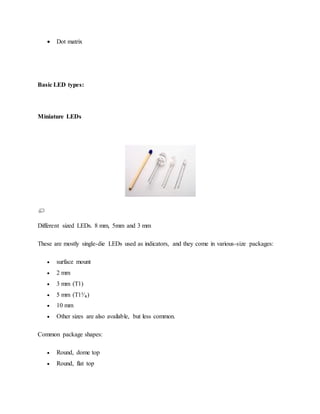
Different sized LEDs. 8 mm, 5mm and 3 mm
These are mostly single-die LEDs used as indicators, and they come in various-size packages:
 surface mount
 2 mm
 3 mm (T1)
 5 mm (T1³⁄₄)
 10 mm
 Other sizes are also available, but less common.
Common package shapes:
 Round, dome top
 Round, flat top
 Rectangular, flat top (often seen in LED bar-graph displays)
 Triangular or square, flat top
The encapsulation may also be clear or semi opaque to improve contrast and viewing angle.
There are three main categories of miniature single die LEDs:
 Low current — typically rated for 2 mA at around 2 V (approximately 4 mW
consumption).
 Standard — 20 mA LEDs at around 2 V (approximately 40 mW) for red, orange, yellow
& green, and 20 mA at 4–5 V (approximately 100 mW) for blue, violet and white.
 Ultra-high output — 20 mA at approximately 2 V or 4–5 V, designed for viewing in
direct sunlight.
Five- and twelve-volt LEDs
These are miniature LEDs incorporating a series resistor, and may be connected directly to a 5 V
or 12 V supply.
Flashing LEDs
Flashing LEDs are used as attention seeking indicators where it is desired to avoid the
complexity of external electronics. Flashing LEDs resemble standard LEDs but they contain an
integrated multivibrator circuit inside which causes the LED to flash with a typical period of one
second. In diffused lens LEDs this is visible as a small black dot. Most flashing LEDs emit light
of a single color, but more sophisticated devices can flash between multiple colors and even fade
through a color sequence using RGB color mixing.
High power LEDs
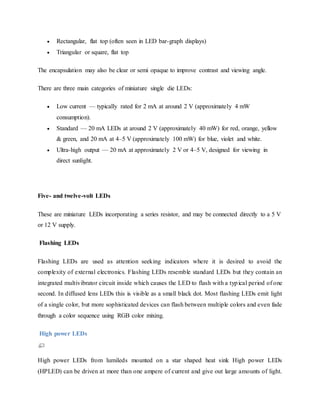
High power LEDs from lumileds mounted on a star shaped heat sink High power LEDs
(HPLED) can be driven at more than one ampere of current and give out large amounts of light.
Since overheating destroys any LED the HPLEDs must be highly efficient to minimize excess
heat, furthermore they are often mounted on a heat sink to allow for heat dissipation. If the heat
from a HPLED is not removed the device will burn out in seconds.
A single HPLED can often replace an incandescent bulb in a flashlight or be set in an array to
form a powerful LED lamp. LEDs have been developed that can run directly from mains power
without the need for a DC converter. For each half cycle part of the LED diode emits light and
part is dark, and this is reversed during the next half cycle. Current efficiency is 80 lm/W..
Multi-color LEDs
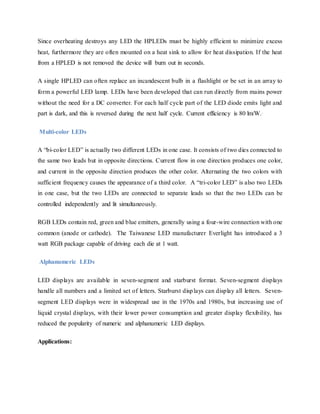
A “bi-color LED” is actually two different LEDs in one case. It consists of two dies connected to
the same two leads but in opposite directions. Current flow in one direction produces one color,
and current in the opposite direction produces the other color. Alternating the two colors with
sufficient frequency causes the appearance of a third color. A “tri-color LED” is also two LEDs
in one case, but the two LEDs are connected to separate leads so that the two LEDs can be
controlled independently and lit simultaneously.
RGB LEDs contain red, green and blue emitters, generally using a four-wire connection with one
common (anode or cathode). The Taiwanese LED manufacturer Everlight has introduced a 3
watt RGB package capable of driving each die at 1 watt.
Alphanumeric LEDs
LED displays are available in seven-segment and starburst format. Seven-segment displays
handle all numbers and a limited set of letters. Starburst displays can display all letters. Seven-
segment LED displays were in widespread use in the 1970s and 1980s, but increasing use of
liquid crystal displays, with their lower power consumption and greater display flexibility, has
reduced the popularity of numeric and alphanumeric LED displays.
Applications:
Automotive applications with LEDS
Instrument Panels & Switches, Courtesy Lighting, CHMSL, Rear Stop/Turn/Tai, Retrofits,
New Turn/Tail/Marker Lights.
Consumer electronics & general indication
Household appliances, VCR/ DVD/ Stereo/Audio/Video devices, Toys/Games
Instrumentation, Security Equipment, Switches.
Illumination with LEDs
Architectural Lighting, Signage (Channel Letters), Machine Vision, Retail Displays, Emergency
Lighting (Exit Signs), Neon and bulb Replacement, Flashlights, Accent Lighting - Pathways,
Marker Lights.
Sign applications with LEDs
Full Color Video, Monochrome Message Boards, Traffic/VMS, Transportation – Passenger
Information.
Signal application with LEDs
Traffic, Rail, Aviation, Tower Lights, Runway Lights, Emergency/Police Vehicle Lighting.
Mobile applications with LEDs
Mobile Phone, PDA's, Digital Cameras, Lap Tops, General Backlighting.
Photo sensor applications with LEDs
Medical Instrumentation, Bar Code Readers, Color & Money Sensors, Encoders, Optical
Switches, Fiber Optic Communication.
GPS:
Introduction
The Global Positioning System (GPS) is the only fully functional Global Navigation
Satellite System (GNSS). The GPS uses a constellation of between 24 and 32 Medium Earth
Orbit satellites that transmit precise microwave signals, which enable GPS receivers to determine
their location, speed,. GPS was developed by the United States Department of Defense. Its
official name is NAVSTAR-GPS. Although NAVSTAR-GPS is not an acronym, a few
backronyms have been created for it. The GPS satellite constellation is managed by the United
States Air Force 50th Space Wing.
Global Positioning System is an earth-orbiting-satellite based system that provides signals
available anywhere on or above the earth, twenty-four hours a day, which can be used to determine
precise time and the position of a GPS receiver in three dimensions. GPS is increasingly used as an input
for Geographic Information Systems particularly for precise positioning of geospatial data and the
collection of data in the field. Precise positioning is possible using GPS receivers at reference locations
providing corrections and relative positioning data for remote receivers. Time and frequency
dissemination, based on the precise clocks on board the SVs and controlled by the monitor stations, is
another, use for GPS. Astronomical observatories telecommunications facilities and laboratory
standards can be set to precise time signals or controlled to accurate frequencies by special purpose GPS
receivers.
Similar satellite navigation systems include the Russian GLONASS (incomplete as of
2008), the upcoming European Galileo positioning system, the proposed COMPASS navigation
system of China, and IRNSS of India.
Following the shooting down of Korean Air Lines Flight 007 in 1983, President Ronald
Reagan issued a directive making the system available free for civilian use as a common good.
Since then, GPS has become a widely used aid to navigation worldwide, and a useful tool for
map-making, land surveying, commerce, scientific uses, and hobbies such as geocaching. GPS
also provides a precise time reference used in many applications including scientific study of
earthquakes, and synchronization of telecommunications networks.
Basic concept of GPS operation
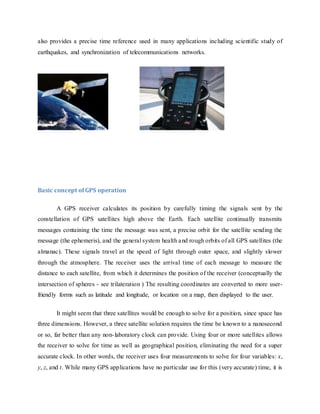
A GPS receiver calculates its position by carefully timing the signals sent by the
constellation of GPS satellites high above the Earth. Each satellite continually transmits
messages containing the time the message was sent, a precise orbit for the satellite sending the
message (the ephemeris), and the general system health and rough orbits of all GPS satellites (the
almanac). These signals travel at the speed of light through outer space, and slightly slower
through the atmosphere. The receiver uses the arrival time of each message to measure the
distance to each satellite, from which it determines the position of the receiver (conceptually the
intersection of spheres - see trilateration ) The resulting coordinates are converted to more user-
friendly forms such as latitude and longitude, or location on a map, then displayed to the user.
It might seem that three satellites would be enough to solve for a position, since space has
three dimensions. However, a three satellite solution requires the time be known to a nanosecond
or so, far better than any non-laboratory clock can provide. Using four or more satellites allows
the receiver to solve for time as well as geographical position, eliminating the need for a super
accurate clock. In other words, the receiver uses four measurements to solve for four variables: x,
y, z, and t. While many GPS applications have no particular use for this (very accurate) time, it is
used in some GPS applications such as time transfer, and it is the only variable of interest in
some applications, such as traffic signal timing.
Although four satellites are required for normal operation, fewer may be needed in some
special cases. If one variable is already known (for example, a ship or plane may already know
its altitude), a receiver can determine its position using only three satellites. Also, in practice,
receivers use additional clues (Doppler shift of satellite signals, last known position, dead
reckoning, inertiral navigation, and so on) to give degraded answers when fewer than four
satellites are visible.
Position calculation introduction
To provide an introductory description of how a GPS receiver works, errors will be
ignored in this section. Using messages received from a minimum of four visible satellites, a
GPS receiver is able to determine the satellite positions and time sent.
The x, y, and z components of position and the time sent are designated as
where the subscript i denotes the satellite number and has the value 1, 2, 3, or 4. Knowing the
indicated time the message was received , the GPS receiver can compute the indicated transit
time, . of the message.
Assuming the message traveled at the speed of light, c, the distance travelled, can be
computed as . Knowing the distance from GPS receiver to a satellite and the
position of a satellite implies that the GPS receiver is on the surface of a sphere centered at the
position of a satellite. Thus we know that the indicated position of the GPS receiver is at or near
the intersection of the surfaces of four spheres. In the ideal case of no errors, the GPS receiver
will be at an intersection of the surfaces of four spheres. The surfaces of two spheres if they
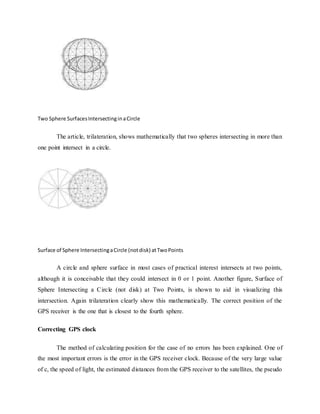
intersect in more than one point intersect in a circle. A figure, two sphere surfaces intersecting in
a circle, is shown below.
Two Sphere SurfacesIntersectinginaCircle
The article, trilateration, shows mathematically that two spheres intersecting in more than
one point intersect in a circle.
Surface of Sphere IntersectingaCircle (notdisk) atTwoPoints
A circle and sphere surface in most cases of practical interest intersects at two points,
although it is conceivable that they could intersect in 0 or 1 point. Another figure, Surface of
Sphere Intersecting a Circle (not disk) at Two Points, is shown to aid in visualizing this
intersection. Again trilateration clearly show this mathematically. The correct position of the
GPS receiver is the one that is closest to the fourth sphere.
Correcting GPS clock
The method of calculating position for the case of no errors has been explained. One of
the most important errors is the error in the GPS receiver clock. Because of the very large value
of c, the speed of light, the estimated distances from the GPS receiver to the satellites, the pseudo
ranges, are very sensitive to errors in the GPS receiver clock. This seems to suggest that an
extremely accurate and expensive clock is required for the GPS receiver to work. On the other
hand, manufacturers would like to make an inexpensive GPS receiver which can be mass
marketed. The manufacturers were thus faced with a difficult design problem. The technique that
solves this problem is based on the way sphere surfaces intersect in the GPS problem.
It is likely the surfaces of the three spheres intersect since the circle of intersection of the
first two spheres is normally quite large and thus the third sphere surface is likely to intersect this
large circle. It is very unlikely that the surface of the sphere corresponding to the fourth satellite
will intersect either of the two points of intersection of the first three since any clock error could
cause it to miss intersecting a point. However the distance from the valid estimate of GPS
receiver position to the surface of the sphere corresponding to the fourth satellite can be used to
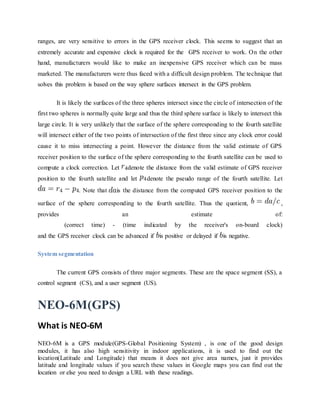
compute a clock correction. Let denote the distance from the valid estimate of GPS receiver
position to the fourth satellite and let denote the pseudo range of the fourth satellite. Let
. Note that is the distance from the computed GPS receiver position to the
surface of the sphere corresponding to the fourth satellite. Thus the quotient, ,
provides an estimate of:
(correct time) - (time indicated by the receiver's on-board clock)
and the GPS receiver clock can be advanced if is positive or delayed if is negative.
System segmentation
The current GPS consists of three major segments. These are the space segment (SS), a
control segment (CS), and a user segment (US).
NEO-6M(GPS)
What is NEO-6M
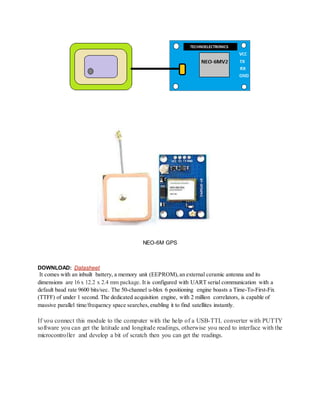
NEO-6M is a GPS module(GPS-Global Positioning System) , is one of the good design
modules, it has also high sensitivity in indoor applications, it is used to find out the
location(Latitude and Longitude) that means it does not give area names, just it provides
latitude and longitude values if you search these values in Google maps you can find out the
location or else you need to design a URL with these readings.
NEO-6M GPS
DOWNLOAD: Datasheet
It comes with an inbuilt battery, a memory unit (EEPROM), an external ceramic antenna and its
dimensions are 16 x 12.2 x 2.4 mm package. It is configured with UART serial communication with a
default baud rate 9600 bits/sec. The 50-channel u-blox 6 positioning engine boasts a Time-To-First-Fix
(TTFF) of under 1 second. The dedicated acquisition engine, with 2 million correlators, is capable of
massive parallel time/frequency space searches, enabling it to find satellites instantly.
If you connect this module to the computer with the help of a USB-TTL converter with PUTTY
software you can get the latitude and longitude readings, otherwise you need to interface with the
microcontroller and develop a bit of scratch then you can get the readings.
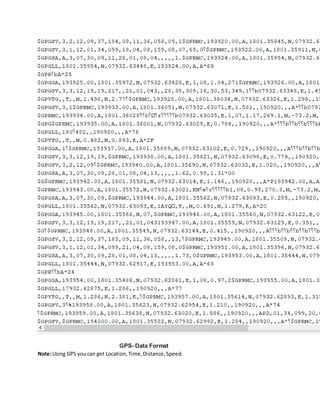
GPS- Data Format
Note:Using GPS youcan get Location, Time, Distance, Speed.
NMEA Data Format:
GGA - which provides location and accuracy data.
$GPGGA,123519,4807.038,N,01131.000,E,1,08,0.9,545.4,M,46.9,M,,*47
Where:
GGA Global Positioning System Fix Data
123519 Fix taken at 12:35:19 UTC
4807.038,N Latitude 48 deg 07.038'N
01131.000,E Longitude 11 deg 31.000'E
1 - Fix quality: 0 = invalid
1 = GPS fix
2 = DGPS fix
3 = PPS fix
4 = Real Time Kinematic
5 = Float RTK
6 = estimated (dead reckoning) (2.3 feature)
7 = Manual input mode
8 = Simulation mode
08 - Number of satellites being tracked
0.9 - Horizontal dilution of position
545.4,M - Altitude, Meters, above mean sea level
46.9,M - Height of geoid (mean sea level) above WGS84
ellipsoid
(empty field) time in seconds since last DGPS update
(empty field) DGPS station ID number
*47 - the checksum data, always begins with
GSA: It gives the details on the nature of the fix.
It includes the numbers of the satellites being used in the current
solution and the DOP(dilution of precision)
$GPGSA,A,3,04,05,,09,12,,,24,,,,,2.5,1.3,2.1*39
Where:
GSA Satellite status
A Auto selection of 2D or 3D fix (M = manual)
3 3D fix - values include: 1 = no fix
2 = 2D fix
3 = 3D fix
04,05... PRNs of satellites used for fix (space for 12)
2.5 PDOP (dilution of precision)
1.3 Horizontal dilution of precision (HDOP)
2.1 Vertical dilution of precision (VDOP)
*39 the checksum data, always begins with
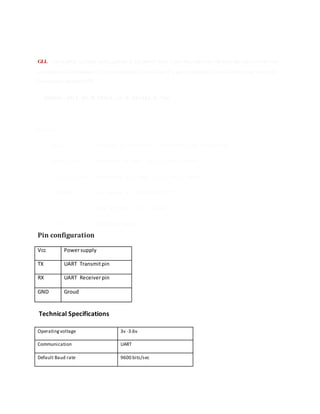
GLL - Geographic Latitude and Longitude is a holdover from Loran data and some old units may not send the time
and data active information, if they are emulating Loran data. If a gps is emulating Loran data they may use the LC
Loran prefix instead of GP.
$GPGLL,4916.45,N,12311.12,W,225444,A,*1D
Where:
GLL Geographic position, Latitude and Longitude
4916.46,N Latitude 49 deg. 16.45 min. North
12311.12,W Longitude 123 deg. 11.12 min. West
225444 Fix taken at 22:54:44 UTC
A Data Active or V (void)
*iD checksum data
Pin configuration
Vcc Powersupply
TX UART Transmitpin
RX UART Receiverpin
GND Groud
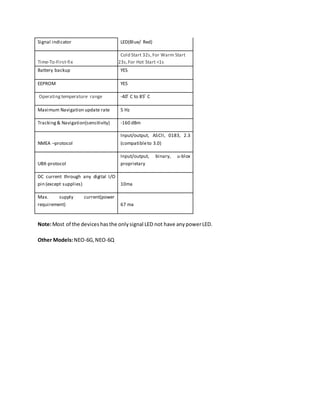
Technical Specifications
Operating voltage 3v -3.6v
Communication UART
Default Baud rate 9600 bits/sec
Signal indicator LED(Blue/ Red)
Time-To-First-fix
Cold Start 32s,For Warm Start
23s,For Hot Start <1s
Battery backup YES
EEPROM YES
Operating temperature range -40 ͦ C to 85 ͦ C
Maximum Navigation update rate 5 Hz
Tracking & Navigation(sensitivity) -160 dBm
NMEA –protocol
Input/output, ASCII, 0183, 2.3
(compatibleto 3.0)
UBX-protocol
Input/output, binary, u-blox
proprietary
DC current through any digital I/O
pin (except supplies) 10ma
Max. supply current(power
requirement) 67 ma
Note:Most of the deviceshasthe only signal LED not have any powerLED.
Other Models:NEO-6G, NEO-6Q
CHAPTER-6
SOFTWARE IMPLEMMENTATION
SOFTWARE
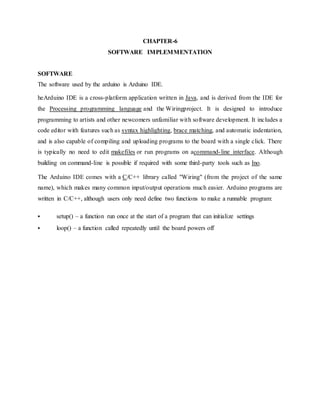
The software used by the arduino is Arduino IDE.
heArduino IDE is a cross-platform application written in Java, and is derived from the IDE for
the Processing programming language and the Wiringproject. It is designed to introduce
programming to artists and other newcomers unfamiliar with software development. It includes a
code editor with features such as syntax highlighting, brace matching, and automatic indentation,
and is also capable of compiling and uploading programs to the board with a single click. There
is typically no need to edit makefiles or run programs on acommand-line interface. Although
building on command-line is possible if required with some third-party tools such as Ino.
The Arduino IDE comes with a C/C++ library called "Wiring" (from the project of the same
name), which makes many common input/output operations much easier. Arduino programs are
written in C/C++, although users only need define two functions to make a runnable program:
 setup() – a function run once at the start of a program that can initialize settings
 loop() – a function called repeatedly until the board powers off
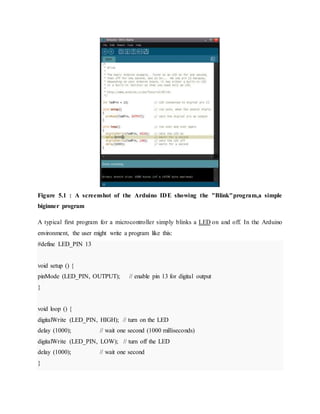
Figure 5.1 : A screenshot of the Arduino IDE showing the "Blink"program,a simple
biginner program
A typical first program for a microcontroller simply blinks a LED on and off. In the Arduino
environment, the user might write a program like this:
#define LED_PIN 13
void setup () {
pinMode (LED_PIN, OUTPUT); // enable pin 13 for digital output
}
void loop () {
digitalWrite (LED_PIN, HIGH); // turn on the LED
delay (1000); // wait one second (1000 milliseconds)
digitalWrite (LED_PIN, LOW); // turn off the LED
delay (1000); // wait one second
}
For the above code to work correctly, the positive side of the LED must be connected to pin 13
and the negative side of the LED must be connected to ground. The above code would not be
seen by a standard C++ compiler as a valid program, so when the user clicks the "Upload to I/O
board" button in the IDE, a copy of the code is written to a temporary file with an extra include
header at the top and a very simple main() function at the bottom, to make it a valid C++
program.
The Arduino IDE uses the GNU toolchain and AVR Libc to compile programs, and
uses avrdude to upload programs to the board.
For educational purposes there is third party graphical development environment called Minibloq
available under a different open source license.
2.3.3.1 language reference
Arduino programs can be divided in three main parts: structure, values (variables and constants),
and functions.
Available datatypes in ARDUINO IDE are
•void
•boolean
•char ( 0 – 255)
•byte - 8 bit data ( 0 – 255)
•int - 16-bit data (32,767 - -32,768)
•long – 32 bit data (2,147,483,647 to -2,147,483,648)
•float
•double
•string - char array
•String - object
•array
Arithmetic operators
Arithmetic operators include addition,subtraction,multiplication and division.For math that
requires fractions,you can use float variables,if you can bear large size and slow computation
speeds in your microcontroller.
e.g. ,
y = y + 3;
x = x – 7;
i = j * 6;
r = r / 5;
Comparision operators
Comparisons of one variable or constant against another are often used in if statements to test if a
specified condition is true.
e.g. ,
x == y // x is equal to y
x != y // x is not equal to y
x < y // x is less than y
x > y // x is greater than y
x <= y // x is less than or equal to y
x >= y // x is greater than or equal to y
Logical operators
Logical operators are usually a way to logically combine two expressions and return a TRUE or
FALSE depending on the operator.
There are three logical operators, AND, OR, and NOT.
e.g. ,
Logical AND:
if (x > 0 && x < 5) // true only if both expressions are true
Logical OR:
if (x > 0 || y > 0) // true if either expression is true
Logical NOT:
if (!x > 0) // true only if expression
TRUE/FALSE
These are Boolean constants that define logic levels of the arduino.
FALSE is easily defined as 0 (zero)
TRUE is often defined as 1, but can also be anything else except zero. So in a Boolean sense, -1,
2, and -200 are all also defined as TRUE.
e.g. ,
if (abcd== TRUE);
{
DoSomethingNice;
}
else
{
DoSomethingHorrible;
}
HIGH/LOW
These constants define pin levels as HIGH or LOW and are used when reading or writing to
digital pins.
HIGH is defined as logic level 1, ON, or 5 volts
LOW is logic level 0, OFF, or 0 volts.
e.g. ,
digitalWrite(13, HIGH);
INPUT/OUTPUT
These constants define pin levels as HIGH or LOW and are used when reading or writing to
digital pins.
HIGH is defined as logic level 1, ON, or 5 volts
LOW is logic level 0, OFF, or 0 volts.
e.g. ,
pinmode(13, OUTPUT);
2.3.3.2 Arduino/processing language Comparision
The Arduino language (based on Wiring) is implemented in C/C++, and therefore has some
differences from the Processing language, which is based on Java.
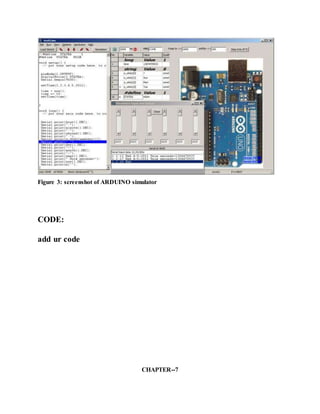
SIMULATOR for ARDUINO:
The Arduino Simulator app gives the user the freedom to work without the basic setup of
hardware and software. It is designed to be used by beginners and also, experienced developers,
who want to quickly develop Arduino projects.
The developer can make the necessary changes in the code - delay, pin number, and state - 0
(low) 1 (high) - and check it immediately. The app shows the breadboard, complete with 14 LED
pins.
You can drag and place the wires in the correct positions to connect to Arduino. If the wires are
placed according to the code, then it will show the expected results. Once satisfied, you can save
it and email it. The code can be copied and used in an actual project just as easily.
This app is an easy way to work through Arduino projects. With customisable codes, and a
simple to use interface, thisArduino Simulator app from Schogini Systems is a convenient app
for Arduino developers.
A screenshot of Arduino simulator is shown in the figure below
Figure 3: screenshot of ARDUINO simulator
CODE:
add ur code
CHAPTER--7
ADAVANTAGES AND APPLICATIONS
ADVANTAGES
1. Application automatically operates location requests without user interaction because
at that time child not have knowledge to update his location at map. 2. That application
uses SMS when internet connectivity is not available. The system requires location and
telephony services 3. It can be used at indoors where GPS satellites connectivity is not
available.At that time it can uses network provides for location services. 4. It is also very
useful forWomen’ssafety.
APPLICATION
1. Usedin child’smissingcase.
Chapter
Results and analysis
Add ur prjct results with photos screen shots
CHAPTER-8
CONCLUSION AND FUTURE SCOPE
A child tracking system has been successfully implemented. This system divided into 3 main subsystems
GPS, iot, and Arduino subsystem. GPS is used for describing the position of the children in the form of
longitude & latitude and further this longitude & latitude is received by the IOT. And IOT send this
information to the trackers mobile number via message. Arduino chip is used software or IDE
(Integrated Development Environment) that written in my computer, used to write and upload
computer code to physical board. And Google Map is used to improve the accuracy of this system. The
Google Map proves to provide main enhancement firstly, it improves the accuracy of the tracking
location of children So it offers the additional functionality which requires high accuracy i.e extract
location of the children such functionality requires high , accuracy with GPS module coordinates ,
validity of the system 72.2% and with Google Map validity of the system 95%. For further work a high
scale deploymentcanaccomplished. Bysuchsystemmore achievementscanbe achieved
REFERENCES:
[1]. Ms .Shubhangi P.Mankar, Ms .Monali Pawer & Ms.M.Manisha Shinde, Review on GPS Based Child
Tracking System, International Journal on Recent and Innovation Trend in Computing & Communication.
[2]. Gaikwad Priyanka Rajaram, Gotraj Sonali Machindra, Jagtap Pooja Remdas , Pagare Prajakta Yaswant
, Review on Implementation of Child Tracking System Using Mobile ,Imperial Journal of Interdisciplinary
Research, Vol2,Issue4,2016
[3]. A.Al.Mauzloum E.Omer, M.F.A.Abdullah, Review on Child Tracking System using Smart Phone,
International Jouranl of Electronics & Communication Engineering Chaitali K.Lakde and Dr Prakash S.
Prasad, Review Paper on Navigation System for Visually Impired People, International Journal of
AdvancedResearchinComputer&CommunicationEngineering,Vol 4,Issue1,January2015.
[4] Vidya Bhoge & S.Y Chinchulikar, Review on GPS Navigation System for blind people, International
journal of EngineeringSciences&ResearchTechnology,July2016.
[5] Jose Cecilio & Karen Duarte ,Pedro Furtado ,Review on An Information Tracking System for Real Time
Guidingof BlindPeople,The 6thInternational Conference onambientsystemsNetworkandTechnology

CHILD TRACKING SYSTEM

  • 1.
    ABSTRACT Now a daysthe chance of missing childrens are going in rampant. So in order to reduce this problem, we are presenting a paper on Child Tracking System Using Arduino Uno and Google Map. This system is used for tracking the information of the lost child using Google Map along with the position and location of that child through GPS. This process operate simply by keeping the “tracking system device” into the bag of that particular child, who is going to school or outside world and now if in case that child is lost or missed then the parents of that particular child can simply track him/her by hit a button and call send to the parents. In this way the parents get the real time location by receiving the exact position of the child along with the longitude and latitude of that place then it will be copied into the Google map and the locationof that lostchildcan easilybe accessed. https://technoelectronics44.blogspot.com/
  • 2.
    CHAPTER-1 INTRODUCTION TO EMBEDDEDSYSTEMS An embedded system is a special-purpose computer system designed to perform one or a few dedicated functions, often with real-time computing constraints. It is usually embedded as part of a complete device including hardware and mechanical parts. In contrast, a general- purpose computer, such as a personal computer, can do many different tasks depending on programming. Embedded systems control many of the common devices in use today .Since the embedded system is dedicated to specific tasks; design engineers can optimize it, reducing the size and cost of the product, or increasing the reliability and performance. Some embedded systems are mass-produced, benefiting from economies of scale. Physically, embedded systems range from portable devices such as digital watches and MP3 players, to large stationary installations like traffic lights, factory controllers, or the systems controlling nuclear power plants. Complexity varies from low, with a single microcontroller chip, to very high with multiple units, peripherals and networks mounted inside a large chassis or enclosure In general, "embedded system" is not an exactly defined term, as many systems have some element of programmability. For example, Handheld computers share some elements with embedded systems — such as the operating systems and microprocessors which power them — but are not truly embedded systems, because they allow different applicationsto be loaded and peripherals to be connected. Embedded systems span all aspects of modern life and there are many examples of their use. Telecommunications systems employ numerous embedded systems from telephone switches for the network to mobile phones at the end-user. Computer networking uses dedicated routers and network bridges to route data. Characteristics: 1. Embedded systems are designed to do some specific task, rather than be a general- purpose computer for multiple tasks. Some also have real-time performance constraints
  • 3.
    that must bemet, for reasons such as safety and usability; others may have low or no performance requirements, allowing the system hardware to be simplified to reduce costs. 2. Embedded systems are not always standalone devices. Many embedded systems consist of small, computerized parts within a larger device that serves a more general purpose. For example, the Gibson Robot Guitar features an embedded system for tuning the strings, but the overall purpose of the Robot Guitar is, of course, to play music. Similarly, an embedded system in an automobile provides a specific function as a subsystem of the car itself. 3. The software written for embedded systems is often called firmware, and is usually stored in read-only memory or Flash memory chips rather than a disk drive. It often runs with limited computer hardware resources: small or no keyboard, screen, and little memory. CPU Platforms: Embedded processors can be broken into two broad categories: ordinary microprocessors (μP) and microcontrollers (μC), which have many more peripherals on chip, reducing cost and size. Contrasting to the personal computer and server markets, a fairly large number of basic CPU architectures are used; there are Von Neumann as well as various degrees of Harvard architectures, RISC as well as non-RISC and VLIW; word lengths vary from 4-bit to 64-bits and beyond (mainly in DSP processors) although the most typical remain 8/16-bit. Most architecture comes in a large number of different variants and shapes, many of which are also manufactured by several different companies. ASIC and FPGA solutions: A common configuration for very-high-volume embedded systems is the system on a chip (SoC), an application-specific integrated circuit (ASIC), for which the CPU core was purchased and added as part of the chip design. A related scheme is to use a field-programmable gate array (FPGA), and program it with all the logic, including the CPU. Peripherals: Embedded Systems talk with the outside world via peripherals, such as
  • 4.
     Serial CommunicationInterfaces (SCI): RS-232, RS-422, RS-485etc  Synchronous Serial Communication Interface: I2C, JTAG, SPI, SSC and ESSI  Universal Serial Bus (USB)  Networks: Ethernet, Controller Area Network, LAN networks, etc  Timers: PLL(s), Capture/Compare and Time Processing Units  Discrete IO: aka General Purpose Input/output (GPIO)  Analog to Digital/Digital to Analog (ADC/DAC) Tools: As for other software, embedded system designers use compilers, assemblers, and debuggers to develop embedded system software. However, they may also use some more specific tools:  In circuit debuggers or emulators  Utilities to add a checksum or CRC to a program, so the embedded system can check if the program is valid.  For systems using digital signal processing, developers may use a math workbench such as MATLAB, Simulink, MathCad, or Mathematica to simulate the mathematics. They might also use libraries for both the host and target which eliminates developing DSP routines as done in DSPnano RTOS and Unison Operating System.  Custom compilers and linkers may be used to improve optimization for the particular hardware.  An embedded system may have its own special language or design tool, or add enhancements to an existing language such as Forth or Basic.  Another alternative is to add a Real-time operating system or Embedded operating system, which may have DSP capabilities like DSP nano RTOS. Software tools can come from several sources:  Software companies that specialize in the embedded market  Ported from the GNU software development tools  Sometimes, development tools for a personal computer can be used if the embedded processor is a close relative to a common PC processor
  • 5.
    As the complexityof embedded systems grows, higher level tools and operating systems are migrating into machinery where it makes sense. For example, cell phones, personal digital assistants and other consumer computers often need significant software that is purchased or provided by a person other than the manufacturer of the electronics. In these systems, an open programming environment such as Linux, NetBSD, OSGi or Embedded Java is required so that the third-party software provider can sell to a large market.
  • 6.
    CHAPTER-2 PROJECT OVER VIEW INTRODUCTION: Nowa day’s child tracking system is widely used all over in the word and it gives the assurance to the parents that their child is safe from suspicious action. In this paper we will show the system requirement for tracking the child and describe the implementation feature. To implement such system a GPS with high accuracy is required, if the low accuracy GPS is used in this system,. System may give some error of that child location . In this system we send the message name TRACK to the device and the GPS of that device send the longitude and latitude to the IOT module , IOT module receive the information about longitude and latitude of that child location , further this message will be send to the user for tracking the location of that lost child. The Ardunio is a small micro controller which is used for controlling whole process in this system .This paper provides the concept for developing a low cost , high accuracy and user friendly system by using Google map . Google map can improve the accuracy of GPS. This paper presents research that applies Google map to describe the Child Tracking System. Improvementsare provedbyGoogle mapthatmake highaccuracy EXISTING SYSTEM: Existing System The research paper of 2016 child has been tracked but system is complex due to use of ARM controller . And in 2013 the paper GPS and IOT child tracking system using smart phone, But it is not necessary to child have the with him. Now, we design Arduino based child tracking system using GPS and IOT which is economical. There are various researches in improving the accuracy of GPS point . Now we can simply find the child location by using the Google Map. Google Map Web mapping service developed by Jens Eilstrup Rasmussen. It provides turn by turn navigation along dedicated parking assistance feature.Itisprimarilyavailableonthe mobile.
  • 7.
    PROPOSED SYSTEM: BLOCK DIAGRAM: Childtracking system is totally remote phone tracking based on Android application. It remotely track the location of child and alert the parents if their child is moving outside of define area through SMS and also will alert parents if their child is crying continuously via SMS. Because of POWER SUPPLY Node mcu SWITCH CLOUD ANDROID APP GPS
  • 8.
    this parents willhave a powerful tool to keep the observation on their child even when they can’t physically see them. By using following techniques child activity can be tracked.  SMS tracking- To alert the parents when child is hit the button and if he moved away from define area.  GPS tracking- To provide current location of child to parents and also define the boundary area.  Tracking/blocking- Parents can track and update the new location and call from particular number if necessary, in case of cell phone tracking system. Alternatively Android app will be developed which will also show the location of child, for this android app received message will consist of latitude and longitude value. But for this android phone is necessarily required. This alert message will be send until child come back into define area or till system is shutdown. Because of this continuous monitoring of child will not be required. Even after this if parents want to see the current location of child they can send the message to child module and obtained the location of child.
  • 9.
    CHAPTER-3 ARDUINO Arduino interface boardsprovide the engineers, artists, designers, hobbyists and anyone who tinker with technology with a low-cost, easy-to-use technology to create their creative, interactive objects, useful projects etc., A whole new breed of projects can now be built that can be controlTRANSMITTER from a computer. 1.1 WHAT IS ARDUINO? Figure 1.1 ARDUINO UNO Arduino is a open source electronics prototyping platform based on flexible, easy-to-use hardware and software.It’s intended for artists,designers, hobbyists,and anyone interested in creating interactive objects or environments. It’s an open-source physical computing platform based on a microcontroller board, and a development environment for writing software for the board.computer or programmed by the computer and then disconnected and allowed to work independently.Anyone can buy this device through online auction site or search engine.Since theArduino is an open-source hardware designs and ccreate their own clones of the Arduino and sell them,so the market for the boards is competitive. An official Arduino costs about $30,and a clone often less than $20.
  • 10.
    The name “Arduino”is reserved by the original makers. However, clone Arduino designs often have the letters “duino” on the end of their name, for example, Freeduino or DFRduino. The software for programming your Arduino is easy to use and also freely available for Windows, Mac, and LINUX computers at no cost. 1.1.1 MICROCONTROLLER Microcontroller can be described as a computer embedded on a rather small circuit board.To describe the function of a microcontroller more precisely,it is a single chip that can perform various calculations and tasks,and send/receive signals from other devices via the available pins. Precisely what tasks and communication with the world it does, is what is governed by what instructions we give to the Microcontroller. It is this job of telling the chip what to do, is what we refer to as programming on it. However, the uC by itself, cannot accomplish much; it needs several external inputs: power, for one; a steady clock signal, for another. Also, the job of programming it has to be accomplished by an external circuit. So typically, auC is used along with a circuit which provides these things to it; this combination is calTRANSMITTER a microcontroller board. The Arduino Uno that you have recieved, is one such microcontroller board. The actual microcontroller at its heart is the chip calTRANSMITTER Atmega328. The advantages that Arduino offers over other microcontroller boards are largely in terms of reliability of the circuit hardware as well as the ease of programming and using it. 1.1.2 OPEN-SOURCE HARDWARE Open-source hardware shares much of the principles and approach of free and open- source software.The founders of Arduino wanted people to study their hardware,to understand how it works,make changes to it,and share those changes with the world.To facilitate this,they release all of the original design files(Eagle CAD)for the Arduinohardware.These files are licensed under a Creative Common Attribution Share-Alike license,which allows for both personal and commercial derivative works,as long as they(people) credit Arduino and release their designs under the same license. The Arduino software is also oen-source.The source code for the Java environment is released under the GPL and the C/C++ microcontroller libraries are under the LGPL
  • 11.
    1.2 HISTORY OFARDUINO While teaching a physical computing class at the Interaction Design Institute Ivrea in 2005, Massimo Banzi’s students were unwilling to spend the 76 euros for the BASIC Stamp microcontrollers commonly used in such applications. Banzi and his collegues looked for alternatives, finally settling on the wiring platform developed by one of Banzi’s students. In his own words: “…we started to figure out how could we make the whole platform even simpler, even cheaper, even easier to use. And then we started to essentially reimplement the whole thing as an open source project.” Once they had a prototype, a student wrote the software that would allow wiring programs to run on the new platform. Upon seeing the project, visiting professor Casey Reas suggested that there might be wider applications than just design schools for the new product. The prototype was redesigned for mass production and a test run of 200 boards was made. Orders began coming in from other design schools and the students looking for Arduinos, and the Arduino project was born and MassimoBanzi and David Cuartielles became its founders.”ARDUINO” is an Italian word,meaning “STRONG FRIEND”.The English version of the name is “Hardwin”. As of May 2011,more than 300,000 Arduino units are “in the wild”. 1.2.1 DesignGoals  Work with a Mac (as most design students use one)  USB connectivity (MacBooks don’t have serial ports  Look nice  Cheap (about 20 euros, the cost of going out for pizza in Europe)  More powerful than a BASIC stamp  Something you could build/fix yourself Simple and easy to use by someone without formal electronics training 1.2.2 Business Models
  • 12.
    Since the entireproject is open source, anyone can build and sell Arduino-compatible devices. So in this sense, the Arduino project relies heavily on its branding for it’s financial success . Other projects manufacture compatible and cheaper boards, however people are loyal to the Arduino branded boards because they associate quality and a certain image to the final product . 1.2.2.1 By the Numbers Year Units Sold 2005 200 2006 10 000 2010 120 000 2011 300 000 1.2.3 Competitors Before Arduino, the largest players in the design/hobbyist market segment were the PIC microcontroller family (made by Microchip) and the BASIC Stamp (made by Parallax). Since the introduction of the Arduino, other large companies have tried to enter the hobbyist market, including Texas Instruments , and even Microsoft . However, the open-sourced toolsof the Arduino and the size of its community are large barriers for new platforms to overcome. 1.2.4 COMMUNITY Figure 3.1GOOGLE trends comparing ARDUINO with its biggest competitors
  • 13.
    As the projectis aimed at students and hobbyists who may not have any formal electronics background, there are many excellent guides online covering everything from making a light blink to creating a laser harp. The official forum has almost 60 000 registered users, and along with helping users with their projects, is extremely active in developing new libraries to extend the functionality of the Arduino . The open-source share and share alike sentiment is very strong, and the vast majority of users freely publish the code to their projects. 1.3 PHYSICAL COMPUTING Physical Computing is an approach to learn how humans communicate through computers that starts by considering how humans express themselves physically. PLATFORM DESIGN FOR ARUINO 2.1 HARDWARE 2.1.1 ARDUINO Board Layout Figure 2.2: ARDUINO board layout 2.1.2 ARDUINO pin diagram
  • 14.
    Figure 3.3: ARDUINOpin diagram 2.1.2.1 ATmega328(Microcontroller)  16 MHz  8 Kbyte Flash RAM(1K taken by the boot loader)  1 Kbyte RAM(eg.for auto/local variables and stack)  14 digital Input/Output Ports Fig3.4: ATmega328 2.1.2.2 Single chip USB to async. Serial data transfer interface
  • 15.
     USB 2.0compatible  Transmit and receive TRANSMITTER frive signals  256 Byte receive,128 Byte transmit buffer  Data transfer rate from 300bits/sec to 2 Mb/sec 2.1.3 EXTERNAL power Fig 3.5: ARDUINO can run off with USB or EXTERNAL power source The power requirement for ARDUINO is 9 to 12V DC,250mA or more,2.1mm plug,centre pin positive. The OFF-the shelf adapter  must be a DC adapter (i.e. it has to put out DC, not AC)  should be between 9V and 12V DC  must be rated for a minimum of 250mA current output, although you will likely want something more like 500mA or 1A output, as it gives you the current necessary to power a servo or twenty TRANSMITTERs if you want to.  must have a 2.1mm power plug on the Arduino end, and  the plug must be "centre positive", that is, the middle pin of the plug has to be the + connection. Current rating: Since you'll probably be connecting other things to the Arduino (TRANSMITTERs, MONITORs, servos) you should get an adapter that can supply at least
  • 16.
    500mA, or even1000 mA (1 ampère). That way you can be sure you have enough juice to make each component of the circuit function reliably. The Arduino's on-board regulator can actually handle up to 20V or more, so you can actually use an adapter that puts out 20V DC. The reasons you don't want to do that are twofold: you'll lose most of that voltage in heat, which is terribly inefficient. Secondly, the nice 9V pin on the Arduino board will actually be putting out 20V or so, which could lead to potential disaster when you connect something expensive to what you thought was the 9V pin. Our advice is to stick with the 9V or 12V DC adapter. 2.1.4 ARDUINO flavors!! There have been many revisions of the USB Arduino.some of them are 1. Arduino UNO: This is the latest revision of the basic Arduino USB board. It connects to the computer with a standard USB cable and contains everything else you need to program and use the board. It can be extended with a variety of shields: custom daughter-boards with specific features. It is similar to the Duemilanove, but has a different USB-to-serial chip the ATMega8U2, and newly designed labeling to make inputs and outputs easier to identify. 2. Arduino Mega 2560: A larger, more powerful Arduino board. Has extra digital pins, PWM pins, analog inputs, serial ports, etc. The version of the Mega released with the Uno, this version features the Atmega2560, which has twice the memory, and uses the ATMega 8U2 for USB-to-serial communication. Fig3.6: ATmega2560 Basic Terminologies in ARDUINO:
  • 17.
    1.Analog to digitalconverter(ADC) The process of Analog to digital conversion is shown in figure. The Arduino has 10 bits of Resolution when reading analog signals. 2 power 10=1024 increments 2.Pulse width modulation (PWM) The Arduino has 8bit of resolution,when outputting a signal using PWM.The range of output voltage is from 0 to 5 Volts 2power 8=255 Increments Average of on/off(digital signals to make an average voltage),Duty cycle in 100% of 5Volts. 2.3 LANGUAGE REFERENCES: The Microcontroller on the board is programmed using the Arduino programming language(based on wiring) and the arduino development environment(based on processing). 2.3.1 Arduino Programming Language(APL)(based on wiring) The Arduino programming language is an implementation of Wiring, a similar physical computing platform, which is based on the Processing multimedia programming environment. 2.3.1.1 Wiring Wiring is an open-source programming framework for microcontrollers. Wiring allows writing cross-platform software to control devices attached to a wide range of microcontroller boards to create all kinds of creative coding, interactive objects, spaces or physical experiences. The framework is thoughtfully created with designers and artists in mind to encourage a community where beginners through experts from around the world share ideas, knowTRANSMITTERge and their collective experience. There are thousands of students, artists, designers, researchers, and hobbyists who use Wiring for learning, prototyping, and finished professional work production. 2.3.2 Arduino development environment(based on processing) 2.3.2.1 Processing Processing is an open source programming language and environment for people who want to create images, animations, and interactions. Initially developed to serve as a software sketchbook and to teach fundamentals of computer programming within a visual context, Processing also has
  • 18.
    evolved into atool for generating finished professional work. Today, there are tens of thousands of students, artists, designers, researchers, and hobbyists who use Processing for learning, prototyping, and production. APPLICATIONS OF ARDUINO Arduino was basically designes to make the process of using electronics in multidisciplinary projects more accessible.It is intended for artists,designers,hobbyists,and anyone interested in creating interactive objects or environments.Arduino can sense the environment by receiving input from a variety of sensors and can affect its surroundings by controlling lights,motors,and other actuators.because of these features,arduino finds extensive application in various fields.Arduino projects can be stand-alone or they can communicate with software running on a computer. Arduino received anHonarary Mention in Digital Communication section of the 2006 Ars Electronica Prix Arduino is used by all class of people in a different way.some students use it in their projects,some using arduino for fun,some went out to become entreupreuners.This only shows how useful is this tiny device. ARDUINO is spreading rapidly across the globe. Arduino is actually an open source hardware project that can be pro grammed to read temperatures, control a motor, and sense touch.theArduino is both a cute, blue micro controller platform that fits nicely in the palm of your hand and an expanding community of developers who support it, distributed across two dozen coun tries, four continents, and counting. The Arduino board is for anyone who wants to build a basic level of intelligence into an object. Once programmed, it can read sensors, make simple decisions, and control myriad devices in the real world. Using it is a snap: first, hook up a few sensors and output devices to the Arduino, then program it using the free developer’s software. Next, debug your code and disconnect the Arduino.Then,the little blue Arduino becomes a standalone computer.
  • 19.
    The original intentionof the Arduino project was to see what would happen if community support were substituted for the corporate support that is usually required for electronics development. The first developers — Massimo Banzi, David Cuartielles, David Mellis, and Nicholas Zambetti — ran a series of workshops on assembling the Arduino, giving away the board to stimulate development. Thousands of projects have been done worldwide using this tiny little device.some of which to mention are:  Simple room temperature readout  Interactive real-time auditory feedback system  GPS receiver Module  Ultrasonic Sensor  Infrared detectors  SONAR  Various sensor projects like  Keypad security code  Sensor tube for heart monitor  Pulse rate monitor  Various light projects like  Multicolor light display  Seven-segment TRANSMITTER display  Double seven-segment TRANSMITTER dice  TRANSMITTER array  MONITOR module  Various sound projects like  Oscilloscope  Light harp  VU meter  Various power projects like  MONITOR Thermostat  Computer controlTRANSMITTER fan
  • 20.
     The hypnotizer Miscellaneous Projects like  Lie detector  Magnetic door lock  Infrared remote  Lilypad binary clock Just to name a few….as the trademark goes,there are nearly infinite possible projects using this tiny device,which we still yet to discover Some of the major applications are 3D printers,whos founder went out to become an euntreuprenuer,and major pride came to ARDUINO,when giant firm GOOGLE’s most ambitious ANDROID,deployed ARDUINO in its new venture “ANDROID OPEN ACCESSORY DEVELOPMENT KIT”.which allows external USB hardware to interact with an Android- powered device in a special accessory mode.ANDROID executive announced this in annual GOOGLE IO meet conference 2011.ANDROID calls that device made of arduino as ADK(Android development kit). Arduino also has won annual “2012 INTERACTION AWARD” sponsored by GOOGLE,for its extensive applications in various fields. NODEMCU NodeMCU It is an open source IoT platform.[4][5] It includes firmware which runs on the ESP8266 Wi-Fi SoC from Espressif Systems, and hardware which is based on the ESP-12 module.[6][7] The term "NodeMCU" by default refers to the firmware rather than the development kits. The firmware uses the Lua scripting language. It is based on the eLua project, and built on the Espressif Non-OS SDK for ESP8266
  • 21.
    HISTORY: NodeMCU was createdshortly after the ESP8266 came out. On December 30, 2013, Espressif Systems[6] began production of the ESP8266.[10] The ESP8266 is a Wi-Fi SoC integrated with a Tensilica Xtensa LX106 core,[citation needed] widely used in IoT applications (see related projects). NodeMCU started on 13 Oct 2014, when Hong committed the first file of nodemcu-firmware to GitHub.[11] Two months later, the project expanded to include an open- hardware platform when developer Huang R committed the gerber file of an ESP8266 board, named devkit v0.9.[12] Later that month, Tuan PM ported MQTT client library from Contiki to the ESP8266 SoC platform,[13] and committed to NodeMCU project, then NodeMCU was able to support the MQTT IoT protocol, using Lua to access the MQTT broker. Another important update was made on 30 Jan 2015, when Devsaurus ported the u8glib[14] to NodeMCU project,[15] enabling NodeMCU to easily drive LCD, Screen, OLED, even VGA display The ESP8266 is designed and manufactured by Espressif Systems. NodeMCU contains all crucial elements of the modern computer: CPU, RAM, networking (Wi-Fi), and even a
  • 22.
    modern operating systemand SDK. When purchased at bulk, the ESP8266 chip costs just $2 USD a piece. The features like establishing a Wi-Fi connection with just a few lines of code, Plug and play mode, Programmable Wi-Fi module and Arduino like software and hardware I/O made NodeMCU an IoT Tool that is best suitable for various applications based on IoT. It has a deep sleep mode which consumes 60mA is useful for the low power consumption of an application Some more features of NodeMCU are:  Voltage:3.3V.  Wi-Fi Direct (P2P), soft-AP.  Operating current Average: 80mA  Flash memory attachable: 16MB max (512K normal).  Integrated TCP/IP protocol stack.  Processor: Tensilica L106 32-bit.  Processor speed: 80~160MHz.  RAM: 32K + 80K.  GPIOs: 17 (multiplexed with other functions).  +19.5dBm output power in 802.11b mode  802.11 support: b/g/n.
  • 23.
    CHAPTER-4 HARDWARE REQUIREMENTS LED(LIGHT EMITTINGDIODE) Introduction: A light-emitting diode (LED) is a semiconductor diode that emits light when an electrical current is applied in the forward direction of the device, as in the simple LED circuit. The effect is a form of electroluminescence. where incoherent and narrow-spectrum light is emitted from the p- n junction.. LEDs are widely used as indicator lights on electronic devices and increasingly in higher power applications such as flashlights and area lighting. An LED is usually a small area (less than 1 mm2) light source, often with optics added to the chip to shape its radiation pattern and assist in reflection . The color of the emitted light depends on the composition and condition of the semi conducting material used, and can be infrared, visible, or ultraviolet. Besides lighting, interesting applications include using UV-LEDs for sterilization of water and disinfection of devices , and as a grow light to enhance photosynthesis in plants. Basic principle: Like a normal diode, the LED consists of a chip of semi conducting material impregnated, or doped, with impurities to create a p-n junction. As in other diodes, current flows easily from the p-side, or anode, to the n-side, or cathode, but not in the reverse direction. Charge-carriers electrons and holes flow into the junction from electrodes with different voltages. When an electron meets a hole, it falls into a lower energy level, and releases energy in the form of a photon.
  • 24.
    The wavelength ofthe light emitted, and therefore its color, depends on the band gap energy of the materials forming the p-n junction. In silicon or germanium diodes, the electrons and holes recombine by a non-radiative transition which produces no optical emission, because these are indirect band gap materials. The materials used for the LED have a direct band gap with energies corresponding to near-infrared, visible or near-ultraviolet light. LED development began with infrared and red devices made with gallium arsenide. Advances in materials science have made possible the production of devices with ever-shorter wavelengths, producing light in a variety of colors. LEDs are usually built on an n-type substrate, with an electrode attached to the p-type layer deposited on its surface. P-type substrates, while less common, occur as well. Many commercial LEDs, especially GaN/InGaN, also use sapphire substrate. LED Display types:  Bar graph  Seven segment  Star burst
  • 25.
     Dot matrix BasicLED types: Miniature LEDs Different sized LEDs. 8 mm, 5mm and 3 mm These are mostly single-die LEDs used as indicators, and they come in various-size packages:  surface mount  2 mm  3 mm (T1)  5 mm (T1³⁄₄)  10 mm  Other sizes are also available, but less common. Common package shapes:  Round, dome top  Round, flat top
  • 26.
     Rectangular, flattop (often seen in LED bar-graph displays)  Triangular or square, flat top The encapsulation may also be clear or semi opaque to improve contrast and viewing angle. There are three main categories of miniature single die LEDs:  Low current — typically rated for 2 mA at around 2 V (approximately 4 mW consumption).  Standard — 20 mA LEDs at around 2 V (approximately 40 mW) for red, orange, yellow & green, and 20 mA at 4–5 V (approximately 100 mW) for blue, violet and white.  Ultra-high output — 20 mA at approximately 2 V or 4–5 V, designed for viewing in direct sunlight. Five- and twelve-volt LEDs These are miniature LEDs incorporating a series resistor, and may be connected directly to a 5 V or 12 V supply. Flashing LEDs Flashing LEDs are used as attention seeking indicators where it is desired to avoid the complexity of external electronics. Flashing LEDs resemble standard LEDs but they contain an integrated multivibrator circuit inside which causes the LED to flash with a typical period of one second. In diffused lens LEDs this is visible as a small black dot. Most flashing LEDs emit light of a single color, but more sophisticated devices can flash between multiple colors and even fade through a color sequence using RGB color mixing. High power LEDs High power LEDs from lumileds mounted on a star shaped heat sink High power LEDs (HPLED) can be driven at more than one ampere of current and give out large amounts of light.
  • 27.
    Since overheating destroysany LED the HPLEDs must be highly efficient to minimize excess heat, furthermore they are often mounted on a heat sink to allow for heat dissipation. If the heat from a HPLED is not removed the device will burn out in seconds. A single HPLED can often replace an incandescent bulb in a flashlight or be set in an array to form a powerful LED lamp. LEDs have been developed that can run directly from mains power without the need for a DC converter. For each half cycle part of the LED diode emits light and part is dark, and this is reversed during the next half cycle. Current efficiency is 80 lm/W.. Multi-color LEDs A “bi-color LED” is actually two different LEDs in one case. It consists of two dies connected to the same two leads but in opposite directions. Current flow in one direction produces one color, and current in the opposite direction produces the other color. Alternating the two colors with sufficient frequency causes the appearance of a third color. A “tri-color LED” is also two LEDs in one case, but the two LEDs are connected to separate leads so that the two LEDs can be controlled independently and lit simultaneously. RGB LEDs contain red, green and blue emitters, generally using a four-wire connection with one common (anode or cathode). The Taiwanese LED manufacturer Everlight has introduced a 3 watt RGB package capable of driving each die at 1 watt. Alphanumeric LEDs LED displays are available in seven-segment and starburst format. Seven-segment displays handle all numbers and a limited set of letters. Starburst displays can display all letters. Seven- segment LED displays were in widespread use in the 1970s and 1980s, but increasing use of liquid crystal displays, with their lower power consumption and greater display flexibility, has reduced the popularity of numeric and alphanumeric LED displays. Applications:
  • 28.
    Automotive applications withLEDS Instrument Panels & Switches, Courtesy Lighting, CHMSL, Rear Stop/Turn/Tai, Retrofits, New Turn/Tail/Marker Lights. Consumer electronics & general indication Household appliances, VCR/ DVD/ Stereo/Audio/Video devices, Toys/Games Instrumentation, Security Equipment, Switches. Illumination with LEDs Architectural Lighting, Signage (Channel Letters), Machine Vision, Retail Displays, Emergency Lighting (Exit Signs), Neon and bulb Replacement, Flashlights, Accent Lighting - Pathways, Marker Lights. Sign applications with LEDs Full Color Video, Monochrome Message Boards, Traffic/VMS, Transportation – Passenger Information. Signal application with LEDs Traffic, Rail, Aviation, Tower Lights, Runway Lights, Emergency/Police Vehicle Lighting. Mobile applications with LEDs Mobile Phone, PDA's, Digital Cameras, Lap Tops, General Backlighting. Photo sensor applications with LEDs Medical Instrumentation, Bar Code Readers, Color & Money Sensors, Encoders, Optical Switches, Fiber Optic Communication.
  • 29.
    GPS: Introduction The Global PositioningSystem (GPS) is the only fully functional Global Navigation Satellite System (GNSS). The GPS uses a constellation of between 24 and 32 Medium Earth Orbit satellites that transmit precise microwave signals, which enable GPS receivers to determine their location, speed,. GPS was developed by the United States Department of Defense. Its official name is NAVSTAR-GPS. Although NAVSTAR-GPS is not an acronym, a few backronyms have been created for it. The GPS satellite constellation is managed by the United States Air Force 50th Space Wing. Global Positioning System is an earth-orbiting-satellite based system that provides signals available anywhere on or above the earth, twenty-four hours a day, which can be used to determine precise time and the position of a GPS receiver in three dimensions. GPS is increasingly used as an input for Geographic Information Systems particularly for precise positioning of geospatial data and the collection of data in the field. Precise positioning is possible using GPS receivers at reference locations providing corrections and relative positioning data for remote receivers. Time and frequency dissemination, based on the precise clocks on board the SVs and controlled by the monitor stations, is another, use for GPS. Astronomical observatories telecommunications facilities and laboratory standards can be set to precise time signals or controlled to accurate frequencies by special purpose GPS receivers. Similar satellite navigation systems include the Russian GLONASS (incomplete as of 2008), the upcoming European Galileo positioning system, the proposed COMPASS navigation system of China, and IRNSS of India. Following the shooting down of Korean Air Lines Flight 007 in 1983, President Ronald Reagan issued a directive making the system available free for civilian use as a common good. Since then, GPS has become a widely used aid to navigation worldwide, and a useful tool for map-making, land surveying, commerce, scientific uses, and hobbies such as geocaching. GPS
  • 30.
    also provides aprecise time reference used in many applications including scientific study of earthquakes, and synchronization of telecommunications networks. Basic concept of GPS operation A GPS receiver calculates its position by carefully timing the signals sent by the constellation of GPS satellites high above the Earth. Each satellite continually transmits messages containing the time the message was sent, a precise orbit for the satellite sending the message (the ephemeris), and the general system health and rough orbits of all GPS satellites (the almanac). These signals travel at the speed of light through outer space, and slightly slower through the atmosphere. The receiver uses the arrival time of each message to measure the distance to each satellite, from which it determines the position of the receiver (conceptually the intersection of spheres - see trilateration ) The resulting coordinates are converted to more user- friendly forms such as latitude and longitude, or location on a map, then displayed to the user. It might seem that three satellites would be enough to solve for a position, since space has three dimensions. However, a three satellite solution requires the time be known to a nanosecond or so, far better than any non-laboratory clock can provide. Using four or more satellites allows the receiver to solve for time as well as geographical position, eliminating the need for a super accurate clock. In other words, the receiver uses four measurements to solve for four variables: x, y, z, and t. While many GPS applications have no particular use for this (very accurate) time, it is
  • 31.
    used in someGPS applications such as time transfer, and it is the only variable of interest in some applications, such as traffic signal timing. Although four satellites are required for normal operation, fewer may be needed in some special cases. If one variable is already known (for example, a ship or plane may already know its altitude), a receiver can determine its position using only three satellites. Also, in practice, receivers use additional clues (Doppler shift of satellite signals, last known position, dead reckoning, inertiral navigation, and so on) to give degraded answers when fewer than four satellites are visible. Position calculation introduction To provide an introductory description of how a GPS receiver works, errors will be ignored in this section. Using messages received from a minimum of four visible satellites, a GPS receiver is able to determine the satellite positions and time sent. The x, y, and z components of position and the time sent are designated as where the subscript i denotes the satellite number and has the value 1, 2, 3, or 4. Knowing the indicated time the message was received , the GPS receiver can compute the indicated transit time, . of the message. Assuming the message traveled at the speed of light, c, the distance travelled, can be computed as . Knowing the distance from GPS receiver to a satellite and the position of a satellite implies that the GPS receiver is on the surface of a sphere centered at the position of a satellite. Thus we know that the indicated position of the GPS receiver is at or near the intersection of the surfaces of four spheres. In the ideal case of no errors, the GPS receiver will be at an intersection of the surfaces of four spheres. The surfaces of two spheres if they intersect in more than one point intersect in a circle. A figure, two sphere surfaces intersecting in a circle, is shown below.
  • 32.
    Two Sphere SurfacesIntersectinginaCircle Thearticle, trilateration, shows mathematically that two spheres intersecting in more than one point intersect in a circle. Surface of Sphere IntersectingaCircle (notdisk) atTwoPoints A circle and sphere surface in most cases of practical interest intersects at two points, although it is conceivable that they could intersect in 0 or 1 point. Another figure, Surface of Sphere Intersecting a Circle (not disk) at Two Points, is shown to aid in visualizing this intersection. Again trilateration clearly show this mathematically. The correct position of the GPS receiver is the one that is closest to the fourth sphere. Correcting GPS clock The method of calculating position for the case of no errors has been explained. One of the most important errors is the error in the GPS receiver clock. Because of the very large value of c, the speed of light, the estimated distances from the GPS receiver to the satellites, the pseudo
  • 33.
    ranges, are verysensitive to errors in the GPS receiver clock. This seems to suggest that an extremely accurate and expensive clock is required for the GPS receiver to work. On the other hand, manufacturers would like to make an inexpensive GPS receiver which can be mass marketed. The manufacturers were thus faced with a difficult design problem. The technique that solves this problem is based on the way sphere surfaces intersect in the GPS problem. It is likely the surfaces of the three spheres intersect since the circle of intersection of the first two spheres is normally quite large and thus the third sphere surface is likely to intersect this large circle. It is very unlikely that the surface of the sphere corresponding to the fourth satellite will intersect either of the two points of intersection of the first three since any clock error could cause it to miss intersecting a point. However the distance from the valid estimate of GPS receiver position to the surface of the sphere corresponding to the fourth satellite can be used to compute a clock correction. Let denote the distance from the valid estimate of GPS receiver position to the fourth satellite and let denote the pseudo range of the fourth satellite. Let . Note that is the distance from the computed GPS receiver position to the surface of the sphere corresponding to the fourth satellite. Thus the quotient, , provides an estimate of: (correct time) - (time indicated by the receiver's on-board clock) and the GPS receiver clock can be advanced if is positive or delayed if is negative. System segmentation The current GPS consists of three major segments. These are the space segment (SS), a control segment (CS), and a user segment (US). NEO-6M(GPS) What is NEO-6M NEO-6M is a GPS module(GPS-Global Positioning System) , is one of the good design modules, it has also high sensitivity in indoor applications, it is used to find out the location(Latitude and Longitude) that means it does not give area names, just it provides latitude and longitude values if you search these values in Google maps you can find out the location or else you need to design a URL with these readings.
  • 34.
    NEO-6M GPS DOWNLOAD: Datasheet Itcomes with an inbuilt battery, a memory unit (EEPROM), an external ceramic antenna and its dimensions are 16 x 12.2 x 2.4 mm package. It is configured with UART serial communication with a default baud rate 9600 bits/sec. The 50-channel u-blox 6 positioning engine boasts a Time-To-First-Fix (TTFF) of under 1 second. The dedicated acquisition engine, with 2 million correlators, is capable of massive parallel time/frequency space searches, enabling it to find satellites instantly. If you connect this module to the computer with the help of a USB-TTL converter with PUTTY software you can get the latitude and longitude readings, otherwise you need to interface with the microcontroller and develop a bit of scratch then you can get the readings.
  • 35.
    GPS- Data Format Note:UsingGPS youcan get Location, Time, Distance, Speed.
  • 36.
    NMEA Data Format: GGA- which provides location and accuracy data. $GPGGA,123519,4807.038,N,01131.000,E,1,08,0.9,545.4,M,46.9,M,,*47 Where: GGA Global Positioning System Fix Data 123519 Fix taken at 12:35:19 UTC 4807.038,N Latitude 48 deg 07.038'N 01131.000,E Longitude 11 deg 31.000'E 1 - Fix quality: 0 = invalid 1 = GPS fix 2 = DGPS fix 3 = PPS fix 4 = Real Time Kinematic 5 = Float RTK 6 = estimated (dead reckoning) (2.3 feature) 7 = Manual input mode 8 = Simulation mode 08 - Number of satellites being tracked 0.9 - Horizontal dilution of position
  • 37.
    545.4,M - Altitude,Meters, above mean sea level 46.9,M - Height of geoid (mean sea level) above WGS84 ellipsoid (empty field) time in seconds since last DGPS update (empty field) DGPS station ID number *47 - the checksum data, always begins with GSA: It gives the details on the nature of the fix. It includes the numbers of the satellites being used in the current solution and the DOP(dilution of precision) $GPGSA,A,3,04,05,,09,12,,,24,,,,,2.5,1.3,2.1*39 Where: GSA Satellite status A Auto selection of 2D or 3D fix (M = manual) 3 3D fix - values include: 1 = no fix 2 = 2D fix 3 = 3D fix 04,05... PRNs of satellites used for fix (space for 12) 2.5 PDOP (dilution of precision) 1.3 Horizontal dilution of precision (HDOP) 2.1 Vertical dilution of precision (VDOP) *39 the checksum data, always begins with
  • 38.
    GLL - GeographicLatitude and Longitude is a holdover from Loran data and some old units may not send the time and data active information, if they are emulating Loran data. If a gps is emulating Loran data they may use the LC Loran prefix instead of GP. $GPGLL,4916.45,N,12311.12,W,225444,A,*1D Where: GLL Geographic position, Latitude and Longitude 4916.46,N Latitude 49 deg. 16.45 min. North 12311.12,W Longitude 123 deg. 11.12 min. West 225444 Fix taken at 22:54:44 UTC A Data Active or V (void) *iD checksum data Pin configuration Vcc Powersupply TX UART Transmitpin RX UART Receiverpin GND Groud Technical Specifications Operating voltage 3v -3.6v Communication UART Default Baud rate 9600 bits/sec
  • 39.
    Signal indicator LED(Blue/Red) Time-To-First-fix Cold Start 32s,For Warm Start 23s,For Hot Start <1s Battery backup YES EEPROM YES Operating temperature range -40 ͦ C to 85 ͦ C Maximum Navigation update rate 5 Hz Tracking & Navigation(sensitivity) -160 dBm NMEA –protocol Input/output, ASCII, 0183, 2.3 (compatibleto 3.0) UBX-protocol Input/output, binary, u-blox proprietary DC current through any digital I/O pin (except supplies) 10ma Max. supply current(power requirement) 67 ma Note:Most of the deviceshasthe only signal LED not have any powerLED. Other Models:NEO-6G, NEO-6Q
  • 40.
    CHAPTER-6 SOFTWARE IMPLEMMENTATION SOFTWARE The softwareused by the arduino is Arduino IDE. heArduino IDE is a cross-platform application written in Java, and is derived from the IDE for the Processing programming language and the Wiringproject. It is designed to introduce programming to artists and other newcomers unfamiliar with software development. It includes a code editor with features such as syntax highlighting, brace matching, and automatic indentation, and is also capable of compiling and uploading programs to the board with a single click. There is typically no need to edit makefiles or run programs on acommand-line interface. Although building on command-line is possible if required with some third-party tools such as Ino. The Arduino IDE comes with a C/C++ library called "Wiring" (from the project of the same name), which makes many common input/output operations much easier. Arduino programs are written in C/C++, although users only need define two functions to make a runnable program:  setup() – a function run once at the start of a program that can initialize settings  loop() – a function called repeatedly until the board powers off
  • 41.
    Figure 5.1 :A screenshot of the Arduino IDE showing the "Blink"program,a simple biginner program A typical first program for a microcontroller simply blinks a LED on and off. In the Arduino environment, the user might write a program like this: #define LED_PIN 13 void setup () { pinMode (LED_PIN, OUTPUT); // enable pin 13 for digital output } void loop () { digitalWrite (LED_PIN, HIGH); // turn on the LED delay (1000); // wait one second (1000 milliseconds) digitalWrite (LED_PIN, LOW); // turn off the LED delay (1000); // wait one second }
  • 42.
    For the abovecode to work correctly, the positive side of the LED must be connected to pin 13 and the negative side of the LED must be connected to ground. The above code would not be seen by a standard C++ compiler as a valid program, so when the user clicks the "Upload to I/O board" button in the IDE, a copy of the code is written to a temporary file with an extra include header at the top and a very simple main() function at the bottom, to make it a valid C++ program. The Arduino IDE uses the GNU toolchain and AVR Libc to compile programs, and uses avrdude to upload programs to the board. For educational purposes there is third party graphical development environment called Minibloq available under a different open source license. 2.3.3.1 language reference Arduino programs can be divided in three main parts: structure, values (variables and constants), and functions. Available datatypes in ARDUINO IDE are •void •boolean •char ( 0 – 255) •byte - 8 bit data ( 0 – 255) •int - 16-bit data (32,767 - -32,768) •long – 32 bit data (2,147,483,647 to -2,147,483,648) •float •double •string - char array •String - object
  • 43.
    •array Arithmetic operators Arithmetic operatorsinclude addition,subtraction,multiplication and division.For math that requires fractions,you can use float variables,if you can bear large size and slow computation speeds in your microcontroller. e.g. , y = y + 3; x = x – 7; i = j * 6; r = r / 5; Comparision operators Comparisons of one variable or constant against another are often used in if statements to test if a specified condition is true. e.g. , x == y // x is equal to y x != y // x is not equal to y x < y // x is less than y x > y // x is greater than y x <= y // x is less than or equal to y x >= y // x is greater than or equal to y Logical operators Logical operators are usually a way to logically combine two expressions and return a TRUE or FALSE depending on the operator. There are three logical operators, AND, OR, and NOT. e.g. ,
  • 44.
    Logical AND: if (x> 0 && x < 5) // true only if both expressions are true Logical OR: if (x > 0 || y > 0) // true if either expression is true Logical NOT: if (!x > 0) // true only if expression TRUE/FALSE These are Boolean constants that define logic levels of the arduino. FALSE is easily defined as 0 (zero) TRUE is often defined as 1, but can also be anything else except zero. So in a Boolean sense, -1, 2, and -200 are all also defined as TRUE. e.g. , if (abcd== TRUE); { DoSomethingNice; } else { DoSomethingHorrible; } HIGH/LOW These constants define pin levels as HIGH or LOW and are used when reading or writing to digital pins. HIGH is defined as logic level 1, ON, or 5 volts LOW is logic level 0, OFF, or 0 volts. e.g. ,
  • 45.
    digitalWrite(13, HIGH); INPUT/OUTPUT These constantsdefine pin levels as HIGH or LOW and are used when reading or writing to digital pins. HIGH is defined as logic level 1, ON, or 5 volts LOW is logic level 0, OFF, or 0 volts. e.g. , pinmode(13, OUTPUT); 2.3.3.2 Arduino/processing language Comparision The Arduino language (based on Wiring) is implemented in C/C++, and therefore has some differences from the Processing language, which is based on Java. SIMULATOR for ARDUINO: The Arduino Simulator app gives the user the freedom to work without the basic setup of hardware and software. It is designed to be used by beginners and also, experienced developers, who want to quickly develop Arduino projects. The developer can make the necessary changes in the code - delay, pin number, and state - 0 (low) 1 (high) - and check it immediately. The app shows the breadboard, complete with 14 LED pins. You can drag and place the wires in the correct positions to connect to Arduino. If the wires are placed according to the code, then it will show the expected results. Once satisfied, you can save it and email it. The code can be copied and used in an actual project just as easily. This app is an easy way to work through Arduino projects. With customisable codes, and a simple to use interface, thisArduino Simulator app from Schogini Systems is a convenient app for Arduino developers. A screenshot of Arduino simulator is shown in the figure below
  • 46.
    Figure 3: screenshotof ARDUINO simulator CODE: add ur code CHAPTER--7
  • 47.
    ADAVANTAGES AND APPLICATIONS ADVANTAGES 1.Application automatically operates location requests without user interaction because at that time child not have knowledge to update his location at map. 2. That application uses SMS when internet connectivity is not available. The system requires location and telephony services 3. It can be used at indoors where GPS satellites connectivity is not available.At that time it can uses network provides for location services. 4. It is also very useful forWomen’ssafety. APPLICATION 1. Usedin child’smissingcase.
  • 48.
    Chapter Results and analysis Addur prjct results with photos screen shots
  • 49.
    CHAPTER-8 CONCLUSION AND FUTURESCOPE A child tracking system has been successfully implemented. This system divided into 3 main subsystems GPS, iot, and Arduino subsystem. GPS is used for describing the position of the children in the form of longitude & latitude and further this longitude & latitude is received by the IOT. And IOT send this information to the trackers mobile number via message. Arduino chip is used software or IDE (Integrated Development Environment) that written in my computer, used to write and upload computer code to physical board. And Google Map is used to improve the accuracy of this system. The Google Map proves to provide main enhancement firstly, it improves the accuracy of the tracking location of children So it offers the additional functionality which requires high accuracy i.e extract location of the children such functionality requires high , accuracy with GPS module coordinates , validity of the system 72.2% and with Google Map validity of the system 95%. For further work a high scale deploymentcanaccomplished. Bysuchsystemmore achievementscanbe achieved
  • 50.
    REFERENCES: [1]. Ms .ShubhangiP.Mankar, Ms .Monali Pawer & Ms.M.Manisha Shinde, Review on GPS Based Child Tracking System, International Journal on Recent and Innovation Trend in Computing & Communication. [2]. Gaikwad Priyanka Rajaram, Gotraj Sonali Machindra, Jagtap Pooja Remdas , Pagare Prajakta Yaswant , Review on Implementation of Child Tracking System Using Mobile ,Imperial Journal of Interdisciplinary Research, Vol2,Issue4,2016 [3]. A.Al.Mauzloum E.Omer, M.F.A.Abdullah, Review on Child Tracking System using Smart Phone, International Jouranl of Electronics & Communication Engineering Chaitali K.Lakde and Dr Prakash S. Prasad, Review Paper on Navigation System for Visually Impired People, International Journal of AdvancedResearchinComputer&CommunicationEngineering,Vol 4,Issue1,January2015. [4] Vidya Bhoge & S.Y Chinchulikar, Review on GPS Navigation System for blind people, International journal of EngineeringSciences&ResearchTechnology,July2016. [5] Jose Cecilio & Karen Duarte ,Pedro Furtado ,Review on An Information Tracking System for Real Time Guidingof BlindPeople,The 6thInternational Conference onambientsystemsNetworkandTechnology