Charting Solutions
Evaluation Report of available solutions
Solutions available
Column1

Column2

Pros

a)Easy to implement
b)Requires little or No IT support

Cons

a)Limited or no interactivity
b)For the chart data to show meaningful data the data
should be consolidated and grouped
c)The chart draws data from SPS lists which by itself are
not consoldiated

1 Sharepoint Chart Webpart

2 Power Pivot using Excel 2010

a)Easy to implement
b)Requires little or No IT support
c)Can create powerful BI reports
d)Can work over raw sharepoint list data and create
consoldiated pivots

a)Will not work with Forms Based authentication enabled
thereby severely affecting two of our requirements
b)GC Contractor forms and Access request forms need
Forms based authenticatio to be enabled and hence
conflicts with the Powerpivot

3 MS Performance Point

a)Powerful BI tool which can create all kinds of
dashboards and scorecards
b)Can work over sequel server data

a)Required professional help in creating the datacubes
b)Will not work directly over sharepoint List data
c)Overkill solution for a requirement as the feedback loop
requirement

a)Easy to implement
b)Need little of no IT help
c)No limit to the pivots and charts that can be created
4 Excel pivot published using Excel web services d)Can work directly over sharepoint Lists

a)Involves manual data refresh to reflect the changes
made to the sharepoint List
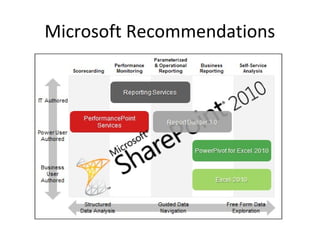
Microsoft Recommendations
Excel Web access & Pivot chart
solution
•
•
•
•
•
•
•
•

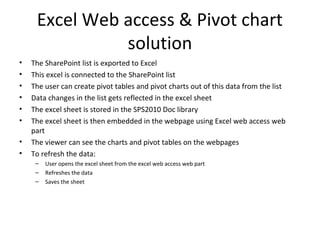
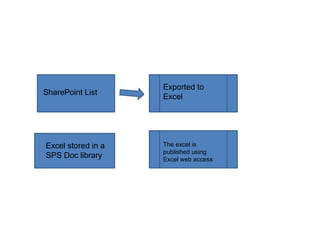
The SharePoint list is exported to Excel
This excel is connected to the SharePoint list
The user can create pivot tables and pivot charts out of this data from the list
Data changes in the list gets reflected in the excel sheet
The excel sheet is stored in the SPS2010 Doc library
The excel sheet is then embedded in the webpage using Excel web access web
part
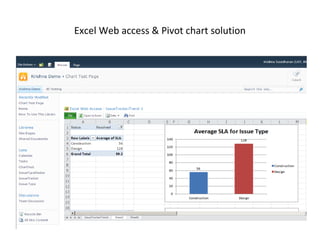
The viewer can see the charts and pivot tables on the webpages
To refresh the data:
–
–
–

User opens the excel sheet from the excel web access web part
Refreshes the data
Saves the sheet
Excel Web access & Pivot chart solution
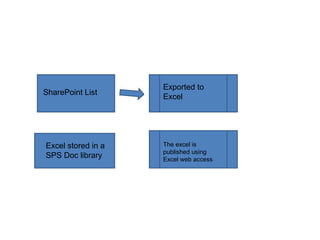
SharePoint List

Excel stored in a
SPS Doc library

Exported to
Excel

The excel is
published using
Excel web access
SharePoint List

Excel stored in a
SPS Doc library

Exported to
Excel

The excel is
published using
Excel web access

Charting solutions evaluation-1

  • 1.
  • 2.
    Solutions available Column1 Column2 Pros a)Easy toimplement b)Requires little or No IT support Cons a)Limited or no interactivity b)For the chart data to show meaningful data the data should be consolidated and grouped c)The chart draws data from SPS lists which by itself are not consoldiated 1 Sharepoint Chart Webpart 2 Power Pivot using Excel 2010 a)Easy to implement b)Requires little or No IT support c)Can create powerful BI reports d)Can work over raw sharepoint list data and create consoldiated pivots a)Will not work with Forms Based authentication enabled thereby severely affecting two of our requirements b)GC Contractor forms and Access request forms need Forms based authenticatio to be enabled and hence conflicts with the Powerpivot 3 MS Performance Point a)Powerful BI tool which can create all kinds of dashboards and scorecards b)Can work over sequel server data a)Required professional help in creating the datacubes b)Will not work directly over sharepoint List data c)Overkill solution for a requirement as the feedback loop requirement a)Easy to implement b)Need little of no IT help c)No limit to the pivots and charts that can be created 4 Excel pivot published using Excel web services d)Can work directly over sharepoint Lists a)Involves manual data refresh to reflect the changes made to the sharepoint List
  • 3.
  • 4.
    Excel Web access& Pivot chart solution • • • • • • • • The SharePoint list is exported to Excel This excel is connected to the SharePoint list The user can create pivot tables and pivot charts out of this data from the list Data changes in the list gets reflected in the excel sheet The excel sheet is stored in the SPS2010 Doc library The excel sheet is then embedded in the webpage using Excel web access web part The viewer can see the charts and pivot tables on the webpages To refresh the data: – – – User opens the excel sheet from the excel web access web part Refreshes the data Saves the sheet
  • 5.
    Excel Web access& Pivot chart solution
  • 6.
    SharePoint List Excel storedin a SPS Doc library Exported to Excel The excel is published using Excel web access
  • 7.
    SharePoint List Excel storedin a SPS Doc library Exported to Excel The excel is published using Excel web access