
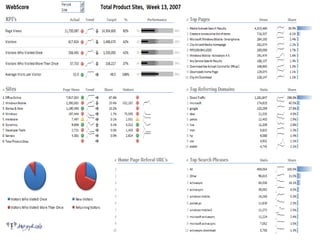
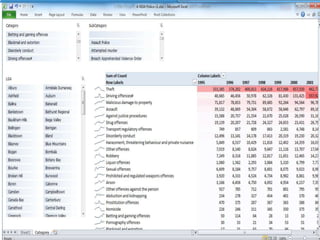
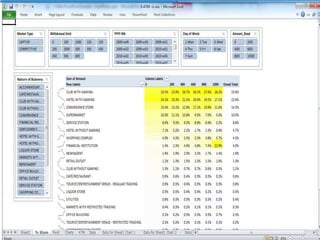
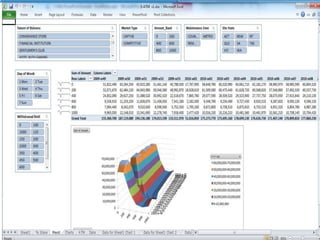
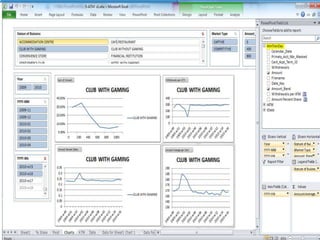
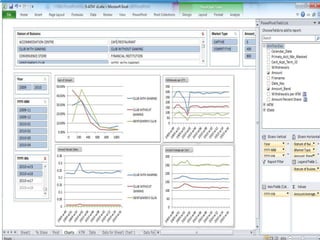
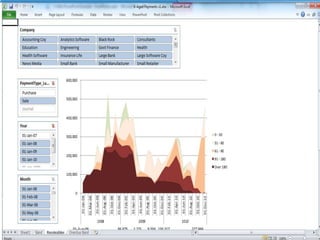
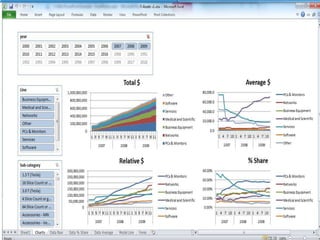

SQL Server Data Mining and Power Pviot (Data Discovery)Level 300Dr. Eduardo Castro MartinezArquitectoecastro@grupoasesor.nethttp://ecastrom.blogspot.comhttp://tiny.cc/comwindowsTwitter edocastro
What Will We Cover?•What is PowerPivot for SharePoint•Managing PowerPivot for SharePoint
AgendaReview•Configuring PowerPivot for SharePoint•Working With PowerPivotWorkbooks•Managing PowerPivot for SharePoint
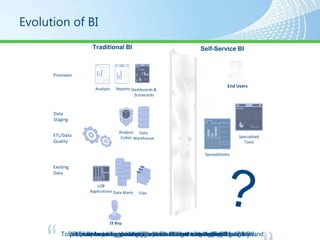
Evolution of BISelf-Service BITraditional BIProvisionAnalysisReportsDashboards & ScorecardsData StagingAnalysis CubesData WarehouseETL/Data QualitySpecialized ToolsEnd UsersSpreadsheetsExisting DataIT Pro?LOB ApplicationsData MartsFilesIT has been busy keeping up with the growing demand for BI…Harvesting existing data, cleaning it and staging it …To provision reports, dashboards & scorecards to meet End User demand.But business is outpacing IT and End Users are demanding Agility …Rapidly breaking down the barriers of Control with Self-Service BI!Is it possible to balance Control with Agility?
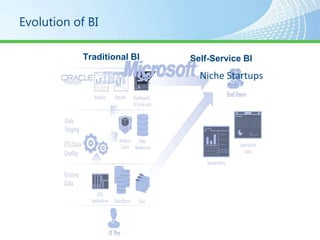
Evolution of BISelf-Service BITraditional BINiche Startups
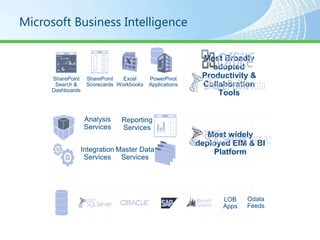
Microsoft Business IntelligenceMost Broadly adopted Productivity & Collaboration ToolsSharePointScorecardsExcel WorkbooksPowerPivot ApplicationsSharePointSearch & DashboardsAnalysis ServicesReporting ServicesMost widely deployed EIM & BI PlatformIntegration ServicesMaster Data ServicesOdataFeedsLOB Apps
Background Self-Service Business IntelligenceNew paradigm“Business intelligence for the masses”“Managed self-service business intelligence”Put simple, powerful BI tools in the hands of “knowledge workers”Familiar tools: ExcelPeople who own the dataExcel spreadsheet, Access database or SharePoint list dataReality: Office power users
PowerPivotTechnologiesAbility to easily create self-service BI applications using familiar tools (MS Excel)Easy to update and modify without being a BI developerDon’t need to install SQL Server 2008 R2
Analysis Services in VertiPaq ModeIn SQL Server 2008 R2, the VertiPaq storage engine is used for in-memory multidimensional databases withinExcel workbooksIncludes PowerPivot workbooks that have been published to a SharePoint site.
Analysis Services in VertiPaq ModePowerPivot for Excel is the only client that is supported for creating and querying in-memory databases that use VertiPaq mode. The multidimensional database that you create in PowerPivot tools is contained within the Excel workbookYou cannot access the VertiPaq storage engine by using traditional SSAS clients and tools
What is Microsoft PowerPivot?PowerPivot for Excel: Free TechnologyExcel add-in that enhances Excel’s capabilities for creating and editing PowerPivot applications. Requires Excel 2010Runs best with lots of RAM and Windows x64PowerPivot for SharePoint: LicensedSharePoint 2010 extension that enhances SharePoint’s enterprise capabilities for sharing and managing PowerPivot applications. Requires SharePoint 2010
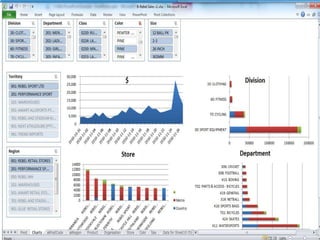
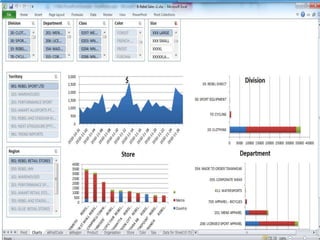
PowerPivot ApplicationsAppear to be ordinary Excel workbooksHave a UI that looks like a collection of tabbed Excel spreadsheetsCan store 2-3 orders of magnitude more rows of data than a spreadsheet can store (100’s millions of rows vs. 1 million rows) 2GB File Size limit
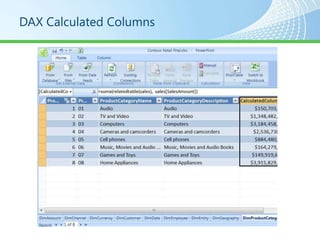
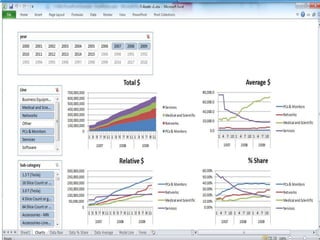
DAX Calculated Columns
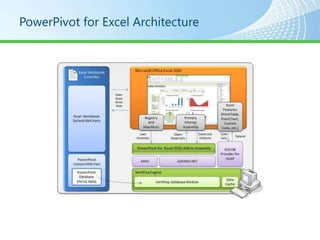
PowerPivot for Excel Architecture
VertiPaqVertiPaq Storage EngineLots of cheap RAM => In-memory storageColumn-oriented data compression > 10:1Support for column-oriented DAX queries
DemoUsing PowerPivot
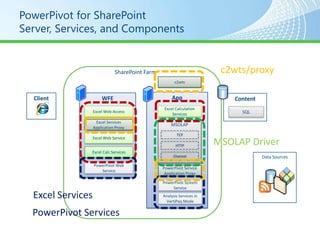
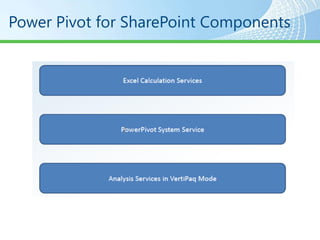
PowerPivot for SharePointServer, Services, and Componentsc2wts/proxySharePoint Farmc2wtsAppClientWFEContentExcel Calculation ServicesExcel Web AccessSQLExcel Services Application ProxyMSOLAPTCPExcel Web ServiceMSOLAP DriverHTTPExcel Calc ServicesChannelData SourcesPowerPivot Web ServicePowerPivot Service Application ProxyPowerPivot System ServiceExcel ServicesAnalysis Services in VertiPaq ModePowerPivot Services
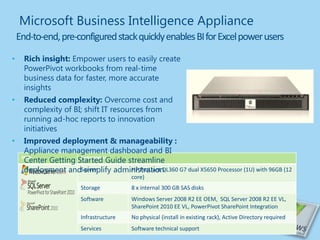
Microsoft Business Intelligence ApplianceEnd-to-end, pre-configured stack quickly enables BI for Excel power usersRich insight: Empower users to easily create PowerPivot workbooks from real-time business data for faster, more accurate insightsReduced complexity: Overcome cost and complexity of BI; shift IT resources from running ad-hoc reports to innovation initiativesImproved deployment & manageability : Appliance management dashboard and BI Center Getting Started Guide streamline deployment and simplify administration.
Power Pivot for SharePoint Components
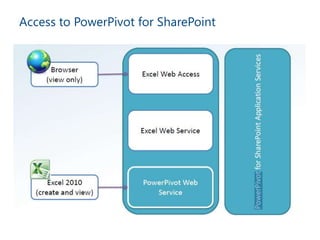
Access to PowerPivot for SharePoint
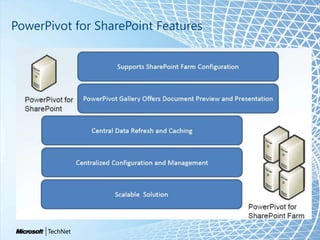
PowerPivot for SharePoint Features
Demonstration: Configuring PowerPivot For SharePoint•Install SQL Analysis Services and PowerPivot for SharePoint•Configure SharePoint for Workbook Uploads•Configure Excel Services
PowerPivotWhat cannot be done with a workbook loaded in a browser window?1.View the current data set2.Refresh the data3.Save changes to SharePoint4.Change the view by selecting different slicers
PowerPivotWhat cannot be done with a workbook loaded in a browser window?3.Save changes to SharePoint
PowerPivotSQL Server Analysis Services in VertiPaqmode provides what features?1.Efficient data compression2.Management of large data sets within memory3.Real-time restructuring of data based on user requests4.All of the above
PowerPivotSQL Server Analysis Services in VertiPaqmode provides what features?4.All of the above
Agenda•Configuring PowerPivot for SharePoint•Working With PowerPivotWorkbooks•Managing PowerPivot for SharePoint•Using StreamInsight
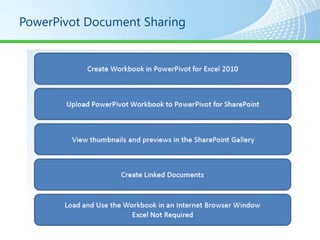
PowerPivot Document Sharing
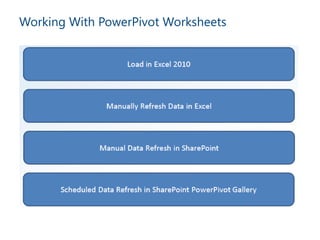
Working With PowerPivot Worksheets
Demonstration: Sharing PowerPivot Workbooks•Upload a Workbook to the SharePoint PowerPivot Gallery•Access a SharePoint Workbook•Manually Refresh the Workbook
ReviewPowerPivot workbooks are uploaded, accessed, and managed in the…?1.SharePoint Site Pages2.PowerPivot Gallery3.Document Library4.SharePoint Customized Reports page
ReviewPowerPivot workbooks are uploaded, accessed, and managed in the…?2.PowerPivotGallery
AgendaReview•Configuring PowerPivot for SharePoint•Working With PowerPivotWorkbooks•Managing PowerPivot for SharePoint•Using StreamInsight
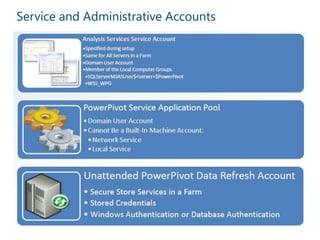
Service and Administrative Accounts
Demonstration: Managing and Monitoring PowerPivot for SharePoint•Examine Server Health•Configure Usage Data Collection•View Workbook Activity•View Error Logs
ReviewThe Analysis Services service account for all servers in a SharePoint farm with PowerPivot installed must be…1.The same user2.A different user3.A local Machine User4.A domain user
ReviewThe Analysis Services service account for all servers in a SharePoint farm with PowerPivot installed must be…1.The same user4.A domain user
AgendaReview•Configuring PowerPivot for SharePoint•Working With PowerPivotWorkbooks•Managing PowerPivot for SharePoint
Session Summary•PowerPivot For SharePoint is Part of SQL Server 2008 R2 Analysis Services•PowerPivot Enables Business Intelligence Collaboration for the Average User•Easy Access To PowerPivot Workbooks Using a Web Browser or Excel 2010
What’s Next…•Data Warehouse Scaling and Performance–SQL Server 2008 R2 Data Warehouse Optimizations–New Data Warehouse Scalability Features in SQL Server 2008 R2.
Preguntas?Q&A
SQL Server Data Mining and Power Pviot (Data Discovery)Level 300Dr. Eduardo Castro MartinezArquitectoecastro@grupoasesor.nethttp://ecastrom.blogspot.comhttp://tiny.cc/comwindowsTwitter edocastro
SQL Server Data Discovery with PowerPivot

SQL Server Data Discovery with PowerPivot

  • 1.
    SQL Server DataMining and Power Pviot (Data Discovery)Level 300Dr. Eduardo Castro MartinezArquitectoecastro@grupoasesor.nethttp://ecastrom.blogspot.comhttp://tiny.cc/comwindowsTwitter edocastro
  • 2.
    What Will WeCover?•What is PowerPivot for SharePoint•Managing PowerPivot for SharePoint
  • 3.
    AgendaReview•Configuring PowerPivot forSharePoint•Working With PowerPivotWorkbooks•Managing PowerPivot for SharePoint
  • 4.
    Evolution of BISelf-ServiceBITraditional BIProvisionAnalysisReportsDashboards & ScorecardsData StagingAnalysis CubesData WarehouseETL/Data QualitySpecialized ToolsEnd UsersSpreadsheetsExisting DataIT Pro?LOB ApplicationsData MartsFilesIT has been busy keeping up with the growing demand for BI…Harvesting existing data, cleaning it and staging it …To provision reports, dashboards & scorecards to meet End User demand.But business is outpacing IT and End Users are demanding Agility …Rapidly breaking down the barriers of Control with Self-Service BI!Is it possible to balance Control with Agility?
  • 5.
    Evolution of BISelf-ServiceBITraditional BINiche Startups
  • 6.
    Microsoft Business IntelligenceMostBroadly adopted Productivity & Collaboration ToolsSharePointScorecardsExcel WorkbooksPowerPivot ApplicationsSharePointSearch & DashboardsAnalysis ServicesReporting ServicesMost widely deployed EIM & BI PlatformIntegration ServicesMaster Data ServicesOdataFeedsLOB Apps
  • 7.
    Background Self-Service BusinessIntelligenceNew paradigm“Business intelligence for the masses”“Managed self-service business intelligence”Put simple, powerful BI tools in the hands of “knowledge workers”Familiar tools: ExcelPeople who own the dataExcel spreadsheet, Access database or SharePoint list dataReality: Office power users
  • 8.
    PowerPivotTechnologiesAbility to easilycreate self-service BI applications using familiar tools (MS Excel)Easy to update and modify without being a BI developerDon’t need to install SQL Server 2008 R2
  • 9.
    Analysis Services inVertiPaq ModeIn SQL Server 2008 R2, the VertiPaq storage engine is used for in-memory multidimensional databases withinExcel workbooksIncludes PowerPivot workbooks that have been published to a SharePoint site.
  • 10.
    Analysis Services inVertiPaq ModePowerPivot for Excel is the only client that is supported for creating and querying in-memory databases that use VertiPaq mode. The multidimensional database that you create in PowerPivot tools is contained within the Excel workbookYou cannot access the VertiPaq storage engine by using traditional SSAS clients and tools
  • 11.
    What is MicrosoftPowerPivot?PowerPivot for Excel: Free TechnologyExcel add-in that enhances Excel’s capabilities for creating and editing PowerPivot applications. Requires Excel 2010Runs best with lots of RAM and Windows x64PowerPivot for SharePoint: LicensedSharePoint 2010 extension that enhances SharePoint’s enterprise capabilities for sharing and managing PowerPivot applications. Requires SharePoint 2010
  • 12.
    PowerPivot ApplicationsAppear tobe ordinary Excel workbooksHave a UI that looks like a collection of tabbed Excel spreadsheetsCan store 2-3 orders of magnitude more rows of data than a spreadsheet can store (100’s millions of rows vs. 1 million rows) 2GB File Size limit
  • 13.
  • 14.
  • 15.
    VertiPaqVertiPaq Storage EngineLotsof cheap RAM => In-memory storageColumn-oriented data compression > 10:1Support for column-oriented DAX queries
  • 16.
  • 28.
    PowerPivot for SharePointServer,Services, and Componentsc2wts/proxySharePoint Farmc2wtsAppClientWFEContentExcel Calculation ServicesExcel Web AccessSQLExcel Services Application ProxyMSOLAPTCPExcel Web ServiceMSOLAP DriverHTTPExcel Calc ServicesChannelData SourcesPowerPivot Web ServicePowerPivot Service Application ProxyPowerPivot System ServiceExcel ServicesAnalysis Services in VertiPaq ModePowerPivot Services
  • 29.
    Microsoft Business IntelligenceApplianceEnd-to-end, pre-configured stack quickly enables BI for Excel power usersRich insight: Empower users to easily create PowerPivot workbooks from real-time business data for faster, more accurate insightsReduced complexity: Overcome cost and complexity of BI; shift IT resources from running ad-hoc reports to innovation initiativesImproved deployment & manageability : Appliance management dashboard and BI Center Getting Started Guide streamline deployment and simplify administration.
  • 30.
    Power Pivot forSharePoint Components
  • 31.
    Access to PowerPivotfor SharePoint
  • 32.
  • 33.
    Demonstration: Configuring PowerPivotFor SharePoint•Install SQL Analysis Services and PowerPivot for SharePoint•Configure SharePoint for Workbook Uploads•Configure Excel Services
  • 34.
    PowerPivotWhat cannot bedone with a workbook loaded in a browser window?1.View the current data set2.Refresh the data3.Save changes to SharePoint4.Change the view by selecting different slicers
  • 35.
    PowerPivotWhat cannot bedone with a workbook loaded in a browser window?3.Save changes to SharePoint
  • 36.
    PowerPivotSQL Server AnalysisServices in VertiPaqmode provides what features?1.Efficient data compression2.Management of large data sets within memory3.Real-time restructuring of data based on user requests4.All of the above
  • 37.
    PowerPivotSQL Server AnalysisServices in VertiPaqmode provides what features?4.All of the above
  • 38.
    Agenda•Configuring PowerPivot forSharePoint•Working With PowerPivotWorkbooks•Managing PowerPivot for SharePoint•Using StreamInsight
  • 39.
  • 40.
  • 41.
    Demonstration: Sharing PowerPivotWorkbooks•Upload a Workbook to the SharePoint PowerPivot Gallery•Access a SharePoint Workbook•Manually Refresh the Workbook
  • 42.
    Demonstration: Sharing PowerPivotWorkbooks•Upload a Workbook to the SharePoint PowerPivot Gallery•Access a SharePoint Workbook•Manually Refresh the Workbook
  • 43.
    ReviewPowerPivot workbooks areuploaded, accessed, and managed in the…?1.SharePoint Site Pages2.PowerPivot Gallery3.Document Library4.SharePoint Customized Reports page
  • 44.
    ReviewPowerPivot workbooks areuploaded, accessed, and managed in the…?2.PowerPivotGallery
  • 45.
    AgendaReview•Configuring PowerPivot forSharePoint•Working With PowerPivotWorkbooks•Managing PowerPivot for SharePoint•Using StreamInsight
  • 46.
  • 47.
    Demonstration: Managing andMonitoring PowerPivot for SharePoint•Examine Server Health•Configure Usage Data Collection•View Workbook Activity•View Error Logs
  • 48.
    ReviewThe Analysis Servicesservice account for all servers in a SharePoint farm with PowerPivot installed must be…1.The same user2.A different user3.A local Machine User4.A domain user
  • 49.
    ReviewThe Analysis Servicesservice account for all servers in a SharePoint farm with PowerPivot installed must be…1.The same user4.A domain user
  • 50.
    AgendaReview•Configuring PowerPivot forSharePoint•Working With PowerPivotWorkbooks•Managing PowerPivot for SharePoint
  • 51.
    Session Summary•PowerPivot ForSharePoint is Part of SQL Server 2008 R2 Analysis Services•PowerPivot Enables Business Intelligence Collaboration for the Average User•Easy Access To PowerPivot Workbooks Using a Web Browser or Excel 2010
  • 52.
    What’s Next…•Data WarehouseScaling and Performance–SQL Server 2008 R2 Data Warehouse Optimizations–New Data Warehouse Scalability Features in SQL Server 2008 R2.
  • 53.
  • 54.
    SQL Server DataMining and Power Pviot (Data Discovery)Level 300Dr. Eduardo Castro MartinezArquitectoecastro@grupoasesor.nethttp://ecastrom.blogspot.comhttp://tiny.cc/comwindowsTwitter edocastro