Management Information SystemsManagement Information Systems
MANAGING THE DIGITAL FIRM, 12TH
EDITION
BUILDING INFORMATION SYSTEMS
Chapter 9
Management Information SystemsManagement Information Systems
• How does building new systems produce
organizational change?
• What are the core activities in the systems
development process?
• What are the principal methodologies for modeling
and designing systems?
• What are the alternative methods for building
information systems?
• What are new approaches for system building in
the digital firm era?
Learning Objectives
CHAPTER 9: BUILDING INFORMATION SYSTEMS
© Prentice Hall 20112
Management Information SystemsManagement Information Systems
• Problem: Financial services provider CIMB group
wanted to improve efficiency in business processes,
specifically process of opening accounts at branch
• Solutions: ARIS BPM tool used to identify 25 areas
for improving efficiency. Utilized Malaysia’s
government ID smart card to automate inputting
customer data, reducing time spent by 50%
• Demonstrates the use of information systems to
streamline and redesign business processes
• Illustrates first key step in building new system −
analysis
CIMB Group Redesigns Its Account Opening Process
CHAPTER 9: BUILDING INFORMATION SYSTEMS
© Prentice Hall 20113
Management Information SystemsManagement Information Systems
• Structural organizational changes enabled by IT
1. Automation
• Increases efficiency
• Replaces manual tasks
1. Rationalization of procedures
• Streamlines standard operating procedures
• Often found in programs for making continuous
quality improvements
• Total quality management (TQM)
• Six sigma
Systems as Planned Organizational Change
CHAPTER 9: BUILDING INFORMATION SYSTEMS
© Prentice Hall 20114
Management Information SystemsManagement Information Systems
• Structural organizational changes enabled by IT
3. Business process redesign
• Analyze, simplify, and redesign business
processes
• Reorganize workflow, combine steps, eliminate
repetition
4. Paradigm shifts
• Rethink nature of business
• Define new business model
• Change nature of organization
Systems as Planned Organizational Change
CHAPTER 9: BUILDING INFORMATION SYSTEMS
© Prentice Hall 20115
Management Information SystemsManagement Information Systems
Systems as Planned Organizational Change
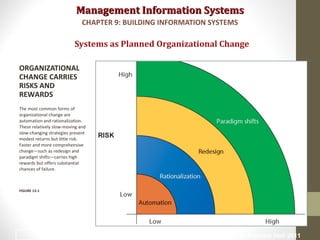
ORGANIZATIONAL
CHANGE CARRIES
RISKS AND
REWARDS
The most common forms of
organizational change are
automation and rationalization.
These relatively slow-moving and
slow-changing strategies present
modest returns but little risk.
Faster and more comprehensive
change—such as redesign and
paradigm shifts—carries high
rewards but offers substantial
chances of failure.
FIGURE 13-1
CHAPTER 9: BUILDING INFORMATION SYSTEMS
© Prentice Hall 20116
Management Information SystemsManagement Information Systems
• Business process management (BPM)
• Variety of tools, methodologies to analyze, design,
optimize processes
• Used by firms to manage business process redesign
• Steps in BPM
1.Identify processes for change
2.Analyze existing processes
3.Design the new process
4.Implement the new process
5.Continuous measurement
Systems as Planned Organizational Change
CHAPTER 9: BUILDING INFORMATION SYSTEMS
© Prentice Hall 20117
Management Information SystemsManagement Information Systems
Systems as Planned Organizational Change
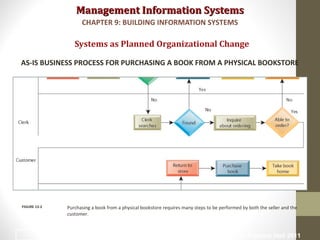
AS-IS BUSINESS PROCESS FOR PURCHASING A BOOK FROM A PHYSICAL BOOKSTORE
Purchasing a book from a physical bookstore requires many steps to be performed by both the seller and the
customer.
FIGURE 13-2
CHAPTER 9: BUILDING INFORMATION SYSTEMS
© Prentice Hall 20118
Management Information SystemsManagement Information Systems
Systems as Planned Organizational Change
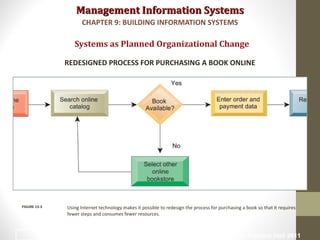
REDESIGNED PROCESS FOR PURCHASING A BOOK ONLINE
Using Internet technology makes it possible to redesign the process for purchasing a book so that it requires
fewer steps and consumes fewer resources.
FIGURE 13-3
CHAPTER 9: BUILDING INFORMATION SYSTEMS
© Prentice Hall 20119
Management Information SystemsManagement Information Systems
• Variety of tools for BPM, to
• Identify and document existing processes
• Identify inefficiencies
• Create models of improved processes
• Capture and enforce business rules for performing
processes
• Integrate existing systems to support process
improvements
• Verify that new processes have improved
• Measure impact of process changes on key business
performance indicators
Systems as Planned Organizational Change
CHAPTER 9: BUILDING INFORMATION SYSTEMS
© Prentice Hall 201110
Management Information SystemsManagement Information Systems
Read the Interactive Session and discuss the following questions
• Why are large companies such as AmerisourceBergen and
Diebold good candidates for business process management?
• What were the business benefits for each company from
redesigning and managing their business processes?
• How did BPM change the way these companies ran their
businesses?
• What might be some of the problems with extending BPM
software across a large number of business processes?
• What companies stand to gain the most by implementing
BPM?
Systems as Planned Organizational Change
CAN BUSINESS PROCESS MANAGEMENT MAKE A DIFFERENCE?
CHAPTER 9: BUILDING INFORMATION SYSTEMS
© Prentice Hall 201111
Management Information SystemsManagement Information Systems
• Systems development:
• Activities that go into producing an information
system solution to an organizational problem or
opportunity
1.Systems analysis
2.Systems design
3.Programming
4.Testing
5.Conversion
6.Production and maintenance
Overview of Systems Development
CHAPTER 9: BUILDING INFORMATION SYSTEMS
© Prentice Hall 201112
Management Information SystemsManagement Information Systems
Overview of Systems Development
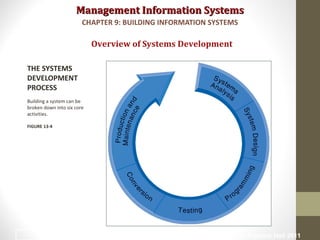
THE SYSTEMS
DEVELOPMENT
PROCESS
Building a system can be
broken down into six core
activities.
FIGURE 13-4
CHAPTER 9: BUILDING INFORMATION SYSTEMS
© Prentice Hall 201113
Management Information SystemsManagement Information Systems
• Systems analysis
• Analysis of problem to be solved by new system
• Defining the problem and identifying causes
• Specifying solutions
• Systems proposal report identifies and examines alternative
solutions
• Identifying information requirements
• Includes feasibility study
• Is solution feasible and good investment?
• Is required technology, skill available?
Overview of Systems Development
CHAPTER 9: BUILDING INFORMATION SYSTEMS
© Prentice Hall 201114
Management Information SystemsManagement Information Systems
• System analysis (cont.)
• Establishing information requirements
• Who needs what information, where, when, and
how
• Define objectives of new/modified system
• Detail the functions new system must perform
• Faulty requirements analysis is leading cause of
systems failure and high systems development
cost
Overview of Systems Development
CHAPTER 9: BUILDING INFORMATION SYSTEMS
© Prentice Hall 201115
Management Information SystemsManagement Information Systems
• Systems design
• Describes system specifications that will deliver
functions identified during systems analysis
• Should address all managerial, organizational, and
technological components of system solution
• Role of end users
• User information requirements drive system building
• Users must have sufficient control over design process to
ensure system reflects their business priorities and
information needs
• Insufficient user involvement in design effort is major cause
of system failure
Overview of Systems Development
CHAPTER 9: BUILDING INFORMATION SYSTEMS
© Prentice Hall 201116
Management Information SystemsManagement Information Systems
Overview of Systems Development
CHAPTER 9: BUILDING INFORMATION SYSTEMS
© Prentice Hall 201117
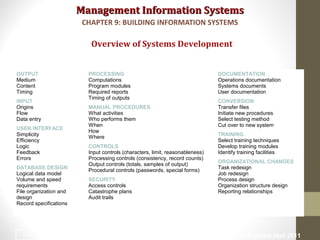
OUTPUT
Medium
Content
Timing
INPUT
Origins
Flow
Data entry
USER INTERFACE
Simplicity
Efficiency
Logic
Feedback
Errors
DATABASE DESIGN
Logical data model
Volume and speed
requirements
File organization and
design
Record specifications
PROCESSING
Computations
Program modules
Required reports
Timing of outputs
MANUAL PROCEDURES
What activities
Who performs them
When
How
Where
CONTROLS
Input controls (characters, limit, reasonableness)
Processing controls (consistency, record counts)
Output controls (totals, samples of output)
Procedural controls (passwords, special forms)
SECURITY
Access controls
Catastrophe plans
Audit trails
DOCUMENTATION
Operations documentation
Systems documents
User documentation
CONVERSION
Transfer files
Initiate new procedures
Select testing method
Cut over to new system
TRAINING
Select training techniques
Develop training modules
Identify training facilities
ORGANIZATIONAL CHANGES
Task redesign
Job redesign
Process design
Organization structure design
Reporting relationships
Management Information SystemsManagement Information Systems
• Programming:
• System specifications from design stage are
translated into software program code
• Testing
• Ensures system produces right results
• Unit testing: Tests each program in system separately
• System testing: Test functioning of system as a whole
• Acceptance testing: Makes sure system is ready to be
used in production setting
• Test plan: All preparations for series of tests
Overview of Systems Development
CHAPTER 9: BUILDING INFORMATION SYSTEMS
© Prentice Hall 201118
Management Information SystemsManagement Information Systems
Overview of Systems Development
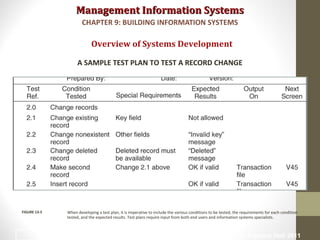
A SAMPLE TEST PLAN TO TEST A RECORD CHANGE
When developing a test plan, it is imperative to include the various conditions to be tested, the requirements for each condition
tested, and the expected results. Test plans require input from both end users and information systems specialists.
FIGURE 13-5
CHAPTER 9: BUILDING INFORMATION SYSTEMS
© Prentice Hall 201119
Management Information SystemsManagement Information Systems
• Conversion
• Process of changing from old system to new system
• Four main strategies
1. Parallel strategy
2. Direct cutover
3. Pilot study
4. Phased approach
• Requires end-user training
• Finalization of detailed documentation showing how
system works from technical and end-user standpoint
Overview of Systems Development
CHAPTER 9: BUILDING INFORMATION SYSTEMS
© Prentice Hall 201120
Management Information SystemsManagement Information Systems
• Production and maintenance
• System reviewed to determine if revisions needed
• May include post-implementation audit document
• Maintenance
• Changes in hardware, software, documentation, or
procedures to a production system to correct errors,
meet new requirements, or improve processing
efficiency
• 20% debugging, emergency work
• 20% changes to hardware, software, data, reporting
• 60% of work: User enhancements, improving documentation,
recoding for greater processing efficiency
Overview of Systems Development
CHAPTER 9: BUILDING INFORMATION SYSTEMS
© Prentice Hall 201121
Management Information SystemsManagement Information Systems
Overview of Systems Development
CHAPTER 9: BUILDING INFORMATION SYSTEMS
© Prentice Hall 201122
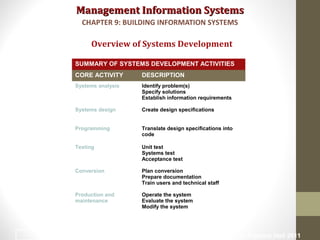
SUMMARY OF SYSTEMS DEVELOPMENT ACTIVITIES
CORE ACTIVITY DESCRIPTION
Systems analysis Identify problem(s)
Specify solutions
Establish information requirements
Systems design Create design specifications
Programming Translate design specifications into
code
Testing Unit test
Systems test
Acceptance test
Conversion Plan conversion
Prepare documentation
Train users and technical staff
Production and
maintenance
Operate the system
Evaluate the system
Modify the system
Management Information SystemsManagement Information Systems
• Most prominent methodologies for modeling and
designing systems:
1. Structured methodologies
2. Object-oriented development
• Structured methodologies
• Structured: Techniques are step-by-step,
progressive
• Process-oriented: Focusing on modeling processes
or actions that manipulate data
• Separate data from processes
Overview of Systems Development
CHAPTER 9: BUILDING INFORMATION SYSTEMS
© Prentice Hall 201123
Management Information SystemsManagement Information Systems
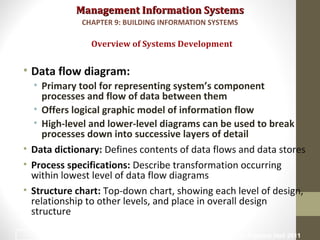
• Data flow diagram:
• Primary tool for representing system’s component
processes and flow of data between them
• Offers logical graphic model of information flow
• High-level and lower-level diagrams can be used to break
processes down into successive layers of detail
• Data dictionary: Defines contents of data flows and data stores
• Process specifications: Describe transformation occurring
within lowest level of data flow diagrams
• Structure chart: Top-down chart, showing each level of design,
relationship to other levels, and place in overall design
structure
Overview of Systems Development
CHAPTER 9: BUILDING INFORMATION SYSTEMS
© Prentice Hall 201124
Management Information SystemsManagement Information Systems
Overview of Systems Development
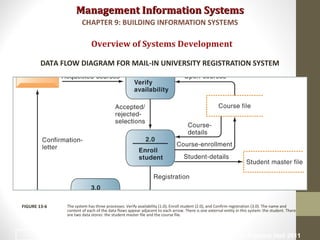
DATA FLOW DIAGRAM FOR MAIL-IN UNIVERSITY REGISTRATION SYSTEM
The system has three processes: Verify availability (1.0), Enroll student (2.0), and Confirm registration (3.0). The name and
content of each of the data flows appear adjacent to each arrow. There is one external entity in this system: the student. There
are two data stores: the student master file and the course file.
FIGURE 13-6
CHAPTER 9: BUILDING INFORMATION SYSTEMS
© Prentice Hall 201125
Management Information SystemsManagement Information Systems
Overview of Systems Development
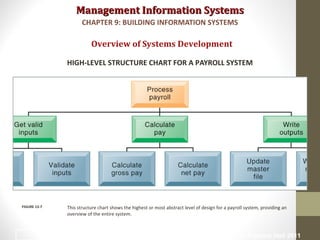
HIGH-LEVEL STRUCTURE CHART FOR A PAYROLL SYSTEM
This structure chart shows the highest or most abstract level of design for a payroll system, providing an
overview of the entire system.
FIGURE 13-7
CHAPTER 9: BUILDING INFORMATION SYSTEMS
© Prentice Hall 201126
Management Information SystemsManagement Information Systems
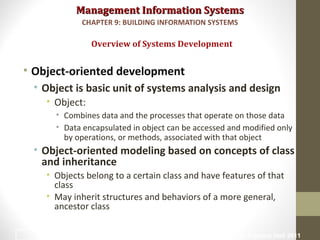
• Object-oriented development
• Object is basic unit of systems analysis and design
• Object:
• Combines data and the processes that operate on those data
• Data encapsulated in object can be accessed and modified only
by operations, or methods, associated with that object
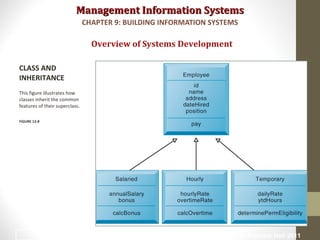
• Object-oriented modeling based on concepts of class
and inheritance
• Objects belong to a certain class and have features of that
class
• May inherit structures and behaviors of a more general,
ancestor class
Overview of Systems Development
CHAPTER 9: BUILDING INFORMATION SYSTEMS
© Prentice Hall 201127
Management Information SystemsManagement Information Systems
Overview of Systems Development
CLASS AND
INHERITANCE
This figure illustrates how
classes inherit the common
features of their superclass.
FIGURE 13-8
CHAPTER 9: BUILDING INFORMATION SYSTEMS
© Prentice Hall 201128
Management Information SystemsManagement Information Systems
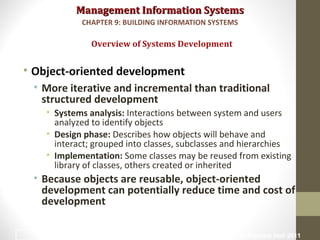
• Object-oriented development
• More iterative and incremental than traditional
structured development
• Systems analysis: Interactions between system and users
analyzed to identify objects
• Design phase: Describes how objects will behave and
interact; grouped into classes, subclasses and hierarchies
• Implementation: Some classes may be reused from existing
library of classes, others created or inherited
• Because objects are reusable, object-oriented
development can potentially reduce time and cost of
development
Overview of Systems Development
CHAPTER 9: BUILDING INFORMATION SYSTEMS
© Prentice Hall 201129
Management Information SystemsManagement Information Systems
• Computer-aided software engineering (CASE)
• Software tools to automate development and reduce
repetitive work, including
• Graphics facilities for producing charts and diagrams
• Screen and report generators, reporting facilities
• Analysis and checking tools
• Data dictionaries
• Code and documentation generators
• Support iterative design by automating revisions and
changes and providing prototyping facilities
• Require organizational discipline to be used effectively
Overview of Systems Development
CHAPTER 9: BUILDING INFORMATION SYSTEMS
© Prentice Hall 201130
Management Information SystemsManagement Information Systems
•Alternative Systems-Building Methods
• Traditional systems life-cycle
• Prototyping
• End-user development
• Application software packages
• Outsourcing
Alternative Systems Building Approaches
CHAPTER 9: BUILDING INFORMATION SYSTEMS
© Prentice Hall 201131
Management Information SystemsManagement Information Systems
• Traditional systems lifecycle:
• Oldest method for building information systems
• Phased approach divides development into formal stages
• Follows “waterfall” approach: Tasks in one stage finish
before another stage begins
• Maintains formal division of labor between end users
and information systems specialists
• Emphasizes formal specifications and paperwork
• Still used for building large complex systems
• Can be costly, time-consuming, and inflexible
Alternative Systems Building Approaches
CHAPTER 9: BUILDING INFORMATION SYSTEMS
© Prentice Hall 201132
Management Information SystemsManagement Information Systems
• Prototyping
• Building experimental system rapidly and
inexpensively for end users to evaluate
• Prototype: Working but preliminary version of
information system
• Approved prototype serves as template for final system
• Steps in prototyping
1. Identify user requirements
2. Develop initial prototype
3. Use prototype
4. Revise and enhance prototype
Alternative Systems Building Approaches
CHAPTER 9: BUILDING INFORMATION SYSTEMS
© Prentice Hall 201133
Management Information SystemsManagement Information Systems
Alternative Systems Building Approaches
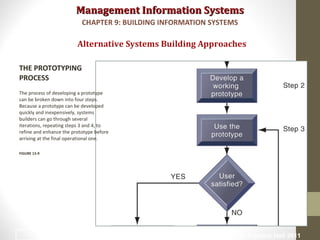
THE PROTOTYPING
PROCESS
The process of developing a prototype
can be broken down into four steps.
Because a prototype can be developed
quickly and inexpensively, systems
builders can go through several
iterations, repeating steps 3 and 4, to
refine and enhance the prototype before
arriving at the final operational one.
FIGURE 13-9
CHAPTER 9: BUILDING INFORMATION SYSTEMS
© Prentice Hall 201134
Management Information SystemsManagement Information Systems
• Advantages of prototyping
• Useful if some uncertainty in requirements or design
solutions
• Often used for end-user interface design
• More likely to fulfill end-user requirements
• Disadvantages
• May gloss over essential steps
• May not accommodate large quantities of data or
large number of users
• May not undergo full testing or documentation
Alternative Systems Building Approaches
CHAPTER 9: BUILDING INFORMATION SYSTEMS
© Prentice Hall 201135
Management Information SystemsManagement Information Systems
• End-user development:
• Uses fourth-generation languages to allow end-users
to develop systems with little or no help from
technical specialists
• Fourth generation languages: Less procedural than
conventional programming languages
• PC software tools
• Query languages
• Report generators
• Graphics languages
• Application generators
• Application software packages
• Very high-level programming languages
Alternative Systems Building Approaches
CHAPTER 9: BUILDING INFORMATION SYSTEMS
© Prentice Hall 201136
Management Information SystemsManagement Information Systems
• End-user development (cont.):
• Advantages:
• More rapid completion of projects
• High-level of user involvement and satisfaction
• Disadvantages:
• Not designed for processing-intensive applications
• Inadequate management and control, testing,
documentation
• Loss of control over data
• Managing end-user development
• Require cost-justification of end-user system projects
• Establish hardware, software, and quality standards
Alternative Systems Building Approaches
CHAPTER 9: BUILDING INFORMATION SYSTEMS
© Prentice Hall 201137
Management Information SystemsManagement Information Systems
• Application software packages
• Save time and money
• Many offer customization features:
• Software can be modified to meet unique requirements without
destroying integrity of package software
• Evaluation criteria for systems analysis include:
• Functions provided by the package, flexibility, user friendliness,
hardware and software resources, database requirements,
installation and maintenance efforts, documentation, vendor
quality, and cost
• Request for Proposal (RFP)
• Detailed list of questions submitted to packaged-software vendors
• Used to evaluate alternative software packages
Alternative Systems Building Approaches
CHAPTER 9: BUILDING INFORMATION SYSTEMS
© Prentice Hall 201138
Management Information SystemsManagement Information Systems
• Outsourcing
• Several types
• Cloud and SaaS providers
• Subscribing companies use software and computer hardware
provided by vendors
• External vendors
• Hired to design, create software
• Domestic outsourcing
• Driven by firms need for additional skills, resources, assets
• Offshore outsourcing
• Driven by cost-savings
Alternative Systems Building Approaches
CHAPTER 9: BUILDING INFORMATION SYSTEMS
© Prentice Hall 201139
Management Information SystemsManagement Information Systems
• Outsourcing (cont.)
• Advantages
• Allows organization flexibility in IT needs
• Disadvantages
• Hidden costs, e.g.
• Identifying and selecting vendor
• Transitioning to vendor
• Opening up proprietary business processes to
third party
Alternative Systems Building Approaches
CHAPTER 9: BUILDING INFORMATION SYSTEMS
© Prentice Hall 201140
Management Information SystemsManagement Information Systems
Alternative Systems Building Approaches
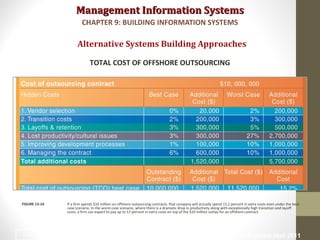
TOTAL COST OF OFFSHORE OUTSOURCING
If a firm spends $10 million on offshore outsourcing contracts, that company will actually spend 15.2 percent in extra costs even under the best-
case scenario. In the worst-case scenario, where there is a dramatic drop in productivity along with exceptionally high transition and layoff
costs, a firm can expect to pay up to 57 percent in extra costs on top of the $10 million outlay for an offshore contract.
FIGURE 13-10
CHAPTER 9: BUILDING INFORMATION SYSTEMS
© Prentice Hall 201141
Management Information SystemsManagement Information Systems
• Rapid application development (RAD)
• Process of creating workable systems in a very short
period of time
• Utilizes techniques such as:
• Visual programming and other tools for building
graphical user interfaces
• Iterative prototyping of key system elements
• Automation of program code generation
• Close teamwork among end users and information
systems specialists
Application Development for the Digital Firm
CHAPTER 9: BUILDING INFORMATION SYSTEMS
© Prentice Hall 201142
Management Information SystemsManagement Information Systems
• Joint application design (JAD)
• Used to accelerate generation of information
requirements and to develop initial systems
design
• Brings end users and information systems
specialists together in interactive session to
discuss system’s design
• Can significantly speed up design phase and
involve users at intense level
Application Development for the Digital Firm
CHAPTER 9: BUILDING INFORMATION SYSTEMS
© Prentice Hall 201143
Management Information SystemsManagement Information Systems
• Agile development
• Focuses on rapid delivery of working software by
breaking large project into several small sub-projects
• Subprojects
• Treated as separate, complete projects
• Completed in short periods of time using iteration and
continuous feedback
• Emphasizes face-to-face communication over written
documents, allowing collaboration and faster
decision making
Application Development for the Digital Firm
CHAPTER 9: BUILDING INFORMATION SYSTEMS
© Prentice Hall 201144
Management Information SystemsManagement Information Systems
• Component-based development
• Groups of objects that provide software for common
functions (e.g., online ordering) and can be combined to
create large-scale business applications
• Web services
• Reusable software components that use XML and open Internet
standards (platform independent)
• Enable applications to communicate with no custom
programming required to share data and services
• Can engage other Web services for more complex transactions
• Using platform and device-independent standards can result in
significant cost-savings and opportunities for collaboration with
other companies
Application Development for the Digital Firm
CHAPTER 9: BUILDING INFORMATION SYSTEMS
© Prentice Hall 201145

Chapter 9 MIS

  • 1.
    Management Information SystemsManagementInformation Systems MANAGING THE DIGITAL FIRM, 12TH EDITION BUILDING INFORMATION SYSTEMS Chapter 9
  • 2.
    Management Information SystemsManagementInformation Systems • How does building new systems produce organizational change? • What are the core activities in the systems development process? • What are the principal methodologies for modeling and designing systems? • What are the alternative methods for building information systems? • What are new approaches for system building in the digital firm era? Learning Objectives CHAPTER 9: BUILDING INFORMATION SYSTEMS © Prentice Hall 20112
  • 3.
    Management Information SystemsManagementInformation Systems • Problem: Financial services provider CIMB group wanted to improve efficiency in business processes, specifically process of opening accounts at branch • Solutions: ARIS BPM tool used to identify 25 areas for improving efficiency. Utilized Malaysia’s government ID smart card to automate inputting customer data, reducing time spent by 50% • Demonstrates the use of information systems to streamline and redesign business processes • Illustrates first key step in building new system − analysis CIMB Group Redesigns Its Account Opening Process CHAPTER 9: BUILDING INFORMATION SYSTEMS © Prentice Hall 20113
  • 4.
    Management Information SystemsManagementInformation Systems • Structural organizational changes enabled by IT 1. Automation • Increases efficiency • Replaces manual tasks 1. Rationalization of procedures • Streamlines standard operating procedures • Often found in programs for making continuous quality improvements • Total quality management (TQM) • Six sigma Systems as Planned Organizational Change CHAPTER 9: BUILDING INFORMATION SYSTEMS © Prentice Hall 20114
  • 5.
    Management Information SystemsManagementInformation Systems • Structural organizational changes enabled by IT 3. Business process redesign • Analyze, simplify, and redesign business processes • Reorganize workflow, combine steps, eliminate repetition 4. Paradigm shifts • Rethink nature of business • Define new business model • Change nature of organization Systems as Planned Organizational Change CHAPTER 9: BUILDING INFORMATION SYSTEMS © Prentice Hall 20115
  • 6.
    Management Information SystemsManagementInformation Systems Systems as Planned Organizational Change ORGANIZATIONAL CHANGE CARRIES RISKS AND REWARDS The most common forms of organizational change are automation and rationalization. These relatively slow-moving and slow-changing strategies present modest returns but little risk. Faster and more comprehensive change—such as redesign and paradigm shifts—carries high rewards but offers substantial chances of failure. FIGURE 13-1 CHAPTER 9: BUILDING INFORMATION SYSTEMS © Prentice Hall 20116
  • 7.
    Management Information SystemsManagementInformation Systems • Business process management (BPM) • Variety of tools, methodologies to analyze, design, optimize processes • Used by firms to manage business process redesign • Steps in BPM 1.Identify processes for change 2.Analyze existing processes 3.Design the new process 4.Implement the new process 5.Continuous measurement Systems as Planned Organizational Change CHAPTER 9: BUILDING INFORMATION SYSTEMS © Prentice Hall 20117
  • 8.
    Management Information SystemsManagementInformation Systems Systems as Planned Organizational Change AS-IS BUSINESS PROCESS FOR PURCHASING A BOOK FROM A PHYSICAL BOOKSTORE Purchasing a book from a physical bookstore requires many steps to be performed by both the seller and the customer. FIGURE 13-2 CHAPTER 9: BUILDING INFORMATION SYSTEMS © Prentice Hall 20118
  • 9.
    Management Information SystemsManagementInformation Systems Systems as Planned Organizational Change REDESIGNED PROCESS FOR PURCHASING A BOOK ONLINE Using Internet technology makes it possible to redesign the process for purchasing a book so that it requires fewer steps and consumes fewer resources. FIGURE 13-3 CHAPTER 9: BUILDING INFORMATION SYSTEMS © Prentice Hall 20119
  • 10.
    Management Information SystemsManagementInformation Systems • Variety of tools for BPM, to • Identify and document existing processes • Identify inefficiencies • Create models of improved processes • Capture and enforce business rules for performing processes • Integrate existing systems to support process improvements • Verify that new processes have improved • Measure impact of process changes on key business performance indicators Systems as Planned Organizational Change CHAPTER 9: BUILDING INFORMATION SYSTEMS © Prentice Hall 201110
  • 11.
    Management Information SystemsManagementInformation Systems Read the Interactive Session and discuss the following questions • Why are large companies such as AmerisourceBergen and Diebold good candidates for business process management? • What were the business benefits for each company from redesigning and managing their business processes? • How did BPM change the way these companies ran their businesses? • What might be some of the problems with extending BPM software across a large number of business processes? • What companies stand to gain the most by implementing BPM? Systems as Planned Organizational Change CAN BUSINESS PROCESS MANAGEMENT MAKE A DIFFERENCE? CHAPTER 9: BUILDING INFORMATION SYSTEMS © Prentice Hall 201111
  • 12.
    Management Information SystemsManagementInformation Systems • Systems development: • Activities that go into producing an information system solution to an organizational problem or opportunity 1.Systems analysis 2.Systems design 3.Programming 4.Testing 5.Conversion 6.Production and maintenance Overview of Systems Development CHAPTER 9: BUILDING INFORMATION SYSTEMS © Prentice Hall 201112
  • 13.
    Management Information SystemsManagementInformation Systems Overview of Systems Development THE SYSTEMS DEVELOPMENT PROCESS Building a system can be broken down into six core activities. FIGURE 13-4 CHAPTER 9: BUILDING INFORMATION SYSTEMS © Prentice Hall 201113
  • 14.
    Management Information SystemsManagementInformation Systems • Systems analysis • Analysis of problem to be solved by new system • Defining the problem and identifying causes • Specifying solutions • Systems proposal report identifies and examines alternative solutions • Identifying information requirements • Includes feasibility study • Is solution feasible and good investment? • Is required technology, skill available? Overview of Systems Development CHAPTER 9: BUILDING INFORMATION SYSTEMS © Prentice Hall 201114
  • 15.
    Management Information SystemsManagementInformation Systems • System analysis (cont.) • Establishing information requirements • Who needs what information, where, when, and how • Define objectives of new/modified system • Detail the functions new system must perform • Faulty requirements analysis is leading cause of systems failure and high systems development cost Overview of Systems Development CHAPTER 9: BUILDING INFORMATION SYSTEMS © Prentice Hall 201115
  • 16.
    Management Information SystemsManagementInformation Systems • Systems design • Describes system specifications that will deliver functions identified during systems analysis • Should address all managerial, organizational, and technological components of system solution • Role of end users • User information requirements drive system building • Users must have sufficient control over design process to ensure system reflects their business priorities and information needs • Insufficient user involvement in design effort is major cause of system failure Overview of Systems Development CHAPTER 9: BUILDING INFORMATION SYSTEMS © Prentice Hall 201116
  • 17.
    Management Information SystemsManagementInformation Systems Overview of Systems Development CHAPTER 9: BUILDING INFORMATION SYSTEMS © Prentice Hall 201117 OUTPUT Medium Content Timing INPUT Origins Flow Data entry USER INTERFACE Simplicity Efficiency Logic Feedback Errors DATABASE DESIGN Logical data model Volume and speed requirements File organization and design Record specifications PROCESSING Computations Program modules Required reports Timing of outputs MANUAL PROCEDURES What activities Who performs them When How Where CONTROLS Input controls (characters, limit, reasonableness) Processing controls (consistency, record counts) Output controls (totals, samples of output) Procedural controls (passwords, special forms) SECURITY Access controls Catastrophe plans Audit trails DOCUMENTATION Operations documentation Systems documents User documentation CONVERSION Transfer files Initiate new procedures Select testing method Cut over to new system TRAINING Select training techniques Develop training modules Identify training facilities ORGANIZATIONAL CHANGES Task redesign Job redesign Process design Organization structure design Reporting relationships
  • 18.
    Management Information SystemsManagementInformation Systems • Programming: • System specifications from design stage are translated into software program code • Testing • Ensures system produces right results • Unit testing: Tests each program in system separately • System testing: Test functioning of system as a whole • Acceptance testing: Makes sure system is ready to be used in production setting • Test plan: All preparations for series of tests Overview of Systems Development CHAPTER 9: BUILDING INFORMATION SYSTEMS © Prentice Hall 201118
  • 19.
    Management Information SystemsManagementInformation Systems Overview of Systems Development A SAMPLE TEST PLAN TO TEST A RECORD CHANGE When developing a test plan, it is imperative to include the various conditions to be tested, the requirements for each condition tested, and the expected results. Test plans require input from both end users and information systems specialists. FIGURE 13-5 CHAPTER 9: BUILDING INFORMATION SYSTEMS © Prentice Hall 201119
  • 20.
    Management Information SystemsManagementInformation Systems • Conversion • Process of changing from old system to new system • Four main strategies 1. Parallel strategy 2. Direct cutover 3. Pilot study 4. Phased approach • Requires end-user training • Finalization of detailed documentation showing how system works from technical and end-user standpoint Overview of Systems Development CHAPTER 9: BUILDING INFORMATION SYSTEMS © Prentice Hall 201120
  • 21.
    Management Information SystemsManagementInformation Systems • Production and maintenance • System reviewed to determine if revisions needed • May include post-implementation audit document • Maintenance • Changes in hardware, software, documentation, or procedures to a production system to correct errors, meet new requirements, or improve processing efficiency • 20% debugging, emergency work • 20% changes to hardware, software, data, reporting • 60% of work: User enhancements, improving documentation, recoding for greater processing efficiency Overview of Systems Development CHAPTER 9: BUILDING INFORMATION SYSTEMS © Prentice Hall 201121
  • 22.
    Management Information SystemsManagementInformation Systems Overview of Systems Development CHAPTER 9: BUILDING INFORMATION SYSTEMS © Prentice Hall 201122 SUMMARY OF SYSTEMS DEVELOPMENT ACTIVITIES CORE ACTIVITY DESCRIPTION Systems analysis Identify problem(s) Specify solutions Establish information requirements Systems design Create design specifications Programming Translate design specifications into code Testing Unit test Systems test Acceptance test Conversion Plan conversion Prepare documentation Train users and technical staff Production and maintenance Operate the system Evaluate the system Modify the system
  • 23.
    Management Information SystemsManagementInformation Systems • Most prominent methodologies for modeling and designing systems: 1. Structured methodologies 2. Object-oriented development • Structured methodologies • Structured: Techniques are step-by-step, progressive • Process-oriented: Focusing on modeling processes or actions that manipulate data • Separate data from processes Overview of Systems Development CHAPTER 9: BUILDING INFORMATION SYSTEMS © Prentice Hall 201123
  • 24.
    Management Information SystemsManagementInformation Systems • Data flow diagram: • Primary tool for representing system’s component processes and flow of data between them • Offers logical graphic model of information flow • High-level and lower-level diagrams can be used to break processes down into successive layers of detail • Data dictionary: Defines contents of data flows and data stores • Process specifications: Describe transformation occurring within lowest level of data flow diagrams • Structure chart: Top-down chart, showing each level of design, relationship to other levels, and place in overall design structure Overview of Systems Development CHAPTER 9: BUILDING INFORMATION SYSTEMS © Prentice Hall 201124
  • 25.
    Management Information SystemsManagementInformation Systems Overview of Systems Development DATA FLOW DIAGRAM FOR MAIL-IN UNIVERSITY REGISTRATION SYSTEM The system has three processes: Verify availability (1.0), Enroll student (2.0), and Confirm registration (3.0). The name and content of each of the data flows appear adjacent to each arrow. There is one external entity in this system: the student. There are two data stores: the student master file and the course file. FIGURE 13-6 CHAPTER 9: BUILDING INFORMATION SYSTEMS © Prentice Hall 201125
  • 26.
    Management Information SystemsManagementInformation Systems Overview of Systems Development HIGH-LEVEL STRUCTURE CHART FOR A PAYROLL SYSTEM This structure chart shows the highest or most abstract level of design for a payroll system, providing an overview of the entire system. FIGURE 13-7 CHAPTER 9: BUILDING INFORMATION SYSTEMS © Prentice Hall 201126
  • 27.
    Management Information SystemsManagementInformation Systems • Object-oriented development • Object is basic unit of systems analysis and design • Object: • Combines data and the processes that operate on those data • Data encapsulated in object can be accessed and modified only by operations, or methods, associated with that object • Object-oriented modeling based on concepts of class and inheritance • Objects belong to a certain class and have features of that class • May inherit structures and behaviors of a more general, ancestor class Overview of Systems Development CHAPTER 9: BUILDING INFORMATION SYSTEMS © Prentice Hall 201127
  • 28.
    Management Information SystemsManagementInformation Systems Overview of Systems Development CLASS AND INHERITANCE This figure illustrates how classes inherit the common features of their superclass. FIGURE 13-8 CHAPTER 9: BUILDING INFORMATION SYSTEMS © Prentice Hall 201128
  • 29.
    Management Information SystemsManagementInformation Systems • Object-oriented development • More iterative and incremental than traditional structured development • Systems analysis: Interactions between system and users analyzed to identify objects • Design phase: Describes how objects will behave and interact; grouped into classes, subclasses and hierarchies • Implementation: Some classes may be reused from existing library of classes, others created or inherited • Because objects are reusable, object-oriented development can potentially reduce time and cost of development Overview of Systems Development CHAPTER 9: BUILDING INFORMATION SYSTEMS © Prentice Hall 201129
  • 30.
    Management Information SystemsManagementInformation Systems • Computer-aided software engineering (CASE) • Software tools to automate development and reduce repetitive work, including • Graphics facilities for producing charts and diagrams • Screen and report generators, reporting facilities • Analysis and checking tools • Data dictionaries • Code and documentation generators • Support iterative design by automating revisions and changes and providing prototyping facilities • Require organizational discipline to be used effectively Overview of Systems Development CHAPTER 9: BUILDING INFORMATION SYSTEMS © Prentice Hall 201130
  • 31.
    Management Information SystemsManagementInformation Systems •Alternative Systems-Building Methods • Traditional systems life-cycle • Prototyping • End-user development • Application software packages • Outsourcing Alternative Systems Building Approaches CHAPTER 9: BUILDING INFORMATION SYSTEMS © Prentice Hall 201131
  • 32.
    Management Information SystemsManagementInformation Systems • Traditional systems lifecycle: • Oldest method for building information systems • Phased approach divides development into formal stages • Follows “waterfall” approach: Tasks in one stage finish before another stage begins • Maintains formal division of labor between end users and information systems specialists • Emphasizes formal specifications and paperwork • Still used for building large complex systems • Can be costly, time-consuming, and inflexible Alternative Systems Building Approaches CHAPTER 9: BUILDING INFORMATION SYSTEMS © Prentice Hall 201132
  • 33.
    Management Information SystemsManagementInformation Systems • Prototyping • Building experimental system rapidly and inexpensively for end users to evaluate • Prototype: Working but preliminary version of information system • Approved prototype serves as template for final system • Steps in prototyping 1. Identify user requirements 2. Develop initial prototype 3. Use prototype 4. Revise and enhance prototype Alternative Systems Building Approaches CHAPTER 9: BUILDING INFORMATION SYSTEMS © Prentice Hall 201133
  • 34.
    Management Information SystemsManagementInformation Systems Alternative Systems Building Approaches THE PROTOTYPING PROCESS The process of developing a prototype can be broken down into four steps. Because a prototype can be developed quickly and inexpensively, systems builders can go through several iterations, repeating steps 3 and 4, to refine and enhance the prototype before arriving at the final operational one. FIGURE 13-9 CHAPTER 9: BUILDING INFORMATION SYSTEMS © Prentice Hall 201134
  • 35.
    Management Information SystemsManagementInformation Systems • Advantages of prototyping • Useful if some uncertainty in requirements or design solutions • Often used for end-user interface design • More likely to fulfill end-user requirements • Disadvantages • May gloss over essential steps • May not accommodate large quantities of data or large number of users • May not undergo full testing or documentation Alternative Systems Building Approaches CHAPTER 9: BUILDING INFORMATION SYSTEMS © Prentice Hall 201135
  • 36.
    Management Information SystemsManagementInformation Systems • End-user development: • Uses fourth-generation languages to allow end-users to develop systems with little or no help from technical specialists • Fourth generation languages: Less procedural than conventional programming languages • PC software tools • Query languages • Report generators • Graphics languages • Application generators • Application software packages • Very high-level programming languages Alternative Systems Building Approaches CHAPTER 9: BUILDING INFORMATION SYSTEMS © Prentice Hall 201136
  • 37.
    Management Information SystemsManagementInformation Systems • End-user development (cont.): • Advantages: • More rapid completion of projects • High-level of user involvement and satisfaction • Disadvantages: • Not designed for processing-intensive applications • Inadequate management and control, testing, documentation • Loss of control over data • Managing end-user development • Require cost-justification of end-user system projects • Establish hardware, software, and quality standards Alternative Systems Building Approaches CHAPTER 9: BUILDING INFORMATION SYSTEMS © Prentice Hall 201137
  • 38.
    Management Information SystemsManagementInformation Systems • Application software packages • Save time and money • Many offer customization features: • Software can be modified to meet unique requirements without destroying integrity of package software • Evaluation criteria for systems analysis include: • Functions provided by the package, flexibility, user friendliness, hardware and software resources, database requirements, installation and maintenance efforts, documentation, vendor quality, and cost • Request for Proposal (RFP) • Detailed list of questions submitted to packaged-software vendors • Used to evaluate alternative software packages Alternative Systems Building Approaches CHAPTER 9: BUILDING INFORMATION SYSTEMS © Prentice Hall 201138
  • 39.
    Management Information SystemsManagementInformation Systems • Outsourcing • Several types • Cloud and SaaS providers • Subscribing companies use software and computer hardware provided by vendors • External vendors • Hired to design, create software • Domestic outsourcing • Driven by firms need for additional skills, resources, assets • Offshore outsourcing • Driven by cost-savings Alternative Systems Building Approaches CHAPTER 9: BUILDING INFORMATION SYSTEMS © Prentice Hall 201139
  • 40.
    Management Information SystemsManagementInformation Systems • Outsourcing (cont.) • Advantages • Allows organization flexibility in IT needs • Disadvantages • Hidden costs, e.g. • Identifying and selecting vendor • Transitioning to vendor • Opening up proprietary business processes to third party Alternative Systems Building Approaches CHAPTER 9: BUILDING INFORMATION SYSTEMS © Prentice Hall 201140
  • 41.
    Management Information SystemsManagementInformation Systems Alternative Systems Building Approaches TOTAL COST OF OFFSHORE OUTSOURCING If a firm spends $10 million on offshore outsourcing contracts, that company will actually spend 15.2 percent in extra costs even under the best- case scenario. In the worst-case scenario, where there is a dramatic drop in productivity along with exceptionally high transition and layoff costs, a firm can expect to pay up to 57 percent in extra costs on top of the $10 million outlay for an offshore contract. FIGURE 13-10 CHAPTER 9: BUILDING INFORMATION SYSTEMS © Prentice Hall 201141
  • 42.
    Management Information SystemsManagementInformation Systems • Rapid application development (RAD) • Process of creating workable systems in a very short period of time • Utilizes techniques such as: • Visual programming and other tools for building graphical user interfaces • Iterative prototyping of key system elements • Automation of program code generation • Close teamwork among end users and information systems specialists Application Development for the Digital Firm CHAPTER 9: BUILDING INFORMATION SYSTEMS © Prentice Hall 201142
  • 43.
    Management Information SystemsManagementInformation Systems • Joint application design (JAD) • Used to accelerate generation of information requirements and to develop initial systems design • Brings end users and information systems specialists together in interactive session to discuss system’s design • Can significantly speed up design phase and involve users at intense level Application Development for the Digital Firm CHAPTER 9: BUILDING INFORMATION SYSTEMS © Prentice Hall 201143
  • 44.
    Management Information SystemsManagementInformation Systems • Agile development • Focuses on rapid delivery of working software by breaking large project into several small sub-projects • Subprojects • Treated as separate, complete projects • Completed in short periods of time using iteration and continuous feedback • Emphasizes face-to-face communication over written documents, allowing collaboration and faster decision making Application Development for the Digital Firm CHAPTER 9: BUILDING INFORMATION SYSTEMS © Prentice Hall 201144
  • 45.
    Management Information SystemsManagementInformation Systems • Component-based development • Groups of objects that provide software for common functions (e.g., online ordering) and can be combined to create large-scale business applications • Web services • Reusable software components that use XML and open Internet standards (platform independent) • Enable applications to communicate with no custom programming required to share data and services • Can engage other Web services for more complex transactions • Using platform and device-independent standards can result in significant cost-savings and opportunities for collaboration with other companies Application Development for the Digital Firm CHAPTER 9: BUILDING INFORMATION SYSTEMS © Prentice Hall 201145

Editor's Notes

  • #9 This slide’s graphic illustrates the process of purchasing a book prior to reengineering, including the steps if a book is not available. It emphasizes the sequential nature of the task. Besides the time taken for this process, what are other disadvantages of this traditional business process?
  • #10 This graphic illustrates the book purchasing process after reengineering as an online process. The new process and technology has reduced numerous stages to four or five. What are the elements that have allowed these steps to occur? Which of the four types of organizational change described earlier does this redesigned process most closely resemble – automation, rationalization, redesign, paradigm shift?