Foundations of Business
Intelligence: Databases and
Information Management
Chapter 6
VIDEO CASES
Case 1a: City of Dubuque Uses Cloud Computing and Sensors to Build a Smarter,
Sustainable City
Case 1b: IBM Smarter City: Portland, Oregon
Case 2: Data Warehousing at REI: Understanding the Customer
Case 3: Maruti Suzuki Business Intelligence and Enterprise Databases
6.2 Copyright © 2016 Pearson Education Ltd.
Management Information Systems
Chapter 6: Foundations of Business Intelligence
• What are the problems of managing data resources in a
traditional file environment?
• What are the major capabilities of database management
systems (DBMS) and why is a relational DBMS so powerful?
• What are the principal tools and technologies for accessing
information from databases to improve business
performance and decision making?
• Why are information policy, data administration, and data
quality assurance essential for managing the firm’s data
resources?
Learning Objectives
6.3 Copyright © 2016 Pearson Education Ltd.
Management Information Systems
Chapter 6: Foundations of Business Intelligence
• Problem: Accessing data from many systems is a complex
task
• Solution: A single repository for CAD?CAM data that also
facilitates the integration of the data held in its legacy systems
• BAE implemented Siemens’ Teamcenter product lifecycle
management software and Dassault Systemes’ CATIA
CAM/CAM software
• Demonstrates IT’s role in successful data management
• Illustrates digital technology’s ability to lower costs while
improving performance
BAE Systems
6.4 Copyright © 2016 Pearson Education Ltd.
Management Information Systems
Chapter 6: Foundations of Business Intelligence
• Siemens’ Teamcenter and Dassault
Systemes’ CATIA to facilitate integration of
data
• Demonstrates IT’s role in successful data
management
• Illustrates digital technology’s ability to lower
costs while improving performance
Better Data Management Helps Toronto Globe and Mail
6.5 Copyright © 2016 Pearson Education Ltd.
Management Information Systems
Chapter 6: Foundations of Business Intelligence
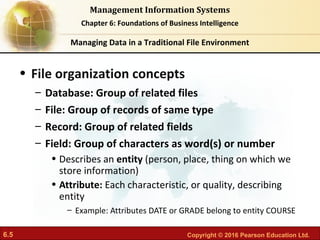
• File organization concepts
– Database: Group of related files
– File: Group of records of same type
– Record: Group of related fields
– Field: Group of characters as word(s) or number
• Describes an entity (person, place, thing on which we
store information)
• Attribute: Each characteristic, or quality, describing
entity
– Example: Attributes DATE or GRADE belong to entity COURSE
Managing Data in a Traditional File Environment
6.6 Copyright © 2016 Pearson Education Ltd.
Management Information Systems
Chapter 6: Foundations of Business Intelligence
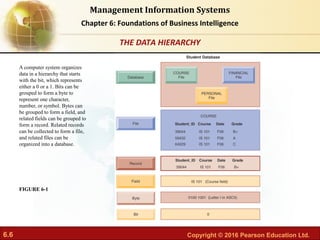
A computer system organizes
data in a hierarchy that starts
with the bit, which represents
either a 0 or a 1. Bits can be
grouped to form a byte to
represent one character,
number, or symbol. Bytes can
be grouped to form a field, and
related fields can be grouped to
form a record. Related records
can be collected to form a file,
and related files can be
organized into a database.
FIGURE 6-1
THE DATA HIERARCHY
6.7 Copyright © 2016 Pearson Education Ltd.
Management Information Systems
Chapter 6: Foundations of Business Intelligence
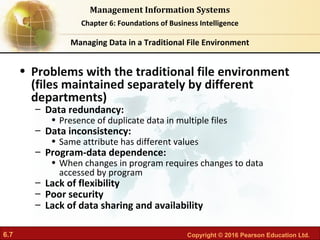
• Problems with the traditional file environment
(files maintained separately by different
departments)
– Data redundancy:
• Presence of duplicate data in multiple files
– Data inconsistency:
• Same attribute has different values
– Program-data dependence:
• When changes in program requires changes to data
accessed by program
– Lack of flexibility
– Poor security
– Lack of data sharing and availability
Managing Data in a Traditional File Environment
6.8 Copyright © 2016 Pearson Education Ltd.
Management Information Systems
Chapter 6: Foundations of Business Intelligence
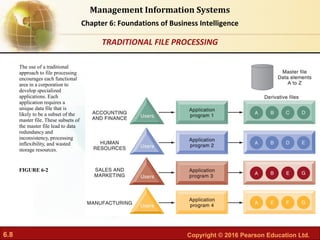
The use of a traditional
approach to file processing
encourages each functional
area in a corporation to
develop specialized
applications. Each
application requires a
unique data file that is
likely to be a subset of the
master file. These subsets of
the master file lead to data
redundancy and
inconsistency, processing
inflexibility, and wasted
storage resources.
FIGURE 6-2
TRADITIONAL FILE PROCESSING
6.9 Copyright © 2016 Pearson Education Ltd.
Management Information Systems
Chapter 6: Foundations of Business Intelligence
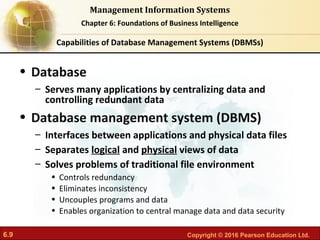
• Database
– Serves many applications by centralizing data and
controlling redundant data
• Database management system (DBMS)
– Interfaces between applications and physical data files
– Separates logical and physical views of data
– Solves problems of traditional file environment
• Controls redundancy
• Eliminates inconsistency
• Uncouples programs and data
• Enables organization to central manage data and data security
Capabilities of Database Management Systems (DBMSs)
6.10 Copyright © 2016 Pearson Education Ltd.
Management Information Systems
Chapter 6: Foundations of Business Intelligence
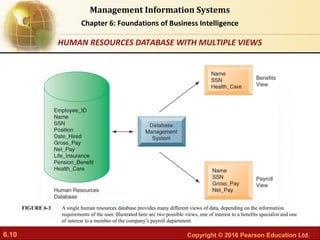
A single human resources database provides many different views of data, depending on the information
requirements of the user. Illustrated here are two possible views, one of interest to a benefits specialist and one
of interest to a member of the company’s payroll department.
FIGURE 6-3
HUMAN RESOURCES DATABASE WITH MULTIPLE VIEWS
6.11 Copyright © 2016 Pearson Education Ltd.
Management Information Systems
Chapter 6: Foundations of Business Intelligence
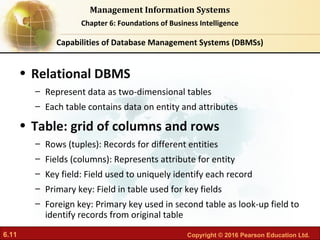
• Relational DBMS
– Represent data as two-dimensional tables
– Each table contains data on entity and attributes
• Table: grid of columns and rows
– Rows (tuples): Records for different entities
– Fields (columns): Represents attribute for entity
– Key field: Field used to uniquely identify each record
– Primary key: Field in table used for key fields
– Foreign key: Primary key used in second table as look-up field to
identify records from original table
Capabilities of Database Management Systems (DBMSs)
6.12 Copyright © 2016 Pearson Education Ltd.
Management Information Systems
Chapter 6: Foundations of Business Intelligence
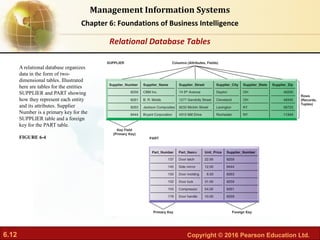
A relational database organizes
data in the form of two-
dimensional tables. Illustrated
here are tables for the entities
SUPPLIER and PART showing
how they represent each entity
and its attributes. Supplier
Number is a primary key for the
SUPPLIER table and a foreign
key for the PART table.
FIGURE 6-4
Relational Database Tables
6.13 Copyright © 2016 Pearson Education Ltd.
Management Information Systems
Chapter 6: Foundations of Business Intelligence
• Operations of a Relational DBMS
– Three basic operations used to develop useful
sets of data
• SELECT: Creates subset of data of all records that
meet stated criteria
• JOIN: Combines relational tables to provide user
with more information than available in individual
tables
• PROJECT: Creates subset of columns in table,
creating tables with only the information specified
Capabilities of Database Management Systems (DBMSs)
6.14 Copyright © 2016 Pearson Education Ltd.
Management Information Systems
Chapter 6: Foundations of Business Intelligence
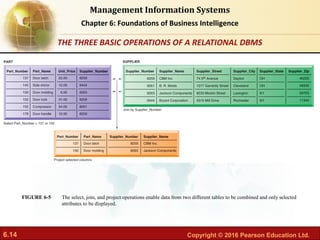
The select, join, and project operations enable data from two different tables to be combined and only selected
attributes to be displayed.
FIGURE 6-5
THE THREE BASIC OPERATIONS OF A RELATIONAL DBMS
6.15 Copyright © 2016 Pearson Education Ltd.
Management Information Systems
Chapter 6: Foundations of Business Intelligence
• Non-relational databases: “NoSQL”
– More flexible data model
– Data sets stored across distributed machines
– Easier to scale
– Handle large volumes of unstructured and structured
data (Web, social media, graphics)
• Databases in the cloud
– Typically, less functionality than on-premises DBs
– Amazon Relational Database Service, Microsoft SQL
Azure
– Private clouds
Capabilities of Database Management Systems (DBMSs)
6.16 Copyright © 2016 Pearson Education Ltd.
Management Information Systems
Chapter 6: Foundations of Business Intelligence
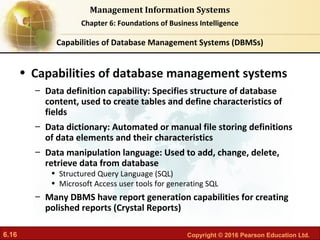
• Capabilities of database management systems
– Data definition capability: Specifies structure of database
content, used to create tables and define characteristics of
fields
– Data dictionary: Automated or manual file storing definitions
of data elements and their characteristics
– Data manipulation language: Used to add, change, delete,
retrieve data from database
• Structured Query Language (SQL)
• Microsoft Access user tools for generating SQL
– Many DBMS have report generation capabilities for creating
polished reports (Crystal Reports)
Capabilities of Database Management Systems (DBMSs)
6.17 Copyright © 2016 Pearson Education Ltd.
Management Information Systems
Chapter 6: Foundations of Business Intelligence
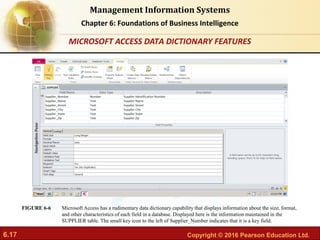
Microsoft Access has a rudimentary data dictionary capability that displays information about the size, format,
and other characteristics of each field in a database. Displayed here is the information maintained in the
SUPPLIER table. The small key icon to the left of Supplier_Number indicates that it is a key field.
FIGURE 6-6
MICROSOFT ACCESS DATA DICTIONARY FEATURES
6.18 Copyright © 2016 Pearson Education Ltd.
Management Information Systems
Chapter 6: Foundations of Business Intelligence
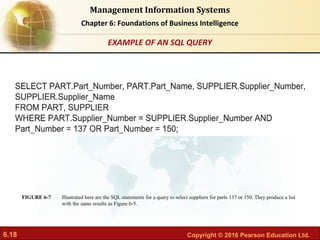
Illustrated here are the SQL statements for a query to select suppliers for parts 137 or 150. They produce a list
with the same results as Figure 6-5.
FIGURE 6-7
EXAMPLE OF AN SQL QUERY
6.19 Copyright © 2016 Pearson Education Ltd.
Management Information Systems
Chapter 6: Foundations of Business Intelligence
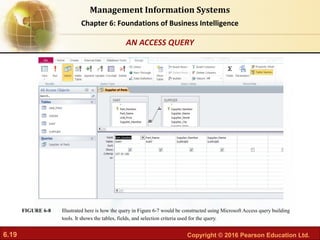
Illustrated here is how the query in Figure 6-7 would be constructed using Microsoft Access query building
tools. It shows the tables, fields, and selection criteria used for the query.
FIGURE 6-8
AN ACCESS QUERY
6.20 Copyright © 2016 Pearson Education Ltd.
Management Information Systems
Chapter 6: Foundations of Business Intelligence
• Designing Databases
– Conceptual (logical) design: abstract model from business perspective
– Physical design: How database is arranged on direct-access storage
devices
• Design process identifies:
– Relationships among data elements, redundant database elements
– Most efficient way to group data elements to meet business
requirements, needs of application programs
• Normalization
– Streamlining complex groupings of data to minimize redundant data
elements and awkward many-to-many relationships
Capabilities of Database Management Systems (DBMSs)
6.21 Copyright © 2016 Pearson Education Ltd.
Management Information Systems
Chapter 6: Foundations of Business Intelligence
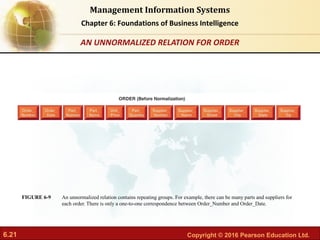
An unnormalized relation contains repeating groups. For example, there can be many parts and suppliers for
each order. There is only a one-to-one correspondence between Order_Number and Order_Date.
FIGURE 6-9
AN UNNORMALIZED RELATION FOR ORDER
6.22 Copyright © 2016 Pearson Education Ltd.
Management Information Systems
Chapter 6: Foundations of Business Intelligence
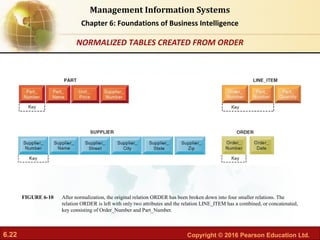
After normalization, the original relation ORDER has been broken down into four smaller relations. The
relation ORDER is left with only two attributes and the relation LINE_ITEM has a combined, or concatenated,
key consisting of Order_Number and Part_Number.
FIGURE 6-10
NORMALIZED TABLES CREATED FROM ORDER
6.23 Copyright © 2016 Pearson Education Ltd.
Management Information Systems
Chapter 6: Foundations of Business Intelligence
• Referential integrity rules
• Used by RDMS to ensure relationships between tables
remain consistent
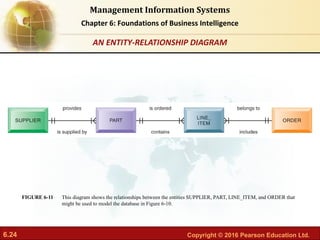
• Entity-relationship diagram
– Used by database designers to document the data model
– Illustrates relationships between entities
– Caution: If a business doesn’t get data model
right, system won’t be able to serve business
well
Capabilities of Database Management Systems (DBMSs)
6.24 Copyright © 2016 Pearson Education Ltd.
Management Information Systems
Chapter 6: Foundations of Business Intelligence
This diagram shows the relationships between the entities SUPPLIER, PART, LINE_ITEM, and ORDER that
might be used to model the database in Figure 6-10.
FIGURE 6-11
AN ENTITY-RELATIONSHIP DIAGRAM
6.25 Copyright © 2016 Pearson Education Ltd.
Management Information Systems
Chapter 6: Foundations of Business Intelligence
• Big data
• Massive sets of unstructured/semi-structured data
from Web traffic, social media, sensors, and so on
• Petabytes, exabytes of data
• Volumes too great for typical DBMS
• Can reveal more patterns and anomalies
Tools for Improving Business Performance and Decision Making
6.26 Copyright © 2016 Pearson Education Ltd.
Management Information Systems
Chapter 6: Foundations of Business Intelligence
• Business intelligence infrastructure
– Today includes an array of tools for separate
systems, and big data
• Contemporary tools:
– Data warehouses
– Data marts
– Hadoop
– In-memory computing
– Analytical platforms
Tools for Improving Business Performance and Decision Making
6.27 Copyright © 2016 Pearson Education Ltd.
Management Information Systems
Chapter 6: Foundations of Business Intelligence
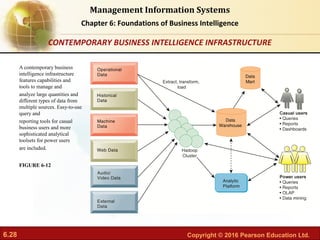
• Data warehouse:
– Stores current and historical data from many core
operational transaction systems
– Consolidates and standardizes information for use across
enterprise, but data cannot be altered
– Provides analysis and reporting tools
• Data marts:
– Subset of data warehouse
– Summarized or focused portion of data for use by specific
population of users
– Typically focuses on single subject or line of business
Tools for Improving Business Performance and Decision Making
6.28 Copyright © 2016 Pearson Education Ltd.
Management Information Systems
Chapter 6: Foundations of Business Intelligence
A contemporary business
intelligence infrastructure
features capabilities and
tools to manage and
analyze large quantities and
different types of data from
multiple sources. Easy-to-use
query and
reporting tools for casual
business users and more
sophisticated analytical
toolsets for power users
are included.
FIGURE 6-12
CONTEMPORARY BUSINESS INTELLIGENCE INFRASTRUCTURE
6.29 Copyright © 2016 Pearson Education Ltd.
Management Information Systems
Chapter 6: Foundations of Business Intelligence
• Hadoop
– Enables distributed parallel processing of big data
across inexpensive computers
– Key services
• Hadoop Distributed File System (HDFS): data storage
• MapReduce: breaks data into clusters for work
• Hbase: NoSQL database
– Used by Facebook, Yahoo, NextBio
Tools for Improving Business Performance and Decision Making
6.30 Copyright © 2016 Pearson Education Ltd.
Management Information Systems
Chapter 6: Foundations of Business Intelligence
• In-memory computing
– Used in big data analysis
– Uses computers main memory (RAM) for data
storage to avoid delays in retrieving data from disk
storage
– Can reduce hours/days of processing to seconds
– Requires optimized hardware
• Analytic platforms
– High-speed platforms using both relational and non-
relational tools optimized for large datasets
Tools for Improving Business Performance and Decision Making
6.31 Copyright © 2016 Pearson Education Ltd.
Management Information Systems
Chapter 6: Foundations of Business Intelligence
Read the Interactive Session and discuss the following questions
Interactive Session: Technology
• Why was data management so problematic at ARI?
• Describe ARI’s earlier capabilities for data analysis
and reporting and their impact on the business.
• Was SAP HANA a good solution for ARI? Why or
why not?
• Describe the changes in the business as a result of
adopting HANA.
Driving ARI Fleet Management with Real-Time Analytics
6.32 Copyright © 2016 Pearson Education Ltd.
Management Information Systems
Chapter 6: Foundations of Business Intelligence
• Analytical tools: Relationships, patterns,
trends
– Tools for consolidating, analyzing, and providing
access to vast amounts of data to help users make
better business decisions
• Multidimensional data analysis (OLAP)
• Data mining
• Text mining
• Web mining
Tools for Improving Business Performance and Decision Making
6.33 Copyright © 2016 Pearson Education Ltd.
Management Information Systems
Chapter 6: Foundations of Business Intelligence
• Online analytical processing (OLAP)
– Supports multidimensional data analysis
• Viewing data using multiple dimensions
• Each aspect of information (product, pricing, cost,
region, time period) is different dimension
• Example: How many washers sold in the East in June
compared with other regions?
– OLAP enables rapid, online answers to ad hoc
queries
Tools for Improving Business Performance and Decision Making
6.34 Copyright © 2016 Pearson Education Ltd.
Management Information Systems
Chapter 6: Foundations of Business Intelligence
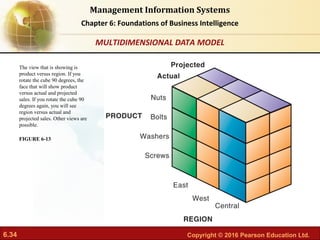
The view that is showing is
product versus region. If you
rotate the cube 90 degrees, the
face that will show product
versus actual and projected
sales. If you rotate the cube 90
degrees again, you will see
region versus actual and
projected sales. Other views are
possible.
FIGURE 6-13
MULTIDIMENSIONAL DATA MODEL
6.35 Copyright © 2016 Pearson Education Ltd.
Management Information Systems
Chapter 6: Foundations of Business Intelligence
• Data mining:
– Finds hidden patterns, relationships in datasets
• Example: customer buying patterns
– Infers rules to predict future behavior
– Types of information obtainable from data mining:
• Associations
• Sequences
• Classification
• Clustering
• Forecasting
Tools for Improving Business Performance and Decision Making
6.36 Copyright © 2016 Pearson Education Ltd.
Management Information Systems
Chapter 6: Foundations of Business Intelligence
• Text mining
– Extracts key elements from large unstructured data
sets
• Stored e-mails
• Call center transcripts
• Legal cases
• Patent descriptions
• Service reports, and so on
– Sentiment analysis software
• Mines e-mails, blogs, social media to detect opinions
Tools for Improving Business Performance and Decision Making
6.37 Copyright © 2016 Pearson Education Ltd.
Management Information Systems
Chapter 6: Foundations of Business Intelligence
• Web mining
– Discovery and analysis of useful patterns and
information from Web
– Understand customer behavior
– Evaluate effectiveness of Web site, and so on
– Web content mining
• Mines content of Web pages
– Web structure mining
• Analyzes links to and from Web page
– Web usage mining
• Mines user interaction data recorded by Web server
Tools for Improving Business Performance and Decision Making
6.38 Copyright © 2016 Pearson Education Ltd.
Management Information Systems
Chapter 6: Foundations of Business Intelligence
• Databases and the Web
– Many companies use Web to make some internal
databases available to customers or partners
– Typical configuration includes:
• Web server
• Application server/middleware/CGI scripts
• Database server (hosting DBMS)
– Advantages of using Web for database access:
• Ease of use of browser software
• Web interface requires few or no changes to database
• Inexpensive to add Web interface to system
Tools for Improving Business Performance and Decision Making
6.39 Copyright © 2016 Pearson Education Ltd.
Management Information Systems
Chapter 6: Foundations of Business Intelligence
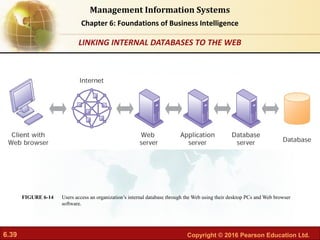
Users access an organization’s internal database through the Web using their desktop PCs and Web browser
software.
FIGURE 6-14
LINKING INTERNAL DATABASES TO THE WEB
6.40 Copyright © 2016 Pearson Education Ltd.
Management Information Systems
Chapter 6: Foundations of Business Intelligence
• Establishing an information policy
– Firm’s rules, procedures, roles for sharing, managing,
standardizing data
– Data administration
• Establishes policies and procedures to manage data
– Data governance
• Deals with policies and processes for managing availability,
usability, integrity, and security of data, especially regarding
government regulations
– Database administration
• Creating and maintaining database
Managing the Firm’s Data Resources
6.41 Copyright © 2016 Pearson Education Ltd.
Management Information Systems
Chapter 6: Foundations of Business Intelligence
• Ensuring data quality
– More than 25 percent of critical data in Fortune
1000 company databases are inaccurate or
incomplete
– Redundant data
– Inconsistent data
– Faulty input
– Before new database in place, need to:
• Identify and correct faulty data
• Establish better routines for editing data once database
in operation
Managing Data Resources
6.42 Copyright © 2016 Pearson Education Ltd.
Management Information Systems
Chapter 6: Foundations of Business Intelligence
• Data quality audit:
– Structured survey of the accuracy and level of
completeness of the data in an information system
• Survey samples from data files, or
• Survey end users for perceptions of quality
• Data cleansing
– Software to detect and correct data that are
incorrect, incomplete, improperly formatted, or
redundant
– Enforces consistency among different sets of data
from separate information systems
Managing Data Resources
6.43 Copyright © 2016 Pearson Education Ltd.
Management Information Systems
Chapter 6: Foundations of Business Intelligence
Read the Interactive Session and discuss the following questions
Interactive Session: Management
• Discuss the role of information policy, data administration,
and efforts to ensure data quality in improving data
management at American Water.
• Describe roles played by information systems specialists and
end users in American Water’s systems transformation
project.
• Why was the participation of business users so important? If
they didn’t play this role, what would have happened?
American Water Keeps Data Flowing
6.44 Copyright © 2016 Pearson Education Ltd.
Management Information Systems
Chapter 6: Foundations of Business Intelligence
Read the Interactive Session and discuss the following questions
Interactive Session: Management
• How did implementing a data warehouse help
American Water move toward a more centralized
organization?
• Give some examples of problems that would have
occurred at American Water if its data were not
“clean”?
• How did American Water’s data warehouse improve
operations and management decision making?
American Water Keeps Data Flowing (cont.)

Chapter 6 foundations of business intelligence

  • 1.
    Foundations of Business Foundationsof Business Intelligence: Databases and Intelligence: Databases and Information Management Information Management Chapter 6 VIDEO CASES Case 1a: City of Dubuque Uses Cloud Computing and Sensors to Build a Smarter, Sustainable City Case 1b: IBM Smarter City: Portland, Oregon Case 2: Data Warehousing at REI: Understanding the Customer Case 3: Maruti Suzuki Business Intelligence and Enterprise Databases
  • 2.
    6.2 Copyright ©2016 Pearson Education Ltd. Management Information Systems Chapter 6: Foundations of Business Intelligence • What are the problems of managing data resources in a traditional file environment? • What are the major capabilities of database management systems (DBMS) and why is a relational DBMS so powerful? • What are the principal tools and technologies for accessing information from databases to improve business performance and decision making? • Why are information policy, data administration, and data quality assurance essential for managing the firm’s data resources? Learning Objectives
  • 3.
    6.3 Copyright ©2016 Pearson Education Ltd. Management Information Systems Chapter 6: Foundations of Business Intelligence • Problem: Accessing data from many systems is a complex task • Solution: A single repository for CAD?CAM data that also facilitates the integration of the data held in its legacy systems • BAE implemented Siemens’ Teamcenter product lifecycle management software and Dassault Systemes’ CATIA CAM/CAM software • Demonstrates IT’s role in successful data management • Illustrates digital technology’s ability to lower costs while improving performance BAE Systems
  • 4.
    6.4 Copyright ©2016 Pearson Education Ltd. Management Information Systems Chapter 6: Foundations of Business Intelligence • Siemens’ Teamcenter and Dassault Systemes’ CATIA to facilitate integration of data • Demonstrates IT’s role in successful data management • Illustrates digital technology’s ability to lower costs while improving performance Better Data Management Helps Toronto Globe and Mail
  • 5.
    6.5 Copyright ©2016 Pearson Education Ltd. Management Information Systems Chapter 6: Foundations of Business Intelligence • File organization concepts – Database: Group of related files – File: Group of records of same type – Record: Group of related fields – Field: Group of characters as word(s) or number • Describes an entity (person, place, thing on which we store information) • Attribute: Each characteristic, or quality, describing entity – Example: Attributes DATE or GRADE belong to entity COURSE Managing Data in a Traditional File Environment
  • 6.
    6.6 Copyright ©2016 Pearson Education Ltd. Management Information Systems Chapter 6: Foundations of Business Intelligence A computer system organizes data in a hierarchy that starts with the bit, which represents either a 0 or a 1. Bits can be grouped to form a byte to represent one character, number, or symbol. Bytes can be grouped to form a field, and related fields can be grouped to form a record. Related records can be collected to form a file, and related files can be organized into a database. FIGURE 6-1 THE DATA HIERARCHY
  • 7.
    6.7 Copyright ©2016 Pearson Education Ltd. Management Information Systems Chapter 6: Foundations of Business Intelligence • Problems with the traditional file environment (files maintained separately by different departments) – Data redundancy: • Presence of duplicate data in multiple files – Data inconsistency: • Same attribute has different values – Program-data dependence: • When changes in program requires changes to data accessed by program – Lack of flexibility – Poor security – Lack of data sharing and availability Managing Data in a Traditional File Environment
  • 8.
    6.8 Copyright ©2016 Pearson Education Ltd. Management Information Systems Chapter 6: Foundations of Business Intelligence The use of a traditional approach to file processing encourages each functional area in a corporation to develop specialized applications. Each application requires a unique data file that is likely to be a subset of the master file. These subsets of the master file lead to data redundancy and inconsistency, processing inflexibility, and wasted storage resources. FIGURE 6-2 TRADITIONAL FILE PROCESSING
  • 9.
    6.9 Copyright ©2016 Pearson Education Ltd. Management Information Systems Chapter 6: Foundations of Business Intelligence • Database – Serves many applications by centralizing data and controlling redundant data • Database management system (DBMS) – Interfaces between applications and physical data files – Separates logical and physical views of data – Solves problems of traditional file environment • Controls redundancy • Eliminates inconsistency • Uncouples programs and data • Enables organization to central manage data and data security Capabilities of Database Management Systems (DBMSs)
  • 10.
    6.10 Copyright ©2016 Pearson Education Ltd. Management Information Systems Chapter 6: Foundations of Business Intelligence A single human resources database provides many different views of data, depending on the information requirements of the user. Illustrated here are two possible views, one of interest to a benefits specialist and one of interest to a member of the company’s payroll department. FIGURE 6-3 HUMAN RESOURCES DATABASE WITH MULTIPLE VIEWS
  • 11.
    6.11 Copyright ©2016 Pearson Education Ltd. Management Information Systems Chapter 6: Foundations of Business Intelligence • Relational DBMS – Represent data as two-dimensional tables – Each table contains data on entity and attributes • Table: grid of columns and rows – Rows (tuples): Records for different entities – Fields (columns): Represents attribute for entity – Key field: Field used to uniquely identify each record – Primary key: Field in table used for key fields – Foreign key: Primary key used in second table as look-up field to identify records from original table Capabilities of Database Management Systems (DBMSs)
  • 12.
    6.12 Copyright ©2016 Pearson Education Ltd. Management Information Systems Chapter 6: Foundations of Business Intelligence A relational database organizes data in the form of two- dimensional tables. Illustrated here are tables for the entities SUPPLIER and PART showing how they represent each entity and its attributes. Supplier Number is a primary key for the SUPPLIER table and a foreign key for the PART table. FIGURE 6-4 Relational Database Tables
  • 13.
    6.13 Copyright ©2016 Pearson Education Ltd. Management Information Systems Chapter 6: Foundations of Business Intelligence • Operations of a Relational DBMS – Three basic operations used to develop useful sets of data • SELECT: Creates subset of data of all records that meet stated criteria • JOIN: Combines relational tables to provide user with more information than available in individual tables • PROJECT: Creates subset of columns in table, creating tables with only the information specified Capabilities of Database Management Systems (DBMSs)
  • 14.
    6.14 Copyright ©2016 Pearson Education Ltd. Management Information Systems Chapter 6: Foundations of Business Intelligence The select, join, and project operations enable data from two different tables to be combined and only selected attributes to be displayed. FIGURE 6-5 THE THREE BASIC OPERATIONS OF A RELATIONAL DBMS
  • 15.
    6.15 Copyright ©2016 Pearson Education Ltd. Management Information Systems Chapter 6: Foundations of Business Intelligence • Non-relational databases: “NoSQL” – More flexible data model – Data sets stored across distributed machines – Easier to scale – Handle large volumes of unstructured and structured data (Web, social media, graphics) • Databases in the cloud – Typically, less functionality than on-premises DBs – Amazon Relational Database Service, Microsoft SQL Azure – Private clouds Capabilities of Database Management Systems (DBMSs)
  • 16.
    6.16 Copyright ©2016 Pearson Education Ltd. Management Information Systems Chapter 6: Foundations of Business Intelligence • Capabilities of database management systems – Data definition capability: Specifies structure of database content, used to create tables and define characteristics of fields – Data dictionary: Automated or manual file storing definitions of data elements and their characteristics – Data manipulation language: Used to add, change, delete, retrieve data from database • Structured Query Language (SQL) • Microsoft Access user tools for generating SQL – Many DBMS have report generation capabilities for creating polished reports (Crystal Reports) Capabilities of Database Management Systems (DBMSs)
  • 17.
    6.17 Copyright ©2016 Pearson Education Ltd. Management Information Systems Chapter 6: Foundations of Business Intelligence Microsoft Access has a rudimentary data dictionary capability that displays information about the size, format, and other characteristics of each field in a database. Displayed here is the information maintained in the SUPPLIER table. The small key icon to the left of Supplier_Number indicates that it is a key field. FIGURE 6-6 MICROSOFT ACCESS DATA DICTIONARY FEATURES
  • 18.
    6.18 Copyright ©2016 Pearson Education Ltd. Management Information Systems Chapter 6: Foundations of Business Intelligence Illustrated here are the SQL statements for a query to select suppliers for parts 137 or 150. They produce a list with the same results as Figure 6-5. FIGURE 6-7 EXAMPLE OF AN SQL QUERY
  • 19.
    6.19 Copyright ©2016 Pearson Education Ltd. Management Information Systems Chapter 6: Foundations of Business Intelligence Illustrated here is how the query in Figure 6-7 would be constructed using Microsoft Access query building tools. It shows the tables, fields, and selection criteria used for the query. FIGURE 6-8 AN ACCESS QUERY
  • 20.
    6.20 Copyright ©2016 Pearson Education Ltd. Management Information Systems Chapter 6: Foundations of Business Intelligence • Designing Databases – Conceptual (logical) design: abstract model from business perspective – Physical design: How database is arranged on direct-access storage devices • Design process identifies: – Relationships among data elements, redundant database elements – Most efficient way to group data elements to meet business requirements, needs of application programs • Normalization – Streamlining complex groupings of data to minimize redundant data elements and awkward many-to-many relationships Capabilities of Database Management Systems (DBMSs)
  • 21.
    6.21 Copyright ©2016 Pearson Education Ltd. Management Information Systems Chapter 6: Foundations of Business Intelligence An unnormalized relation contains repeating groups. For example, there can be many parts and suppliers for each order. There is only a one-to-one correspondence between Order_Number and Order_Date. FIGURE 6-9 AN UNNORMALIZED RELATION FOR ORDER
  • 22.
    6.22 Copyright ©2016 Pearson Education Ltd. Management Information Systems Chapter 6: Foundations of Business Intelligence After normalization, the original relation ORDER has been broken down into four smaller relations. The relation ORDER is left with only two attributes and the relation LINE_ITEM has a combined, or concatenated, key consisting of Order_Number and Part_Number. FIGURE 6-10 NORMALIZED TABLES CREATED FROM ORDER
  • 23.
    6.23 Copyright ©2016 Pearson Education Ltd. Management Information Systems Chapter 6: Foundations of Business Intelligence • Referential integrity rules • Used by RDMS to ensure relationships between tables remain consistent • Entity-relationship diagram – Used by database designers to document the data model – Illustrates relationships between entities – Caution: If a business doesn’t get data model right, system won’t be able to serve business well Capabilities of Database Management Systems (DBMSs)
  • 24.
    6.24 Copyright ©2016 Pearson Education Ltd. Management Information Systems Chapter 6: Foundations of Business Intelligence This diagram shows the relationships between the entities SUPPLIER, PART, LINE_ITEM, and ORDER that might be used to model the database in Figure 6-10. FIGURE 6-11 AN ENTITY-RELATIONSHIP DIAGRAM
  • 25.
    6.25 Copyright ©2016 Pearson Education Ltd. Management Information Systems Chapter 6: Foundations of Business Intelligence • Big data • Massive sets of unstructured/semi-structured data from Web traffic, social media, sensors, and so on • Petabytes, exabytes of data • Volumes too great for typical DBMS • Can reveal more patterns and anomalies Tools for Improving Business Performance and Decision Making
  • 26.
    6.26 Copyright ©2016 Pearson Education Ltd. Management Information Systems Chapter 6: Foundations of Business Intelligence • Business intelligence infrastructure – Today includes an array of tools for separate systems, and big data • Contemporary tools: – Data warehouses – Data marts – Hadoop – In-memory computing – Analytical platforms Tools for Improving Business Performance and Decision Making
  • 27.
    6.27 Copyright ©2016 Pearson Education Ltd. Management Information Systems Chapter 6: Foundations of Business Intelligence • Data warehouse: – Stores current and historical data from many core operational transaction systems – Consolidates and standardizes information for use across enterprise, but data cannot be altered – Provides analysis and reporting tools • Data marts: – Subset of data warehouse – Summarized or focused portion of data for use by specific population of users – Typically focuses on single subject or line of business Tools for Improving Business Performance and Decision Making
  • 28.
    6.28 Copyright ©2016 Pearson Education Ltd. Management Information Systems Chapter 6: Foundations of Business Intelligence A contemporary business intelligence infrastructure features capabilities and tools to manage and analyze large quantities and different types of data from multiple sources. Easy-to-use query and reporting tools for casual business users and more sophisticated analytical toolsets for power users are included. FIGURE 6-12 CONTEMPORARY BUSINESS INTELLIGENCE INFRASTRUCTURE
  • 29.
    6.29 Copyright ©2016 Pearson Education Ltd. Management Information Systems Chapter 6: Foundations of Business Intelligence • Hadoop – Enables distributed parallel processing of big data across inexpensive computers – Key services • Hadoop Distributed File System (HDFS): data storage • MapReduce: breaks data into clusters for work • Hbase: NoSQL database – Used by Facebook, Yahoo, NextBio Tools for Improving Business Performance and Decision Making
  • 30.
    6.30 Copyright ©2016 Pearson Education Ltd. Management Information Systems Chapter 6: Foundations of Business Intelligence • In-memory computing – Used in big data analysis – Uses computers main memory (RAM) for data storage to avoid delays in retrieving data from disk storage – Can reduce hours/days of processing to seconds – Requires optimized hardware • Analytic platforms – High-speed platforms using both relational and non- relational tools optimized for large datasets Tools for Improving Business Performance and Decision Making
  • 31.
    6.31 Copyright ©2016 Pearson Education Ltd. Management Information Systems Chapter 6: Foundations of Business Intelligence Read the Interactive Session and discuss the following questions Interactive Session: Technology • Why was data management so problematic at ARI? • Describe ARI’s earlier capabilities for data analysis and reporting and their impact on the business. • Was SAP HANA a good solution for ARI? Why or why not? • Describe the changes in the business as a result of adopting HANA. Driving ARI Fleet Management with Real-Time Analytics
  • 32.
    6.32 Copyright ©2016 Pearson Education Ltd. Management Information Systems Chapter 6: Foundations of Business Intelligence • Analytical tools: Relationships, patterns, trends – Tools for consolidating, analyzing, and providing access to vast amounts of data to help users make better business decisions • Multidimensional data analysis (OLAP) • Data mining • Text mining • Web mining Tools for Improving Business Performance and Decision Making
  • 33.
    6.33 Copyright ©2016 Pearson Education Ltd. Management Information Systems Chapter 6: Foundations of Business Intelligence • Online analytical processing (OLAP) – Supports multidimensional data analysis • Viewing data using multiple dimensions • Each aspect of information (product, pricing, cost, region, time period) is different dimension • Example: How many washers sold in the East in June compared with other regions? – OLAP enables rapid, online answers to ad hoc queries Tools for Improving Business Performance and Decision Making
  • 34.
    6.34 Copyright ©2016 Pearson Education Ltd. Management Information Systems Chapter 6: Foundations of Business Intelligence The view that is showing is product versus region. If you rotate the cube 90 degrees, the face that will show product versus actual and projected sales. If you rotate the cube 90 degrees again, you will see region versus actual and projected sales. Other views are possible. FIGURE 6-13 MULTIDIMENSIONAL DATA MODEL
  • 35.
    6.35 Copyright ©2016 Pearson Education Ltd. Management Information Systems Chapter 6: Foundations of Business Intelligence • Data mining: – Finds hidden patterns, relationships in datasets • Example: customer buying patterns – Infers rules to predict future behavior – Types of information obtainable from data mining: • Associations • Sequences • Classification • Clustering • Forecasting Tools for Improving Business Performance and Decision Making
  • 36.
    6.36 Copyright ©2016 Pearson Education Ltd. Management Information Systems Chapter 6: Foundations of Business Intelligence • Text mining – Extracts key elements from large unstructured data sets • Stored e-mails • Call center transcripts • Legal cases • Patent descriptions • Service reports, and so on – Sentiment analysis software • Mines e-mails, blogs, social media to detect opinions Tools for Improving Business Performance and Decision Making
  • 37.
    6.37 Copyright ©2016 Pearson Education Ltd. Management Information Systems Chapter 6: Foundations of Business Intelligence • Web mining – Discovery and analysis of useful patterns and information from Web – Understand customer behavior – Evaluate effectiveness of Web site, and so on – Web content mining • Mines content of Web pages – Web structure mining • Analyzes links to and from Web page – Web usage mining • Mines user interaction data recorded by Web server Tools for Improving Business Performance and Decision Making
  • 38.
    6.38 Copyright ©2016 Pearson Education Ltd. Management Information Systems Chapter 6: Foundations of Business Intelligence • Databases and the Web – Many companies use Web to make some internal databases available to customers or partners – Typical configuration includes: • Web server • Application server/middleware/CGI scripts • Database server (hosting DBMS) – Advantages of using Web for database access: • Ease of use of browser software • Web interface requires few or no changes to database • Inexpensive to add Web interface to system Tools for Improving Business Performance and Decision Making
  • 39.
    6.39 Copyright ©2016 Pearson Education Ltd. Management Information Systems Chapter 6: Foundations of Business Intelligence Users access an organization’s internal database through the Web using their desktop PCs and Web browser software. FIGURE 6-14 LINKING INTERNAL DATABASES TO THE WEB
  • 40.
    6.40 Copyright ©2016 Pearson Education Ltd. Management Information Systems Chapter 6: Foundations of Business Intelligence • Establishing an information policy – Firm’s rules, procedures, roles for sharing, managing, standardizing data – Data administration • Establishes policies and procedures to manage data – Data governance • Deals with policies and processes for managing availability, usability, integrity, and security of data, especially regarding government regulations – Database administration • Creating and maintaining database Managing the Firm’s Data Resources
  • 41.
    6.41 Copyright ©2016 Pearson Education Ltd. Management Information Systems Chapter 6: Foundations of Business Intelligence • Ensuring data quality – More than 25 percent of critical data in Fortune 1000 company databases are inaccurate or incomplete – Redundant data – Inconsistent data – Faulty input – Before new database in place, need to: • Identify and correct faulty data • Establish better routines for editing data once database in operation Managing Data Resources
  • 42.
    6.42 Copyright ©2016 Pearson Education Ltd. Management Information Systems Chapter 6: Foundations of Business Intelligence • Data quality audit: – Structured survey of the accuracy and level of completeness of the data in an information system • Survey samples from data files, or • Survey end users for perceptions of quality • Data cleansing – Software to detect and correct data that are incorrect, incomplete, improperly formatted, or redundant – Enforces consistency among different sets of data from separate information systems Managing Data Resources
  • 43.
    6.43 Copyright ©2016 Pearson Education Ltd. Management Information Systems Chapter 6: Foundations of Business Intelligence Read the Interactive Session and discuss the following questions Interactive Session: Management • Discuss the role of information policy, data administration, and efforts to ensure data quality in improving data management at American Water. • Describe roles played by information systems specialists and end users in American Water’s systems transformation project. • Why was the participation of business users so important? If they didn’t play this role, what would have happened? American Water Keeps Data Flowing
  • 44.
    6.44 Copyright ©2016 Pearson Education Ltd. Management Information Systems Chapter 6: Foundations of Business Intelligence Read the Interactive Session and discuss the following questions Interactive Session: Management • How did implementing a data warehouse help American Water move toward a more centralized organization? • Give some examples of problems that would have occurred at American Water if its data were not “clean”? • How did American Water’s data warehouse improve operations and management decision making? American Water Keeps Data Flowing (cont.)