Vaughan: Multimedia:
Making It Work, Sixth
Edition
1. What is Multimedia? Text © The McGraw−Hill
Companies, 2005
In this chapter, you will
learn how to:
■ Define common multimedia
terms such as multimedia,
integration, interactive, HTML,
authoring
■ Describe the two primary
multimedia delivery media—
CD-ROM and DVD versus the
World Wide Web—and their
primary differences
■ Qualify various characteristics
of multimedia: linear versus
nonlinear content
■ Describe several different
environments in which
multimedia might be used, and
several different aspects of
multimedia that provide a
benefit over other forms of
information presentation
■ Cite the history of multimedia
and note important projected
changes in the future of
multimedia
MU L T I M E D I A is an eerie wail as two cat’s eyes appear on
a dark screen. It’s the red rose that dissolves into a little girl’s face when you
press “Valentine’s Day.” It’s a small window of video laid onto a map of In-
dia, showing an old man recalling his dusty journey to meet a rajah there.
It’s a catalog of fancy cars with a guide to help you buy one. It’s a real-time
video conference with colleagues in Paris, London, and Hong Kong on
your office computer using whiteboards, microphones, and question tech-
niques (www.webtrain.com). At home, it’s an algebra or geography lesson
for a fifth-grader. At the arcade, it’s goggle-faced kids flying fighter planes
in sweaty virtual reality. On a DVD, it’s the interactive video sequence
(screen hot spots) that explain how the Harry Potter movie was made—all
using your remote control.
Multimedia is any combination of text, art, sound, animation, and
video delivered to you by computer or other electronic or digitally manip-
ulated means. It is richly presented sensation. When you weave together
the sensual elements of multimedia—dazzling pictures and animations,
engaging sounds, compelling video clips, and raw textual information—
you can electrify the thought and action centers of people’s minds. When you
give them interactive control of the process, they can be enchanted.
This book is about creating each of the elements of multimedia and
about how you can weave them together for maximum effect. This book is
for computer beginners and computer experts. It is for serious multimedia
producers and their clients, as well. It is for desktop publishers and video
producers who may need a leg-up as they watch traditional methods for
delivery of information and ideas evolve into new, technology-driven for-
mats. This book is also for hobbyists, who want to make albums and fam-
ily histories on the World Wide Web; for mainstream businesses, where
word-processed documents and spreadsheets are illustrated with audio,
video, and graphic animations; for public speakers, who use animation
and sound on large monitors and auditorium projection systems to present
ideas and information to an audience; for information managers, who or-
ganize and distribute digital images, sound, video, and text; and for educa-
tors and trainers, who design and present information for learning.
chapter 1What is Multimedia?
Vaughan: Multimedia:
Making It Work, Sixth
Edition
1. What is Multimedia? Text © The McGraw−Hill
Companies, 2005
If you are new to multimedia and are facing a major investment in hard-
ware, software, and the time to learn each new tool, take a gradual ap-
proach to these challenges. Begin by studying each element of multimedia
and learning one or more tools for creating and editing that element. Get
to know how to use text and fonts, how to make and edit colorful graphic
images and animate them into movies, and how to record and edit digital
sound. Read the computer trade periodicals that contain the most up-to-
date information. Your skills will be most valuable if you develop a broad
foundation of knowledge about each of the basic elements of multimedia.
Producing a multimedia project or a web site requires more than cre-
ative skill and high technology. You need organizing and business talent as
well. For example, issues of ownership and copyright will be attached to
some elements that you wish to use: text from books, scanned images from
magazines, audio and video clips. These require permission and often pay-
ment of a fee to the owner. Indeed, the management and production infra-
structure of a multimedia project may be as intense and complicated as the
technology and creative skills you bring to bear in rendering it. Keys to
successful development of a multimedia project are management of digital
tools and skillsets, teamwork, general project management, documenting
and archiving the process, and delivering the completed product on time
and within budget.
Definitions
Multimedia is, as described above, woven combinations of digitally ma-
nipulated text, photographs, graphic art, sound, animation, and video ele-
ments. When you allow an end user—the viewer of a multimedia project—
to control what and when the elements are delivered, it is interactive mul-
timedia. When you provide a structure of linked elements through which
the user can navigate, interactive multimedia becomes hypermedia.
Although the definition of multimedia is a simple one, making it work
can be complicated. Not only do you need to understand how to make
each multimedia element stand up and dance, but you also need to know
how to use multimedia computer tools and technologies to weave them to-
gether. The people who weave multimedia into meaningful tapestries are
multimedia developers.
The software vehicle, the messages, and the content presented on a com-
puter or television screen together constitute a multimedia project. If the
project will be shipped or sold to consumers or end users, typically in a box
or sleeve or on the Internet, with or without instructions, it is a multimedia
title. Your project may also be a “page” or “site” on the World Wide Web,
where you can weave the elements of multimedia into documents with
HTML (Hypertext Markup Language) or DHTML (Dynamic Hypertext
Markup Language) and play rich media files created in such programs as
Macromedia’s Flash, Adobe’s LiveMotion, or Apple’s QuickTime by in-
stalling “plug-ins” into a browser application such as Internet Explorer or
Netscape Navigator. See Chapter 13 for more about plug-ins, multimedia,
and the Web.
Chapter 1: What is Multimedia?
The implementation of
multimedia capabilities in
computers is just the latest
episode in a long series: cave
painting, hand-crafted
manuscripts, the printing press,
radio and television... These
advances reflect the innate
desire of man to create outlets
for creative expression, to use
technology and imagination
to gain empowerment and
freedom for ideas.
Glenn Ochsenreiter, Director,
Multimedia PC Council
Vaughan: Multimedia:
Making It Work, Sixth
Edition
1. What is Multimedia? Text © The McGraw−Hill
Companies, 2005
A multimedia project need not be interactive to be called multimedia:
users can sit back and watch it just as they do a movie or the television. In
such cases a project is linear, starting at the beginning and running through
to the end. When users are given navigational control and can wander
through the content at will, multimedia becomes nonlinear and user inter-
active, and is a powerful personal gateway to information.
Determining how a user will interact with and navigate through the
content of a project requires great attention to the message, the scripting
or storyboarding, the artwork, and the programming. You can break an
entire project with a badly designed interface. You can also lose the mes-
sage in a project with inadequate or inaccurate content.
Multimedia elements are typically sewn together into a project using
authoring tools.These software tools are designed to manage individual
multimedia elements and provide user interaction. Integratedmultimedia
is the “weaving” part of the multimedia definition, where source docu-
ments such as montages, graphics, video cuts, and sounds merge into a fi-
nal presentation. In addition to providing a method for users to interact
with the project, most authoring tools also offer facilities for creating and
editing text and images and controls for playing back separate audio and
video files that have been created with editing tools designed for these media.
The sum of what gets played back and how it is presented to the viewer on a
monitor is the graphical user interface, or GUI (pronounced “gooey”).
This interface is just as much the rules for what happens to the user’s input
as it is the actual graphics on the screen. The hardware and software that
govern the limits of what can happen are the multimedia platform or envi-
ronment.
CD-ROM and the Multimedia Highway
Multimedia requires large amounts of digital memory when stored in an
end user’s library, or large amounts of bandwidth when distributed over
wires, glass fiber, or airwaves on a network. The greater the bandwidth, the
bigger the “pipeline,” so more content can be delivered to end users quickly.
CD-ROM, DVD, and Multimedia
CD-ROM (compact disc read-only memory, see Chapter 18) has become
the most cost-effective distribution medium for multimedia projects: a
CD-ROM disc can be mass-produced for pennies and can contain up to 80
minutes of full-screen video or sound. Or it can contain unique mixes of
images, sounds, text, video, and animations controlled by an authoring
system to provide unlimited user interaction.
Discs can be stamped out of polycarbonate plastic as fast as cookies on
a baker’s production line and just as cheaply. Virtually all personal com-
puters sold today include at least a CD-ROM player, and the software that
drives these computers is commonly available on a CD-ROM disc—appli-
cations that required inserting as many as 16 or more floppy disks one af-
ter another are now installed from a CD-ROM without muss or fuss.
Multimedia: Making It Work
Vaughan: Multimedia:
Making It Work, Sixth
Edition
1. What is Multimedia? Text © The McGraw−Hill
Companies, 2005
Many systems now come with a DVD-ROM player. Multilayered Digital
Versatile Disc (DVD) technology increases the capacity and multimedia ca-
pability of current optical technology to 18GB. CD and DVD burners are
used for reading discs and for making them, too, in audio, video, and data
formats. DVD authoring and integration software allows the creation of
interactive front-end menus for films and games.
In the very long term, however, CD-ROM and DVD discs are but interim
memory technologies that will be replaced by new devices that do not re-
quire moving parts. As the data highway described below becomes more
and more pervasive and users become better “connected,” copper wire,
glass fiber, and radio/cellular technologies may prevail as the most common
delivery means for interactive multimedia files, served across the broadband
Internet or from dedicated computer farms and storage facilities.
The Multimedia Highway
Now that telecommunications networks are global, and when informa-
tion providers and content owners determine the worth of their products
and how to charge money for them, information elements will ultimately
link up online as distributed resources on a data highway (actually more
like a toll road), where you will pay to acquire and use multimedia-based
information.
Curiously, the actual glass fiber cables that make up much of the physical
backbone of the data highway are, in many cases, owned by railroads and
pipeline companies who simply buried the cable on existing rights of way
where no special permits and environmental reports are necessary. One rail-
road in the United States invested more than a million dollars in a special ca-
ble-laying trenching car; in the United Kingdom, there is talk of placing a
fiber-optic cable backbone along the decaying 19th-century canal and barge
system. Bandwidth on these lines is leased to others, so competing retailers
such as AT&T, MCI, and Sprint may even share the same cable.
Full-text content from books and magazines is accessible by modem
and electronic link; feature movies are played at home; real-time news re-
ports from anywhere on earth are available; lectures from participating
universities are monitored for education credits; street maps of any city are
viewable—with recommendations for restaurants, in any language—and
online travelogues include testimonials and video tracks. This is not sci-
ence fiction; it is happening now. For each of these interfaces or gateways
to information is a multimedia project just waiting to be developed.
http://www.moviefone.com
http://www.travelocity.com
http://www.nytimes.com
http://www.5pm.co.uk
Showtimes for many major cities, restaurants, vacation trips, and
current news items are quickly available on the Web
Interactive multimedia is delivered to many homes throughout the
world. Interest from a confluence of entertainment megacorps, information
Chapter 1: What is Multimedia?
Vaughan: Multimedia:
Making It Work, Sixth
Edition
1. What is Multimedia? Text © The McGraw−Hill
Companies, 2005
Multimedia: Making It Work
publishers and providers, cable and telephone companies, and hardware and
software manufacturers is driving this inevitable evolution, and profound
changes in global communications strategy are on the drawing boards. What
will be piped through this new system for entertainment, reference, and life-
long learning experiences are the very multimedia elements discussed in
the chapters of this book: text, graphics, animation, sound, and video. The
software tools for making and editing these elements are discussed later in
the book; the methods for delivering these elements on the Internet are de-
scribed in Chapter 14. The actual content provided, let us hope, will be ex-
cellent fare generated by thinking and caring creative people using ideas
that will propel all of us into a better world. Entertainment companies that
own content easily converted to multimedia projects are teaming up with
cable TV companies. Film studios are creating new divisions to produce
interactive multimedia, and wealthy talents have formed new companies
to join the action. Even without a clear business model with known prof-
its, large media corporations are uniting to create huge conglomerates to
control the content and delivery of tomorrow’s information. Disney
merged with Capital Cities/ABC, Time Warner purchased Turner Broad-
casting, and both were bought by AOL, and Microsoft joined forces with
NBC. Indeed, Microsoft’s interests in the growing Internet are so pervasive
that it continues to risk government intervention under antitrust and mo-
nopoly laws.
Some companies will own the routes for carrying data, other companies
will own the hardware and software interfaces at the end of the line, at of-
fices and homes. Some will knit it all together and provide supply-on-de-
mand and billing services. Regardless of who owns the roadways and the
hardware boxes, multimedia producers will create the new literature and
the rich content sent along it. This is a fresh and exciting industry coming
of age, but one still faced with many growing pains.
Where to Use Multimedia
Multimedia is appropriate whenever a human interface connects a human
user to electronic information of any kind. Multimedia enhances minimal-
ist text-only computer interfaces and yields measurable benefit by gaining
and holding attention and interest; multimedia improves information re-
tention. When properly woven, multimedia can also be profoundly enter-
taining.
Multimedia in Business
Business applications for multimedia include presentations, training, mar-
keting, advertising, product demos, databases, catalogs, instant messaging,
and networked communications. Voice mail and video conferencing are
provided on many local and wide area networks (LANs and WANs) using
distributed networks and Internet protocols.
After a morning of mind-numbing 35 mm slide and overhead presenta-
tions delivered from the podium of a national sales conference, a multime-
dia presentation can make an audience come alive. Most presentation
Multimedia is a very effective
presentation and sales tool. If
you’re being driven somewhere
in the back seat of a car, you
may not remember how you got
to your destination; but if you
had been driving the car
yourself, chances are you could
get there again. Studies indicate
that if you’re stimulated with
audio, you will have about a 20
percent retention rate,
audiovisual is up to 30 percent,
and in interactive multimedia
presentations where you are
really involved, the retention
rate is as high as 60 percent.
Jay Sandom, Einstein & Sandom
Vaughan: Multimedia:
Making It Work, Sixth
Edition
1. What is Multimedia? Text © The McGraw−Hill
Companies, 2005
Chapter 1: What is Multimedia?
software packages let you add audio and video clips to the usual “slide
show” of graphics and text material.
Multimedia is enjoying widespread use in training programs. Flight at-
tendants learn to manage international terrorism and security through
simulation. Drug enforcement agencies of the UN are trained using inter-
active videos and photographs to recognize likely hiding places on air-
planes and ships. Mechanics learn to repair engines. Salespeople learn
about product lines and leave behind software to train their customers.
Fighter pilots practice full-terrain sorties before spooling up for the real
thing. Increasingly easy-to-use authoring programs and media production
tools even let workers on assembly lines create their own training pro-
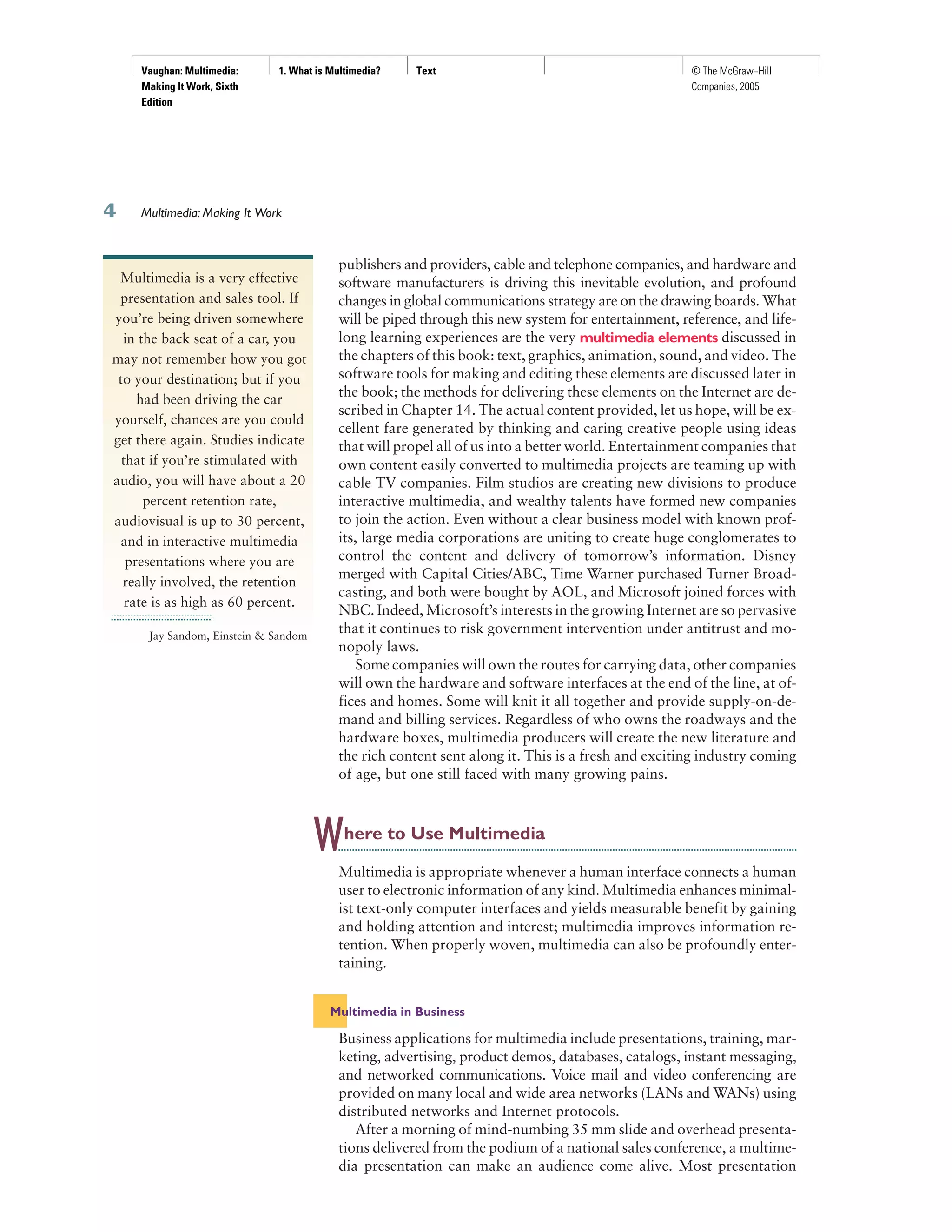
grams for use by their peers. Figure 1-1 is from an animated project made
with Macromedia’s Director that describes the process of making steel.
Multimedia around the office has become more commonplace. Image
capture hardware is used for building employee ID and badging databases,
for video annotation, and for real-time teleconferencing. Presentation
documents attached to e-mail and video conferencing is widely available.
Laptop computers and high-resolution projectors are commonplace for
multimedia presentations on the road. Cell phones and personal data as-
sistants (PDAs) utilizing Bluetooth communications technology make
communication and the business of business more efficient.
As companies and businesses catch on to the power of multimedia, and
the cost of installing multimedia capability decreases, more applications
will be developed both in-house and by third parties to allow businesses to
run more smoothly and effectively. These advances will change the very
way business is transacted as they affirm the use of multimedia that offers
a significant contribution to the bottom line while advertising the public
image of the business as an investor in technology.
Multimedia in Schools
Schools are perhaps the most needy destination for multimedia. Many
schools in the United States today are chronically underfunded and occa-
sionally slow to adopt new technologies, but it is here that the power of
multimedia can be maximized for the greatest long-term benefit to all.
The Clinton/Gore administration challenged the telecommunications
industry to connect every classroom, library, clinic, and hospital in America
to the information superhighway, and much work has been done in this
FIGURE 1-1
Animated instructional
and training
multimedia can
simulate the real thing,
allowing trainees to
actually turn valves
and flip switches
History has proven that
advances in the way we
communicate can give rise to
entirely new communication
cultures. Much like the
transition from radio to TV, the
evolution from text messaging
to multimedia messaging
(MMS) marks a whole new era
of mobile communications,
combining images with
sound and text.
Jorma Ollila, Chairman and
CEO of Nokia
Vaughan: Multimedia:
Making It Work, Sixth
Edition
1. What is Multimedia? Text © The McGraw−Hill
Companies, 2005
Multimedia: Making It Work
area. Steps have also been taken to provide governmental support for
state-of-the-art technology in low-income rural and urban school districts.
The National Grid for Learning (NGfL) has established similar aims for
schools in the United Kingdom.
Multimedia will provoke radical changes in the teaching process during
the coming decades, particularly as smart students discover they can go be-
yond the limits of traditional teaching methods. There is, indeed, a move
away from the “transmission” or “passive-learner” model of learning to
the “Experiential Learning” or “active-learner” model of Kolb. In some in-
stances, teachers may become more like guides and mentors, facilitators of
learning, leading students along a learning path, not the primary providers
of information and understanding. The students, not teachers, become the
core of the teaching and learning process. This is a sensitive and highly po-
liticized subject among educators, so educational software is often posi-
tioned as “enriching” the learning process, not as a potential substitute for
traditional teacher-based methods. The work of Warren Longmire of San
Francisco organizes subject matter into “Learning Objects” or “granules”
of learning material to build rich learning objects (like Lego building
blocks) that have a long shelf life and multi-use applications.
Multimedia for learning takes many
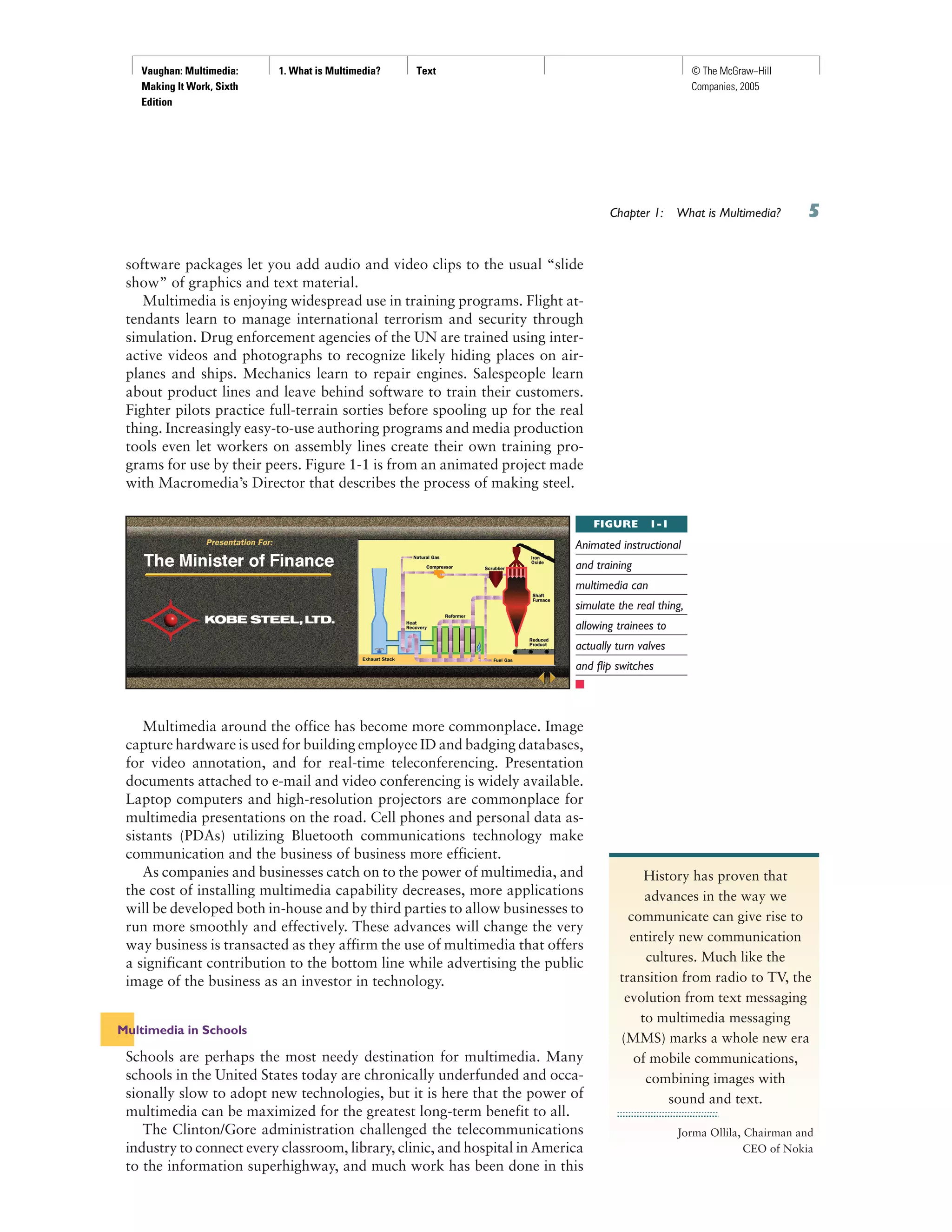
forms. Figure 1-2 shows Mercer Meyer’s
pioneering and award-winning classic “Just
Grandma and Me,” aimed at three- to
eight-year-olds.Readingskillsgrowthrough
word recognition: a mouse click on any
word plays it back. The computer reads
the story aloud, sometimes spelling words
individually. Click on the mailbox and a
frog jumps out; the chimney coughs smoke;
the telephone rings, but nobody is home,
and you hear Grandma’s answering ma-
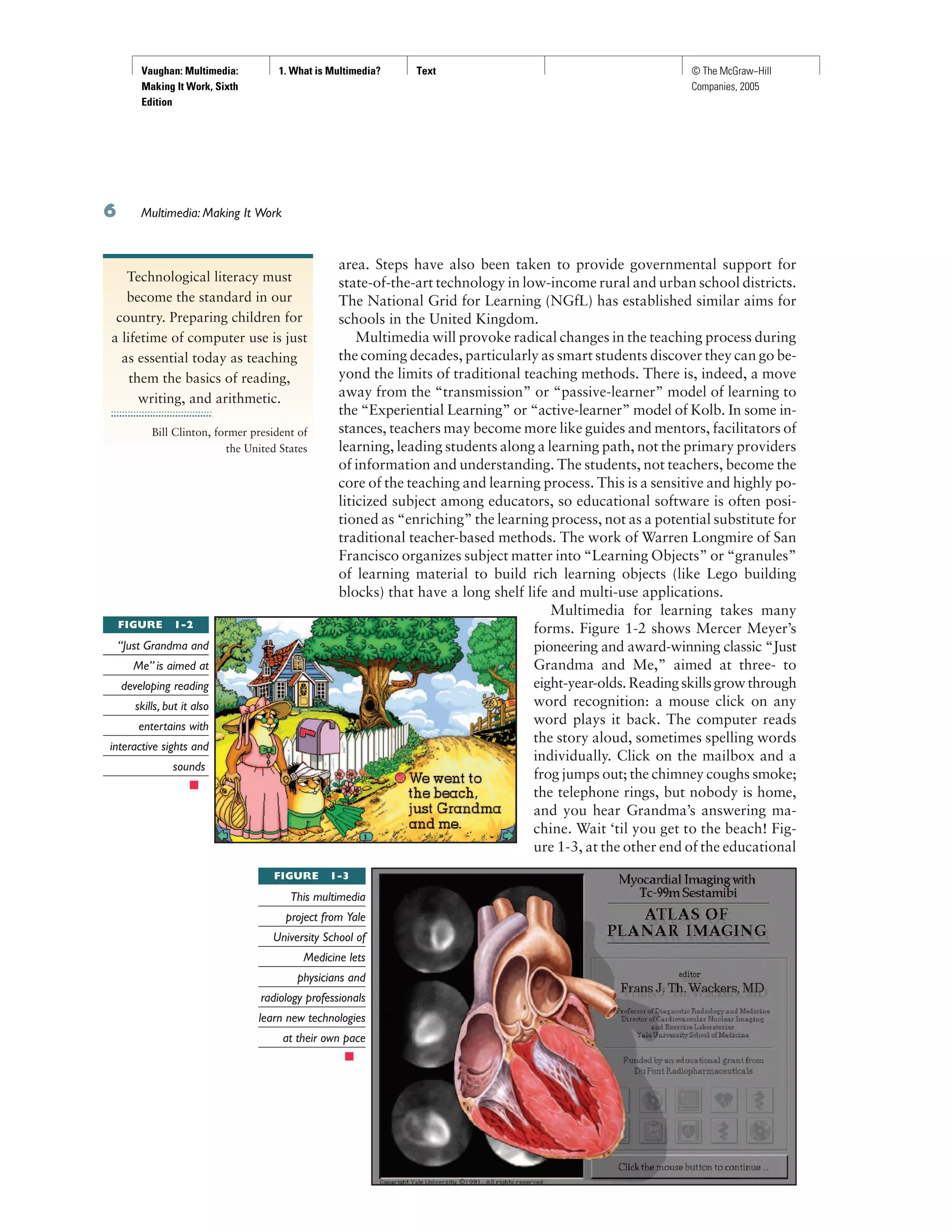
chine. Wait ‘til you get to the beach! Fig-
ure 1-3, at the other end of the educational
Technological literacy must
become the standard in our
country. Preparing children for
a lifetime of computer use is just
as essential today as teaching
them the basics of reading,
writing, and arithmetic.
Bill Clinton, former president of
the United States
FIGURE 1-2
“Just Grandma and
Me” is aimed at
developing reading
skills, but it also
entertains with
interactive sights and
sounds
FIGURE 1-3
This multimedia
project from Yale
University School of
Medicine lets
physicians and
radiology professionals
learn new technologies
at their own pace
Vaughan: Multimedia:
Making It Work, Sixth
Edition
1. What is Multimedia? Text © The McGraw−Hill
Companies, 2005
continuum, shows the title screen from an advanced electronic teaching
tool prepared by Yale University School of Medicine. It provides physi-
cians with over 100 case presentations and gives cardiologists, radiolo-
gists, medical students, and fellows an opportunity for in-depth learning
of new clinical techniques in nuclear cardiac perfusion imaging. Adults, as
well as children, learn well by exploration and discovery.
An interesting use of multimedia in schools involves the students them-
selves. Students put together interactive magazines and newsletters, they
make original art using image manipulation software tools (see Chapter 10),
they interview students and townspeople and coaches and teachers, and they
make QuickTime movies (see Chapter 5). They design and run web sites.
http://www.elibrary.com
http://www.lib.umich.edu/chhome.html
http://www.ucalgary.ca/~dkbrown/index.html
http://web66.coled.umn.edu/schools.html
http://www.gda.org
From homework helpers to literature guides to school registries to
home pages and information servers, education is finding a place on the
World Wide Web
At one time, laserdiscs brought the greatest amount of multimedia to the
classroom—in 1994, there were more than 2,500 educational titles avail-
able on laserdisc for grades K–12, the majority aimed at science and social
science curricula. Use of laserdiscs has been supplanted as schools have pur-
chased more computers with CD-ROM players. And as schools become
part of the Internet, multimedia arrives by glass fiber and over a network.
Multimedia at Home
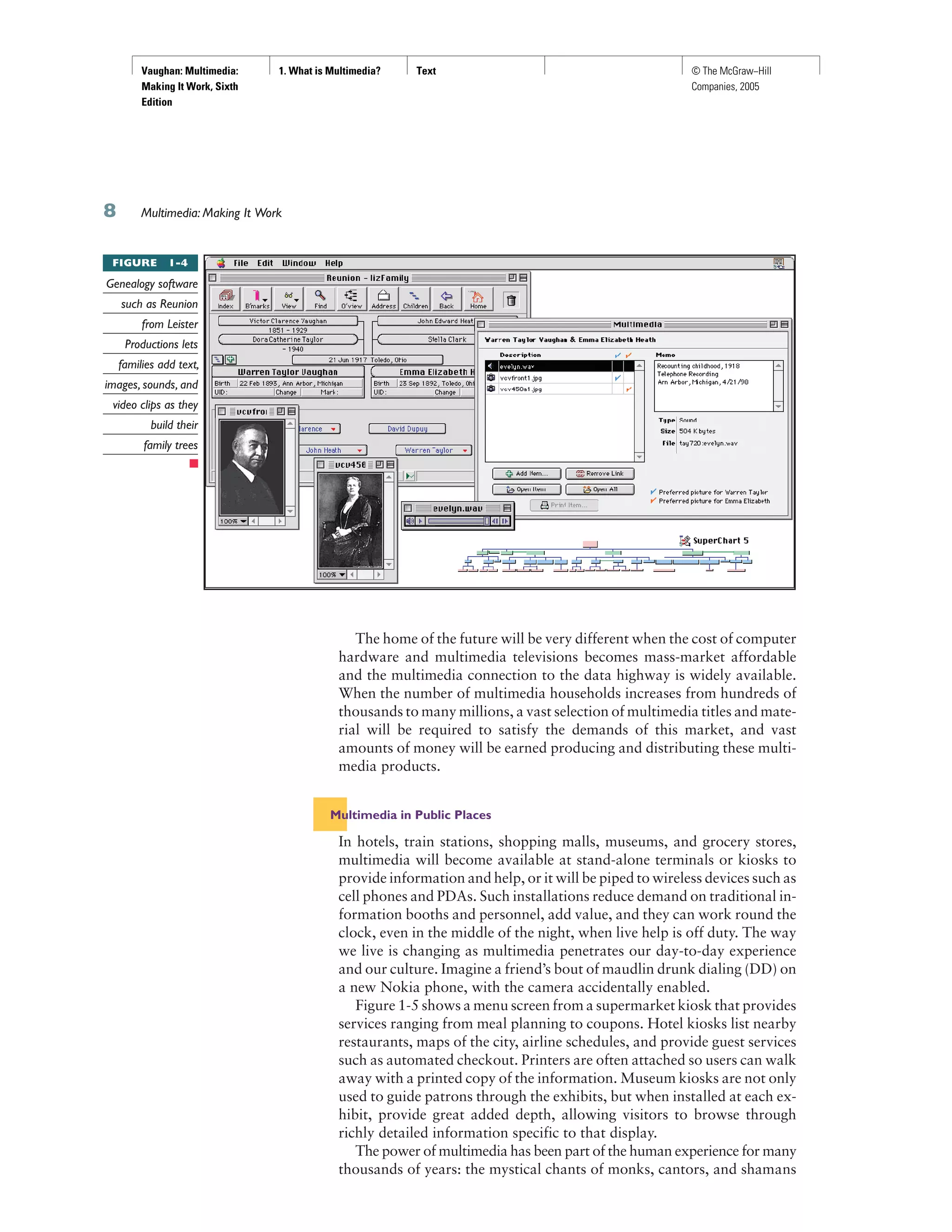
From gardening to cooking to home design, remodeling, and repair to geneal-
ogy software (see Figure 1-4), multimedia has entered the home. Eventually,
most multimedia projects will reach the home via television sets or monitors
with built-in interactive user inputs—either on old-fashioned color TVs or on
new high-definition sets (see Chapter 8). The multimedia viewed on these sets
will likely arrive on a pay-for-use basis along the data highway.
Today, home consumers of multimedia own either a computer with an
attached CD-ROM or DVD drive or a set-top player that hooks up to the
television, such as a Sega, Nintendo, X-box, or Sony game machine. There
is increasing convergence of computer-based multimedia with entertain-
ment and games-based media traditionally described as “shoot-em-up.”
Nintendo alone has sold over 100 million game players worldwide and more
than 750 million games. Users with TiVo technology (www.tivo.com) can
store80hoursoftelevisionviewingandgamingonastand-aloneharddisk.
Live Internet pay-for-play gaming with multiple players has become
popular, bringing multimedia to homes on the data highway, often in com-
bination with CD-ROMs inserted into the user’s machine. Microsoft’s
Internet Gaming Zone and Sony’s Station web site boast more than a mil-
lion registered users each—Microsoft claims to be the most successful,
with tens of thousands of people logged on and playing every evening.
Chapter 1: What is Multimedia?
An interactive episode of Wild
Kingdom might start out with
normal narration. “We’re here
in the Serengeti to learn about
the animals.” I see a lion on the
screen and think, “I want to
learn about the lion.” So I point
at the lion, and it zooms up on
the screen. The narration is now
just about the lion. I say, “Well
that’s really interesting, but I
wonder how the lion hunts.” I
point at a hunt icon. Now the
lion is hunting, and the narrator
tells me about how it hunts. I
dream about being the lion. I
select another icon and now see
the world from the lion’s point
of view, making the same kinds
of decisions the lion has to
make—with some hints as I go
along. I’m told how I’m doing
and how well I’m surviving.
Kids could get very motivated
from experiencing what it’s like
to be a lion and from wanting
to be a competent lion. Pretty
soon they’d be digging deeper
into the information resource,
finding out about animals in
different parts of the world,
studying geography from maps
displayed on the screen,
learning which animals are
endangered species...
Trip Hawkins, Chairman,
Electronic Arts
Vaughan: Multimedia:
Making It Work, Sixth
Edition
1. What is Multimedia? Text © The McGraw−Hill
Companies, 2005
Multimedia: Making It Work
The home of the future will be very different when the cost of computer
hardware and multimedia televisions becomes mass-market affordable
and the multimedia connection to the data highway is widely available.
When the number of multimedia households increases from hundreds of
thousands to many millions, a vast selection of multimedia titles and mate-
rial will be required to satisfy the demands of this market, and vast
amounts of money will be earned producing and distributing these multi-
media products.
Multimedia in Public Places
In hotels, train stations, shopping malls, museums, and grocery stores,
multimedia will become available at stand-alone terminals or kiosks to
provide information and help, or it will be piped to wireless devices such as
cell phones and PDAs. Such installations reduce demand on traditional in-
formation booths and personnel, add value, and they can work round the
clock, even in the middle of the night, when live help is off duty. The way
we live is changing as multimedia penetrates our day-to-day experience
and our culture. Imagine a friend’s bout of maudlin drunk dialing (DD) on
a new Nokia phone, with the camera accidentally enabled.
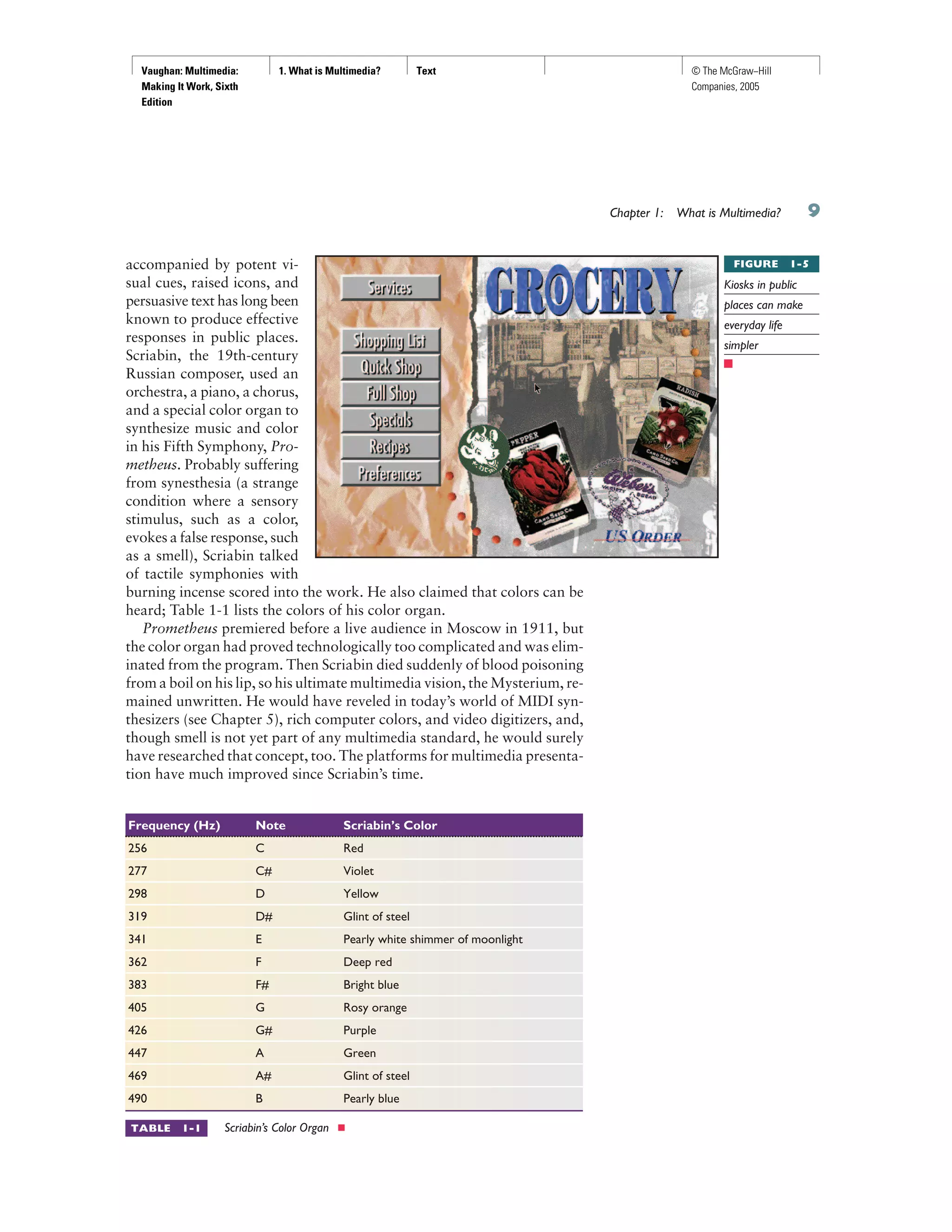
Figure 1-5 shows a menu screen from a supermarket kiosk that provides
services ranging from meal planning to coupons. Hotel kiosks list nearby
restaurants, maps of the city, airline schedules, and provide guest services
such as automated checkout. Printers are often attached so users can walk
away with a printed copy of the information. Museum kiosks are not only
used to guide patrons through the exhibits, but when installed at each ex-
hibit, provide great added depth, allowing visitors to browse through
richly detailed information specific to that display.
The power of multimedia has been part of the human experience for many
thousands of years: the mystical chants of monks, cantors, and shamans
FIGURE 1-4
Genealogy software
such as Reunion
from Leister
Productions lets
families add text,
images, sounds, and
video clips as they
build their
family trees
Vaughan: Multimedia:
Making It Work, Sixth
Edition
1. What is Multimedia? Text © The McGraw−Hill
Companies, 2005
accompanied by potent vi-
sual cues, raised icons, and
persuasive text has long been
known to produce effective
responses in public places.
Scriabin, the 19th-century
Russian composer, used an
orchestra, a piano, a chorus,
and a special color organ to
synthesize music and color
in his Fifth Symphony, Pro-
metheus. Probably suffering
from synesthesia (a strange
condition where a sensory
stimulus, such as a color,
evokes a false response, such
as a smell), Scriabin talked
of tactile symphonies with
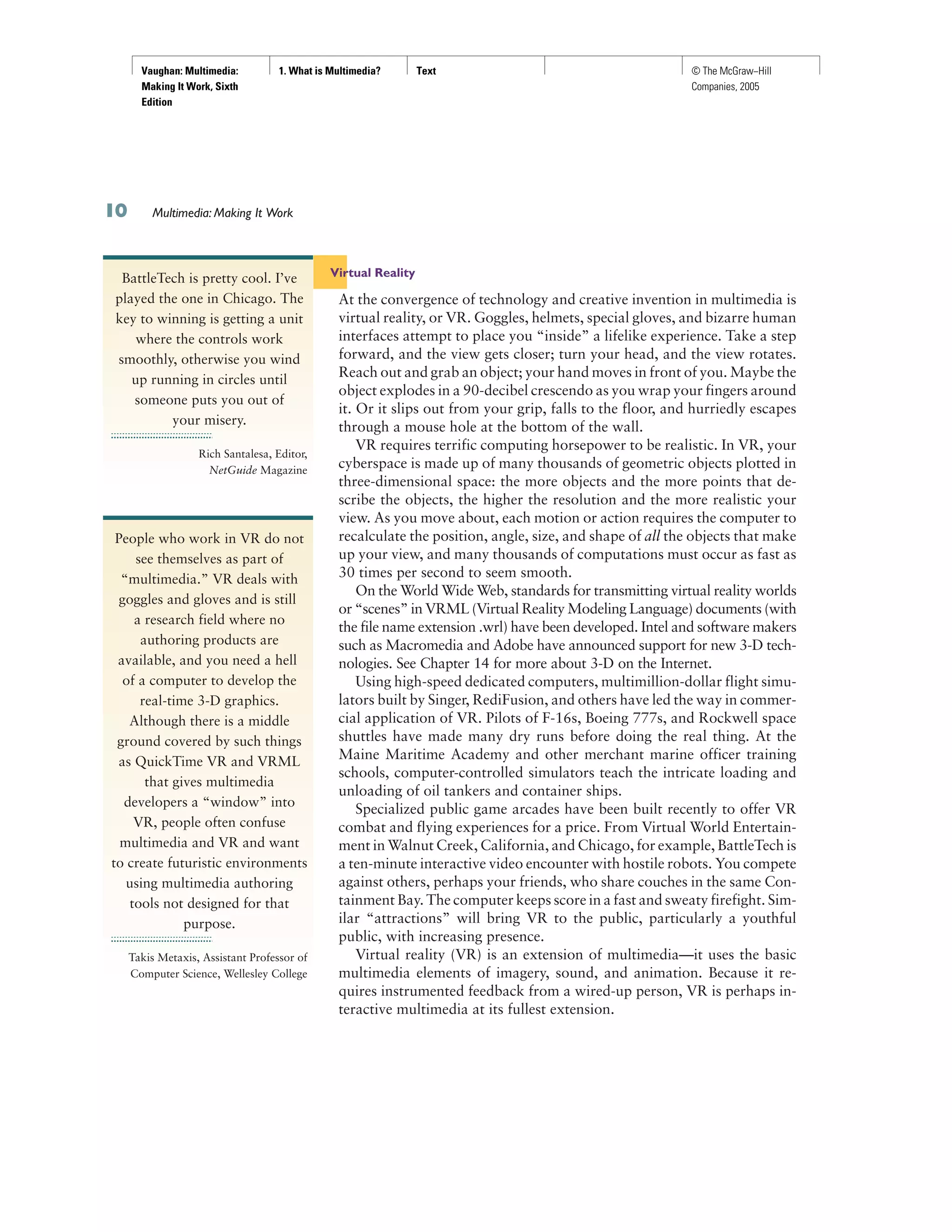
burning incense scored into the work. He also claimed that colors can be
heard; Table 1-1 lists the colors of his color organ.
Prometheus premiered before a live audience in Moscow in 1911, but
the color organ had proved technologically too complicated and was elim-
inated from the program. Then Scriabin died suddenly of blood poisoning
from a boil on his lip, so his ultimate multimedia vision, the Mysterium, re-
mained unwritten. He would have reveled in today’s world of MIDI syn-
thesizers (see Chapter 5), rich computer colors, and video digitizers, and,
though smell is not yet part of any multimedia standard, he would surely
have researched that concept, too. The platforms for multimedia presenta-
tion have much improved since Scriabin’s time.
Chapter 1: What is Multimedia?
Frequency (Hz) Note Scriabin’s Color
256 C Red
277 C# Violet
298 D Yellow
319 D# Glint of steel
341 E Pearly white shimmer of moonlight
362 F Deep red
383 F# Bright blue
405 G Rosy orange
426 G# Purple
447 A Green
469 A# Glint of steel
490 B Pearly blue
TABLE 1-1 Scriabin’s Color Organ n
FIGURE 1-5
Kiosks in public
places can make
everyday life
simpler
Vaughan: Multimedia:
Making It Work, Sixth
Edition
1. What is Multimedia? Text © The McGraw−Hill
Companies, 2005
Virtual Reality
At the convergence of technology and creative invention in multimedia is
virtual reality, or VR. Goggles, helmets, special gloves, and bizarre human
interfaces attempt to place you “inside” a lifelike experience. Take a step
forward, and the view gets closer; turn your head, and the view rotates.
Reach out and grab an object; your hand moves in front of you. Maybe the
object explodes in a 90-decibel crescendo as you wrap your fingers around
it. Or it slips out from your grip, falls to the floor, and hurriedly escapes
through a mouse hole at the bottom of the wall.
VR requires terrific computing horsepower to be realistic. In VR, your
cyberspace is made up of many thousands of geometric objects plotted in
three-dimensional space: the more objects and the more points that de-
scribe the objects, the higher the resolution and the more realistic your
view. As you move about, each motion or action requires the computer to
recalculate the position, angle, size, and shape of all the objects that make
up your view, and many thousands of computations must occur as fast as
30 times per second to seem smooth.
On the World Wide Web, standards for transmitting virtual reality worlds
or “scenes” in VRML (Virtual Reality Modeling Language) documents (with
the file name extension .wrl) have been developed. Intel and software makers
such as Macromedia and Adobe have announced support for new 3-D tech-
nologies. See Chapter 14 for more about 3-D on the Internet.
Using high-speed dedicated computers, multimillion-dollar flight simu-
lators built by Singer, RediFusion, and others have led the way in commer-
cial application of VR. Pilots of F-16s, Boeing 777s, and Rockwell space
shuttles have made many dry runs before doing the real thing. At the
Maine Maritime Academy and other merchant marine officer training
schools, computer-controlled simulators teach the intricate loading and
unloading of oil tankers and container ships.
Specialized public game arcades have been built recently to offer VR
combat and flying experiences for a price. From Virtual World Entertain-
ment in Walnut Creek, California, and Chicago, for example, BattleTech is
a ten-minute interactive video encounter with hostile robots. You compete
against others, perhaps your friends, who share couches in the same Con-
tainment Bay. The computer keeps score in a fast and sweaty firefight. Sim-
ilar “attractions” will bring VR to the public, particularly a youthful
public, with increasing presence.
Virtual reality (VR) is an extension of multimedia—it uses the basic
multimedia elements of imagery, sound, and animation. Because it re-
quires instrumented feedback from a wired-up person, VR is perhaps in-
teractive multimedia at its fullest extension.
Multimedia: Making It Work
BattleTech is pretty cool. I’ve
played the one in Chicago. The
key to winning is getting a unit
where the controls work
smoothly, otherwise you wind
up running in circles until
someone puts you out of
your misery.
Rich Santalesa, Editor,
NetGuide Magazine
People who work in VR do not
see themselves as part of
“multimedia.” VR deals with
goggles and gloves and is still
a research field where no
authoring products are
available, and you need a hell
of a computer to develop the
real-time 3-D graphics.
Although there is a middle
ground covered by such things
as QuickTime VR and VRML
that gives multimedia
developers a “window” into
VR, people often confuse
multimedia and VR and want
to create futuristic environments
using multimedia authoring
tools not designed for that
purpose.
Takis Metaxis, Assistant Professor of
Computer Science, Wellesley College
Vaughan: Multimedia:
Making It Work, Sixth
Edition
1. What is Multimedia? Text © The McGraw−Hill
Companies, 2005
Chapter 1 Review
■ Chapter Summary
For your review, here’s a summary of the important
concepts discussed in this chapter.
Define common multimedia terms such as
multimedia, integration, interactive, HTML,
authoring
■ Multimedia is any combination of text, graphic
art, sound, animation, and video delivered by
computer or other electronic means.
■ Multimedia production requires creative,
technical, organizing, and business ability.
Describe the two primary multimedia delivery
media—CD-ROM and DVD versus the World
Wide Web—and their primary differences
■ Multimedia projects often require a large amount
of digital memory; hence they are often stored on
CD-ROM or DVDs.
■ Multimedia also includes web pages in HTML or
DHTML (XML) on the World Wide Web, and
can include rich media created by various tools
using plug-ins.
■ Web sites with rich media require large amounts
of bandwidth.
Qualify various characteristics of multimedia:
nonlinear versus linear content
■ Multimedia presentations can be nonlinear
(interactive) or linear (passive).
■ Multimedia can contain structured linking; this is
called hypermedia.
■ Multimedia developers produce multimedia titles
using authoring tools.
■ Multimedia projects, when published, are
multimedia titles.
Describe several different environments in which
multimedia might be used, and several different
aspects of multimedia that provide a benefit over
other forms of information
■ Multimedia is appropriate wherever a human
interacts with electronic information.
■ Areas in which multimedia presentations are
suitable include education, training, marketing,
advertising, product demos, databases, catalogs,
and networked communications.
Cite the history of multimedia and note
important projected changes in the future
of multimedia
■ The promise of multimedia has spawned
numerous mergers, expansions, and other
ventures. These include hardware, software,
content, and delivery services.
■ The future of multimedia will include
high-bandwidth access to a wide array of
multimedia resources and learning materials.
■ Key Terms
authoring tools (2)
bandwidth (2)
browser (1)
burners (3)
CD-ROM (2)
content (2)
convergence (7)
digital manipulation (1)
distributed resources (3)
DVD (3)
environment (2)
font (1)
graphical user interface
(GUI) (2)
HTML (1)
hypermedia (1)
integrated multimedia (2)
interactive multimedia (1)
linear (2)
multimedia (0)
multimedia developers (1)
multimedia elements (4)
multimedia project (1)
multimedia title (1)
nonlinear (2)
platform (2)
scripting (2)
storyboarding (2)
web site (1)
Vaughan: Multimedia:
Making It Work, Sixth
Edition
1. What is Multimedia? Text © The McGraw−Hill
Companies, 2005
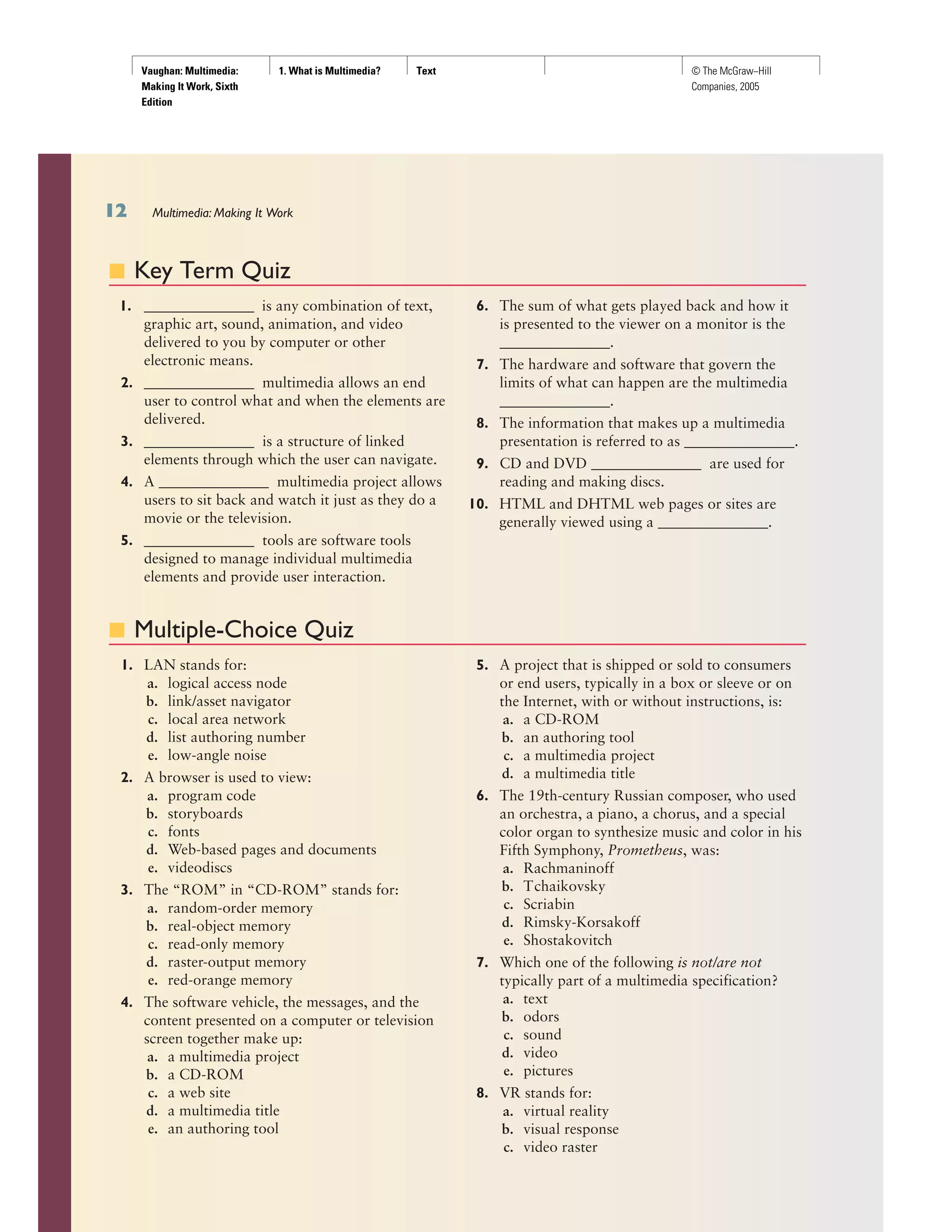
■ Key Term Quiz
1. _______________ is any combination of text,
graphic art, sound, animation, and video
delivered to you by computer or other
electronic means.
2. _______________ multimedia allows an end
user to control what and when the elements are
delivered.
3. _______________ is a structure of linked
elements through which the user can navigate.
4. A _______________ multimedia project allows
users to sit back and watch it just as they do a
movie or the television.
5. _______________ tools are software tools
designed to manage individual multimedia
elements and provide user interaction.
6. The sum of what gets played back and how it
is presented to the viewer on a monitor is the
_______________.
7. The hardware and software that govern the
limits of what can happen are the multimedia
_______________.
8. The information that makes up a multimedia
presentation is referred to as _______________.
9. CD and DVD _______________ are used for
reading and making discs.
10. HTML and DHTML web pages or sites are
generally viewed using a _______________.
■ Multiple-Choice Quiz
1. LAN stands for:
a. logical access node
b. link/asset navigator
c. local area network
d. list authoring number
e. low-angle noise
2. A browser is used to view:
a. program code
b. storyboards
c. fonts
d. Web-based pages and documents
e. videodiscs
3. The “ROM” in “CD-ROM” stands for:
a. random-order memory
b. real-object memory
c. read-only memory
d. raster-output memory
e. red-orange memory
4. The software vehicle, the messages, and the
content presented on a computer or television
screen together make up:
a. a multimedia project
b. a CD-ROM
c. a web site
d. a multimedia title
e. an authoring tool
5. A project that is shipped or sold to consumers
or end users, typically in a box or sleeve or on
the Internet, with or without instructions, is:
a. a CD-ROM
b. an authoring tool
c. a multimedia project
d. a multimedia title
6. The 19th-century Russian composer, who used
an orchestra, a piano, a chorus, and a special
color organ to synthesize music and color in his
Fifth Symphony, Prometheus, was:
a. Rachmaninoff
b. Tchaikovsky
c. Scriabin
d. Rimsky-Korsakoff
e. Shostakovitch
7. Which one of the following is not/are not
typically part of a multimedia specification?
a. text
b. odors
c. sound
d. video
e. pictures
8. VR stands for:
a. virtual reality
b. visual response
c. video raster
Multimedia: Making It Work
Vaughan: Multimedia:
Making It Work, Sixth
Edition
1. What is Multimedia? Text © The McGraw−Hill
Companies, 2005
Chapter 1: What is Multimedia?
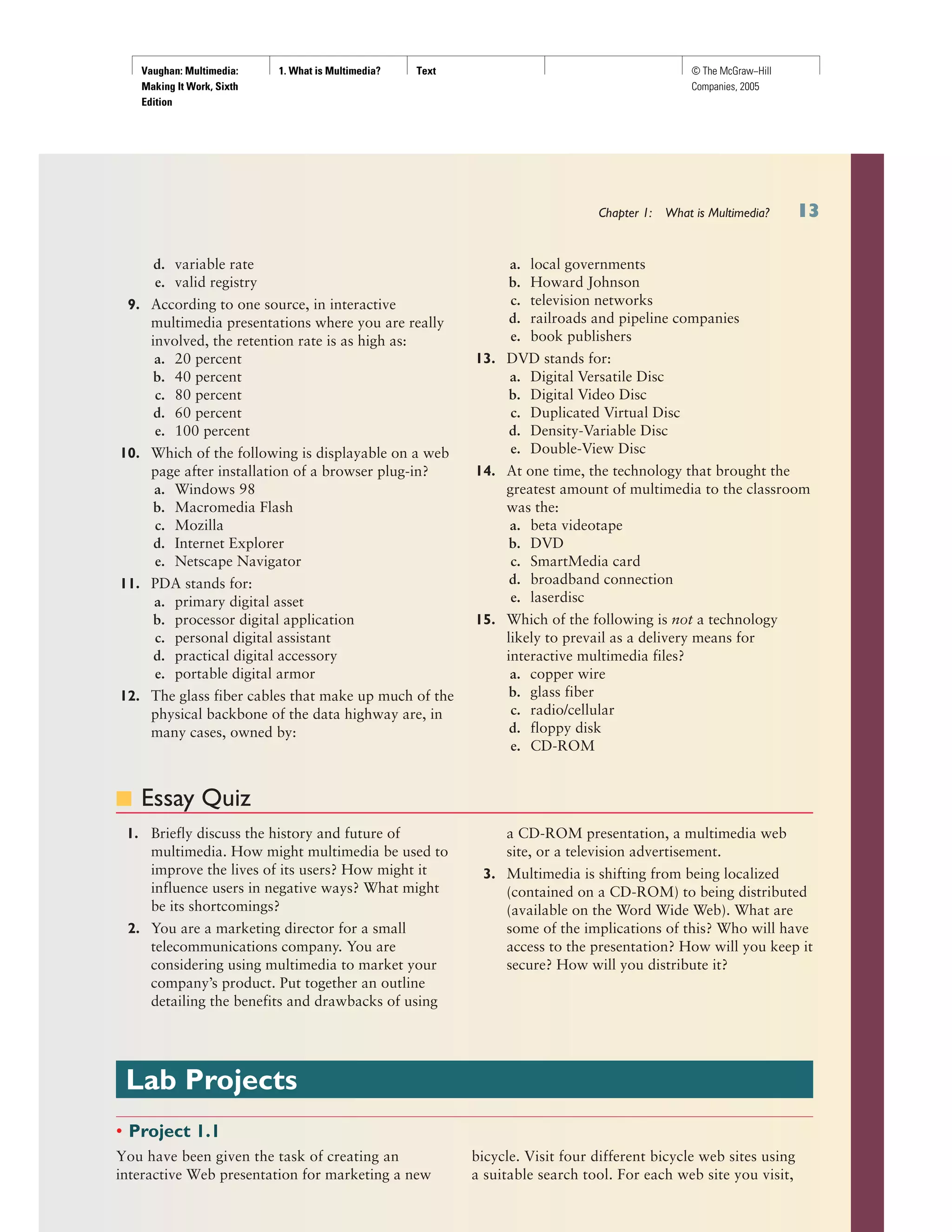
d. variable rate
e. valid registry
9. According to one source, in interactive
multimedia presentations where you are really
involved, the retention rate is as high as:
a. 20 percent
b. 40 percent
c. 80 percent
d. 60 percent
e. 100 percent
10. Which of the following is displayable on a web
page after installation of a browser plug-in?
a. Windows 98
b. Macromedia Flash
c. Mozilla
d. Internet Explorer
e. Netscape Navigator
11. PDA stands for:
a. primary digital asset
b. processor digital application
c. personal digital assistant
d. practical digital accessory
e. portable digital armor
12. The glass fiber cables that make up much of the
physical backbone of the data highway are, in
many cases, owned by:
a. local governments
b. Howard Johnson
c. television networks
d. railroads and pipeline companies
e. book publishers
13. DVD stands for:
a. Digital Versatile Disc
b. Digital Video Disc
c. Duplicated Virtual Disc
d. Density-Variable Disc
e. Double-View Disc
14. At one time, the technology that brought the
greatest amount of multimedia to the classroom
was the:
a. beta videotape
b. DVD
c. SmartMedia card
d. broadband connection
e. laserdisc
15. Which of the following is not a technology
likely to prevail as a delivery means for
interactive multimedia files?
a. copper wire
b. glass fiber
c. radio/cellular
d. floppy disk
e. CD-ROM
■ Essay Quiz
1. Briefly discuss the history and future of
multimedia. How might multimedia be used to
improve the lives of its users? How might it
influence users in negative ways? What might
be its shortcomings?
2. You are a marketing director for a small
telecommunications company. You are
considering using multimedia to market your
company’s product. Put together an outline
detailing the benefits and drawbacks of using
a CD-ROM presentation, a multimedia web
site, or a television advertisement.
3. Multimedia is shifting from being localized
(contained on a CD-ROM) to being distributed
(available on the Word Wide Web). What are
some of the implications of this? Who will have
access to the presentation? How will you keep it
secure? How will you distribute it?
Lab Projects
• Project 1.1
You have been given the task of creating an
interactive Web presentation for marketing a new
bicycle. Visit four different bicycle web sites using
a suitable search tool. For each web site you visit,
Vaughan: Multimedia:
Making It Work, Sixth
Edition
1. What is Multimedia? Text © The McGraw−Hill
Companies, 2005
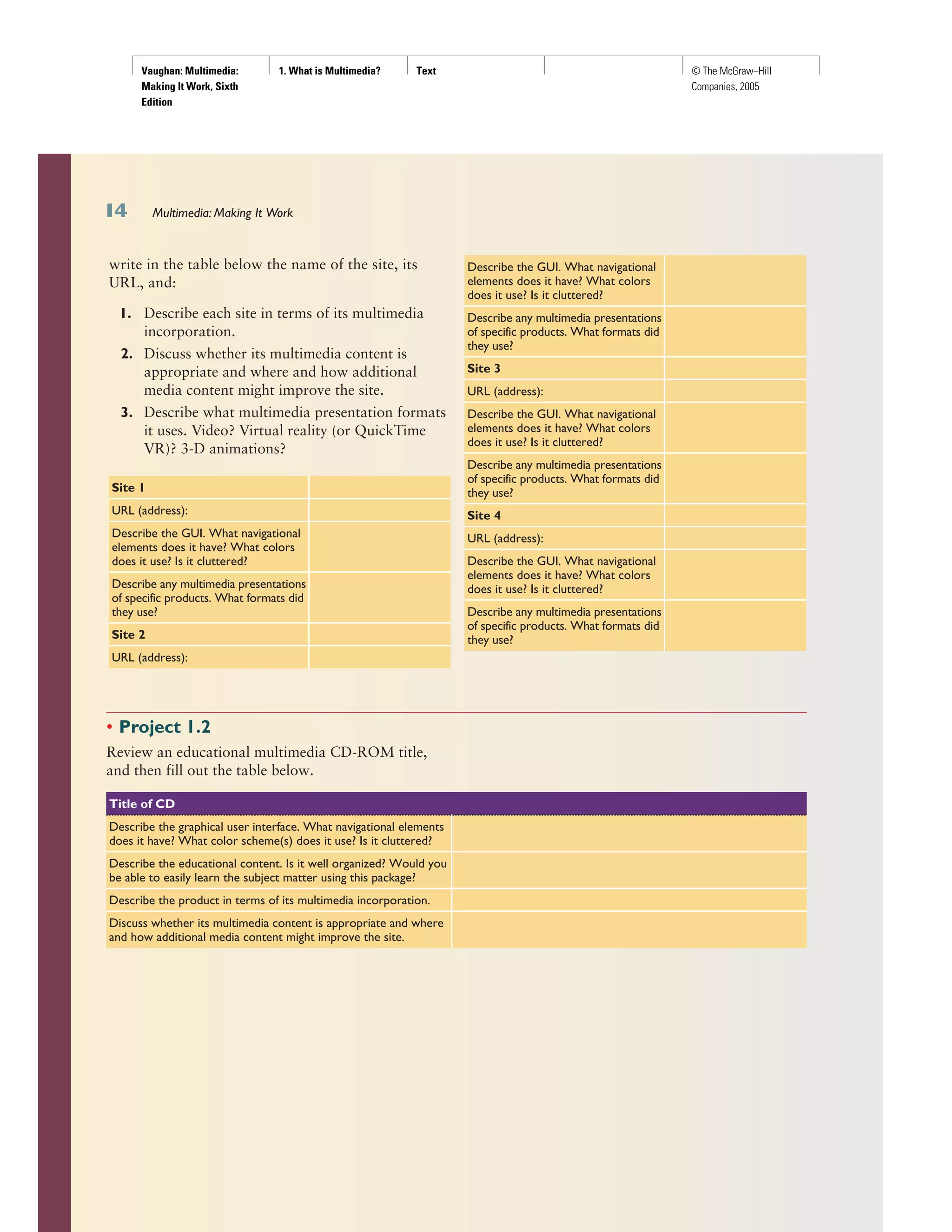
write in the table below the name of the site, its
URL, and:
1. Describe each site in terms of its multimedia
incorporation.
2. Discuss whether its multimedia content is
appropriate and where and how additional
media content might improve the site.
3. Describe what multimedia presentation formats
it uses. Video? Virtual reality (or QuickTime
VR)? 3-D animations?
Site 1
URL (address):
Describe the GUI. What navigational
elements does it have? What colors
does it use? Is it cluttered?
Describe any multimedia presentations
of specific products. What formats did
they use?
Site 2
URL (address):
Describe the GUI. What navigational
elements does it have? What colors
does it use? Is it cluttered?
Describe any multimedia presentations
of specific products. What formats did
they use?
Site 3
URL (address):
Describe the GUI. What navigational
elements does it have? What colors
does it use? Is it cluttered?
Describe any multimedia presentations
of specific products. What formats did
they use?
Site 4
URL (address):
Describe the GUI. What navigational
elements does it have? What colors
does it use? Is it cluttered?
Describe any multimedia presentations
of specific products. What formats did
they use?
Multimedia: Making It Work
• Project 1.2
Review an educational multimedia CD-ROM title,
and then fill out the table below.
Title of CD
Describe the graphical user interface. What navigational elements
does it have? What color scheme(s) does it use? Is it cluttered?
Describe the educational content. Is it well organized? Would you
be able to easily learn the subject matter using this package?
Describe the product in terms of its multimedia incorporation.
Discuss whether its multimedia content is appropriate and where
and how additional media content might improve the site.
Vaughan: Multimedia:
Making It Work, Sixth
Edition
1. What is Multimedia? Text © The McGraw−Hill
Companies, 2005
Chapter 1: What is Multimedia?
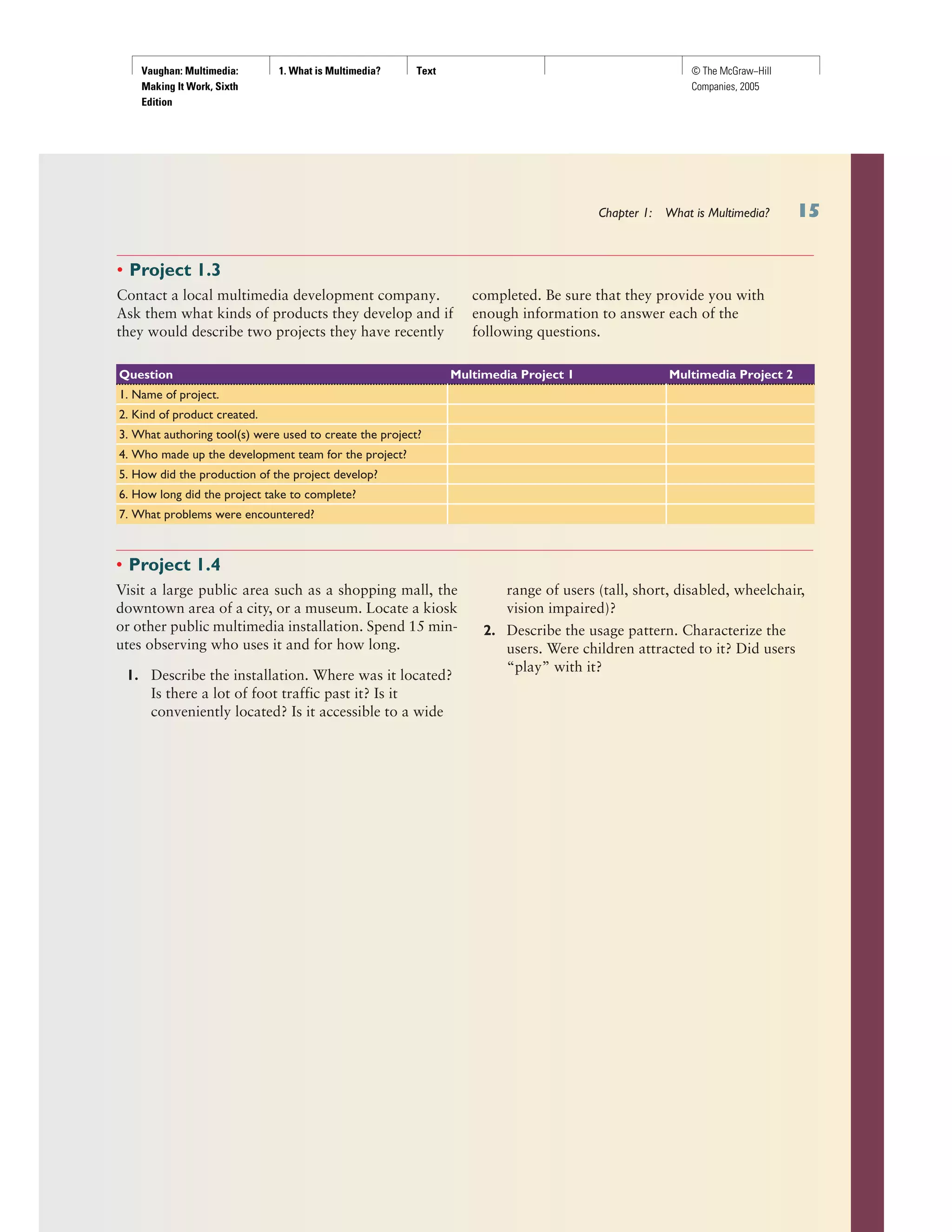
Question Multimedia Project 1 Multimedia Project 2
1. Name of project.
2. Kind of product created.
3. What authoring tool(s) were used to create the project?
4. Who made up the development team for the project?
5. How did the production of the project develop?
6. How long did the project take to complete?
7. What problems were encountered?
• Project 1.4
Visit a large public area such as a shopping mall, the
downtown area of a city, or a museum. Locate a kiosk
or other public multimedia installation. Spend 15 min-
utes observing who uses it and for how long.
1. Describe the installation. Where was it located?
Is there a lot of foot traffic past it? Is it
conveniently located? Is it accessible to a wide
range of users (tall, short, disabled, wheelchair,
vision impaired)?
2. Describe the usage pattern. Characterize the
users. Were children attracted to it? Did users
“play” with it?
• Project 1.3
Contact a local multimedia development company.
Ask them what kinds of products they develop and if
they would describe two projects they have recently
completed. Be sure that they provide you with
enough information to answer each of the
following questions.

Chapter 1.1

  • 1.
    Vaughan: Multimedia: Making ItWork, Sixth Edition 1. What is Multimedia? Text © The McGraw−Hill Companies, 2005 In this chapter, you will learn how to: ■ Define common multimedia terms such as multimedia, integration, interactive, HTML, authoring ■ Describe the two primary multimedia delivery media— CD-ROM and DVD versus the World Wide Web—and their primary differences ■ Qualify various characteristics of multimedia: linear versus nonlinear content ■ Describe several different environments in which multimedia might be used, and several different aspects of multimedia that provide a benefit over other forms of information presentation ■ Cite the history of multimedia and note important projected changes in the future of multimedia MU L T I M E D I A is an eerie wail as two cat’s eyes appear on a dark screen. It’s the red rose that dissolves into a little girl’s face when you press “Valentine’s Day.” It’s a small window of video laid onto a map of In- dia, showing an old man recalling his dusty journey to meet a rajah there. It’s a catalog of fancy cars with a guide to help you buy one. It’s a real-time video conference with colleagues in Paris, London, and Hong Kong on your office computer using whiteboards, microphones, and question tech- niques (www.webtrain.com). At home, it’s an algebra or geography lesson for a fifth-grader. At the arcade, it’s goggle-faced kids flying fighter planes in sweaty virtual reality. On a DVD, it’s the interactive video sequence (screen hot spots) that explain how the Harry Potter movie was made—all using your remote control. Multimedia is any combination of text, art, sound, animation, and video delivered to you by computer or other electronic or digitally manip- ulated means. It is richly presented sensation. When you weave together the sensual elements of multimedia—dazzling pictures and animations, engaging sounds, compelling video clips, and raw textual information— you can electrify the thought and action centers of people’s minds. When you give them interactive control of the process, they can be enchanted. This book is about creating each of the elements of multimedia and about how you can weave them together for maximum effect. This book is for computer beginners and computer experts. It is for serious multimedia producers and their clients, as well. It is for desktop publishers and video producers who may need a leg-up as they watch traditional methods for delivery of information and ideas evolve into new, technology-driven for- mats. This book is also for hobbyists, who want to make albums and fam- ily histories on the World Wide Web; for mainstream businesses, where word-processed documents and spreadsheets are illustrated with audio, video, and graphic animations; for public speakers, who use animation and sound on large monitors and auditorium projection systems to present ideas and information to an audience; for information managers, who or- ganize and distribute digital images, sound, video, and text; and for educa- tors and trainers, who design and present information for learning. chapter 1What is Multimedia?
  • 2.
    Vaughan: Multimedia: Making ItWork, Sixth Edition 1. What is Multimedia? Text © The McGraw−Hill Companies, 2005 If you are new to multimedia and are facing a major investment in hard- ware, software, and the time to learn each new tool, take a gradual ap- proach to these challenges. Begin by studying each element of multimedia and learning one or more tools for creating and editing that element. Get to know how to use text and fonts, how to make and edit colorful graphic images and animate them into movies, and how to record and edit digital sound. Read the computer trade periodicals that contain the most up-to- date information. Your skills will be most valuable if you develop a broad foundation of knowledge about each of the basic elements of multimedia. Producing a multimedia project or a web site requires more than cre- ative skill and high technology. You need organizing and business talent as well. For example, issues of ownership and copyright will be attached to some elements that you wish to use: text from books, scanned images from magazines, audio and video clips. These require permission and often pay- ment of a fee to the owner. Indeed, the management and production infra- structure of a multimedia project may be as intense and complicated as the technology and creative skills you bring to bear in rendering it. Keys to successful development of a multimedia project are management of digital tools and skillsets, teamwork, general project management, documenting and archiving the process, and delivering the completed product on time and within budget. Definitions Multimedia is, as described above, woven combinations of digitally ma- nipulated text, photographs, graphic art, sound, animation, and video ele- ments. When you allow an end user—the viewer of a multimedia project— to control what and when the elements are delivered, it is interactive mul- timedia. When you provide a structure of linked elements through which the user can navigate, interactive multimedia becomes hypermedia. Although the definition of multimedia is a simple one, making it work can be complicated. Not only do you need to understand how to make each multimedia element stand up and dance, but you also need to know how to use multimedia computer tools and technologies to weave them to- gether. The people who weave multimedia into meaningful tapestries are multimedia developers. The software vehicle, the messages, and the content presented on a com- puter or television screen together constitute a multimedia project. If the project will be shipped or sold to consumers or end users, typically in a box or sleeve or on the Internet, with or without instructions, it is a multimedia title. Your project may also be a “page” or “site” on the World Wide Web, where you can weave the elements of multimedia into documents with HTML (Hypertext Markup Language) or DHTML (Dynamic Hypertext Markup Language) and play rich media files created in such programs as Macromedia’s Flash, Adobe’s LiveMotion, or Apple’s QuickTime by in- stalling “plug-ins” into a browser application such as Internet Explorer or Netscape Navigator. See Chapter 13 for more about plug-ins, multimedia, and the Web. Chapter 1: What is Multimedia? The implementation of multimedia capabilities in computers is just the latest episode in a long series: cave painting, hand-crafted manuscripts, the printing press, radio and television... These advances reflect the innate desire of man to create outlets for creative expression, to use technology and imagination to gain empowerment and freedom for ideas. Glenn Ochsenreiter, Director, Multimedia PC Council
  • 3.
    Vaughan: Multimedia: Making ItWork, Sixth Edition 1. What is Multimedia? Text © The McGraw−Hill Companies, 2005 A multimedia project need not be interactive to be called multimedia: users can sit back and watch it just as they do a movie or the television. In such cases a project is linear, starting at the beginning and running through to the end. When users are given navigational control and can wander through the content at will, multimedia becomes nonlinear and user inter- active, and is a powerful personal gateway to information. Determining how a user will interact with and navigate through the content of a project requires great attention to the message, the scripting or storyboarding, the artwork, and the programming. You can break an entire project with a badly designed interface. You can also lose the mes- sage in a project with inadequate or inaccurate content. Multimedia elements are typically sewn together into a project using authoring tools.These software tools are designed to manage individual multimedia elements and provide user interaction. Integratedmultimedia is the “weaving” part of the multimedia definition, where source docu- ments such as montages, graphics, video cuts, and sounds merge into a fi- nal presentation. In addition to providing a method for users to interact with the project, most authoring tools also offer facilities for creating and editing text and images and controls for playing back separate audio and video files that have been created with editing tools designed for these media. The sum of what gets played back and how it is presented to the viewer on a monitor is the graphical user interface, or GUI (pronounced “gooey”). This interface is just as much the rules for what happens to the user’s input as it is the actual graphics on the screen. The hardware and software that govern the limits of what can happen are the multimedia platform or envi- ronment. CD-ROM and the Multimedia Highway Multimedia requires large amounts of digital memory when stored in an end user’s library, or large amounts of bandwidth when distributed over wires, glass fiber, or airwaves on a network. The greater the bandwidth, the bigger the “pipeline,” so more content can be delivered to end users quickly. CD-ROM, DVD, and Multimedia CD-ROM (compact disc read-only memory, see Chapter 18) has become the most cost-effective distribution medium for multimedia projects: a CD-ROM disc can be mass-produced for pennies and can contain up to 80 minutes of full-screen video or sound. Or it can contain unique mixes of images, sounds, text, video, and animations controlled by an authoring system to provide unlimited user interaction. Discs can be stamped out of polycarbonate plastic as fast as cookies on a baker’s production line and just as cheaply. Virtually all personal com- puters sold today include at least a CD-ROM player, and the software that drives these computers is commonly available on a CD-ROM disc—appli- cations that required inserting as many as 16 or more floppy disks one af- ter another are now installed from a CD-ROM without muss or fuss. Multimedia: Making It Work
  • 4.
    Vaughan: Multimedia: Making ItWork, Sixth Edition 1. What is Multimedia? Text © The McGraw−Hill Companies, 2005 Many systems now come with a DVD-ROM player. Multilayered Digital Versatile Disc (DVD) technology increases the capacity and multimedia ca- pability of current optical technology to 18GB. CD and DVD burners are used for reading discs and for making them, too, in audio, video, and data formats. DVD authoring and integration software allows the creation of interactive front-end menus for films and games. In the very long term, however, CD-ROM and DVD discs are but interim memory technologies that will be replaced by new devices that do not re- quire moving parts. As the data highway described below becomes more and more pervasive and users become better “connected,” copper wire, glass fiber, and radio/cellular technologies may prevail as the most common delivery means for interactive multimedia files, served across the broadband Internet or from dedicated computer farms and storage facilities. The Multimedia Highway Now that telecommunications networks are global, and when informa- tion providers and content owners determine the worth of their products and how to charge money for them, information elements will ultimately link up online as distributed resources on a data highway (actually more like a toll road), where you will pay to acquire and use multimedia-based information. Curiously, the actual glass fiber cables that make up much of the physical backbone of the data highway are, in many cases, owned by railroads and pipeline companies who simply buried the cable on existing rights of way where no special permits and environmental reports are necessary. One rail- road in the United States invested more than a million dollars in a special ca- ble-laying trenching car; in the United Kingdom, there is talk of placing a fiber-optic cable backbone along the decaying 19th-century canal and barge system. Bandwidth on these lines is leased to others, so competing retailers such as AT&T, MCI, and Sprint may even share the same cable. Full-text content from books and magazines is accessible by modem and electronic link; feature movies are played at home; real-time news re- ports from anywhere on earth are available; lectures from participating universities are monitored for education credits; street maps of any city are viewable—with recommendations for restaurants, in any language—and online travelogues include testimonials and video tracks. This is not sci- ence fiction; it is happening now. For each of these interfaces or gateways to information is a multimedia project just waiting to be developed. http://www.moviefone.com http://www.travelocity.com http://www.nytimes.com http://www.5pm.co.uk Showtimes for many major cities, restaurants, vacation trips, and current news items are quickly available on the Web Interactive multimedia is delivered to many homes throughout the world. Interest from a confluence of entertainment megacorps, information Chapter 1: What is Multimedia?
  • 5.
    Vaughan: Multimedia: Making ItWork, Sixth Edition 1. What is Multimedia? Text © The McGraw−Hill Companies, 2005 Multimedia: Making It Work publishers and providers, cable and telephone companies, and hardware and software manufacturers is driving this inevitable evolution, and profound changes in global communications strategy are on the drawing boards. What will be piped through this new system for entertainment, reference, and life- long learning experiences are the very multimedia elements discussed in the chapters of this book: text, graphics, animation, sound, and video. The software tools for making and editing these elements are discussed later in the book; the methods for delivering these elements on the Internet are de- scribed in Chapter 14. The actual content provided, let us hope, will be ex- cellent fare generated by thinking and caring creative people using ideas that will propel all of us into a better world. Entertainment companies that own content easily converted to multimedia projects are teaming up with cable TV companies. Film studios are creating new divisions to produce interactive multimedia, and wealthy talents have formed new companies to join the action. Even without a clear business model with known prof- its, large media corporations are uniting to create huge conglomerates to control the content and delivery of tomorrow’s information. Disney merged with Capital Cities/ABC, Time Warner purchased Turner Broad- casting, and both were bought by AOL, and Microsoft joined forces with NBC. Indeed, Microsoft’s interests in the growing Internet are so pervasive that it continues to risk government intervention under antitrust and mo- nopoly laws. Some companies will own the routes for carrying data, other companies will own the hardware and software interfaces at the end of the line, at of- fices and homes. Some will knit it all together and provide supply-on-de- mand and billing services. Regardless of who owns the roadways and the hardware boxes, multimedia producers will create the new literature and the rich content sent along it. This is a fresh and exciting industry coming of age, but one still faced with many growing pains. Where to Use Multimedia Multimedia is appropriate whenever a human interface connects a human user to electronic information of any kind. Multimedia enhances minimal- ist text-only computer interfaces and yields measurable benefit by gaining and holding attention and interest; multimedia improves information re- tention. When properly woven, multimedia can also be profoundly enter- taining. Multimedia in Business Business applications for multimedia include presentations, training, mar- keting, advertising, product demos, databases, catalogs, instant messaging, and networked communications. Voice mail and video conferencing are provided on many local and wide area networks (LANs and WANs) using distributed networks and Internet protocols. After a morning of mind-numbing 35 mm slide and overhead presenta- tions delivered from the podium of a national sales conference, a multime- dia presentation can make an audience come alive. Most presentation Multimedia is a very effective presentation and sales tool. If you’re being driven somewhere in the back seat of a car, you may not remember how you got to your destination; but if you had been driving the car yourself, chances are you could get there again. Studies indicate that if you’re stimulated with audio, you will have about a 20 percent retention rate, audiovisual is up to 30 percent, and in interactive multimedia presentations where you are really involved, the retention rate is as high as 60 percent. Jay Sandom, Einstein & Sandom
  • 6.
    Vaughan: Multimedia: Making ItWork, Sixth Edition 1. What is Multimedia? Text © The McGraw−Hill Companies, 2005 Chapter 1: What is Multimedia? software packages let you add audio and video clips to the usual “slide show” of graphics and text material. Multimedia is enjoying widespread use in training programs. Flight at- tendants learn to manage international terrorism and security through simulation. Drug enforcement agencies of the UN are trained using inter- active videos and photographs to recognize likely hiding places on air- planes and ships. Mechanics learn to repair engines. Salespeople learn about product lines and leave behind software to train their customers. Fighter pilots practice full-terrain sorties before spooling up for the real thing. Increasingly easy-to-use authoring programs and media production tools even let workers on assembly lines create their own training pro- grams for use by their peers. Figure 1-1 is from an animated project made with Macromedia’s Director that describes the process of making steel. Multimedia around the office has become more commonplace. Image capture hardware is used for building employee ID and badging databases, for video annotation, and for real-time teleconferencing. Presentation documents attached to e-mail and video conferencing is widely available. Laptop computers and high-resolution projectors are commonplace for multimedia presentations on the road. Cell phones and personal data as- sistants (PDAs) utilizing Bluetooth communications technology make communication and the business of business more efficient. As companies and businesses catch on to the power of multimedia, and the cost of installing multimedia capability decreases, more applications will be developed both in-house and by third parties to allow businesses to run more smoothly and effectively. These advances will change the very way business is transacted as they affirm the use of multimedia that offers a significant contribution to the bottom line while advertising the public image of the business as an investor in technology. Multimedia in Schools Schools are perhaps the most needy destination for multimedia. Many schools in the United States today are chronically underfunded and occa- sionally slow to adopt new technologies, but it is here that the power of multimedia can be maximized for the greatest long-term benefit to all. The Clinton/Gore administration challenged the telecommunications industry to connect every classroom, library, clinic, and hospital in America to the information superhighway, and much work has been done in this FIGURE 1-1 Animated instructional and training multimedia can simulate the real thing, allowing trainees to actually turn valves and flip switches History has proven that advances in the way we communicate can give rise to entirely new communication cultures. Much like the transition from radio to TV, the evolution from text messaging to multimedia messaging (MMS) marks a whole new era of mobile communications, combining images with sound and text. Jorma Ollila, Chairman and CEO of Nokia
  • 7.
    Vaughan: Multimedia: Making ItWork, Sixth Edition 1. What is Multimedia? Text © The McGraw−Hill Companies, 2005 Multimedia: Making It Work area. Steps have also been taken to provide governmental support for state-of-the-art technology in low-income rural and urban school districts. The National Grid for Learning (NGfL) has established similar aims for schools in the United Kingdom. Multimedia will provoke radical changes in the teaching process during the coming decades, particularly as smart students discover they can go be- yond the limits of traditional teaching methods. There is, indeed, a move away from the “transmission” or “passive-learner” model of learning to the “Experiential Learning” or “active-learner” model of Kolb. In some in- stances, teachers may become more like guides and mentors, facilitators of learning, leading students along a learning path, not the primary providers of information and understanding. The students, not teachers, become the core of the teaching and learning process. This is a sensitive and highly po- liticized subject among educators, so educational software is often posi- tioned as “enriching” the learning process, not as a potential substitute for traditional teacher-based methods. The work of Warren Longmire of San Francisco organizes subject matter into “Learning Objects” or “granules” of learning material to build rich learning objects (like Lego building blocks) that have a long shelf life and multi-use applications. Multimedia for learning takes many forms. Figure 1-2 shows Mercer Meyer’s pioneering and award-winning classic “Just Grandma and Me,” aimed at three- to eight-year-olds.Readingskillsgrowthrough word recognition: a mouse click on any word plays it back. The computer reads the story aloud, sometimes spelling words individually. Click on the mailbox and a frog jumps out; the chimney coughs smoke; the telephone rings, but nobody is home, and you hear Grandma’s answering ma- chine. Wait ‘til you get to the beach! Fig- ure 1-3, at the other end of the educational Technological literacy must become the standard in our country. Preparing children for a lifetime of computer use is just as essential today as teaching them the basics of reading, writing, and arithmetic. Bill Clinton, former president of the United States FIGURE 1-2 “Just Grandma and Me” is aimed at developing reading skills, but it also entertains with interactive sights and sounds FIGURE 1-3 This multimedia project from Yale University School of Medicine lets physicians and radiology professionals learn new technologies at their own pace
  • 8.
    Vaughan: Multimedia: Making ItWork, Sixth Edition 1. What is Multimedia? Text © The McGraw−Hill Companies, 2005 continuum, shows the title screen from an advanced electronic teaching tool prepared by Yale University School of Medicine. It provides physi- cians with over 100 case presentations and gives cardiologists, radiolo- gists, medical students, and fellows an opportunity for in-depth learning of new clinical techniques in nuclear cardiac perfusion imaging. Adults, as well as children, learn well by exploration and discovery. An interesting use of multimedia in schools involves the students them- selves. Students put together interactive magazines and newsletters, they make original art using image manipulation software tools (see Chapter 10), they interview students and townspeople and coaches and teachers, and they make QuickTime movies (see Chapter 5). They design and run web sites. http://www.elibrary.com http://www.lib.umich.edu/chhome.html http://www.ucalgary.ca/~dkbrown/index.html http://web66.coled.umn.edu/schools.html http://www.gda.org From homework helpers to literature guides to school registries to home pages and information servers, education is finding a place on the World Wide Web At one time, laserdiscs brought the greatest amount of multimedia to the classroom—in 1994, there were more than 2,500 educational titles avail- able on laserdisc for grades K–12, the majority aimed at science and social science curricula. Use of laserdiscs has been supplanted as schools have pur- chased more computers with CD-ROM players. And as schools become part of the Internet, multimedia arrives by glass fiber and over a network. Multimedia at Home From gardening to cooking to home design, remodeling, and repair to geneal- ogy software (see Figure 1-4), multimedia has entered the home. Eventually, most multimedia projects will reach the home via television sets or monitors with built-in interactive user inputs—either on old-fashioned color TVs or on new high-definition sets (see Chapter 8). The multimedia viewed on these sets will likely arrive on a pay-for-use basis along the data highway. Today, home consumers of multimedia own either a computer with an attached CD-ROM or DVD drive or a set-top player that hooks up to the television, such as a Sega, Nintendo, X-box, or Sony game machine. There is increasing convergence of computer-based multimedia with entertain- ment and games-based media traditionally described as “shoot-em-up.” Nintendo alone has sold over 100 million game players worldwide and more than 750 million games. Users with TiVo technology (www.tivo.com) can store80hoursoftelevisionviewingandgamingonastand-aloneharddisk. Live Internet pay-for-play gaming with multiple players has become popular, bringing multimedia to homes on the data highway, often in com- bination with CD-ROMs inserted into the user’s machine. Microsoft’s Internet Gaming Zone and Sony’s Station web site boast more than a mil- lion registered users each—Microsoft claims to be the most successful, with tens of thousands of people logged on and playing every evening. Chapter 1: What is Multimedia? An interactive episode of Wild Kingdom might start out with normal narration. “We’re here in the Serengeti to learn about the animals.” I see a lion on the screen and think, “I want to learn about the lion.” So I point at the lion, and it zooms up on the screen. The narration is now just about the lion. I say, “Well that’s really interesting, but I wonder how the lion hunts.” I point at a hunt icon. Now the lion is hunting, and the narrator tells me about how it hunts. I dream about being the lion. I select another icon and now see the world from the lion’s point of view, making the same kinds of decisions the lion has to make—with some hints as I go along. I’m told how I’m doing and how well I’m surviving. Kids could get very motivated from experiencing what it’s like to be a lion and from wanting to be a competent lion. Pretty soon they’d be digging deeper into the information resource, finding out about animals in different parts of the world, studying geography from maps displayed on the screen, learning which animals are endangered species... Trip Hawkins, Chairman, Electronic Arts
  • 9.
    Vaughan: Multimedia: Making ItWork, Sixth Edition 1. What is Multimedia? Text © The McGraw−Hill Companies, 2005 Multimedia: Making It Work The home of the future will be very different when the cost of computer hardware and multimedia televisions becomes mass-market affordable and the multimedia connection to the data highway is widely available. When the number of multimedia households increases from hundreds of thousands to many millions, a vast selection of multimedia titles and mate- rial will be required to satisfy the demands of this market, and vast amounts of money will be earned producing and distributing these multi- media products. Multimedia in Public Places In hotels, train stations, shopping malls, museums, and grocery stores, multimedia will become available at stand-alone terminals or kiosks to provide information and help, or it will be piped to wireless devices such as cell phones and PDAs. Such installations reduce demand on traditional in- formation booths and personnel, add value, and they can work round the clock, even in the middle of the night, when live help is off duty. The way we live is changing as multimedia penetrates our day-to-day experience and our culture. Imagine a friend’s bout of maudlin drunk dialing (DD) on a new Nokia phone, with the camera accidentally enabled. Figure 1-5 shows a menu screen from a supermarket kiosk that provides services ranging from meal planning to coupons. Hotel kiosks list nearby restaurants, maps of the city, airline schedules, and provide guest services such as automated checkout. Printers are often attached so users can walk away with a printed copy of the information. Museum kiosks are not only used to guide patrons through the exhibits, but when installed at each ex- hibit, provide great added depth, allowing visitors to browse through richly detailed information specific to that display. The power of multimedia has been part of the human experience for many thousands of years: the mystical chants of monks, cantors, and shamans FIGURE 1-4 Genealogy software such as Reunion from Leister Productions lets families add text, images, sounds, and video clips as they build their family trees
  • 10.
    Vaughan: Multimedia: Making ItWork, Sixth Edition 1. What is Multimedia? Text © The McGraw−Hill Companies, 2005 accompanied by potent vi- sual cues, raised icons, and persuasive text has long been known to produce effective responses in public places. Scriabin, the 19th-century Russian composer, used an orchestra, a piano, a chorus, and a special color organ to synthesize music and color in his Fifth Symphony, Pro- metheus. Probably suffering from synesthesia (a strange condition where a sensory stimulus, such as a color, evokes a false response, such as a smell), Scriabin talked of tactile symphonies with burning incense scored into the work. He also claimed that colors can be heard; Table 1-1 lists the colors of his color organ. Prometheus premiered before a live audience in Moscow in 1911, but the color organ had proved technologically too complicated and was elim- inated from the program. Then Scriabin died suddenly of blood poisoning from a boil on his lip, so his ultimate multimedia vision, the Mysterium, re- mained unwritten. He would have reveled in today’s world of MIDI syn- thesizers (see Chapter 5), rich computer colors, and video digitizers, and, though smell is not yet part of any multimedia standard, he would surely have researched that concept, too. The platforms for multimedia presenta- tion have much improved since Scriabin’s time. Chapter 1: What is Multimedia? Frequency (Hz) Note Scriabin’s Color 256 C Red 277 C# Violet 298 D Yellow 319 D# Glint of steel 341 E Pearly white shimmer of moonlight 362 F Deep red 383 F# Bright blue 405 G Rosy orange 426 G# Purple 447 A Green 469 A# Glint of steel 490 B Pearly blue TABLE 1-1 Scriabin’s Color Organ n FIGURE 1-5 Kiosks in public places can make everyday life simpler
  • 11.
    Vaughan: Multimedia: Making ItWork, Sixth Edition 1. What is Multimedia? Text © The McGraw−Hill Companies, 2005 Virtual Reality At the convergence of technology and creative invention in multimedia is virtual reality, or VR. Goggles, helmets, special gloves, and bizarre human interfaces attempt to place you “inside” a lifelike experience. Take a step forward, and the view gets closer; turn your head, and the view rotates. Reach out and grab an object; your hand moves in front of you. Maybe the object explodes in a 90-decibel crescendo as you wrap your fingers around it. Or it slips out from your grip, falls to the floor, and hurriedly escapes through a mouse hole at the bottom of the wall. VR requires terrific computing horsepower to be realistic. In VR, your cyberspace is made up of many thousands of geometric objects plotted in three-dimensional space: the more objects and the more points that de- scribe the objects, the higher the resolution and the more realistic your view. As you move about, each motion or action requires the computer to recalculate the position, angle, size, and shape of all the objects that make up your view, and many thousands of computations must occur as fast as 30 times per second to seem smooth. On the World Wide Web, standards for transmitting virtual reality worlds or “scenes” in VRML (Virtual Reality Modeling Language) documents (with the file name extension .wrl) have been developed. Intel and software makers such as Macromedia and Adobe have announced support for new 3-D tech- nologies. See Chapter 14 for more about 3-D on the Internet. Using high-speed dedicated computers, multimillion-dollar flight simu- lators built by Singer, RediFusion, and others have led the way in commer- cial application of VR. Pilots of F-16s, Boeing 777s, and Rockwell space shuttles have made many dry runs before doing the real thing. At the Maine Maritime Academy and other merchant marine officer training schools, computer-controlled simulators teach the intricate loading and unloading of oil tankers and container ships. Specialized public game arcades have been built recently to offer VR combat and flying experiences for a price. From Virtual World Entertain- ment in Walnut Creek, California, and Chicago, for example, BattleTech is a ten-minute interactive video encounter with hostile robots. You compete against others, perhaps your friends, who share couches in the same Con- tainment Bay. The computer keeps score in a fast and sweaty firefight. Sim- ilar “attractions” will bring VR to the public, particularly a youthful public, with increasing presence. Virtual reality (VR) is an extension of multimedia—it uses the basic multimedia elements of imagery, sound, and animation. Because it re- quires instrumented feedback from a wired-up person, VR is perhaps in- teractive multimedia at its fullest extension. Multimedia: Making It Work BattleTech is pretty cool. I’ve played the one in Chicago. The key to winning is getting a unit where the controls work smoothly, otherwise you wind up running in circles until someone puts you out of your misery. Rich Santalesa, Editor, NetGuide Magazine People who work in VR do not see themselves as part of “multimedia.” VR deals with goggles and gloves and is still a research field where no authoring products are available, and you need a hell of a computer to develop the real-time 3-D graphics. Although there is a middle ground covered by such things as QuickTime VR and VRML that gives multimedia developers a “window” into VR, people often confuse multimedia and VR and want to create futuristic environments using multimedia authoring tools not designed for that purpose. Takis Metaxis, Assistant Professor of Computer Science, Wellesley College
  • 12.
    Vaughan: Multimedia: Making ItWork, Sixth Edition 1. What is Multimedia? Text © The McGraw−Hill Companies, 2005 Chapter 1 Review ■ Chapter Summary For your review, here’s a summary of the important concepts discussed in this chapter. Define common multimedia terms such as multimedia, integration, interactive, HTML, authoring ■ Multimedia is any combination of text, graphic art, sound, animation, and video delivered by computer or other electronic means. ■ Multimedia production requires creative, technical, organizing, and business ability. Describe the two primary multimedia delivery media—CD-ROM and DVD versus the World Wide Web—and their primary differences ■ Multimedia projects often require a large amount of digital memory; hence they are often stored on CD-ROM or DVDs. ■ Multimedia also includes web pages in HTML or DHTML (XML) on the World Wide Web, and can include rich media created by various tools using plug-ins. ■ Web sites with rich media require large amounts of bandwidth. Qualify various characteristics of multimedia: nonlinear versus linear content ■ Multimedia presentations can be nonlinear (interactive) or linear (passive). ■ Multimedia can contain structured linking; this is called hypermedia. ■ Multimedia developers produce multimedia titles using authoring tools. ■ Multimedia projects, when published, are multimedia titles. Describe several different environments in which multimedia might be used, and several different aspects of multimedia that provide a benefit over other forms of information ■ Multimedia is appropriate wherever a human interacts with electronic information. ■ Areas in which multimedia presentations are suitable include education, training, marketing, advertising, product demos, databases, catalogs, and networked communications. Cite the history of multimedia and note important projected changes in the future of multimedia ■ The promise of multimedia has spawned numerous mergers, expansions, and other ventures. These include hardware, software, content, and delivery services. ■ The future of multimedia will include high-bandwidth access to a wide array of multimedia resources and learning materials. ■ Key Terms authoring tools (2) bandwidth (2) browser (1) burners (3) CD-ROM (2) content (2) convergence (7) digital manipulation (1) distributed resources (3) DVD (3) environment (2) font (1) graphical user interface (GUI) (2) HTML (1) hypermedia (1) integrated multimedia (2) interactive multimedia (1) linear (2) multimedia (0) multimedia developers (1) multimedia elements (4) multimedia project (1) multimedia title (1) nonlinear (2) platform (2) scripting (2) storyboarding (2) web site (1)
  • 13.
    Vaughan: Multimedia: Making ItWork, Sixth Edition 1. What is Multimedia? Text © The McGraw−Hill Companies, 2005 ■ Key Term Quiz 1. _______________ is any combination of text, graphic art, sound, animation, and video delivered to you by computer or other electronic means. 2. _______________ multimedia allows an end user to control what and when the elements are delivered. 3. _______________ is a structure of linked elements through which the user can navigate. 4. A _______________ multimedia project allows users to sit back and watch it just as they do a movie or the television. 5. _______________ tools are software tools designed to manage individual multimedia elements and provide user interaction. 6. The sum of what gets played back and how it is presented to the viewer on a monitor is the _______________. 7. The hardware and software that govern the limits of what can happen are the multimedia _______________. 8. The information that makes up a multimedia presentation is referred to as _______________. 9. CD and DVD _______________ are used for reading and making discs. 10. HTML and DHTML web pages or sites are generally viewed using a _______________. ■ Multiple-Choice Quiz 1. LAN stands for: a. logical access node b. link/asset navigator c. local area network d. list authoring number e. low-angle noise 2. A browser is used to view: a. program code b. storyboards c. fonts d. Web-based pages and documents e. videodiscs 3. The “ROM” in “CD-ROM” stands for: a. random-order memory b. real-object memory c. read-only memory d. raster-output memory e. red-orange memory 4. The software vehicle, the messages, and the content presented on a computer or television screen together make up: a. a multimedia project b. a CD-ROM c. a web site d. a multimedia title e. an authoring tool 5. A project that is shipped or sold to consumers or end users, typically in a box or sleeve or on the Internet, with or without instructions, is: a. a CD-ROM b. an authoring tool c. a multimedia project d. a multimedia title 6. The 19th-century Russian composer, who used an orchestra, a piano, a chorus, and a special color organ to synthesize music and color in his Fifth Symphony, Prometheus, was: a. Rachmaninoff b. Tchaikovsky c. Scriabin d. Rimsky-Korsakoff e. Shostakovitch 7. Which one of the following is not/are not typically part of a multimedia specification? a. text b. odors c. sound d. video e. pictures 8. VR stands for: a. virtual reality b. visual response c. video raster Multimedia: Making It Work
  • 14.
    Vaughan: Multimedia: Making ItWork, Sixth Edition 1. What is Multimedia? Text © The McGraw−Hill Companies, 2005 Chapter 1: What is Multimedia? d. variable rate e. valid registry 9. According to one source, in interactive multimedia presentations where you are really involved, the retention rate is as high as: a. 20 percent b. 40 percent c. 80 percent d. 60 percent e. 100 percent 10. Which of the following is displayable on a web page after installation of a browser plug-in? a. Windows 98 b. Macromedia Flash c. Mozilla d. Internet Explorer e. Netscape Navigator 11. PDA stands for: a. primary digital asset b. processor digital application c. personal digital assistant d. practical digital accessory e. portable digital armor 12. The glass fiber cables that make up much of the physical backbone of the data highway are, in many cases, owned by: a. local governments b. Howard Johnson c. television networks d. railroads and pipeline companies e. book publishers 13. DVD stands for: a. Digital Versatile Disc b. Digital Video Disc c. Duplicated Virtual Disc d. Density-Variable Disc e. Double-View Disc 14. At one time, the technology that brought the greatest amount of multimedia to the classroom was the: a. beta videotape b. DVD c. SmartMedia card d. broadband connection e. laserdisc 15. Which of the following is not a technology likely to prevail as a delivery means for interactive multimedia files? a. copper wire b. glass fiber c. radio/cellular d. floppy disk e. CD-ROM ■ Essay Quiz 1. Briefly discuss the history and future of multimedia. How might multimedia be used to improve the lives of its users? How might it influence users in negative ways? What might be its shortcomings? 2. You are a marketing director for a small telecommunications company. You are considering using multimedia to market your company’s product. Put together an outline detailing the benefits and drawbacks of using a CD-ROM presentation, a multimedia web site, or a television advertisement. 3. Multimedia is shifting from being localized (contained on a CD-ROM) to being distributed (available on the Word Wide Web). What are some of the implications of this? Who will have access to the presentation? How will you keep it secure? How will you distribute it? Lab Projects • Project 1.1 You have been given the task of creating an interactive Web presentation for marketing a new bicycle. Visit four different bicycle web sites using a suitable search tool. For each web site you visit,
  • 15.
    Vaughan: Multimedia: Making ItWork, Sixth Edition 1. What is Multimedia? Text © The McGraw−Hill Companies, 2005 write in the table below the name of the site, its URL, and: 1. Describe each site in terms of its multimedia incorporation. 2. Discuss whether its multimedia content is appropriate and where and how additional media content might improve the site. 3. Describe what multimedia presentation formats it uses. Video? Virtual reality (or QuickTime VR)? 3-D animations? Site 1 URL (address): Describe the GUI. What navigational elements does it have? What colors does it use? Is it cluttered? Describe any multimedia presentations of specific products. What formats did they use? Site 2 URL (address): Describe the GUI. What navigational elements does it have? What colors does it use? Is it cluttered? Describe any multimedia presentations of specific products. What formats did they use? Site 3 URL (address): Describe the GUI. What navigational elements does it have? What colors does it use? Is it cluttered? Describe any multimedia presentations of specific products. What formats did they use? Site 4 URL (address): Describe the GUI. What navigational elements does it have? What colors does it use? Is it cluttered? Describe any multimedia presentations of specific products. What formats did they use? Multimedia: Making It Work • Project 1.2 Review an educational multimedia CD-ROM title, and then fill out the table below. Title of CD Describe the graphical user interface. What navigational elements does it have? What color scheme(s) does it use? Is it cluttered? Describe the educational content. Is it well organized? Would you be able to easily learn the subject matter using this package? Describe the product in terms of its multimedia incorporation. Discuss whether its multimedia content is appropriate and where and how additional media content might improve the site.
  • 16.
    Vaughan: Multimedia: Making ItWork, Sixth Edition 1. What is Multimedia? Text © The McGraw−Hill Companies, 2005 Chapter 1: What is Multimedia? Question Multimedia Project 1 Multimedia Project 2 1. Name of project. 2. Kind of product created. 3. What authoring tool(s) were used to create the project? 4. Who made up the development team for the project? 5. How did the production of the project develop? 6. How long did the project take to complete? 7. What problems were encountered? • Project 1.4 Visit a large public area such as a shopping mall, the downtown area of a city, or a museum. Locate a kiosk or other public multimedia installation. Spend 15 min- utes observing who uses it and for how long. 1. Describe the installation. Where was it located? Is there a lot of foot traffic past it? Is it conveniently located? Is it accessible to a wide range of users (tall, short, disabled, wheelchair, vision impaired)? 2. Describe the usage pattern. Characterize the users. Were children attracted to it? Did users “play” with it? • Project 1.3 Contact a local multimedia development company. Ask them what kinds of products they develop and if they would describe two projects they have recently completed. Be sure that they provide you with enough information to answer each of the following questions.