Chapter 6
Understanding Output


Discovering
    Computers 2012
     Your Interactive Guide
      to the Digital World
Objectives Overview


                                          Explain the                         Describe the factors
Describe the types of                  characteristics of                    that affect the quality
       output                           various display                      of an LCD monitor or
                                            devices                                LCD screen


                                                             Differentiate
                          Describe various                    between a
                           ways to print                  nonimpact printer
                                                         and an impact printer


See Page 303                         Discovering Computers 2012: Chapter 6                         2
for Detailed Objectives
Objectives Overview

           Summarize the characteristics of ink-
             jet printers, photo printers, laser
                   printers, multifunction                 Describe the uses and characteristics
           peripherals, thermal printers, mobile              of speakers, headphones, and
                 printers, label and postage                             earbuds
              printers, and plotters and large-
                       format printers


            Identify the purpose and features of
                data projectors, interactive               Identify output options for physically
              whiteboards, and force-feedback                        challenged users
             game controllers and tactile output


See Page 303                          Discovering Computers 2012: Chapter 6                         3
for Detailed Objectives
What Is Output?

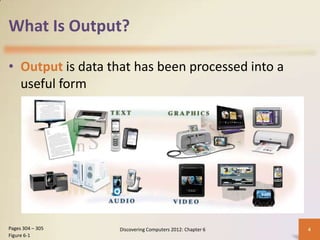
• Output is data that has been processed into a
  useful form


Pages 304 – 305   Discovering Computers 2012: Chapter 6   4
Figure 6-1
What Is Output?

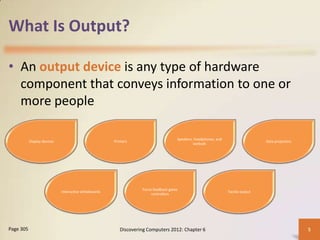
• An output device is any type of hardware
  component that conveys information to one or
  more people

                                                                                     Speakers, headphones, and
           Display devices                             Printers                                                                   Data projectors
                                                                                              earbuds


                                                                   Force-feedback game
                             Interactive whiteboards                                                             Tactile output
                                                                        controllers


Page 305                                                  Discovering Computers 2012: Chapter 6                                                     5
Display Devices

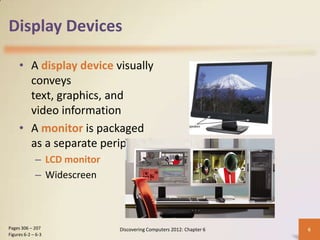
     • A display device visually
       conveys
       text, graphics, and
       video information
     • A monitor is packaged
       as a separate peripheral
             – LCD monitor
             – Widescreen


Pages 306 – 207              Discovering Computers 2012: Chapter 6   6
Figures 6-2 – 6-3
Display Devices

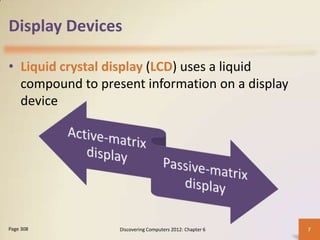
• Liquid crystal display (LCD) uses a liquid
  compound to present information on a display
  device


Page 308          Discovering Computers 2012: Chapter 6   7
Display Devices

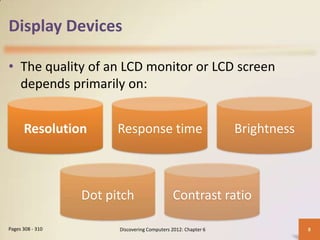
• The quality of an LCD monitor or LCD screen
  depends primarily on:


      Resolution        Response time                           Brightness


                  Dot pitch                   Contrast ratio

Pages 308 - 310         Discovering Computers 2012: Chapter 6                8
Display Devices

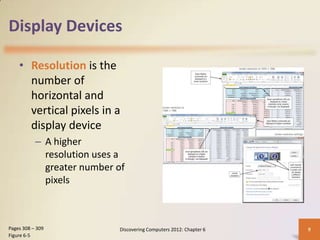
    • Resolution is the
      number of
      horizontal and
      vertical pixels in a
      display device
           – A higher
             resolution uses a
             greater number of
             pixels


Pages 308 – 309             Discovering Computers 2012: Chapter 6   9
Figure 6-5
Display Devices

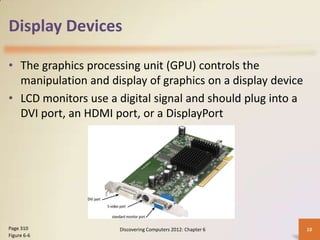
• The graphics processing unit (GPU) controls the
  manipulation and display of graphics on a display device
• LCD monitors use a digital signal and should plug into a
  DVI port, an HDMI port, or a DisplayPort


Page 310             Discovering Computers 2012: Chapter 6   10
Figure 6-6
Display Devices

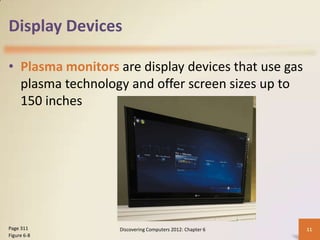
• Plasma monitors are display devices that use gas
  plasma technology and offer screen sizes up to
  150 inches


Page 311          Discovering Computers 2012: Chapter 6   11
Figure 6-8
Display Devices

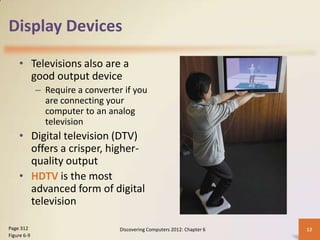
    • Televisions also are a
      good output device
             – Require a converter if you
               are connecting your
               computer to an analog
               television
    • Digital television (DTV)
      offers a crisper, higher-
      quality output
    • HDTV is the most
      advanced form of digital
      television

Page 312                          Discovering Computers 2012: Chapter 6   12
Figure 6-9
Video: SID: Size Matters


                       CLICK TO START

               Discovering Computers 2012: Chapter 6   13
Display Devices

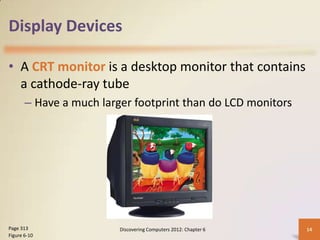
• A CRT monitor is a desktop monitor that contains
  a cathode-ray tube
       – Have a much larger footprint than do LCD monitors


Page 313                 Discovering Computers 2012: Chapter 6   14
Figure 6-10
Printers

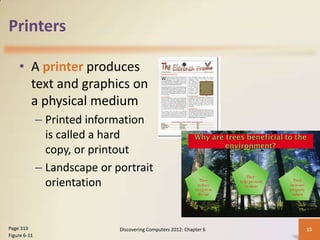
    • A printer produces
      text and graphics on
      a physical medium
              – Printed information
                is called a hard
                copy, or printout
              – Landscape or portrait
                orientation


Page 313                      Discovering Computers 2012: Chapter 6   15
Figure 6-11
Printers
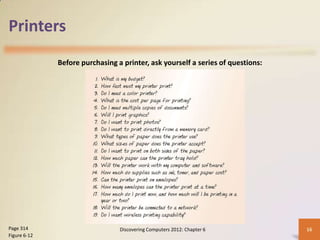
              Before purchasing a printer, ask yourself a series of questions:


Page 314                         Discovering Computers 2012: Chapter 6           16
Figure 6-12
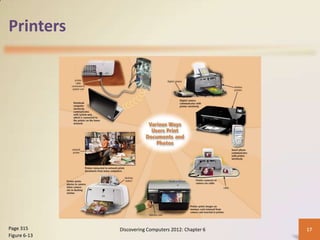
Printers


Page 315      Discovering Computers 2012: Chapter 6   17
Figure 6-13
Printers

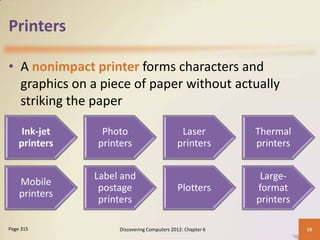
• A nonimpact printer forms characters and
  graphics on a piece of paper without actually
  striking the paper

     Ink-jet    Photo                        Laser          Thermal
    printers   printers                     printers        printers


               Label and                                     Large-
    Mobile
                postage                     Plotters        format
    printers
                printers                                    printers

Page 315            Discovering Computers 2012: Chapter 6              18
Printers

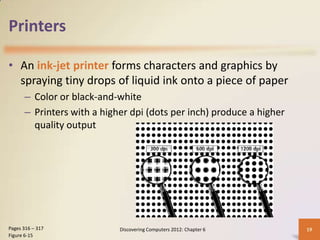
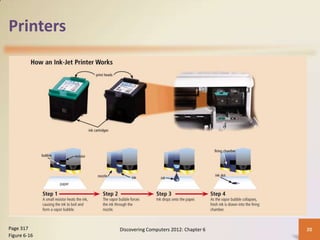
• An ink-jet printer forms characters and graphics by
  spraying tiny drops of liquid ink onto a piece of paper
      – Color or black-and-white
      – Printers with a higher dpi (dots per inch) produce a higher
        quality output


Pages 316 – 317             Discovering Computers 2012: Chapter 6     19
Figure 6-15
Printers


Page 317      Discovering Computers 2012: Chapter 6   20
Figure 6-16
Printers


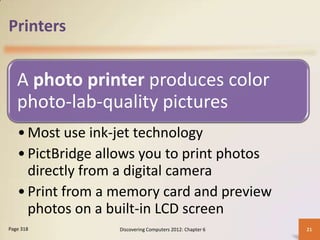
   A photo printer produces color
   photo-lab-quality pictures
   • Most use ink-jet technology
   • PictBridge allows you to print photos
     directly from a digital camera
   • Print from a memory card and preview
     photos on a built-in LCD screen
Page 318          Discovering Computers 2012: Chapter 6   21
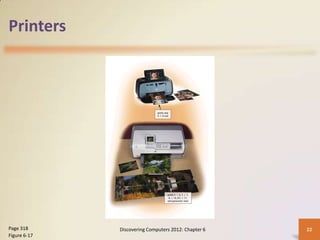
Printers


Page 318      Discovering Computers 2012: Chapter 6   22
Figure 6-17
Printers

                                        High-
                                        speed


                  Black-
                   and-
                                     Laser                          High-
                                                                   quality
                  white             printer


                                        Color


Pages 319 - 320            Discovering Computers 2012: Chapter 6             23
Printers


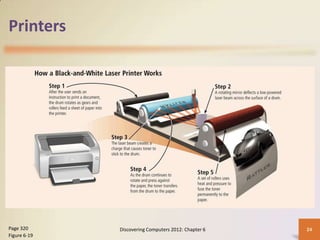
Page 320      Discovering Computers 2012: Chapter 6   24
Figure 6-19
Printers

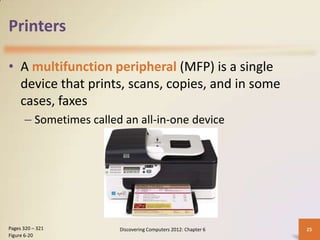
• A multifunction peripheral (MFP) is a single
  device that prints, scans, copies, and in some
  cases, faxes
      – Sometimes called an all-in-one device


Pages 320 – 321         Discovering Computers 2012: Chapter 6   25
Figure 6-20
Printers

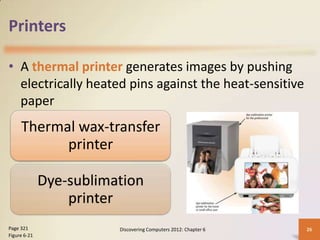
• A thermal printer generates images by pushing
  electrically heated pins against the heat-sensitive
  paper
     Thermal wax-transfer
           printer

              Dye-sublimation
                  printer
Page 321                 Discovering Computers 2012: Chapter 6   26
Figure 6-21
Printers

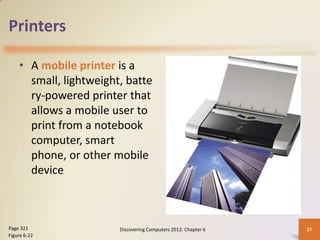
    • A mobile printer is a
      small, lightweight, batte
      ry-powered printer that
      allows a mobile user to
      print from a notebook
      computer, smart
      phone, or other mobile
      device


Page 321                Discovering Computers 2012: Chapter 6   27
Figure 6-22
Printers

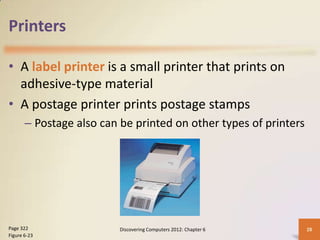
• A label printer is a small printer that prints on
  adhesive-type material
• A postage printer prints postage stamps
       – Postage also can be printed on other types of printers


Page 322                  Discovering Computers 2012: Chapter 6   28
Figure 6-23
Printers

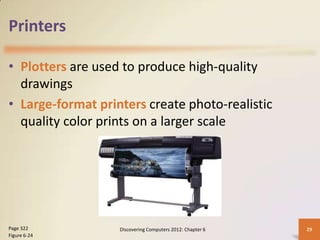
• Plotters are used to produce high-quality
  drawings
• Large-format printers create photo-realistic
  quality color prints on a larger scale


Page 322           Discovering Computers 2012: Chapter 6   29
Figure 6-24
Printers

• Impact printers form characters and graphics on a
  piece of paper by striking a mechanism against an
  inked ribbon that physically contacts the paper


     Dot-matrix                                       Line
      printer                                        printer
Pages 322 - 323   Discovering Computers 2012: Chapter 6        30
Printers

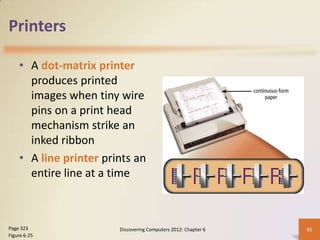
    • A dot-matrix printer
      produces printed
      images when tiny wire
      pins on a print head
      mechanism strike an
      inked ribbon
    • A line printer prints an
      entire line at a time


Page 323                Discovering Computers 2012: Chapter 6   31
Figure 6-25
Speakers, Headphones, and Earbuds

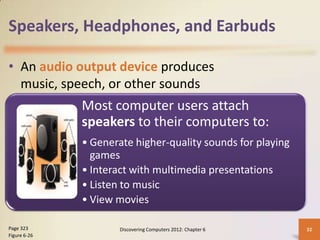
• An audio output device produces
  music, speech, or other sounds
              Most computer users attach
              speakers to their computers to:
              • Generate higher-quality sounds for playing
                games
              • Interact with multimedia presentations
              • Listen to music
              • View movies

Page 323              Discovering Computers 2012: Chapter 6   32
Figure 6-26
Speakers, Headphones, and Earbuds

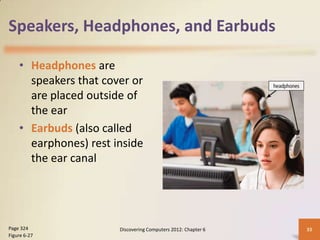
    • Headphones are
      speakers that cover or
      are placed outside of
      the ear
    • Earbuds (also called
      earphones) rest inside
      the ear canal


Page 324               Discovering Computers 2012: Chapter 6   33
Figure 6-27
Speakers, Headphones, and Earbuds

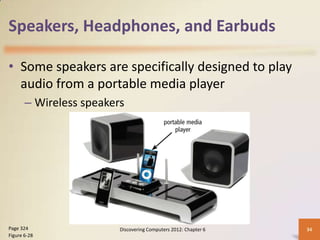
• Some speakers are specifically designed to play
  audio from a portable media player
       – Wireless speakers


Page 324                 Discovering Computers 2012: Chapter 6   34
Figure 6-28
Speakers, Headphones, and Earbuds

  Voice output occurs when you hear a
  person’s voice or when the computer
  talks to you through the speakers
  • Some Web sites dedicate themselves to
    providing voice output
  • Often works with voice input
  • VoIP uses voice output and voice input
Page 325          Discovering Computers 2012: Chapter 6   35
Other Output Devices

• Other output devices are available for specific
  uses and applications

                                                 Interactive
           Data projectors
                                                whiteboards


           Force-feedback
                game                           Tactile output
             controllers

Page 325             Discovering Computers 2012: Chapter 6      36
Other Output Devices

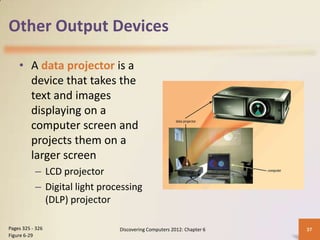
    • A data projector is a
      device that takes the
      text and images
      displaying on a
      computer screen and
      projects them on a
      larger screen
           – LCD projector
           – Digital light processing
             (DLP) projector

Pages 325 - 326                Discovering Computers 2012: Chapter 6   37
Figure 6-29
Other Output Devices

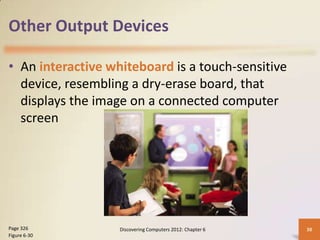
• An interactive whiteboard is a touch-sensitive
  device, resembling a dry-erase board, that
  displays the image on a connected computer
  screen


Page 326           Discovering Computers 2012: Chapter 6   38
Figure 6-30
Other Output Devices

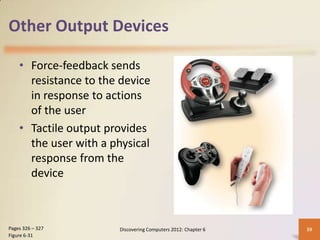
    • Force-feedback sends
      resistance to the device
      in response to actions
      of the user
    • Tactile output provides
      the user with a physical
      response from the
      device


Pages 326 – 327        Discovering Computers 2012: Chapter 6   39
Figure 6-31
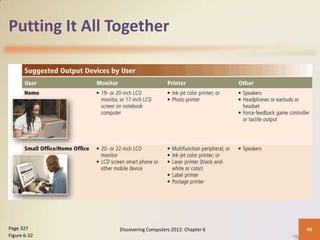
Putting It All Together


Page 327       Discovering Computers 2012: Chapter 6   40
Figure 6-32
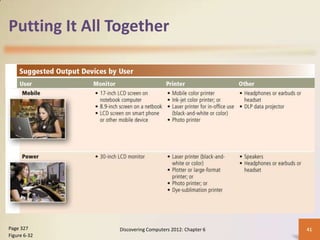
Putting It All Together


Page 327       Discovering Computers 2012: Chapter 6   41
Figure 6-32
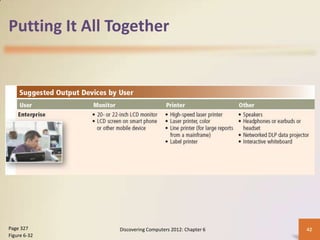
Putting It All Together


Page 327       Discovering Computers 2012: Chapter 6   42
Figure 6-32
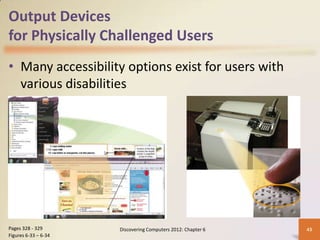
Output Devices
for Physically Challenged Users
• Many accessibility options exist for users with
  various disabilities


Pages 328 - 329       Discovering Computers 2012: Chapter 6   43
Figures 6-33 – 6-34
Summary


           Various methods of output                              Several commonly used output devices


                                                   Display
                           devices, printers, speakers, headphones, earbuds, data
                            projectors, interactive whiteboards, force-feedback
                                     game controllers, and tactile output


Page 329                           Discovering Computers 2012: Chapter 6                                 44
Chapter 6
Understanding Output


Discovering
    Computers 2012
     Your Interactive Guide
      to the Digital World
    Chapter 6 Complete

CH06-Understanding Output

  • 1.
    Chapter 6 Understanding Output Discovering Computers 2012 Your Interactive Guide to the Digital World
  • 2.
    Objectives Overview Explain the Describe the factors Describe the types of characteristics of that affect the quality output various display of an LCD monitor or devices LCD screen Differentiate Describe various between a ways to print nonimpact printer and an impact printer See Page 303 Discovering Computers 2012: Chapter 6 2 for Detailed Objectives
  • 3.
    Objectives Overview Summarize the characteristics of ink- jet printers, photo printers, laser printers, multifunction Describe the uses and characteristics peripherals, thermal printers, mobile of speakers, headphones, and printers, label and postage earbuds printers, and plotters and large- format printers Identify the purpose and features of data projectors, interactive Identify output options for physically whiteboards, and force-feedback challenged users game controllers and tactile output See Page 303 Discovering Computers 2012: Chapter 6 3 for Detailed Objectives
  • 4.
    What Is Output? •Output is data that has been processed into a useful form Pages 304 – 305 Discovering Computers 2012: Chapter 6 4 Figure 6-1
  • 5.
    What Is Output? •An output device is any type of hardware component that conveys information to one or more people Speakers, headphones, and Display devices Printers Data projectors earbuds Force-feedback game Interactive whiteboards Tactile output controllers Page 305 Discovering Computers 2012: Chapter 6 5
  • 6.
    Display Devices • A display device visually conveys text, graphics, and video information • A monitor is packaged as a separate peripheral – LCD monitor – Widescreen Pages 306 – 207 Discovering Computers 2012: Chapter 6 6 Figures 6-2 – 6-3
  • 7.
    Display Devices • Liquidcrystal display (LCD) uses a liquid compound to present information on a display device Page 308 Discovering Computers 2012: Chapter 6 7
  • 8.
    Display Devices • Thequality of an LCD monitor or LCD screen depends primarily on: Resolution Response time Brightness Dot pitch Contrast ratio Pages 308 - 310 Discovering Computers 2012: Chapter 6 8
  • 9.
    Display Devices • Resolution is the number of horizontal and vertical pixels in a display device – A higher resolution uses a greater number of pixels Pages 308 – 309 Discovering Computers 2012: Chapter 6 9 Figure 6-5
  • 10.
    Display Devices • Thegraphics processing unit (GPU) controls the manipulation and display of graphics on a display device • LCD monitors use a digital signal and should plug into a DVI port, an HDMI port, or a DisplayPort Page 310 Discovering Computers 2012: Chapter 6 10 Figure 6-6
  • 11.
    Display Devices • Plasmamonitors are display devices that use gas plasma technology and offer screen sizes up to 150 inches Page 311 Discovering Computers 2012: Chapter 6 11 Figure 6-8
  • 12.
    Display Devices • Televisions also are a good output device – Require a converter if you are connecting your computer to an analog television • Digital television (DTV) offers a crisper, higher- quality output • HDTV is the most advanced form of digital television Page 312 Discovering Computers 2012: Chapter 6 12 Figure 6-9
  • 13.
    Video: SID: SizeMatters CLICK TO START Discovering Computers 2012: Chapter 6 13
  • 14.
    Display Devices • ACRT monitor is a desktop monitor that contains a cathode-ray tube – Have a much larger footprint than do LCD monitors Page 313 Discovering Computers 2012: Chapter 6 14 Figure 6-10
  • 15.
    Printers • A printer produces text and graphics on a physical medium – Printed information is called a hard copy, or printout – Landscape or portrait orientation Page 313 Discovering Computers 2012: Chapter 6 15 Figure 6-11
  • 16.
    Printers Before purchasing a printer, ask yourself a series of questions: Page 314 Discovering Computers 2012: Chapter 6 16 Figure 6-12
  • 17.
    Printers Page 315 Discovering Computers 2012: Chapter 6 17 Figure 6-13
  • 18.
    Printers • A nonimpactprinter forms characters and graphics on a piece of paper without actually striking the paper Ink-jet Photo Laser Thermal printers printers printers printers Label and Large- Mobile postage Plotters format printers printers printers Page 315 Discovering Computers 2012: Chapter 6 18
  • 19.
    Printers • An ink-jetprinter forms characters and graphics by spraying tiny drops of liquid ink onto a piece of paper – Color or black-and-white – Printers with a higher dpi (dots per inch) produce a higher quality output Pages 316 – 317 Discovering Computers 2012: Chapter 6 19 Figure 6-15
  • 20.
    Printers Page 317 Discovering Computers 2012: Chapter 6 20 Figure 6-16
  • 21.
    Printers A photo printer produces color photo-lab-quality pictures • Most use ink-jet technology • PictBridge allows you to print photos directly from a digital camera • Print from a memory card and preview photos on a built-in LCD screen Page 318 Discovering Computers 2012: Chapter 6 21
  • 22.
    Printers Page 318 Discovering Computers 2012: Chapter 6 22 Figure 6-17
  • 23.
    Printers High- speed Black- and- Laser High- quality white printer Color Pages 319 - 320 Discovering Computers 2012: Chapter 6 23
  • 24.
    Printers Page 320 Discovering Computers 2012: Chapter 6 24 Figure 6-19
  • 25.
    Printers • A multifunctionperipheral (MFP) is a single device that prints, scans, copies, and in some cases, faxes – Sometimes called an all-in-one device Pages 320 – 321 Discovering Computers 2012: Chapter 6 25 Figure 6-20
  • 26.
    Printers • A thermalprinter generates images by pushing electrically heated pins against the heat-sensitive paper Thermal wax-transfer printer Dye-sublimation printer Page 321 Discovering Computers 2012: Chapter 6 26 Figure 6-21
  • 27.
    Printers • A mobile printer is a small, lightweight, batte ry-powered printer that allows a mobile user to print from a notebook computer, smart phone, or other mobile device Page 321 Discovering Computers 2012: Chapter 6 27 Figure 6-22
  • 28.
    Printers • A labelprinter is a small printer that prints on adhesive-type material • A postage printer prints postage stamps – Postage also can be printed on other types of printers Page 322 Discovering Computers 2012: Chapter 6 28 Figure 6-23
  • 29.
    Printers • Plotters areused to produce high-quality drawings • Large-format printers create photo-realistic quality color prints on a larger scale Page 322 Discovering Computers 2012: Chapter 6 29 Figure 6-24
  • 30.
    Printers • Impact printersform characters and graphics on a piece of paper by striking a mechanism against an inked ribbon that physically contacts the paper Dot-matrix Line printer printer Pages 322 - 323 Discovering Computers 2012: Chapter 6 30
  • 31.
    Printers • A dot-matrix printer produces printed images when tiny wire pins on a print head mechanism strike an inked ribbon • A line printer prints an entire line at a time Page 323 Discovering Computers 2012: Chapter 6 31 Figure 6-25
  • 32.
    Speakers, Headphones, andEarbuds • An audio output device produces music, speech, or other sounds Most computer users attach speakers to their computers to: • Generate higher-quality sounds for playing games • Interact with multimedia presentations • Listen to music • View movies Page 323 Discovering Computers 2012: Chapter 6 32 Figure 6-26
  • 33.
    Speakers, Headphones, andEarbuds • Headphones are speakers that cover or are placed outside of the ear • Earbuds (also called earphones) rest inside the ear canal Page 324 Discovering Computers 2012: Chapter 6 33 Figure 6-27
  • 34.
    Speakers, Headphones, andEarbuds • Some speakers are specifically designed to play audio from a portable media player – Wireless speakers Page 324 Discovering Computers 2012: Chapter 6 34 Figure 6-28
  • 35.
    Speakers, Headphones, andEarbuds Voice output occurs when you hear a person’s voice or when the computer talks to you through the speakers • Some Web sites dedicate themselves to providing voice output • Often works with voice input • VoIP uses voice output and voice input Page 325 Discovering Computers 2012: Chapter 6 35
  • 36.
    Other Output Devices •Other output devices are available for specific uses and applications Interactive Data projectors whiteboards Force-feedback game Tactile output controllers Page 325 Discovering Computers 2012: Chapter 6 36
  • 37.
    Other Output Devices • A data projector is a device that takes the text and images displaying on a computer screen and projects them on a larger screen – LCD projector – Digital light processing (DLP) projector Pages 325 - 326 Discovering Computers 2012: Chapter 6 37 Figure 6-29
  • 38.
    Other Output Devices •An interactive whiteboard is a touch-sensitive device, resembling a dry-erase board, that displays the image on a connected computer screen Page 326 Discovering Computers 2012: Chapter 6 38 Figure 6-30
  • 39.
    Other Output Devices • Force-feedback sends resistance to the device in response to actions of the user • Tactile output provides the user with a physical response from the device Pages 326 – 327 Discovering Computers 2012: Chapter 6 39 Figure 6-31
  • 40.
    Putting It AllTogether Page 327 Discovering Computers 2012: Chapter 6 40 Figure 6-32
  • 41.
    Putting It AllTogether Page 327 Discovering Computers 2012: Chapter 6 41 Figure 6-32
  • 42.
    Putting It AllTogether Page 327 Discovering Computers 2012: Chapter 6 42 Figure 6-32
  • 43.
    Output Devices for PhysicallyChallenged Users • Many accessibility options exist for users with various disabilities Pages 328 - 329 Discovering Computers 2012: Chapter 6 43 Figures 6-33 – 6-34
  • 44.
    Summary Various methods of output Several commonly used output devices Display devices, printers, speakers, headphones, earbuds, data projectors, interactive whiteboards, force-feedback game controllers, and tactile output Page 329 Discovering Computers 2012: Chapter 6 44
  • 45.
    Chapter 6 Understanding Output Discovering Computers 2012 Your Interactive Guide to the Digital World Chapter 6 Complete