Chapter 6 Output
Chapter 6 Objectives Describe the four categories of output Summarize the characteristics of LCD monitors, LCD screens, plasma monitors, and CRT monitors Describe the various ways to print Differentiate between a nonimpact printer and an impact printer Describe the uses of speakers, headphones, and earphones Identify the output characteristics of fax machines and fax modems, multifunction peripherals, data projectors, interactive whiteboards, joysticks, wheels, gamepads, and motion-sensing game controllers Identify output options for  physically challenged users Summarize the characteristics of ink-jet printers, photo printers, laser printers, thermal printers, mobile printers, label and postage printers, and plotters and large-format printers Next
What is Output? What is   output ? p. 300 - 301 Fig. 6-1 Data that has been processed into a useful form Output device  is any hardware component that can convey  information to one or more people Next
Display Devices What is a   display device ? p. 302 Output device that visually conveys text, graphics, and video information Information on display device sometimes  called soft copy Monitor   houses display device that is packaged as separate peripheral Next
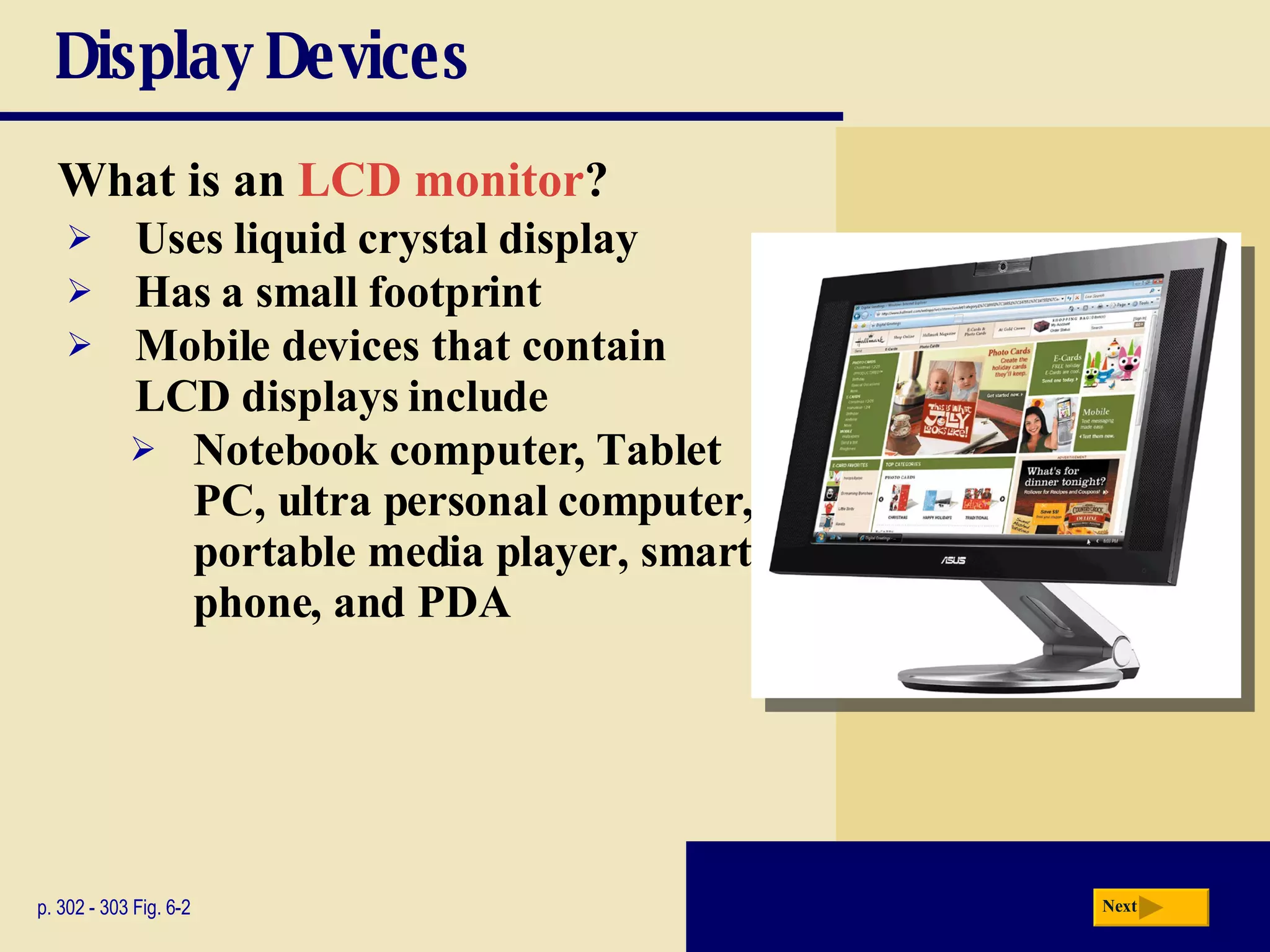
Display Devices What is an  LCD monitor ? p. 302 - 303 Fig. 6-2 Uses liquid crystal display Has a small footprint Mobile devices that contain LCD displays include Notebook computer, Tablet PC, ultra personal computer, portable media player, smart phone, and PDA Next
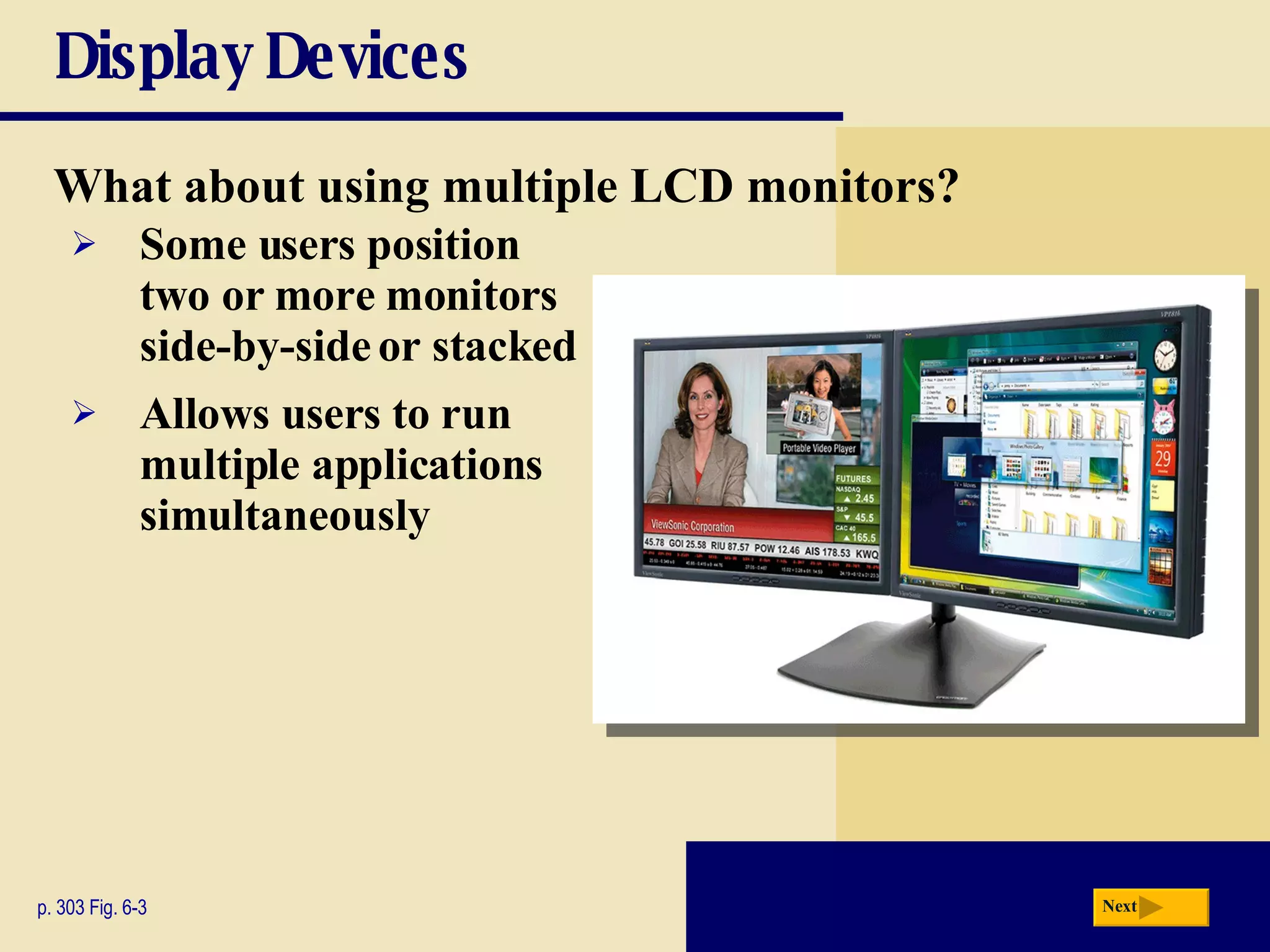
Display Devices What about using multiple LCD monitors? p. 303 Fig. 6-3 Some users position two or more monitors side-by-side or stacked Allows users to run multiple applications simultaneously Next
Display Devices What are some mobile devices that have LCD screens? p. 303 - 304 Fig. 6-4 Next Click to view Web Link, click Chapter 6, Click Web Link from left navigation,  then click Widescreen LCD Monitors below Chapter 6
Display Devices Video: SID: Size Matters Next CLICK TO START
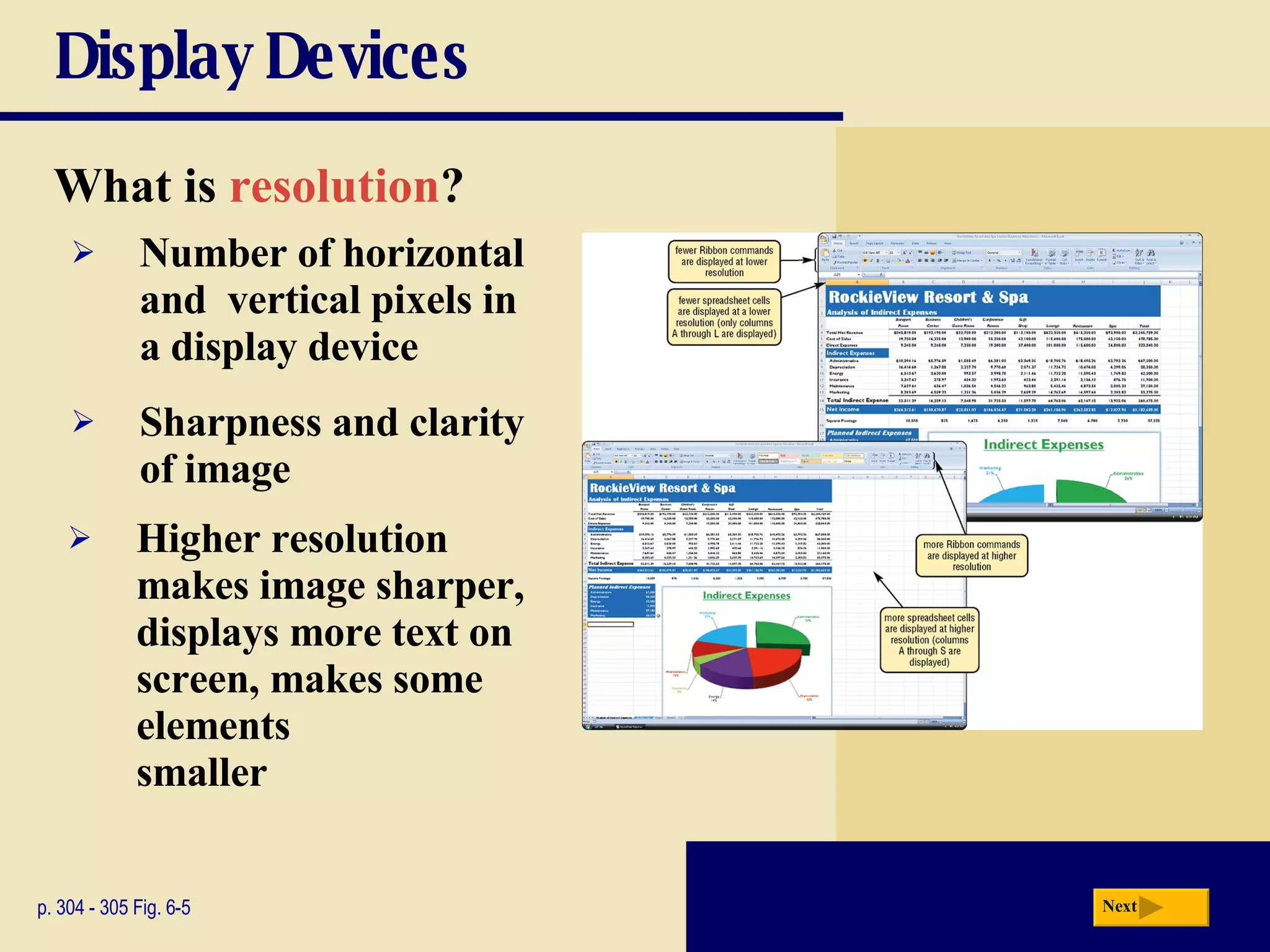
Display Devices What is   resolution ? p. 304 - 305 Fig. 6-5 Sharpness and clarity of image Higher resolution makes image sharper, displays more text on screen, makes some elements  smaller Number of horizontal and  vertical pixels in a display device Next
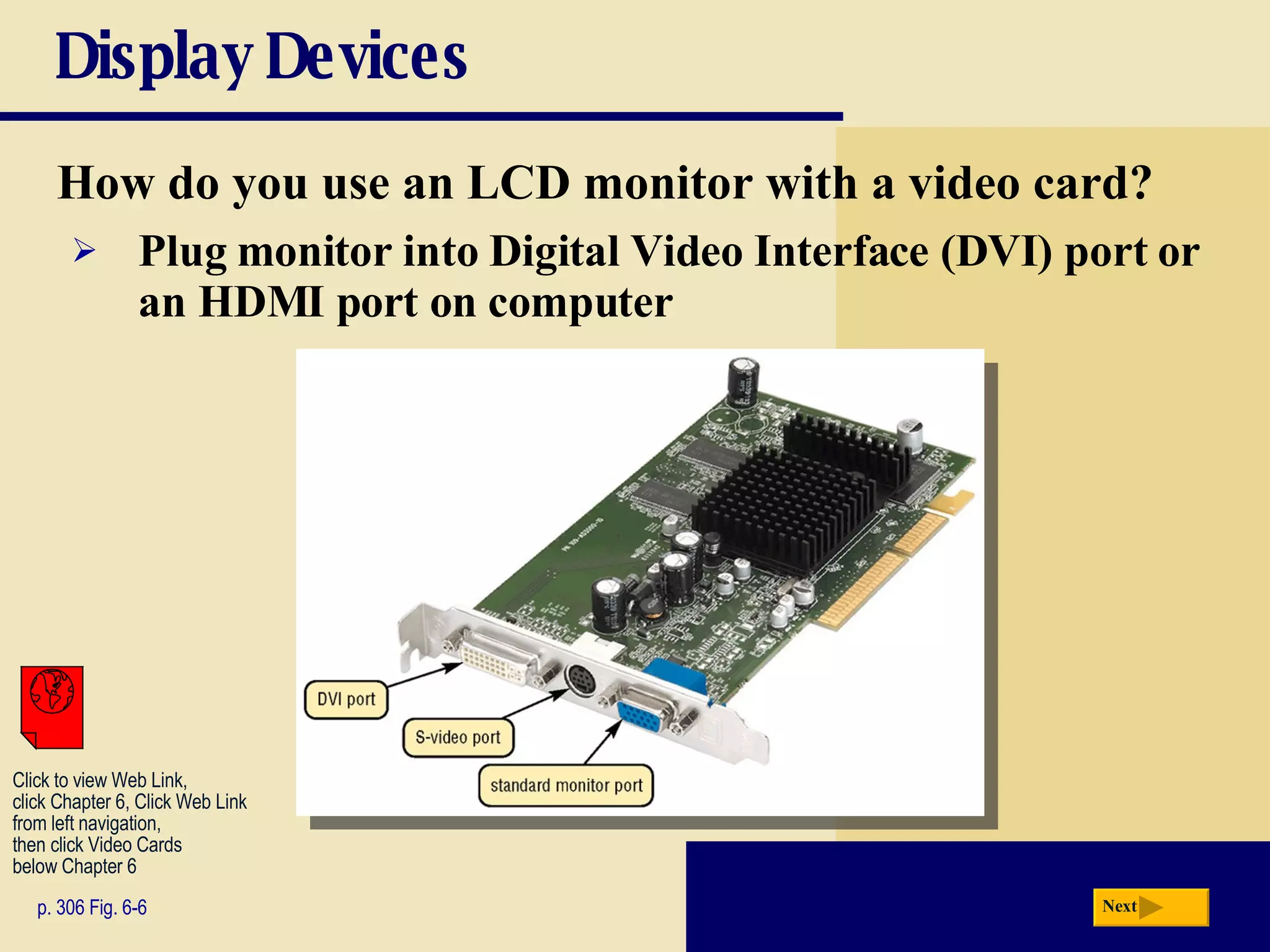
Display Devices How do you use an LCD monitor with a video card? p. 306 Fig. 6-6 Plug monitor into   Digital Video Interface (DVI)   port or an HDMI port on computer Next Click to view Web Link, click Chapter 6, Click Web Link from left navigation,  then click Video Cards below Chapter 6
Display Devices What is a   plasma monitor ? p. 307 Fig. 6-8 Displays image by applying voltage to layer of gas Larger screen size and richer colors than LCD, but are more expensive Next
Display Devices What is   digital television (DTV)  and   high-definition television (HDTV) ? Great for game playing, watching movies, and browsing the Internet HDTV  (high-definition television) is the most advanced form of digital TV p. 308 Uses digital signals to produce crisper, higher-quality output on LCD and plasma televisions Many programs can be broadcast on a single digital channel All broadcast stations transmit digital signals High resolution Next
Display Devices What is a   CRT monitor ? p. 309 Fig. 6-10 Contains   cathode-ray  tube (CRT) Screen coated with tiny dots of phosphor material Each dot consists of a red, blue, and green phosphor Common sizes are 15, 17, 19, 21, and 22 inches Viewable size is diagonal measurement of actual viewing area Next
Display Devices What is the   ENERGY STAR program ? p. 309 Encourages manufacturers to create energy-efficient devices that require little power when not in use Monitors and devices meeting guidelines display ENERGY STAR label Next
Printers What is a   printer ? p. 310 Fig. 6-11 Output device that produces text and graphics on a physical medium Result is   hard copy, or   printout Two orientations:   portrait   and   landscape Next portrait landscape
Printers How do you know which printer to buy? Speed p. 310 Budget Color or black and white Cost per page Paper types and sizes Graphics and  photo printing Multiple copies System compatibility Depends on printing needs Wireless capability Future needs Next
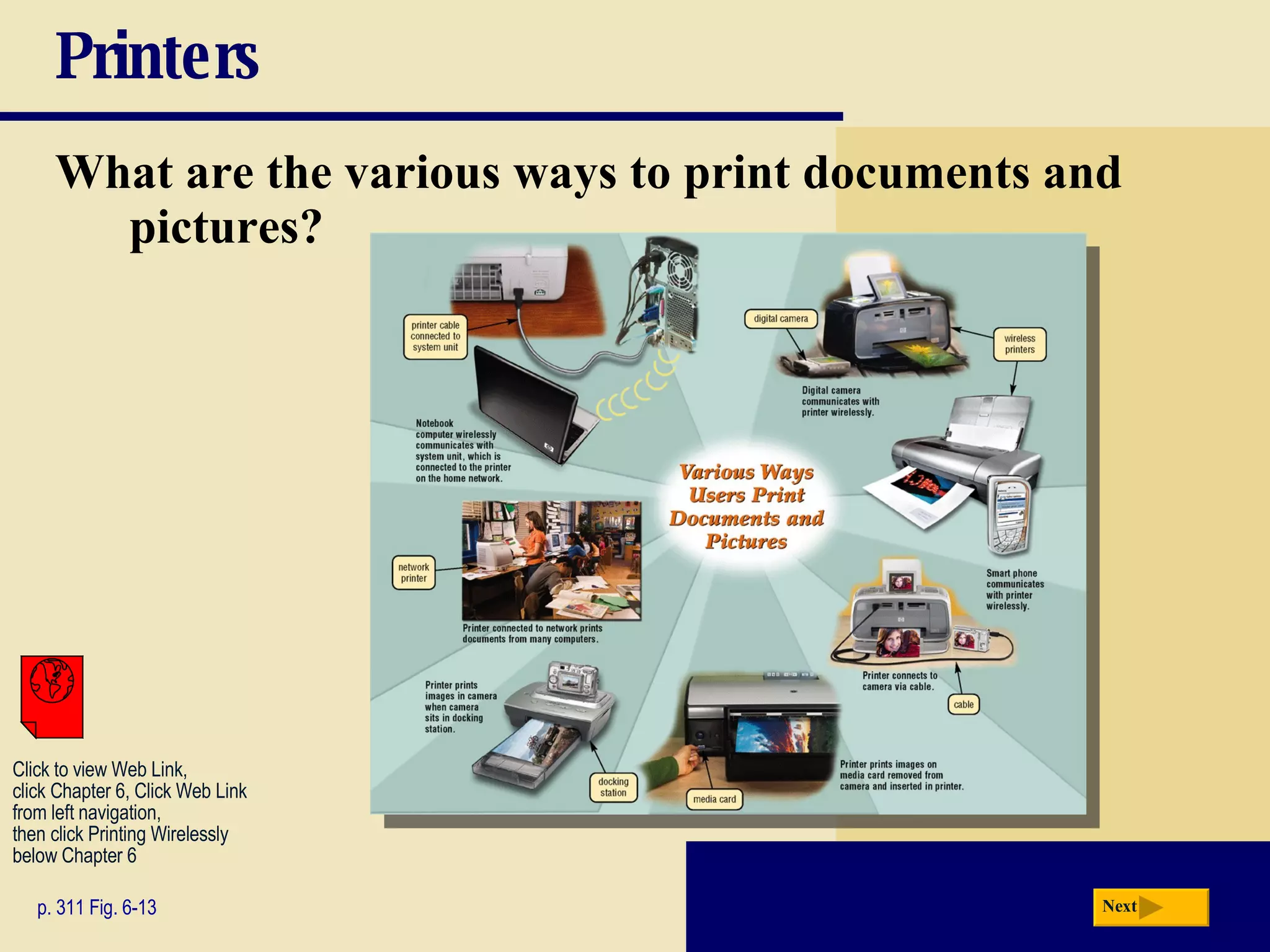
Printers What are the various ways to print documents and pictures? p. 311 Fig. 6-13 Next Click to view Web Link, click Chapter 6, Click Web Link from left navigation,  then click Printing Wirelessly below Chapter 6
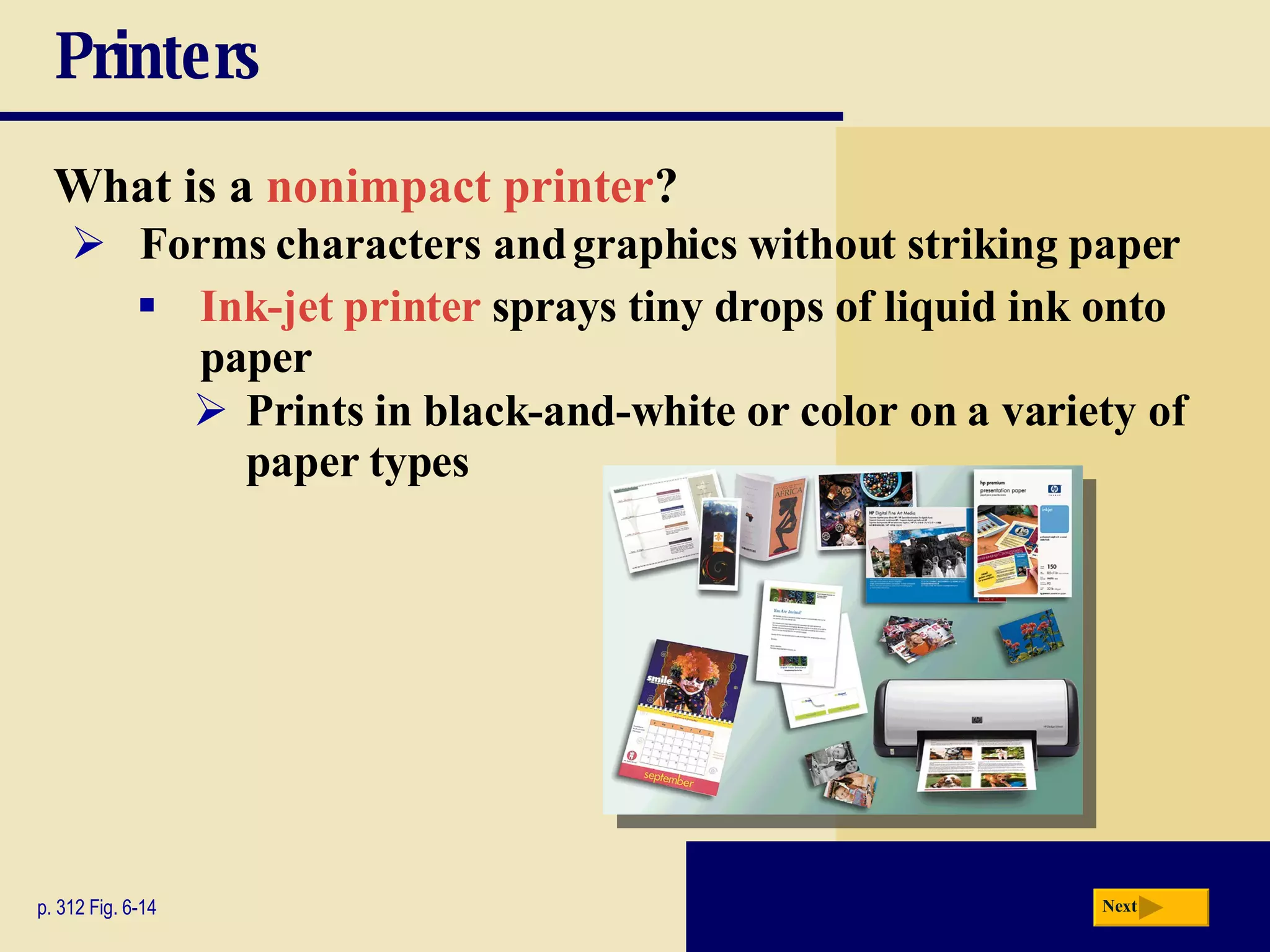
Printers What is a   nonimpact printer ? p. 312 Fig. 6-14 Forms characters and graphics without striking paper Ink-jet printer   sprays tiny drops of liquid ink onto paper Prints in black-and-white or color on a variety of paper types Next
Printers What is the   resolution   of a printer? p. 313 Fig. 6-15 Sharpness and clarity Measured by number of   dots per inch (dpi)   printer can output Next
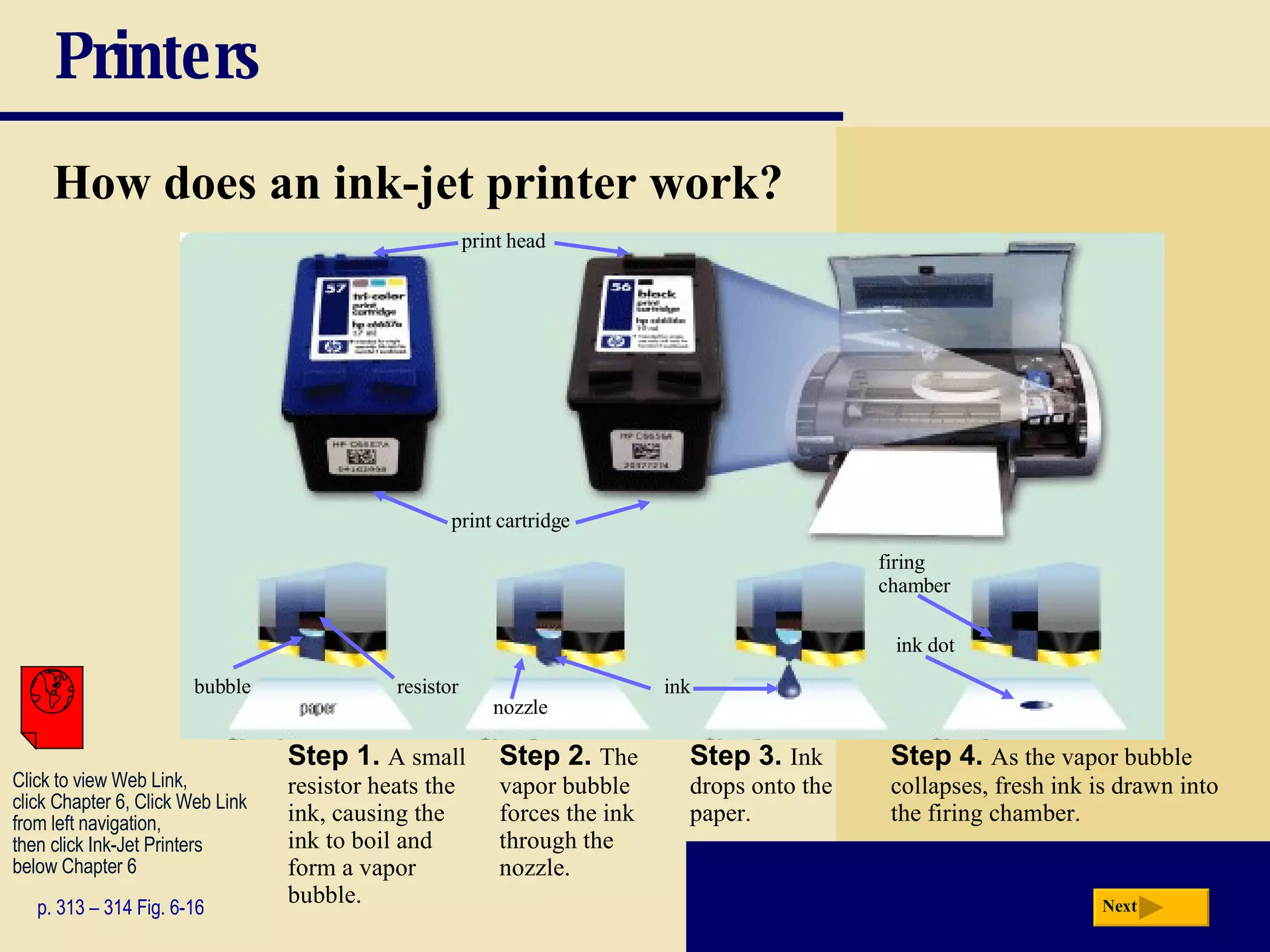
Printers How does an ink-jet printer work? p. 313 – 314 Fig. 6-16 Step 1.   A small resistor heats the ink, causing the ink to boil and form a vapor bubble. Step 2.   The vapor bubble forces the ink through the nozzle. Step 3.   Ink drops onto the paper. Step 4.   As the vapor bubble collapses, fresh ink is drawn into the firing chamber. Next Click to view Web Link, click Chapter 6, Click Web Link from left navigation,  then click Ink-Jet Printers below Chapter 6 print cartridge print head firing  chamber nozzle bubble resistor ink ink dot
Printers What is a   photo printer ? p. 314 - 315 Fig. 6-17 Color printer that produces photo-lab-quality pictures Many photo printers have a built-in card slot PictBridge is a standard technology that allows you to print pictures directly from a digital camera Next Click to view Web Link, click Chapter 6, Click  Web Link from left  navigation, then click  PictBridge below Chapter 6
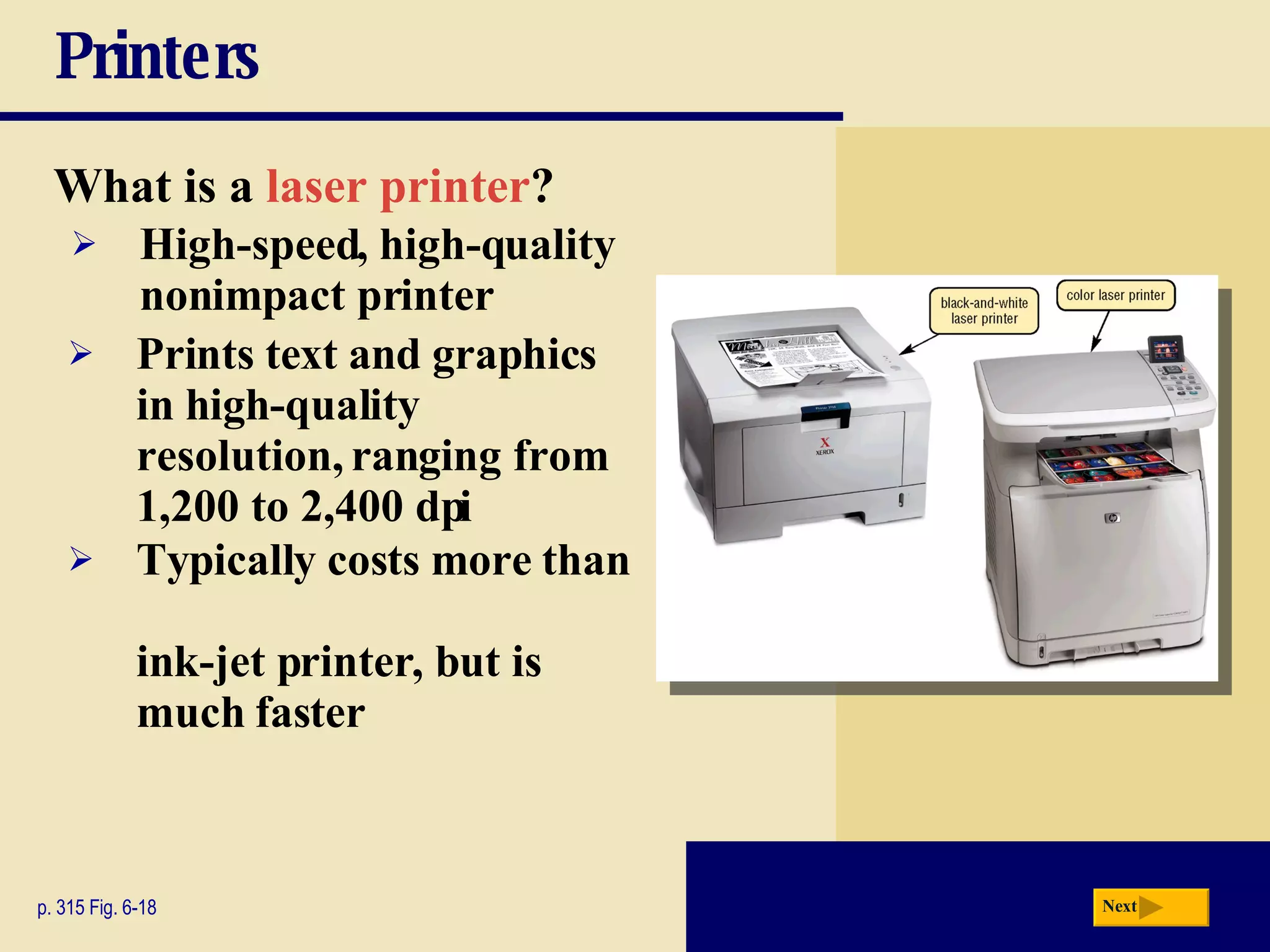
Printers What is a   laser printer ? p. 315 Fig. 6-18 High-speed, high-quality nonimpact printer Prints text and graphics in high-quality resolution, ranging from 1,200 to 2,400 dpi Typically costs more than  ink-jet printer, but is much faster Next
Printers How does a laser printer work? p. 316 Fig. 6-19 Next Click to view Web Link, click Chapter 6, Click  Web Link from left  navigation, then click  Laser Printers below Chapter 6
Printers What is a   thermal printer ? p. 317 Fig. 6-20 Generates images by pushing electrically heated pins against heat-sensitive paper Dye-sublimation printer (also called a digital photo printer) uses heat to transfer dye to specially coated paper Next
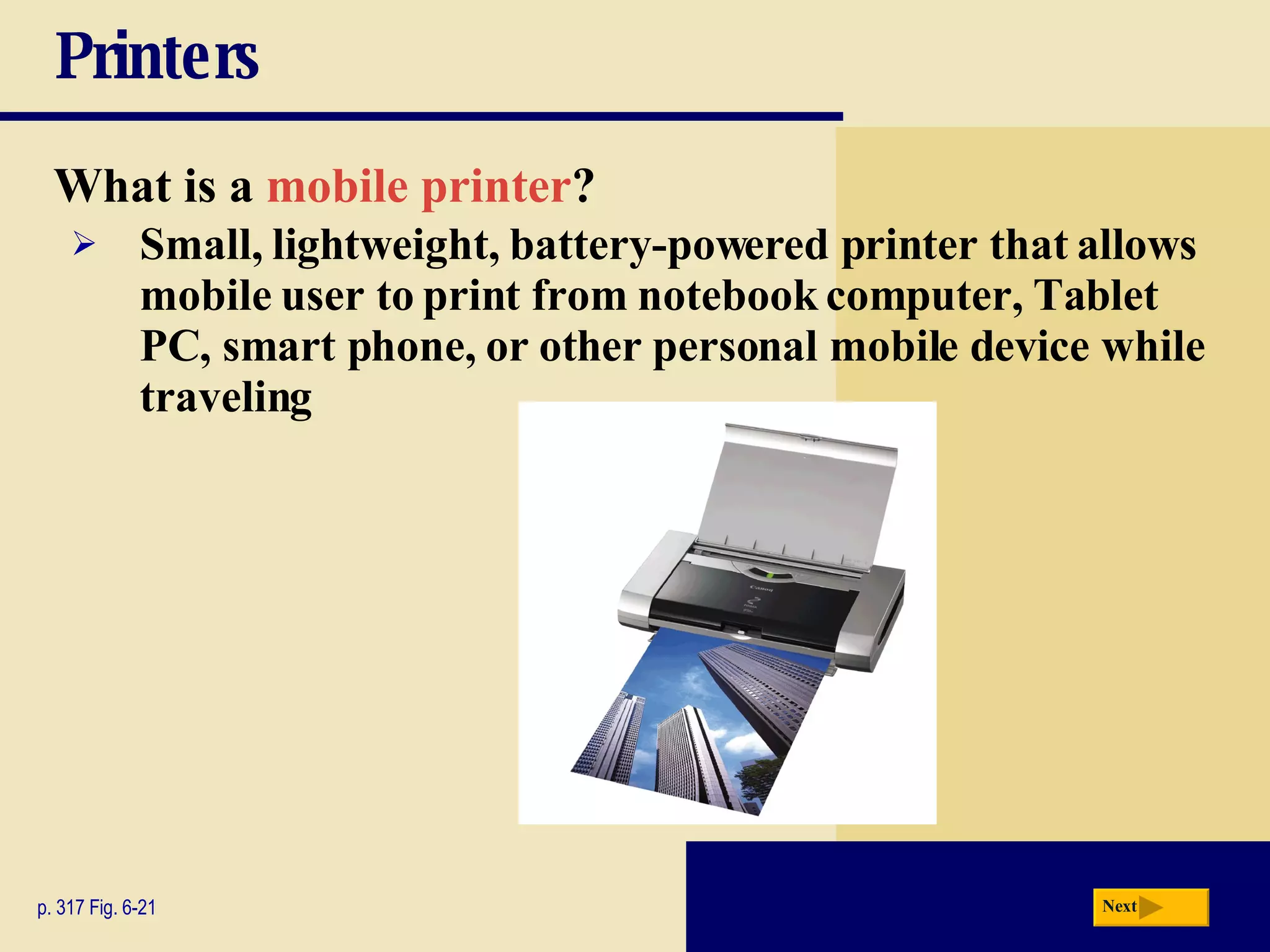
Printers What is a   mobile printer ? p. 317 Fig. 6-21 Small, lightweight, battery-powered printer that allows mobile user to print from notebook computer, Tablet PC, smart phone, or other personal mobile device while traveling Next
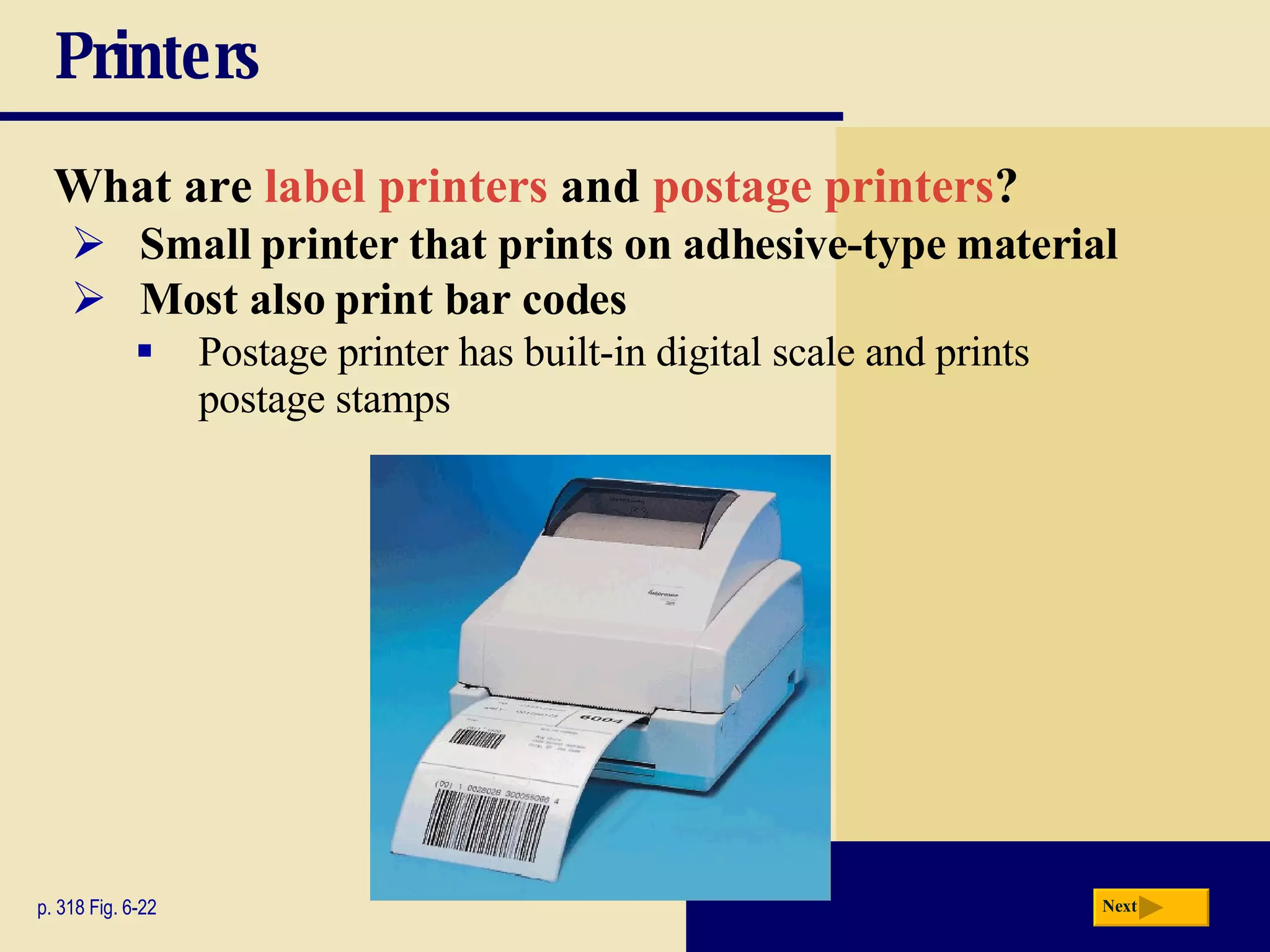
Printers What are  label printers  and  postage printers ? p. 318 Fig. 6-22 Small printer that prints on adhesive-type material Postage printer has built-in digital scale and prints postage stamps Most also print bar codes Next
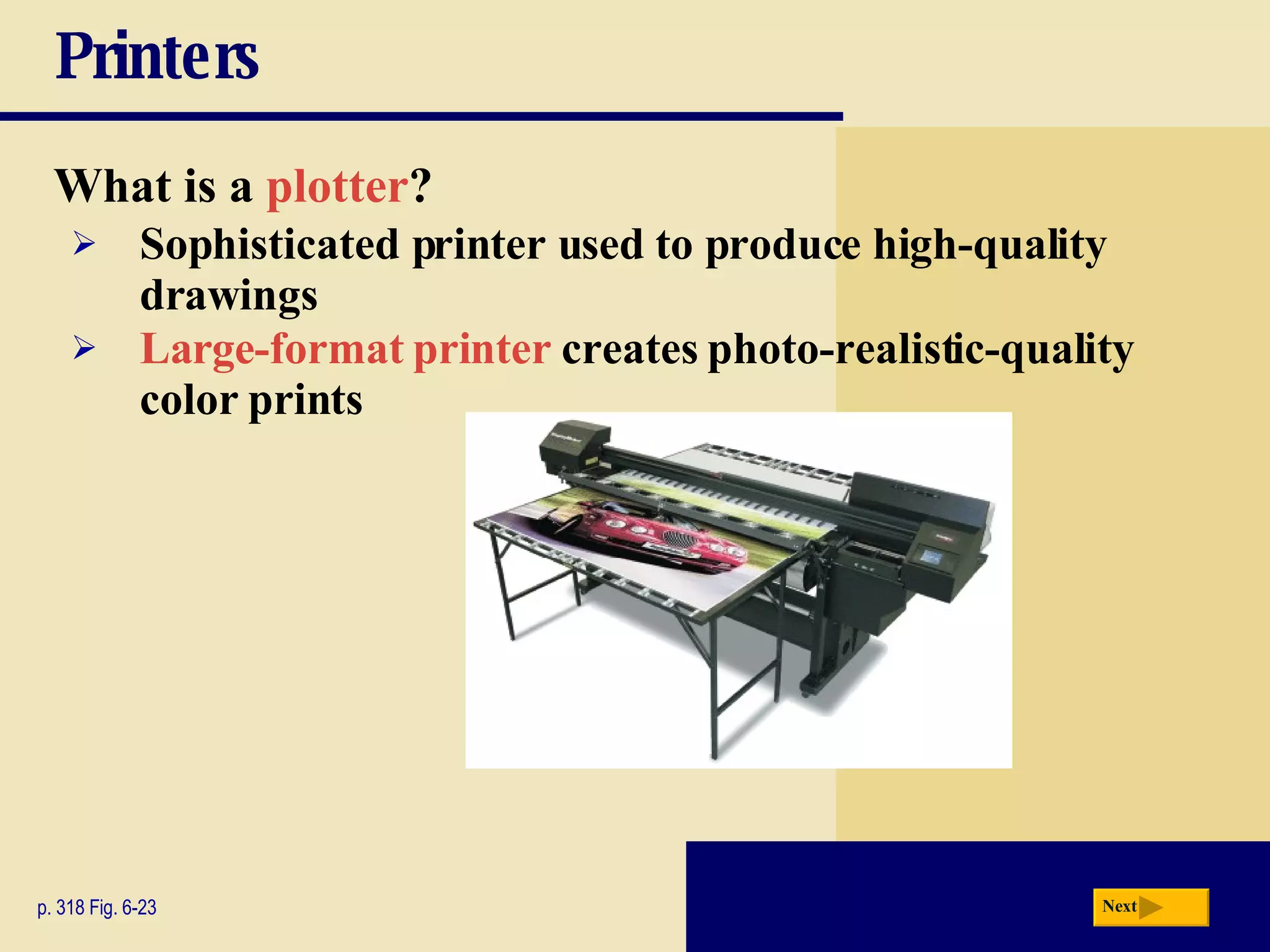
Printers What is a   plotter ? p. 318 Fig. 6-23 Sophisticated printer used to produce high-quality drawings Large-format printer   creates photo-realistic-quality color prints Next
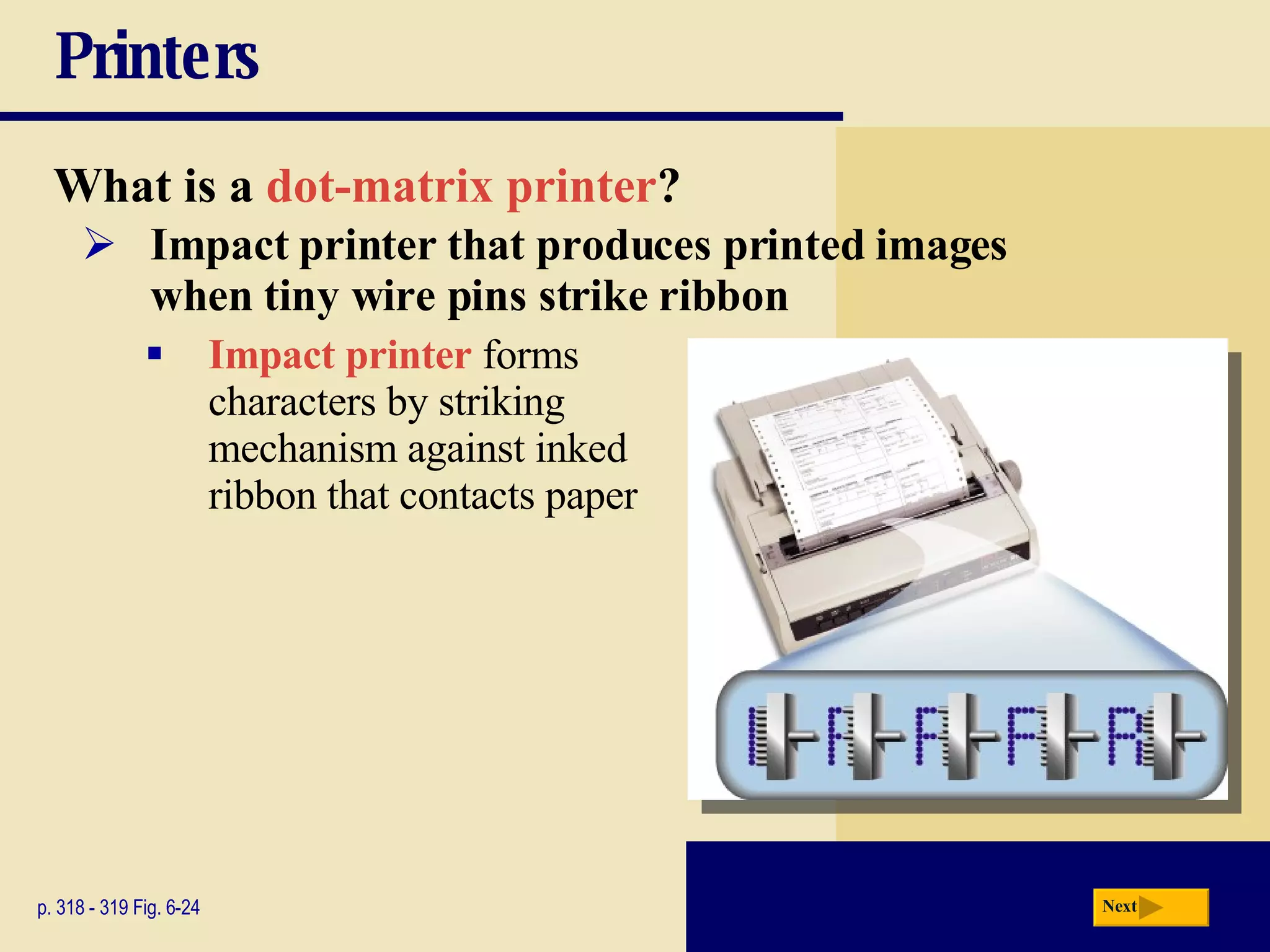
Printers What is a   dot-matrix printer ? p. 318 - 319 Fig. 6-24 Impact printer that produces printed images  when tiny wire pins strike ribbon Impact printer  forms  characters by striking  mechanism against inked  ribbon that contacts paper Next
Printers What is a   line printer ? p. 319 Fig. 6-25 High-speed impact printer that prints entire line at a time Speed measured in lines per minute (lpm) Band printer prints fully formed characters using a hammer mechanism Shuttle-matrix printer is high-speed printer that works like dot-matrix printer Next
Speakers, Headphones, and Earphones What is an   audio output device ? p. 320 - 321 Figs. 6-26 – 6-28 Computer component that produces music, speech, or other sounds Speakers  and headsets are common devices Next Click to view Web  Link, click Chapter 6, Click  Web Link from left  navigation, then click  Wireless Music System  below Chapter 6
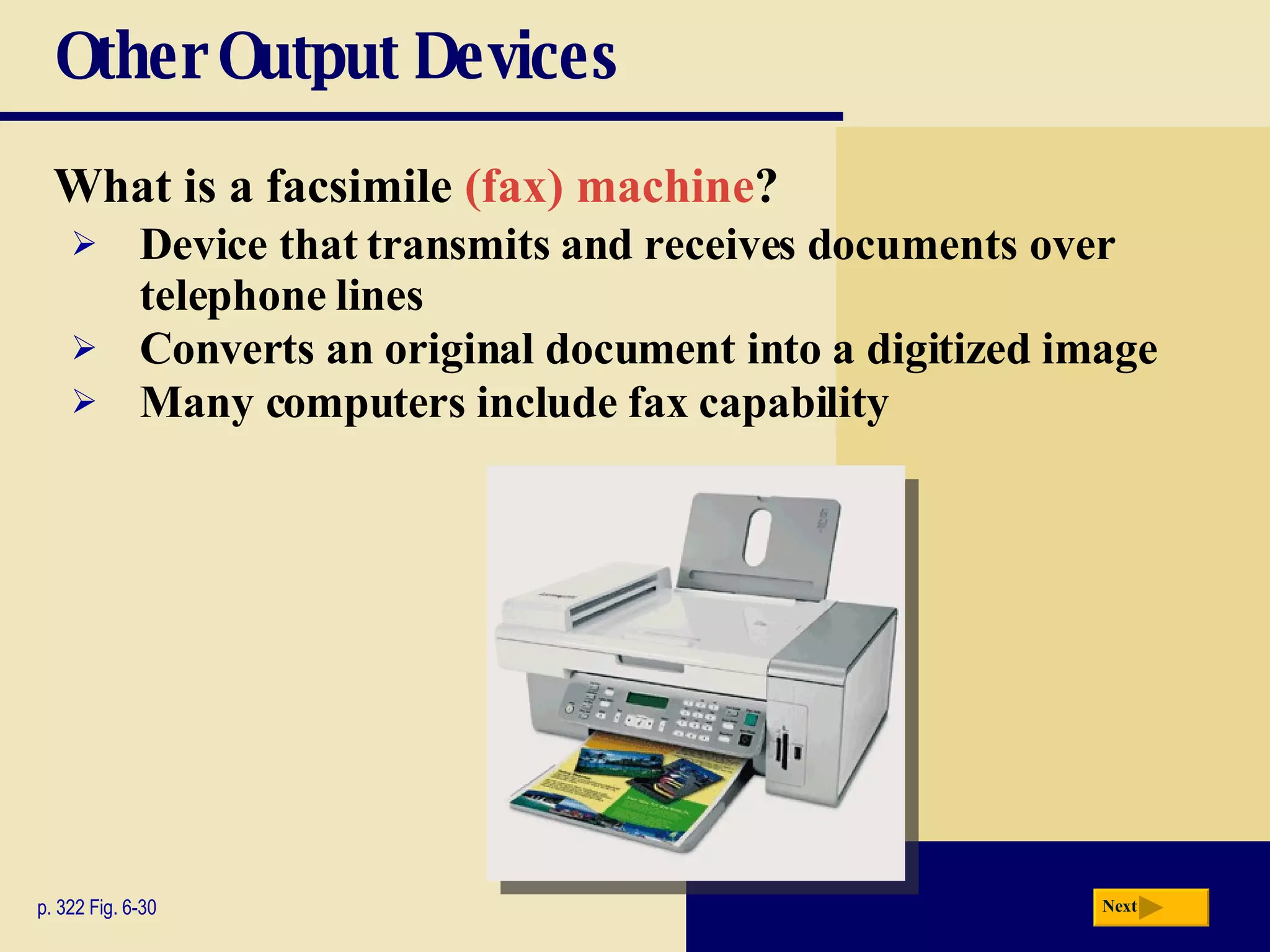
Other Output Devices What is a   facsimile  (fax) machine ? p. 322 Fig. 6-30 Device that transmits and receives documents over telephone lines Converts an original document into a digitized image Many computers include fax capability Next
Other Output Devices What is a   fax modem? p. 322 Fig. 6-29 Modem that allows you to send and receive electronic documents as faxes Next Click to view Web  Link, click Chapter 6,  Click Web Link from  left navigation, then  click Fax Modems  below Chapter 6
Other Output Devices What is a   multifunction peripheral ? p. 323 Fig. 6-30 Provides functionality  of printer, scanner,  copy machine, and  fax machine Next
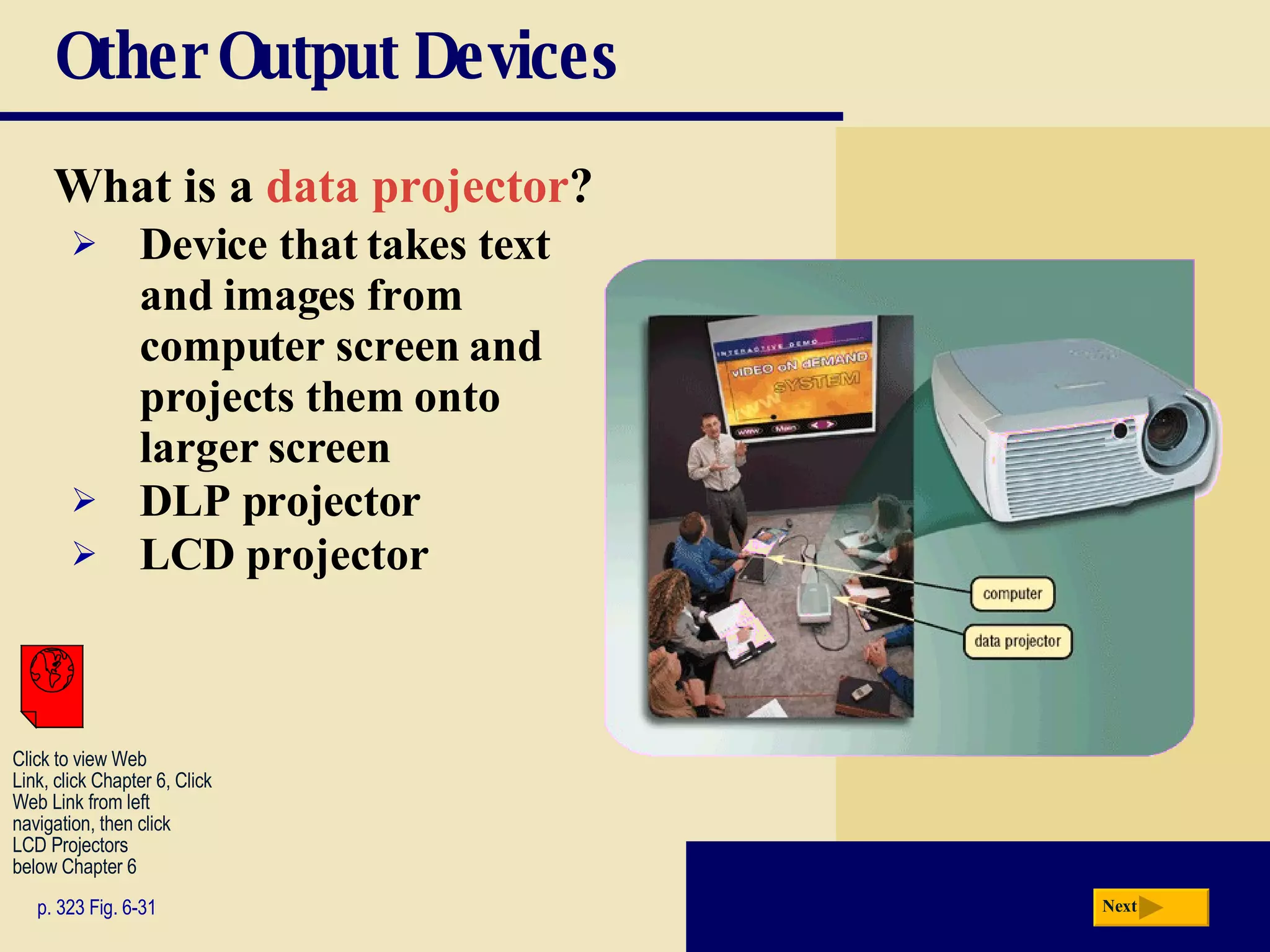
Other Output Devices What is a   data projector ? p. 323 Fig. 6-31 Device that takes text and images from computer screen and projects them onto larger screen DLP projector LCD projector Next Click to view Web  Link, click Chapter 6, Click  Web Link from left  navigation, then click  LCD Projectors below Chapter 6
Other Output Devices What is an   interactive whiteboard ? p. 324 Fig. 6-32 Touch-sensitive device that displays the image on a connected computer screen SMART board Next Click to view Web  Link, click Chapter 6, Click  Web Link from left  navigation, then click  SMART Board below Chapter 6
Other Output Devices What is   force feedback? p. 324 Fig. 6-33 Sends resistance to device in response to actions of user Next
Putting It All Together What are suggested output devices for the home user? p. 325 Fig. 6-34 Monitor Printer Other 17- or 19-inch LCD monitor, or 17-inch LCD screen on notebook computer Ink-jet color printer; or Photo printer Speakers Headphones or earphones Force-feedback joystick, wheel, gamepad, and/or motion-sensing game controller Next
Putting It All Together What are suggested output devices for the small office/home office user? p. 325 Fig. 6-34 19- or 22-inch LCD monitor LCD screen on Tablet PC, smart phone, or other personal mobile device Multifunction peripheral; or Ink-jet color printer; or Laser printer (black-and-white or color) Label printer Postage printer Fax machine Speakers Monitor Printer Other Next
Putting It All Together What are suggested output devices for the mobile user? p. 325 Fig. 6-34 17-inch color LCD screen on notebook computer LCD screen on Tablet PC, smart phone, or other personal mobile device Mobile color printer Ink-jet color printer; or Laser printer for in-office use (black-and-white or color) Photo printer Fax modem Headphones or earphones DLP data projector Monitor Printer Other Next
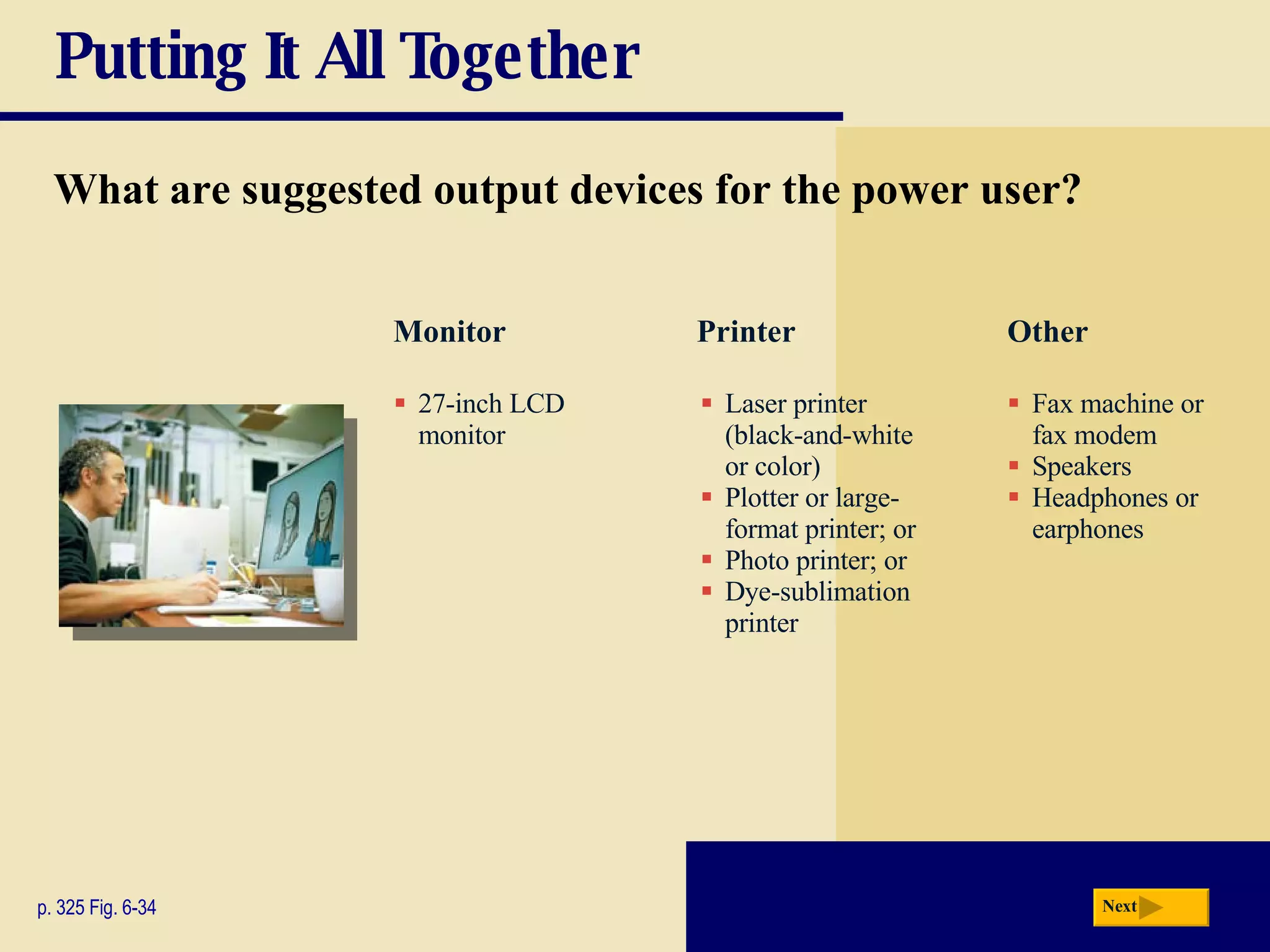
Putting It All Together What are suggested output devices for the power user? p. 325 Fig. 6-34 27-inch LCD monitor Laser printer (black-and-white or color) Plotter or large-format printer; or Photo printer; or Dye-sublimation printer Fax machine or fax modem Speakers Headphones or earphones Monitor Printer Other Next
Putting It All Together What are suggested output devices for the large business user? p. 325 Fig. 6-34 High-speed laser printer Laser printer, color Line printer (for large reports from a mainframe) Label printer Fax machine or fax modem Speakers Headphones or earphones Networked DLP data projector Interactive whiteboard Monitor Printer Other 19- or 22-inch LCD monitor LCD screen on Tablet PC, smart phone, or other personal mobile device Next
Output Devices for Physically Challenged Users What is the   Magnifier? p. 326 Fig. 6-35 Windows Magnifier  enlarges text and  other items on  screen Next
Output Devices for Physically Challenged Users What other output options are available for visually impaired users? p. 326 Fig. 6-36 Change Window settings,  such as increasing size or  changing color of text to  make words easier to read Blind users can work with  Windows Vista’s Narrator Braille printer   outputs  information in Braille  onto paper Next
Summary of  Output Multifunction peripherals Display devices Printers Speakers, headphones, and earphones Fax machines and fax modems Data projectors Interactive whiteboards Force feedback joysticks, wheels,  and gamepads Chapter 6 Complete

Chapter06

  • 1.
  • 2.
    Chapter 6 ObjectivesDescribe the four categories of output Summarize the characteristics of LCD monitors, LCD screens, plasma monitors, and CRT monitors Describe the various ways to print Differentiate between a nonimpact printer and an impact printer Describe the uses of speakers, headphones, and earphones Identify the output characteristics of fax machines and fax modems, multifunction peripherals, data projectors, interactive whiteboards, joysticks, wheels, gamepads, and motion-sensing game controllers Identify output options for physically challenged users Summarize the characteristics of ink-jet printers, photo printers, laser printers, thermal printers, mobile printers, label and postage printers, and plotters and large-format printers Next
  • 3.
    What is Output?What is output ? p. 300 - 301 Fig. 6-1 Data that has been processed into a useful form Output device is any hardware component that can convey information to one or more people Next
  • 4.
    Display Devices Whatis a display device ? p. 302 Output device that visually conveys text, graphics, and video information Information on display device sometimes called soft copy Monitor houses display device that is packaged as separate peripheral Next
  • 5.
    Display Devices Whatis an LCD monitor ? p. 302 - 303 Fig. 6-2 Uses liquid crystal display Has a small footprint Mobile devices that contain LCD displays include Notebook computer, Tablet PC, ultra personal computer, portable media player, smart phone, and PDA Next
  • 6.
    Display Devices Whatabout using multiple LCD monitors? p. 303 Fig. 6-3 Some users position two or more monitors side-by-side or stacked Allows users to run multiple applications simultaneously Next
  • 7.
    Display Devices Whatare some mobile devices that have LCD screens? p. 303 - 304 Fig. 6-4 Next Click to view Web Link, click Chapter 6, Click Web Link from left navigation, then click Widescreen LCD Monitors below Chapter 6
  • 8.
    Display Devices Video:SID: Size Matters Next CLICK TO START
  • 9.
    Display Devices Whatis resolution ? p. 304 - 305 Fig. 6-5 Sharpness and clarity of image Higher resolution makes image sharper, displays more text on screen, makes some elements smaller Number of horizontal and vertical pixels in a display device Next
  • 10.
    Display Devices Howdo you use an LCD monitor with a video card? p. 306 Fig. 6-6 Plug monitor into Digital Video Interface (DVI) port or an HDMI port on computer Next Click to view Web Link, click Chapter 6, Click Web Link from left navigation, then click Video Cards below Chapter 6
  • 11.
    Display Devices Whatis a plasma monitor ? p. 307 Fig. 6-8 Displays image by applying voltage to layer of gas Larger screen size and richer colors than LCD, but are more expensive Next
  • 12.
    Display Devices Whatis digital television (DTV) and high-definition television (HDTV) ? Great for game playing, watching movies, and browsing the Internet HDTV (high-definition television) is the most advanced form of digital TV p. 308 Uses digital signals to produce crisper, higher-quality output on LCD and plasma televisions Many programs can be broadcast on a single digital channel All broadcast stations transmit digital signals High resolution Next
  • 13.
    Display Devices Whatis a CRT monitor ? p. 309 Fig. 6-10 Contains cathode-ray tube (CRT) Screen coated with tiny dots of phosphor material Each dot consists of a red, blue, and green phosphor Common sizes are 15, 17, 19, 21, and 22 inches Viewable size is diagonal measurement of actual viewing area Next
  • 14.
    Display Devices Whatis the ENERGY STAR program ? p. 309 Encourages manufacturers to create energy-efficient devices that require little power when not in use Monitors and devices meeting guidelines display ENERGY STAR label Next
  • 15.
    Printers What isa printer ? p. 310 Fig. 6-11 Output device that produces text and graphics on a physical medium Result is hard copy, or printout Two orientations: portrait and landscape Next portrait landscape
  • 16.
    Printers How doyou know which printer to buy? Speed p. 310 Budget Color or black and white Cost per page Paper types and sizes Graphics and photo printing Multiple copies System compatibility Depends on printing needs Wireless capability Future needs Next
  • 17.
    Printers What arethe various ways to print documents and pictures? p. 311 Fig. 6-13 Next Click to view Web Link, click Chapter 6, Click Web Link from left navigation, then click Printing Wirelessly below Chapter 6
  • 18.
    Printers What isa nonimpact printer ? p. 312 Fig. 6-14 Forms characters and graphics without striking paper Ink-jet printer sprays tiny drops of liquid ink onto paper Prints in black-and-white or color on a variety of paper types Next
  • 19.
    Printers What isthe resolution of a printer? p. 313 Fig. 6-15 Sharpness and clarity Measured by number of dots per inch (dpi) printer can output Next
  • 20.
    Printers How doesan ink-jet printer work? p. 313 – 314 Fig. 6-16 Step 1. A small resistor heats the ink, causing the ink to boil and form a vapor bubble. Step 2. The vapor bubble forces the ink through the nozzle. Step 3. Ink drops onto the paper. Step 4. As the vapor bubble collapses, fresh ink is drawn into the firing chamber. Next Click to view Web Link, click Chapter 6, Click Web Link from left navigation, then click Ink-Jet Printers below Chapter 6 print cartridge print head firing chamber nozzle bubble resistor ink ink dot
  • 21.
    Printers What isa photo printer ? p. 314 - 315 Fig. 6-17 Color printer that produces photo-lab-quality pictures Many photo printers have a built-in card slot PictBridge is a standard technology that allows you to print pictures directly from a digital camera Next Click to view Web Link, click Chapter 6, Click Web Link from left navigation, then click PictBridge below Chapter 6
  • 22.
    Printers What isa laser printer ? p. 315 Fig. 6-18 High-speed, high-quality nonimpact printer Prints text and graphics in high-quality resolution, ranging from 1,200 to 2,400 dpi Typically costs more than ink-jet printer, but is much faster Next
  • 23.
    Printers How doesa laser printer work? p. 316 Fig. 6-19 Next Click to view Web Link, click Chapter 6, Click Web Link from left navigation, then click Laser Printers below Chapter 6
  • 24.
    Printers What isa thermal printer ? p. 317 Fig. 6-20 Generates images by pushing electrically heated pins against heat-sensitive paper Dye-sublimation printer (also called a digital photo printer) uses heat to transfer dye to specially coated paper Next
  • 25.
    Printers What isa mobile printer ? p. 317 Fig. 6-21 Small, lightweight, battery-powered printer that allows mobile user to print from notebook computer, Tablet PC, smart phone, or other personal mobile device while traveling Next
  • 26.
    Printers What are label printers and postage printers ? p. 318 Fig. 6-22 Small printer that prints on adhesive-type material Postage printer has built-in digital scale and prints postage stamps Most also print bar codes Next
  • 27.
    Printers What isa plotter ? p. 318 Fig. 6-23 Sophisticated printer used to produce high-quality drawings Large-format printer creates photo-realistic-quality color prints Next
  • 28.
    Printers What isa dot-matrix printer ? p. 318 - 319 Fig. 6-24 Impact printer that produces printed images when tiny wire pins strike ribbon Impact printer forms characters by striking mechanism against inked ribbon that contacts paper Next
  • 29.
    Printers What isa line printer ? p. 319 Fig. 6-25 High-speed impact printer that prints entire line at a time Speed measured in lines per minute (lpm) Band printer prints fully formed characters using a hammer mechanism Shuttle-matrix printer is high-speed printer that works like dot-matrix printer Next
  • 30.
    Speakers, Headphones, andEarphones What is an audio output device ? p. 320 - 321 Figs. 6-26 – 6-28 Computer component that produces music, speech, or other sounds Speakers and headsets are common devices Next Click to view Web Link, click Chapter 6, Click Web Link from left navigation, then click Wireless Music System below Chapter 6
  • 31.
    Other Output DevicesWhat is a facsimile (fax) machine ? p. 322 Fig. 6-30 Device that transmits and receives documents over telephone lines Converts an original document into a digitized image Many computers include fax capability Next
  • 32.
    Other Output DevicesWhat is a fax modem? p. 322 Fig. 6-29 Modem that allows you to send and receive electronic documents as faxes Next Click to view Web Link, click Chapter 6, Click Web Link from left navigation, then click Fax Modems below Chapter 6
  • 33.
    Other Output DevicesWhat is a multifunction peripheral ? p. 323 Fig. 6-30 Provides functionality of printer, scanner, copy machine, and fax machine Next
  • 34.
    Other Output DevicesWhat is a data projector ? p. 323 Fig. 6-31 Device that takes text and images from computer screen and projects them onto larger screen DLP projector LCD projector Next Click to view Web Link, click Chapter 6, Click Web Link from left navigation, then click LCD Projectors below Chapter 6
  • 35.
    Other Output DevicesWhat is an interactive whiteboard ? p. 324 Fig. 6-32 Touch-sensitive device that displays the image on a connected computer screen SMART board Next Click to view Web Link, click Chapter 6, Click Web Link from left navigation, then click SMART Board below Chapter 6
  • 36.
    Other Output DevicesWhat is force feedback? p. 324 Fig. 6-33 Sends resistance to device in response to actions of user Next
  • 37.
    Putting It AllTogether What are suggested output devices for the home user? p. 325 Fig. 6-34 Monitor Printer Other 17- or 19-inch LCD monitor, or 17-inch LCD screen on notebook computer Ink-jet color printer; or Photo printer Speakers Headphones or earphones Force-feedback joystick, wheel, gamepad, and/or motion-sensing game controller Next
  • 38.
    Putting It AllTogether What are suggested output devices for the small office/home office user? p. 325 Fig. 6-34 19- or 22-inch LCD monitor LCD screen on Tablet PC, smart phone, or other personal mobile device Multifunction peripheral; or Ink-jet color printer; or Laser printer (black-and-white or color) Label printer Postage printer Fax machine Speakers Monitor Printer Other Next
  • 39.
    Putting It AllTogether What are suggested output devices for the mobile user? p. 325 Fig. 6-34 17-inch color LCD screen on notebook computer LCD screen on Tablet PC, smart phone, or other personal mobile device Mobile color printer Ink-jet color printer; or Laser printer for in-office use (black-and-white or color) Photo printer Fax modem Headphones or earphones DLP data projector Monitor Printer Other Next
  • 40.
    Putting It AllTogether What are suggested output devices for the power user? p. 325 Fig. 6-34 27-inch LCD monitor Laser printer (black-and-white or color) Plotter or large-format printer; or Photo printer; or Dye-sublimation printer Fax machine or fax modem Speakers Headphones or earphones Monitor Printer Other Next
  • 41.
    Putting It AllTogether What are suggested output devices for the large business user? p. 325 Fig. 6-34 High-speed laser printer Laser printer, color Line printer (for large reports from a mainframe) Label printer Fax machine or fax modem Speakers Headphones or earphones Networked DLP data projector Interactive whiteboard Monitor Printer Other 19- or 22-inch LCD monitor LCD screen on Tablet PC, smart phone, or other personal mobile device Next
  • 42.
    Output Devices forPhysically Challenged Users What is the Magnifier? p. 326 Fig. 6-35 Windows Magnifier enlarges text and other items on screen Next
  • 43.
    Output Devices forPhysically Challenged Users What other output options are available for visually impaired users? p. 326 Fig. 6-36 Change Window settings, such as increasing size or changing color of text to make words easier to read Blind users can work with Windows Vista’s Narrator Braille printer outputs information in Braille onto paper Next
  • 44.
    Summary of Output Multifunction peripherals Display devices Printers Speakers, headphones, and earphones Fax machines and fax modems Data projectors Interactive whiteboards Force feedback joysticks, wheels, and gamepads Chapter 6 Complete