CHAPTERTHREE

Discovering Computers
Fundamentals,
2011 Edition
Living in a Digital World
Objectives Overview
Identify the keys and buttons
commonly found on desktop
computer keyboards, and
describe how keyboards for
mobile computers and devices
differ from desktop computer
keyboards

Describe different mouse types

Describe various types of touch
screens and explain how a
touch-sensitive pad works

Describe various types of pen
input

2
Objectives Overview

Explain other types of input

Explain the characteristics
of LCD monitors, LCD
screens, and CRT monitors

Identify the purpose and
features of speakers,
headphones, and ear-buds;
data projectors; and
interactive whiteboards

Summarize the various
types of printers

Identify input and output
options for physically
challenged users

3
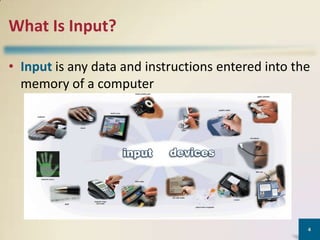
What Is Input?
• Input is any data and instructions entered into the
memory of a computer

4
What Is Input?

An input device
is any hardware
component that
allows users to
enter data and
instructions into
a computer

5
Keyboard
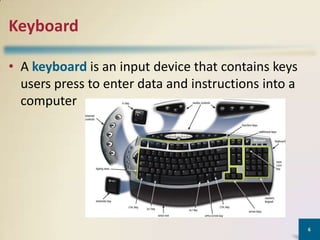
• A keyboard is an input device that contains keys
users press to enter data and instructions into a
computer

6
Keyboard
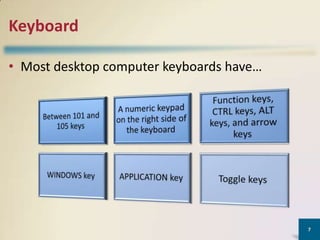
• Most desktop computer keyboards have…

7
Keyboard
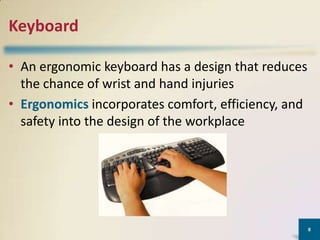
• An ergonomic keyboard has a design that reduces
the chance of wrist and hand injuries
• Ergonomics incorporates comfort, efficiency, and
safety into the design of the workplace

8
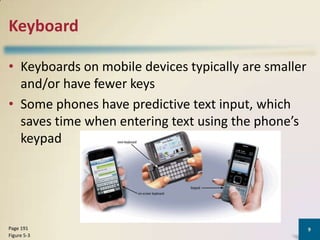
Keyboard
• Keyboards on mobile devices typically are smaller
and/or have fewer keys
• Some phones have predictive text input, which
saves time when entering text using the phone’s
keypad

Page 191
Figure 5-3

9
Pointing Devices

Page 189

10
Types of Pointing Devices:
• Mouse
• Devices used for games - joystick
• Devices used in laptops – track ball, touch pad,
pointing stick

11
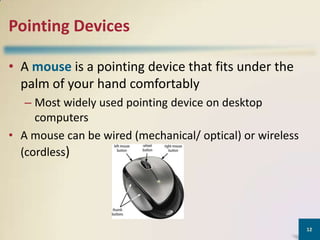
Pointing Devices
• A mouse is a pointing device that fits under the
palm of your hand comfortably
– Most widely used pointing device on desktop
computers
• A mouse can be wired (mechanical/ optical) or wireless
(cordless)

12
Types:
• Mechanical – small ball on underside rolls as
mouse is moved
• Optical – uses a light beam to monitor mouse
movement
• Cordless – uses either infrared or radio waves

13
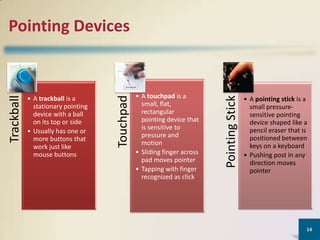
• A touchpad is a
small, flat,
rectangular
pointing device that
is sensitive to
pressure and
motion
• Sliding finger across
pad moves pointer
• Tapping with finger
recognized as click

Pointing Stick

• A trackball is a
stationary pointing
device with a ball
on its top or side
• Usually has one or
more buttons that
work just like
mouse buttons

Touchpad

Trackball

Pointing Devices

• A pointing stick is a
small pressuresensitive pointing
device shaped like a
pencil eraser that is
positioned between
keys on a keyboard
• Pushing post in any
direction moves
pointer

14
Pointing Devices
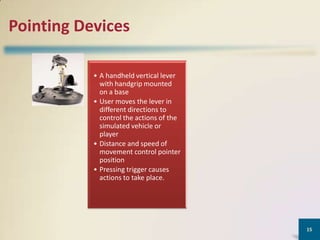
• A handheld vertical lever
with handgrip mounted
on a base
• User moves the lever in
different directions to
control the actions of the
simulated vehicle or
player
• Distance and speed of
movement control pointer
position
• Pressing trigger causes
actions to take place.

15
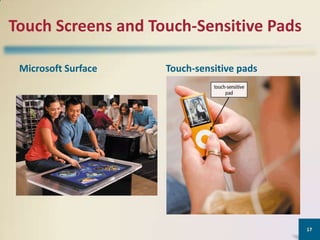
Touch Screens and Touch-Sensitive Pads
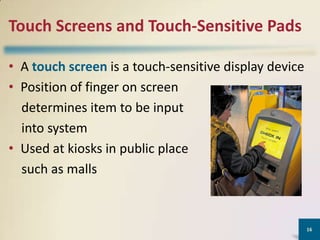
• A touch screen is a touch-sensitive display device
• Position of finger on screen
determines item to be input
into system
• Used at kiosks in public place
such as malls

16
Touch Screens and Touch-Sensitive Pads
Microsoft Surface

Touch-sensitive pads

17
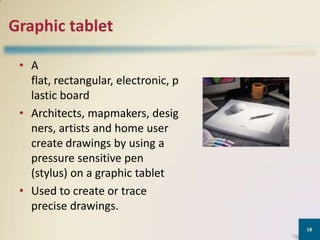
Graphic tablet
• A
flat, rectangular, electronic, p
lastic board
• Architects, mapmakers, desig
ners, artists and home user
create drawings by using a
pressure sensitive pen
(stylus) on a graphic tablet
• Used to create or trace
precise drawings.
18
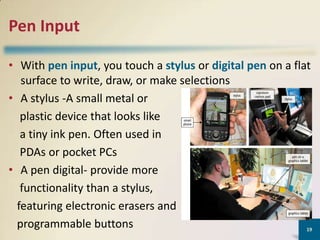
Pen Input
• With pen input, you touch a stylus or digital pen on a flat
surface to write, draw, or make selections
• A stylus -A small metal or
plastic device that looks like
a tiny ink pen. Often used in
PDAs or pocket PCs
• A pen digital- provide more
functionality than a stylus,
featuring electronic erasers and
programmable buttons
19
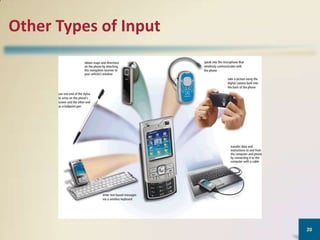
Other Types of Input

20
Other Types of Input
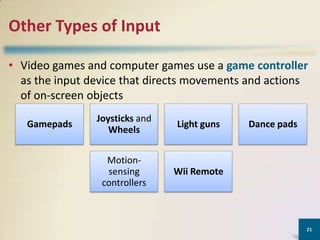
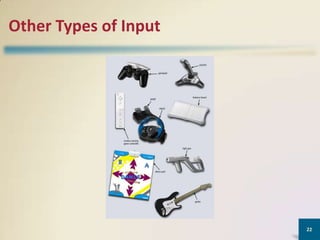
• Video games and computer games use a game controller
as the input device that directs movements and actions
of on-screen objects
Gamepads

Joysticks and
Wheels

Light guns

Motionsensing
controllers

Wii Remote

Dance pads

21
Other Types of Input

22
Other Types of Input
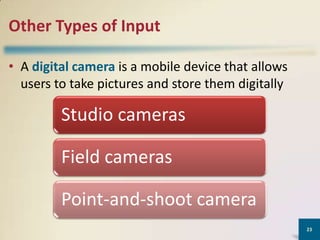
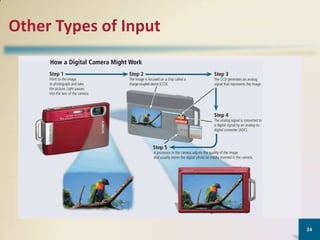
• A digital camera is a mobile device that allows
users to take pictures and store them digitally

Studio cameras
Field cameras
Point-and-shoot camera
23
Other Types of Input

24
Other Types of Input
• Two factors affect the quality of digital camera photos:

Resolution

• Resolution is the
number of horizontal
and vertical pictures
in a display device
• A pixel is the smallest
element in an
electronic display

25
Other Types of Input
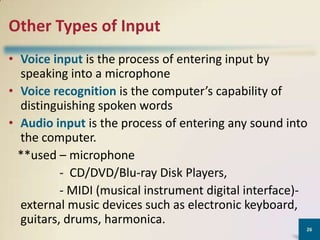
• Voice input is the process of entering input by
speaking into a microphone
• Voice recognition is the computer’s capability of
distinguishing spoken words
• Audio input is the process of entering any sound into
the computer.
**used – microphone
- CD/DVD/Blu-ray Disk Players,
- MIDI (musical instrument digital interface)external music devices such as electronic keyboard,
guitars, drums, harmonica.
26
Other Types of Input
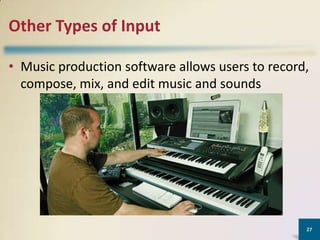
• Music production software allows users to record,
compose, mix, and edit music and sounds

27
Other Types of Input
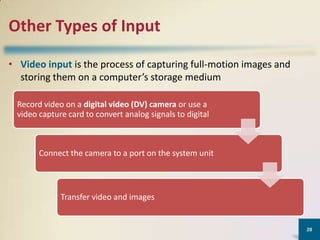
• Video input is the process of capturing full-motion images and
storing them on a computer’s storage medium
Record video on a digital video (DV) camera or use a
video capture card to convert analog signals to digital

Connect the camera to a port on the system unit

Transfer video and images

28
Other Types of Input
• A Web cam is a type of digital video camera that
enables a user to:
Capture video and
still images

Send e-mail
messages with
video attachments

Broadcast live
images over the
Internet

Add live images to
instant messages

Make video
telephone calls

29
Other Types of Input
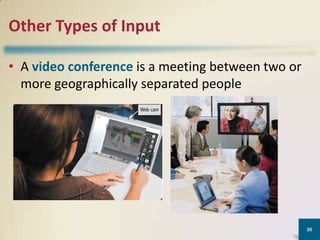
• A video conference is a meeting between two or
more geographically separated people

30
Other Types of Input
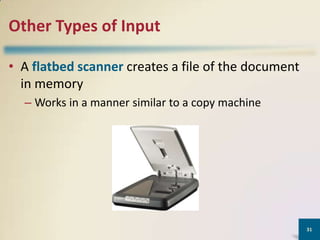
• A flatbed scanner creates a file of the document
in memory
– Works in a manner similar to a copy machine

31
Other Types of Input
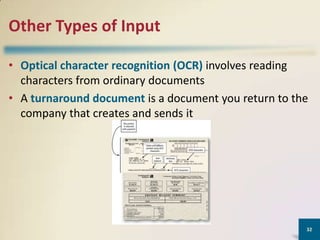
• Optical character recognition (OCR) involves reading
characters from ordinary documents
• A turnaround document is a document you return to the
company that creates and sends it

32
Other Types of Input
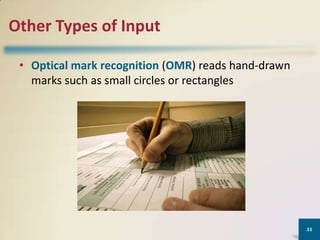
• Optical mark recognition (OMR) reads hand-drawn
marks such as small circles or rectangles

33
Other Types of Input
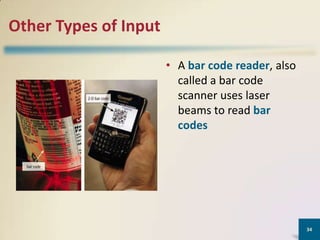
• A bar code reader, also
called a bar code
scanner uses laser
beams to read bar
codes

34
Other Types of Input
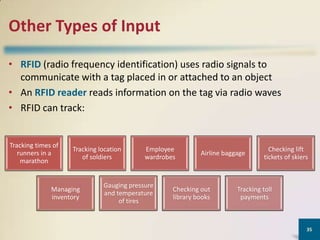
• RFID (radio frequency identification) uses radio signals to
communicate with a tag placed in or attached to an object
• An RFID reader reads information on the tag via radio waves
• RFID can track:

Tracking times of
runners in a
marathon

Tracking location
of soldiers

Managing
inventory

Employee
wardrobes

Gauging pressure
and temperature
of tires

Airline baggage

Checking out
library books

Checking lift
tickets of skiers

Tracking toll
payments

35
Other Types of Input
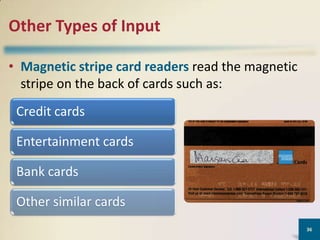
• Magnetic stripe card readers read the magnetic
stripe on the back of cards such as:
Credit cards
Entertainment cards
Bank cards
Other similar cards
36
Other Types of Input
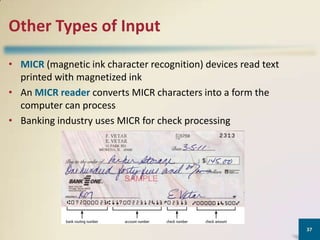
• MICR (magnetic ink character recognition) devices read text
printed with magnetized ink
• An MICR reader converts MICR characters into a form the
computer can process
• Banking industry uses MICR for check processing

37
Other Types of Input
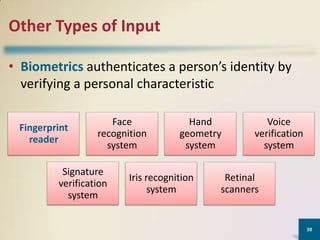
• Biometrics authenticates a person’s identity by
verifying a personal characteristic
Fingerprint
reader

Face
recognition
system

Signature
verification
system

Hand
geometry
system

Iris recognition
system

Voice
verification
system

Retinal
scanners

38
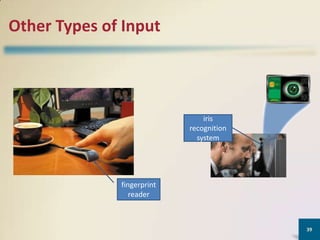
Other Types of Input

iris
recognition
system

fingerprint
reader

39
Other Types of Input
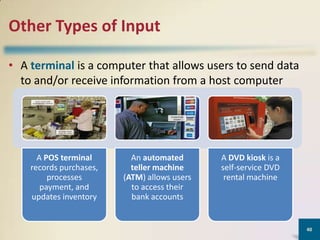
• A terminal is a computer that allows users to send data
to and/or receive information from a host computer

A POS terminal
records purchases,
processes
payment, and
updates inventory

An automated
teller machine
(ATM) allows users
to access their
bank accounts

A DVD kiosk is a
self-service DVD
rental machine

40
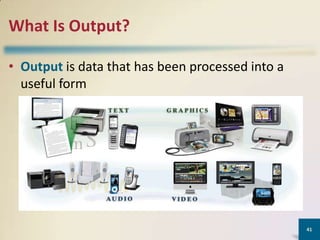
What Is Output?
• Output is data that has been processed into a
useful form

41
Categories of output:
• Text : memos, letters, press
releases, report, classified
advertisements, envelops, mailing labels, text
messages.
• Graphics : logos, charts, drawings, clip
arts, photos.
• Audio : songs, narrations, speeches
• Video : video blogs, vodcast.
42
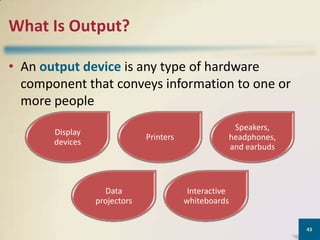
What Is Output?
• An output device is any type of hardware
component that conveys information to one or
more people
Display
devices

Speakers,
headphones,
and earbuds

Printers

Data
projectors

Interactive
whiteboards
43
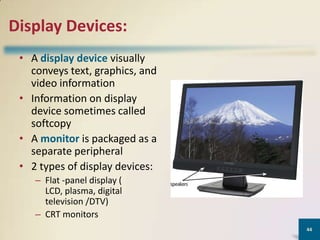
Display Devices:
• A display device visually
conveys text, graphics, and
video information
• Information on display
device sometimes called
softcopy
• A monitor is packaged as a
separate peripheral
• 2 types of display devices:
– Flat -panel display (
LCD, plasma, digital
television /DTV)
– CRT monitors
44
Display Devices :Flat-panel display
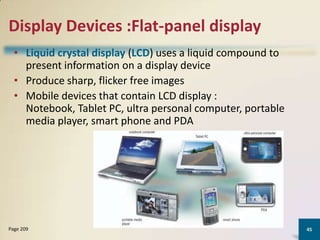
• Liquid crystal display (LCD) uses a liquid compound to
present information on a display device
• Produce sharp, flicker free images
• Mobile devices that contain LCD display :
Notebook, Tablet PC, ultra personal computer, portable
media player, smart phone and PDA

Page 209

45
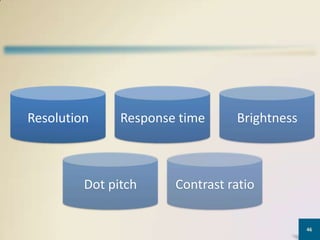
Resolution

Response time

Dot pitch

Brightness

Contrast ratio
46
Resolution:
• Number of a horizontal and vertical pixel in a
display device.
• Sharpness and clarity of images
• Higher resolution makes image sharper, display
more text on the screen, makes some elements
smaller.

47
Dot pitch:
• Distance in millimeters between pixel on a display
device.
• Text created with a smaller dot pitch is easier to
read.
• Average dot pitch on LCD monitors and screen
should be 0.30mm or lower. The lower the
number, the sharper the image.

48
Response time:
• The time in milliseconds (ms) that it takes to turn
a pixel on or off.
• LCD monitor’ and screens’ response time today
range from 3 to 16 ms. The lower the number, the
faster the response time.

49
Brightness:
• Measured in nits. A nit is a unit of visible light
intensity equal to one candela per square.
• Candela is the standard unit of luminous intensity.
• LCD monitor and screen range from 250 to 550
nits. The higher the nits, the brighter the images.

50
Contras ratio:
• Describe the difference in light intensity between
the brightness white and darkest black that can
be displayed on an LCD monitor.
• Contrast ratios today range from 500:1 to 2000:1.
higher contrast ratios represent colours better.

51
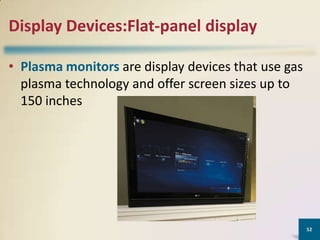
Display Devices:Flat-panel display
• Plasma monitors are display devices that use gas
plasma technology and offer screen sizes up to
150 inches

52
Display Devices:Flat-panel display
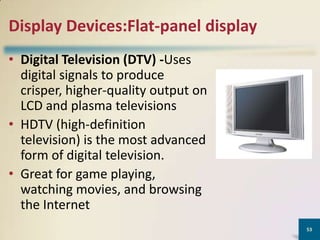
• Digital Television (DTV) -Uses
digital signals to produce
crisper, higher-quality output on
LCD and plasma televisions
• HDTV (high-definition
television) is the most advanced
form of digital television.
• Great for game playing,
watching movies, and browsing
the Internet
53
Display Devices: CRT monitor
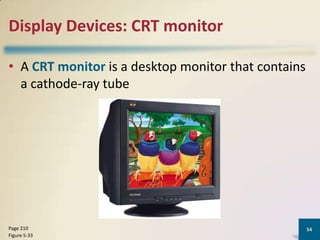
• A CRT monitor is a desktop monitor that contains
a cathode-ray tube

Page 210
Figure 5-33

54
• Screen coated with tiny dots of phosphor
material. Each dot consist of a red, blue and green
phosphor.
• What determines the quality of a CRT monitor?
– Screen resolution
– Text created with a smaller dot pitch is easier to read.
– Refresh rate is speed at which monitor redraws images
on screen.

55
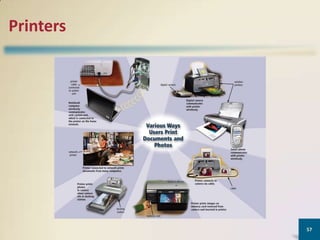
Printers
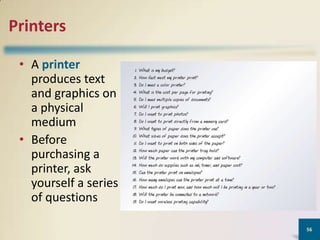
• A printer
produces text
and graphics on
a physical
medium
• Before
purchasing a
printer, ask
yourself a series
of questions
56
Printers

57
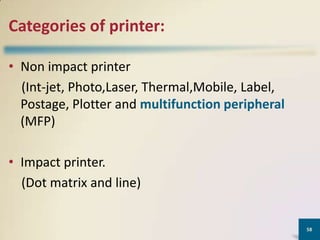
Categories of printer:
• Non impact printer
(Int-jet, Photo,Laser, Thermal,Mobile, Label,
Postage, Plotter and multifunction peripheral
(MFP)
• Impact printer.
(Dot matrix and line)

58
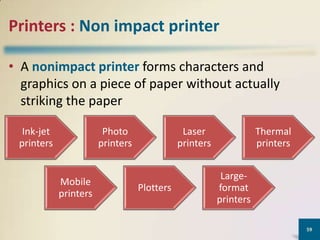
Printers : Non impact printer
• A nonimpact printer forms characters and
graphics on a piece of paper without actually
striking the paper
Ink-jet
printers

Photo
printers

Mobile
printers

Laser
printers

Plotters

Thermal
printers

Largeformat
printers
59
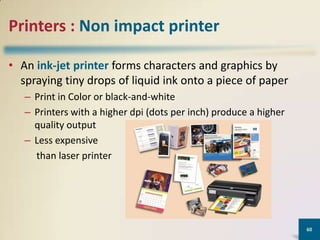
Printers : Non impact printer
• An ink-jet printer forms characters and graphics by
spraying tiny drops of liquid ink onto a piece of paper
– Print in Color or black-and-white
– Printers with a higher dpi (dots per inch) produce a higher
quality output
– Less expensive
than laser printer

60
Printers: Non impact printer

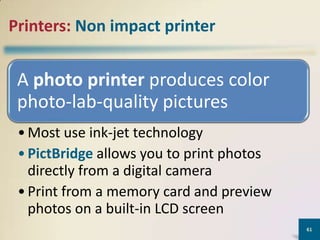
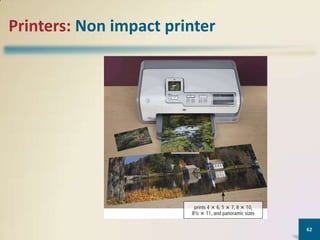
A photo printer produces color
photo-lab-quality pictures
• Most use ink-jet technology
• PictBridge allows you to print photos
directly from a digital camera
• Print from a memory card and preview
photos on a built-in LCD screen
61
Printers: Non impact printer

62
Printers : Non impact printer
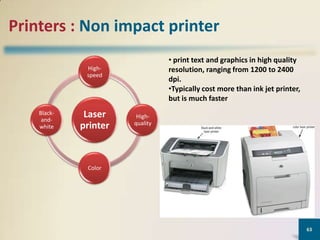
• print text and graphics in high quality
resolution, ranging from 1200 to 2400
dpi.
•Typically cost more than ink jet printer,
but is much faster

Highspeed

Blackandwhite

Laser
printer

Highquality

Color

63
Printers: Non impact printer
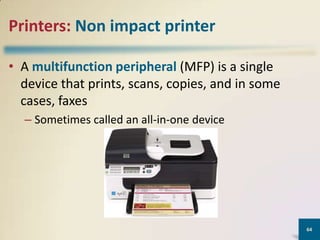
• A multifunction peripheral (MFP) is a single
device that prints, scans, copies, and in some
cases, faxes
– Sometimes called an all-in-one device

64
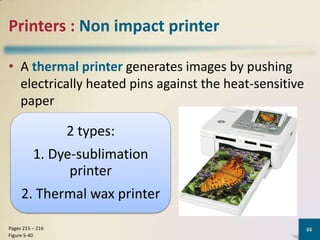
Printers : Non impact printer
• A thermal printer generates images by pushing
electrically heated pins against the heat-sensitive
paper

2 types:
1. Dye-sublimation
printer

2. Thermal wax printer
Pages 215 – 216
Figure 5-40

65
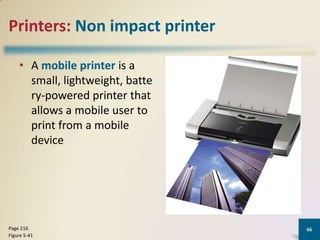
Printers: Non impact printer
• A mobile printer is a
small, lightweight, batte
ry-powered printer that
allows a mobile user to
print from a mobile
device

Page 216
Figure 5-41

66
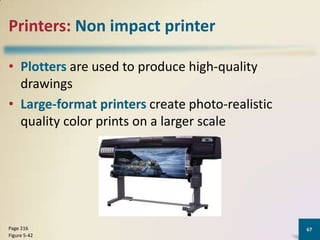
Printers: Non impact printer
• Plotters are used to produce high-quality
drawings
• Large-format printers create photo-realistic
quality color prints on a larger scale

Page 216
Figure 5-42

67
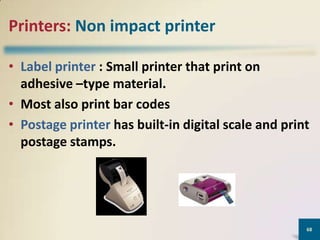
Printers: Non impact printer
• Label printer : Small printer that print on
adhesive –type material.
• Most also print bar codes
• Postage printer has built-in digital scale and print
postage stamps.

68
Printers: Impact printers
• Impact printers form characters and graphics on a
piece of paper by striking a mechanism against an
inked ribbon that physically contacts the paper

Dot-matrix
printer
Page 217

Line
printer
69
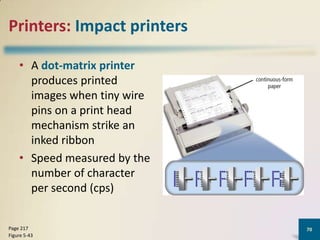
Printers: Impact printers
• A dot-matrix printer
produces printed
images when tiny wire
pins on a print head
mechanism strike an
inked ribbon
• Speed measured by the
number of character
per second (cps)

Page 217
Figure 5-43

70
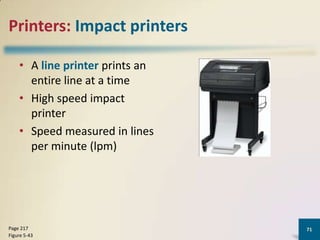
Printers: Impact printers
• A line printer prints an
entire line at a time
• High speed impact
printer
• Speed measured in lines
per minute (lpm)

Page 217
Figure 5-43

71
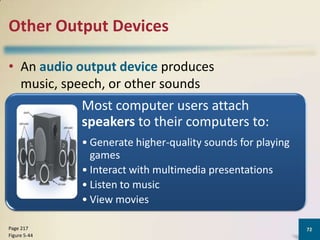
Other Output Devices
• An audio output device produces
music, speech, or other sounds

Most computer users attach
speakers to their computers to:
• Generate higher-quality sounds for playing
games
• Interact with multimedia presentations
• Listen to music
• View movies
Page 217
Figure 5-44

72
Other Output Devices
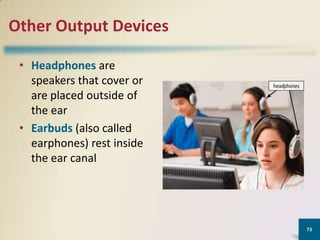
• Headphones are
speakers that cover or
are placed outside of
the ear
• Earbuds (also called
earphones) rest inside
the ear canal

73
Other Output Devices

Voice output occurs when you hear a
person’s voice or when the computer
talks to you through the speakers
• Some Web sites dedicate themselves to
providing voice output
• Often works with voice input
• VoIP uses voice output and voice input
Page 218

74
Other Output Devices
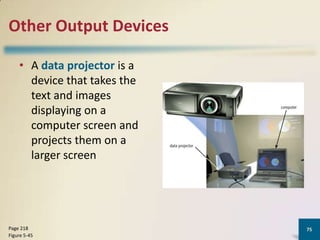
• A data projector is a
device that takes the
text and images
displaying on a
computer screen and
projects them on a
larger screen

Page 218
Figure 5-45

75
Other Output Devices
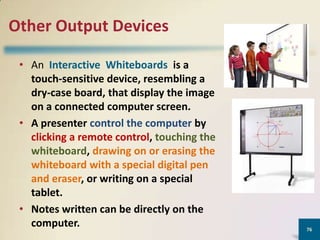
• An Interactive Whiteboards is a
touch-sensitive device, resembling a
dry-case board, that display the image
on a connected computer screen.
• A presenter control the computer by
clicking a remote control, touching the
whiteboard, drawing on or erasing the
whiteboard with a special digital pen
and eraser, or writing on a special
tablet.
• Notes written can be directly on the
computer.

76
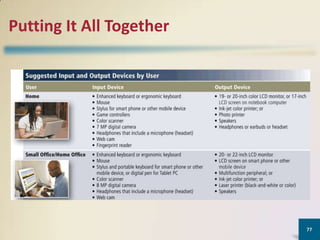
Putting It All Together

77
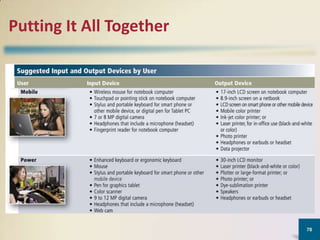
Putting It All Together

78
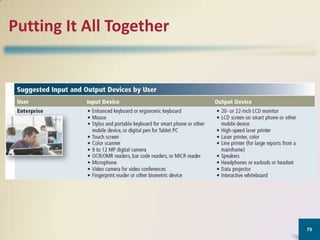
Putting It All Together

79
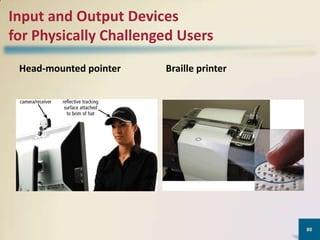
Input and Output Devices
for Physically Challenged Users
Head-mounted pointer

Braille printer

80
Summary

Various techniques for
entering input and
several commonly
used input device

Various methods of
output and several
commonly used
output devices

81
CHAPTER 3

Discovering Computers
Fundamentals,
2011 Edition
Living in a Digital World

Chapter 03 io csc&tts

  • 1.
  • 2.
    Objectives Overview Identify thekeys and buttons commonly found on desktop computer keyboards, and describe how keyboards for mobile computers and devices differ from desktop computer keyboards Describe different mouse types Describe various types of touch screens and explain how a touch-sensitive pad works Describe various types of pen input 2
  • 3.
    Objectives Overview Explain othertypes of input Explain the characteristics of LCD monitors, LCD screens, and CRT monitors Identify the purpose and features of speakers, headphones, and ear-buds; data projectors; and interactive whiteboards Summarize the various types of printers Identify input and output options for physically challenged users 3
  • 4.
    What Is Input? •Input is any data and instructions entered into the memory of a computer 4
  • 5.
    What Is Input? Aninput device is any hardware component that allows users to enter data and instructions into a computer 5
  • 6.
    Keyboard • A keyboardis an input device that contains keys users press to enter data and instructions into a computer 6
  • 7.
    Keyboard • Most desktopcomputer keyboards have… 7
  • 8.
    Keyboard • An ergonomickeyboard has a design that reduces the chance of wrist and hand injuries • Ergonomics incorporates comfort, efficiency, and safety into the design of the workplace 8
  • 9.
    Keyboard • Keyboards onmobile devices typically are smaller and/or have fewer keys • Some phones have predictive text input, which saves time when entering text using the phone’s keypad Page 191 Figure 5-3 9
  • 10.
  • 11.
    Types of PointingDevices: • Mouse • Devices used for games - joystick • Devices used in laptops – track ball, touch pad, pointing stick 11
  • 12.
    Pointing Devices • Amouse is a pointing device that fits under the palm of your hand comfortably – Most widely used pointing device on desktop computers • A mouse can be wired (mechanical/ optical) or wireless (cordless) 12
  • 13.
    Types: • Mechanical –small ball on underside rolls as mouse is moved • Optical – uses a light beam to monitor mouse movement • Cordless – uses either infrared or radio waves 13
  • 14.
    • A touchpadis a small, flat, rectangular pointing device that is sensitive to pressure and motion • Sliding finger across pad moves pointer • Tapping with finger recognized as click Pointing Stick • A trackball is a stationary pointing device with a ball on its top or side • Usually has one or more buttons that work just like mouse buttons Touchpad Trackball Pointing Devices • A pointing stick is a small pressuresensitive pointing device shaped like a pencil eraser that is positioned between keys on a keyboard • Pushing post in any direction moves pointer 14
  • 15.
    Pointing Devices • Ahandheld vertical lever with handgrip mounted on a base • User moves the lever in different directions to control the actions of the simulated vehicle or player • Distance and speed of movement control pointer position • Pressing trigger causes actions to take place. 15
  • 16.
    Touch Screens andTouch-Sensitive Pads • A touch screen is a touch-sensitive display device • Position of finger on screen determines item to be input into system • Used at kiosks in public place such as malls 16
  • 17.
    Touch Screens andTouch-Sensitive Pads Microsoft Surface Touch-sensitive pads 17
  • 18.
    Graphic tablet • A flat,rectangular, electronic, p lastic board • Architects, mapmakers, desig ners, artists and home user create drawings by using a pressure sensitive pen (stylus) on a graphic tablet • Used to create or trace precise drawings. 18
  • 19.
    Pen Input • Withpen input, you touch a stylus or digital pen on a flat surface to write, draw, or make selections • A stylus -A small metal or plastic device that looks like a tiny ink pen. Often used in PDAs or pocket PCs • A pen digital- provide more functionality than a stylus, featuring electronic erasers and programmable buttons 19
  • 20.
  • 21.
    Other Types ofInput • Video games and computer games use a game controller as the input device that directs movements and actions of on-screen objects Gamepads Joysticks and Wheels Light guns Motionsensing controllers Wii Remote Dance pads 21
  • 22.
  • 23.
    Other Types ofInput • A digital camera is a mobile device that allows users to take pictures and store them digitally Studio cameras Field cameras Point-and-shoot camera 23
  • 24.
  • 25.
    Other Types ofInput • Two factors affect the quality of digital camera photos: Resolution • Resolution is the number of horizontal and vertical pictures in a display device • A pixel is the smallest element in an electronic display 25
  • 26.
    Other Types ofInput • Voice input is the process of entering input by speaking into a microphone • Voice recognition is the computer’s capability of distinguishing spoken words • Audio input is the process of entering any sound into the computer. **used – microphone - CD/DVD/Blu-ray Disk Players, - MIDI (musical instrument digital interface)external music devices such as electronic keyboard, guitars, drums, harmonica. 26
  • 27.
    Other Types ofInput • Music production software allows users to record, compose, mix, and edit music and sounds 27
  • 28.
    Other Types ofInput • Video input is the process of capturing full-motion images and storing them on a computer’s storage medium Record video on a digital video (DV) camera or use a video capture card to convert analog signals to digital Connect the camera to a port on the system unit Transfer video and images 28
  • 29.
    Other Types ofInput • A Web cam is a type of digital video camera that enables a user to: Capture video and still images Send e-mail messages with video attachments Broadcast live images over the Internet Add live images to instant messages Make video telephone calls 29
  • 30.
    Other Types ofInput • A video conference is a meeting between two or more geographically separated people 30
  • 31.
    Other Types ofInput • A flatbed scanner creates a file of the document in memory – Works in a manner similar to a copy machine 31
  • 32.
    Other Types ofInput • Optical character recognition (OCR) involves reading characters from ordinary documents • A turnaround document is a document you return to the company that creates and sends it 32
  • 33.
    Other Types ofInput • Optical mark recognition (OMR) reads hand-drawn marks such as small circles or rectangles 33
  • 34.
    Other Types ofInput • A bar code reader, also called a bar code scanner uses laser beams to read bar codes 34
  • 35.
    Other Types ofInput • RFID (radio frequency identification) uses radio signals to communicate with a tag placed in or attached to an object • An RFID reader reads information on the tag via radio waves • RFID can track: Tracking times of runners in a marathon Tracking location of soldiers Managing inventory Employee wardrobes Gauging pressure and temperature of tires Airline baggage Checking out library books Checking lift tickets of skiers Tracking toll payments 35
  • 36.
    Other Types ofInput • Magnetic stripe card readers read the magnetic stripe on the back of cards such as: Credit cards Entertainment cards Bank cards Other similar cards 36
  • 37.
    Other Types ofInput • MICR (magnetic ink character recognition) devices read text printed with magnetized ink • An MICR reader converts MICR characters into a form the computer can process • Banking industry uses MICR for check processing 37
  • 38.
    Other Types ofInput • Biometrics authenticates a person’s identity by verifying a personal characteristic Fingerprint reader Face recognition system Signature verification system Hand geometry system Iris recognition system Voice verification system Retinal scanners 38
  • 39.
    Other Types ofInput iris recognition system fingerprint reader 39
  • 40.
    Other Types ofInput • A terminal is a computer that allows users to send data to and/or receive information from a host computer A POS terminal records purchases, processes payment, and updates inventory An automated teller machine (ATM) allows users to access their bank accounts A DVD kiosk is a self-service DVD rental machine 40
  • 41.
    What Is Output? •Output is data that has been processed into a useful form 41
  • 42.
    Categories of output: •Text : memos, letters, press releases, report, classified advertisements, envelops, mailing labels, text messages. • Graphics : logos, charts, drawings, clip arts, photos. • Audio : songs, narrations, speeches • Video : video blogs, vodcast. 42
  • 43.
    What Is Output? •An output device is any type of hardware component that conveys information to one or more people Display devices Speakers, headphones, and earbuds Printers Data projectors Interactive whiteboards 43
  • 44.
    Display Devices: • Adisplay device visually conveys text, graphics, and video information • Information on display device sometimes called softcopy • A monitor is packaged as a separate peripheral • 2 types of display devices: – Flat -panel display ( LCD, plasma, digital television /DTV) – CRT monitors 44
  • 45.
    Display Devices :Flat-paneldisplay • Liquid crystal display (LCD) uses a liquid compound to present information on a display device • Produce sharp, flicker free images • Mobile devices that contain LCD display : Notebook, Tablet PC, ultra personal computer, portable media player, smart phone and PDA Page 209 45
  • 46.
  • 47.
    Resolution: • Number ofa horizontal and vertical pixel in a display device. • Sharpness and clarity of images • Higher resolution makes image sharper, display more text on the screen, makes some elements smaller. 47
  • 48.
    Dot pitch: • Distancein millimeters between pixel on a display device. • Text created with a smaller dot pitch is easier to read. • Average dot pitch on LCD monitors and screen should be 0.30mm or lower. The lower the number, the sharper the image. 48
  • 49.
    Response time: • Thetime in milliseconds (ms) that it takes to turn a pixel on or off. • LCD monitor’ and screens’ response time today range from 3 to 16 ms. The lower the number, the faster the response time. 49
  • 50.
    Brightness: • Measured innits. A nit is a unit of visible light intensity equal to one candela per square. • Candela is the standard unit of luminous intensity. • LCD monitor and screen range from 250 to 550 nits. The higher the nits, the brighter the images. 50
  • 51.
    Contras ratio: • Describethe difference in light intensity between the brightness white and darkest black that can be displayed on an LCD monitor. • Contrast ratios today range from 500:1 to 2000:1. higher contrast ratios represent colours better. 51
  • 52.
    Display Devices:Flat-panel display •Plasma monitors are display devices that use gas plasma technology and offer screen sizes up to 150 inches 52
  • 53.
    Display Devices:Flat-panel display •Digital Television (DTV) -Uses digital signals to produce crisper, higher-quality output on LCD and plasma televisions • HDTV (high-definition television) is the most advanced form of digital television. • Great for game playing, watching movies, and browsing the Internet 53
  • 54.
    Display Devices: CRTmonitor • A CRT monitor is a desktop monitor that contains a cathode-ray tube Page 210 Figure 5-33 54
  • 55.
    • Screen coatedwith tiny dots of phosphor material. Each dot consist of a red, blue and green phosphor. • What determines the quality of a CRT monitor? – Screen resolution – Text created with a smaller dot pitch is easier to read. – Refresh rate is speed at which monitor redraws images on screen. 55
  • 56.
    Printers • A printer producestext and graphics on a physical medium • Before purchasing a printer, ask yourself a series of questions 56
  • 57.
  • 58.
    Categories of printer: •Non impact printer (Int-jet, Photo,Laser, Thermal,Mobile, Label, Postage, Plotter and multifunction peripheral (MFP) • Impact printer. (Dot matrix and line) 58
  • 59.
    Printers : Nonimpact printer • A nonimpact printer forms characters and graphics on a piece of paper without actually striking the paper Ink-jet printers Photo printers Mobile printers Laser printers Plotters Thermal printers Largeformat printers 59
  • 60.
    Printers : Nonimpact printer • An ink-jet printer forms characters and graphics by spraying tiny drops of liquid ink onto a piece of paper – Print in Color or black-and-white – Printers with a higher dpi (dots per inch) produce a higher quality output – Less expensive than laser printer 60
  • 61.
    Printers: Non impactprinter A photo printer produces color photo-lab-quality pictures • Most use ink-jet technology • PictBridge allows you to print photos directly from a digital camera • Print from a memory card and preview photos on a built-in LCD screen 61
  • 62.
  • 63.
    Printers : Nonimpact printer • print text and graphics in high quality resolution, ranging from 1200 to 2400 dpi. •Typically cost more than ink jet printer, but is much faster Highspeed Blackandwhite Laser printer Highquality Color 63
  • 64.
    Printers: Non impactprinter • A multifunction peripheral (MFP) is a single device that prints, scans, copies, and in some cases, faxes – Sometimes called an all-in-one device 64
  • 65.
    Printers : Nonimpact printer • A thermal printer generates images by pushing electrically heated pins against the heat-sensitive paper 2 types: 1. Dye-sublimation printer 2. Thermal wax printer Pages 215 – 216 Figure 5-40 65
  • 66.
    Printers: Non impactprinter • A mobile printer is a small, lightweight, batte ry-powered printer that allows a mobile user to print from a mobile device Page 216 Figure 5-41 66
  • 67.
    Printers: Non impactprinter • Plotters are used to produce high-quality drawings • Large-format printers create photo-realistic quality color prints on a larger scale Page 216 Figure 5-42 67
  • 68.
    Printers: Non impactprinter • Label printer : Small printer that print on adhesive –type material. • Most also print bar codes • Postage printer has built-in digital scale and print postage stamps. 68
  • 69.
    Printers: Impact printers •Impact printers form characters and graphics on a piece of paper by striking a mechanism against an inked ribbon that physically contacts the paper Dot-matrix printer Page 217 Line printer 69
  • 70.
    Printers: Impact printers •A dot-matrix printer produces printed images when tiny wire pins on a print head mechanism strike an inked ribbon • Speed measured by the number of character per second (cps) Page 217 Figure 5-43 70
  • 71.
    Printers: Impact printers •A line printer prints an entire line at a time • High speed impact printer • Speed measured in lines per minute (lpm) Page 217 Figure 5-43 71
  • 72.
    Other Output Devices •An audio output device produces music, speech, or other sounds Most computer users attach speakers to their computers to: • Generate higher-quality sounds for playing games • Interact with multimedia presentations • Listen to music • View movies Page 217 Figure 5-44 72
  • 73.
    Other Output Devices •Headphones are speakers that cover or are placed outside of the ear • Earbuds (also called earphones) rest inside the ear canal 73
  • 74.
    Other Output Devices Voiceoutput occurs when you hear a person’s voice or when the computer talks to you through the speakers • Some Web sites dedicate themselves to providing voice output • Often works with voice input • VoIP uses voice output and voice input Page 218 74
  • 75.
    Other Output Devices •A data projector is a device that takes the text and images displaying on a computer screen and projects them on a larger screen Page 218 Figure 5-45 75
  • 76.
    Other Output Devices •An Interactive Whiteboards is a touch-sensitive device, resembling a dry-case board, that display the image on a connected computer screen. • A presenter control the computer by clicking a remote control, touching the whiteboard, drawing on or erasing the whiteboard with a special digital pen and eraser, or writing on a special tablet. • Notes written can be directly on the computer. 76
  • 77.
    Putting It AllTogether 77
  • 78.
    Putting It AllTogether 78
  • 79.
    Putting It AllTogether 79
  • 80.
    Input and OutputDevices for Physically Challenged Users Head-mounted pointer Braille printer 80
  • 81.
    Summary Various techniques for enteringinput and several commonly used input device Various methods of output and several commonly used output devices 81
  • 82.
    CHAPTER 3 Discovering Computers Fundamentals, 2011Edition Living in a Digital World