Chapter 3: SQL Database System Concepts, 5th Ed . ©Silberschatz, Korth and Sudarshan See  www.db-book.com  for conditions on re-use
Chapter 3: SQL Data Definition Basic Query Structure Set Operations Aggregate Functions Null Values Nested Subqueries Complex Queries  Views Modification of the Database Joined Relations**  3.2 Database System Concepts, 5 th  Ed., June 2006
History IBM Sequel language developed as part of System R project at the IBM San Jose Research Laboratory Renamed Structured Query Language (SQL) ANSI and ISO standard SQL: SQL-86 SQL-89 SQL-92  SQL:1999 (language name became Y2K compliant!) SQL:2003 Commercial systems offer most, if not all, SQL-92 features, plus varying feature sets from later standards and special proprietary features.  Not all examples here may work on your particular system. 3.3 Database System Concepts, 5 th  Ed., June 2006
Data Definition Language The schema for each relation, including attribute types. Integrity constraints Authorization information for each relation. Non-standard SQL extensions also allow specification of The set of indices to be maintained for each relations. The physical storage structure of each relation on disk. 3.4 Database System Concepts, 5 th  Ed., June 2006 Allows the specification of:
Create Table Construct An SQL relation is defined using the  create table   command: create table  r  ( A 1   D 1 ,  A 2   D 2 , ...,  A n  D n , (integrity-constraint 1 ), ..., (integrity-constraint k )) r  is the name of the relation each  A i  is an attribute name in the schema of relation  r D i  is the data type of attribute  A i Example: create table  branch ( branch_name  char (15) , branch_city   char( 30), assets  integer ) 3.5 Database System Concepts, 5 th  Ed., June 2006
Domain Types in SQL char(n).  Fixed length character string, with user-specified length  n. varchar(n).   Variable length character strings, with user-specified maximum length  n. int.   Integer (a finite subset of the integers that is machine-dependent). smallint.  Small integer (a machine-dependent subset of the integer domain type). numeric(p,d).  Fixed point number, with user-specified precision of  p  digits, with  n  digits to the right of decimal point.  real, double precision.  Floating point and double-precision floating point numbers, with machine-dependent precision. float(n).  Floating point number, with user-specified precision of at least  n  digits. More are covered in Chapter 4. 3.6 Database System Concepts, 5 th  Ed., June 2006
Integrity Constraints on Tables not null primary key  ( A 1 , ...,  A n  ) 3.7 Database System Concepts, 5 th  Ed., June 2006 Example: Declare  branch_name  as the primary key for  branch . create table  branch ( branch_name  char(15) , branch_city  char(30)  not null , assets  integer, primary key  ( branch_name )) primary key  declaration on an attribute automatically ensures  not null  in SQL-92 onwards, needs to be explicitly stated in SQL-89
Basic Insertion and Deletion of Tuples Newly created table is empty Add a new tuple to  account insert into  account values  ('A-9732', 'Perryridge', 1200) Insertion fails if any integrity constraint is violated Delete  all  tuples from  account delete from  account Note: Will see later how to delete selected tuples 3.8 Database System Concepts, 5 th  Ed., June 2006
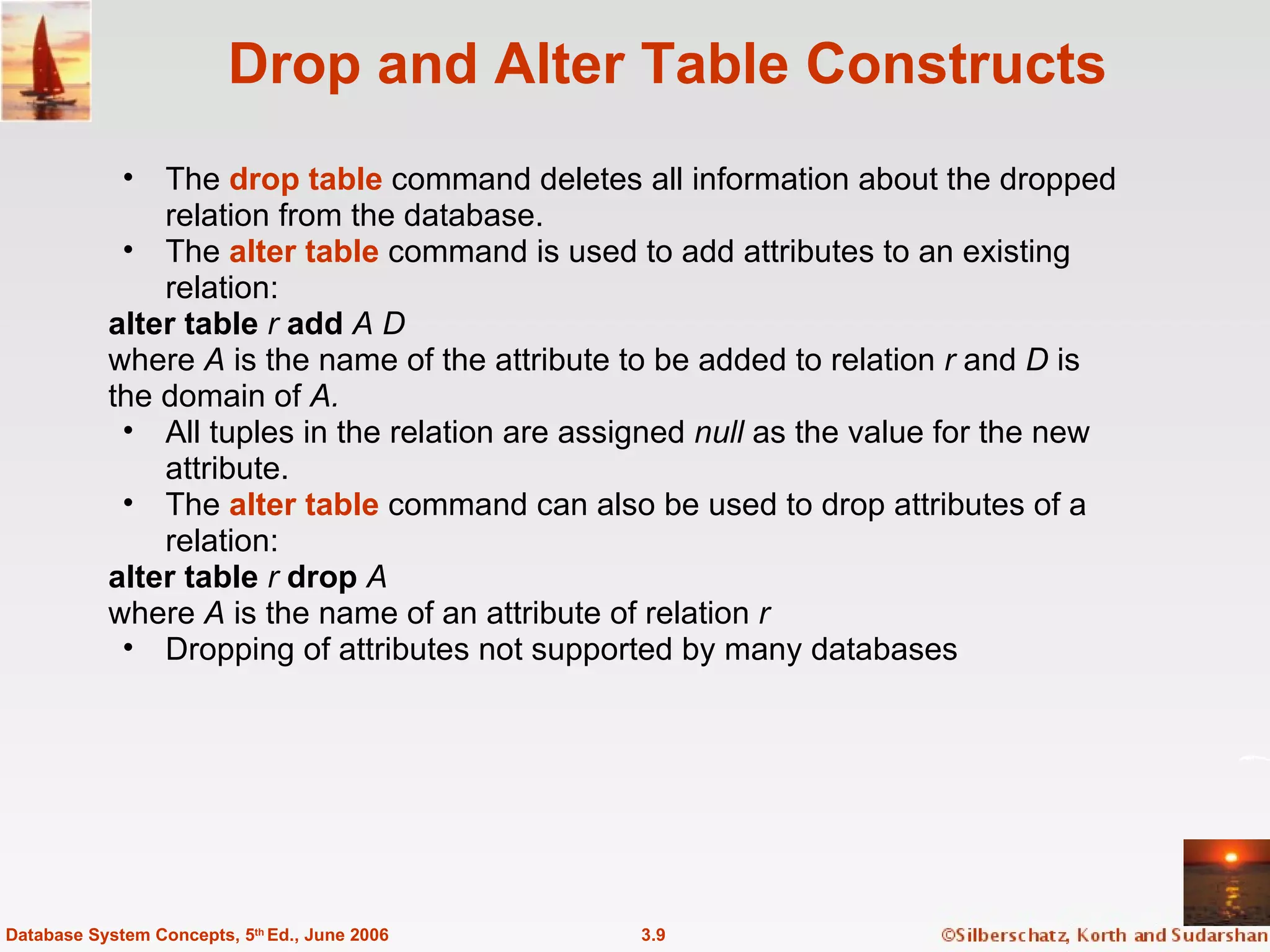
Drop and Alter Table Constructs The  drop table   command deletes all information about the dropped relation from the database. The  alter table  command is used to add attributes to an existing relation:  alter table  r  add  A D where  A  is the name of the attribute to be added to relation  r  and  D  is the domain of  A. All tuples in the relation are assigned  null  as the value for the new attribute.  The  alter table  command can also be used to drop attributes of a relation: alter table  r  drop  A  where  A  is the name of an attribute of relation  r Dropping of attributes not supported by many databases 3.9 Database System Concepts, 5 th  Ed., June 2006
Basic Query Structure  A typical SQL query has the form: select  A 1 ,  A 2 , ...,  A n from   r 1 ,  r 2 , ...,  r m where  P A i  represents an attribute R i  represents a relation P  is a predicate. This query is equivalent to the relational algebra expression. The result of an SQL query is a relation. 3.10 Database System Concepts, 5 th  Ed., June 2006
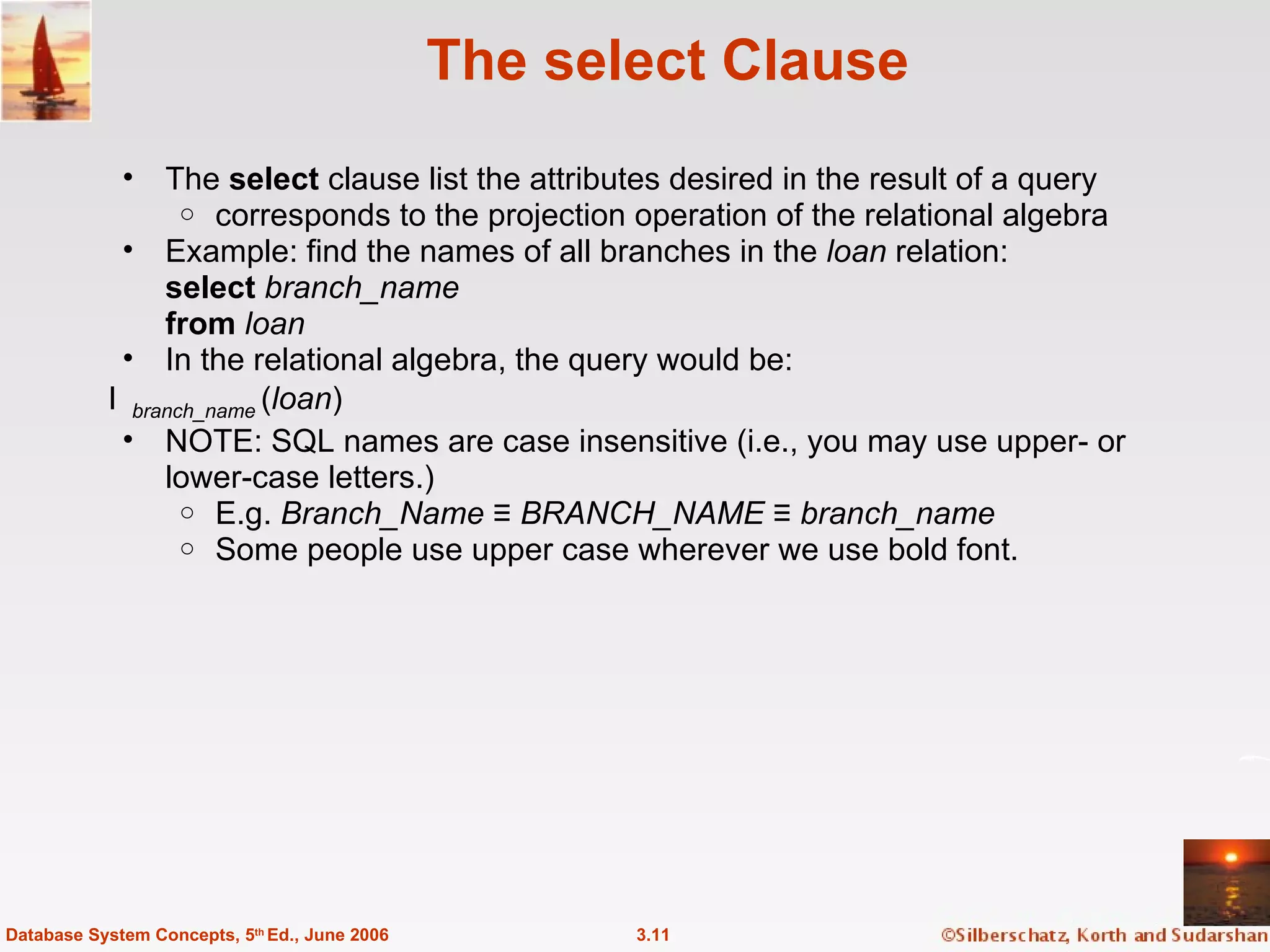
The select Clause The  select  clause list the attributes desired in the result of a query corresponds to the projection operation of the relational algebra Example: find the names of all branches in the  loan  relation: select  branch_name from  loan In the relational algebra, the query would be:   branch_name  ( loan ) NOTE: SQL names are case insensitive (i.e., you may use upper- or lower-case letters.)  E.g.  Branch_Name  ≡  BRANCH_NAME  ≡  branch_name Some people use upper case wherever we use bold font. 3.11 Database System Concepts, 5 th  Ed., June 2006
The select Clause (Cont.) SQL allows duplicates in relations as well as in query results. To force the elimination of duplicates, insert the keyword  distinct  after select . Find the names of all branches in the  loan  relations, and remove duplicates select distinct  branch_name from  loan The keyword  all  specifies that duplicates not be removed. select all   branch_name from  loan 3.12 Database System Concepts, 5 th  Ed., June 2006
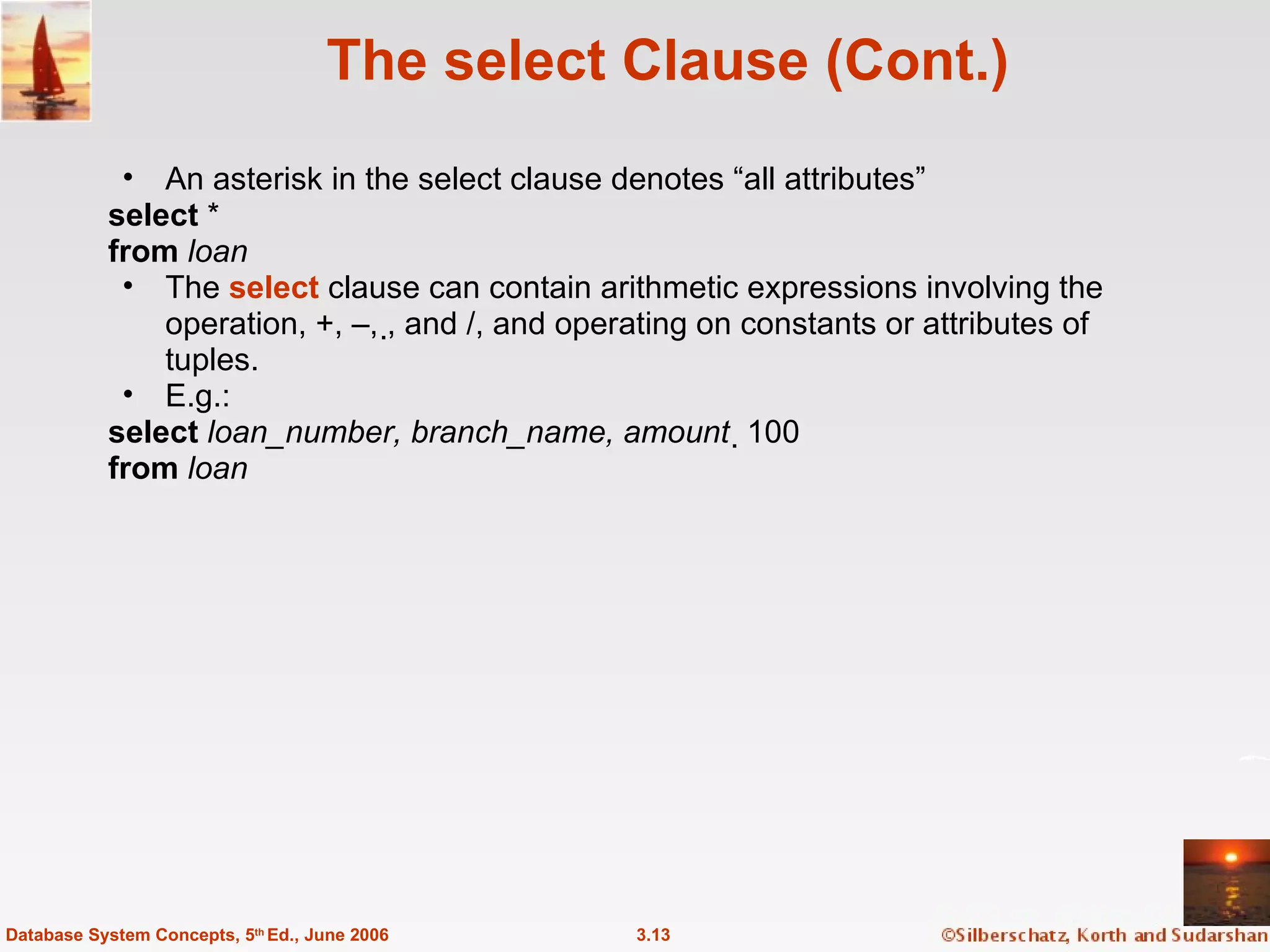
The select Clause (Cont.) An asterisk in the select clause denotes “all attributes” select  * from  loan The  select  clause can contain arithmetic expressions involving the operation, +, –, , and /, and operating on constants or attributes of tuples. E.g.:  select   loan_number, branch_name, amount   100 from  loan 3.13 Database System Concepts, 5 th  Ed., June 2006
The where Clause The  where   clause specifies conditions that the result must satisfy Corresponds to the selection predicate of the relational algebra.  To find all loan number for loans made at the Perryridge branch with loan amounts greater than $1200. select  loan_number from  loan where  branch_name =   ' Perryridge'   and  amount  > 1200 Comparison results can be combined using the logical connectives  and, or,  and  not.   3.14 Database System Concepts, 5 th  Ed., June 2006
The from Clause The  from   clause lists the relations involved in the query Corresponds to the Cartesian product operation of the relational algebra. Find the Cartesian product  borrower X loan select   from  borrower, loan 3.15 Database System Concepts, 5 th  Ed., June 2006 Find the name, loan number and loan amount of all customers  having a loan at the Perryridge branch. select  customer_name, borrower.loan_number, amount from  borrower, loan where  borrower.loan_number = loan.loan_number  and branch_name =  'Perryridge'
The Rename Operation SQL allows renaming relations and attributes using the  as  clause: old-name  as  new-name E.g. Find the name, loan number and loan amount of all customers; rename the column name  loan_number  as  loan_id. 3.16 Database System Concepts, 5 th  Ed., June 2006 select  customer_name, borrower.loan_number  as  loan_id, amount from  borrower, loan where  borrower.loan_number = loan.loan_number
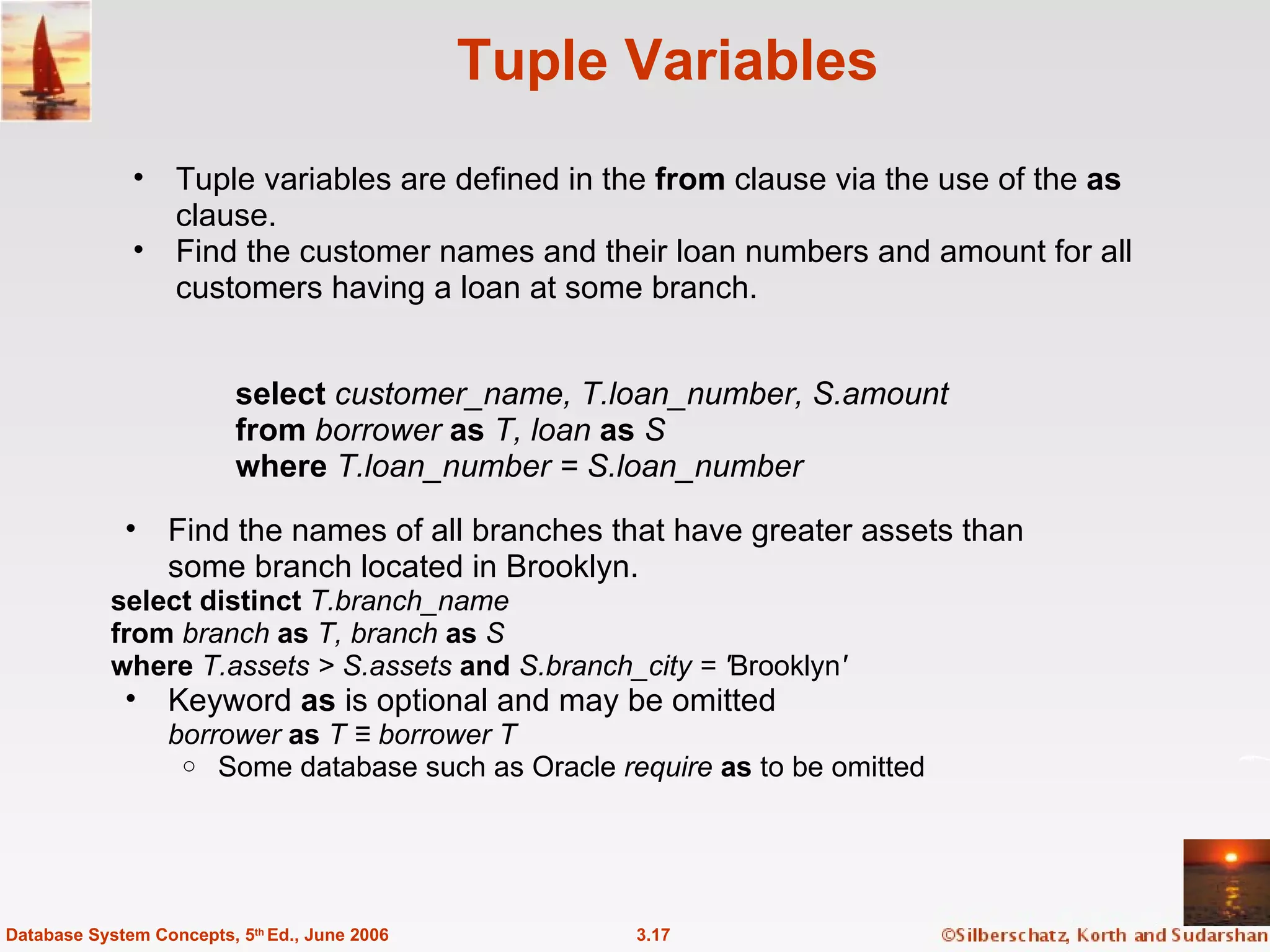
Tuple Variables Tuple variables are defined in the  from  clause via the use of the  as  clause. Find the customer names and their loan numbers and amount for all customers having a loan at some branch. 3.17 Database System Concepts, 5 th  Ed., June 2006 Find the names of all branches that have greater assets than  some branch located in Brooklyn. select distinct  T.branch_name from  branch  as  T, branch  as  S where  T.assets > S.assets  and  S.branch_city = ' Brooklyn '  Keyword  as  is optional and may be omitted borrower  as  T ≡ borrower   T Some database such as Oracle  require   as  to be omitted select  customer_name, T.loan_number, S.amount from  borrower  as  T, loan  as  S where  T.loan_number = S.loan_number
String Operations SQL includes a string-matching operator for comparisons on character strings. The operator “like” uses patterns that are described using two special characters: percent (%). The % character matches any substring. underscore (_). The _ character matches any character. Find the names of all customers whose street includes the substring “Main”. select  customer_name from  customer where   customer_street  like ' % Main%'  Match the name “Main%” like ' Main\%'  escape ' \'  SQL supports a variety of string operations such as concatenation (using “||”) converting from upper to lower case (and vice versa) finding string length, extracting substrings, etc. 3.18 Database System Concepts, 5 th  Ed., June 2006
Ordering the Display of Tuples List in alphabetic order the names of all customers having a loan in Perryridge branch select distinct  customer_name from  borrower, loan where  borrower loan_number = loan.loan_number  and branch_name =  'Perryridge'  order by  customer_name We may specify  desc  for descending order or  asc  for ascending order, for each attribute; ascending order is the default. Example:  order by   customer_name   desc 3.19 Database System Concepts, 5 th  Ed., June 2006
Duplicates In relations with duplicates, SQL can define how many copies of tuples appear in the result. Multiset  versions of some of the relational algebra operators – given multiset relations  r 1  and  r 2 : 1.     ( r 1 ) :  If there are  c 1  copies of tuple  t 1  in  r 1 , and  t 1  satisfies selections    , , then there are  c 1  copies of  t 1  in     ( r 1 ) . 2.   A  ( r  ):  For each copy of tuple  t 1   in  r 1 ,  there is a copy of tuple    A  ( t 1 )  in  A  ( r 1 ) where  A  ( t 1 ) denotes the projection of the single tuple  t 1 . 3.  r 1  x  r 2  :  If there are  c 1  copies of tuple  t 1   in  r 1  and  c 2  copies of tuple  t 2  in  r 2 , there are  c 1  x  c 2  copies of the tuple  t 1 . t 2  in  r 1  x  r 2 3.20 Database System Concepts, 5 th  Ed., June 2006
Duplicates (Cont.) Example: Suppose multiset relations  r 1  ( A, B ) and  r 2  ( C ) are as follows: r 1  = {(1,  a ) (2, a )}  r 2  = {(2), (3), (3)} Then  B ( r 1 ) would be {(a), (a)}, while  B ( r 1 ) x  r 2  would be {( a ,2), ( a ,2), ( a ,3), ( a ,3), ( a ,3), ( a ,3)} SQL duplicate semantics:  select  A 1 , ,  A 2 , ...,  A n from  r 1 ,  r 2 , ...,  r m where  P is equivalent to the  multiset  version of the expression: 3.21 Database System Concepts, 5 th  Ed., June 2006
Set Operations The set operations  union ,  intersect ,  and  except   operate on relations and correspond to the relational algebra operations  Each of the above operations automatically eliminates duplicates; to retain all duplicates use the corresponding multiset versions  union all ,  intersect all   and  except all . Suppose a tuple occurs  m  times in  r  and  n  times in  s,  then, it occurs: m + n  times in  r  union all  s min( m,n)  times in  r   intersect all  s max(0,  m – n)  times in  r   except all  s 3.22 Database System Concepts, 5 th  Ed., June 2006
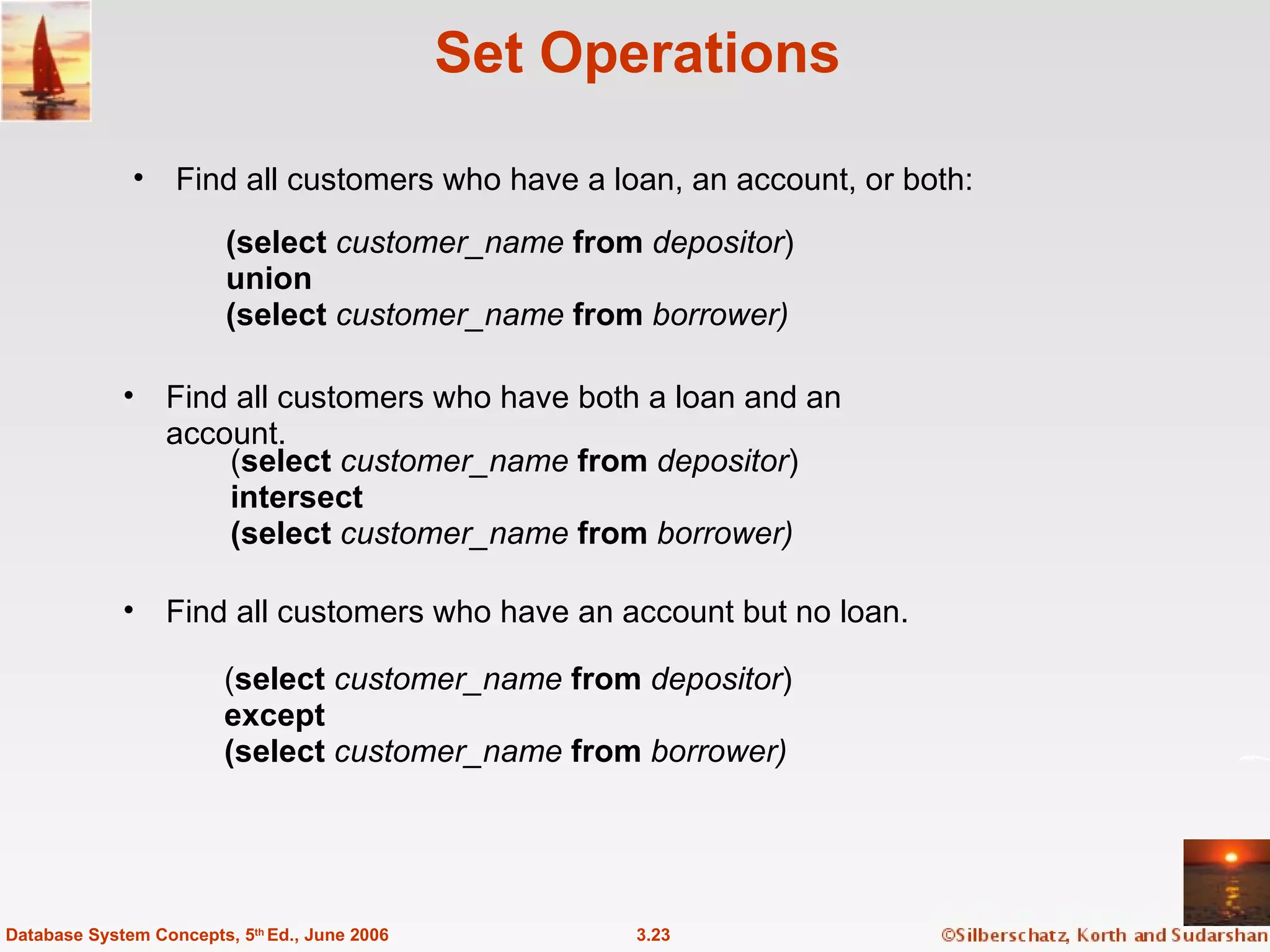
Set Operations Find all customers who have a loan, an account, or both: 3.23 Database System Concepts, 5 th  Ed., June 2006 ( select   customer_name  from  depositor ) except (select   customer_name  from  borrower) ( select   customer_name  from  depositor ) intersect (select   customer_name  from  borrower) Find all customers who have an account but no loan.  (select   customer_name  from  depositor ) union (select   customer_name  from  borrower) Find all customers who have both a loan and an account.
Aggregate Functions These functions operate on the multiset of values of a column of a relation, and return a value avg:  average value min:  minimum value max:  maximum value sum:  sum of values count:  number of values 3.24 Database System Concepts, 5 th  Ed., June 2006
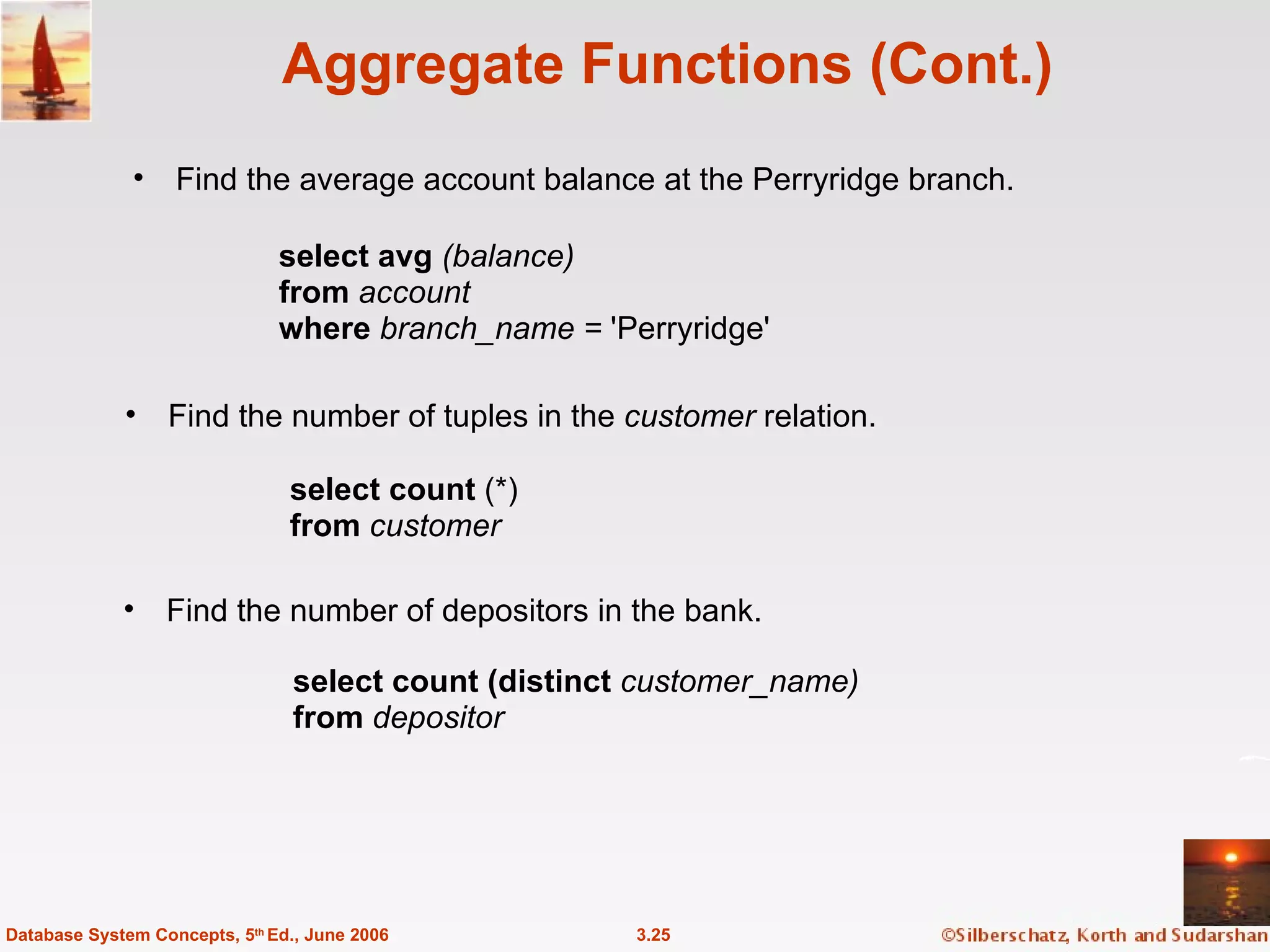
Aggregate Functions (Cont.) Find the average account balance at the Perryridge branch. 3.25 Database System Concepts, 5 th  Ed., June 2006 Find the number of depositors in the bank. Find the number of tuples in the  customer  relation. select avg  (balance) from  account where  branch_name =  'Perryridge'  select count  (*) from  customer select count (distinct  customer_name) from  depositor
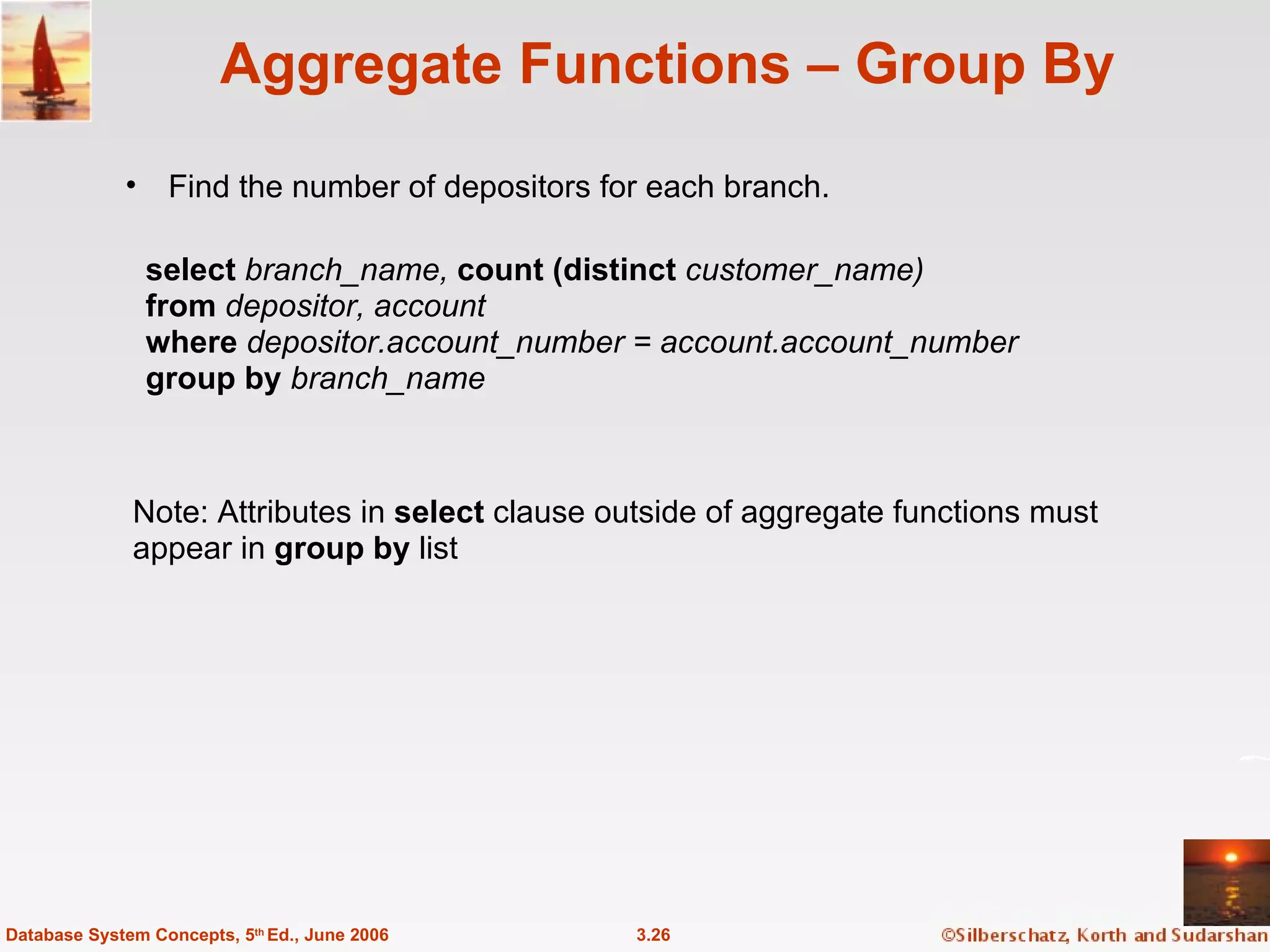
Aggregate Functions – Group By Find the number of depositors for each branch. 3.26 Database System Concepts, 5 th  Ed., June 2006 Note: Attributes in  select  clause outside of aggregate functions must  appear in  group by  list select  branch_name,  count (distinct   customer_name) from  depositor, account where  depositor.account_number = account.account_number group by  branch_name
Aggregate Functions – Having Clause Find the names of all branches where the average account balance is more than $1,200. 3.27 Database System Concepts, 5 th  Ed., June 2006 Note: predicates in the  having  clause are applied after the  formation of groups whereas predicates in the  where   clause are applied before forming groups select  branch_name,  avg  ( balance ) from  account group by  branch_name having avg   ( balance )  >  1200
Nested Subqueries SQL provides a mechanism for the nesting of subqueries. A  subquery  is a  select-from-where  expression that is nested within another query. A common use of subqueries is to perform tests for set membership, set comparisons, and set cardinality. 3.28 Database System Concepts, 5 th  Ed., June 2006
“ In” Construct Find all customers who have both an account and a loan at the bank. 3.29 Database System Concepts, 5 th  Ed., June 2006 Find all customers who have a loan at the bank but do not have  an account at the bank select distinct  customer_name from  borrower where  customer_name  not in  ( select  customer_name from  depositor  ) select distinct  customer_name from  borrower where  customer_name  in  ( select  customer_name from   depositor  )
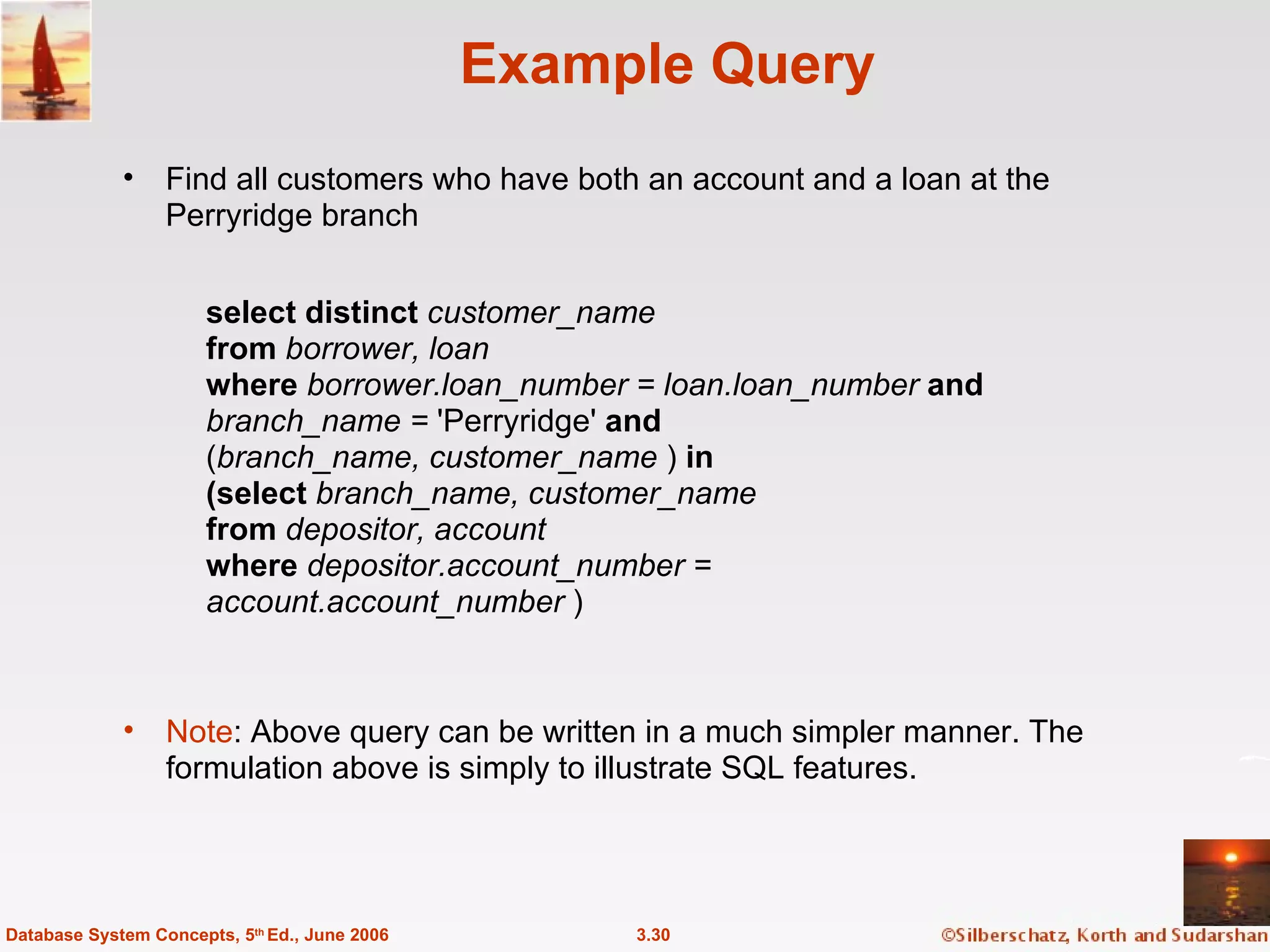
Example Query Find all customers who have both an account and a loan at the Perryridge branch 3.30 Database System Concepts, 5 th  Ed., June 2006 Note : Above query can be written in a much simpler manner. The  formulation above is simply to illustrate SQL features. select distinct   customer_name from  borrower, loan where  borrower.loan_number = loan.loan_number  and branch_name =  'Perryridge'  and ( branch_name, customer_name  )   in (select  branch_name, customer_name from  depositor, account where  depositor.account_number =  account.account_number  )
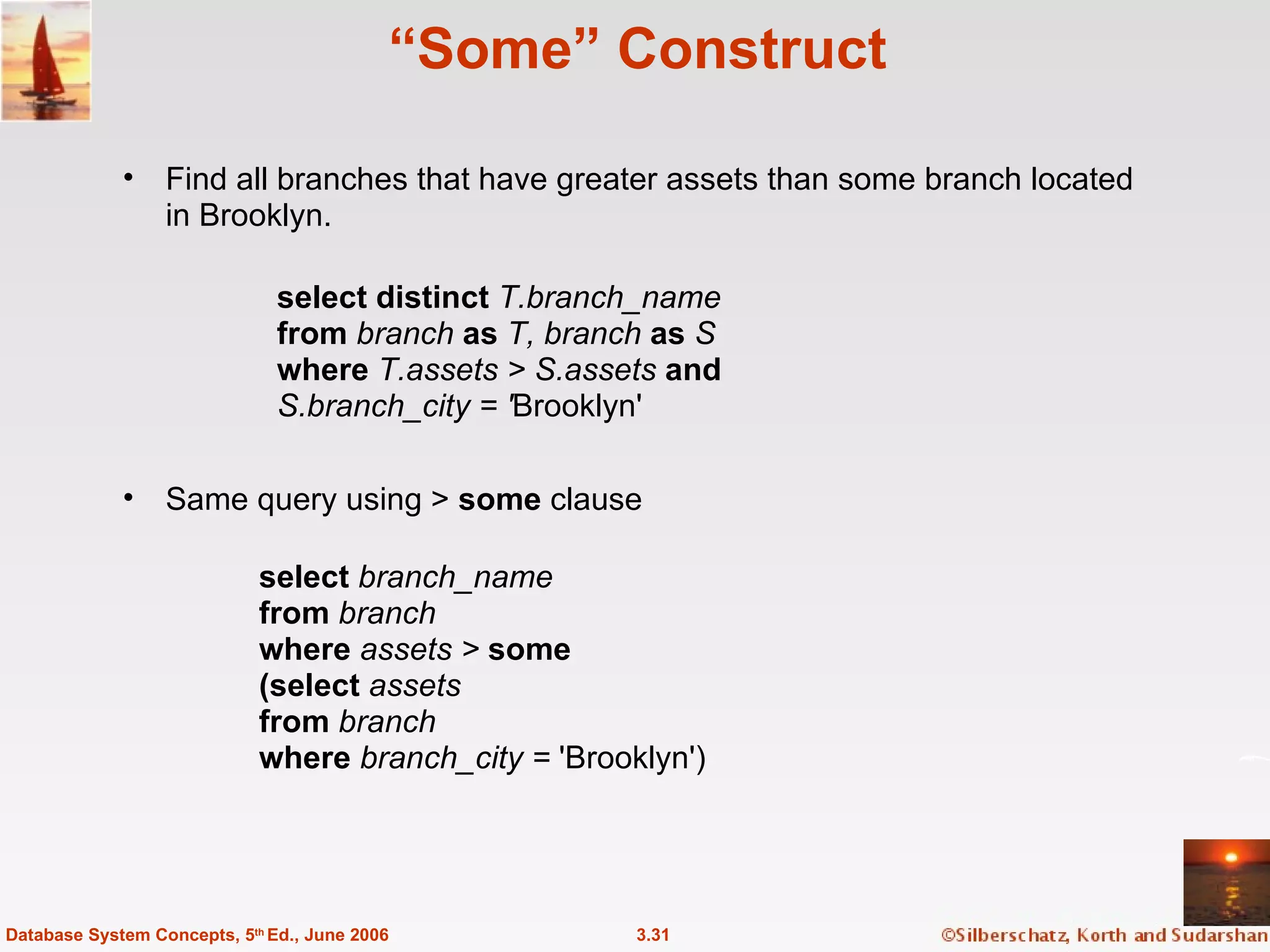
“ Some” Construct Find all branches that have greater assets than some branch located in Brooklyn. 3.31 Database System Concepts, 5 th  Ed., June 2006 Same query using >  some  clause select  branch_name from  branch where  assets >  some (select  assets from  branch where  branch_city =  'Brooklyn')  select distinct  T.branch_name from  branch  as  T, branch  as  S where  T.assets > S.assets  and S.branch_city = ' Brooklyn'
“ All” Construct Find the names of all branches that have greater assets than all branches located in Brooklyn. 3.32 Database System Concepts, 5 th  Ed., June 2006 select  branch_name from  branch where  assets >  all (select  assets from  branch where  branch_city =  'Brooklyn')
“ Exists” Construct Find all customers who have an account at all branches located in Brooklyn. 3.33 Database System Concepts, 5 th  Ed., June 2006 select distinct  S.customer_name from  depositor  as  S where not exists  ( ( select  branch_name from  branch where  branch_city =  'Brooklyn')  except ( select  R.branch_name from  depositor  as  T, account  as  R where  T.account_number = R.account_number  and S.customer_name = T.customer_name  )) Note that  X – Y = Ø    X   Y Note:  Cannot write this query using   =  all   and its variants
Absence of Duplicate Tuples The  unique  construct tests whether a subquery has any duplicate tuples in its result. Find all customers who have at most one account at the Perryridge branch. select  T.customer_name from  depositor  as  T where unique  ( select  R.customer_name from  account, depositor  as  R where  T.customer_name = R.customer_name  and R.account_number = account.account_number  and account.branch_name =  'Perryridge')  3.34 Database System Concepts, 5 th  Ed., June 2006
Example Query Find all customers who have at least two accounts at the Perryridge branch.  3.35 Database System Concepts, 5 th  Ed., June 2006 select distinct  T.customer_name from  depositor  as  T where not unique  ( select  R.customer_name from  account, depositor  as  R where  T.customer_name  = R.customer_name  and R.account_number = account.account_number  and account.branch_name =  'Perryridge')  Variable from outer level is known as a  correlation variable
Modification of the Database – Deletion Delete all account tuples at the Perryridge branch delete from  account where  branch_name =  'Perryridge'  Delete all accounts at every branch located in the city ‘Needham’. delete from  account where  branch_name  in  ( select  branch_name from  branch where  branch_city =  'Needham')  3.36 Database System Concepts, 5 th  Ed., June 2006
Example Query Delete the record of all accounts with balances below the average at the bank. 3.37 Database System Concepts, 5 th  Ed., June 2006 delete from  account where  balance  < ( select avg  ( balance  ) from  account  ) Problem: as we delete tuples from deposit, the average balance changes Solution used in SQL: 1. First, compute  avg  balance and find all tuples to delete 2. Next, delete all tuples found above (without recomputing  avg  or  retesting the tuples)
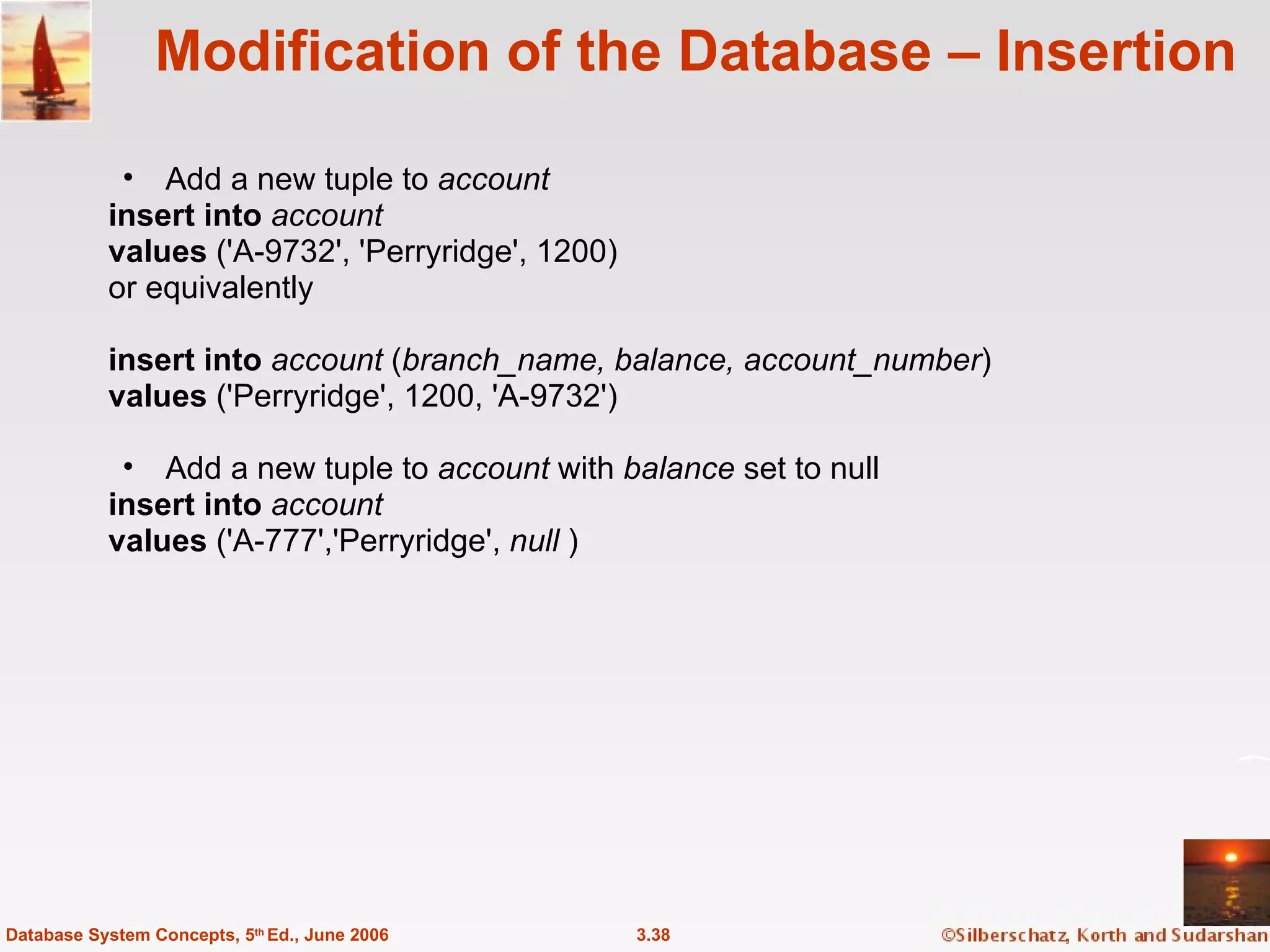
Modification of the Database – Insertion Add a new tuple to  account insert into  account values  ('A-9732', 'Perryridge', 1200) or equivalently insert into  account  ( branch_name, balance, account_number ) values  ('Perryridge', 1200, 'A-9732')  Add a new tuple to  account  with  balance  set to null insert into  account values  ('A-777','Perryridge',  null  ) 3.38 Database System Concepts, 5 th  Ed., June 2006
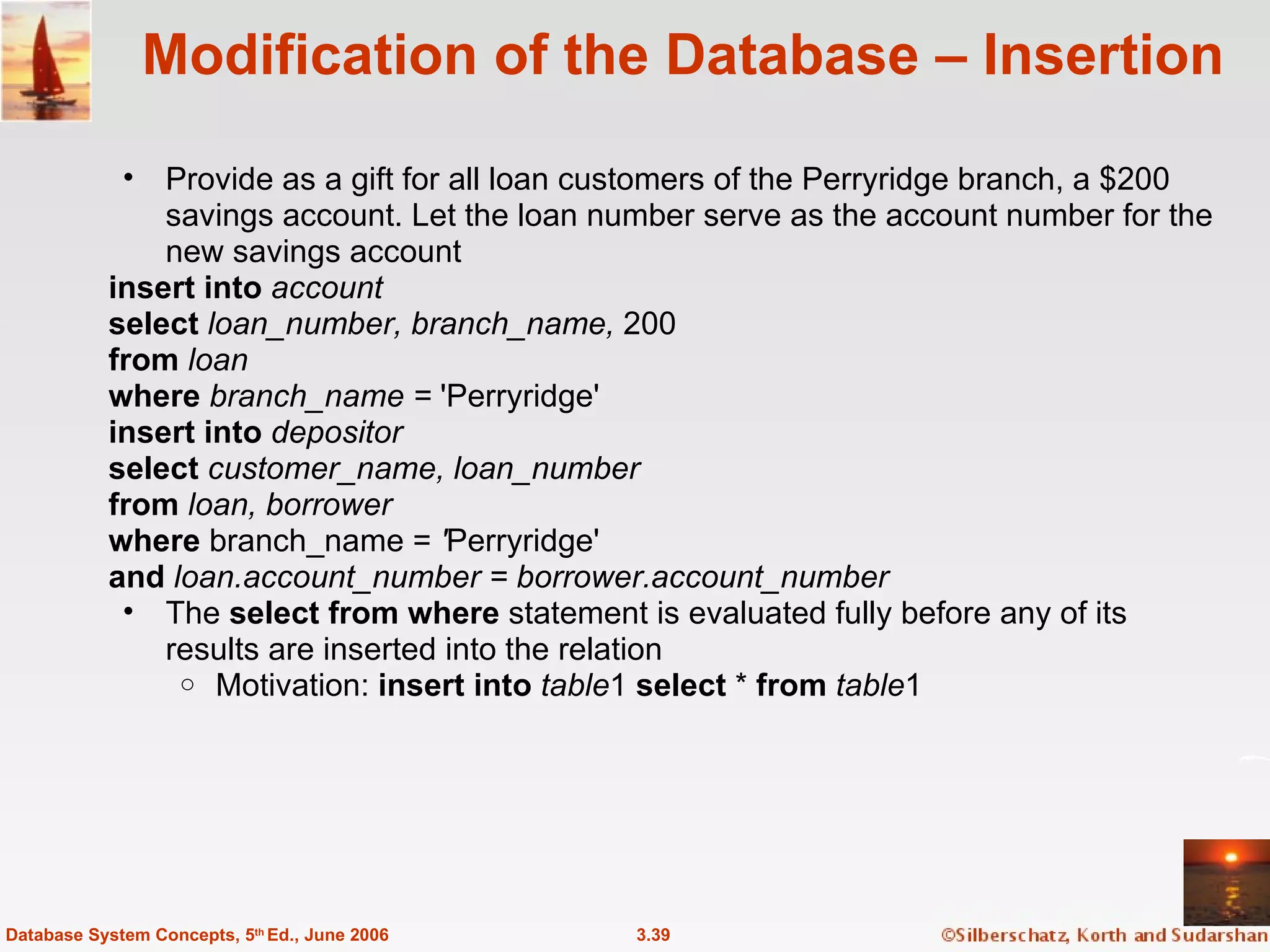
Modification of the Database – Insertion Provide as a gift for all loan customers of the Perryridge branch, a $200 savings account. Let the loan number serve as the account number for the new savings account insert into  account select  loan_number, branch_name,  200 from  loan where  branch_name =  'Perryridge'  insert into  depositor select  customer_name, loan_number from  loan, borrower where  branch_name =  ' Perryridge'  and  loan.account_number = borrower.account_number The  select from where  statement is evaluated fully before any of its results are inserted into the relation  Motivation:  insert into   table 1  select  *  from   table 1 3.39 Database System Concepts, 5 th  Ed., June 2006
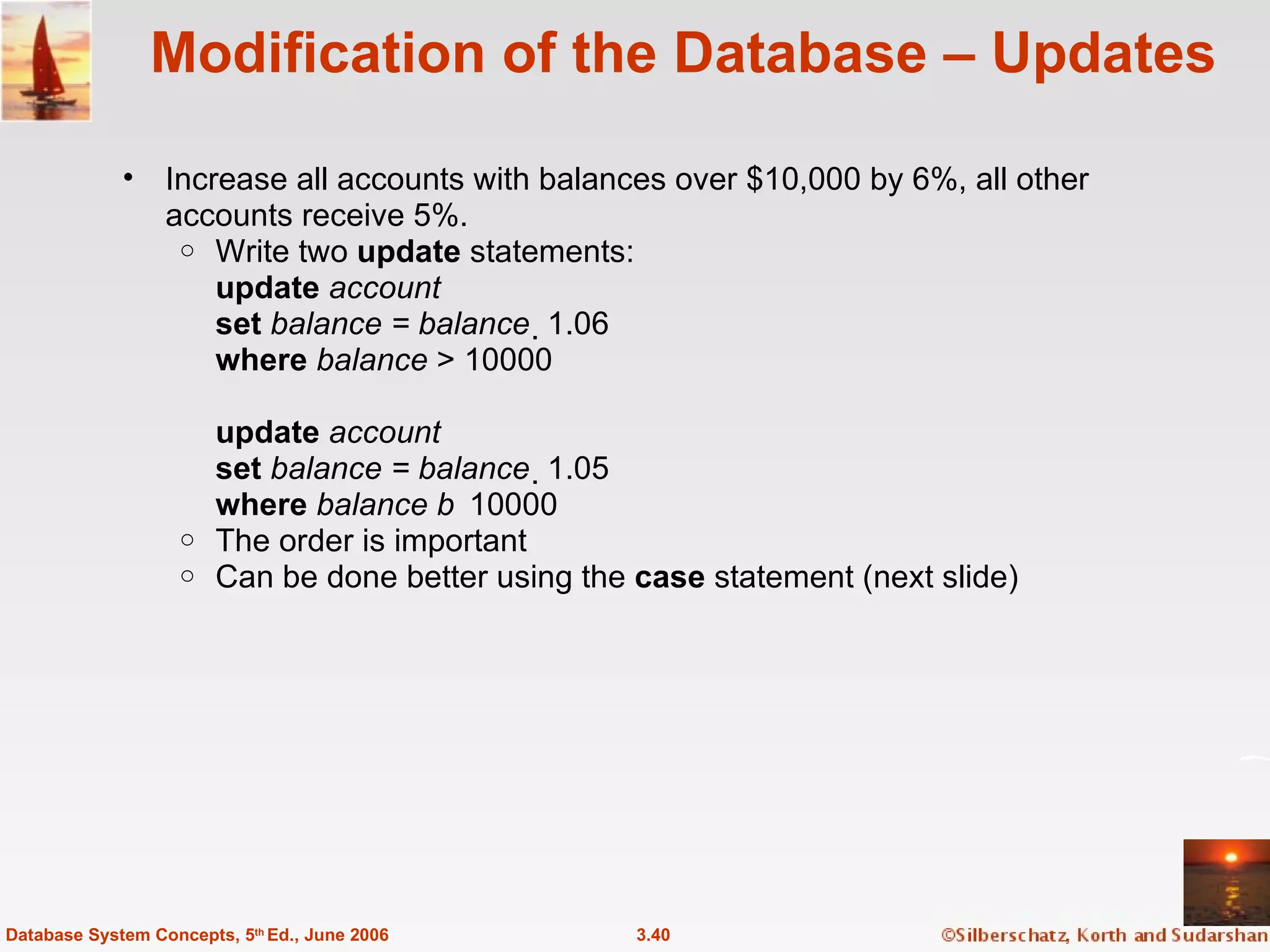
Modification of the Database – Updates Increase all accounts with balances over $10,000 by 6%, all other accounts receive 5%. Write two  update  statements: update  account set  balance = balance   1.06 where  balance  > 10000 update  account set  balance = balance   1.05 where  balance   10000 The order is important Can be done better using the  case  statement (next slide) 3.40 Database System Concepts, 5 th  Ed., June 2006
Case Statement for Conditional Updates Same query as before: Increase all accounts with balances over $10,000 by 6%, all other accounts receive 5%. update   account set   balance  =  case   when   balance  <= 10000  then   balance  *1.05 else   balance  * 1.06 end 3.41 Database System Concepts, 5 th  Ed., June 2006
More Features Database System Concepts, 5th Ed . ©Silberschatz, Korth and Sudarshan See  www.db-book.com  for conditions on re-use
Joined Relations** Join operations  take two relations and return as a result another relation. These additional operations are typically used as subquery expressions in the  from  clause Join condition  – defines which tuples in the two relations match, and what attributes are present in the result of the join. Join type  – defines how tuples in each relation that do not match any tuple in the other relation (based on the join condition) are treated. 3.43 Database System Concepts, 5 th  Ed., June 2006
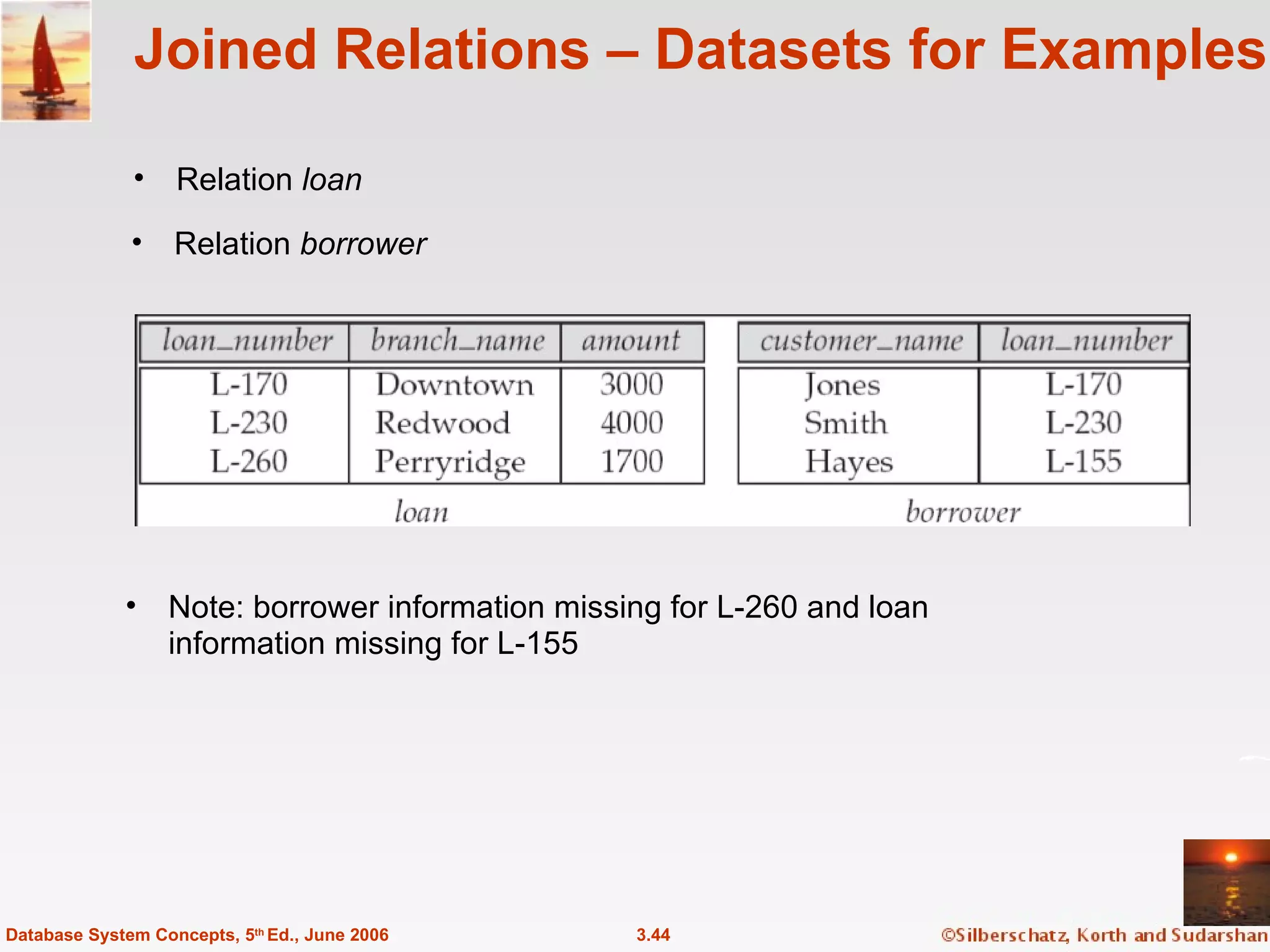
Joined Relations – Datasets for Examples Relation  loan 3.44 Database System Concepts, 5 th  Ed., June 2006 Relation  borrower Note: borrower information missing for L-260 and loan information missing for L-155
Joined Relations – Examples  loan  inner join  borrower  on loan.loan_number = borrower.loan_number 3.45 Database System Concepts, 5 th  Ed., June 2006 loan  left outer join  borrower  on loan.loan_number = borrower.loan_number
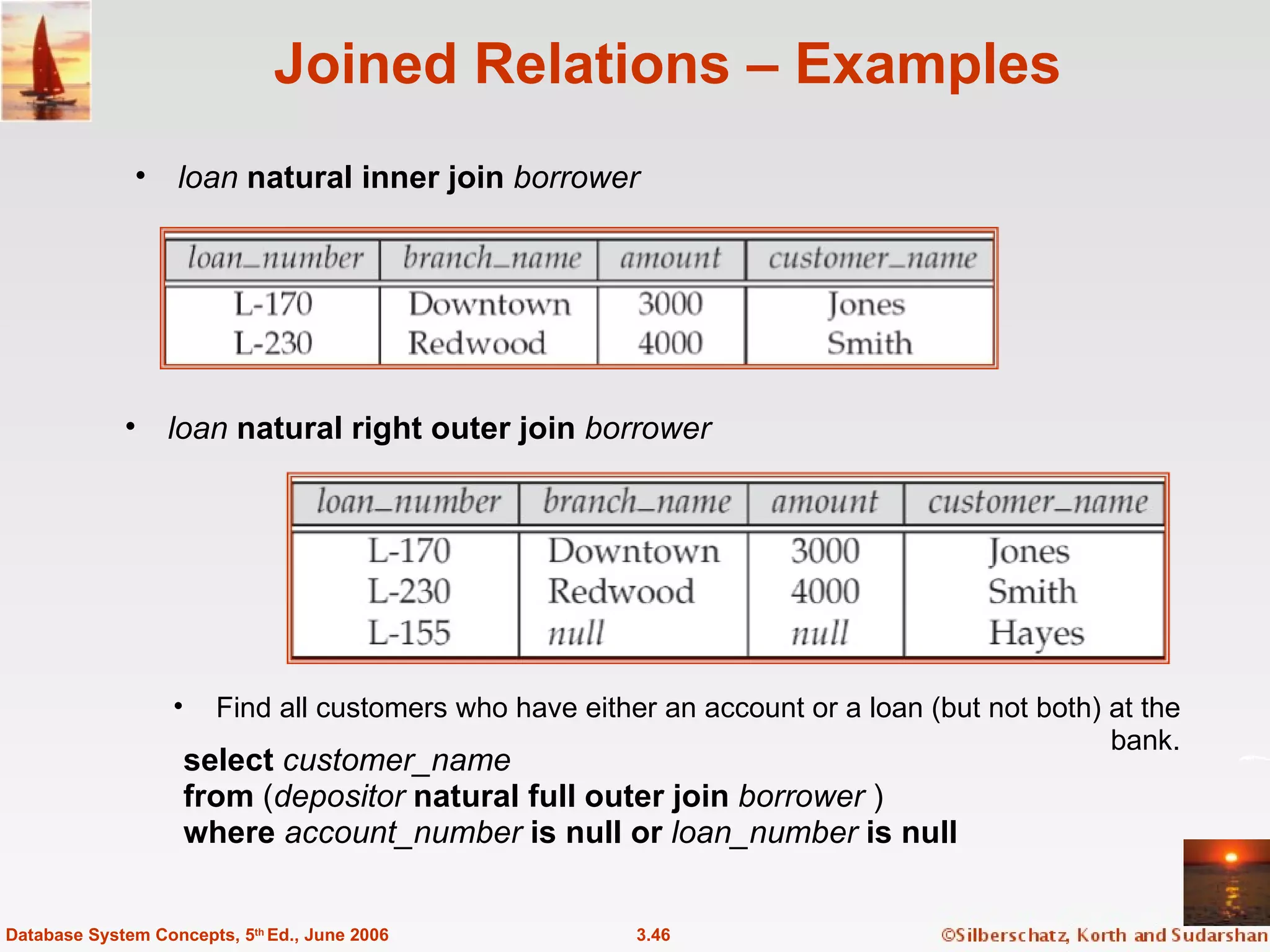
Joined Relations – Examples loan  natural inner join   borrower 3.46 Database System Concepts, 5 th  Ed., June 2006 loan  natural right outer join  borrower Find all customers who have either an account or a loan (but not both) at the bank. select  customer_name from  ( depositor  natural full outer join  borrower  ) where  account_number  is null or  loan_number  is null
Joined Relations – Examples Natural join can get into trouble if two relations have an attribute with  same name that should not affect the join condition e.g. an attribute such as  remarks  may be present in many tables Solution:  loan  full outer join  borrower  using  ( loan_number ) 3.47 Database System Concepts, 5 th  Ed., June 2006
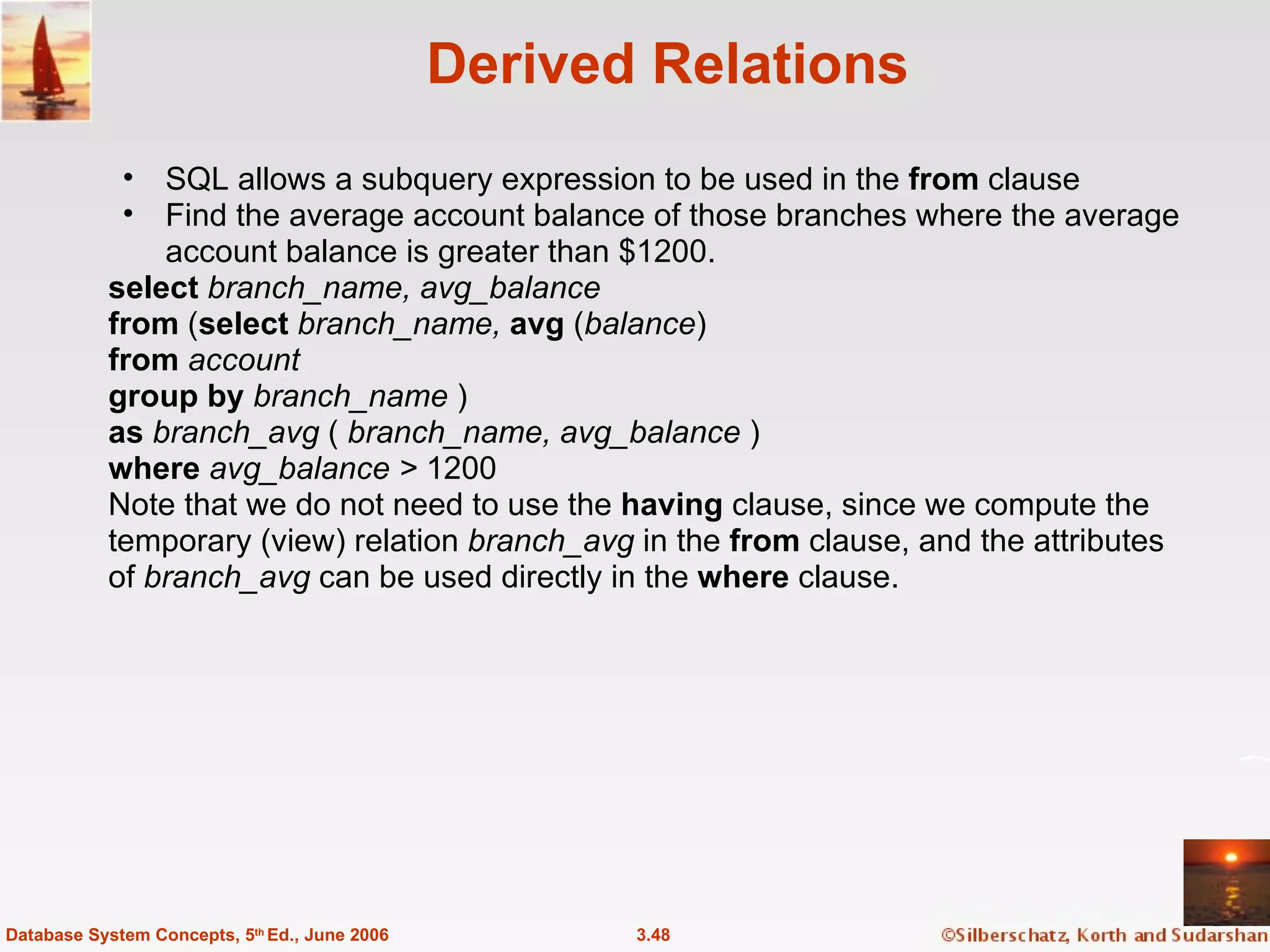
Derived Relations SQL allows a subquery expression to be used in the  from  clause Find the average account balance of those branches where the average account balance is greater than $1200. select  branch_name, avg_balance from  ( select  branch_name,  avg  ( balance ) from  account group by  branch_name  ) as  branch_avg  (  branch_name, avg_balance  ) where  avg_balance >  1200 Note that we do not need to use the  having  clause, since we compute the temporary (view) relation  branch_avg  in the  from  clause, and the attributes of  branch_avg  can be used directly in the  where  clause. 3.48 Database System Concepts, 5 th  Ed., June 2006
View Definition A relation that is not of the conceptual model but is made visible to a user as a “virtual relation” is called a  view . A view is defined using the  create view  statement which has the form create view  v  as  <  query expression > where <query expression> is any legal SQL expression. The view name is represented by  v. Once a view is defined, the view name can be used to refer to the virtual relation that the view generates. 3.49 Database System Concepts, 5 th  Ed., June 2006
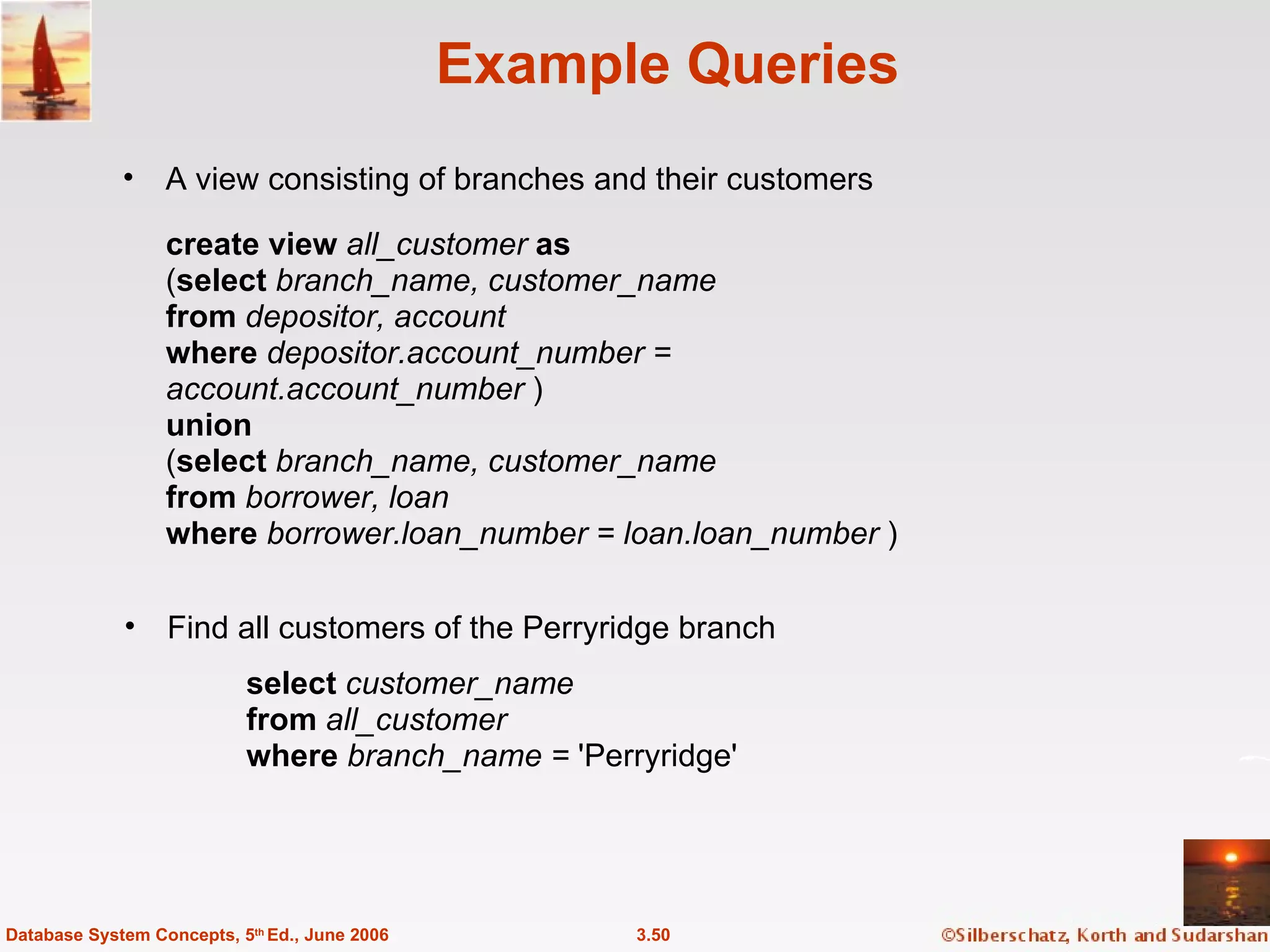
Example Queries A view consisting of branches and their customers 3.50 Database System Concepts, 5 th  Ed., June 2006 Find all customers of the Perryridge branch create view  all_customer  as ( select  branch_name, customer_name from  depositor, account where  depositor.account_number = account.account_number  ) union ( select  branch_name, customer_name from  borrower, loan where  borrower.loan_number = loan.loan_number  ) select  customer_name from  all_customer where  branch_name =  'Perryridge'
Uses of Views Hiding some information from some users Consider a user who needs to know a customer’s name, loan number and branch name, but has no need to see the loan amount.  Define a view  ( create view  cust_loan_data  as select  customer_name, borrower.loan_number, branch_name from  borrower, loan where  borrower.loan_number = loan.loan_number  ) Grant the user permission to read  cust_loan_data,  but not  borrower or loan Predefined queries to make writing of other queries easier Common example: Aggregate queries used for statistical analysis of data 3.51 Database System Concepts, 5 th  Ed., June 2006
Processing of Views When a view is created the query expression is stored in the database along with the view name the expression is substituted into any query using the view Views definitions containing views One view may be used in the expression defining another view  A view relation  v 1  is said to  depend directly   on a view relation  v 2   if  v 2  is used in the expression defining  v 1 A view relation  v 1  is said to  depend on  view relation  v 2   if either  v 1  depends directly to  v 2  or there is a path of dependencies from  v 1  to  v 2   A view relation  v  is said to be  recursive   if it depends on itself. 3.52 Database System Concepts, 5 th  Ed., June 2006
View Expansion A way to define the meaning of views defined in terms of other views. Let view  v 1  be defined by an expression  e 1  that may itself contain uses of view relations. View expansion of an expression repeats the following replacement step: repeat Find any view relation  v i  in  e 1 Replace the view relation  v i  by the expression defining  v i   until  no more view relations are present in  e 1 As long as the view definitions are not recursive, this loop will terminate 3.53 Database System Concepts, 5 th  Ed., June 2006
With Clause The  with  clause provides a way of defining a temporary view whose definition is available only to the query in which the  with   clause occurs.  Find all accounts with the maximum balance  with   max_balance  ( value )  as   select   max  ( balance ) from   account select   account_number from   account, max_balance where   account.balance = max_balance.value 3.54 Database System Concepts, 5 th  Ed., June 2006
Complex Queries using With Clause Find all branches where the total account deposit is greater than the average of the total account deposits at all branches. 3.55 Database System Concepts, 5 th  Ed., June 2006 with   branch_total  ( branch _ name ,  value )  as select   branch _ name ,  sum  ( balance ) from   account group   by   branch _ name with   branch _ total _ avg  ( value )  as select   avg  ( value ) from   branch _ total select  branch _ name from   branch _ total ,  branch _ total_avg  where   branch_total.value >= branch_total_avg.value Note: the exact syntax supported by your database may vary slightly. E.g.  Oracle syntax is of the form with   branch_total  as  (  select  .. ), branch_total_avg   as  (  select  .. ) select  …
Update of a View Create a view of all loan data in the  loan  relation, hiding the  amount  attribute create view  loan_branch  as select  loan_number, branch_name from  loan Add a new tuple to  loan_branch insert into  loan_branch values  ('L-37‘, 'Perryridge‘)  This insertion must be represented by the insertion of the tuple ('L-37', 'Perryridge',  null  ) into the  loan  relation 3.56 Database System Concepts, 5 th  Ed., June 2006
Updates Through Views (Cont.) Some updates through views are impossible to translate into updates on the database relations create view  v  as select  loan_number, branch_name, amount from  loan where  branch_name =  ‘Perryridge’ insert into  v   values  (  'L-99 ',' Downtown ', '23' )  Others cannot be translated uniquely insert into  all_customer  values  (' Perryridge' , ' John')   Have to choose loan or account, and  create a new loan/account number! Most SQL implementations allow updates only on simple views (without aggregates) defined on a single relation 3.57 Database System Concepts, 5 th  Ed., June 2006
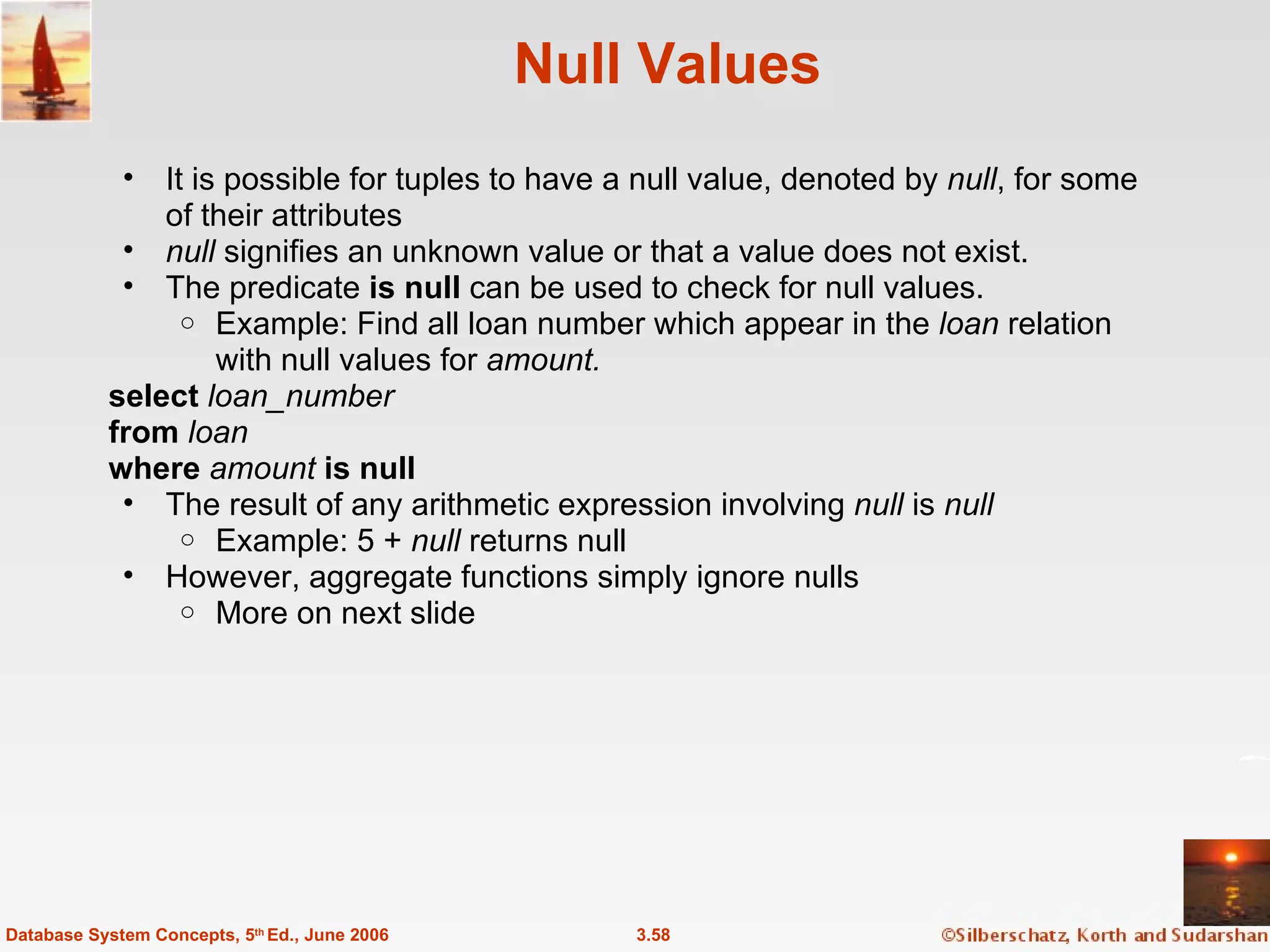
Null Values It is possible for tuples to have a null value, denoted by  null , for some of their attributes null  signifies an unknown value or that a value does not exist. The predicate  is null  can be used to check for null values. Example: Find all loan number which appear in the  loan  relation with null values for  amount. select  loan_number from  loan where  amount  is null The result of any arithmetic expression involving  null  is  null Example: 5 +  null  returns null However, aggregate functions simply ignore nulls More on next slide 3.58 Database System Concepts, 5 th  Ed., June 2006
Null Values and Three Valued Logic Any comparison with  null  returns  unknown Example : 5 < null or null <> null or null = null Three-valued logic using the truth value  unknown : OR: ( unknown   or   true ) =  true , ( unknown   or   false ) =  unknown ( unknown  or  unknown) = unknown AND:  (true  and  unknown) = unknown,  (false  and  unknown) = false, (unknown  and  unknown) = unknown NOT : ( not  unknown) = unknown “ P  is unknown ”   evaluates to true if predicate  P  evaluates to  unknown Result of  where  clause predicate is treated as  false  if it evaluates to  unknown 3.59 Database System Concepts, 5 th  Ed., June 2006
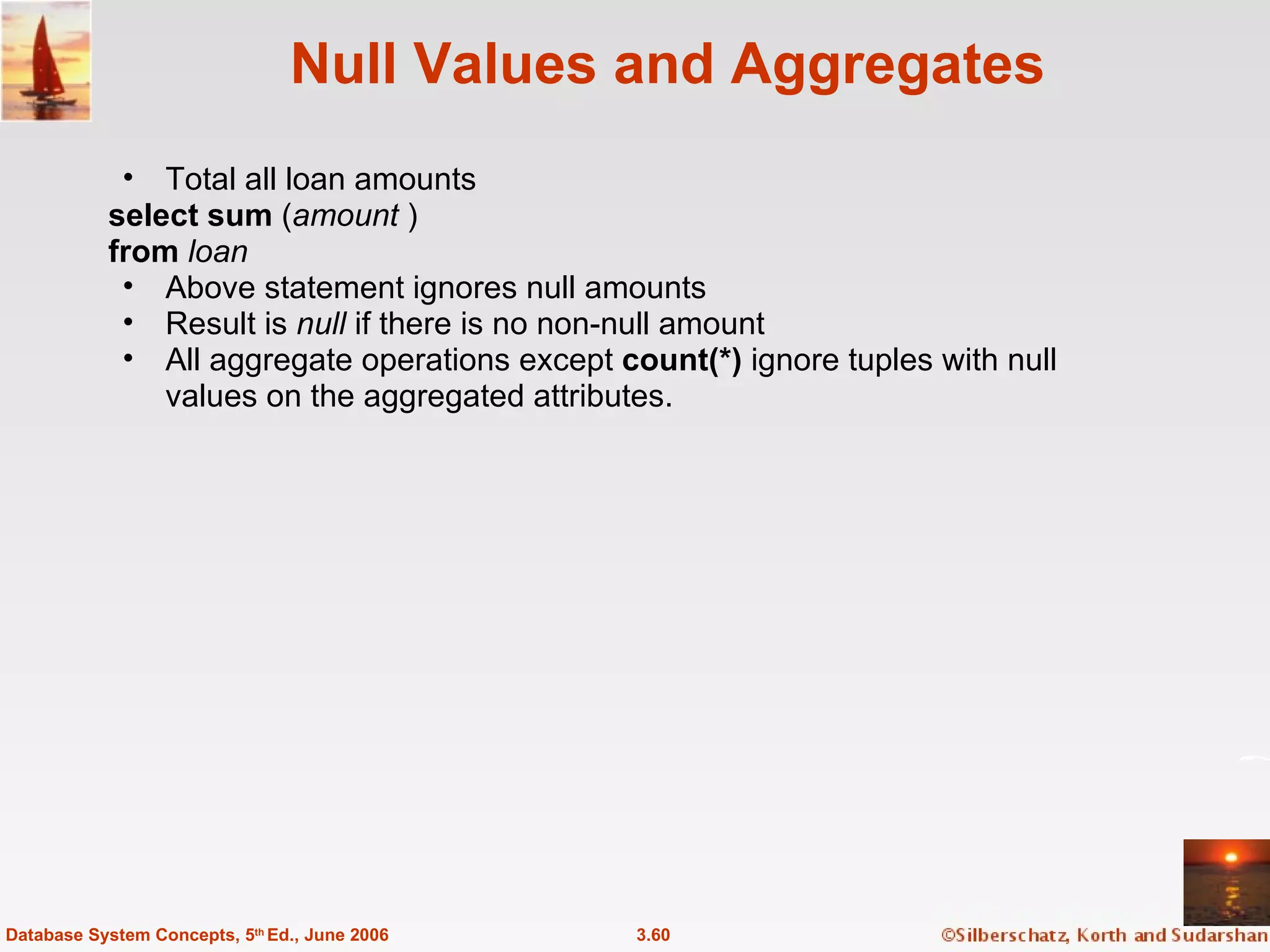
Null Values and Aggregates Total all loan amounts select sum  ( amount  ) from  loan Above statement ignores null amounts Result is  null  if there is no non-null amount All aggregate operations except  count(*)  ignore tuples with null values on the aggregated attributes. 3.60 Database System Concepts, 5 th  Ed., June 2006
End of Chapter 3 Database System Concepts, 5th Ed . ©Silberschatz, Korth and Sudarshan See  www.db-book.com  for conditions on re-use
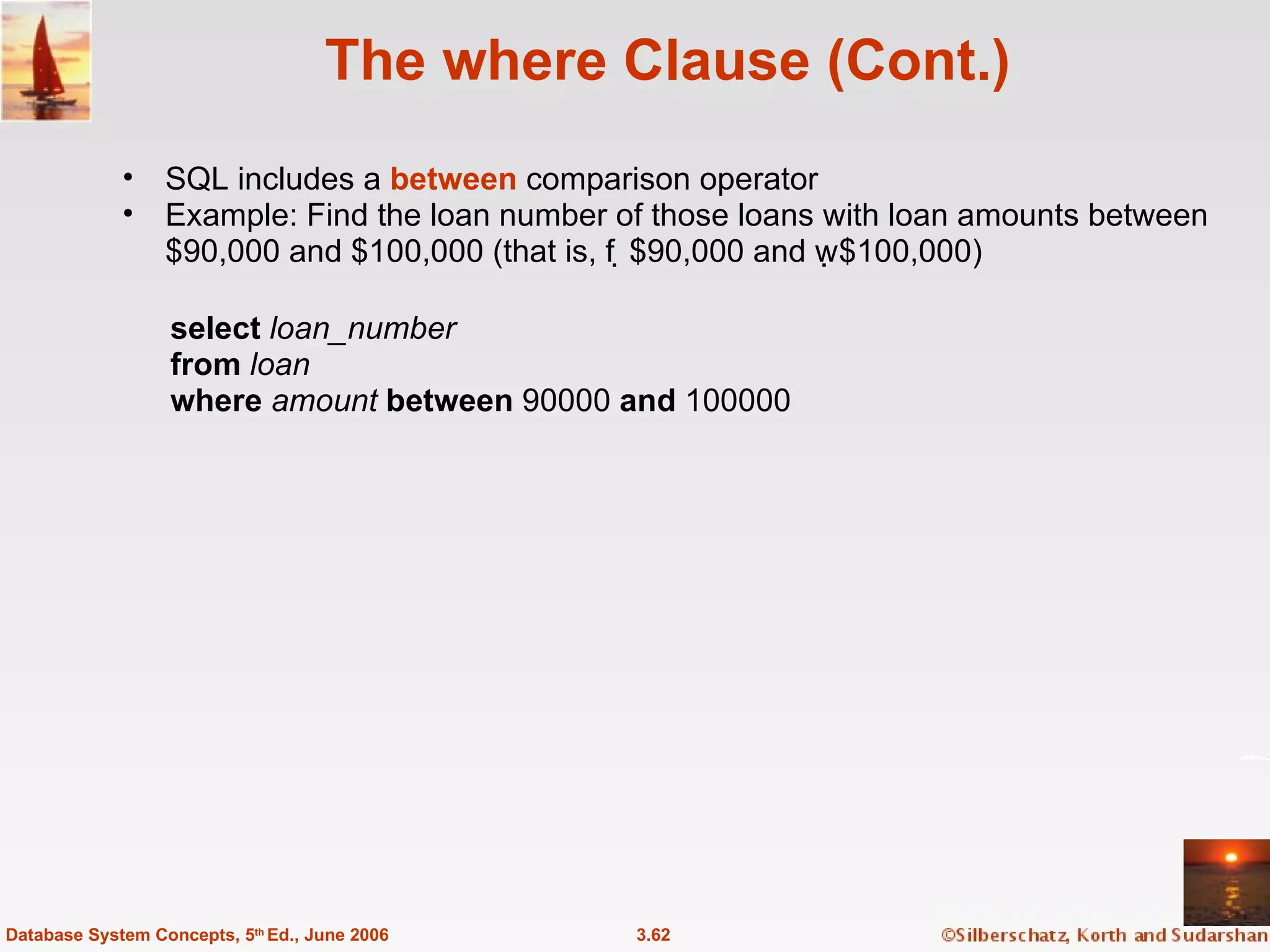
The where Clause (Cont.) SQL includes a  between  comparison operator Example: Find the loan number of those loans with loan amounts between $90,000 and $100,000 (that is, $90,000 and $100,000) 3.62 Database System Concepts, 5 th  Ed., June 2006 select  loan_number from  loan where  amount   between  90000  and  100000
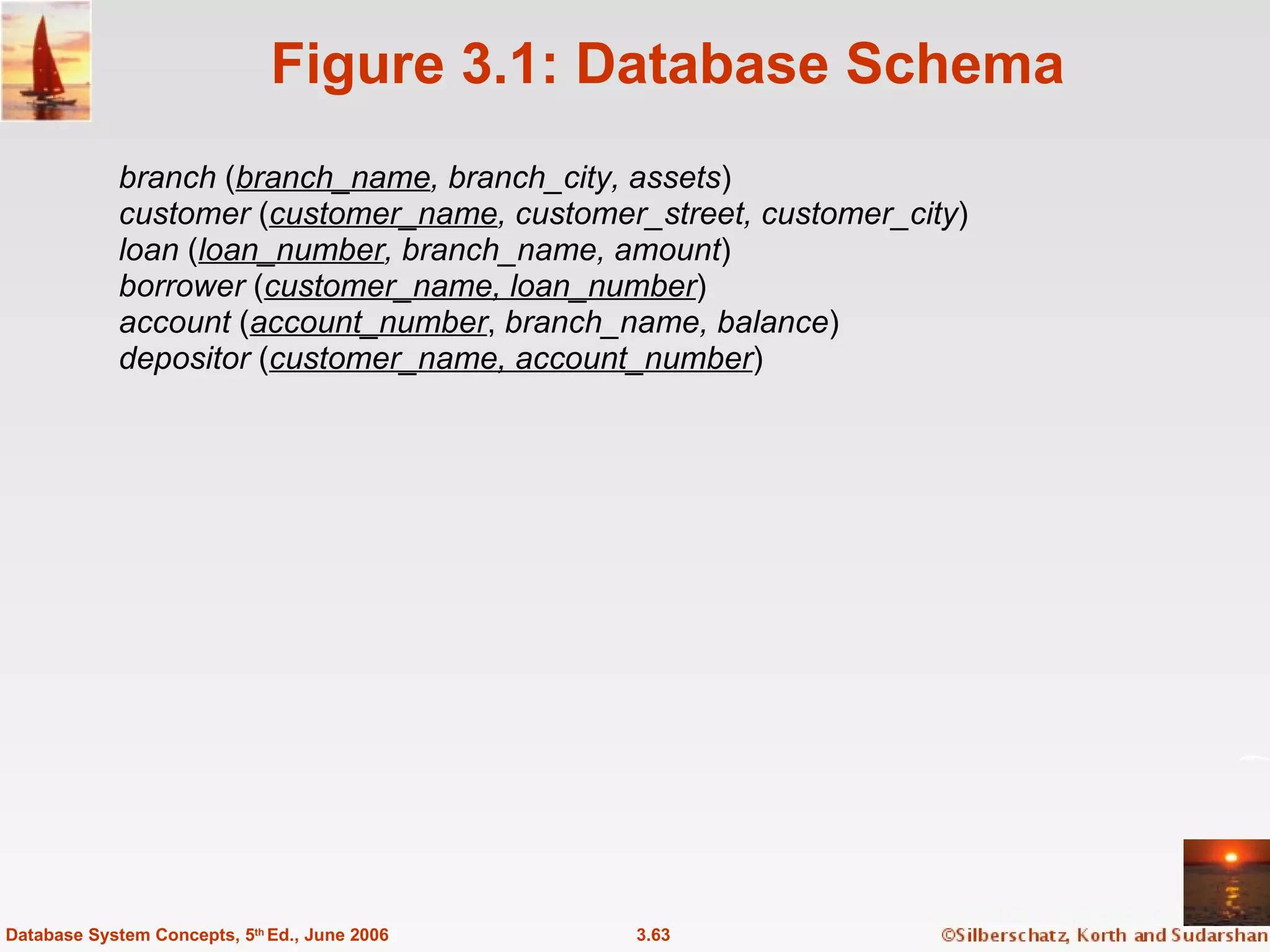
Figure 3.1: Database Schema branch  ( branch_name , branch_city, assets ) customer  ( customer_name , customer_street, customer_city ) loan  ( loan_number , branch_name, amount ) borrower  ( customer_name, loan_number ) account  ( account_number ,  branch_name, balance ) depositor  ( customer_name, account_number ) 3.63 Database System Concepts, 5 th  Ed., June 2006
Definition of Some Clause (=  some )   in However, (  some ) is not equivalent to  not in 3.64 Database System Concepts, 5 th  Ed., June 2006 0 5 0 5 (5     some ) = true (since 0    5) ) = true (5 =  some
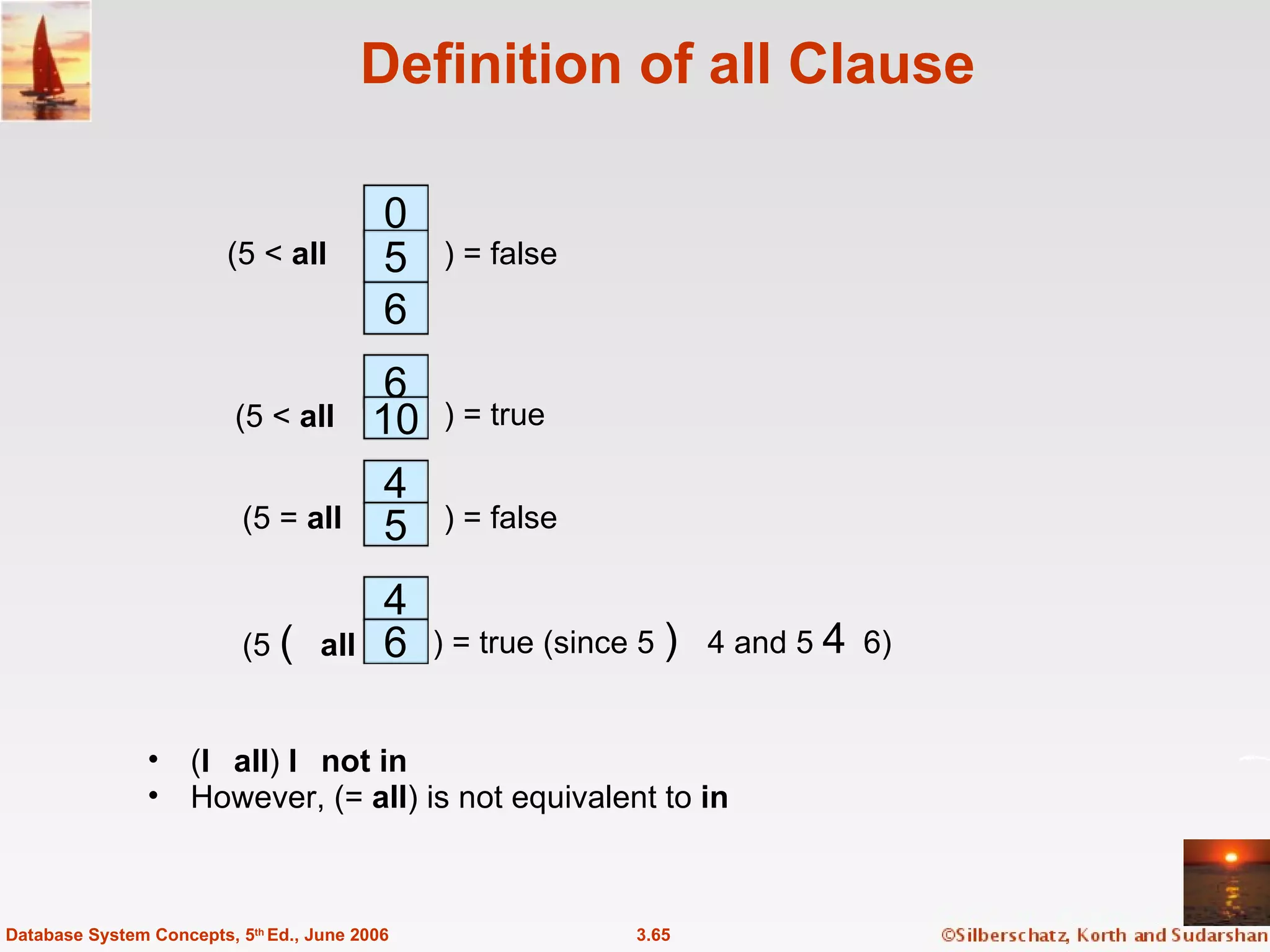
Definition of all Clause (  all )   not in However, (=  all ) is not equivalent to  in 3.65 Database System Concepts, 5 th  Ed., June 2006 0 5 6 (5 <  all ) = false 6 10 4 ) = true 5 4 6 (5     all ) = true (since 5    4 and 5    6) (5 <  all ) = false (5 =  all
Test for Empty Relations The  exists  construct returns the value  true  if the argument subquery is nonempty. exists  r    r    Ø not exists  r    r  =  Ø 3.66 Database System Concepts, 5 th  Ed., June 2006
Figure 3.3: Tuples inserted into  loan  and  borrower 3.67 Database System Concepts, 5 th  Ed., June 2006
Figure 3.4: The  loan  and  borrower  relations 3.68 Database System Concepts, 5 th  Ed., June 2006

ch3

  • 1.
    Chapter 3: SQLDatabase System Concepts, 5th Ed . ©Silberschatz, Korth and Sudarshan See www.db-book.com for conditions on re-use
  • 2.
    Chapter 3: SQLData Definition Basic Query Structure Set Operations Aggregate Functions Null Values Nested Subqueries Complex Queries Views Modification of the Database Joined Relations** 3.2 Database System Concepts, 5 th Ed., June 2006
  • 3.
    History IBM Sequellanguage developed as part of System R project at the IBM San Jose Research Laboratory Renamed Structured Query Language (SQL) ANSI and ISO standard SQL: SQL-86 SQL-89 SQL-92 SQL:1999 (language name became Y2K compliant!) SQL:2003 Commercial systems offer most, if not all, SQL-92 features, plus varying feature sets from later standards and special proprietary features. Not all examples here may work on your particular system. 3.3 Database System Concepts, 5 th Ed., June 2006
  • 4.
    Data Definition LanguageThe schema for each relation, including attribute types. Integrity constraints Authorization information for each relation. Non-standard SQL extensions also allow specification of The set of indices to be maintained for each relations. The physical storage structure of each relation on disk. 3.4 Database System Concepts, 5 th Ed., June 2006 Allows the specification of:
  • 5.
    Create Table ConstructAn SQL relation is defined using the create table command: create table r ( A 1 D 1 , A 2 D 2 , ..., A n D n , (integrity-constraint 1 ), ..., (integrity-constraint k )) r is the name of the relation each A i is an attribute name in the schema of relation r D i is the data type of attribute A i Example: create table branch ( branch_name char (15) , branch_city char( 30), assets integer ) 3.5 Database System Concepts, 5 th Ed., June 2006
  • 6.
    Domain Types inSQL char(n). Fixed length character string, with user-specified length n. varchar(n). Variable length character strings, with user-specified maximum length n. int. Integer (a finite subset of the integers that is machine-dependent). smallint. Small integer (a machine-dependent subset of the integer domain type). numeric(p,d). Fixed point number, with user-specified precision of p digits, with n digits to the right of decimal point. real, double precision. Floating point and double-precision floating point numbers, with machine-dependent precision. float(n). Floating point number, with user-specified precision of at least n digits. More are covered in Chapter 4. 3.6 Database System Concepts, 5 th Ed., June 2006
  • 7.
    Integrity Constraints onTables not null primary key ( A 1 , ..., A n ) 3.7 Database System Concepts, 5 th Ed., June 2006 Example: Declare branch_name as the primary key for branch . create table branch ( branch_name char(15) , branch_city char(30) not null , assets integer, primary key ( branch_name )) primary key declaration on an attribute automatically ensures not null in SQL-92 onwards, needs to be explicitly stated in SQL-89
  • 8.
    Basic Insertion andDeletion of Tuples Newly created table is empty Add a new tuple to account insert into account values ('A-9732', 'Perryridge', 1200) Insertion fails if any integrity constraint is violated Delete all tuples from account delete from account Note: Will see later how to delete selected tuples 3.8 Database System Concepts, 5 th Ed., June 2006
  • 9.
    Drop and AlterTable Constructs The drop table command deletes all information about the dropped relation from the database. The alter table command is used to add attributes to an existing relation: alter table r add A D where A is the name of the attribute to be added to relation r and D is the domain of A. All tuples in the relation are assigned null as the value for the new attribute. The alter table command can also be used to drop attributes of a relation: alter table r drop A where A is the name of an attribute of relation r Dropping of attributes not supported by many databases 3.9 Database System Concepts, 5 th Ed., June 2006
  • 10.
    Basic Query Structure A typical SQL query has the form: select A 1 , A 2 , ..., A n from r 1 , r 2 , ..., r m where P A i represents an attribute R i represents a relation P is a predicate. This query is equivalent to the relational algebra expression. The result of an SQL query is a relation. 3.10 Database System Concepts, 5 th Ed., June 2006
  • 11.
    The select ClauseThe select clause list the attributes desired in the result of a query corresponds to the projection operation of the relational algebra Example: find the names of all branches in the loan relation: select branch_name from loan In the relational algebra, the query would be:  branch_name ( loan ) NOTE: SQL names are case insensitive (i.e., you may use upper- or lower-case letters.) E.g. Branch_Name ≡ BRANCH_NAME ≡ branch_name Some people use upper case wherever we use bold font. 3.11 Database System Concepts, 5 th Ed., June 2006
  • 12.
    The select Clause(Cont.) SQL allows duplicates in relations as well as in query results. To force the elimination of duplicates, insert the keyword distinct after select . Find the names of all branches in the loan relations, and remove duplicates select distinct branch_name from loan The keyword all specifies that duplicates not be removed. select all branch_name from loan 3.12 Database System Concepts, 5 th Ed., June 2006
  • 13.
    The select Clause(Cont.) An asterisk in the select clause denotes “all attributes” select * from loan The select clause can contain arithmetic expressions involving the operation, +, –, , and /, and operating on constants or attributes of tuples. E.g.: select loan_number, branch_name, amount  100 from loan 3.13 Database System Concepts, 5 th Ed., June 2006
  • 14.
    The where ClauseThe where clause specifies conditions that the result must satisfy Corresponds to the selection predicate of the relational algebra. To find all loan number for loans made at the Perryridge branch with loan amounts greater than $1200. select loan_number from loan where branch_name = ' Perryridge' and amount > 1200 Comparison results can be combined using the logical connectives and, or, and not. 3.14 Database System Concepts, 5 th Ed., June 2006
  • 15.
    The from ClauseThe from clause lists the relations involved in the query Corresponds to the Cartesian product operation of the relational algebra. Find the Cartesian product borrower X loan select  from borrower, loan 3.15 Database System Concepts, 5 th Ed., June 2006 Find the name, loan number and loan amount of all customers having a loan at the Perryridge branch. select customer_name, borrower.loan_number, amount from borrower, loan where borrower.loan_number = loan.loan_number and branch_name = 'Perryridge'
  • 16.
    The Rename OperationSQL allows renaming relations and attributes using the as clause: old-name as new-name E.g. Find the name, loan number and loan amount of all customers; rename the column name loan_number as loan_id. 3.16 Database System Concepts, 5 th Ed., June 2006 select customer_name, borrower.loan_number as loan_id, amount from borrower, loan where borrower.loan_number = loan.loan_number
  • 17.
    Tuple Variables Tuplevariables are defined in the from clause via the use of the as clause. Find the customer names and their loan numbers and amount for all customers having a loan at some branch. 3.17 Database System Concepts, 5 th Ed., June 2006 Find the names of all branches that have greater assets than some branch located in Brooklyn. select distinct T.branch_name from branch as T, branch as S where T.assets > S.assets and S.branch_city = ' Brooklyn ' Keyword as is optional and may be omitted borrower as T ≡ borrower T Some database such as Oracle require as to be omitted select customer_name, T.loan_number, S.amount from borrower as T, loan as S where T.loan_number = S.loan_number
  • 18.
    String Operations SQLincludes a string-matching operator for comparisons on character strings. The operator “like” uses patterns that are described using two special characters: percent (%). The % character matches any substring. underscore (_). The _ character matches any character. Find the names of all customers whose street includes the substring “Main”. select customer_name from customer where customer_street like ' % Main%' Match the name “Main%” like ' Main\%' escape ' \' SQL supports a variety of string operations such as concatenation (using “||”) converting from upper to lower case (and vice versa) finding string length, extracting substrings, etc. 3.18 Database System Concepts, 5 th Ed., June 2006
  • 19.
    Ordering the Displayof Tuples List in alphabetic order the names of all customers having a loan in Perryridge branch select distinct customer_name from borrower, loan where borrower loan_number = loan.loan_number and branch_name = 'Perryridge' order by customer_name We may specify desc for descending order or asc for ascending order, for each attribute; ascending order is the default. Example: order by customer_name desc 3.19 Database System Concepts, 5 th Ed., June 2006
  • 20.
    Duplicates In relationswith duplicates, SQL can define how many copies of tuples appear in the result. Multiset versions of some of the relational algebra operators – given multiset relations r 1 and r 2 : 1.   ( r 1 ) : If there are c 1 copies of tuple t 1 in r 1 , and t 1 satisfies selections   , , then there are c 1 copies of t 1 in   ( r 1 ) . 2.  A ( r ): For each copy of tuple t 1 in r 1 , there is a copy of tuple  A ( t 1 ) in  A ( r 1 ) where  A ( t 1 ) denotes the projection of the single tuple t 1 . 3. r 1 x r 2 : If there are c 1 copies of tuple t 1 in r 1 and c 2 copies of tuple t 2 in r 2 , there are c 1 x c 2 copies of the tuple t 1 . t 2 in r 1 x r 2 3.20 Database System Concepts, 5 th Ed., June 2006
  • 21.
    Duplicates (Cont.) Example:Suppose multiset relations r 1 ( A, B ) and r 2 ( C ) are as follows: r 1 = {(1, a ) (2, a )} r 2 = {(2), (3), (3)} Then  B ( r 1 ) would be {(a), (a)}, while  B ( r 1 ) x r 2 would be {( a ,2), ( a ,2), ( a ,3), ( a ,3), ( a ,3), ( a ,3)} SQL duplicate semantics: select A 1 , , A 2 , ..., A n from r 1 , r 2 , ..., r m where P is equivalent to the multiset version of the expression: 3.21 Database System Concepts, 5 th Ed., June 2006
  • 22.
    Set Operations Theset operations union , intersect , and except operate on relations and correspond to the relational algebra operations  Each of the above operations automatically eliminates duplicates; to retain all duplicates use the corresponding multiset versions union all , intersect all and except all . Suppose a tuple occurs m times in r and n times in s, then, it occurs: m + n times in r union all s min( m,n) times in r intersect all s max(0, m – n) times in r except all s 3.22 Database System Concepts, 5 th Ed., June 2006
  • 23.
    Set Operations Findall customers who have a loan, an account, or both: 3.23 Database System Concepts, 5 th Ed., June 2006 ( select customer_name from depositor ) except (select customer_name from borrower) ( select customer_name from depositor ) intersect (select customer_name from borrower) Find all customers who have an account but no loan. (select customer_name from depositor ) union (select customer_name from borrower) Find all customers who have both a loan and an account.
  • 24.
    Aggregate Functions Thesefunctions operate on the multiset of values of a column of a relation, and return a value avg: average value min: minimum value max: maximum value sum: sum of values count: number of values 3.24 Database System Concepts, 5 th Ed., June 2006
  • 25.
    Aggregate Functions (Cont.)Find the average account balance at the Perryridge branch. 3.25 Database System Concepts, 5 th Ed., June 2006 Find the number of depositors in the bank. Find the number of tuples in the customer relation. select avg (balance) from account where branch_name = 'Perryridge' select count (*) from customer select count (distinct customer_name) from depositor
  • 26.
    Aggregate Functions –Group By Find the number of depositors for each branch. 3.26 Database System Concepts, 5 th Ed., June 2006 Note: Attributes in select clause outside of aggregate functions must appear in group by list select branch_name, count (distinct customer_name) from depositor, account where depositor.account_number = account.account_number group by branch_name
  • 27.
    Aggregate Functions –Having Clause Find the names of all branches where the average account balance is more than $1,200. 3.27 Database System Concepts, 5 th Ed., June 2006 Note: predicates in the having clause are applied after the formation of groups whereas predicates in the where clause are applied before forming groups select branch_name, avg ( balance ) from account group by branch_name having avg ( balance ) > 1200
  • 28.
    Nested Subqueries SQLprovides a mechanism for the nesting of subqueries. A subquery is a select-from-where expression that is nested within another query. A common use of subqueries is to perform tests for set membership, set comparisons, and set cardinality. 3.28 Database System Concepts, 5 th Ed., June 2006
  • 29.
    “ In” ConstructFind all customers who have both an account and a loan at the bank. 3.29 Database System Concepts, 5 th Ed., June 2006 Find all customers who have a loan at the bank but do not have an account at the bank select distinct customer_name from borrower where customer_name not in ( select customer_name from depositor ) select distinct customer_name from borrower where customer_name in ( select customer_name from depositor )
  • 30.
    Example Query Findall customers who have both an account and a loan at the Perryridge branch 3.30 Database System Concepts, 5 th Ed., June 2006 Note : Above query can be written in a much simpler manner. The formulation above is simply to illustrate SQL features. select distinct customer_name from borrower, loan where borrower.loan_number = loan.loan_number and branch_name = 'Perryridge' and ( branch_name, customer_name ) in (select branch_name, customer_name from depositor, account where depositor.account_number = account.account_number )
  • 31.
    “ Some” ConstructFind all branches that have greater assets than some branch located in Brooklyn. 3.31 Database System Concepts, 5 th Ed., June 2006 Same query using > some clause select branch_name from branch where assets > some (select assets from branch where branch_city = 'Brooklyn') select distinct T.branch_name from branch as T, branch as S where T.assets > S.assets and S.branch_city = ' Brooklyn'
  • 32.
    “ All” ConstructFind the names of all branches that have greater assets than all branches located in Brooklyn. 3.32 Database System Concepts, 5 th Ed., June 2006 select branch_name from branch where assets > all (select assets from branch where branch_city = 'Brooklyn')
  • 33.
    “ Exists” ConstructFind all customers who have an account at all branches located in Brooklyn. 3.33 Database System Concepts, 5 th Ed., June 2006 select distinct S.customer_name from depositor as S where not exists ( ( select branch_name from branch where branch_city = 'Brooklyn') except ( select R.branch_name from depositor as T, account as R where T.account_number = R.account_number and S.customer_name = T.customer_name )) Note that X – Y = Ø  X  Y Note: Cannot write this query using = all and its variants
  • 34.
    Absence of DuplicateTuples The unique construct tests whether a subquery has any duplicate tuples in its result. Find all customers who have at most one account at the Perryridge branch. select T.customer_name from depositor as T where unique ( select R.customer_name from account, depositor as R where T.customer_name = R.customer_name and R.account_number = account.account_number and account.branch_name = 'Perryridge') 3.34 Database System Concepts, 5 th Ed., June 2006
  • 35.
    Example Query Findall customers who have at least two accounts at the Perryridge branch. 3.35 Database System Concepts, 5 th Ed., June 2006 select distinct T.customer_name from depositor as T where not unique ( select R.customer_name from account, depositor as R where T.customer_name = R.customer_name and R.account_number = account.account_number and account.branch_name = 'Perryridge') Variable from outer level is known as a correlation variable
  • 36.
    Modification of theDatabase – Deletion Delete all account tuples at the Perryridge branch delete from account where branch_name = 'Perryridge' Delete all accounts at every branch located in the city ‘Needham’. delete from account where branch_name in ( select branch_name from branch where branch_city = 'Needham') 3.36 Database System Concepts, 5 th Ed., June 2006
  • 37.
    Example Query Deletethe record of all accounts with balances below the average at the bank. 3.37 Database System Concepts, 5 th Ed., June 2006 delete from account where balance < ( select avg ( balance ) from account ) Problem: as we delete tuples from deposit, the average balance changes Solution used in SQL: 1. First, compute avg balance and find all tuples to delete 2. Next, delete all tuples found above (without recomputing avg or retesting the tuples)
  • 38.
    Modification of theDatabase – Insertion Add a new tuple to account insert into account values ('A-9732', 'Perryridge', 1200) or equivalently insert into account ( branch_name, balance, account_number ) values ('Perryridge', 1200, 'A-9732') Add a new tuple to account with balance set to null insert into account values ('A-777','Perryridge', null ) 3.38 Database System Concepts, 5 th Ed., June 2006
  • 39.
    Modification of theDatabase – Insertion Provide as a gift for all loan customers of the Perryridge branch, a $200 savings account. Let the loan number serve as the account number for the new savings account insert into account select loan_number, branch_name, 200 from loan where branch_name = 'Perryridge' insert into depositor select customer_name, loan_number from loan, borrower where branch_name = ' Perryridge' and loan.account_number = borrower.account_number The select from where statement is evaluated fully before any of its results are inserted into the relation Motivation: insert into table 1 select * from table 1 3.39 Database System Concepts, 5 th Ed., June 2006
  • 40.
    Modification of theDatabase – Updates Increase all accounts with balances over $10,000 by 6%, all other accounts receive 5%. Write two update statements: update account set balance = balance  1.06 where balance > 10000 update account set balance = balance  1.05 where balance  10000 The order is important Can be done better using the case statement (next slide) 3.40 Database System Concepts, 5 th Ed., June 2006
  • 41.
    Case Statement forConditional Updates Same query as before: Increase all accounts with balances over $10,000 by 6%, all other accounts receive 5%. update account set balance = case when balance <= 10000 then balance *1.05 else balance * 1.06 end 3.41 Database System Concepts, 5 th Ed., June 2006
  • 42.
    More Features DatabaseSystem Concepts, 5th Ed . ©Silberschatz, Korth and Sudarshan See www.db-book.com for conditions on re-use
  • 43.
    Joined Relations** Joinoperations take two relations and return as a result another relation. These additional operations are typically used as subquery expressions in the from clause Join condition – defines which tuples in the two relations match, and what attributes are present in the result of the join. Join type – defines how tuples in each relation that do not match any tuple in the other relation (based on the join condition) are treated. 3.43 Database System Concepts, 5 th Ed., June 2006
  • 44.
    Joined Relations –Datasets for Examples Relation loan 3.44 Database System Concepts, 5 th Ed., June 2006 Relation borrower Note: borrower information missing for L-260 and loan information missing for L-155
  • 45.
    Joined Relations –Examples loan inner join borrower on loan.loan_number = borrower.loan_number 3.45 Database System Concepts, 5 th Ed., June 2006 loan left outer join borrower on loan.loan_number = borrower.loan_number
  • 46.
    Joined Relations –Examples loan natural inner join borrower 3.46 Database System Concepts, 5 th Ed., June 2006 loan natural right outer join borrower Find all customers who have either an account or a loan (but not both) at the bank. select customer_name from ( depositor natural full outer join borrower ) where account_number is null or loan_number is null
  • 47.
    Joined Relations –Examples Natural join can get into trouble if two relations have an attribute with same name that should not affect the join condition e.g. an attribute such as remarks may be present in many tables Solution: loan full outer join borrower using ( loan_number ) 3.47 Database System Concepts, 5 th Ed., June 2006
  • 48.
    Derived Relations SQLallows a subquery expression to be used in the from clause Find the average account balance of those branches where the average account balance is greater than $1200. select branch_name, avg_balance from ( select branch_name, avg ( balance ) from account group by branch_name ) as branch_avg ( branch_name, avg_balance ) where avg_balance > 1200 Note that we do not need to use the having clause, since we compute the temporary (view) relation branch_avg in the from clause, and the attributes of branch_avg can be used directly in the where clause. 3.48 Database System Concepts, 5 th Ed., June 2006
  • 49.
    View Definition Arelation that is not of the conceptual model but is made visible to a user as a “virtual relation” is called a view . A view is defined using the create view statement which has the form create view v as < query expression > where <query expression> is any legal SQL expression. The view name is represented by v. Once a view is defined, the view name can be used to refer to the virtual relation that the view generates. 3.49 Database System Concepts, 5 th Ed., June 2006
  • 50.
    Example Queries Aview consisting of branches and their customers 3.50 Database System Concepts, 5 th Ed., June 2006 Find all customers of the Perryridge branch create view all_customer as ( select branch_name, customer_name from depositor, account where depositor.account_number = account.account_number ) union ( select branch_name, customer_name from borrower, loan where borrower.loan_number = loan.loan_number ) select customer_name from all_customer where branch_name = 'Perryridge'
  • 51.
    Uses of ViewsHiding some information from some users Consider a user who needs to know a customer’s name, loan number and branch name, but has no need to see the loan amount. Define a view ( create view cust_loan_data as select customer_name, borrower.loan_number, branch_name from borrower, loan where borrower.loan_number = loan.loan_number ) Grant the user permission to read cust_loan_data, but not borrower or loan Predefined queries to make writing of other queries easier Common example: Aggregate queries used for statistical analysis of data 3.51 Database System Concepts, 5 th Ed., June 2006
  • 52.
    Processing of ViewsWhen a view is created the query expression is stored in the database along with the view name the expression is substituted into any query using the view Views definitions containing views One view may be used in the expression defining another view A view relation v 1 is said to depend directly on a view relation v 2 if v 2 is used in the expression defining v 1 A view relation v 1 is said to depend on view relation v 2 if either v 1 depends directly to v 2 or there is a path of dependencies from v 1 to v 2 A view relation v is said to be recursive if it depends on itself. 3.52 Database System Concepts, 5 th Ed., June 2006
  • 53.
    View Expansion Away to define the meaning of views defined in terms of other views. Let view v 1 be defined by an expression e 1 that may itself contain uses of view relations. View expansion of an expression repeats the following replacement step: repeat Find any view relation v i in e 1 Replace the view relation v i by the expression defining v i until no more view relations are present in e 1 As long as the view definitions are not recursive, this loop will terminate 3.53 Database System Concepts, 5 th Ed., June 2006
  • 54.
    With Clause The with clause provides a way of defining a temporary view whose definition is available only to the query in which the with clause occurs. Find all accounts with the maximum balance with max_balance ( value ) as select max ( balance ) from account select account_number from account, max_balance where account.balance = max_balance.value 3.54 Database System Concepts, 5 th Ed., June 2006
  • 55.
    Complex Queries usingWith Clause Find all branches where the total account deposit is greater than the average of the total account deposits at all branches. 3.55 Database System Concepts, 5 th Ed., June 2006 with branch_total ( branch _ name , value ) as select branch _ name , sum ( balance ) from account group by branch _ name with branch _ total _ avg ( value ) as select avg ( value ) from branch _ total select branch _ name from branch _ total , branch _ total_avg where branch_total.value >= branch_total_avg.value Note: the exact syntax supported by your database may vary slightly. E.g. Oracle syntax is of the form with branch_total as ( select .. ), branch_total_avg as ( select .. ) select …
  • 56.
    Update of aView Create a view of all loan data in the loan relation, hiding the amount attribute create view loan_branch as select loan_number, branch_name from loan Add a new tuple to loan_branch insert into loan_branch values ('L-37‘, 'Perryridge‘) This insertion must be represented by the insertion of the tuple ('L-37', 'Perryridge', null ) into the loan relation 3.56 Database System Concepts, 5 th Ed., June 2006
  • 57.
    Updates Through Views(Cont.) Some updates through views are impossible to translate into updates on the database relations create view v as select loan_number, branch_name, amount from loan where branch_name = ‘Perryridge’ insert into v values ( 'L-99 ',' Downtown ', '23' ) Others cannot be translated uniquely insert into all_customer values (' Perryridge' , ' John') Have to choose loan or account, and create a new loan/account number! Most SQL implementations allow updates only on simple views (without aggregates) defined on a single relation 3.57 Database System Concepts, 5 th Ed., June 2006
  • 58.
    Null Values Itis possible for tuples to have a null value, denoted by null , for some of their attributes null signifies an unknown value or that a value does not exist. The predicate is null can be used to check for null values. Example: Find all loan number which appear in the loan relation with null values for amount. select loan_number from loan where amount is null The result of any arithmetic expression involving null is null Example: 5 + null returns null However, aggregate functions simply ignore nulls More on next slide 3.58 Database System Concepts, 5 th Ed., June 2006
  • 59.
    Null Values andThree Valued Logic Any comparison with null returns unknown Example : 5 < null or null <> null or null = null Three-valued logic using the truth value unknown : OR: ( unknown or true ) = true , ( unknown or false ) = unknown ( unknown or unknown) = unknown AND: (true and unknown) = unknown, (false and unknown) = false, (unknown and unknown) = unknown NOT : ( not unknown) = unknown “ P is unknown ” evaluates to true if predicate P evaluates to unknown Result of where clause predicate is treated as false if it evaluates to unknown 3.59 Database System Concepts, 5 th Ed., June 2006
  • 60.
    Null Values andAggregates Total all loan amounts select sum ( amount ) from loan Above statement ignores null amounts Result is null if there is no non-null amount All aggregate operations except count(*) ignore tuples with null values on the aggregated attributes. 3.60 Database System Concepts, 5 th Ed., June 2006
  • 61.
    End of Chapter3 Database System Concepts, 5th Ed . ©Silberschatz, Korth and Sudarshan See www.db-book.com for conditions on re-use
  • 62.
    The where Clause(Cont.) SQL includes a between comparison operator Example: Find the loan number of those loans with loan amounts between $90,000 and $100,000 (that is, $90,000 and $100,000) 3.62 Database System Concepts, 5 th Ed., June 2006 select loan_number from loan where amount between 90000 and 100000
  • 63.
    Figure 3.1: DatabaseSchema branch ( branch_name , branch_city, assets ) customer ( customer_name , customer_street, customer_city ) loan ( loan_number , branch_name, amount ) borrower ( customer_name, loan_number ) account ( account_number , branch_name, balance ) depositor ( customer_name, account_number ) 3.63 Database System Concepts, 5 th Ed., June 2006
  • 64.
    Definition of SomeClause (= some )  in However, ( some ) is not equivalent to not in 3.64 Database System Concepts, 5 th Ed., June 2006 0 5 0 5 (5  some ) = true (since 0  5) ) = true (5 = some
  • 65.
    Definition of allClause ( all )  not in However, (= all ) is not equivalent to in 3.65 Database System Concepts, 5 th Ed., June 2006 0 5 6 (5 < all ) = false 6 10 4 ) = true 5 4 6 (5  all ) = true (since 5  4 and 5  6) (5 < all ) = false (5 = all
  • 66.
    Test for EmptyRelations The exists construct returns the value true if the argument subquery is nonempty. exists r  r  Ø not exists r  r = Ø 3.66 Database System Concepts, 5 th Ed., June 2006
  • 67.
    Figure 3.3: Tuplesinserted into loan and borrower 3.67 Database System Concepts, 5 th Ed., June 2006
  • 68.
    Figure 3.4: The loan and borrower relations 3.68 Database System Concepts, 5 th Ed., June 2006