Database System Sunita M. Dol
Page 1
HANDOUT#04
Aim:
Basic SQL: Write simple queries in SQL on the schema created for a specific application.
Theory:
SQL is based on set and relational operations with certain modifications and enhancements. A
typical SQL query has the form:
select A1, A2, ..., An
from r1, r2, ..., rm
where P
– Ai represents an attribute,
– Ri represents a relation and
– P is a predicate.
The SELECT Clause
The select clause list the attributes desired in the result of a query. SQL allows duplicates in
relations as well as in query results. To force the elimination of duplicates, insert the keyword
distinct after select. The keyword all specifies that duplicates not be removed. An asterisk in the
select clause denotes “all attributes”. The select clause can contain arithmetic expressions
involving the operation, +, –, *, and /, and operating on constants or attributes of tuples.
The WHERE Clause
The where clause specifies conditions that the result must satisfy. Comparison results can be
combined using the logical connectives and, or, and not. Comparisons can be applied to results
of arithmetic expressions. SQL includes a between comparison operator.
The FROM Clause
The from clause lists the relations involved in the query.
The RENAME Operation
The SQL allows renaming relations and attributes using the as clause:
old-name as new-name
Tuple Variables
Tuple variables are defined in the from clause via the use of the as clause. Keyword as is
optional and may be omitted
borrower as T ≡ borrower T
Database System Sunita M. Dol
Page 2
String Operations
SQL includes a string-matching operator for comparisons on character strings. The operator
“like” uses patterns that are described using two special characters:
• percent (%). The % character matches any substring.
• underscore (_). The _ character matches any character.
SQL supports a variety of string operations such as
• concatenation (using “||”)
• converting from upper to lower case (and vice versa)
• Finding string length, extracting substrings, etc.
Ordering the display of tuples
SQL offers the user some control over the order in which tuples in a relation are displayed. The
order by clause causes the tuples in the result of a query to appear in sorted order. We may
specify desc for descending order or asc for ascending order, for each attribute; ascending order
is the default.
Set Operations:
The SQL operations union, intersect, and except operate on relations and correspond to the
relational-algebra operations ∪, ∩, and −. Like union, intersection, and set difference in
relational algebra, the relations participating in the operations must be compatible; that is, they
must have the same set of attributes.
• In union operation, the number of duplicate tuples in the result is equal to the total
number of duplicates that appear in both d and b. Thus, if Jones has three accounts and
two loans at the bank, then there will be five tuples with the name Jones in the result.
• In intersection operation, the number of duplicate tuples that appear in the result is equal
to the minimum number of duplicates in both d and b. Thus, if Jones has three accounts
and two loans at the bank, then there will be two tuples with the name Jones in the result.
In except operation, the number of duplicate copies of a tuple in the result is equal to the number
of duplicate copies of the tuple in d minus the number of duplicate copies of the tuple in b,
provided that the difference is positive. Thus, if Jones has three accounts and one loan at the
bank, then there will be two tuples with the name Jones in the result. If, instead, this customer
has two accounts and three loans at the bank, there will be no tuple with the name Jones in the
result.
Queries and Output:
Select-From-Where Clause
Find the names of all branches in the loan relation
SQL> select branch_name from loan;
Database System Sunita M. Dol
Page 3
BRANCH_NAME
---------------
Round Hill
Downtown
Perryridge
Perryridge
Downtown
Redwood
Mianus
7 rows selected.
List the tuples of loan relation with amount multiplied by 100.
SQL> select * from loan;
LOAN_NUMBE BRANCH_NAME AMOUNT
---------- --------------- ----------
L-11 Round Hill 900
L-14 Downtown 1500
L-15 Perryridge 1500
L-16 Perryridge 1300
L-17 Downtown 1000
L-23 Redwood 2000
L-93 Mianus 500
7 rows selected.
SQL> select loan_number,branch_name,amount*100 from loan;
LOAN_NUMBE BRANCH_NAME AMOUNT*100
---------- --------------- ----------
L-11 Round Hill 90000
L-14 Downtown 150000
L-15 Perryridge 150000
L-16 Perryridge 130000
L-17 Downtown 100000
L-23 Redwood 200000
L-93 Mianus 50000
7 rows selected.
Database System Sunita M. Dol
Page 4
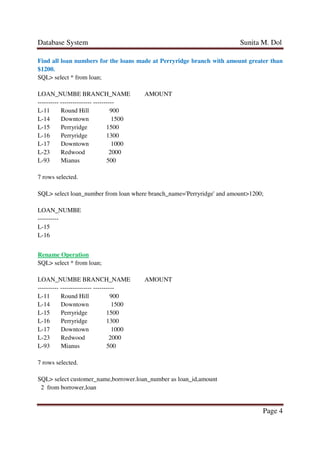
Find all loan numbers for the loans made at Perryridge branch with amount greater than
$1200.
SQL> select * from loan;
LOAN_NUMBE BRANCH_NAME AMOUNT
---------- --------------- ----------
L-11 Round Hill 900
L-14 Downtown 1500
L-15 Perryridge 1500
L-16 Perryridge 1300
L-17 Downtown 1000
L-23 Redwood 2000
L-93 Mianus 500
7 rows selected.
SQL> select loan_number from loan where branch_name='Perryridge' and amount>1200;
LOAN_NUMBE
----------
L-15
L-16
Rename Operation
SQL> select * from loan;
LOAN_NUMBE BRANCH_NAME AMOUNT
---------- --------------- ----------
L-11 Round Hill 900
L-14 Downtown 1500
L-15 Perryridge 1500
L-16 Perryridge 1300
L-17 Downtown 1000
L-23 Redwood 2000
L-93 Mianus 500
7 rows selected.
SQL> select customer_name,borrower.loan_number as loan_id,amount
2 from borrower,loan
Database System Sunita M. Dol
Page 5
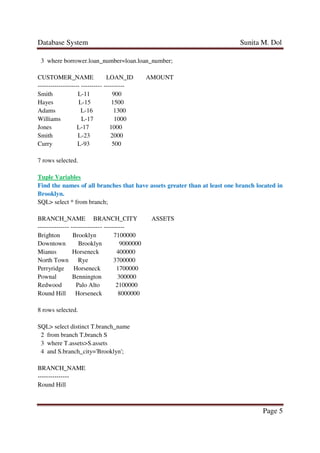
3 where borrower.loan_number=loan.loan_number;
CUSTOMER_NAME LOAN_ID AMOUNT
-------------------- ---------- ----------
Smith L-11 900
Hayes L-15 1500
Adams L-16 1300
Williams L-17 1000
Jones L-17 1000
Smith L-23 2000
Curry L-93 500
7 rows selected.
Tuple Variables
Find the names of all branches that have assets greater than at least one branch located in
Brooklyn.
SQL> select * from branch;
BRANCH_NAME BRANCH_CITY ASSETS
--------------- --------------- ----------
Brighton Brooklyn 7100000
Downtown Brooklyn 9000000
Mianus Horseneck 400000
North Town Rye 3700000
Perryridge Horseneck 1700000
Pownal Bennington 300000
Redwood Palo Alto 2100000
Round Hill Horseneck 8000000
8 rows selected.
SQL> select distinct T.branch_name
2 from branch T,branch S
3 where T.assets>S.assets
4 and S.branch_city='Brooklyn';
BRANCH_NAME
---------------
Round Hill
Database System Sunita M. Dol
Page 6
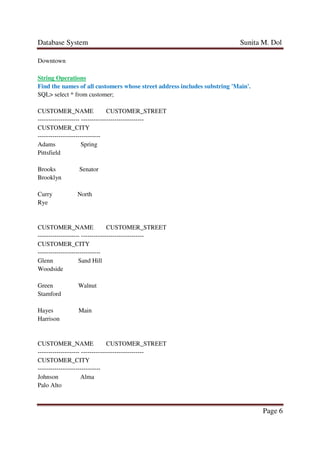
Downtown
String Operations
Find the names of all customers whose street address includes substring 'Main'.
SQL> select * from customer;
CUSTOMER_NAME CUSTOMER_STREET
-------------------- ------------------------------
CUSTOMER_CITY
------------------------------
Adams Spring
Pittsfield
Brooks Senator
Brooklyn
Curry North
Rye
CUSTOMER_NAME CUSTOMER_STREET
-------------------- ------------------------------
CUSTOMER_CITY
------------------------------
Glenn Sand Hill
Woodside
Green Walnut
Stamford
Hayes Main
Harrison
CUSTOMER_NAME CUSTOMER_STREET
-------------------- ------------------------------
CUSTOMER_CITY
------------------------------
Johnson Alma
Palo Alto
Database System Sunita M. Dol
Page 7
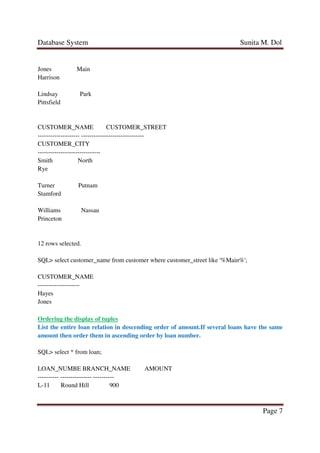
Jones Main
Harrison
Lindsay Park
Pittsfield
CUSTOMER_NAME CUSTOMER_STREET
-------------------- ------------------------------
CUSTOMER_CITY
------------------------------
Smith North
Rye
Turner Putnam
Stamford
Williams Nassau
Princeton
12 rows selected.
SQL> select customer_name from customer where customer_street like '%Main%';
CUSTOMER_NAME
--------------------
Hayes
Jones
Ordering the display of tuples
List the entire loan relation in descending order of amount.If several loans have the same
amount then order them in ascending order by loan number.
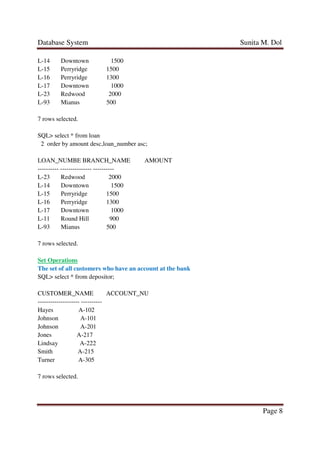
SQL> select * from loan;
LOAN_NUMBE BRANCH_NAME AMOUNT
---------- --------------- ----------
L-11 Round Hill 900
Database System Sunita M. Dol
Page 8
L-14 Downtown 1500
L-15 Perryridge 1500
L-16 Perryridge 1300
L-17 Downtown 1000
L-23 Redwood 2000
L-93 Mianus 500
7 rows selected.
SQL> select * from loan
2 order by amount desc,loan_number asc;
LOAN_NUMBE BRANCH_NAME AMOUNT
---------- --------------- ----------
L-23 Redwood 2000
L-14 Downtown 1500
L-15 Perryridge 1500
L-16 Perryridge 1300
L-17 Downtown 1000
L-11 Round Hill 900
L-93 Mianus 500
7 rows selected.
Set Operations
The set of all customers who have an account at the bank
SQL> select * from depositor;
CUSTOMER_NAME ACCOUNT_NU
-------------------- ----------
Hayes A-102
Johnson A-101
Johnson A-201
Jones A-217
Lindsay A-222
Smith A-215
Turner A-305
7 rows selected.
Database System Sunita M. Dol
Page 9
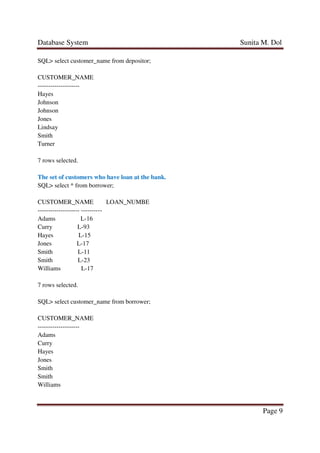
SQL> select customer_name from depositor;
CUSTOMER_NAME
--------------------
Hayes
Johnson
Johnson
Jones
Lindsay
Smith
Turner
7 rows selected.
The set of customers who have loan at the bank.
SQL> select * from borrower;
CUSTOMER_NAME LOAN_NUMBE
-------------------- ----------
Adams L-16
Curry L-93
Hayes L-15
Jones L-17
Smith L-11
Smith L-23
Williams L-17
7 rows selected.
SQL> select customer_name from borrower;
CUSTOMER_NAME
--------------------
Adams
Curry
Hayes
Jones
Smith
Smith
Williams
Database System Sunita M. Dol
Page 10
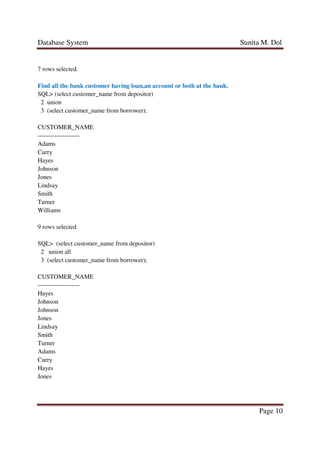
7 rows selected.
Find all the bank customer having loan,an account or both at the bank.
SQL> (select customer_name from depositor)
2 union
3 (select customer_name from borrower);
CUSTOMER_NAME
--------------------
Adams
Curry
Hayes
Johnson
Jones
Lindsay
Smith
Turner
Williams
9 rows selected.
SQL> (select customer_name from depositor)
2 union all
3 (select customer_name from borrower);
CUSTOMER_NAME
--------------------
Hayes
Johnson
Johnson
Jones
Lindsay
Smith
Turner
Adams
Curry
Hayes
Jones
Database System Sunita M. Dol
Page 11
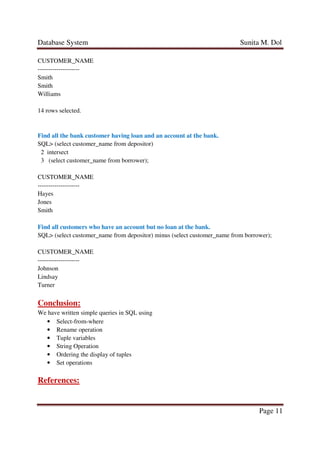
CUSTOMER_NAME
--------------------
Smith
Smith
Williams
14 rows selected.
Find all the bank customer having loan and an account at the bank.
SQL> (select customer_name from depositor)
2 intersect
3 (select customer_name from borrower);
CUSTOMER_NAME
--------------------
Hayes
Jones
Smith
Find all customers who have an account but no loan at the bank.
SQL> (select customer_name from depositor) minus (select customer_name from borrower);
CUSTOMER_NAME
--------------------
Johnson
Lindsay
Turner
Conclusion:
We have written simple queries in SQL using
• Select-from-where
• Rename operation
• Tuple variables
• String Operation
• Ordering the display of tuples
• Set operations
References:
Database System Sunita M. Dol
Page 12
• Database system concepts by Abraham Silberschatz, Henry F. Korth, S. Sudarshan
(McGraw Hill International Edition) sixth edition.
• Database system concepts by Abraham Silberschatz, Henry F. Korth, S. Sudarshan
(McGraw Hill International Edition) fifth edition.
• http://codex.cs.yale.edu/avi/db-book/db4/slide-dir/
• http://codex.cs.yale.edu/avi/db-book/db5/slide-dir/
• http://codex.cs.yale.edu/avi/db-book/db6/slide-dir/

Assignment#04

  • 1.
    Database System SunitaM. Dol Page 1 HANDOUT#04 Aim: Basic SQL: Write simple queries in SQL on the schema created for a specific application. Theory: SQL is based on set and relational operations with certain modifications and enhancements. A typical SQL query has the form: select A1, A2, ..., An from r1, r2, ..., rm where P – Ai represents an attribute, – Ri represents a relation and – P is a predicate. The SELECT Clause The select clause list the attributes desired in the result of a query. SQL allows duplicates in relations as well as in query results. To force the elimination of duplicates, insert the keyword distinct after select. The keyword all specifies that duplicates not be removed. An asterisk in the select clause denotes “all attributes”. The select clause can contain arithmetic expressions involving the operation, +, –, *, and /, and operating on constants or attributes of tuples. The WHERE Clause The where clause specifies conditions that the result must satisfy. Comparison results can be combined using the logical connectives and, or, and not. Comparisons can be applied to results of arithmetic expressions. SQL includes a between comparison operator. The FROM Clause The from clause lists the relations involved in the query. The RENAME Operation The SQL allows renaming relations and attributes using the as clause: old-name as new-name Tuple Variables Tuple variables are defined in the from clause via the use of the as clause. Keyword as is optional and may be omitted borrower as T ≡ borrower T
  • 2.
    Database System SunitaM. Dol Page 2 String Operations SQL includes a string-matching operator for comparisons on character strings. The operator “like” uses patterns that are described using two special characters: • percent (%). The % character matches any substring. • underscore (_). The _ character matches any character. SQL supports a variety of string operations such as • concatenation (using “||”) • converting from upper to lower case (and vice versa) • Finding string length, extracting substrings, etc. Ordering the display of tuples SQL offers the user some control over the order in which tuples in a relation are displayed. The order by clause causes the tuples in the result of a query to appear in sorted order. We may specify desc for descending order or asc for ascending order, for each attribute; ascending order is the default. Set Operations: The SQL operations union, intersect, and except operate on relations and correspond to the relational-algebra operations ∪, ∩, and −. Like union, intersection, and set difference in relational algebra, the relations participating in the operations must be compatible; that is, they must have the same set of attributes. • In union operation, the number of duplicate tuples in the result is equal to the total number of duplicates that appear in both d and b. Thus, if Jones has three accounts and two loans at the bank, then there will be five tuples with the name Jones in the result. • In intersection operation, the number of duplicate tuples that appear in the result is equal to the minimum number of duplicates in both d and b. Thus, if Jones has three accounts and two loans at the bank, then there will be two tuples with the name Jones in the result. In except operation, the number of duplicate copies of a tuple in the result is equal to the number of duplicate copies of the tuple in d minus the number of duplicate copies of the tuple in b, provided that the difference is positive. Thus, if Jones has three accounts and one loan at the bank, then there will be two tuples with the name Jones in the result. If, instead, this customer has two accounts and three loans at the bank, there will be no tuple with the name Jones in the result. Queries and Output: Select-From-Where Clause Find the names of all branches in the loan relation SQL> select branch_name from loan;
  • 3.
    Database System SunitaM. Dol Page 3 BRANCH_NAME --------------- Round Hill Downtown Perryridge Perryridge Downtown Redwood Mianus 7 rows selected. List the tuples of loan relation with amount multiplied by 100. SQL> select * from loan; LOAN_NUMBE BRANCH_NAME AMOUNT ---------- --------------- ---------- L-11 Round Hill 900 L-14 Downtown 1500 L-15 Perryridge 1500 L-16 Perryridge 1300 L-17 Downtown 1000 L-23 Redwood 2000 L-93 Mianus 500 7 rows selected. SQL> select loan_number,branch_name,amount*100 from loan; LOAN_NUMBE BRANCH_NAME AMOUNT*100 ---------- --------------- ---------- L-11 Round Hill 90000 L-14 Downtown 150000 L-15 Perryridge 150000 L-16 Perryridge 130000 L-17 Downtown 100000 L-23 Redwood 200000 L-93 Mianus 50000 7 rows selected.
  • 4.
    Database System SunitaM. Dol Page 4 Find all loan numbers for the loans made at Perryridge branch with amount greater than $1200. SQL> select * from loan; LOAN_NUMBE BRANCH_NAME AMOUNT ---------- --------------- ---------- L-11 Round Hill 900 L-14 Downtown 1500 L-15 Perryridge 1500 L-16 Perryridge 1300 L-17 Downtown 1000 L-23 Redwood 2000 L-93 Mianus 500 7 rows selected. SQL> select loan_number from loan where branch_name='Perryridge' and amount>1200; LOAN_NUMBE ---------- L-15 L-16 Rename Operation SQL> select * from loan; LOAN_NUMBE BRANCH_NAME AMOUNT ---------- --------------- ---------- L-11 Round Hill 900 L-14 Downtown 1500 L-15 Perryridge 1500 L-16 Perryridge 1300 L-17 Downtown 1000 L-23 Redwood 2000 L-93 Mianus 500 7 rows selected. SQL> select customer_name,borrower.loan_number as loan_id,amount 2 from borrower,loan
  • 5.
    Database System SunitaM. Dol Page 5 3 where borrower.loan_number=loan.loan_number; CUSTOMER_NAME LOAN_ID AMOUNT -------------------- ---------- ---------- Smith L-11 900 Hayes L-15 1500 Adams L-16 1300 Williams L-17 1000 Jones L-17 1000 Smith L-23 2000 Curry L-93 500 7 rows selected. Tuple Variables Find the names of all branches that have assets greater than at least one branch located in Brooklyn. SQL> select * from branch; BRANCH_NAME BRANCH_CITY ASSETS --------------- --------------- ---------- Brighton Brooklyn 7100000 Downtown Brooklyn 9000000 Mianus Horseneck 400000 North Town Rye 3700000 Perryridge Horseneck 1700000 Pownal Bennington 300000 Redwood Palo Alto 2100000 Round Hill Horseneck 8000000 8 rows selected. SQL> select distinct T.branch_name 2 from branch T,branch S 3 where T.assets>S.assets 4 and S.branch_city='Brooklyn'; BRANCH_NAME --------------- Round Hill
  • 6.
    Database System SunitaM. Dol Page 6 Downtown String Operations Find the names of all customers whose street address includes substring 'Main'. SQL> select * from customer; CUSTOMER_NAME CUSTOMER_STREET -------------------- ------------------------------ CUSTOMER_CITY ------------------------------ Adams Spring Pittsfield Brooks Senator Brooklyn Curry North Rye CUSTOMER_NAME CUSTOMER_STREET -------------------- ------------------------------ CUSTOMER_CITY ------------------------------ Glenn Sand Hill Woodside Green Walnut Stamford Hayes Main Harrison CUSTOMER_NAME CUSTOMER_STREET -------------------- ------------------------------ CUSTOMER_CITY ------------------------------ Johnson Alma Palo Alto
  • 7.
    Database System SunitaM. Dol Page 7 Jones Main Harrison Lindsay Park Pittsfield CUSTOMER_NAME CUSTOMER_STREET -------------------- ------------------------------ CUSTOMER_CITY ------------------------------ Smith North Rye Turner Putnam Stamford Williams Nassau Princeton 12 rows selected. SQL> select customer_name from customer where customer_street like '%Main%'; CUSTOMER_NAME -------------------- Hayes Jones Ordering the display of tuples List the entire loan relation in descending order of amount.If several loans have the same amount then order them in ascending order by loan number. SQL> select * from loan; LOAN_NUMBE BRANCH_NAME AMOUNT ---------- --------------- ---------- L-11 Round Hill 900
  • 8.
    Database System SunitaM. Dol Page 8 L-14 Downtown 1500 L-15 Perryridge 1500 L-16 Perryridge 1300 L-17 Downtown 1000 L-23 Redwood 2000 L-93 Mianus 500 7 rows selected. SQL> select * from loan 2 order by amount desc,loan_number asc; LOAN_NUMBE BRANCH_NAME AMOUNT ---------- --------------- ---------- L-23 Redwood 2000 L-14 Downtown 1500 L-15 Perryridge 1500 L-16 Perryridge 1300 L-17 Downtown 1000 L-11 Round Hill 900 L-93 Mianus 500 7 rows selected. Set Operations The set of all customers who have an account at the bank SQL> select * from depositor; CUSTOMER_NAME ACCOUNT_NU -------------------- ---------- Hayes A-102 Johnson A-101 Johnson A-201 Jones A-217 Lindsay A-222 Smith A-215 Turner A-305 7 rows selected.
  • 9.
    Database System SunitaM. Dol Page 9 SQL> select customer_name from depositor; CUSTOMER_NAME -------------------- Hayes Johnson Johnson Jones Lindsay Smith Turner 7 rows selected. The set of customers who have loan at the bank. SQL> select * from borrower; CUSTOMER_NAME LOAN_NUMBE -------------------- ---------- Adams L-16 Curry L-93 Hayes L-15 Jones L-17 Smith L-11 Smith L-23 Williams L-17 7 rows selected. SQL> select customer_name from borrower; CUSTOMER_NAME -------------------- Adams Curry Hayes Jones Smith Smith Williams
  • 10.
    Database System SunitaM. Dol Page 10 7 rows selected. Find all the bank customer having loan,an account or both at the bank. SQL> (select customer_name from depositor) 2 union 3 (select customer_name from borrower); CUSTOMER_NAME -------------------- Adams Curry Hayes Johnson Jones Lindsay Smith Turner Williams 9 rows selected. SQL> (select customer_name from depositor) 2 union all 3 (select customer_name from borrower); CUSTOMER_NAME -------------------- Hayes Johnson Johnson Jones Lindsay Smith Turner Adams Curry Hayes Jones
  • 11.
    Database System SunitaM. Dol Page 11 CUSTOMER_NAME -------------------- Smith Smith Williams 14 rows selected. Find all the bank customer having loan and an account at the bank. SQL> (select customer_name from depositor) 2 intersect 3 (select customer_name from borrower); CUSTOMER_NAME -------------------- Hayes Jones Smith Find all customers who have an account but no loan at the bank. SQL> (select customer_name from depositor) minus (select customer_name from borrower); CUSTOMER_NAME -------------------- Johnson Lindsay Turner Conclusion: We have written simple queries in SQL using • Select-from-where • Rename operation • Tuple variables • String Operation • Ordering the display of tuples • Set operations References:
  • 12.
    Database System SunitaM. Dol Page 12 • Database system concepts by Abraham Silberschatz, Henry F. Korth, S. Sudarshan (McGraw Hill International Edition) sixth edition. • Database system concepts by Abraham Silberschatz, Henry F. Korth, S. Sudarshan (McGraw Hill International Edition) fifth edition. • http://codex.cs.yale.edu/avi/db-book/db4/slide-dir/ • http://codex.cs.yale.edu/avi/db-book/db5/slide-dir/ • http://codex.cs.yale.edu/avi/db-book/db6/slide-dir/