PARUL INSTITUTE OF ENGINEERING
& TECHNOLOGY
Name Of Subject : Database Management System
Unit-2:-Relational Model
Structure of Relational Database
 Based on the core concept of relation
 It has a fixed no. of named coloumn
(Attributes) and variable no. of row
(tuples).
 No. of Tuples called cardinality
 No. of Attributes is called degree
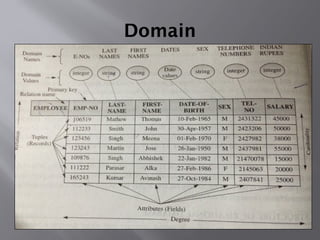
Domain
Keys
 Group of attributes whose values are unique
throughout all of the tuples of the relation.
 Each tuple is distinct and can be identified by
the values of one or more of its attributes
called keys
 Primary key
 Candidate key
 Super key
 Foreign key
Primary key
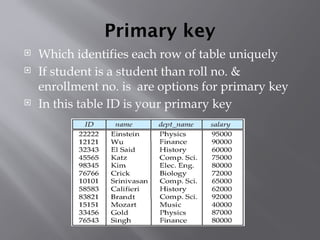
 Which identifies each row of table uniquely
 If student is a student than roll no. &
enrollment no. is are options for primary key
 In this table ID is your primary key
Candidate Key
 Attributes capable for primary key are
Candidate key.
 Roll no. and enrollment no. are candidate key
in student table
 Every primary key is candidate key.
Composite key
 Candidate key have more than one attribute is
composite key.
 In this no unique key but there combination is
candidate key.
 Eg. Combination of name & father name is
candidate key.
Super key
 Super set of candidate key is super key.
 Every C.K. is super key
 When we add any other attribute in super key
so it is also super key.
 Candidate key is minimal super key
 Every C.K. is super key but vise versa may or
may not be....
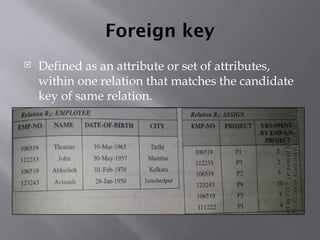
Foreign key
 Defined as an attribute or set of attributes,
within one relation that matches the candidate
key of same relation.
Relational Algebra
 Also called processorial language
 It is practical implementation of SQL
 It is the collection of operations to manipulate
or access relations.
 8 operators in relational operations divided
into 2 categories
 Set theoretic operations
 Native relational operations
Set theoretic Operations
 Union
 Intersection (Intersect)
 Difference (Minus)
 Product (Times)
Native Relational Operations
 Projection
 Selection
 Join
 Division
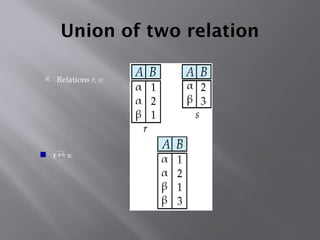
Union of two relation
 Relations r, s:
 r  s:
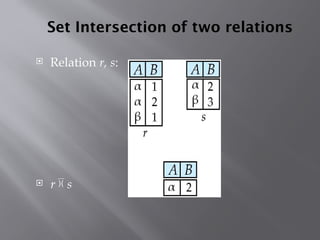
Set Intersection of two relations
 Relation r, s:
 r  s
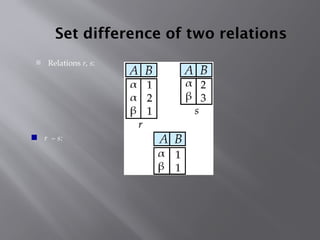
Set difference of two relations
 Relations r, s:
 r – s:
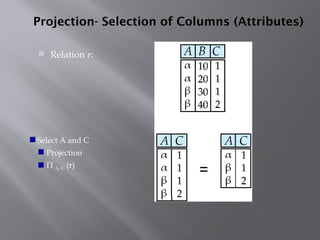
Projection- Selection of Columns (Attributes)
 Relation r:
 Select A and C
 Projection
 Π A, C (r)
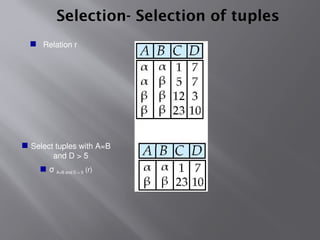
Selection- Selection of tuples
 Relation r
 Select tuples with A=B
and D > 5
 σ A=B and D > 5 (r)
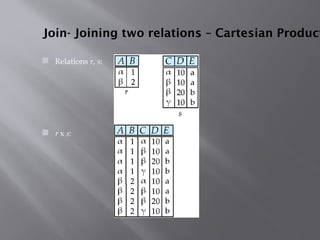
Join- Joining two relations – Cartesian Product
 Relations r, s:
 r x s:
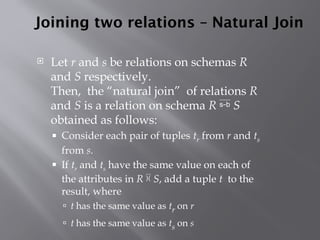
Joining two relations – Natural Join
 Let r and s be relations on schemas R
and S respectively.
Then, the “natural join” of relations R
and S is a relation on schema R  S
obtained as follows:
 Consider each pair of tuples tr from r and ts
from s.
 If tr and ts have the same value on each of
the attributes in R  S, add a tuple t to the
result, where
 t has the same value as tr on r
 t has the same value as ts on s
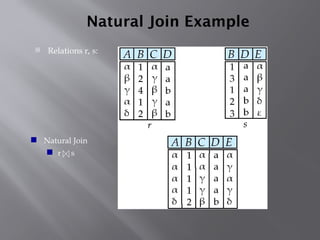
Natural Join Example
 Relations r, s:
 Natural Join
 r s
Outer Join
 An extension of the join operation that avoids
loss of information.
 Computes the join and then adds tuples form
one relation that does not match tuples in the
other relation to the result of the join.
 Uses null values:
 null signifies that the value is unknown or does not
exist
 All comparisons involving null are (roughly
speaking) false by definition.
 We shall study precise meaning of comparisons with
nulls later
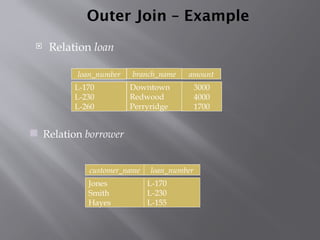
Outer Join – Example
 Relation loan
 Relation borrower
customer_name loan_number
Jones
Smith
Hayes
L-170
L-230
L-155
3000
4000
1700
loan_number amount
L-170
L-230
L-260
branch_name
Downtown
Redwood
Perryridge
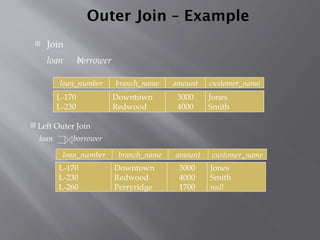
Outer Join – Example
 Join
loan borrower
loan_number amount
L-170
L-230
3000
4000
customer_name
Jones
Smith
branch_name
Downtown
Redwood
Jones
Smith
null
loan_number amount
L-170
L-230
L-260
3000
4000
1700
customer_name
branch_name
Downtown
Redwood
Perryridge
 Left Outer Join
loan borrower
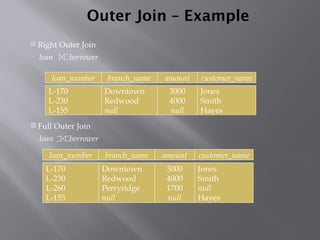
Outer Join – Example
loan_number amount
L-170
L-230
L-155
3000
4000
null
customer_name
Jones
Smith
Hayes
branch_name
Downtown
Redwood
null
loan_number amount
L-170
L-230
L-260
L-155
3000
4000
1700
null
customer_name
Jones
Smith
null
Hayes
branch_name
Downtown
Redwood
Perryridge
null
 Full Outer Join
loan borrower
 Right Outer Join
loan borrower
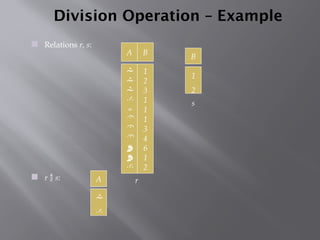
Division Operation – Example
 Relations r, s:
 r  s: A
B


1
2
A B











1
2
3
1
1
1
3
4
6
1
2
r
s
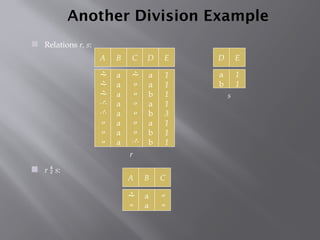
Another Division Example
A B








a
a
a
a
a
a
a
a
C D








a
a
b
a
b
a
b
b
E
1
1
1
1
3
1
1
1
 Relations r, s:
 r  s:
D
a
b
E
1
1
A B


a
a
C


r
s
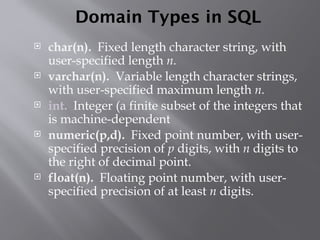
Domain Types in SQL
 char(n). Fixed length character string, with
user-specified length n.
 varchar(n). Variable length character strings,
with user-specified maximum length n.
 int. Integer (a finite subset of the integers that
is machine-dependent
 numeric(p,d). Fixed point number, with user-
specified precision of p digits, with n digits to
the right of decimal point.
 float(n). Floating point number, with user-
specified precision of at least n digits.
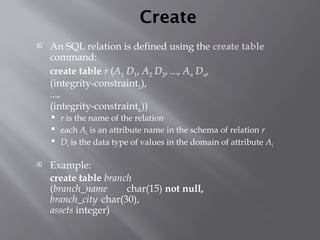
Create
 An SQL relation is defined using the create table
command:
create table r (A1 D1, A2 D2, ..., An Dn,
(integrity-constraint1),
...,
(integrity-constraintk))
 r is the name of the relation
 each Ai is an attribute name in the schema of relation r
 Di is the data type of values in the domain of attribute Ai
 Example:
create table branch
(branch_name char(15) not null,
branch_city char(30),
assets integer)
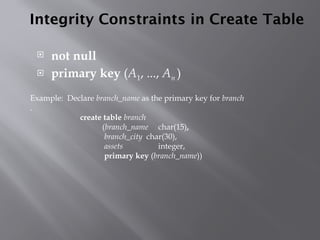
Integrity Constraints in Create Table
 not null
 primary key (A1, ..., An )
Example: Declare branch_name as the primary key for branch
.
create table branch
(branch_name char(15),
branch_city char(30),
assets integer,
primary key (branch_name))
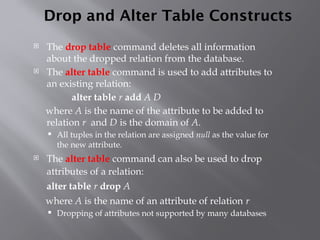
Drop and Alter Table Constructs
 The drop table command deletes all information
about the dropped relation from the database.
 The alter table command is used to add attributes to
an existing relation:
alter table r add A D
where A is the name of the attribute to be added to
relation r and D is the domain of A.
 All tuples in the relation are assigned null as the value for
the new attribute.
 The alter table command can also be used to drop
attributes of a relation:
alter table r drop A
where A is the name of an attribute of relation r
 Dropping of attributes not supported by many databases
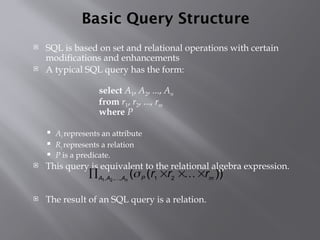
Basic Query Structure
 SQL is based on set and relational operations with certain
modifications and enhancements
 A typical SQL query has the form:
select A1, A2, ..., An
from r1, r2, ..., rm
where P
 Ai represents an attribute
 Ri represents a relation
 P is a predicate.
 This query is equivalent to the relational algebra expression.
 The result of an SQL query is a relation.
))
(
( 2
1
,
,
, 2
1 m
P
A
A
A
r
r
r
n



 


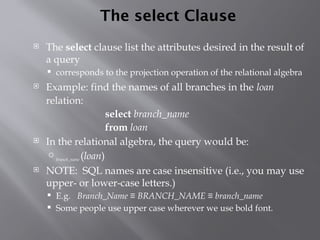
The select Clause
 The select clause list the attributes desired in the result of
a query
 corresponds to the projection operation of the relational algebra
 Example: find the names of all branches in the loan
relation:
select branch_name
from loan
 In the relational algebra, the query would be:
branch_name (loan)
 NOTE: SQL names are case insensitive (i.e., you may use
upper- or lower-case letters.)
 E.g. Branch_Name ≡ BRANCH_NAME ≡ branch_name
 Some people use upper case wherever we use bold font.
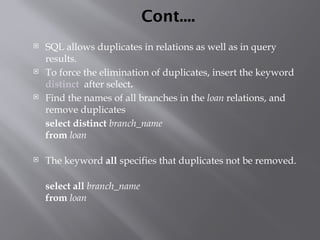
Cont....
 SQL allows duplicates in relations as well as in query
results.
 To force the elimination of duplicates, insert the keyword
distinct after select.
 Find the names of all branches in the loan relations, and
remove duplicates
select distinct branch_name
from loan
 The keyword all specifies that duplicates not be removed.
select all branch_name
from loan
The select Clause (Cont.)
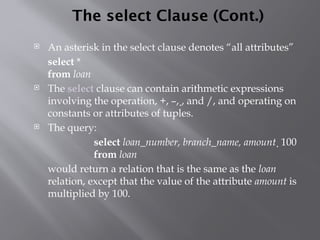
 An asterisk in the select clause denotes “all attributes”
select *
from loan
 The select clause can contain arithmetic expressions
involving the operation, +, –, , and /, and operating on
constants or attributes of tuples.
 The query:
select loan_number, branch_name, amount  100
from loan
would return a relation that is the same as the loan
relation, except that the value of the attribute amount is
multiplied by 100.
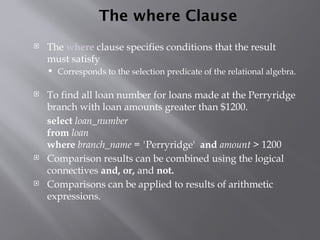
The where Clause
 The where clause specifies conditions that the result
must satisfy
 Corresponds to the selection predicate of the relational algebra.
 To find all loan number for loans made at the Perryridge
branch with loan amounts greater than $1200.
select loan_number
from loan
where branch_name = 'Perryridge' and amount > 1200
 Comparison results can be combined using the logical
connectives and, or, and not.
 Comparisons can be applied to results of arithmetic
expressions.
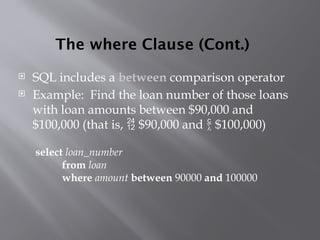
The where Clause (Cont.)
 SQL includes a between comparison operator
 Example: Find the loan number of those loans
with loan amounts between $90,000 and
$100,000 (that is,  $90,000 and  $100,000)
select loan_number
from loan
where amount between 90000 and 100000
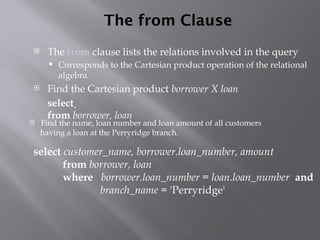
The from Clause
 The from clause lists the relations involved in the query
 Corresponds to the Cartesian product operation of the relational
algebra.
 Find the Cartesian product borrower X loan
select 
from borrower, loan
 Find the name, loan number and loan amount of all customers
having a loan at the Perryridge branch.
select customer_name, borrower.loan_number, amount
from borrower, loan
where borrower.loan_number = loan.loan_number and
branch_name = 'Perryridge'
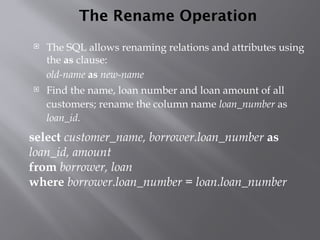
The Rename Operation
 The SQL allows renaming relations and attributes using
the as clause:
old-name as new-name
 Find the name, loan number and loan amount of all
customers; rename the column name loan_number as
loan_id.
select customer_name, borrower.loan_number as
loan_id, amount
from borrower, loan
where borrower.loan_number = loan.loan_number
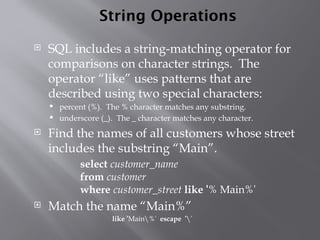
String Operations
 SQL includes a string-matching operator for
comparisons on character strings. The
operator “like” uses patterns that are
described using two special characters:
 percent (%). The % character matches any substring.
 underscore (_). The _ character matches any character.
 Find the names of all customers whose street
includes the substring “Main”.
select customer_name
from customer
where customer_street like '% Main%'
 Match the name “Main%”
like 'Main%' escape ''
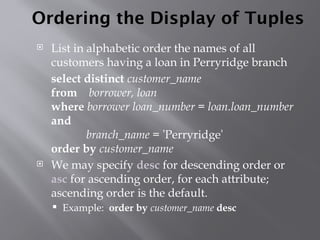
Ordering the Display of Tuples
 List in alphabetic order the names of all
customers having a loan in Perryridge branch
select distinct customer_name
from borrower, loan
where borrower loan_number = loan.loan_number
and
branch_name = 'Perryridge'
order by customer_name
 We may specify desc for descending order or
asc for ascending order, for each attribute;
ascending order is the default.
 Example: order by customer_name desc
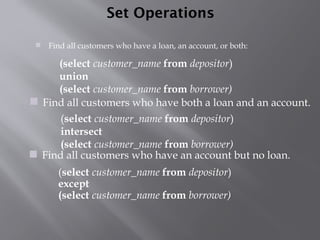
Set Operations
 Find all customers who have a loan, an account, or both:
(select customer_name from depositor)
except
(select customer_name from borrower)
(select customer_name from depositor)
intersect
(select customer_name from borrower)
 Find all customers who have an account but no loan.
(select customer_name from depositor)
union
(select customer_name from borrower)
 Find all customers who have both a loan and an account.
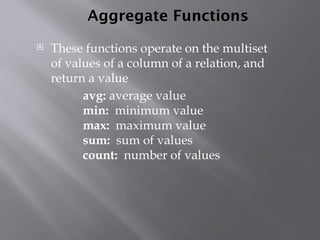
Aggregate Functions
 These functions operate on the multiset
of values of a column of a relation, and
return a value
avg: average value
min: minimum value
max: maximum value
sum: sum of values
count: number of values
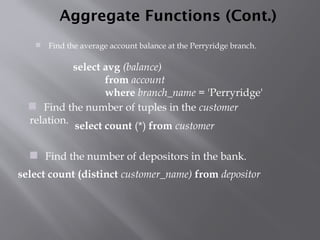
Aggregate Functions (Cont.)
 Find the average account balance at the Perryridge branch.
 Find the number of depositors in the bank.
 Find the number of tuples in the customer
relation.
select avg (balance)
from account
where branch_name = 'Perryridge'
select count (*) from customer
select count (distinct customer_name) from depositor
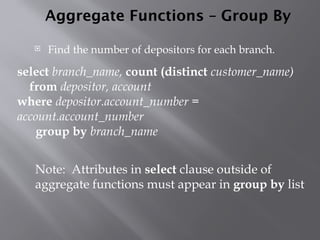
Aggregate Functions – Group By
 Find the number of depositors for each branch.
Note: Attributes in select clause outside of
aggregate functions must appear in group by list
select branch_name, count (distinct customer_name)
from depositor, account
where depositor.account_number =
account.account_number
group by branch_name
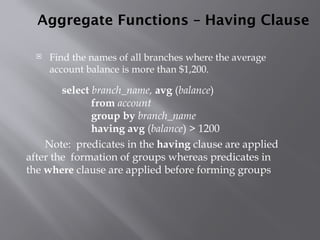
Aggregate Functions – Having Clause
 Find the names of all branches where the average
account balance is more than $1,200.
Note: predicates in the having clause are applied
after the formation of groups whereas predicates in
the where clause are applied before forming groups
select branch_name, avg (balance)
from account
group by branch_name
having avg (balance) > 1200
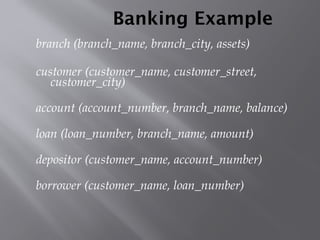
Banking Example
branch (branch_name, branch_city, assets)
customer (customer_name, customer_street,
customer_city)
account (account_number, branch_name, balance)
loan (loan_number, branch_name, amount)
depositor (customer_name, account_number)
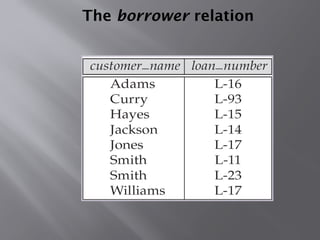
borrower (customer_name, loan_number)
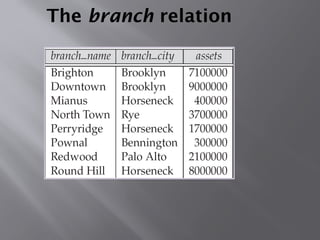
The branch relation
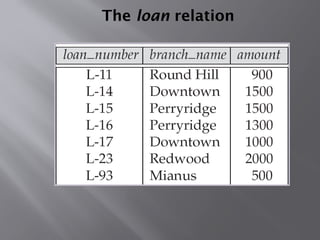
The loan relation
The borrower relation
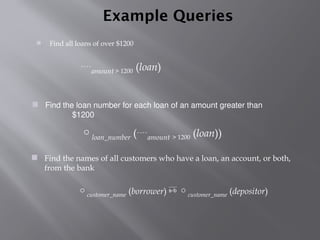
Example Queries
 Find all loans of over $1200
 Find the loan number for each loan of an amount greater than
$1200
amount > 1200 (loan)
loan_number (amount > 1200 (loan))
 Find the names of all customers who have a loan, an account, or both,
from the bank
customer_name (borrower)  customer_name (depositor)
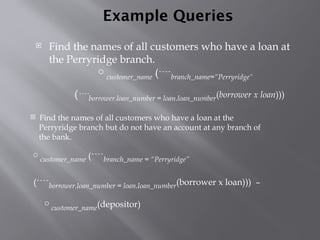
Example Queries
 Find the names of all customers who have a loan at
the Perryridge branch.
 Find the names of all customers who have a loan at the
Perryridge branch but do not have an account at any branch of
the bank.
customer_name (branch_name = “Perryridge”
(borrower.loan_number = loan.loan_number(borrower x loan))) –
customer_name(depositor)
customer_name (branch_name=“Perryridge”
(borrower.loan_number = loan.loan_number(borrower x loan)))
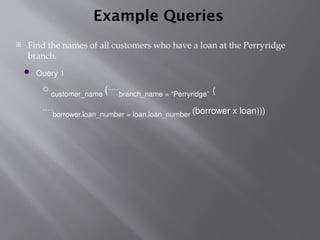
Example Queries
 Find the names of all customers who have a loan at the Perryridge
branch.
 Query 1
customer_name (branch_name = “Perryridge” (
borrower.loan_number = loan.loan_number (borrower x loan)))
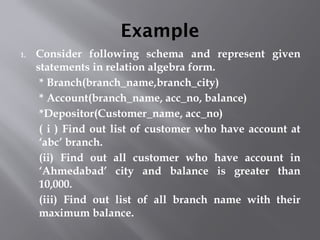
Example
1. Consider following schema and represent given
statements in relation algebra form.
* Branch(branch_name,branch_city)
* Account(branch_name, acc_no, balance)
*Depositor(Customer_name, acc_no)
( i ) Find out list of customer who have account at
‘abc’ branch.
(ii) Find out all customer who have account in
‘Ahmedabad’ city and balance is greater than
10,000.
(iii) Find out list of all branch name with their
maximum balance.
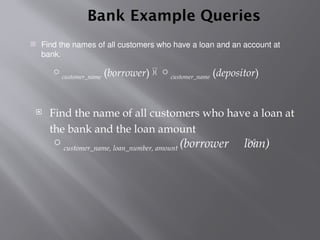
Bank Example Queries
 Find the names of all customers who have a loan and an account at
bank.
customer_name (borrower)  customer_name (depositor)
 Find the name of all customers who have a loan at
the bank and the loan amount
customer_name, loan_number, amount (borrower loan)
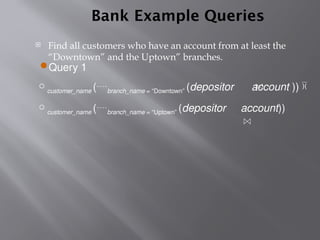
 Query 1
customer_name (branch_name = “Downtown” (depositor account )) 
customer_name (branch_name = “Uptown” (depositor account))
Bank Example Queries
 Find all customers who have an account from at least the
“Downtown” and the Uptown” branches.
UNIT-2 Relational Model.pptx,Description of relational Model

  • 1.
    PARUL INSTITUTE OFENGINEERING & TECHNOLOGY Name Of Subject : Database Management System Unit-2:-Relational Model
  • 2.
    Structure of RelationalDatabase  Based on the core concept of relation  It has a fixed no. of named coloumn (Attributes) and variable no. of row (tuples).  No. of Tuples called cardinality  No. of Attributes is called degree
  • 3.
  • 4.
    Keys  Group ofattributes whose values are unique throughout all of the tuples of the relation.  Each tuple is distinct and can be identified by the values of one or more of its attributes called keys  Primary key  Candidate key  Super key  Foreign key
  • 5.
    Primary key  Whichidentifies each row of table uniquely  If student is a student than roll no. & enrollment no. is are options for primary key  In this table ID is your primary key
  • 6.
    Candidate Key  Attributescapable for primary key are Candidate key.  Roll no. and enrollment no. are candidate key in student table  Every primary key is candidate key.
  • 7.
    Composite key  Candidatekey have more than one attribute is composite key.  In this no unique key but there combination is candidate key.  Eg. Combination of name & father name is candidate key.
  • 8.
    Super key  Superset of candidate key is super key.  Every C.K. is super key  When we add any other attribute in super key so it is also super key.  Candidate key is minimal super key  Every C.K. is super key but vise versa may or may not be....
  • 9.
    Foreign key  Definedas an attribute or set of attributes, within one relation that matches the candidate key of same relation.
  • 10.
    Relational Algebra  Alsocalled processorial language  It is practical implementation of SQL  It is the collection of operations to manipulate or access relations.  8 operators in relational operations divided into 2 categories  Set theoretic operations  Native relational operations
  • 11.
    Set theoretic Operations Union  Intersection (Intersect)  Difference (Minus)  Product (Times)
  • 12.
    Native Relational Operations Projection  Selection  Join  Division
  • 13.
    Union of tworelation  Relations r, s:  r  s:
  • 14.
    Set Intersection oftwo relations  Relation r, s:  r  s
  • 15.
    Set difference oftwo relations  Relations r, s:  r – s:
  • 16.
    Projection- Selection ofColumns (Attributes)  Relation r:  Select A and C  Projection  Π A, C (r)
  • 17.
    Selection- Selection oftuples  Relation r  Select tuples with A=B and D > 5  σ A=B and D > 5 (r)
  • 18.
    Join- Joining tworelations – Cartesian Product  Relations r, s:  r x s:
  • 19.
    Joining two relations– Natural Join  Let r and s be relations on schemas R and S respectively. Then, the “natural join” of relations R and S is a relation on schema R  S obtained as follows:  Consider each pair of tuples tr from r and ts from s.  If tr and ts have the same value on each of the attributes in R  S, add a tuple t to the result, where  t has the same value as tr on r  t has the same value as ts on s
  • 20.
    Natural Join Example Relations r, s:  Natural Join  r s
  • 21.
    Outer Join  Anextension of the join operation that avoids loss of information.  Computes the join and then adds tuples form one relation that does not match tuples in the other relation to the result of the join.  Uses null values:  null signifies that the value is unknown or does not exist  All comparisons involving null are (roughly speaking) false by definition.  We shall study precise meaning of comparisons with nulls later
  • 22.
    Outer Join –Example  Relation loan  Relation borrower customer_name loan_number Jones Smith Hayes L-170 L-230 L-155 3000 4000 1700 loan_number amount L-170 L-230 L-260 branch_name Downtown Redwood Perryridge
  • 23.
    Outer Join –Example  Join loan borrower loan_number amount L-170 L-230 3000 4000 customer_name Jones Smith branch_name Downtown Redwood Jones Smith null loan_number amount L-170 L-230 L-260 3000 4000 1700 customer_name branch_name Downtown Redwood Perryridge  Left Outer Join loan borrower
  • 24.
    Outer Join –Example loan_number amount L-170 L-230 L-155 3000 4000 null customer_name Jones Smith Hayes branch_name Downtown Redwood null loan_number amount L-170 L-230 L-260 L-155 3000 4000 1700 null customer_name Jones Smith null Hayes branch_name Downtown Redwood Perryridge null  Full Outer Join loan borrower  Right Outer Join loan borrower
  • 25.
    Division Operation –Example  Relations r, s:  r  s: A B   1 2 A B            1 2 3 1 1 1 3 4 6 1 2 r s
  • 26.
    Another Division Example AB         a a a a a a a a C D         a a b a b a b b E 1 1 1 1 3 1 1 1  Relations r, s:  r  s: D a b E 1 1 A B   a a C   r s
  • 27.
    Domain Types inSQL  char(n). Fixed length character string, with user-specified length n.  varchar(n). Variable length character strings, with user-specified maximum length n.  int. Integer (a finite subset of the integers that is machine-dependent  numeric(p,d). Fixed point number, with user- specified precision of p digits, with n digits to the right of decimal point.  float(n). Floating point number, with user- specified precision of at least n digits.
  • 28.
    Create  An SQLrelation is defined using the create table command: create table r (A1 D1, A2 D2, ..., An Dn, (integrity-constraint1), ..., (integrity-constraintk))  r is the name of the relation  each Ai is an attribute name in the schema of relation r  Di is the data type of values in the domain of attribute Ai  Example: create table branch (branch_name char(15) not null, branch_city char(30), assets integer)
  • 29.
    Integrity Constraints inCreate Table  not null  primary key (A1, ..., An ) Example: Declare branch_name as the primary key for branch . create table branch (branch_name char(15), branch_city char(30), assets integer, primary key (branch_name))
  • 30.
    Drop and AlterTable Constructs  The drop table command deletes all information about the dropped relation from the database.  The alter table command is used to add attributes to an existing relation: alter table r add A D where A is the name of the attribute to be added to relation r and D is the domain of A.  All tuples in the relation are assigned null as the value for the new attribute.  The alter table command can also be used to drop attributes of a relation: alter table r drop A where A is the name of an attribute of relation r  Dropping of attributes not supported by many databases
  • 31.
    Basic Query Structure SQL is based on set and relational operations with certain modifications and enhancements  A typical SQL query has the form: select A1, A2, ..., An from r1, r2, ..., rm where P  Ai represents an attribute  Ri represents a relation  P is a predicate.  This query is equivalent to the relational algebra expression.  The result of an SQL query is a relation. )) ( ( 2 1 , , , 2 1 m P A A A r r r n       
  • 32.
    The select Clause The select clause list the attributes desired in the result of a query  corresponds to the projection operation of the relational algebra  Example: find the names of all branches in the loan relation: select branch_name from loan  In the relational algebra, the query would be: branch_name (loan)  NOTE: SQL names are case insensitive (i.e., you may use upper- or lower-case letters.)  E.g. Branch_Name ≡ BRANCH_NAME ≡ branch_name  Some people use upper case wherever we use bold font.
  • 33.
    Cont....  SQL allowsduplicates in relations as well as in query results.  To force the elimination of duplicates, insert the keyword distinct after select.  Find the names of all branches in the loan relations, and remove duplicates select distinct branch_name from loan  The keyword all specifies that duplicates not be removed. select all branch_name from loan
  • 34.
    The select Clause(Cont.)  An asterisk in the select clause denotes “all attributes” select * from loan  The select clause can contain arithmetic expressions involving the operation, +, –, , and /, and operating on constants or attributes of tuples.  The query: select loan_number, branch_name, amount  100 from loan would return a relation that is the same as the loan relation, except that the value of the attribute amount is multiplied by 100.
  • 35.
    The where Clause The where clause specifies conditions that the result must satisfy  Corresponds to the selection predicate of the relational algebra.  To find all loan number for loans made at the Perryridge branch with loan amounts greater than $1200. select loan_number from loan where branch_name = 'Perryridge' and amount > 1200  Comparison results can be combined using the logical connectives and, or, and not.  Comparisons can be applied to results of arithmetic expressions.
  • 36.
    The where Clause(Cont.)  SQL includes a between comparison operator  Example: Find the loan number of those loans with loan amounts between $90,000 and $100,000 (that is,  $90,000 and  $100,000) select loan_number from loan where amount between 90000 and 100000
  • 37.
    The from Clause The from clause lists the relations involved in the query  Corresponds to the Cartesian product operation of the relational algebra.  Find the Cartesian product borrower X loan select  from borrower, loan  Find the name, loan number and loan amount of all customers having a loan at the Perryridge branch. select customer_name, borrower.loan_number, amount from borrower, loan where borrower.loan_number = loan.loan_number and branch_name = 'Perryridge'
  • 38.
    The Rename Operation The SQL allows renaming relations and attributes using the as clause: old-name as new-name  Find the name, loan number and loan amount of all customers; rename the column name loan_number as loan_id. select customer_name, borrower.loan_number as loan_id, amount from borrower, loan where borrower.loan_number = loan.loan_number
  • 39.
    String Operations  SQLincludes a string-matching operator for comparisons on character strings. The operator “like” uses patterns that are described using two special characters:  percent (%). The % character matches any substring.  underscore (_). The _ character matches any character.  Find the names of all customers whose street includes the substring “Main”. select customer_name from customer where customer_street like '% Main%'  Match the name “Main%” like 'Main%' escape ''
  • 40.
    Ordering the Displayof Tuples  List in alphabetic order the names of all customers having a loan in Perryridge branch select distinct customer_name from borrower, loan where borrower loan_number = loan.loan_number and branch_name = 'Perryridge' order by customer_name  We may specify desc for descending order or asc for ascending order, for each attribute; ascending order is the default.  Example: order by customer_name desc
  • 41.
    Set Operations  Findall customers who have a loan, an account, or both: (select customer_name from depositor) except (select customer_name from borrower) (select customer_name from depositor) intersect (select customer_name from borrower)  Find all customers who have an account but no loan. (select customer_name from depositor) union (select customer_name from borrower)  Find all customers who have both a loan and an account.
  • 42.
    Aggregate Functions  Thesefunctions operate on the multiset of values of a column of a relation, and return a value avg: average value min: minimum value max: maximum value sum: sum of values count: number of values
  • 43.
    Aggregate Functions (Cont.) Find the average account balance at the Perryridge branch.  Find the number of depositors in the bank.  Find the number of tuples in the customer relation. select avg (balance) from account where branch_name = 'Perryridge' select count (*) from customer select count (distinct customer_name) from depositor
  • 44.
    Aggregate Functions –Group By  Find the number of depositors for each branch. Note: Attributes in select clause outside of aggregate functions must appear in group by list select branch_name, count (distinct customer_name) from depositor, account where depositor.account_number = account.account_number group by branch_name
  • 45.
    Aggregate Functions –Having Clause  Find the names of all branches where the average account balance is more than $1,200. Note: predicates in the having clause are applied after the formation of groups whereas predicates in the where clause are applied before forming groups select branch_name, avg (balance) from account group by branch_name having avg (balance) > 1200
  • 46.
    Banking Example branch (branch_name,branch_city, assets) customer (customer_name, customer_street, customer_city) account (account_number, branch_name, balance) loan (loan_number, branch_name, amount) depositor (customer_name, account_number) borrower (customer_name, loan_number)
  • 47.
  • 48.
  • 49.
  • 50.
    Example Queries  Findall loans of over $1200  Find the loan number for each loan of an amount greater than $1200 amount > 1200 (loan) loan_number (amount > 1200 (loan))  Find the names of all customers who have a loan, an account, or both, from the bank customer_name (borrower)  customer_name (depositor)
  • 51.
    Example Queries  Findthe names of all customers who have a loan at the Perryridge branch.  Find the names of all customers who have a loan at the Perryridge branch but do not have an account at any branch of the bank. customer_name (branch_name = “Perryridge” (borrower.loan_number = loan.loan_number(borrower x loan))) – customer_name(depositor) customer_name (branch_name=“Perryridge” (borrower.loan_number = loan.loan_number(borrower x loan)))
  • 52.
    Example Queries  Findthe names of all customers who have a loan at the Perryridge branch.  Query 1 customer_name (branch_name = “Perryridge” ( borrower.loan_number = loan.loan_number (borrower x loan)))
  • 53.
    Example 1. Consider followingschema and represent given statements in relation algebra form. * Branch(branch_name,branch_city) * Account(branch_name, acc_no, balance) *Depositor(Customer_name, acc_no) ( i ) Find out list of customer who have account at ‘abc’ branch. (ii) Find out all customer who have account in ‘Ahmedabad’ city and balance is greater than 10,000. (iii) Find out list of all branch name with their maximum balance.
  • 54.
    Bank Example Queries Find the names of all customers who have a loan and an account at bank. customer_name (borrower)  customer_name (depositor)  Find the name of all customers who have a loan at the bank and the loan amount customer_name, loan_number, amount (borrower loan)
  • 55.
     Query 1 customer_name(branch_name = “Downtown” (depositor account ))  customer_name (branch_name = “Uptown” (depositor account)) Bank Example Queries  Find all customers who have an account from at least the “Downtown” and the Uptown” branches.