Lesson 18-Internet
Architecture
Overview


Internet services.

Develop a communications architecture.

Design a demilitarized zone.

Understand network address translation.

Design partner networks.
Internet Services


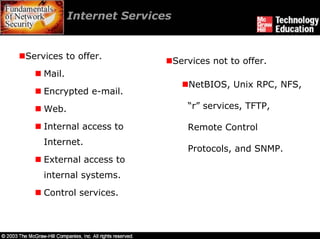
Services to offer.
                                Services not to offer.
    Mail.
                                   NetBIOS, Unix RPC, NFS,
    Encrypted e-mail.
    Web.                           “r” services, TFTP,

    Internal access to             Remote Control
    Internet.
                                   Protocols, and SNMP.
    External access to
    internal systems.
    Control services.
Mail


Mail service is generally offered to internal employees to

send and receive messages.

It requires that at least one server be established to receive

inbound mail.

Outbound mail can move through the same server or

directly through desktop systems.

Organization may choose to establish relays for public mail

to be sent to discussion groups.
Encrypted E-mail


It is better to encrypt the contents of the e-mail to protect

any sensitive information.

Systems like desktop software and network appliances

placed in mail stream provide encrypted e-mail.
Web


To publish information via Web, the organization needs to

establish a Web server.

Web servers can provide static content or dynamic content.

HTTPS is used for Web pages that contain sensitive

information or require authentication.

File Transfer Protocol (FTP) server allows external

individuals to get or send files.
Internal Access to Internet


Most common services that employees are allowed to

access are:

      HTTP (port 80) and HTTPS (port 443)

      FTP (ports 21 and 20)

      Telnet (port 23) and SSH (port 22)

      POP-3 (port 110) and IMAP (port 143)

      NNTP (port 119)
External Access to Internal
          Systems


External access to sensitive internal systems is a delicate

matter.

The two forms of external access are employee access or

non-employee access.

External access may be accomplished through VPNs, dial-

up lines, leased lines, or unencrypted access over the

Internet.
Control Services


These services are required for smooth function of network and

Internet connection.

DNS - Domain Name Service is used to resolve system names into

IP addresses.

ICMP - Internet Control Message Protocol provides services such

as ping and messages that help the network function efficiently.

NTP - Network Time Protocol is used to synchronize time between

various systems.
Develop a Communications
        Architecture


Primary issues for establishing an organization’s Internet

connection are throughput requirements and availability.

Availability requirements of the connection should be set by

the organization.
Develop a Communications
        Architecture


Single-line access

Multiple-line access to a single ISP

Multiple-line access to multiple ISPs
Single-Line Access


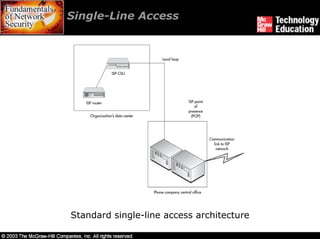
Standard single-line access architecture
Single-Line Access


The following potential failures make single-line access

suitable for non-business-critical Internet connections:

      Router failure.

      CSU failure.

      Cut local loop.

      Damage to the telephone company’s CO (central office).

      POP failure at the ISP.
Multiple-Line Access to a
         Single ISP


They are used to overcome the single point of failure issues

with the single ISP architecture.

Shadow link or redundant circuit services offered by

different ISPs provide a second communication link in case

of failure.

Multiple-line access to a single ISP has Single-POP access

or Multiple-POP access.
Multiple-Line Access to a
           Single ISP


Single-POP access:

     An ISP can provide fail-over access by setting up a redundant

     circuit to the same POP.

     It addresses failures in router, CSU, phone company circuit to

     CO, and ISP equipment.

     Benefit to this architecture is the low cost of the redundant

     circuit.
Multiple-Line Access to a
          Single ISP


Multiple-POP access:

     Running second connection to a second POP additional

     availability and reliability can be obtained.

     Border Gateway Protocol (BGP) protocol, run by ISP, specifies

     routes between entities with such dual connections.

     Single point failures of local loop and CO can be overcome if

     the organization’s facility has two local loop connections.
Multiple-line Access to
        Multiple ISPs


If architected correctly, use of multiple ISPs can reduce the

risk of loss of service dramatically.

Issues that occur in choosing ISPs are complexity of using

different ISPs, thorough knowledge in ISPs, and physical

routing of connections.

Working with multiple ISPs also involve routing and IP

address space issues that must be resolved.
Design a Demilitarized Zone


Defining the DMZ.

Systems to place in DMZ.

Appropriate DMZ architectures.
Defining the DMZ


A DMZ is created by providing a semi-protected network

zone.

The DMZ is delineated with network access controls, such

as firewalls or heavily filtered routers.

Any system that can be directly contacted by an external

user should be placed in a DMZ since they can be attacked.

External system’s access to sensitive systems must be

avoided.
Systems to Place in DMZ


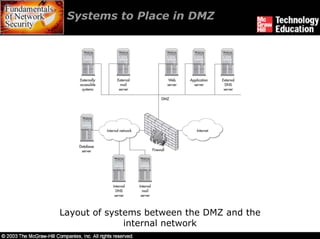
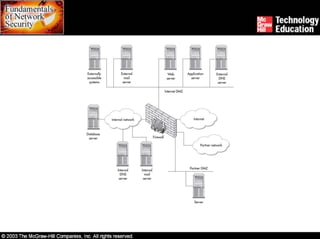
Layout of systems between the DMZ and the
              internal network
Systems to Place in DMZ


DMZ can have either both internal and external mail

servers or a single firewall mail server.

Using Web server for receiving user’s input and application

server for processing it provides protection to the database

server.

All externally accessible systems should be placed in the

DMZ.

The organization’s ISP can provide alternate DNS services.
Appropriate DMZ Architectures


The three common architectures are router and firewall,

single firewall, and dual firewall.

These architectures have their own advantages and

disadvantages; hence organizations must choose the

appropriate one.
Appropriate DMZ Architectures


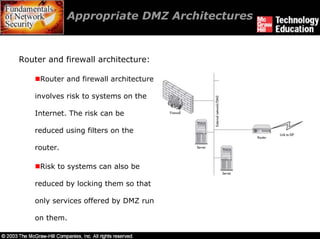
Router and firewall architecture:

     Router and firewall architecture

    involves risk to systems on the

    Internet. The risk can be

    reduced using filters on the

    router.

     Risk to systems can also be

    reduced by locking them so that

    only services offered by DMZ run

    on them.
Appropriate DMZ Architectures


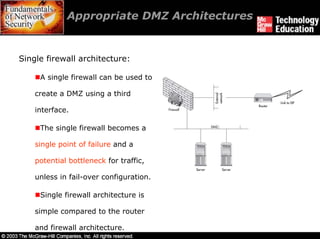
Single firewall architecture:

     A single firewall can be used to

    create a DMZ using a third

    interface.

     The single firewall becomes a

    single point of failure and a

    potential bottleneck for traffic,

    unless in fail-over configuration.

     Single firewall architecture is

    simple compared to the router

    and firewall architecture.
Appropriate DMZ Architectures


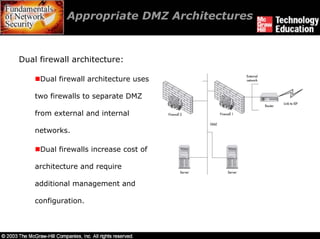
Dual firewall architecture:

     Dual firewall architecture uses

    two firewalls to separate DMZ

    from external and internal

    networks.

     Dual firewalls increase cost of

    architecture and require

    additional management and

    configuration.
Understand Network Address
        Translation


Any organization that plans to install a firewall will have to

deal with addressing issues.

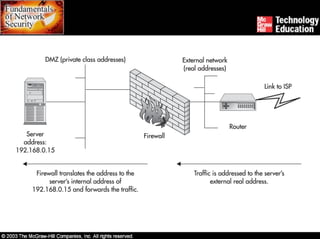
In most networks, the firewall performs the NAT function of

translating one or more addresses into other addresses.

NAT can also provide a security function as hidden

addresses of internal systems are not visible to the Internet.
Understand Network Address
        Translation


Private class addresses are used on internal networks

behind a firewall that performs NAT.

These addresses provide an organization with flexibility in

designing its internal addressing scheme.

Static NAT is a one- to-one configuration that allows

accessing internal network addresses from the Internet.

Static NAT maps a single real address from the

organization’s external network to a system on the DMZ.
Understand Network Address
            Translation

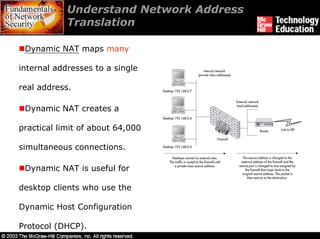
 Dynamic NAT maps many

internal addresses to a single

real address.

 Dynamic NAT creates a

practical limit of about 64,000

simultaneous connections.

 Dynamic NAT is useful for

desktop clients who use the

Dynamic Host Configuration

Protocol (DHCP).
Design Partner Networks


Partner networks are generally established to exchange

certain files or pieces of data between organizations.

Architectures and methodologies of Internet connection can

be used for partner networks as their requirements do not

differ much.

Rules must be added to firewall to allow systems at the

partner organization and internal systems to access partner

DMZ systems.

NAT should be used when connecting to partner networks.
Summary


Organizations can offer services like mail, encrypted e-mail,

Web, internal access to Internet, external access to internal

systems, and control services.

Control services include DNS, ICMP, and NTP.

To reduce security risks, services that are not required

should not be offered.

Types of Internet architectures are single-line access,

multiple-line access to a single ISP, and multiple-line access

to multiple ISPs.
Summary


Establishing a not truly trusted, semi-secure zone outside

of the trusted network creates a DMZ.

Router and firewall, single firewall, and dual firewall are the

three DMZ architectures.

Firewall performs the NAT function of translating one or

more addresses into other addresses.

Partner networks are generally established to exchange

data between organizations.

Ch18 Internet Security

  • 1.
  • 2.
    Overview Internet services. Develop acommunications architecture. Design a demilitarized zone. Understand network address translation. Design partner networks.
  • 3.
    Internet Services Services tooffer. Services not to offer. Mail. NetBIOS, Unix RPC, NFS, Encrypted e-mail. Web. “r” services, TFTP, Internal access to Remote Control Internet. Protocols, and SNMP. External access to internal systems. Control services.
  • 4.
    Mail Mail service isgenerally offered to internal employees to send and receive messages. It requires that at least one server be established to receive inbound mail. Outbound mail can move through the same server or directly through desktop systems. Organization may choose to establish relays for public mail to be sent to discussion groups.
  • 5.
    Encrypted E-mail It isbetter to encrypt the contents of the e-mail to protect any sensitive information. Systems like desktop software and network appliances placed in mail stream provide encrypted e-mail.
  • 6.
    Web To publish informationvia Web, the organization needs to establish a Web server. Web servers can provide static content or dynamic content. HTTPS is used for Web pages that contain sensitive information or require authentication. File Transfer Protocol (FTP) server allows external individuals to get or send files.
  • 7.
    Internal Access toInternet Most common services that employees are allowed to access are: HTTP (port 80) and HTTPS (port 443) FTP (ports 21 and 20) Telnet (port 23) and SSH (port 22) POP-3 (port 110) and IMAP (port 143) NNTP (port 119)
  • 8.
    External Access toInternal Systems External access to sensitive internal systems is a delicate matter. The two forms of external access are employee access or non-employee access. External access may be accomplished through VPNs, dial- up lines, leased lines, or unencrypted access over the Internet.
  • 9.
    Control Services These servicesare required for smooth function of network and Internet connection. DNS - Domain Name Service is used to resolve system names into IP addresses. ICMP - Internet Control Message Protocol provides services such as ping and messages that help the network function efficiently. NTP - Network Time Protocol is used to synchronize time between various systems.
  • 10.
    Develop a Communications Architecture Primary issues for establishing an organization’s Internet connection are throughput requirements and availability. Availability requirements of the connection should be set by the organization.
  • 11.
    Develop a Communications Architecture Single-line access Multiple-line access to a single ISP Multiple-line access to multiple ISPs
  • 12.
  • 13.
    Single-Line Access The followingpotential failures make single-line access suitable for non-business-critical Internet connections: Router failure. CSU failure. Cut local loop. Damage to the telephone company’s CO (central office). POP failure at the ISP.
  • 14.
    Multiple-Line Access toa Single ISP They are used to overcome the single point of failure issues with the single ISP architecture. Shadow link or redundant circuit services offered by different ISPs provide a second communication link in case of failure. Multiple-line access to a single ISP has Single-POP access or Multiple-POP access.
  • 15.
    Multiple-Line Access toa Single ISP Single-POP access: An ISP can provide fail-over access by setting up a redundant circuit to the same POP. It addresses failures in router, CSU, phone company circuit to CO, and ISP equipment. Benefit to this architecture is the low cost of the redundant circuit.
  • 16.
    Multiple-Line Access toa Single ISP Multiple-POP access: Running second connection to a second POP additional availability and reliability can be obtained. Border Gateway Protocol (BGP) protocol, run by ISP, specifies routes between entities with such dual connections. Single point failures of local loop and CO can be overcome if the organization’s facility has two local loop connections.
  • 17.
    Multiple-line Access to Multiple ISPs If architected correctly, use of multiple ISPs can reduce the risk of loss of service dramatically. Issues that occur in choosing ISPs are complexity of using different ISPs, thorough knowledge in ISPs, and physical routing of connections. Working with multiple ISPs also involve routing and IP address space issues that must be resolved.
  • 18.
    Design a DemilitarizedZone Defining the DMZ. Systems to place in DMZ. Appropriate DMZ architectures.
  • 19.
    Defining the DMZ ADMZ is created by providing a semi-protected network zone. The DMZ is delineated with network access controls, such as firewalls or heavily filtered routers. Any system that can be directly contacted by an external user should be placed in a DMZ since they can be attacked. External system’s access to sensitive systems must be avoided.
  • 20.
    Systems to Placein DMZ Layout of systems between the DMZ and the internal network
  • 21.
    Systems to Placein DMZ DMZ can have either both internal and external mail servers or a single firewall mail server. Using Web server for receiving user’s input and application server for processing it provides protection to the database server. All externally accessible systems should be placed in the DMZ. The organization’s ISP can provide alternate DNS services.
  • 22.
    Appropriate DMZ Architectures Thethree common architectures are router and firewall, single firewall, and dual firewall. These architectures have their own advantages and disadvantages; hence organizations must choose the appropriate one.
  • 23.
    Appropriate DMZ Architectures Routerand firewall architecture: Router and firewall architecture involves risk to systems on the Internet. The risk can be reduced using filters on the router. Risk to systems can also be reduced by locking them so that only services offered by DMZ run on them.
  • 24.
    Appropriate DMZ Architectures Singlefirewall architecture: A single firewall can be used to create a DMZ using a third interface. The single firewall becomes a single point of failure and a potential bottleneck for traffic, unless in fail-over configuration. Single firewall architecture is simple compared to the router and firewall architecture.
  • 25.
    Appropriate DMZ Architectures Dualfirewall architecture: Dual firewall architecture uses two firewalls to separate DMZ from external and internal networks. Dual firewalls increase cost of architecture and require additional management and configuration.
  • 26.
    Understand Network Address Translation Any organization that plans to install a firewall will have to deal with addressing issues. In most networks, the firewall performs the NAT function of translating one or more addresses into other addresses. NAT can also provide a security function as hidden addresses of internal systems are not visible to the Internet.
  • 27.
    Understand Network Address Translation Private class addresses are used on internal networks behind a firewall that performs NAT. These addresses provide an organization with flexibility in designing its internal addressing scheme. Static NAT is a one- to-one configuration that allows accessing internal network addresses from the Internet. Static NAT maps a single real address from the organization’s external network to a system on the DMZ.
  • 29.
    Understand Network Address Translation Dynamic NAT maps many internal addresses to a single real address. Dynamic NAT creates a practical limit of about 64,000 simultaneous connections. Dynamic NAT is useful for desktop clients who use the Dynamic Host Configuration Protocol (DHCP).
  • 30.
    Design Partner Networks Partnernetworks are generally established to exchange certain files or pieces of data between organizations. Architectures and methodologies of Internet connection can be used for partner networks as their requirements do not differ much. Rules must be added to firewall to allow systems at the partner organization and internal systems to access partner DMZ systems. NAT should be used when connecting to partner networks.
  • 32.
    Summary Organizations can offerservices like mail, encrypted e-mail, Web, internal access to Internet, external access to internal systems, and control services. Control services include DNS, ICMP, and NTP. To reduce security risks, services that are not required should not be offered. Types of Internet architectures are single-line access, multiple-line access to a single ISP, and multiple-line access to multiple ISPs.
  • 33.
    Summary Establishing a nottruly trusted, semi-secure zone outside of the trusted network creates a DMZ. Router and firewall, single firewall, and dual firewall are the three DMZ architectures. Firewall performs the NAT function of translating one or more addresses into other addresses. Partner networks are generally established to exchange data between organizations.