PRESERVATION


    Dr. Essam Obaid
PRESERVATION
The purpose of preservation is to ensure the continued accessibility
   of
an object overtime. Successful preservation requires that
- The object be accessible to users, and
- It retain its unique value to users.

 Physical materials suffer damage and decay: the acid present in the
 paper damage its fibers, causing it to become brittle and discolored
 overtime. Such concerns also apply to digital objects. The physical
   storage media will degrade over time or may become corrupted
                              overtime.
Digital Information
    Digital information is saved in the form of bits (ones and
   Zeroes) which represents the value in binary notation. Such
information cannot be directly interpreted by the user, but rather
    requires mediation of software capable of translating that
              information into human readable form.
                   (Look at fig 6.1 on page 83)
                Digital Preservation
    Digital preservation requires the management of objects
   overtime, using techniques that may result in frequent and
 profound changes to the technical representation of that record.
 There is no significant difference between the preservation of
    web resources and any other digital object, and the same
             techniques can be applied in each case.
Long-term Sustainable Methodologies
Preservation is concerned with preserving the means of access to
a digital object

o Migration
o Emulation
Emulation
  Emulation is the process of creating a ‘virtual’ version of the
 original environment that was used to access a given file. The
virtualized environment is accessed via an emulation application
  on modern hardware and software. This allows access to the
original content to be maintained (without changing this content),
                 through the emulated computer.

  Emulation attempts to retain the experience, and the original
                                form
   of the data, and to a degree the performance, but does not
   necessarily retain the original form or performance of the
                             hardware.
How it Emulation Works:
1. A contemporary (latest) access environment for a digital object
   is encapsulated into an emulated (copy) environment;
2. The emulated environment is accessed using a current
   hardware and software platform; and
3. By using the current hardware and software platform to access
   the emulated environment, the emulated environment is used
   to access the target file.
Migration
Migration is the process of converting a piece of digital content
 from its original file format into a new format that can more
 easily be accessed without having to maintain contemporary
                    software and hardware.


             The basic premise is that the file format
needs to be changed. It might be preferable to store the properties
 that have been identified as significant across multiple files, or
 using multiple storage mechanisms (e.g., a file and a database).
How Migration works


1. Original file format is acquired; and
2. File Format is changed to another format.
Renders
An application that runs with current hardware and software is used
to access the digital object.


• The software itself could either be written internally, or procured
  from another party.

• It could either be a first party application, if it is written by the
  same Organization responsible for creating the file format, or a
  third party application in all other cases.
PRONOM

The National Archives (TNA) has been actively collecting,
preserving, and making available electronic records for nearly 10
years. TNA’s approach to digital preservation is founded on two
fundamental activities:

- Passive preservation: which provides secure storage, and
- Active preservation: which ensures the continued accessibility
                        of the stored records over time, and across
                        changing technologies.
Active preservation

Active preservation generates new technical manifestations of
     objects through processes such as format migration or
    emulation, to ensure their continued accessibility within
             changing technological environments.
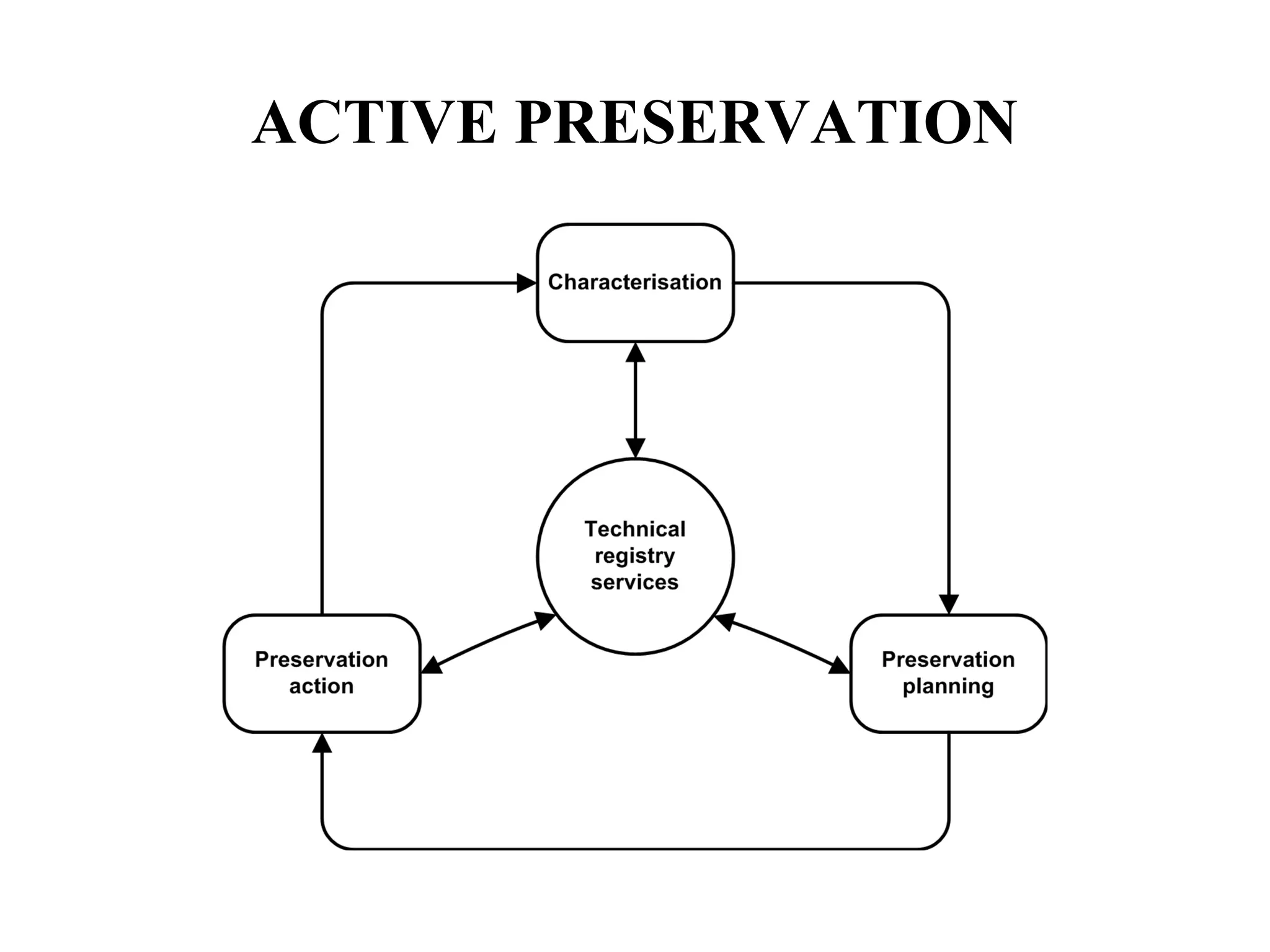
ACTIVE PRESERVATION
Technical Registries
         A registry is an information source that provides a common
reference point for a particular community of users. By registering the
key information concepts, the community can benefit from a shared
understanding of what those concepts mean; in effect it provides a
common vocabulary.
         In case of technical registry in digital reservation, these concepts
relate to the technical dependencies of digital objects.
For example, if an object is described as being in JPEG format, and
another is described as being JFIF1.02 format, how can we tell that both
the formats are same.
         A file format registry containing standard definitions of each
format, provides a solution: if everyone describes formats with reference
to the registry to the registry definition then all ambiguity is removed. A
standard referencing mechanism can be provided if each registry record
is also assigned a persistent unique identifier.
Technical Registries
Not only file formats benefit from registries their use can
potentially be extended to every element of the representation
network, including
- character encoding schemes,
- Compression algorithms
- Software
- Operating systems
- Hardware and storage media
PRONOM the first such operational registry was developed by “
THE NATIONAL ARCHIVES” of the UK (TNA) in 2003 and is
available as a free online resource.
Characterization
Before any object can be preserved, it must be understood with
sufficient technical precision. Specifically, it is necessary to
understand the significant properties of the object, which must be
preserve over time if it is to be regarded as authentic, and its
technical characteristics, which will influence the specific
preservation strategies which may be employed. For example: the
resolution and color depth of a image are likely to be considered
fundamental properties to preserve.

Characterization comprises three discrete stages:
- Identification
- Validation
- Property Extraction
Identification : Identification typically performed using some
                 form of signatures, a digital ‘finger print’ which
                 is unique to a specific format. The simplest
                 signature is provided by a file extension.
        DROID : (Digital Record Object Identification) software
                developed by TNA is an example of an identification tool
                that uses both internal and external signatures to perform
                 automated batch identification formats.


Validation:   This determine whether the object is well formed
              and valid against its formal specification.
Property Extraction : The properties of the object which are
              significant to its long term preservation.
Preservation Planning

Preservation planning forms the decision making of active
preservation. Its role is to identify and monitor technological
changes and their potential impacts on stored digital objects, and
to develop the necessary detailed preservation plans to mitigate
against those impacts.
Preservation Action

Preservation action represents the enactment of the preservation
plan in accordance with the chosen preservation strategy. This
will entail either the migration of objects to new formats or the
development of emulated environments. whatever preservation
plan is adopted, preservation action requires the availability of
specialized software tools.
Passive Preservation
Passive preservation is concerned with the secure storage of
digital objects, and the prevention of accidental or unauthorized
damage or loss. As such, passive preservation needs to
encompass the following functions: {Brown, A. 2006}

a. Security and access control
b. Integrity
c. Storage management
d. Content management
e. Disaster recovery
Tools for Passive Preservation
With journal prices, especially in the science, technical and
medical (STM) sector, still out of control, more and more authors
and universities want to take an active part in the publishing and
preservation process themselves.

In picking a tool, a library has to consider a number of questions:
• What material should be stored in the repository?
• Is long-term preservation an issue?
• Which software should be chosen?
• What is the cost of setting the system up? and
• How much know-how is required?
What is the LOCKSS Program?
LOCKSS (Lots of Copies Keep Stuff Safe), based at Stanford
University Libraries, is an international community initiative that
provides libraries with digital preservation tools and support so
that they can easily and inexpensively collect and preserve their
own copies of authorized e-content. LOCKSS, in its eleventh
year, provides libraries with the open-source software and
support to preserve today’s web-published materials for
tomorrow’s readers while building their own collections and
acquiring a copy of the assets they pay for, instead of simply
leasing them. LOCKSS provides 100% post cancellation access.
                     http://lockss.stanford.edu/
EPrints
          EPrints is a tool that is used to manage the archiving of research in the
form of books, posters, or conference papers. Its purpose is not to provide a
    long-
term archiving solution that ensures that material will be readable and accessible
through technology changes, but instead to give institutions a means to collect,
store and provide Web access to material.
          Currently, there are over 140 repositories worldwide that run the EPrints
software. For example, at the University of Queensland in Australia, EPrints is
used as 'a deposit collection of papers that showcases the research output of UQ
academic staff and postgraduate students across a range of subjects and
disciplines, both before and after peer-reviewed publication.'

         EPrints is a free open source package that was developed at the
University of Southampton in the UK
                              http://www.eprints.org/
DSpace
The DSpace open source software has been developed by the
Massachusetts Institute of Technology Libraries and Hewlett-
Packard. The current version of DSpace is 1.2.1.
According to the DSpace Web site the software allows
institutions to capture and describe digital works using a custom
workflow process distribute an institution's digital works over the
Web, so users can search and retrieve items in the collection
preserve digital works over the long term

                     http://www.dspace.org/
Future Trends
                     International Standards

                With the rapid development of information and
communication environment, numerous intellectual works are
available in digital format on the Internet, and those digital
resources have disappearing tendencies soon after their
appearance. Digital archiving is the long-term procedure to
process, manage and preserve those digital objects, which are
considered to have timeless value. Since 1990's, as their long-
term national projects, many countries like Australia, the United
States, and European nations have progressed their online
preservation efforts for digital resources led by their national
libraries with cooperation from other institutions and organizations.
OASIS
         The National Library of Korea (NLK), with the change of
status of libraries in digital information era, has planned an efficient
national information service to the people with collection of quality
online digital information and provision of public service, to preserve
those intellectual records for the next generations to come.

         For the opening of the National Digital Library of Korea in
2008, to collect various web contents, NLK is working on a project for
online digital resource collection and preservation, OASIS (Online
Archiving & Searching Internet Sources www.OASIS.go.kr). The
OASIS system was developed in December 2005, to preserve online
digital resource for the future generation, to collect and preserve
national digital cultural heritage, and to establish standard management
policies for the digital resources.
OASIS
(Online Archiving & Searching Internet Sources www.OASIS.go.kr)
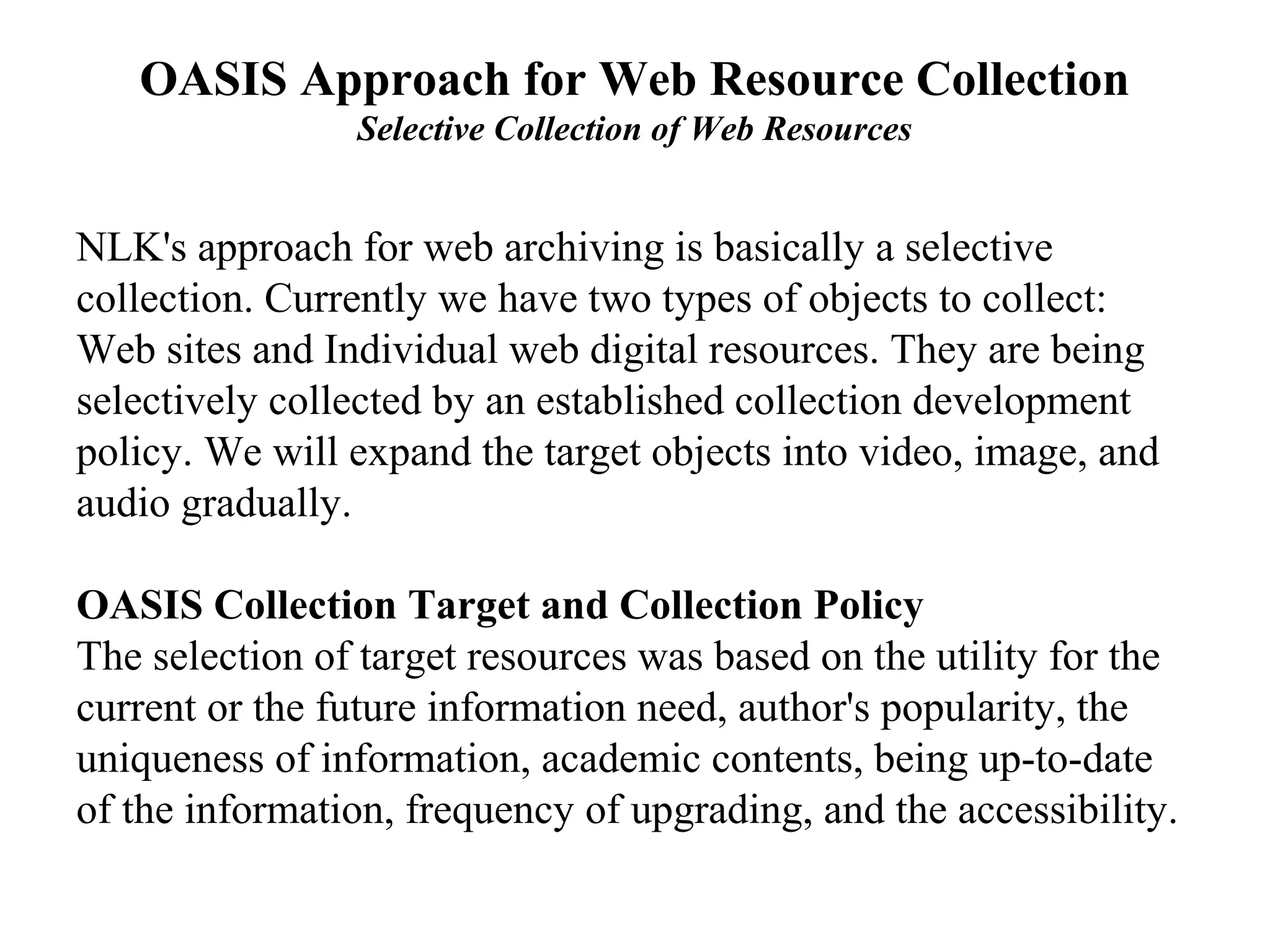
OASIS Approach for Web Resource Collection
                Selective Collection of Web Resources


NLK's approach for web archiving is basically a selective
collection. Currently we have two types of objects to collect:
Web sites and Individual web digital resources. They are being
selectively collected by an established collection development
policy. We will expand the target objects into video, image, and
audio gradually.

OASIS Collection Target and Collection Policy
The selection of target resources was based on the utility for the
current or the future information need, author's popularity, the
uniqueness of information, academic contents, being up-to-date
of the information, frequency of upgrading, and the accessibility.
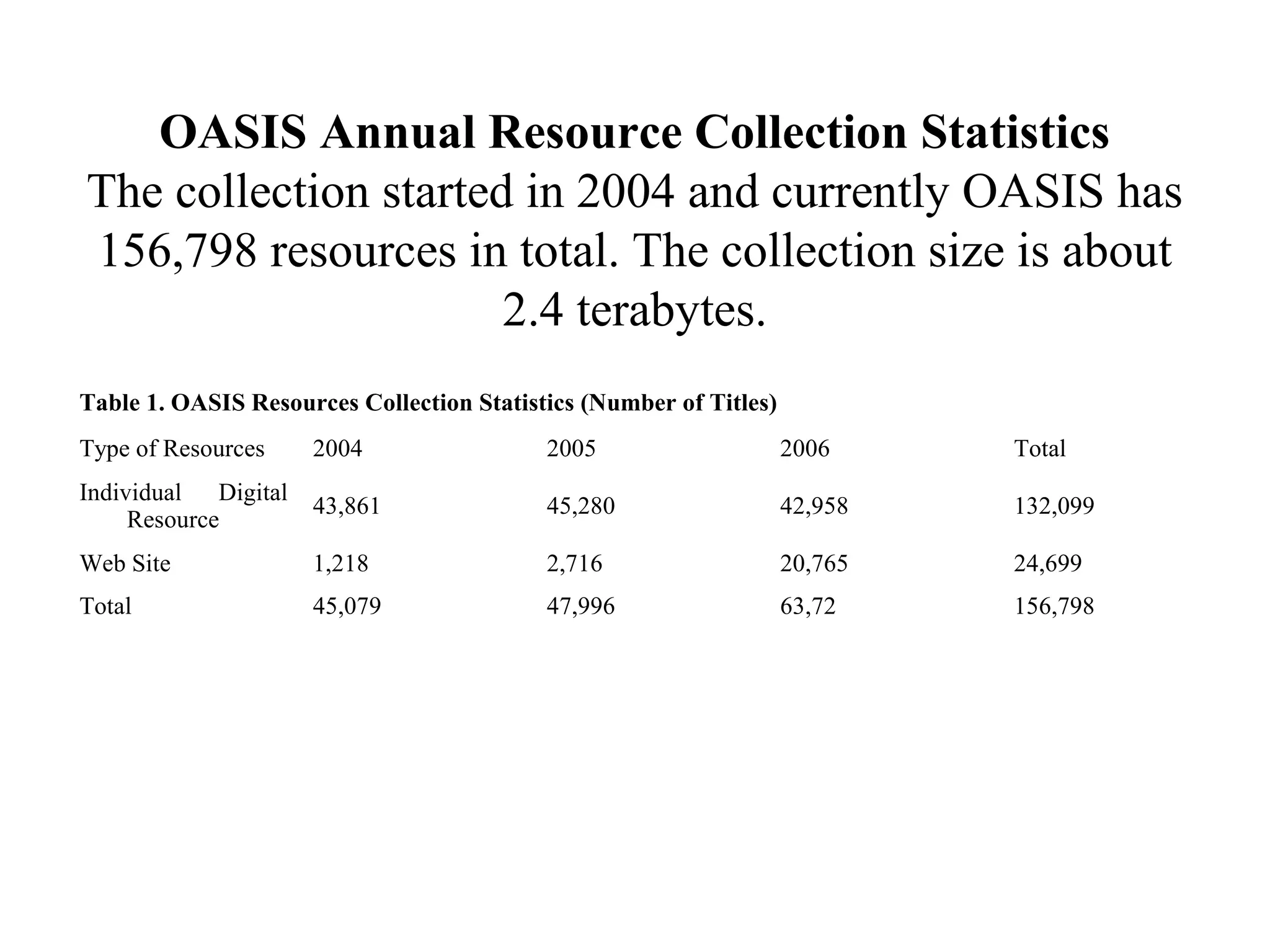
OASIS Annual Resource Collection Statistics
The collection started in 2004 and currently OASIS has
156,798 resources in total. The collection size is about
                      2.4 terabytes.
Table 1. OASIS Resources Collection Statistics (Number of Titles)
Type of Resources    2004                  2005                     2006     Total
Individual Digital
                     43,861                45,280                   42,958   132,099
     Resource
Web Site             1,218                 2,716                    20,765   24,699
Total                45,079                47,996                   63,72    156,798
OASIS Workflow and Process
 OASIS workflows and processes are described for web
     sites and individual digital resources respectively.
The process for web sites does not finalize with one cycle
  for mirroring because web sites change their contents
 continuously. It is necessary to collect their resources to
   preserve them by certain time periods. However, it is
impossible for a manager to monitor numerous web sites
     changes manually, and it is considered a waste of
 resources to collect every resource unconditionally by a
certain interval to preserve, for example, one month, two
                   months, or six months.
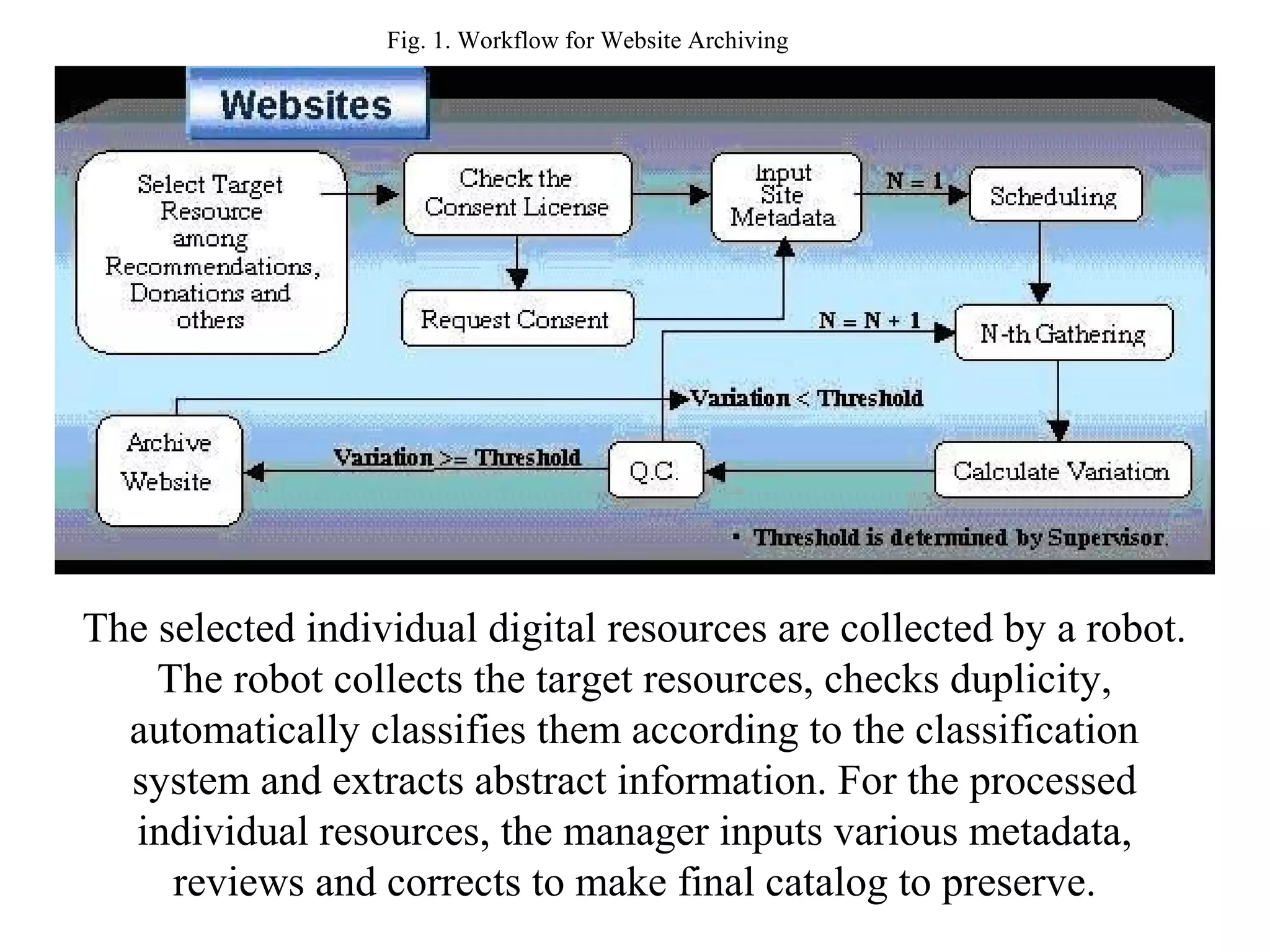
Fig. 1. Workflow for Website Archiving


The selected individual digital resources are collected by a robot.
    The robot collects the target resources, checks duplicity,
  automatically classifies them according to the classification
  system and extracts abstract information. For the processed
  individual resources, the manager inputs various metadata,
     reviews and corrects to make final catalog to preserve.
Future Development Direction
•   As knowledge information resources migrate from paper to digital formats,
    increasing necessity is found for collection and preservation of digital
    knowledge information resources at the national level. Recognizing digital
    resources' being short-lived, the OASIS system is running at the national
    level led by NLK to collect and preserve valuable digital resources for the
    current generation to inherit to the next generation as digital cultural
    heritage.
•   To accomplish the mission, the OASIS system provides national standard
    models for submission of online digital resources to the authority in the
    future digital environment and for standardization of collection and
    preservation systems for online digital resources.
•   Major development technologies are applied to OASIS at the levels of
    collection, preservation, management, public service, etc. They include the
    development of web robot agents and techniques to use them, automatic
    classification and automatic abstracting and others for the collection
    process.

PRESERVATION Web archiving

  • 1.
    PRESERVATION Dr. Essam Obaid
  • 2.
    PRESERVATION The purpose ofpreservation is to ensure the continued accessibility of an object overtime. Successful preservation requires that - The object be accessible to users, and - It retain its unique value to users. Physical materials suffer damage and decay: the acid present in the paper damage its fibers, causing it to become brittle and discolored overtime. Such concerns also apply to digital objects. The physical storage media will degrade over time or may become corrupted overtime.
  • 3.
    Digital Information Digital information is saved in the form of bits (ones and Zeroes) which represents the value in binary notation. Such information cannot be directly interpreted by the user, but rather requires mediation of software capable of translating that information into human readable form. (Look at fig 6.1 on page 83) Digital Preservation Digital preservation requires the management of objects overtime, using techniques that may result in frequent and profound changes to the technical representation of that record. There is no significant difference between the preservation of web resources and any other digital object, and the same techniques can be applied in each case.
  • 4.
    Long-term Sustainable Methodologies Preservationis concerned with preserving the means of access to a digital object o Migration o Emulation
  • 5.
    Emulation Emulationis the process of creating a ‘virtual’ version of the original environment that was used to access a given file. The virtualized environment is accessed via an emulation application on modern hardware and software. This allows access to the original content to be maintained (without changing this content), through the emulated computer. Emulation attempts to retain the experience, and the original form of the data, and to a degree the performance, but does not necessarily retain the original form or performance of the hardware.
  • 6.
    How it EmulationWorks: 1. A contemporary (latest) access environment for a digital object is encapsulated into an emulated (copy) environment; 2. The emulated environment is accessed using a current hardware and software platform; and 3. By using the current hardware and software platform to access the emulated environment, the emulated environment is used to access the target file.
  • 7.
    Migration Migration is theprocess of converting a piece of digital content from its original file format into a new format that can more easily be accessed without having to maintain contemporary software and hardware. The basic premise is that the file format needs to be changed. It might be preferable to store the properties that have been identified as significant across multiple files, or using multiple storage mechanisms (e.g., a file and a database).
  • 8.
    How Migration works 1.Original file format is acquired; and 2. File Format is changed to another format.
  • 9.
    Renders An application thatruns with current hardware and software is used to access the digital object. • The software itself could either be written internally, or procured from another party. • It could either be a first party application, if it is written by the same Organization responsible for creating the file format, or a third party application in all other cases.
  • 10.
    PRONOM The National Archives(TNA) has been actively collecting, preserving, and making available electronic records for nearly 10 years. TNA’s approach to digital preservation is founded on two fundamental activities: - Passive preservation: which provides secure storage, and - Active preservation: which ensures the continued accessibility of the stored records over time, and across changing technologies.
  • 11.
    Active preservation Active preservationgenerates new technical manifestations of objects through processes such as format migration or emulation, to ensure their continued accessibility within changing technological environments.
  • 12.
  • 13.
    Technical Registries A registry is an information source that provides a common reference point for a particular community of users. By registering the key information concepts, the community can benefit from a shared understanding of what those concepts mean; in effect it provides a common vocabulary. In case of technical registry in digital reservation, these concepts relate to the technical dependencies of digital objects. For example, if an object is described as being in JPEG format, and another is described as being JFIF1.02 format, how can we tell that both the formats are same. A file format registry containing standard definitions of each format, provides a solution: if everyone describes formats with reference to the registry to the registry definition then all ambiguity is removed. A standard referencing mechanism can be provided if each registry record is also assigned a persistent unique identifier.
  • 14.
    Technical Registries Not onlyfile formats benefit from registries their use can potentially be extended to every element of the representation network, including - character encoding schemes, - Compression algorithms - Software - Operating systems - Hardware and storage media PRONOM the first such operational registry was developed by “ THE NATIONAL ARCHIVES” of the UK (TNA) in 2003 and is available as a free online resource.
  • 15.
    Characterization Before any objectcan be preserved, it must be understood with sufficient technical precision. Specifically, it is necessary to understand the significant properties of the object, which must be preserve over time if it is to be regarded as authentic, and its technical characteristics, which will influence the specific preservation strategies which may be employed. For example: the resolution and color depth of a image are likely to be considered fundamental properties to preserve. Characterization comprises three discrete stages: - Identification - Validation - Property Extraction
  • 16.
    Identification : Identificationtypically performed using some form of signatures, a digital ‘finger print’ which is unique to a specific format. The simplest signature is provided by a file extension. DROID : (Digital Record Object Identification) software developed by TNA is an example of an identification tool that uses both internal and external signatures to perform automated batch identification formats. Validation: This determine whether the object is well formed and valid against its formal specification. Property Extraction : The properties of the object which are significant to its long term preservation.
  • 17.
    Preservation Planning Preservation planningforms the decision making of active preservation. Its role is to identify and monitor technological changes and their potential impacts on stored digital objects, and to develop the necessary detailed preservation plans to mitigate against those impacts.
  • 18.
    Preservation Action Preservation actionrepresents the enactment of the preservation plan in accordance with the chosen preservation strategy. This will entail either the migration of objects to new formats or the development of emulated environments. whatever preservation plan is adopted, preservation action requires the availability of specialized software tools.
  • 19.
    Passive Preservation Passive preservationis concerned with the secure storage of digital objects, and the prevention of accidental or unauthorized damage or loss. As such, passive preservation needs to encompass the following functions: {Brown, A. 2006} a. Security and access control b. Integrity c. Storage management d. Content management e. Disaster recovery
  • 20.
    Tools for PassivePreservation With journal prices, especially in the science, technical and medical (STM) sector, still out of control, more and more authors and universities want to take an active part in the publishing and preservation process themselves. In picking a tool, a library has to consider a number of questions: • What material should be stored in the repository? • Is long-term preservation an issue? • Which software should be chosen? • What is the cost of setting the system up? and • How much know-how is required?
  • 21.
    What is theLOCKSS Program? LOCKSS (Lots of Copies Keep Stuff Safe), based at Stanford University Libraries, is an international community initiative that provides libraries with digital preservation tools and support so that they can easily and inexpensively collect and preserve their own copies of authorized e-content. LOCKSS, in its eleventh year, provides libraries with the open-source software and support to preserve today’s web-published materials for tomorrow’s readers while building their own collections and acquiring a copy of the assets they pay for, instead of simply leasing them. LOCKSS provides 100% post cancellation access. http://lockss.stanford.edu/
  • 22.
    EPrints EPrints is a tool that is used to manage the archiving of research in the form of books, posters, or conference papers. Its purpose is not to provide a long- term archiving solution that ensures that material will be readable and accessible through technology changes, but instead to give institutions a means to collect, store and provide Web access to material. Currently, there are over 140 repositories worldwide that run the EPrints software. For example, at the University of Queensland in Australia, EPrints is used as 'a deposit collection of papers that showcases the research output of UQ academic staff and postgraduate students across a range of subjects and disciplines, both before and after peer-reviewed publication.' EPrints is a free open source package that was developed at the University of Southampton in the UK http://www.eprints.org/
  • 23.
    DSpace The DSpace opensource software has been developed by the Massachusetts Institute of Technology Libraries and Hewlett- Packard. The current version of DSpace is 1.2.1. According to the DSpace Web site the software allows institutions to capture and describe digital works using a custom workflow process distribute an institution's digital works over the Web, so users can search and retrieve items in the collection preserve digital works over the long term http://www.dspace.org/
  • 24.
    Future Trends International Standards With the rapid development of information and communication environment, numerous intellectual works are available in digital format on the Internet, and those digital resources have disappearing tendencies soon after their appearance. Digital archiving is the long-term procedure to process, manage and preserve those digital objects, which are considered to have timeless value. Since 1990's, as their long- term national projects, many countries like Australia, the United States, and European nations have progressed their online preservation efforts for digital resources led by their national libraries with cooperation from other institutions and organizations.
  • 25.
    OASIS The National Library of Korea (NLK), with the change of status of libraries in digital information era, has planned an efficient national information service to the people with collection of quality online digital information and provision of public service, to preserve those intellectual records for the next generations to come. For the opening of the National Digital Library of Korea in 2008, to collect various web contents, NLK is working on a project for online digital resource collection and preservation, OASIS (Online Archiving & Searching Internet Sources www.OASIS.go.kr). The OASIS system was developed in December 2005, to preserve online digital resource for the future generation, to collect and preserve national digital cultural heritage, and to establish standard management policies for the digital resources.
  • 26.
    OASIS (Online Archiving &Searching Internet Sources www.OASIS.go.kr)
  • 27.
    OASIS Approach forWeb Resource Collection Selective Collection of Web Resources NLK's approach for web archiving is basically a selective collection. Currently we have two types of objects to collect: Web sites and Individual web digital resources. They are being selectively collected by an established collection development policy. We will expand the target objects into video, image, and audio gradually. OASIS Collection Target and Collection Policy The selection of target resources was based on the utility for the current or the future information need, author's popularity, the uniqueness of information, academic contents, being up-to-date of the information, frequency of upgrading, and the accessibility.
  • 28.
    OASIS Annual ResourceCollection Statistics The collection started in 2004 and currently OASIS has 156,798 resources in total. The collection size is about 2.4 terabytes. Table 1. OASIS Resources Collection Statistics (Number of Titles) Type of Resources 2004 2005 2006 Total Individual Digital 43,861 45,280 42,958 132,099 Resource Web Site 1,218 2,716 20,765 24,699 Total 45,079 47,996 63,72 156,798
  • 29.
    OASIS Workflow andProcess OASIS workflows and processes are described for web sites and individual digital resources respectively. The process for web sites does not finalize with one cycle for mirroring because web sites change their contents continuously. It is necessary to collect their resources to preserve them by certain time periods. However, it is impossible for a manager to monitor numerous web sites changes manually, and it is considered a waste of resources to collect every resource unconditionally by a certain interval to preserve, for example, one month, two months, or six months.
  • 30.
    Fig. 1. Workflowfor Website Archiving The selected individual digital resources are collected by a robot. The robot collects the target resources, checks duplicity, automatically classifies them according to the classification system and extracts abstract information. For the processed individual resources, the manager inputs various metadata, reviews and corrects to make final catalog to preserve.
  • 31.
    Future Development Direction • As knowledge information resources migrate from paper to digital formats, increasing necessity is found for collection and preservation of digital knowledge information resources at the national level. Recognizing digital resources' being short-lived, the OASIS system is running at the national level led by NLK to collect and preserve valuable digital resources for the current generation to inherit to the next generation as digital cultural heritage. • To accomplish the mission, the OASIS system provides national standard models for submission of online digital resources to the authority in the future digital environment and for standardization of collection and preservation systems for online digital resources. • Major development technologies are applied to OASIS at the levels of collection, preservation, management, public service, etc. They include the development of web robot agents and techniques to use them, automatic classification and automatic abstracting and others for the collection process.