WEB DEVELOPMENT & DESIGN
FOUNDATIONS WITH HTML5
Chapter 1
Key Concepts

Copyright © Terry Felke-Morris

Wednesday, October 23, 13

1
WEB STANDARDS
AND THE W3C CONSORTIUM
 W3C – World Wide Web Consortium
◦ Develops recommendations and

prototype technologies related to
the Web

◦ Produces specifications, called

Recommendations, in an effort to
standardize web technologies

◦ WAI – Web Accessibility Initiative

Copyright © Terry Felke-Morris

Wednesday, October 23, 13

9
THE CLIENT/SERVER MODEL
Client/Server can describe a

relationship between two computer
programs –
the "client" and the "server".
Client
 requests some type of service (such as a

file or database access) from the server.

Server
 fulfills the request and transmits the

Copyright © Terry Felke-Morris

Wednesday, October 23, 13

18
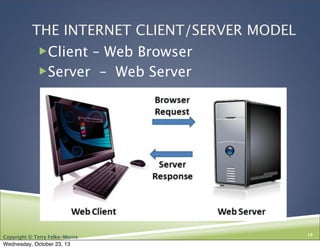
THE INTERNET CLIENT/SERVER MODEL
Client – Web Browser
Server – Web Server

Copyright © Terry Felke-Morris

Wednesday, October 23, 13

19
WEB CLIENT
Connected to the Internet when needed
Usually runs web browser (client) software

(such as Internet Explorer or Firefox)
Uses HTTP (Hypertext Transfer Protocol)
Requests web pages from server
Receives web pages and files from server

Copyright © Terry Felke-Morris

Wednesday, October 23, 13

20
WEB SERVER
Continually connected to the Internet
Runs web server software

(such as Apache or Internet Information
Server)
Uses HTTP (Hypertext Transfer Protocol)
Receives request for the web page
Responds to request and transmits status
code, web page, and associated files

Copyright © Terry Felke-Morris

Wednesday, October 23, 13

21
INTERNET PROTOCOLS
Protocols

 Rules that describe the methods used for

clients and servers to communicate with each
other over a network.

 There is no single protocol that makes the

Internet and Web work.

 A number of protocols with specific functions

are needed.

Copyright © Terry Felke-Morris

Wednesday, October 23, 13

23
FTP
FILE TRANSFER PROTOCOL
A set of rules that allow files to be

exchanged between computers on the
Internet.

Web developers commonly use FTP to

transfer web page files from their
computers to web servers.

FTP is also used to download programs

and files from other servers to individual
computers.

Copyright © Terry Felke-Morris

Wednesday, October 23, 13

24
E-MAIL PROTOCOLS
Sending E-mail
SMTP Simple Mail Transfer
Protocol
Receiving E-mail
POP (POP3) Post Office Protocol
IMAP Internet Mail Access

Copyright © Terry Felke-Morris

Wednesday, October 23, 13

25
HTTP - HYPERTEXT TRANSFER
PROTOCOL

 A set of rules for exchanging files such as text,

graphic images, sound, video, and other multimedia
files on the Web.
http
request

http
respons
e

 Web browsers send HTTP requests for web pages and

their associated files.

 Web servers send HTTP responses back to the web

browsers.

Copyright © Terry Felke-Morris

Wednesday, October 23, 13

26
TCP/IP

TRANSMISSION CONTROL PROTOCOL/INTERNET
PROTOCOL

TCP/IP has been adopted as the official

communication protocol of the Internet.
TCP and IP have different functions that

work together to ensure reliable
communication over the Internet.

Copyright © Terry Felke-Morris

Wednesday, October 23, 13

27
TCP
TRANSMISSION CONTROL PROTOCOL
 Purpose is to ensure the integrity of communication
 Breaks files and messages into individual units called

packets

Copyright © Terry Felke-Morris

Wednesday, October 23, 13

28
IP
INTERNET PROTOCOL
 A set of rules that controls how data is sent

between computers on the Internet.

 IP routes a packet to the correct destination

address.

 The packet gets successively forwarded to


the next closest router (a hardware device
designed to move network traffic) until it
reaches its destination.
http://visualroute.visualware.com/
http://www.tracert.com/cgi-bin/trace.pl

Copyright © Terry Felke-Morris

Wednesday, October 23, 13

29
IP ADDRESS
Each device connected to the Internet

has a unique numeric IP address.

These addresses consist of a set of four

groups of numbers, called octets.
74.125.95.104 will get you Google!

An IP address may correspond to a

domain name.

Copyright © Terry Felke-Morris

Wednesday, October 23, 13

30
DOMAIN NAME
 Locates an organization or other

entity on the Internet
 Domain Name System

◦ Divides the Internet into logical groups and

understandable names
◦ Associates unique computer IP Addresses with
the text-based domain names you type into a
web browser
◦ Browser: http://google.com
◦ IP Address: 74.125.95.104

Copyright © Terry Felke-Morris

Wednesday, October 23, 13

31
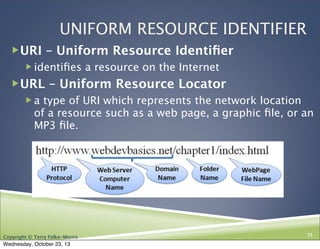
UNIFORM RESOURCE IDENTIFIER
URI – Uniform Resource Identifier
 identifies a resource on the Internet

URL – Uniform Resource Locator
 a type of URI which represents the network location

of a resource such as a web page, a graphic file, or an
MP3 file. 

Copyright © Terry Felke-Morris

Wednesday, October 23, 13

32
TLD
TOP-LEVEL DOMAIN NAME
A top-level domain (TLD) identifies

the right-most part of the domain
name.
Current generic TLDs:

.com, .org, .net, .mil, .gov, .edu,
.int, .aero, .asia, .cat, .jobs, .name,
.biz, .mobi, .museum, .info, .coop,
.post, .pro, .tel, .travel, .xxx
Copyright © Terry Felke-Morris

Wednesday, October 23, 13

33
DOMAIN NAME SYSTEM
The Domain Name System (DNS) associates

Domain Names with IP addresses.
Web
Browser

Domain Name
IP Address

DNS
Web
Server

Use TPC/IP
to send HTTP Request
Use TCP/IP
to send HTTP Responses
with web page files & images
Web Browser
displays web page
Wednesday, October 23, 13

35

Copyright © Terry Felke-Morris

35
MARKUP LANGUAGES
SGML – Standard Generalized Markup

Language
 A standard for specifying a markup language or

tag set

HTML – Hypertext Markup Language
 The set of markup symbols or codes placed in a

file intended for display on a web browser.

Copyright © Terry Felke-Morris

Wednesday, October 23, 13

36
MARKUP LANGUAGES (2)
XML – eXtensible Markup

Language

 A text-based language designed to describe, deliver,

and exchange structured information.

 It is not intended to replace HTML –

it is intended to extend the power of HTML by
separating data from presentation.

Copyright © Terry Felke-Morris

Wednesday, October 23, 13

37
MARKUP LANGUAGES (3)
XHTML – eXtensible Hypertext

Markup Language

 Developed by the W3C as the reformulation of HTML

4.0 as an application of XML.

 It combines the formatting strengths of HTML 4.0 and

the data structure and extensibility strengths of XML.

Copyright © Terry Felke-Morris

Wednesday, October 23, 13

38
MARKUP LANGUAGES (4)

HTML 5
The next version of HTML 4

and XHTML

http://www.w3.org/html/

Copyright © Terry Felke-Morris

Wednesday, October 23, 13

39
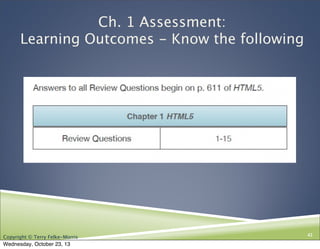
Ch. 1 Assessment:
Learning Outcomes - Know the following

Copyright © Terry Felke-Morris

Wednesday, October 23, 13

42

Ch. 1 HTML5, CIS 110 13F

  • 1.
    WEB DEVELOPMENT &DESIGN FOUNDATIONS WITH HTML5 Chapter 1 Key Concepts Copyright © Terry Felke-Morris Wednesday, October 23, 13 1
  • 2.
    WEB STANDARDS AND THEW3C CONSORTIUM  W3C – World Wide Web Consortium ◦ Develops recommendations and prototype technologies related to the Web ◦ Produces specifications, called Recommendations, in an effort to standardize web technologies ◦ WAI – Web Accessibility Initiative Copyright © Terry Felke-Morris Wednesday, October 23, 13 9
  • 3.
    THE CLIENT/SERVER MODEL Client/Servercan describe a relationship between two computer programs – the "client" and the "server". Client  requests some type of service (such as a file or database access) from the server. Server  fulfills the request and transmits the Copyright © Terry Felke-Morris Wednesday, October 23, 13 18
  • 4.
    THE INTERNET CLIENT/SERVERMODEL Client – Web Browser Server – Web Server Copyright © Terry Felke-Morris Wednesday, October 23, 13 19
  • 5.
    WEB CLIENT Connected tothe Internet when needed Usually runs web browser (client) software (such as Internet Explorer or Firefox) Uses HTTP (Hypertext Transfer Protocol) Requests web pages from server Receives web pages and files from server Copyright © Terry Felke-Morris Wednesday, October 23, 13 20
  • 6.
    WEB SERVER Continually connectedto the Internet Runs web server software (such as Apache or Internet Information Server) Uses HTTP (Hypertext Transfer Protocol) Receives request for the web page Responds to request and transmits status code, web page, and associated files Copyright © Terry Felke-Morris Wednesday, October 23, 13 21
  • 7.
    INTERNET PROTOCOLS Protocols  Rulesthat describe the methods used for clients and servers to communicate with each other over a network.  There is no single protocol that makes the Internet and Web work.  A number of protocols with specific functions are needed. Copyright © Terry Felke-Morris Wednesday, October 23, 13 23
  • 8.
    FTP FILE TRANSFER PROTOCOL Aset of rules that allow files to be exchanged between computers on the Internet. Web developers commonly use FTP to transfer web page files from their computers to web servers. FTP is also used to download programs and files from other servers to individual computers. Copyright © Terry Felke-Morris Wednesday, October 23, 13 24
  • 9.
    E-MAIL PROTOCOLS Sending E-mail SMTPSimple Mail Transfer Protocol Receiving E-mail POP (POP3) Post Office Protocol IMAP Internet Mail Access Copyright © Terry Felke-Morris Wednesday, October 23, 13 25
  • 10.
    HTTP - HYPERTEXTTRANSFER PROTOCOL  A set of rules for exchanging files such as text, graphic images, sound, video, and other multimedia files on the Web. http request http respons e  Web browsers send HTTP requests for web pages and their associated files.  Web servers send HTTP responses back to the web browsers. Copyright © Terry Felke-Morris Wednesday, October 23, 13 26
  • 11.
    TCP/IP TRANSMISSION CONTROL PROTOCOL/INTERNET PROTOCOL TCP/IPhas been adopted as the official communication protocol of the Internet. TCP and IP have different functions that work together to ensure reliable communication over the Internet. Copyright © Terry Felke-Morris Wednesday, October 23, 13 27
  • 12.
    TCP TRANSMISSION CONTROL PROTOCOL Purpose is to ensure the integrity of communication  Breaks files and messages into individual units called packets Copyright © Terry Felke-Morris Wednesday, October 23, 13 28
  • 13.
    IP INTERNET PROTOCOL  Aset of rules that controls how data is sent between computers on the Internet.  IP routes a packet to the correct destination address.  The packet gets successively forwarded to the next closest router (a hardware device designed to move network traffic) until it reaches its destination. http://visualroute.visualware.com/ http://www.tracert.com/cgi-bin/trace.pl Copyright © Terry Felke-Morris Wednesday, October 23, 13 29
  • 14.
    IP ADDRESS Each deviceconnected to the Internet has a unique numeric IP address. These addresses consist of a set of four groups of numbers, called octets. 74.125.95.104 will get you Google! An IP address may correspond to a domain name. Copyright © Terry Felke-Morris Wednesday, October 23, 13 30
  • 15.
    DOMAIN NAME  Locatesan organization or other entity on the Internet  Domain Name System ◦ Divides the Internet into logical groups and understandable names ◦ Associates unique computer IP Addresses with the text-based domain names you type into a web browser ◦ Browser: http://google.com ◦ IP Address: 74.125.95.104 Copyright © Terry Felke-Morris Wednesday, October 23, 13 31
  • 16.
    UNIFORM RESOURCE IDENTIFIER URI– Uniform Resource Identifier  identifies a resource on the Internet URL – Uniform Resource Locator  a type of URI which represents the network location of a resource such as a web page, a graphic file, or an MP3 file. Copyright © Terry Felke-Morris Wednesday, October 23, 13 32
  • 17.
    TLD TOP-LEVEL DOMAIN NAME Atop-level domain (TLD) identifies the right-most part of the domain name. Current generic TLDs: .com, .org, .net, .mil, .gov, .edu, .int, .aero, .asia, .cat, .jobs, .name, .biz, .mobi, .museum, .info, .coop, .post, .pro, .tel, .travel, .xxx Copyright © Terry Felke-Morris Wednesday, October 23, 13 33
  • 18.
    DOMAIN NAME SYSTEM TheDomain Name System (DNS) associates Domain Names with IP addresses. Web Browser Domain Name IP Address DNS Web Server Use TPC/IP to send HTTP Request Use TCP/IP to send HTTP Responses with web page files & images Web Browser displays web page Wednesday, October 23, 13 35 Copyright © Terry Felke-Morris 35
  • 19.
    MARKUP LANGUAGES SGML –Standard Generalized Markup Language  A standard for specifying a markup language or tag set HTML – Hypertext Markup Language  The set of markup symbols or codes placed in a file intended for display on a web browser. Copyright © Terry Felke-Morris Wednesday, October 23, 13 36
  • 20.
    MARKUP LANGUAGES (2) XML– eXtensible Markup Language  A text-based language designed to describe, deliver, and exchange structured information.  It is not intended to replace HTML – it is intended to extend the power of HTML by separating data from presentation. Copyright © Terry Felke-Morris Wednesday, October 23, 13 37
  • 21.
    MARKUP LANGUAGES (3) XHTML– eXtensible Hypertext Markup Language  Developed by the W3C as the reformulation of HTML 4.0 as an application of XML.  It combines the formatting strengths of HTML 4.0 and the data structure and extensibility strengths of XML. Copyright © Terry Felke-Morris Wednesday, October 23, 13 38
  • 22.
    MARKUP LANGUAGES (4) HTML5 The next version of HTML 4 and XHTML http://www.w3.org/html/ Copyright © Terry Felke-Morris Wednesday, October 23, 13 39
  • 23.
    Ch. 1 Assessment: LearningOutcomes - Know the following Copyright © Terry Felke-Morris Wednesday, October 23, 13 42