WEB DEVELOPMENT & DESIGN
FOUNDATIONS WITH HTML5
Chapter 1
Key Concepts

Copyright © Terry Felke-Morris

1
LEARNING OUTCOMES
In this chapter, you will learn how to
Describe the evolution of the Internet and the Web
Explain the need for web standards
Describe Universal Design
Identify benefits of accessible web design
Identify reliable resources of information on the Web
Identify ethical use of the Web
Describe the purpose of web browsers and web servers
Identify networking protocols
Define URIs and domain names
Describe HTML, XHTML, and HTML5
Describe popular trends in the use of the Web

Copyright © Terry Felke-Morris

2
REASONS FOR
INTERNET GROWTH IN THE 1990S
 Removal of the ban on commercial activity
 Development of the World Wide Web

by Tim Berners-Lee at CERN
 Development of Mosaic,
the first graphics-based web browser at NCSA
 Personal computers were increasingly available
and affordable
 Online service providers offered low-cost
connections to the Internet

Copyright © Terry Felke-Morris

3
THE WORLD WIDE WEB

The graphical user interface to
information stored on computers
connected to the Internet.

Copyright © Terry Felke-Morris

4
INTERNET STANDARDS &
COORDINATION
 The Internet Society
 A professional organization that provides

leadership in addressing issues related to the
future of the Internet
 IETF-- Internet Engineering Task Force
 RFC – Requests for Comments
 IAB – Internet Architecture Board

Copyright © Terry Felke-Morris

5
GROWTH OF THE INTERNET

http://www.internetworldstats.com/stats.htm
Copyright © Terry Felke-Morris

6
INTERNET STANDARDS &
COORDINATION
 ICANN - The Internet Corporation for Assigned Numbers &

Names
◦ Non-profit organization
◦ Main function is to coordinate the assignment of:
 Internet domain names
 IP address numbers
 Protocol parameters
 Protocol port numbers.

Copyright © Terry Felke-Morris

7
INTRANET & EXTRANETS
 Intranet
 A private network contained within an organization or
business used to share information and resources among
coworkers.
 Extranet
 A private network that securely shares part of an
organization’s information or operations with external
partners

Copyright © Terry Felke-Morris

8
WEB STANDARDS
AND THE W3C CONSORTIUM
W3C – World Wide Web Consortium
◦ Develops recommendations and

prototype technologies related to the
Web

◦ Produces specifications, called

Recommendations, in an effort to
standardize web technologies

◦ WAI – Web Accessibility Initiative

Copyright © Terry Felke-Morris

9
WEB ACCESSIBILITY
 Accessible Website
 provides accommodations for individuals with visual,

auditory, physical, and neurological disabilities

 WAI
 W3C’s Web Accessibility Initiative
 http://www.w3.org/WAI

 WCAG
 Web Content Accessibility Guidelines

http://www.w3.org/WAI/WCAG20/quickref/

Copyright © Terry Felke-Morris

10
WEB ACCESSIBILITY & THE LAW
 Americans with Disabilities Act (ADA)
 Prohibits discrimination against people with
disabilities
 Section 508 of the Rehabilitation Act
 Requires that government agencies must give
individuals with disabilities access to information
technology that is comparable to the access
available to others
 http://www.section508.gov
Copyright © Terry Felke-Morris

11
UNIVERSAL DESIGN FOR THE WEB
 Universal Design
 the design of products and environments to be

usable by all people, to the greatest extent
possible, without the need for adaptation or
specialized design

http://www.ncsu.edu/www/ncsu/design/sod5/cud/about_ud/about_ud.htm
Copyright © Terry Felke-Morris

12
RELIABILITY &
INFORMATION ON THE WEB
 Questions to Ask:
 Is the organization credible?
 How recent is the information?
 Are there links to additional resources?
 Is it Wikipedia?

Copyright © Terry Felke-Morris

13
CHECKPOINT 1.1
1. Describe the difference between the

Internet and the Web.

2. Explain three events that contributed to

the commercialization and exponential
growth of the Internet.

3. Is the concept of universal design important

to web developers? Explain your answer.

Copyright © Terry Felke-Morris

14
NETWORK OVERVIEW
 Network

two or more computers connected together
for the purpose of communicating and sharing
resources

Copyright © Terry Felke-Morris

15
NETWORKS
 LAN – Local Area Network
 Usually confined to a single building or group of
buildings
 WAN – Wide Area Network
 Usually uses some form of public or commercial
communications network to connect computers is
widely dispersed geographical areas.

Copyright © Terry Felke-Morris

16
INTERNET INFRASTRUCTURE
 Internet Backbone

A high capacity communication link that carries data
gathered from smaller links that interconnect with it.

Source: http://www.alamo.edu/sac/library/faculty/deosdade/wwwtest2.htm
Copyright © Terry Felke-Morris

17
THE CLIENT/SERVER MODEL
 Client/Server can describe a relationship

between two computer programs –
the "client" and the "server".
 Client
 requests some type of service (such as a file or

database access) from the server.
 Server
 fulfills the request and transmits the results to the

client over a network

Copyright © Terry Felke-Morris

18
THE INTERNET CLIENT/SERVER MODEL
 Client – Web Browser
 Server – Web Server

Copyright © Terry Felke-Morris

19
WEB CLIENT
 Connected to the Internet when needed
 Usually runs web browser (client) software

(such as Internet Explorer or Firefox)
 Uses HTTP (Hypertext Transfer Protocol)
 Requests web pages from server
 Receives web pages and files from server

Copyright © Terry Felke-Morris

20
WEB SERVER
 Continually connected to the Internet
 Runs web server software

(such as Apache or Internet Information Server)
 Uses HTTP (Hypertext Transfer Protocol)
 Receives request for the web page
 Responds to request and transmits status code,
web page, and associated files

Copyright © Terry Felke-Morris

21
MIME TYPE
 Multi-Purpose Internet Mail Extension
 a set of rules that allow multimedia documents

to be exchanged among
many different computer systems

Copyright © Terry Felke-Morris

22
INTERNET PROTOCOLS
 Protocols
 Rules that describe the methods used for clients and

servers to communicate with each other over a
network.

 There is no single protocol that makes the Internet and

Web work.

 A number of protocols with specific functions are

needed.

Copyright © Terry Felke-Morris

23
FTP
FILE TRANSFER PROTOCOL
 A set of rules that allow files to be exchanged

between computers on the Internet.

 Web developers commonly use FTP to transfer

web page files from their computers to web
servers.

 FTP is also used to download programs and files

from other servers to individual computers.

Copyright © Terry Felke-Morris

24
E-MAIL PROTOCOLS
 Sending E-mail
 SMTP Simple Mail Transfer Protocol
 Receiving E-mail
 POP (POP3) Post Office Protocol
 IMAP Internet Mail Access Protocol

Copyright © Terry Felke-Morris

25
HTTP - HYPERTEXT TRANSFER PROTOCOL
 A set of rules for exchanging files such as text, graphic images,

sound, video, and other multimedia files on the Web.
http request

http
response

 Web browsers send HTTP requests for web pages and their

associated files.

 Web servers send HTTP responses back to the web browsers.

Copyright © Terry Felke-Morris

26
TCP/IP

TRANSMISSION CONTROL PROTOCOL/INTERNET
PROTOCOL

 TCP/IP has been adopted as the official

communication protocol of the Internet.
 TCP and IP have different functions that work

together to ensure reliable communication over
the Internet.

Copyright © Terry Felke-Morris

27
TCP
TRANSMISSION CONTROL PROTOCOL
 Purpose is to ensure the integrity of communication
 Breaks files and messages into individual units called packets

Copyright © Terry Felke-Morris

28
IP
INTERNET PROTOCOL
A set of rules that controls how data is sent

between computers on the Internet.

IP routes a packet to the correct destination

address.

The packet gets successively forwarded to the next

closest router (a hardware device designed to move
network traffic) until it reaches its destination.
http://visualroute.visualware.com/
http://www.tracert.com/cgi-bin/trace.pl

Copyright © Terry Felke-Morris

29
IP ADDRESS
 Each device connected to the Internet has a

unique numeric IP address.

 These addresses consist of a set of four groups

of numbers, called octets.
74.125.95.104 will get you Google!

 An IP address may correspond to a domain

name.

Copyright © Terry Felke-Morris

30
DOMAIN NAME
Locates an organization or other entity on

the Internet
Domain Name System

◦ Divides the Internet into logical groups and

understandable names
◦ Associates unique computer IP Addresses with the textbased domain names you type into a web browser
◦ Browser: http://google.com
◦ IP Address: 74.125.95.104

Copyright © Terry Felke-Morris

31
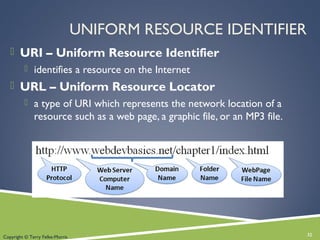
UNIFORM RESOURCE IDENTIFIER
 URI – Uniform Resource Identifier
 identifies a resource on the Internet

 URL – Uniform Resource Locator
 a type of URI which represents the network location of a

resource such as a web page, a graphic file, or an MP3 file.

Copyright © Terry Felke-Morris

32
TLD
TOP-LEVEL DOMAIN NAME
 A top-level domain (TLD) identifies the

right-most part of the domain name.
 Current generic TLDs:

.com, .org, .net, .mil, .gov, .edu, .int, .aero,
.asia, .cat, .jobs, .name, .biz, .mobi,
.museum, .info, .coop, .post, .pro, .tel, .travel,
.xxx
Copyright © Terry Felke-Morris

33
COUNTY CODE TLDS
 Two character codes originally intended to indicate the

geographical location (country) of the web site.

 In practice, it is fairly easy to obtain a domain name with

a country code TLD that is not local to the registrant.

 Examples:
 .tv, .ws, .au, .jp, .uk
 See http://www.iana.org/cctld/cctld-whois.htm

Copyright © Terry Felke-Morris

34
DOMAIN NAME SYSTEM
 The Domain Name System (DNS) associates

Domain Names with IP addresses.
Web
Browser

Domain Name
IP Address

DNS
Web
Server

Use TPC/IP
to send HTTP Request
Use TCP/IP
to send HTTP Responses
with web page files & images
Web Browser
displays web page

35

Copyright © Terry Felke-Morris

35
MARKUP LANGUAGES
 SGML – Standard Generalized Markup Language
 A standard for specifying a markup language or tag set

 HTML – Hypertext Markup Language
 The set of markup symbols or codes placed in a file intended

for display on a web browser.

Copyright © Terry Felke-Morris

36
MARKUP LANGUAGES (2)
 XML – eXtensible Markup Language
 A text-based language designed to describe, deliver, and

exchange structured information.

 It is not intended to replace HTML –

it is intended to extend the power of HTML by separating data
from presentation.

Copyright © Terry Felke-Morris

37
MARKUP LANGUAGES (3)
 XHTML – eXtensible Hypertext Markup

Language

 Developed by the W3C as the reformulation of HTML 4.0 as an

application of XML.

 It combines the formatting strengths of HTML 4.0 and the data

structure and extensibility strengths of XML.

Copyright © Terry Felke-Morris

38
MARKUP LANGUAGES (4)

 HTML 5
 The next version of HTML 4 and

XHTML

 http://www.w3.org/html/

Copyright © Terry Felke-Morris

39
CHECKPOINT 1.2
1.

Describe the components of the client/server
model as applied to the Internet.

2.

Identify two protocols used on the Internet to
convey information that use the Internet but
do not use the Web.

3.

Explain the similarities and differences
between a URL and a domain name.

Copyright © Terry Felke-Morris

40
POPULAR USES OF THE INTERNET









Continued importance of E-Commerce
Mobile Access
Blogs
Wikis
Social Networking
RSS
Podcasts
Web 2.0

Copyright © Terry Felke-Morris

41
SUMMARY
 This chapter provided a brief overview of

Internet, Web, and introductory networking
concepts.

Copyright © Terry Felke-Morris

42

Chapter1

  • 1.
    WEB DEVELOPMENT &DESIGN FOUNDATIONS WITH HTML5 Chapter 1 Key Concepts Copyright © Terry Felke-Morris 1
  • 2.
    LEARNING OUTCOMES In thischapter, you will learn how to Describe the evolution of the Internet and the Web Explain the need for web standards Describe Universal Design Identify benefits of accessible web design Identify reliable resources of information on the Web Identify ethical use of the Web Describe the purpose of web browsers and web servers Identify networking protocols Define URIs and domain names Describe HTML, XHTML, and HTML5 Describe popular trends in the use of the Web Copyright © Terry Felke-Morris 2
  • 3.
    REASONS FOR INTERNET GROWTHIN THE 1990S  Removal of the ban on commercial activity  Development of the World Wide Web by Tim Berners-Lee at CERN  Development of Mosaic, the first graphics-based web browser at NCSA  Personal computers were increasingly available and affordable  Online service providers offered low-cost connections to the Internet Copyright © Terry Felke-Morris 3
  • 4.
    THE WORLD WIDEWEB The graphical user interface to information stored on computers connected to the Internet. Copyright © Terry Felke-Morris 4
  • 5.
    INTERNET STANDARDS & COORDINATION The Internet Society  A professional organization that provides leadership in addressing issues related to the future of the Internet  IETF-- Internet Engineering Task Force  RFC – Requests for Comments  IAB – Internet Architecture Board Copyright © Terry Felke-Morris 5
  • 6.
    GROWTH OF THEINTERNET http://www.internetworldstats.com/stats.htm Copyright © Terry Felke-Morris 6
  • 7.
    INTERNET STANDARDS & COORDINATION ICANN - The Internet Corporation for Assigned Numbers & Names ◦ Non-profit organization ◦ Main function is to coordinate the assignment of:  Internet domain names  IP address numbers  Protocol parameters  Protocol port numbers. Copyright © Terry Felke-Morris 7
  • 8.
    INTRANET & EXTRANETS Intranet  A private network contained within an organization or business used to share information and resources among coworkers.  Extranet  A private network that securely shares part of an organization’s information or operations with external partners Copyright © Terry Felke-Morris 8
  • 9.
    WEB STANDARDS AND THEW3C CONSORTIUM W3C – World Wide Web Consortium ◦ Develops recommendations and prototype technologies related to the Web ◦ Produces specifications, called Recommendations, in an effort to standardize web technologies ◦ WAI – Web Accessibility Initiative Copyright © Terry Felke-Morris 9
  • 10.
    WEB ACCESSIBILITY  AccessibleWebsite  provides accommodations for individuals with visual, auditory, physical, and neurological disabilities  WAI  W3C’s Web Accessibility Initiative  http://www.w3.org/WAI  WCAG  Web Content Accessibility Guidelines http://www.w3.org/WAI/WCAG20/quickref/ Copyright © Terry Felke-Morris 10
  • 11.
    WEB ACCESSIBILITY &THE LAW  Americans with Disabilities Act (ADA)  Prohibits discrimination against people with disabilities  Section 508 of the Rehabilitation Act  Requires that government agencies must give individuals with disabilities access to information technology that is comparable to the access available to others  http://www.section508.gov Copyright © Terry Felke-Morris 11
  • 12.
    UNIVERSAL DESIGN FORTHE WEB  Universal Design  the design of products and environments to be usable by all people, to the greatest extent possible, without the need for adaptation or specialized design http://www.ncsu.edu/www/ncsu/design/sod5/cud/about_ud/about_ud.htm Copyright © Terry Felke-Morris 12
  • 13.
    RELIABILITY & INFORMATION ONTHE WEB  Questions to Ask:  Is the organization credible?  How recent is the information?  Are there links to additional resources?  Is it Wikipedia? Copyright © Terry Felke-Morris 13
  • 14.
    CHECKPOINT 1.1 1. Describethe difference between the Internet and the Web. 2. Explain three events that contributed to the commercialization and exponential growth of the Internet. 3. Is the concept of universal design important to web developers? Explain your answer. Copyright © Terry Felke-Morris 14
  • 15.
    NETWORK OVERVIEW  Network twoor more computers connected together for the purpose of communicating and sharing resources Copyright © Terry Felke-Morris 15
  • 16.
    NETWORKS  LAN –Local Area Network  Usually confined to a single building or group of buildings  WAN – Wide Area Network  Usually uses some form of public or commercial communications network to connect computers is widely dispersed geographical areas. Copyright © Terry Felke-Morris 16
  • 17.
    INTERNET INFRASTRUCTURE  InternetBackbone A high capacity communication link that carries data gathered from smaller links that interconnect with it. Source: http://www.alamo.edu/sac/library/faculty/deosdade/wwwtest2.htm Copyright © Terry Felke-Morris 17
  • 18.
    THE CLIENT/SERVER MODEL Client/Server can describe a relationship between two computer programs – the "client" and the "server".  Client  requests some type of service (such as a file or database access) from the server.  Server  fulfills the request and transmits the results to the client over a network Copyright © Terry Felke-Morris 18
  • 19.
    THE INTERNET CLIENT/SERVERMODEL  Client – Web Browser  Server – Web Server Copyright © Terry Felke-Morris 19
  • 20.
    WEB CLIENT  Connectedto the Internet when needed  Usually runs web browser (client) software (such as Internet Explorer or Firefox)  Uses HTTP (Hypertext Transfer Protocol)  Requests web pages from server  Receives web pages and files from server Copyright © Terry Felke-Morris 20
  • 21.
    WEB SERVER  Continuallyconnected to the Internet  Runs web server software (such as Apache or Internet Information Server)  Uses HTTP (Hypertext Transfer Protocol)  Receives request for the web page  Responds to request and transmits status code, web page, and associated files Copyright © Terry Felke-Morris 21
  • 22.
    MIME TYPE  Multi-PurposeInternet Mail Extension  a set of rules that allow multimedia documents to be exchanged among many different computer systems Copyright © Terry Felke-Morris 22
  • 23.
    INTERNET PROTOCOLS  Protocols Rules that describe the methods used for clients and servers to communicate with each other over a network.  There is no single protocol that makes the Internet and Web work.  A number of protocols with specific functions are needed. Copyright © Terry Felke-Morris 23
  • 24.
    FTP FILE TRANSFER PROTOCOL A set of rules that allow files to be exchanged between computers on the Internet.  Web developers commonly use FTP to transfer web page files from their computers to web servers.  FTP is also used to download programs and files from other servers to individual computers. Copyright © Terry Felke-Morris 24
  • 25.
    E-MAIL PROTOCOLS  SendingE-mail  SMTP Simple Mail Transfer Protocol  Receiving E-mail  POP (POP3) Post Office Protocol  IMAP Internet Mail Access Protocol Copyright © Terry Felke-Morris 25
  • 26.
    HTTP - HYPERTEXTTRANSFER PROTOCOL  A set of rules for exchanging files such as text, graphic images, sound, video, and other multimedia files on the Web. http request http response  Web browsers send HTTP requests for web pages and their associated files.  Web servers send HTTP responses back to the web browsers. Copyright © Terry Felke-Morris 26
  • 27.
    TCP/IP TRANSMISSION CONTROL PROTOCOL/INTERNET PROTOCOL TCP/IP has been adopted as the official communication protocol of the Internet.  TCP and IP have different functions that work together to ensure reliable communication over the Internet. Copyright © Terry Felke-Morris 27
  • 28.
    TCP TRANSMISSION CONTROL PROTOCOL Purpose is to ensure the integrity of communication  Breaks files and messages into individual units called packets Copyright © Terry Felke-Morris 28
  • 29.
    IP INTERNET PROTOCOL A setof rules that controls how data is sent between computers on the Internet. IP routes a packet to the correct destination address. The packet gets successively forwarded to the next closest router (a hardware device designed to move network traffic) until it reaches its destination. http://visualroute.visualware.com/ http://www.tracert.com/cgi-bin/trace.pl Copyright © Terry Felke-Morris 29
  • 30.
    IP ADDRESS  Eachdevice connected to the Internet has a unique numeric IP address.  These addresses consist of a set of four groups of numbers, called octets. 74.125.95.104 will get you Google!  An IP address may correspond to a domain name. Copyright © Terry Felke-Morris 30
  • 31.
    DOMAIN NAME Locates anorganization or other entity on the Internet Domain Name System ◦ Divides the Internet into logical groups and understandable names ◦ Associates unique computer IP Addresses with the textbased domain names you type into a web browser ◦ Browser: http://google.com ◦ IP Address: 74.125.95.104 Copyright © Terry Felke-Morris 31
  • 32.
    UNIFORM RESOURCE IDENTIFIER URI – Uniform Resource Identifier  identifies a resource on the Internet  URL – Uniform Resource Locator  a type of URI which represents the network location of a resource such as a web page, a graphic file, or an MP3 file. Copyright © Terry Felke-Morris 32
  • 33.
    TLD TOP-LEVEL DOMAIN NAME A top-level domain (TLD) identifies the right-most part of the domain name.  Current generic TLDs: .com, .org, .net, .mil, .gov, .edu, .int, .aero, .asia, .cat, .jobs, .name, .biz, .mobi, .museum, .info, .coop, .post, .pro, .tel, .travel, .xxx Copyright © Terry Felke-Morris 33
  • 34.
    COUNTY CODE TLDS Two character codes originally intended to indicate the geographical location (country) of the web site.  In practice, it is fairly easy to obtain a domain name with a country code TLD that is not local to the registrant.  Examples:  .tv, .ws, .au, .jp, .uk  See http://www.iana.org/cctld/cctld-whois.htm Copyright © Terry Felke-Morris 34
  • 35.
    DOMAIN NAME SYSTEM The Domain Name System (DNS) associates Domain Names with IP addresses. Web Browser Domain Name IP Address DNS Web Server Use TPC/IP to send HTTP Request Use TCP/IP to send HTTP Responses with web page files & images Web Browser displays web page 35 Copyright © Terry Felke-Morris 35
  • 36.
    MARKUP LANGUAGES  SGML– Standard Generalized Markup Language  A standard for specifying a markup language or tag set  HTML – Hypertext Markup Language  The set of markup symbols or codes placed in a file intended for display on a web browser. Copyright © Terry Felke-Morris 36
  • 37.
    MARKUP LANGUAGES (2) XML – eXtensible Markup Language  A text-based language designed to describe, deliver, and exchange structured information.  It is not intended to replace HTML – it is intended to extend the power of HTML by separating data from presentation. Copyright © Terry Felke-Morris 37
  • 38.
    MARKUP LANGUAGES (3) XHTML – eXtensible Hypertext Markup Language  Developed by the W3C as the reformulation of HTML 4.0 as an application of XML.  It combines the formatting strengths of HTML 4.0 and the data structure and extensibility strengths of XML. Copyright © Terry Felke-Morris 38
  • 39.
    MARKUP LANGUAGES (4) HTML 5  The next version of HTML 4 and XHTML  http://www.w3.org/html/ Copyright © Terry Felke-Morris 39
  • 40.
    CHECKPOINT 1.2 1. Describe thecomponents of the client/server model as applied to the Internet. 2. Identify two protocols used on the Internet to convey information that use the Internet but do not use the Web. 3. Explain the similarities and differences between a URL and a domain name. Copyright © Terry Felke-Morris 40
  • 41.
    POPULAR USES OFTHE INTERNET         Continued importance of E-Commerce Mobile Access Blogs Wikis Social Networking RSS Podcasts Web 2.0 Copyright © Terry Felke-Morris 41
  • 42.
    SUMMARY  This chapterprovided a brief overview of Internet, Web, and introductory networking concepts. Copyright © Terry Felke-Morris 42