Chapter 16
A Case Study in Database Organization
The iDiary Database
Read pp. 501-514
only
Wednesday, April 9, 14
Copyright © 2011 Pearson Education, Inc. Publishing as Pearson Addison-Wesley
XML
HTML: Everyone can do some things.
-> Not extensible
XML: Someone can do everything.
-> Extensible, but technical
WWW: 1991. Tim Berners-Lee (HTTP)
XML 1.0: 1998.
Wednesday, April 9, 14
Copyright © 2011 Pearson Education, Inc. Publishing as Pearson Addison-Wesley
XML
XML is a suite of technologies:
• DTD
• Schema
• XSL
• XSLT
• XSL-FO (& CSS)
• XPATH
• XLINK, XPointer (links & images)
The biggest obstacle to serving XML documents:
No browser support fo XLink & XPointer
-> XSLT (transform XML to HTML for display)
Wednesday, April 9, 14
Copyright © 2011 Pearson Education, Inc. Publishing as Pearson Addison-Wesley
What this Chapter is About
Wednesday, April 9, 14
Copyright © 2011 Pearson Education, Inc. Publishing as Pearson Addison-Wesley
Ch. 16 Fluency 5/e
Chapter Organization
1. iDiary overview: personal diary, not a blog
Structure the information with XML
-> physical database
XSLT: transform to html to display in browser
-> logical view
2. XML intro: construct a small Travels database
3. Construct iDiary db
Wednesday, April 9, 14
Copyright © 2011 Pearson Education, Inc. Publishing as Pearson Addison-Wesley
16-2
XML db vs. RDBMS
• Regular (-> RDBMS) Versus Irregular Data
– The iDiary will be an irregular data
collection (-> XML)
•Record things we find interesting in our daily
lives
– Text, photos, URLs, animations, poems, videos, etc.
– Use XML to specify metadata
•The database will be an XML tree
•Use the Identity, Affinity, and Collection rules
– Organize the database by date
•The iDiary added to each day
Wednesday, April 9, 14
Copyright © 2011 Pearson Education, Inc. Publishing as Pearson Addison-Wesley
16-3
Thinking About a Personal Database
(cont'd)
• Physical Versus Logical
– physical database: XML tree
– logical database: HTML view
– Use XSL to retrieve data for display
•XSL converts the data to HTML
•XSL acts like an RBDMS SQL query
Wednesday, April 9, 14
Copyright © 2011 Pearson Education, Inc. Publishing as Pearson Addison-Wesley
16-5
The iDiary
sample shows
that the
database will
be a long and
diverse list of
daily entries:
science news,
book reviews,
embedded
videos, poetry,
pictures, other
topics
Wednesday, April 9, 14
Copyright © 2011 Pearson Education, Inc. Publishing as Pearson Addison-Wesley
16-6
Preliminary Exercise: Travels DB
• A warm-up to work out the iDiary design
• The XML Definition
– Entries in the database will be a list of countries
– Each will have a name and a tour that contains
a list of sights, along with that country's flag
<country>
<name flag=“file.gif”> Country name </name>
<tour> <sight> sight name </sight>
... <sight> sight name </sight>
</tour> </country>
Wednesday, April 9, 14
Copyright © 2011 Pearson Education, Inc. Publishing as Pearson Addison-Wesley
16-7
• XML declaration:
<?xml version=“1.0” encoding=“ISO-8859-1”?>
It defines the XML version (1.0) and the encoding used (ISO-8859-1 = Latin-1/
West European character set).
• Make a root tag of <travels>
• XML database saved is a file named
travels.xml
• Direct Check of XML: Open travels.xml
– active display of XML tree
– open (+) and close (-) tags
– but no presentation/style
Preliminary Exercise: Travels DB
Wednesday, April 9, 14
Copyright © 2011 Pearson Education, Inc. Publishing as Pearson Addison-Wesley
16-8
Wednesday, April 9, 14
Copyright © 2011 Pearson Education, Inc. Publishing as Pearson Addison-Wesley
16-7
Active display of XML tree:
tags illustrate Affinity & Collection Rules
• Affinity Rule: Group related data in a pair of tags
-> properties of the same entity
(eg) country element
• Collection Rule: Group several instances in a
pair of tags
-> all instances have same type
(eg) travels element
Preliminary Exercise: Travels DB
Wednesday, April 9, 14
Copyright © 2011 Pearson Education, Inc. Publishing as Pearson Addison-Wesley
16-7
Attributes: Use for metadata, not content
Attributes vs. Elements
•Data: store in an element
•Metadata: store in an attribute
<fact source=’wikipedia’> Josh Gibson is the only
person in the history of baseball to hit a ball out of
Yankee Stadium </fact>
Metadata: Information about data
Wednesday, April 9, 14
Copyright © 2011 Pearson Education, Inc. Publishing as Pearson Addison-Wesley
16-7
Differentiating between data & metadata:
Q: Would you want to see this information?
A: Yes => data; No => Metadata
When in doubt => store in an element
Test: If all tags are removed from the document,
the data should still be present.
XML Elements vs. Attributes:
http://www.w3schools.com/dtd/dtd_el_vs_attr.asp
Metadata: Information about data
Wednesday, April 9, 14
Copyright © 2011 Pearson Education, Inc. Publishing as Pearson Addison-Wesley
16-9
Displaying the Travels with XSL
• Connecting XML with Style
– Style information tells the browser how to
display a markup language like XML
– Style information comes from a companion
file with the file extension .xsl
– Put in the XML file a line which tells the
browser where to find the style information
<?xml-stylesheet type="text/xsl"
href="TravelSS.xsl"?>
Wednesday, April 9, 14
Copyright © 2011 Pearson Education, Inc. Publishing as Pearson Addison-Wesley
16-10
Wednesday, April 9, 14
Copyright © 2011 Pearson Education, Inc. Publishing as Pearson Addison-Wesley
16-11
Displaying the Travels with XSL
(cont'd)
• The Idea of XSL
– The .xsl file contains a series of rules
(templates) on how to format (using XHTML)
the information enclosed in XML tags in the
database
Wednesday, April 9, 14
Copyright © 2011 Pearson Education, Inc. Publishing as Pearson Addison-Wesley
16-12
• XSL Templates
– XSL is really just XML with one template for
each XML tag, with XHTML for how to
display the XML tag
<xsl:template match="XML tag name">
…
</xsl:template>
Displaying the Travels with XSL
(cont'd)
Wednesday, April 9, 14
Copyright © 2011 Pearson Education, Inc. Publishing as Pearson Addison-Wesley
16-13
Wednesday, April 9, 14
Copyright © 2011 Pearson Education, Inc. Publishing as Pearson Addison-Wesley
16-14
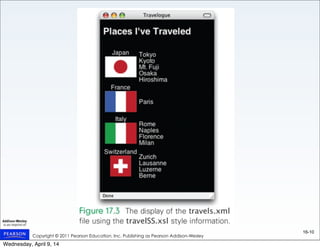
• Creating the Travelogue Display
– Each XML tag has a stylistic role to play in the
overall creation of the Web page
Displaying the Travels with XSL
(cont'd)
Wednesday, April 9, 14
Copyright © 2011 Pearson Education, Inc. Publishing as Pearson Addison-Wesley
16-15
• The <travels> tag template
<xsl:template match=“travels”>
<html><head><title>Travelogue</title>
<meta http-equiv=“Content-type”
content=“text/html;charset=ISO-8859-1”/
>
<style type=“text/css”>
body{background-color:black;color:white;
font-family:helvetica}
</style></head>
<body><h2>Places I’ve Traveled</h2>
<table>
<xsl:apply-templates/>
</table></body></html>
</xsl:template>
Start of
HTML
page
End of
HTML
page
Process tag
content
Displaying the Travels with XSL
(cont'd)
Wednesday, April 9, 14
Copyright © 2011 Pearson Education, Inc. Publishing as Pearson Addison-Wesley
16-16
• The Apply Operation
<xsl:apply-templates/>
– This tag means "now process whatever is
inside this XML tag"
<xsl:template match="tour">
<td>
<xsl:apply-templates/>
</td>
</xsl:template>
Displaying the Travels with XSL
(cont'd)
Wednesday, April 9, 14
Copyright © 2011 Pearson Education, Inc. Publishing as Pearson Addison-Wesley
16-17
• Tag Attributes
– Use curly braces to put information in paired quotes
– @flag refers to the value of the flag attribute of the
<name> tag
<xsl:template match="name">
<td style=“text-align:center”>
<xsl:apply-templates/> <br />
<img src="{@flag}” alt=“Country Flag” />
</td>
</xsl:template>
e.g. src=“{@flag}” becomes src=“fr-flag.gif”
Displaying the Travels with XSL
(cont'd)
Wednesday, April 9, 14
Copyright © 2011 Pearson Education, Inc. Publishing as Pearson Addison-Wesley
16-18
• Summary of XSL
– Browser opens the .xml file, finds a style
specification, opens the .xsl file, and begins to
process the XML tree
– The process:
• match a template
• do what needs to be done before processing the
enclosed information (generate XHTML into the output)
• process the enclosed information
• do what needs to be done after processing the enclosed
information (generate more XHTML)
• consider that tag processed
Displaying the Travels with XSL
(cont'd)
Wednesday, April 9, 14
Copyright © 2011 Pearson Education, Inc. Publishing as Pearson Addison-Wesley
16-19
The iDiary Database
An Incremental approach
1. Getting started
2. Creating the first entry (April 26)
3. Thinking about the nature of things
4. Developing tags and templates
5. Critiquing and evaluating the results
Wednesday, April 9, 14
Copyright © 2011 Pearson Education, Inc. Publishing as Pearson Addison-Wesley
16-20
Getting Started
• Creating the XML Database (iDiary.xml)
– Decide on root Collection tag (<idiary>) and
Affinity tags to enclose daily info (<entry>)
<?xml version=“1.0” encoding=“ISO-8859-1”?>
<!--<?xml-stylesheet type=“text/xsl”
href=“iDiarySS.xsl”?> -->
<idiary>
<entry> This is the first entry </entry>
<entry> This is the second entry </entry>
</idiary>
Wednesday, April 9, 14
Copyright © 2011 Pearson Education, Inc. Publishing as Pearson Addison-Wesley
16-21
Getting Started
• Creating the XSL Stylesheet (iDiarySS.sxl)
– Must recognize the two tags
– <idiary> contains the setup for the Web page
(title, heading, italicized comment at the start of
the page), table containing all the entries
– <entry> produces a row for the table:
<xsl:template match=“entry”>
<tr><td>
<xsl:apply-templates/>
</td></tr>
</xsl:template>
Wednesday, April 9, 14
Copyright © 2011 Pearson Education, Inc. Publishing as Pearson Addison-Wesley
16-22
Wednesday, April 9, 14
Copyright © 2011 Pearson Education, Inc. Publishing as Pearson Addison-Wesley
16-23
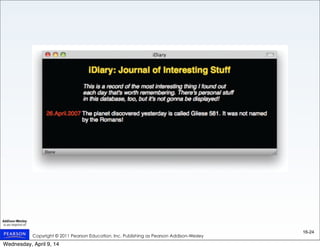
Creating the First Entry (April 26)
• Date Tagging
– Let date be atomic, pick a date format, and surround with
<date> tags (the easy way)
• Revising an <entry>
– <mit> tagging most interesting thing that day
– Add XSL templates in iDiary.xsl for each new
XML tag
• Critiquing the Design
– Vertically align the date
– Modify the color and font
Wednesday, April 9, 14
Copyright © 2011 Pearson Education, Inc. Publishing as Pearson Addison-Wesley
16-24
Wednesday, April 9, 14
Copyright © 2011 Pearson Education, Inc. Publishing as Pearson Addison-Wesley
16-25
Thinking About the Nature of Things
• Recognizing the Need for Specific Tags
– Different kinds of data need different tags
•Link will have a URL specifying it
•Image will have a source file, dimensions
•Text will be written into the file
•Video will have a URL, player dimensions
– Each will require different handling,
different formatting
Wednesday, April 9, 14
Copyright © 2011 Pearson Education, Inc. Publishing as Pearson Addison-Wesley
16-26
• Choosing Specific Tags
<fact> normal text
<title> centered text, larger font
<link> anchor text, URL as attribute
<pic> file name, width, height attributes
<remark> left justified text, as caption
<poem> groups poem component tags
<ytvideo> URL for YouTube video embedding
• <mit> tag becomes more of an Affinity tag
– Still a sister to the <date> tag, still identifies the
most interesting thing, style role continues
Thinking About the Nature of Things
Wednesday, April 9, 14
Copyright © 2011 Pearson Education, Inc. Publishing as Pearson Addison-Wesley
16-27
Developing Tags and Templates
• The Fact Tag
– Enclosed by the <mit> tag
• The Title Tag
– Announces the most interesting thing entry
• The Link Tag
– Specifies a Web link href="{@url}"
• The Picture Tag
– Stand-alone tag; no need for <xsl:apply-templates/>
– All information expressed as tag attributes
Wednesday, April 9, 14
Copyright © 2011 Pearson Education, Inc. Publishing as Pearson Addison-Wesley
16-28
Developing Tags and Templates
(cont'd)
• The Remark Tag
– Captions and labels
• The Poetry Tags
– Title, author, and lines of poetry – assign tags to
each
• The Video Tag
– Display a player as an embedded object
(YouTube)
– Stand-alone tag like the picture tag
• A Check of the Design
Wednesday, April 9, 14
Copyright © 2011 Pearson Education, Inc. Publishing as Pearson Addison-Wesley
16-29
Wednesday, April 9, 14
Copyright © 2011 Pearson Education, Inc. Publishing as Pearson Addison-Wesley
16-30
Wednesday, April 9, 14
Copyright © 2011 Pearson Education, Inc. Publishing as Pearson Addison-Wesley
16-31
Wednesday, April 9, 14
Copyright © 2011 Pearson Education, Inc. Publishing as Pearson Addison-Wesley
16-36
Summary
• XML databases can record irregular data
that relational databases cannot
• An XML database can be directly
displayed by opening it in a Web browser
• Adding a stylesheet line to XML and
building templates in XSL allows the XML
file to be formatted for display by the
browser
Wednesday, April 9, 14

Ch. 16 Database Case Study: XML/XSLT

  • 1.
    Chapter 16 A CaseStudy in Database Organization The iDiary Database Read pp. 501-514 only Wednesday, April 9, 14
  • 2.
    Copyright © 2011Pearson Education, Inc. Publishing as Pearson Addison-Wesley XML HTML: Everyone can do some things. -> Not extensible XML: Someone can do everything. -> Extensible, but technical WWW: 1991. Tim Berners-Lee (HTTP) XML 1.0: 1998. Wednesday, April 9, 14
  • 3.
    Copyright © 2011Pearson Education, Inc. Publishing as Pearson Addison-Wesley XML XML is a suite of technologies: • DTD • Schema • XSL • XSLT • XSL-FO (& CSS) • XPATH • XLINK, XPointer (links & images) The biggest obstacle to serving XML documents: No browser support fo XLink & XPointer -> XSLT (transform XML to HTML for display) Wednesday, April 9, 14
  • 4.
    Copyright © 2011Pearson Education, Inc. Publishing as Pearson Addison-Wesley What this Chapter is About Wednesday, April 9, 14
  • 5.
    Copyright © 2011Pearson Education, Inc. Publishing as Pearson Addison-Wesley Ch. 16 Fluency 5/e Chapter Organization 1. iDiary overview: personal diary, not a blog Structure the information with XML -> physical database XSLT: transform to html to display in browser -> logical view 2. XML intro: construct a small Travels database 3. Construct iDiary db Wednesday, April 9, 14
  • 6.
    Copyright © 2011Pearson Education, Inc. Publishing as Pearson Addison-Wesley 16-2 XML db vs. RDBMS • Regular (-> RDBMS) Versus Irregular Data – The iDiary will be an irregular data collection (-> XML) •Record things we find interesting in our daily lives – Text, photos, URLs, animations, poems, videos, etc. – Use XML to specify metadata •The database will be an XML tree •Use the Identity, Affinity, and Collection rules – Organize the database by date •The iDiary added to each day Wednesday, April 9, 14
  • 7.
    Copyright © 2011Pearson Education, Inc. Publishing as Pearson Addison-Wesley 16-3 Thinking About a Personal Database (cont'd) • Physical Versus Logical – physical database: XML tree – logical database: HTML view – Use XSL to retrieve data for display •XSL converts the data to HTML •XSL acts like an RBDMS SQL query Wednesday, April 9, 14
  • 8.
    Copyright © 2011Pearson Education, Inc. Publishing as Pearson Addison-Wesley 16-5 The iDiary sample shows that the database will be a long and diverse list of daily entries: science news, book reviews, embedded videos, poetry, pictures, other topics Wednesday, April 9, 14
  • 9.
    Copyright © 2011Pearson Education, Inc. Publishing as Pearson Addison-Wesley 16-6 Preliminary Exercise: Travels DB • A warm-up to work out the iDiary design • The XML Definition – Entries in the database will be a list of countries – Each will have a name and a tour that contains a list of sights, along with that country's flag <country> <name flag=“file.gif”> Country name </name> <tour> <sight> sight name </sight> ... <sight> sight name </sight> </tour> </country> Wednesday, April 9, 14
  • 10.
    Copyright © 2011Pearson Education, Inc. Publishing as Pearson Addison-Wesley 16-7 • XML declaration: <?xml version=“1.0” encoding=“ISO-8859-1”?> It defines the XML version (1.0) and the encoding used (ISO-8859-1 = Latin-1/ West European character set). • Make a root tag of <travels> • XML database saved is a file named travels.xml • Direct Check of XML: Open travels.xml – active display of XML tree – open (+) and close (-) tags – but no presentation/style Preliminary Exercise: Travels DB Wednesday, April 9, 14
  • 11.
    Copyright © 2011Pearson Education, Inc. Publishing as Pearson Addison-Wesley 16-8 Wednesday, April 9, 14
  • 12.
    Copyright © 2011Pearson Education, Inc. Publishing as Pearson Addison-Wesley 16-7 Active display of XML tree: tags illustrate Affinity & Collection Rules • Affinity Rule: Group related data in a pair of tags -> properties of the same entity (eg) country element • Collection Rule: Group several instances in a pair of tags -> all instances have same type (eg) travels element Preliminary Exercise: Travels DB Wednesday, April 9, 14
  • 13.
    Copyright © 2011Pearson Education, Inc. Publishing as Pearson Addison-Wesley 16-7 Attributes: Use for metadata, not content Attributes vs. Elements •Data: store in an element •Metadata: store in an attribute <fact source=’wikipedia’> Josh Gibson is the only person in the history of baseball to hit a ball out of Yankee Stadium </fact> Metadata: Information about data Wednesday, April 9, 14
  • 14.
    Copyright © 2011Pearson Education, Inc. Publishing as Pearson Addison-Wesley 16-7 Differentiating between data & metadata: Q: Would you want to see this information? A: Yes => data; No => Metadata When in doubt => store in an element Test: If all tags are removed from the document, the data should still be present. XML Elements vs. Attributes: http://www.w3schools.com/dtd/dtd_el_vs_attr.asp Metadata: Information about data Wednesday, April 9, 14
  • 15.
    Copyright © 2011Pearson Education, Inc. Publishing as Pearson Addison-Wesley 16-9 Displaying the Travels with XSL • Connecting XML with Style – Style information tells the browser how to display a markup language like XML – Style information comes from a companion file with the file extension .xsl – Put in the XML file a line which tells the browser where to find the style information <?xml-stylesheet type="text/xsl" href="TravelSS.xsl"?> Wednesday, April 9, 14
  • 16.
    Copyright © 2011Pearson Education, Inc. Publishing as Pearson Addison-Wesley 16-10 Wednesday, April 9, 14
  • 17.
    Copyright © 2011Pearson Education, Inc. Publishing as Pearson Addison-Wesley 16-11 Displaying the Travels with XSL (cont'd) • The Idea of XSL – The .xsl file contains a series of rules (templates) on how to format (using XHTML) the information enclosed in XML tags in the database Wednesday, April 9, 14
  • 18.
    Copyright © 2011Pearson Education, Inc. Publishing as Pearson Addison-Wesley 16-12 • XSL Templates – XSL is really just XML with one template for each XML tag, with XHTML for how to display the XML tag <xsl:template match="XML tag name"> … </xsl:template> Displaying the Travels with XSL (cont'd) Wednesday, April 9, 14
  • 19.
    Copyright © 2011Pearson Education, Inc. Publishing as Pearson Addison-Wesley 16-13 Wednesday, April 9, 14
  • 20.
    Copyright © 2011Pearson Education, Inc. Publishing as Pearson Addison-Wesley 16-14 • Creating the Travelogue Display – Each XML tag has a stylistic role to play in the overall creation of the Web page Displaying the Travels with XSL (cont'd) Wednesday, April 9, 14
  • 21.
    Copyright © 2011Pearson Education, Inc. Publishing as Pearson Addison-Wesley 16-15 • The <travels> tag template <xsl:template match=“travels”> <html><head><title>Travelogue</title> <meta http-equiv=“Content-type” content=“text/html;charset=ISO-8859-1”/ > <style type=“text/css”> body{background-color:black;color:white; font-family:helvetica} </style></head> <body><h2>Places I’ve Traveled</h2> <table> <xsl:apply-templates/> </table></body></html> </xsl:template> Start of HTML page End of HTML page Process tag content Displaying the Travels with XSL (cont'd) Wednesday, April 9, 14
  • 22.
    Copyright © 2011Pearson Education, Inc. Publishing as Pearson Addison-Wesley 16-16 • The Apply Operation <xsl:apply-templates/> – This tag means "now process whatever is inside this XML tag" <xsl:template match="tour"> <td> <xsl:apply-templates/> </td> </xsl:template> Displaying the Travels with XSL (cont'd) Wednesday, April 9, 14
  • 23.
    Copyright © 2011Pearson Education, Inc. Publishing as Pearson Addison-Wesley 16-17 • Tag Attributes – Use curly braces to put information in paired quotes – @flag refers to the value of the flag attribute of the <name> tag <xsl:template match="name"> <td style=“text-align:center”> <xsl:apply-templates/> <br /> <img src="{@flag}” alt=“Country Flag” /> </td> </xsl:template> e.g. src=“{@flag}” becomes src=“fr-flag.gif” Displaying the Travels with XSL (cont'd) Wednesday, April 9, 14
  • 24.
    Copyright © 2011Pearson Education, Inc. Publishing as Pearson Addison-Wesley 16-18 • Summary of XSL – Browser opens the .xml file, finds a style specification, opens the .xsl file, and begins to process the XML tree – The process: • match a template • do what needs to be done before processing the enclosed information (generate XHTML into the output) • process the enclosed information • do what needs to be done after processing the enclosed information (generate more XHTML) • consider that tag processed Displaying the Travels with XSL (cont'd) Wednesday, April 9, 14
  • 25.
    Copyright © 2011Pearson Education, Inc. Publishing as Pearson Addison-Wesley 16-19 The iDiary Database An Incremental approach 1. Getting started 2. Creating the first entry (April 26) 3. Thinking about the nature of things 4. Developing tags and templates 5. Critiquing and evaluating the results Wednesday, April 9, 14
  • 26.
    Copyright © 2011Pearson Education, Inc. Publishing as Pearson Addison-Wesley 16-20 Getting Started • Creating the XML Database (iDiary.xml) – Decide on root Collection tag (<idiary>) and Affinity tags to enclose daily info (<entry>) <?xml version=“1.0” encoding=“ISO-8859-1”?> <!--<?xml-stylesheet type=“text/xsl” href=“iDiarySS.xsl”?> --> <idiary> <entry> This is the first entry </entry> <entry> This is the second entry </entry> </idiary> Wednesday, April 9, 14
  • 27.
    Copyright © 2011Pearson Education, Inc. Publishing as Pearson Addison-Wesley 16-21 Getting Started • Creating the XSL Stylesheet (iDiarySS.sxl) – Must recognize the two tags – <idiary> contains the setup for the Web page (title, heading, italicized comment at the start of the page), table containing all the entries – <entry> produces a row for the table: <xsl:template match=“entry”> <tr><td> <xsl:apply-templates/> </td></tr> </xsl:template> Wednesday, April 9, 14
  • 28.
    Copyright © 2011Pearson Education, Inc. Publishing as Pearson Addison-Wesley 16-22 Wednesday, April 9, 14
  • 29.
    Copyright © 2011Pearson Education, Inc. Publishing as Pearson Addison-Wesley 16-23 Creating the First Entry (April 26) • Date Tagging – Let date be atomic, pick a date format, and surround with <date> tags (the easy way) • Revising an <entry> – <mit> tagging most interesting thing that day – Add XSL templates in iDiary.xsl for each new XML tag • Critiquing the Design – Vertically align the date – Modify the color and font Wednesday, April 9, 14
  • 30.
    Copyright © 2011Pearson Education, Inc. Publishing as Pearson Addison-Wesley 16-24 Wednesday, April 9, 14
  • 31.
    Copyright © 2011Pearson Education, Inc. Publishing as Pearson Addison-Wesley 16-25 Thinking About the Nature of Things • Recognizing the Need for Specific Tags – Different kinds of data need different tags •Link will have a URL specifying it •Image will have a source file, dimensions •Text will be written into the file •Video will have a URL, player dimensions – Each will require different handling, different formatting Wednesday, April 9, 14
  • 32.
    Copyright © 2011Pearson Education, Inc. Publishing as Pearson Addison-Wesley 16-26 • Choosing Specific Tags <fact> normal text <title> centered text, larger font <link> anchor text, URL as attribute <pic> file name, width, height attributes <remark> left justified text, as caption <poem> groups poem component tags <ytvideo> URL for YouTube video embedding • <mit> tag becomes more of an Affinity tag – Still a sister to the <date> tag, still identifies the most interesting thing, style role continues Thinking About the Nature of Things Wednesday, April 9, 14
  • 33.
    Copyright © 2011Pearson Education, Inc. Publishing as Pearson Addison-Wesley 16-27 Developing Tags and Templates • The Fact Tag – Enclosed by the <mit> tag • The Title Tag – Announces the most interesting thing entry • The Link Tag – Specifies a Web link href="{@url}" • The Picture Tag – Stand-alone tag; no need for <xsl:apply-templates/> – All information expressed as tag attributes Wednesday, April 9, 14
  • 34.
    Copyright © 2011Pearson Education, Inc. Publishing as Pearson Addison-Wesley 16-28 Developing Tags and Templates (cont'd) • The Remark Tag – Captions and labels • The Poetry Tags – Title, author, and lines of poetry – assign tags to each • The Video Tag – Display a player as an embedded object (YouTube) – Stand-alone tag like the picture tag • A Check of the Design Wednesday, April 9, 14
  • 35.
    Copyright © 2011Pearson Education, Inc. Publishing as Pearson Addison-Wesley 16-29 Wednesday, April 9, 14
  • 36.
    Copyright © 2011Pearson Education, Inc. Publishing as Pearson Addison-Wesley 16-30 Wednesday, April 9, 14
  • 37.
    Copyright © 2011Pearson Education, Inc. Publishing as Pearson Addison-Wesley 16-31 Wednesday, April 9, 14
  • 38.
    Copyright © 2011Pearson Education, Inc. Publishing as Pearson Addison-Wesley 16-36 Summary • XML databases can record irregular data that relational databases cannot • An XML database can be directly displayed by opening it in a Web browser • Adding a stylesheet line to XML and building templates in XSL allows the XML file to be formatted for display by the browser Wednesday, April 9, 14