Copyright © Terry Felke-Morris
WEB DEVELOPMENT & DESIGN
FOUNDATIONS WITH HTML5
Chapter 4
Key Concepts
1Copyright © Terry Felke-Morris
Wednesday, April 9, 14
Copyright © Terry Felke-Morris
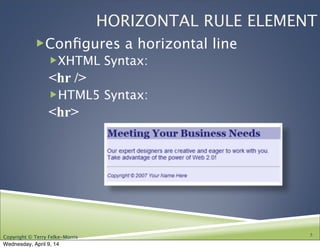
HORIZONTAL RULE ELEMENT
!Configures a horizontal line
!XHTML Syntax:
<hr />
!HTML5 Syntax:
<hr>

3
Wednesday, April 9, 14
Copyright © Terry Felke-Morris
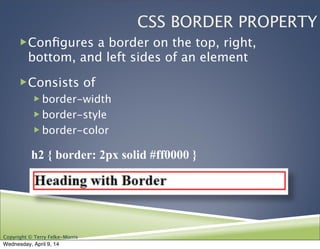
CSS BORDER PROPERTY
!Configures a border on the top, right,
bottom, and left sides of an element
!Consists of
! border-width
! border-style
! border-color

 h2 { border: 2px solid #ff0000 }
Wednesday, April 9, 14
Copyright © Terry Felke-Morris
CSS BORDERS:
BLOCK / INLINE ELEMENTS
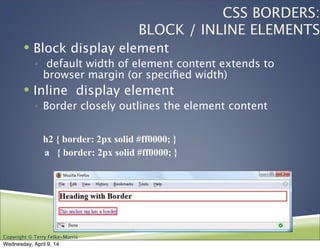
! Block display element
◦ default width of element content extends to
browser margin (or specified width)
! Inline display element
◦ Border closely outlines the element content
h2 { border: 2px solid #ff0000; }
a { border: 2px solid #ff0000; }
Wednesday, April 9, 14
Copyright © Terry Felke-Morris
CSS PADDING PROPERTY
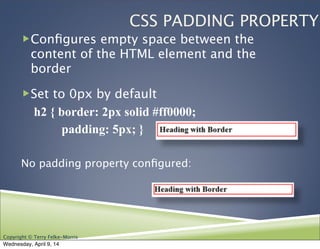
!Configures empty space between the
content of the HTML element and the
border
!Set to 0px by default

h2 { border: 2px solid #ff0000;
padding: 5px; }
No padding property configured:
Wednesday, April 9, 14
Copyright © Terry Felke-Morris
CSS PADDING PROPERTY SHORTHAND:
TWO VALUES
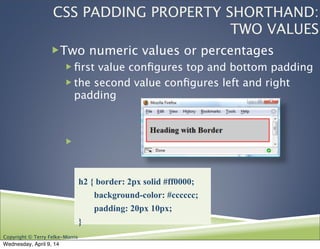
!Two numeric values or percentages
! first value configures top and bottom padding
! the second value configures left and right
padding
!
h2 { border: 2px solid #ff0000;
background-color: #cccccc;
padding: 20px 10px;
}
Wednesday, April 9, 14
Copyright © Terry Felke-Morris
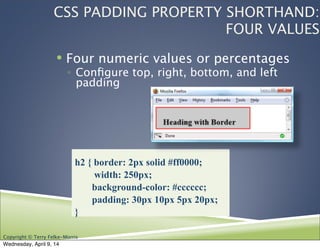
! Four numeric values or percentages
◦ Configure top, right, bottom, and left
padding
h2 { border: 2px solid #ff0000;
width: 250px;
background-color: #cccccc;
padding: 30px 10px 5px 20px;
}
CSS PADDING PROPERTY SHORTHAND:
FOUR VALUES
Wednesday, April 9, 14
Copyright © Terry Felke-Morris
TYPES OF
GRAPHICS
! Graphic types:
!GIF
!JPG
!PNG
14
Wednesday, April 9, 14
Copyright © Terry Felke-Morris
GIF
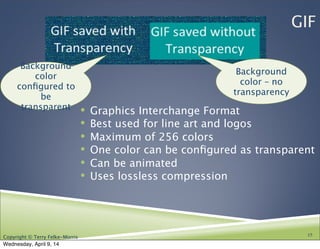
! Graphics Interchange Format
! Best used for line art and logos
! Maximum of 256 colors
! One color can be configured as transparent
! Can be animated
! Uses lossless compression
15
Background
color – no
transparency
Background
color
configured to
be
transparent
Wednesday, April 9, 14
Copyright © Terry Felke-Morris
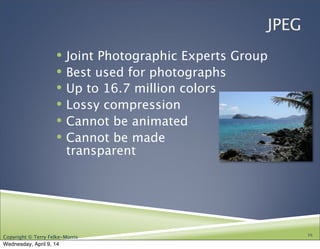
JPEG
! Joint Photographic Experts Group
! Best used for photographs
! Up to 16.7 million colors
! Lossy compression
! Cannot be animated
! Cannot be made
transparent
16
Wednesday, April 9, 14
Copyright © Terry Felke-Morris
PNG
!Portable Network Graphic
!Support millions of colors
!Support multiple levels of transparency
!Lossless compression
!Combines best of GIF & JPEG
17
Wednesday, April 9, 14
Copyright © Terry Felke-Morris
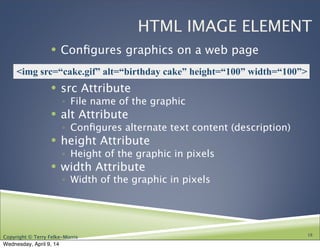
HTML IMAGE ELEMENT
! Configures graphics on a web page
! src Attribute
◦ File name of the graphic
! alt Attribute
◦ Configures alternate text content (description)
! height Attribute
◦ Height of the graphic in pixels
! width Attribute
◦ Width of the graphic in pixels
18
<img src=“cake.gif” alt=“birthday cake” height=“100” width=“100”>
Wednesday, April 9, 14
Copyright © Terry Felke-Morris
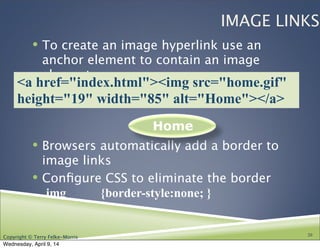
IMAGE LINKS
! To create an image hyperlink use an
anchor element to contain an image
element
! Browsers automatically add a border to
image links
! Configure CSS to eliminate the border
img {border-style:none; }
20
Home
<a href="index.html"><img src="home.gif"
height="19" width="85" alt="Home"></a>
Wednesday, April 9, 14
Copyright © Terry Felke-Morris
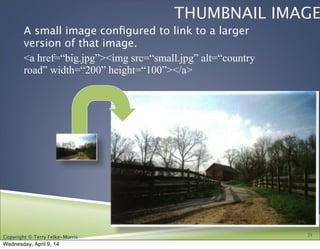
THUMBNAIL IMAGE
A small image configured to link to a larger
version of that image.
<a href=“big.jpg”><img src=“small.jpg” alt=“country
road” width=“200” height=“100”></a>
21
Wednesday, April 9, 14
Copyright © Terry Felke-Morris
IMAGE OPTIMIZATION
! The process of creating an image
with the lowest file size that still
renders a good quality image—
balancing image quality and file size.
! Photographs taken with
digital cameras are
not usually optimized for the Web
22
Wednesday, April 9, 14
Copyright © Terry Felke-Morris
OPTIMIZE AN IMAGE FOR THE WEB
!Image Optimization
! Reduce the file size
! Reduce the dimensions of the image to the
actual width and height of the image on the
web page.
!Image Editing Tools:
! GIMP (free!)
! Adobe Fireworks
! Adobe Photoshop
! http://pixlr.com/editor (free!)
23
Wednesday, April 9, 14
Copyright © Terry Felke-Morris
CHOOSING NAMES FOR IMAGE FILES
!Use all lowercase letters
!Do not use punctuation symbols and spaces
!Do not change the file extensions
(should be .gif, .jpg, .jpeg, or .png)
!Keep your file names short but descriptive
! i1.gif is probably too short
! myimagewithmydogonmybirthday.gif is too long
! dogbday.gif may be just about right
Wednesday, April 9, 14
Copyright © Terry Felke-Morris
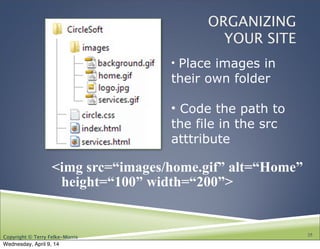
ORGANIZING
YOUR SITE
<img src=“images/home.gif” alt=“Home”
height=“100” width=“200”>
25
• Place images in
their own folder
• Code the path to
the file in the src
atttribute
Wednesday, April 9, 14
Copyright © Terry Felke-Morris
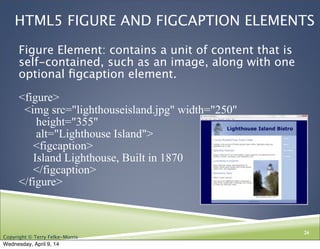
HTML5 FIGURE AND FIGCAPTION ELEMENTS
Figure Element: contains a unit of content that is
self-contained, such as an image, along with one
optional figcaption element.
<figure>
<img src="lighthouseisland.jpg" width="250"
height="355"
alt="Lighthouse Island">
<figcaption>
Island Lighthouse, Built in 1870
</figcaption>
</figure>
 
26
Wednesday, April 9, 14
Copyright © Terry Felke-Morris
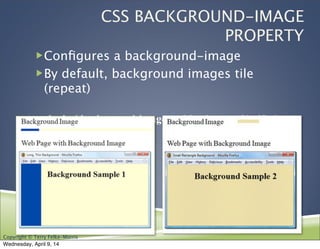
CSS BACKGROUND-IMAGE
PROPERTY
!Configures a background-image
!By default, background images tile
(repeat)
body { background-image: url(background1.gif); }
Wednesday, April 9, 14
Copyright © Terry Felke-Morris
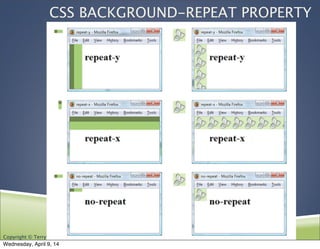
CSS BACKGROUND-REPEAT PROPERTY
Wednesday, April 9, 14
Copyright © Terry Felke-Morris
USING BACKGROUND-REPEAT
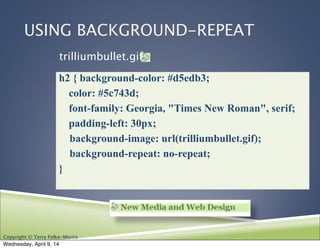
h2 { background-color: #d5edb3;
color: #5c743d;
font-family: Georgia, "Times New Roman", serif;
padding-left: 30px;
background-image: url(trilliumbullet.gif);
background-repeat: no-repeat;
}
trilliumbullet.gif:
Wednesday, April 9, 14
Copyright © Terry Felke-Morris
FAVORITES ICON - FAVICON
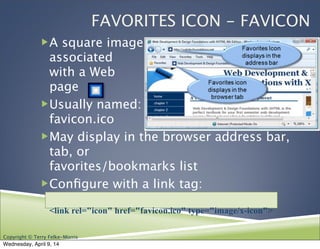
!A square image
associated
with a Web
page
!Usually named:
favicon.ico
!May display in the browser address bar,
tab, or
favorites/bookmarks list
!Configure with a link tag:
<link rel="icon" href="favicon.ico" type="image/x-icon">
Wednesday, April 9, 14
Copyright © Terry Felke-Morris
CSS3 ROUNDED CORNERS
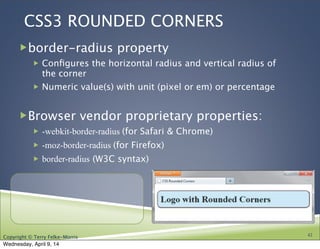
!border-radius property
! Configures the horizontal radius and vertical radius of
the corner
! Numeric value(s) with unit (pixel or em) or percentage
!Browser vendor proprietary properties:
! -webkit-border-radius (for Safari & Chrome)
! -moz-border-radius (for Firefox)
! border-radius (W3C syntax)
42
Wednesday, April 9, 14
Copyright © Terry Felke-Morris
EXAMPLES OF ROUNDED CORNERS
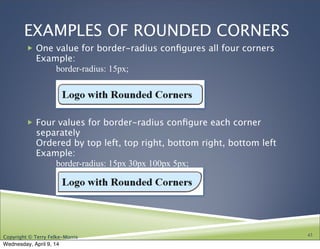
! One value for border-radius configures all four corners
Example:

 border-radius: 15px;
! Four values for border-radius configure each corner
separately
Ordered by top left, top right, bottom right, bottom left
Example:

 border-radius: 15px 30px 100px 5px;
43
Wednesday, April 9, 14
Copyright © Terry Felke-Morris
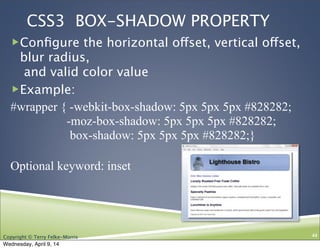
CSS3 BOX-SHADOW PROPERTY
!Configure the horizontal offset, vertical offset,
blur radius,
and valid color value
!Example:
#wrapper { -webkit-box-shadow: 5px 5px 5px #828282;
-moz-box-shadow: 5px 5px 5px #828282;
box-shadow: 5px 5px 5px #828282;}
Optional keyword: inset
44
Wednesday, April 9, 14
Copyright © Terry Felke-Morris
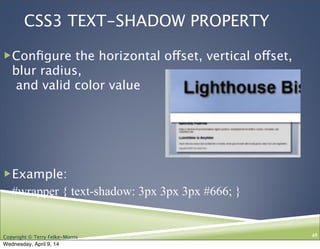
CSS3 TEXT-SHADOW PROPERTY
!Configure the horizontal offset, vertical offset,
blur radius,
and valid color value
!Example:
#wrapper { text-shadow: 3px 3px 3px #666; }
45
Wednesday, April 9, 14

Ch. 4 FIT5, CIS 110 13F

  • 1.
    Copyright © TerryFelke-Morris WEB DEVELOPMENT & DESIGN FOUNDATIONS WITH HTML5 Chapter 4 Key Concepts 1Copyright © Terry Felke-Morris Wednesday, April 9, 14
  • 2.
    Copyright © TerryFelke-Morris HORIZONTAL RULE ELEMENT !Configures a horizontal line !XHTML Syntax: <hr /> !HTML5 Syntax: <hr> 3 Wednesday, April 9, 14
  • 3.
    Copyright © TerryFelke-Morris CSS BORDER PROPERTY !Configures a border on the top, right, bottom, and left sides of an element !Consists of ! border-width ! border-style ! border-color h2 { border: 2px solid #ff0000 } Wednesday, April 9, 14
  • 4.
    Copyright © TerryFelke-Morris CSS BORDERS: BLOCK / INLINE ELEMENTS ! Block display element ◦ default width of element content extends to browser margin (or specified width) ! Inline display element ◦ Border closely outlines the element content h2 { border: 2px solid #ff0000; } a { border: 2px solid #ff0000; } Wednesday, April 9, 14
  • 5.
    Copyright © TerryFelke-Morris CSS PADDING PROPERTY !Configures empty space between the content of the HTML element and the border !Set to 0px by default h2 { border: 2px solid #ff0000; padding: 5px; } No padding property configured: Wednesday, April 9, 14
  • 6.
    Copyright © TerryFelke-Morris CSS PADDING PROPERTY SHORTHAND: TWO VALUES !Two numeric values or percentages ! first value configures top and bottom padding ! the second value configures left and right padding ! h2 { border: 2px solid #ff0000; background-color: #cccccc; padding: 20px 10px; } Wednesday, April 9, 14
  • 7.
    Copyright © TerryFelke-Morris ! Four numeric values or percentages ◦ Configure top, right, bottom, and left padding h2 { border: 2px solid #ff0000; width: 250px; background-color: #cccccc; padding: 30px 10px 5px 20px; } CSS PADDING PROPERTY SHORTHAND: FOUR VALUES Wednesday, April 9, 14
  • 8.
    Copyright © TerryFelke-Morris TYPES OF GRAPHICS ! Graphic types: !GIF !JPG !PNG 14 Wednesday, April 9, 14
  • 9.
    Copyright © TerryFelke-Morris GIF ! Graphics Interchange Format ! Best used for line art and logos ! Maximum of 256 colors ! One color can be configured as transparent ! Can be animated ! Uses lossless compression 15 Background color – no transparency Background color configured to be transparent Wednesday, April 9, 14
  • 10.
    Copyright © TerryFelke-Morris JPEG ! Joint Photographic Experts Group ! Best used for photographs ! Up to 16.7 million colors ! Lossy compression ! Cannot be animated ! Cannot be made transparent 16 Wednesday, April 9, 14
  • 11.
    Copyright © TerryFelke-Morris PNG !Portable Network Graphic !Support millions of colors !Support multiple levels of transparency !Lossless compression !Combines best of GIF & JPEG 17 Wednesday, April 9, 14
  • 12.
    Copyright © TerryFelke-Morris HTML IMAGE ELEMENT ! Configures graphics on a web page ! src Attribute ◦ File name of the graphic ! alt Attribute ◦ Configures alternate text content (description) ! height Attribute ◦ Height of the graphic in pixels ! width Attribute ◦ Width of the graphic in pixels 18 <img src=“cake.gif” alt=“birthday cake” height=“100” width=“100”> Wednesday, April 9, 14
  • 13.
    Copyright © TerryFelke-Morris IMAGE LINKS ! To create an image hyperlink use an anchor element to contain an image element ! Browsers automatically add a border to image links ! Configure CSS to eliminate the border img {border-style:none; } 20 Home <a href="index.html"><img src="home.gif" height="19" width="85" alt="Home"></a> Wednesday, April 9, 14
  • 14.
    Copyright © TerryFelke-Morris THUMBNAIL IMAGE A small image configured to link to a larger version of that image. <a href=“big.jpg”><img src=“small.jpg” alt=“country road” width=“200” height=“100”></a> 21 Wednesday, April 9, 14
  • 15.
    Copyright © TerryFelke-Morris IMAGE OPTIMIZATION ! The process of creating an image with the lowest file size that still renders a good quality image— balancing image quality and file size. ! Photographs taken with digital cameras are not usually optimized for the Web 22 Wednesday, April 9, 14
  • 16.
    Copyright © TerryFelke-Morris OPTIMIZE AN IMAGE FOR THE WEB !Image Optimization ! Reduce the file size ! Reduce the dimensions of the image to the actual width and height of the image on the web page. !Image Editing Tools: ! GIMP (free!) ! Adobe Fireworks ! Adobe Photoshop ! http://pixlr.com/editor (free!) 23 Wednesday, April 9, 14
  • 17.
    Copyright © TerryFelke-Morris CHOOSING NAMES FOR IMAGE FILES !Use all lowercase letters !Do not use punctuation symbols and spaces !Do not change the file extensions (should be .gif, .jpg, .jpeg, or .png) !Keep your file names short but descriptive ! i1.gif is probably too short ! myimagewithmydogonmybirthday.gif is too long ! dogbday.gif may be just about right Wednesday, April 9, 14
  • 18.
    Copyright © TerryFelke-Morris ORGANIZING YOUR SITE <img src=“images/home.gif” alt=“Home” height=“100” width=“200”> 25 • Place images in their own folder • Code the path to the file in the src atttribute Wednesday, April 9, 14
  • 19.
    Copyright © TerryFelke-Morris HTML5 FIGURE AND FIGCAPTION ELEMENTS Figure Element: contains a unit of content that is self-contained, such as an image, along with one optional figcaption element. <figure> <img src="lighthouseisland.jpg" width="250" height="355" alt="Lighthouse Island"> <figcaption> Island Lighthouse, Built in 1870 </figcaption> </figure>   26 Wednesday, April 9, 14
  • 20.
    Copyright © TerryFelke-Morris CSS BACKGROUND-IMAGE PROPERTY !Configures a background-image !By default, background images tile (repeat) body { background-image: url(background1.gif); } Wednesday, April 9, 14
  • 21.
    Copyright © TerryFelke-Morris CSS BACKGROUND-REPEAT PROPERTY Wednesday, April 9, 14
  • 22.
    Copyright © TerryFelke-Morris USING BACKGROUND-REPEAT h2 { background-color: #d5edb3; color: #5c743d; font-family: Georgia, "Times New Roman", serif; padding-left: 30px; background-image: url(trilliumbullet.gif); background-repeat: no-repeat; } trilliumbullet.gif: Wednesday, April 9, 14
  • 23.
    Copyright © TerryFelke-Morris FAVORITES ICON - FAVICON !A square image associated with a Web page !Usually named: favicon.ico !May display in the browser address bar, tab, or favorites/bookmarks list !Configure with a link tag: <link rel="icon" href="favicon.ico" type="image/x-icon"> Wednesday, April 9, 14
  • 24.
    Copyright © TerryFelke-Morris CSS3 ROUNDED CORNERS !border-radius property ! Configures the horizontal radius and vertical radius of the corner ! Numeric value(s) with unit (pixel or em) or percentage !Browser vendor proprietary properties: ! -webkit-border-radius (for Safari & Chrome) ! -moz-border-radius (for Firefox) ! border-radius (W3C syntax) 42 Wednesday, April 9, 14
  • 25.
    Copyright © TerryFelke-Morris EXAMPLES OF ROUNDED CORNERS ! One value for border-radius configures all four corners Example: border-radius: 15px; ! Four values for border-radius configure each corner separately Ordered by top left, top right, bottom right, bottom left Example: border-radius: 15px 30px 100px 5px; 43 Wednesday, April 9, 14
  • 26.
    Copyright © TerryFelke-Morris CSS3 BOX-SHADOW PROPERTY !Configure the horizontal offset, vertical offset, blur radius, and valid color value !Example: #wrapper { -webkit-box-shadow: 5px 5px 5px #828282; -moz-box-shadow: 5px 5px 5px #828282; box-shadow: 5px 5px 5px #828282;} Optional keyword: inset 44 Wednesday, April 9, 14
  • 27.
    Copyright © TerryFelke-Morris CSS3 TEXT-SHADOW PROPERTY !Configure the horizontal offset, vertical offset, blur radius, and valid color value !Example: #wrapper { text-shadow: 3px 3px 3px #666; } 45 Wednesday, April 9, 14