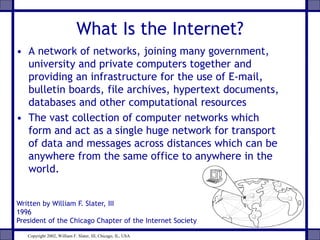
What Is the Internet?
• A network of networks, joining many government,
university and private computers together and
providing an infrastructure for the use of E-mail,
bulletin boards, file archives, hypertext documents,
databases and other computational resources
• The vast collection of computer networks which
form and act as a single huge network for transport
of data and messages across distances which can be
anywhere from the same office to anywhere in the
world.
Written by William F. Slater, III
1996
President of the Chicago Chapter of the Internet Society
Copyright 2002, William F. Slater, III, Chicago, IL, USA
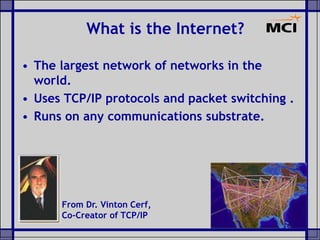
• The largest network of networks in the
world.
• Uses TCP/IP protocols and packet switching .
• Runs on any communications substrate.
What is the Internet?
From Dr. Vinton Cerf,
Co-Creator of TCP/IP
Brief History of the Internet
• 1968 - DARPA (Defense Advanced Research Projects Agency)
contracts with BBN (Bolt, Beranek & Newman) to create
ARPAnet
• 1970 - First five nodes:
– UCLA
– Stanford
– UC Santa Barbara
– U of Utah, and
– BBN
• 1974 - TCP specification by Vint Cerf
• 1984 – On January 1, the Internet with its 1000 hosts
converts en masse to using TCP/IP for its messaging
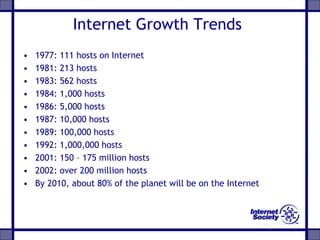
Internet Growth Trends
• 1977: 111 hosts on Internet
• 1981: 213 hosts
• 1983: 562 hosts
• 1984: 1,000 hosts
• 1986: 5,000 hosts
• 1987: 10,000 hosts
• 1989: 100,000 hosts
• 1992: 1,000,000 hosts
• 2001: 150 – 175 million hosts
• 2002: over 200 million hosts
• By 2010, about 80% of the planet will be on the Internet
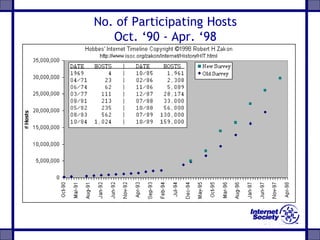
No. of Participating Hosts
Oct. ‘90 - Apr. ‘98
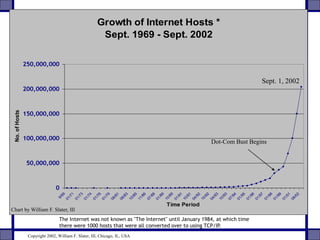
Growth of Internet Hosts *
Sept. 1969 - Sept. 2002
0
50,000,000
100,000,000
150,000,000
200,000,000
250,000,000
9/69
01/71
01/73
01/74
01/76
01/79
08/81
08/83
10/85
11/86
07/88
01/89
10/89
01/91
10/91
04/92
10/92
04/93
10/93
07/94
01/95
01/96
01/97
01/98
01/99
01/01
08/02
Time Period
No.ofHosts
The Internet was not known as "The Internet" until January 1984, at which time
there were 1000 hosts that were all converted over to using TCP/IP.
Chart by William F. Slater, III
Sept. 1, 2002
Dot-Com Bust Begins
Copyright 2002, William F. Slater, III, Chicago, IL, USA
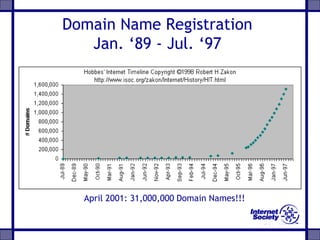
Domain Name Registration
Jan. ‘89 - Jul. ‘97
April 2001: 31,000,000 Domain Names!!!
TCP/IP Addresses
• Every host on the Internet must have a
unique IP address
• The IP address is a 32-bit number which
we write in dotted decimal notation
• The first part of the IP address is the
network address – the remainder is the
host ID
• A subnet mask is used to determine the
network address from a IP host address
• All hosts on the same network are
configured with the same subnet mask
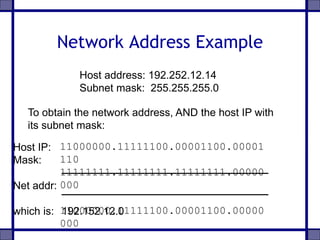
Network Address Example
Host address: 192.252.12.14
Subnet mask: 255.255.255.0
11000000.11111100.00001100.00001
110
11111111.11111111.11111111.00000
000
11000000.11111100.00001100.00000
000
To obtain the network address, AND the host IP with
its subnet mask:
Host IP:
Mask:
Net addr:
which is: 192.152.12.0
Obtaining an Internet Network
Address
• IP network addresses must be unique, or
the Internet will not be stable
• The Internet Network Information Centre
(InterNIC) was originally responsible for
issuing Internet network addresses
• Today, the Internet Assigned Number
Authority (IANA) issues network
addresses to Information Service
Providers (ISPs)
• ISPs split networks up into subnets and
sell them on to their customers
Domain Name System (DNS)
• IP addresses are used to identify hosts on a
TCP/IP network
• Example: 134.220.1.9
• Numbers are not ‘friendly’ – people prefer
names
• DNS is a protocol used to map IP addresses
to textual names
• E.g. www.wlv.ac.uk maps to 134.220.1.9
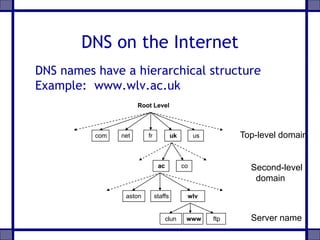
DNS on the Internet
DNS names have a hierarchical structure
Example: www.wlv.ac.uk
com net fr uk us
Root Level
ac co
aston wlvstaffs
ftpwwwclun
Top-level domain
Second-level
domain
Server name
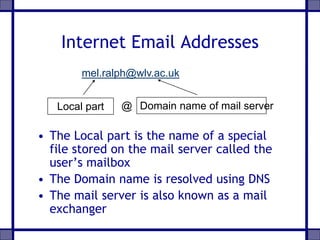
Internet Email Addresses
• The Local part is the name of a special
file stored on the mail server called the
user’s mailbox
• The Domain name is resolved using DNS
• The mail server is also known as a mail
exchanger
Local part Domain name of mail server@
mel.ralph@wlv.ac.uk
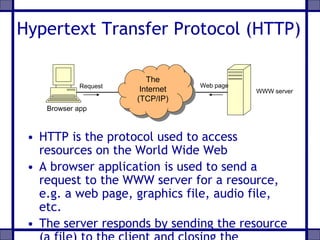
Hypertext Transfer Protocol (HTTP)
• HTTP is the protocol used to access
resources on the World Wide Web
• A browser application is used to send a
request to the WWW server for a resource,
e.g. a web page, graphics file, audio file,
etc.
• The server responds by sending the resource
Request
Browser app
WWW server
The
Internet
(TCP/IP)
Web page
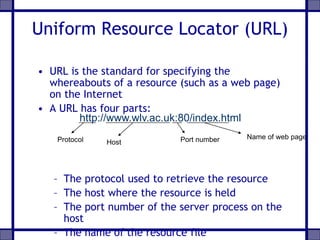
Uniform Resource Locator (URL)
• URL is the standard for specifying the
whereabouts of a resource (such as a web page)
on the Internet
• A URL has four parts:
– The protocol used to retrieve the resource
– The host where the resource is held
– The port number of the server process on the
host
– The name of the resource file
http://www.wlv.ac.uk:80/index.html
Protocol Host Port number Name of web page
URL Defaults
• A server will normally be setup to use
standard defaults
• This enables the URL to be simplified
• In the case of a Web server for example
– Default port will be 80
– Default name for home page will be index.html
• Hence the previous URL can be shortened to
http://www.wlv.ac.uk/
File Transfer Protocol (FTP)
• Protocol for copying files between client
and an FTP server
• Uses a TCP connection for reliable
transfer of files with error-checking
• Most browsers support FTP, or you can
use a dedicated FTP client program, e.g
WS_FTP
• Trivial File Transfer Protocol (TFTP) is a
lightweight version for small memory
devices
ftp://ftp.demon.co.uk/pub/
Telnet
• Telnet allows a user to run commands
and programs remotely on another
computer across the Internet
• The user runs a Telnet client program on
the local host
• A Telnet server process must be running
on the remote host
• The user must have the necessary
permissions and password to access the
remote host
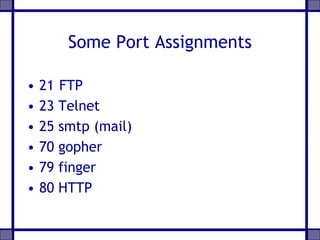
Some Port Assignments
• 21 FTP
• 23 Telnet
• 25 smtp (mail)
• 70 gopher
• 79 finger
• 80 HTTP

Internet

  • 1.
    What Is theInternet? • A network of networks, joining many government, university and private computers together and providing an infrastructure for the use of E-mail, bulletin boards, file archives, hypertext documents, databases and other computational resources • The vast collection of computer networks which form and act as a single huge network for transport of data and messages across distances which can be anywhere from the same office to anywhere in the world. Written by William F. Slater, III 1996 President of the Chicago Chapter of the Internet Society Copyright 2002, William F. Slater, III, Chicago, IL, USA
  • 2.
    • The largestnetwork of networks in the world. • Uses TCP/IP protocols and packet switching . • Runs on any communications substrate. What is the Internet? From Dr. Vinton Cerf, Co-Creator of TCP/IP
  • 3.
    Brief History ofthe Internet • 1968 - DARPA (Defense Advanced Research Projects Agency) contracts with BBN (Bolt, Beranek & Newman) to create ARPAnet • 1970 - First five nodes: – UCLA – Stanford – UC Santa Barbara – U of Utah, and – BBN • 1974 - TCP specification by Vint Cerf • 1984 – On January 1, the Internet with its 1000 hosts converts en masse to using TCP/IP for its messaging
  • 4.
    Internet Growth Trends •1977: 111 hosts on Internet • 1981: 213 hosts • 1983: 562 hosts • 1984: 1,000 hosts • 1986: 5,000 hosts • 1987: 10,000 hosts • 1989: 100,000 hosts • 1992: 1,000,000 hosts • 2001: 150 – 175 million hosts • 2002: over 200 million hosts • By 2010, about 80% of the planet will be on the Internet
  • 5.
    No. of ParticipatingHosts Oct. ‘90 - Apr. ‘98
  • 6.
    Growth of InternetHosts * Sept. 1969 - Sept. 2002 0 50,000,000 100,000,000 150,000,000 200,000,000 250,000,000 9/69 01/71 01/73 01/74 01/76 01/79 08/81 08/83 10/85 11/86 07/88 01/89 10/89 01/91 10/91 04/92 10/92 04/93 10/93 07/94 01/95 01/96 01/97 01/98 01/99 01/01 08/02 Time Period No.ofHosts The Internet was not known as "The Internet" until January 1984, at which time there were 1000 hosts that were all converted over to using TCP/IP. Chart by William F. Slater, III Sept. 1, 2002 Dot-Com Bust Begins Copyright 2002, William F. Slater, III, Chicago, IL, USA
  • 7.
    Domain Name Registration Jan.‘89 - Jul. ‘97 April 2001: 31,000,000 Domain Names!!!
  • 8.
    TCP/IP Addresses • Everyhost on the Internet must have a unique IP address • The IP address is a 32-bit number which we write in dotted decimal notation • The first part of the IP address is the network address – the remainder is the host ID • A subnet mask is used to determine the network address from a IP host address • All hosts on the same network are configured with the same subnet mask
  • 9.
    Network Address Example Hostaddress: 192.252.12.14 Subnet mask: 255.255.255.0 11000000.11111100.00001100.00001 110 11111111.11111111.11111111.00000 000 11000000.11111100.00001100.00000 000 To obtain the network address, AND the host IP with its subnet mask: Host IP: Mask: Net addr: which is: 192.152.12.0
  • 10.
    Obtaining an InternetNetwork Address • IP network addresses must be unique, or the Internet will not be stable • The Internet Network Information Centre (InterNIC) was originally responsible for issuing Internet network addresses • Today, the Internet Assigned Number Authority (IANA) issues network addresses to Information Service Providers (ISPs) • ISPs split networks up into subnets and sell them on to their customers
  • 11.
    Domain Name System(DNS) • IP addresses are used to identify hosts on a TCP/IP network • Example: 134.220.1.9 • Numbers are not ‘friendly’ – people prefer names • DNS is a protocol used to map IP addresses to textual names • E.g. www.wlv.ac.uk maps to 134.220.1.9
  • 12.
    DNS on theInternet DNS names have a hierarchical structure Example: www.wlv.ac.uk com net fr uk us Root Level ac co aston wlvstaffs ftpwwwclun Top-level domain Second-level domain Server name
  • 13.
    Internet Email Addresses •The Local part is the name of a special file stored on the mail server called the user’s mailbox • The Domain name is resolved using DNS • The mail server is also known as a mail exchanger Local part Domain name of mail server@ mel.ralph@wlv.ac.uk
  • 14.
    Hypertext Transfer Protocol(HTTP) • HTTP is the protocol used to access resources on the World Wide Web • A browser application is used to send a request to the WWW server for a resource, e.g. a web page, graphics file, audio file, etc. • The server responds by sending the resource Request Browser app WWW server The Internet (TCP/IP) Web page
  • 15.
    Uniform Resource Locator(URL) • URL is the standard for specifying the whereabouts of a resource (such as a web page) on the Internet • A URL has four parts: – The protocol used to retrieve the resource – The host where the resource is held – The port number of the server process on the host – The name of the resource file http://www.wlv.ac.uk:80/index.html Protocol Host Port number Name of web page
  • 16.
    URL Defaults • Aserver will normally be setup to use standard defaults • This enables the URL to be simplified • In the case of a Web server for example – Default port will be 80 – Default name for home page will be index.html • Hence the previous URL can be shortened to http://www.wlv.ac.uk/
  • 17.
    File Transfer Protocol(FTP) • Protocol for copying files between client and an FTP server • Uses a TCP connection for reliable transfer of files with error-checking • Most browsers support FTP, or you can use a dedicated FTP client program, e.g WS_FTP • Trivial File Transfer Protocol (TFTP) is a lightweight version for small memory devices ftp://ftp.demon.co.uk/pub/
  • 18.
    Telnet • Telnet allowsa user to run commands and programs remotely on another computer across the Internet • The user runs a Telnet client program on the local host • A Telnet server process must be running on the remote host • The user must have the necessary permissions and password to access the remote host
  • 19.
    Some Port Assignments •21 FTP • 23 Telnet • 25 smtp (mail) • 70 gopher • 79 finger • 80 HTTP