MAHARAJA INSTITUTE OF TECHNOLOGY MYSORE
- Prof. Ananda Kumar H N
Department of Computer Science and
Engineering
Computer Graphics and Visualization (CGV)
18CS62
5/7/2021
CGV (18CS62) Dept. of CSE, MIT Mysore 2
TEXT BOOK 1
https://doc.lagout.org/programmation/OpenGL/Computer%20Gra
phics%20with%20OpenGL%20%284th%20ed.%29%20%5BHearn%2C%2
0Baker%20%26%20Carithers%202013%5D.pdf
TEXT BOOK 2
http://digilib.stmik-
banjarbaru.ac.id/data.bc/5.%20Computer%20Graphic/2012%20X%20
Interactive_Computer_Graphics__A_Top_Down_Approach_with
_Shader_Based_OpenGL__6th_Edition_.pdf
5/7/2021
CGV (18CS62) Dept. of CSE, MIT Mysore 3
Text Book Links
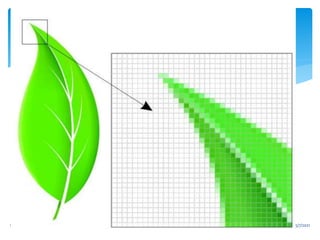
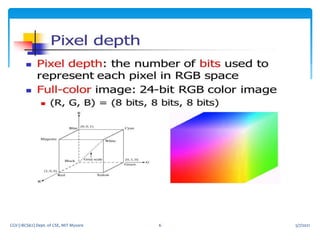
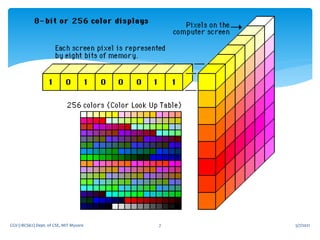
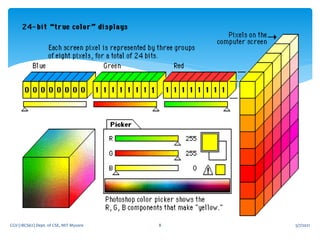
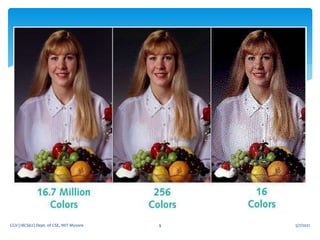
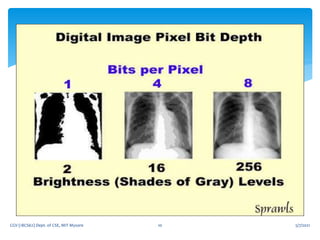
 The number of bits that represent a pixel determine how
many colors it can display.
 The more colors a pixel can display, the better the tone
of the photo and the more lifelike it will look.
 A quality image is not just determined by the number of
pixels in the image, but also the depth of those pixels.
5/7/2021
CGV (18CS62) Dept. of CSE, MIT Mysore 4
Pixel
5/7/2021
CGV (18CS62) Dept. of CSE, MIT Mysore 5
5/7/2021
CGV (18CS62) Dept. of CSE, MIT Mysore 6
5/7/2021
CGV (18CS62) Dept. of CSE, MIT Mysore 7
5/7/2021
CGV (18CS62) Dept. of CSE, MIT Mysore 8
5/7/2021
CGV (18CS62) Dept. of CSE, MIT Mysore 9
5/7/2021
CGV (18CS62) Dept. of CSE, MIT Mysore 10
5/7/2021
CGV (18CS62) Dept. of CSE, MIT Mysore 11
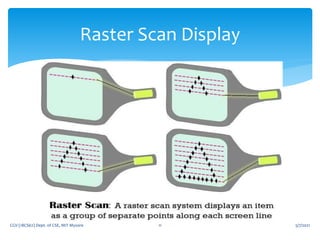
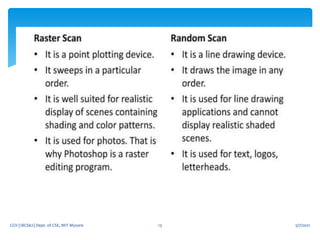
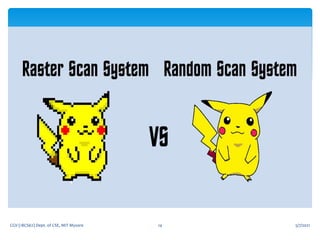
Raster Scan Display
5/7/2021
CGV (18CS62) Dept. of CSE, MIT Mysore 12
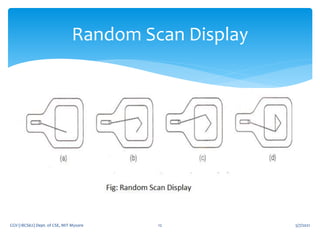
Random Scan Display
5/7/2021
CGV (18CS62) Dept. of CSE, MIT Mysore 13
5/7/2021
CGV (18CS62) Dept. of CSE, MIT Mysore 14
5/7/2021
CGV (18CS62) Dept. of CSE, MIT Mysore 15
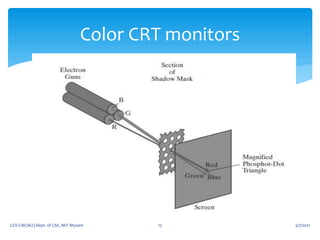
Color CRT monitors
 coat the screen with layers of different colored phosphors
 The emitted color depends on how far the electron beam penetrates
into the phosphor layers
 typically used only two phosphor layers: red and green
 A beam of slow electrons excites only the outer red layer
 but a beam of very fast electrons penetrates the red layer and
excites the inner green layer.
 At intermediate beam speeds, combinations of red and green light
are emitted to show two additional colors: orange and yellow.
 The speed of the electrons, and hence the screen color at any point,
is controlled by the beam acceleration voltage.
 Beam penetration has been an inexpensive way to produce color,
 but only a limited number of colors are possible, and picture quality
is not as good as with other methods.
5/7/2021
CGV (18CS62) Dept. of CSE, MIT Mysore 16
beam-penetration method
 Shadow-mask methods are commonly used in raster-scan systems
(including color TV) because they produce a much wider range of
colors than the beampenetration method.
 This approach is based on the way that we seem to perceive
 colors as combinations of red, green, and blue components, called
the RGB color model.
 Thus, a shadow-mask CRT uses three phosphor color dots at each
pixel position.
 One phosphor dot emits a red light, another emits a green light,
and the third emits a blue light.
 This type of CRT has three electron guns, one for each color dot,
and a shadow-mask grid just behind the phosphor-coated screen.
5/7/2021
CGV (18CS62) Dept. of CSE, MIT Mysore 17
Shadow-mask methods
 light emitted from the three phosphors results in a small
spot of color at each pixel position
 since our eyes tend to merge the light emitted from the
three dots into one composite color
 The three electron beams are deflected and focused as a
group onto the shadow mask, which contains a series of
holes aligned with the phosphor-dot patterns.
 When the three beams pass through a hole in the shadow
mask, they activate a dot triangle, which appears as a small
color spot on the screen.
 The phosphor dots in the triangles are arranged so that each
electron beam can activate only its corresponding color dot
when it passes through the shadow mask.
5/7/2021
CGV (18CS62) Dept. of CSE, MIT Mysore 18
 The term flat-panel display refers to a class of video devices that
have reduced volume, weight, and power requirements compared
to a CRT.
 A significant feature of flat-panel displays is that they are thinner
than CRTs, and we can hang them on walls or wear them on our
wrists.
 Since we can even write on some flat-panel displays, they are also
available as pocket notepads.
 Some additional uses for flat-panel displays are as small TV
monitors, calculator screens, pocket video-game screens, laptop
computer screens, armrest movie-viewing stations on airlines,
advertisement boards in elevators, and graphics displays in
applications requiring rugged, portable monitors.
5/7/2021
CGV (18CS62) Dept. of CSE, MIT Mysore 19
Flat-Panel Displays
 The emissive displays (or emitters) are devices that convert
electrical energy into light.
 Plasma panels, thin-film electroluminescent displays, and light-
emitting diodes are examples of emissive displays.
 Flat CRTs have also been devised, in which electron beams are
accelerated parallel to the screen and then deflected 90 onto the
screen. But flatCRTs have not proved to be as successful as other
emissive devices.
 Nonemissive displays (or nonemitters) use optical effects to convert
sunlight or light from some other source into graphics patterns.
 The most important example of a nonemissive flat-panel display is a
liquid-crystal device (LCD).
5/7/2021
CGV (18CS62) Dept. of CSE, MIT Mysore 20
emissive displays
and nonemissive displays
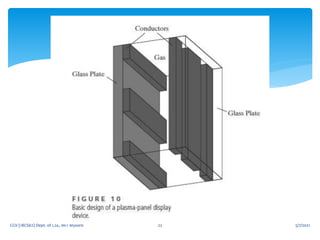
 Plasma panels, also called gas-discharge displays, are
constructed by filling the region between two glass plates with a
mixture of gases that usually includes neon.
 A series of vertical conducting ribbons is placed on one glass
panel, and a set of horizontal conducting ribbons is built into the
other glass panel
 Firing voltages applied to an intersecting pair of horizontal and
vertical conductors cause the gas at the intersection of the two
conductors to break down into a glowing plasma of electrons
and ions.
 Picture definition is stored in a refresh buffer, and the firing
voltages are applied to refresh the pixel positions (at the
intersections of the conductors) 60 times per second.
5/7/2021
CGV (18CS62) Dept. of CSE, MIT Mysore 21
Plasma Panels
5/7/2021
CGV (18CS62) Dept. of CSE, MIT Mysore 22
5/7/2021
CGV (18CS62) Dept. of CSE, MIT Mysore 23
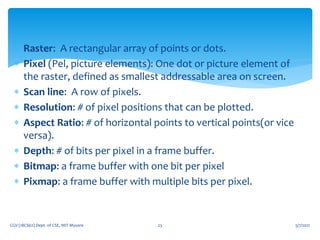
 Raster: A rectangular array of points or dots.
 Pixel (Pel, picture elements): One dot or picture element of
the raster, defined as smallest addressable area on screen.
 Scan line: A row of pixels.
 Resolution: # of pixel positions that can be plotted.
 Aspect Ratio: # of horizontal points to vertical points(or vice
versa).
 Depth: # of bits per pixel in a frame buffer.
 Bitmap: a frame buffer with one bit per pixel
 Pixmap: a frame buffer with multiple bits per pixel.
5/7/2021
CGV (18CS62) Dept. of CSE, MIT Mysore 24
Graphics workstations and viewing
systems
 Most graphics monitors today operate as raster-
scan displays, and both CRT and flat panel
systems are in common use.
 Graphics workstation range from small general-
purpose computer systems to multi monitor
facilities, often with ultra –large viewing
screens.
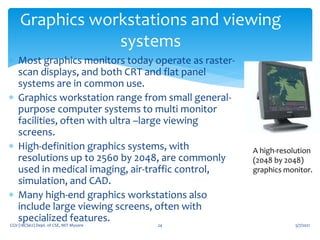
 High-definition graphics systems, with
resolutions up to 2560 by 2048, are commonly
used in medical imaging, air-traffic control,
simulation, and CAD.
 Many high-end graphics workstations also
include large viewing screens, often with
specialized features.
A high-resolution
(2048 by 2048)
graphics monitor.
5/7/2021
CGV (18CS62) Dept. of CSE, MIT Mysore 25
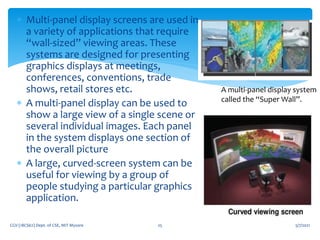
 Multi-panel display screens are used in
a variety of applications that require
“wall-sized” viewing areas. These
systems are designed for presenting
graphics displays at meetings,
conferences, conventions, trade
shows, retail stores etc.
 A multi-panel display can be used to
show a large view of a single scene or
several individual images. Each panel
in the system displays one section of
the overall picture
 A large, curved-screen system can be
useful for viewing by a group of
people studying a particular graphics
application.
A multi-panel display system
called the “Super Wall”.
5/7/2021
CGV (18CS62) Dept. of CSE, MIT Mysore 26
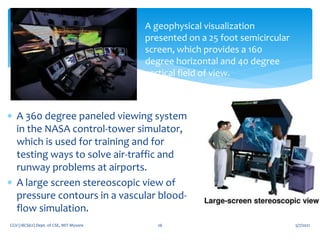
A geophysical visualization
presented on a 25 foot semicircular
screen, which provides a 160
degree horizontal and 40 degree
vertical field of view.
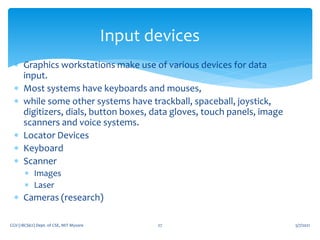
 A 360 degree paneled viewing system
in the NASA control-tower simulator,
which is used for training and for
testing ways to solve air-traffic and
runway problems at airports.
 A large screen stereoscopic view of
pressure contours in a vascular blood-
flow simulation.
5/7/2021
CGV (18CS62) Dept. of CSE, MIT Mysore 27
Input devices
 Graphics workstations make use of various devices for data
input.
 Most systems have keyboards and mouses,
 while some other systems have trackball, spaceball, joystick,
digitizers, dials, button boxes, data gloves, touch panels, image
scanners and voice systems.
 Locator Devices
 Keyboard
 Scanner
 Images
 Laser
 Cameras (research)
 Locator: return a position
 Pick: return ID of an object
 Keyboard: return strings of characters
 Stroke: return array of positions
 Valuator: return floating point number
 Choice: return one of n items
5/7/2021
CGV (18CS62) Dept. of CSE, MIT Mysore 28
six types of logical input for graphics
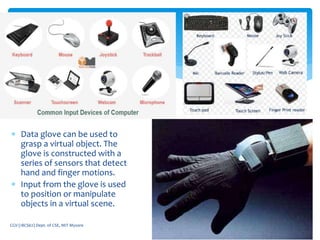
 Data glove can be used to
grasp a virtual object. The
glove is constructed with a
series of sensors that detect
hand and finger motions.
 Input from the glove is used
to position or manipulate
objects in a virtual scene.
5/7/2021
CGV (18CS62) Dept. of CSE, MIT Mysore 29
5/7/2021
CGV (18CS62) Dept. of CSE, MIT Mysore 30
Graphics Networks
 So far, we have mainly considered graphics applications on an
isolated system with a single user.
 Multiuser environments & computer networks are now common
elements in many graphics applications.
 Various resources, such as processors, printers, plotters and data
files can be distributed on a network & shared by multiple users.
 A graphics monitor on a network is generally referred to as a
graphics server.
 The computer on a network that is executing a graphics
application is called the client.
 A workstation that includes processors, as well as a monitor and
input devices can function as both a server and a client.
 A great deal of graphics development is now done on the
Internet.
 Computers on the Internet communicate using TCP/IP.
 Resources such as graphics files are identified by URL (Uniform
resource locator).
 The World Wide Web provides a hypertext system that allows
users to locate and view documents, audio and graphics.
 Each URL sometimes also called as universal resource locator.
 The URL contains two parts Protocol- for transferring the
document, and Server contains the document.
5/7/2021
CGV (18CS62) Dept. of CSE, MIT Mysore 31
Graphics on Internet
 There are two broad classifications for computer-graphics software
 Special-purpose packages: Special-purpose packages are designed for
nonprogrammers
 Example: generate pictures, graphs, charts, painting programs or CAD
systems in some application area without worrying about the graphics
procedure
 General programming packages: general programming package provides
a library of graphics functions that can be used in a programming
language such as C, C++, Java, or FORTRAN.
 Example: GL (Graphics Library), OpenGL, VRML (Virtual-Reality Modeling
Language), Java 2D And Java 3D
NOTE: A set of graphics functions is often called a computer-graphics
application programming interface (CG API)
5/7/2021
CGV (18CS62) Dept. of CSE, MIT Mysore 32
Graphics Software
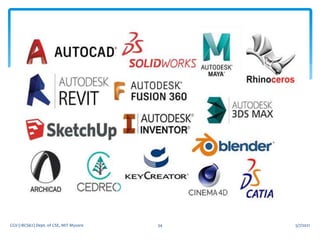
 SuperPaint (1973) was one of the earliest graphics software
applications.
 Currently Adobe Photoshop is one of the most used and best-
known graphics programs.
 GIMP is a popular open-source alternative to Adobe Photoshop.
 GNU Image Manipulation Program) is a free and open-
source raster graphics editor[4] used for image
manipulation (retouching) and image editing, free-form
drawing, transcoding between different image file formats, and
more specialized tasks.
 GIMP is released under GPLv3+ license and is available
for Linux, macOS, and Microsoft Windows.
5/7/2021
CGV (18CS62) Dept. of CSE, MIT Mysore 33
5/7/2021
CGV (18CS62) Dept. of CSE, MIT Mysore 34
5/7/2021
CGV (18CS62) Dept. of CSE, MIT Mysore 35
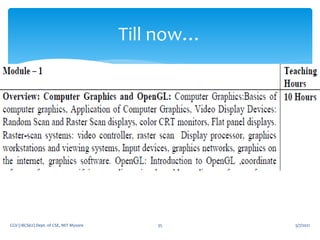
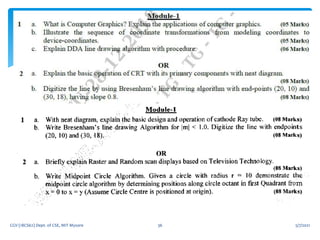
Till now…
5/7/2021
CGV (18CS62) Dept. of CSE, MIT Mysore 36
5/7/2021
CGV (18CS62) Dept. of CSE, MIT Mysore 37
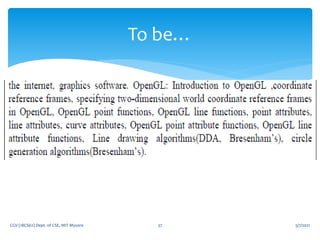
To be…
 OpenGL (Open Graphics Library) is a cross-language, cross-
platform application programming interface (API) for rendering
2D and 3D vector graphics.
 The API is typically used to interact with a graphics processing
unit (GPU), to achieve hardware-accelerated rendering.
 Silicon Graphics, Inc. (SGI) began developing OpenGL in 1991
and released it on June 30, 1992;
 Applications use it extensively in the fields of computer-aided
design (CAD), virtual reality, scientific visualization, information
visualization, flight simulation, and video games.
 Since 2006, OpenGL has been managed by the non-profit
technology consortium Khronos Group.
5/7/2021
CGV (18CS62) Dept. of CSE, MIT Mysore 38
OpenGL
 In the 1980s, developing software that could function with a wide range of
graphics hardware was a real challenge.
 Software developers wrote custom interfaces and drivers for each piece of
hardware. This was expensive and resulted in multiplication of effort.
 By the early 1990s, Silicon Graphics (SGI) was a leader in 3D graphics for
workstations. Their IRIS GL API became the industry standard, used more
widely than the open standards-based PHIGS.
 This was because IRIS GL was considered easier to use, and because it
supported immediate mode rendering.
 By contrast, PHIGS was considered difficult to use and outdated in
functionality.
 SGI's competitors (including Sun Microsystems, Hewlett-Packard and IBM)
were also able to bring to market 3D hardware supported by extensions
made to the PHIGS standard,
 which pressured SGI to open source a version of IrisGL as a public standard
called OpenGL.
5/7/2021
CGV (18CS62) Dept. of CSE, MIT Mysore 39
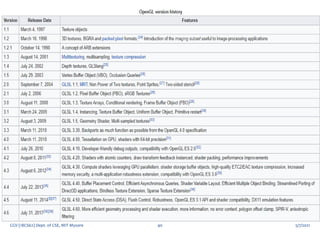
History… OpenGL
5/7/2021
CGV (18CS62) Dept. of CSE, MIT Mysore 40
5/7/2021
CGV (18CS62) Dept. of CSE, MIT Mysore 41
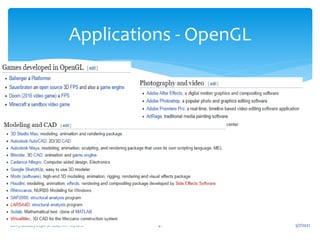
Applications - OpenGL
5/7/2021
CGV (18CS62) Dept. of CSE, MIT Mysore 42
5/7/2021
CGV (18CS62) Dept. of CSE, MIT Mysore 43
Library..
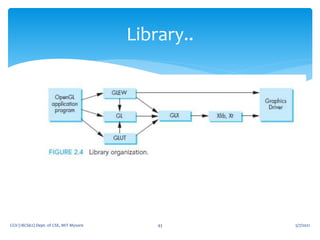
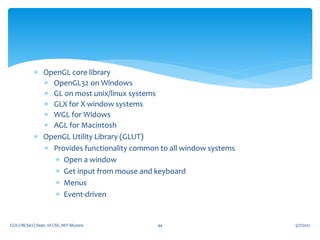
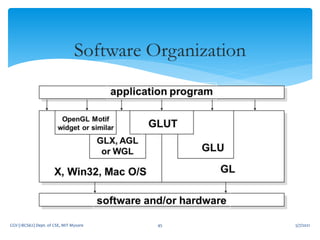
 OpenGL core library
 OpenGL32 on Windows
 GL on most unix/linux systems
 GLX for X window systems
 WGL for Widows
 AGL for Macintosh
 OpenGL Utility Library (GLUT)
 Provides functionality common to all window systems
 Open a window
 Get input from mouse and keyboard
 Menus
 Event-driven
5/7/2021
CGV (18CS62) Dept. of CSE, MIT Mysore 44
5/7/2021
CGV (18CS62) Dept. of CSE, MIT Mysore 45

CGV 18CS62 VTU CSE

  • 1.
    MAHARAJA INSTITUTE OFTECHNOLOGY MYSORE - Prof. Ananda Kumar H N Department of Computer Science and Engineering Computer Graphics and Visualization (CGV) 18CS62
  • 2.
    5/7/2021 CGV (18CS62) Dept.of CSE, MIT Mysore 2
  • 3.
    TEXT BOOK 1 https://doc.lagout.org/programmation/OpenGL/Computer%20Gra phics%20with%20OpenGL%20%284th%20ed.%29%20%5BHearn%2C%2 0Baker%20%26%20Carithers%202013%5D.pdf TEXTBOOK 2 http://digilib.stmik- banjarbaru.ac.id/data.bc/5.%20Computer%20Graphic/2012%20X%20 Interactive_Computer_Graphics__A_Top_Down_Approach_with _Shader_Based_OpenGL__6th_Edition_.pdf 5/7/2021 CGV (18CS62) Dept. of CSE, MIT Mysore 3 Text Book Links
  • 4.
     The numberof bits that represent a pixel determine how many colors it can display.  The more colors a pixel can display, the better the tone of the photo and the more lifelike it will look.  A quality image is not just determined by the number of pixels in the image, but also the depth of those pixels. 5/7/2021 CGV (18CS62) Dept. of CSE, MIT Mysore 4 Pixel
  • 5.
    5/7/2021 CGV (18CS62) Dept.of CSE, MIT Mysore 5
  • 6.
    5/7/2021 CGV (18CS62) Dept.of CSE, MIT Mysore 6
  • 7.
    5/7/2021 CGV (18CS62) Dept.of CSE, MIT Mysore 7
  • 8.
    5/7/2021 CGV (18CS62) Dept.of CSE, MIT Mysore 8
  • 9.
    5/7/2021 CGV (18CS62) Dept.of CSE, MIT Mysore 9
  • 10.
    5/7/2021 CGV (18CS62) Dept.of CSE, MIT Mysore 10
  • 11.
    5/7/2021 CGV (18CS62) Dept.of CSE, MIT Mysore 11 Raster Scan Display
  • 12.
    5/7/2021 CGV (18CS62) Dept.of CSE, MIT Mysore 12 Random Scan Display
  • 13.
    5/7/2021 CGV (18CS62) Dept.of CSE, MIT Mysore 13
  • 14.
    5/7/2021 CGV (18CS62) Dept.of CSE, MIT Mysore 14
  • 15.
    5/7/2021 CGV (18CS62) Dept.of CSE, MIT Mysore 15 Color CRT monitors
  • 16.
     coat thescreen with layers of different colored phosphors  The emitted color depends on how far the electron beam penetrates into the phosphor layers  typically used only two phosphor layers: red and green  A beam of slow electrons excites only the outer red layer  but a beam of very fast electrons penetrates the red layer and excites the inner green layer.  At intermediate beam speeds, combinations of red and green light are emitted to show two additional colors: orange and yellow.  The speed of the electrons, and hence the screen color at any point, is controlled by the beam acceleration voltage.  Beam penetration has been an inexpensive way to produce color,  but only a limited number of colors are possible, and picture quality is not as good as with other methods. 5/7/2021 CGV (18CS62) Dept. of CSE, MIT Mysore 16 beam-penetration method
  • 17.
     Shadow-mask methodsare commonly used in raster-scan systems (including color TV) because they produce a much wider range of colors than the beampenetration method.  This approach is based on the way that we seem to perceive  colors as combinations of red, green, and blue components, called the RGB color model.  Thus, a shadow-mask CRT uses three phosphor color dots at each pixel position.  One phosphor dot emits a red light, another emits a green light, and the third emits a blue light.  This type of CRT has three electron guns, one for each color dot, and a shadow-mask grid just behind the phosphor-coated screen. 5/7/2021 CGV (18CS62) Dept. of CSE, MIT Mysore 17 Shadow-mask methods
  • 18.
     light emittedfrom the three phosphors results in a small spot of color at each pixel position  since our eyes tend to merge the light emitted from the three dots into one composite color  The three electron beams are deflected and focused as a group onto the shadow mask, which contains a series of holes aligned with the phosphor-dot patterns.  When the three beams pass through a hole in the shadow mask, they activate a dot triangle, which appears as a small color spot on the screen.  The phosphor dots in the triangles are arranged so that each electron beam can activate only its corresponding color dot when it passes through the shadow mask. 5/7/2021 CGV (18CS62) Dept. of CSE, MIT Mysore 18
  • 19.
     The termflat-panel display refers to a class of video devices that have reduced volume, weight, and power requirements compared to a CRT.  A significant feature of flat-panel displays is that they are thinner than CRTs, and we can hang them on walls or wear them on our wrists.  Since we can even write on some flat-panel displays, they are also available as pocket notepads.  Some additional uses for flat-panel displays are as small TV monitors, calculator screens, pocket video-game screens, laptop computer screens, armrest movie-viewing stations on airlines, advertisement boards in elevators, and graphics displays in applications requiring rugged, portable monitors. 5/7/2021 CGV (18CS62) Dept. of CSE, MIT Mysore 19 Flat-Panel Displays
  • 20.
     The emissivedisplays (or emitters) are devices that convert electrical energy into light.  Plasma panels, thin-film electroluminescent displays, and light- emitting diodes are examples of emissive displays.  Flat CRTs have also been devised, in which electron beams are accelerated parallel to the screen and then deflected 90 onto the screen. But flatCRTs have not proved to be as successful as other emissive devices.  Nonemissive displays (or nonemitters) use optical effects to convert sunlight or light from some other source into graphics patterns.  The most important example of a nonemissive flat-panel display is a liquid-crystal device (LCD). 5/7/2021 CGV (18CS62) Dept. of CSE, MIT Mysore 20 emissive displays and nonemissive displays
  • 21.
     Plasma panels,also called gas-discharge displays, are constructed by filling the region between two glass plates with a mixture of gases that usually includes neon.  A series of vertical conducting ribbons is placed on one glass panel, and a set of horizontal conducting ribbons is built into the other glass panel  Firing voltages applied to an intersecting pair of horizontal and vertical conductors cause the gas at the intersection of the two conductors to break down into a glowing plasma of electrons and ions.  Picture definition is stored in a refresh buffer, and the firing voltages are applied to refresh the pixel positions (at the intersections of the conductors) 60 times per second. 5/7/2021 CGV (18CS62) Dept. of CSE, MIT Mysore 21 Plasma Panels
  • 22.
    5/7/2021 CGV (18CS62) Dept.of CSE, MIT Mysore 22
  • 23.
    5/7/2021 CGV (18CS62) Dept.of CSE, MIT Mysore 23  Raster: A rectangular array of points or dots.  Pixel (Pel, picture elements): One dot or picture element of the raster, defined as smallest addressable area on screen.  Scan line: A row of pixels.  Resolution: # of pixel positions that can be plotted.  Aspect Ratio: # of horizontal points to vertical points(or vice versa).  Depth: # of bits per pixel in a frame buffer.  Bitmap: a frame buffer with one bit per pixel  Pixmap: a frame buffer with multiple bits per pixel.
  • 24.
    5/7/2021 CGV (18CS62) Dept.of CSE, MIT Mysore 24 Graphics workstations and viewing systems  Most graphics monitors today operate as raster- scan displays, and both CRT and flat panel systems are in common use.  Graphics workstation range from small general- purpose computer systems to multi monitor facilities, often with ultra –large viewing screens.  High-definition graphics systems, with resolutions up to 2560 by 2048, are commonly used in medical imaging, air-traffic control, simulation, and CAD.  Many high-end graphics workstations also include large viewing screens, often with specialized features. A high-resolution (2048 by 2048) graphics monitor.
  • 25.
    5/7/2021 CGV (18CS62) Dept.of CSE, MIT Mysore 25  Multi-panel display screens are used in a variety of applications that require “wall-sized” viewing areas. These systems are designed for presenting graphics displays at meetings, conferences, conventions, trade shows, retail stores etc.  A multi-panel display can be used to show a large view of a single scene or several individual images. Each panel in the system displays one section of the overall picture  A large, curved-screen system can be useful for viewing by a group of people studying a particular graphics application. A multi-panel display system called the “Super Wall”.
  • 26.
    5/7/2021 CGV (18CS62) Dept.of CSE, MIT Mysore 26 A geophysical visualization presented on a 25 foot semicircular screen, which provides a 160 degree horizontal and 40 degree vertical field of view.  A 360 degree paneled viewing system in the NASA control-tower simulator, which is used for training and for testing ways to solve air-traffic and runway problems at airports.  A large screen stereoscopic view of pressure contours in a vascular blood- flow simulation.
  • 27.
    5/7/2021 CGV (18CS62) Dept.of CSE, MIT Mysore 27 Input devices  Graphics workstations make use of various devices for data input.  Most systems have keyboards and mouses,  while some other systems have trackball, spaceball, joystick, digitizers, dials, button boxes, data gloves, touch panels, image scanners and voice systems.  Locator Devices  Keyboard  Scanner  Images  Laser  Cameras (research)
  • 28.
     Locator: returna position  Pick: return ID of an object  Keyboard: return strings of characters  Stroke: return array of positions  Valuator: return floating point number  Choice: return one of n items 5/7/2021 CGV (18CS62) Dept. of CSE, MIT Mysore 28 six types of logical input for graphics
  • 29.
     Data glovecan be used to grasp a virtual object. The glove is constructed with a series of sensors that detect hand and finger motions.  Input from the glove is used to position or manipulate objects in a virtual scene. 5/7/2021 CGV (18CS62) Dept. of CSE, MIT Mysore 29
  • 30.
    5/7/2021 CGV (18CS62) Dept.of CSE, MIT Mysore 30 Graphics Networks  So far, we have mainly considered graphics applications on an isolated system with a single user.  Multiuser environments & computer networks are now common elements in many graphics applications.  Various resources, such as processors, printers, plotters and data files can be distributed on a network & shared by multiple users.  A graphics monitor on a network is generally referred to as a graphics server.  The computer on a network that is executing a graphics application is called the client.  A workstation that includes processors, as well as a monitor and input devices can function as both a server and a client.
  • 31.
     A greatdeal of graphics development is now done on the Internet.  Computers on the Internet communicate using TCP/IP.  Resources such as graphics files are identified by URL (Uniform resource locator).  The World Wide Web provides a hypertext system that allows users to locate and view documents, audio and graphics.  Each URL sometimes also called as universal resource locator.  The URL contains two parts Protocol- for transferring the document, and Server contains the document. 5/7/2021 CGV (18CS62) Dept. of CSE, MIT Mysore 31 Graphics on Internet
  • 32.
     There aretwo broad classifications for computer-graphics software  Special-purpose packages: Special-purpose packages are designed for nonprogrammers  Example: generate pictures, graphs, charts, painting programs or CAD systems in some application area without worrying about the graphics procedure  General programming packages: general programming package provides a library of graphics functions that can be used in a programming language such as C, C++, Java, or FORTRAN.  Example: GL (Graphics Library), OpenGL, VRML (Virtual-Reality Modeling Language), Java 2D And Java 3D NOTE: A set of graphics functions is often called a computer-graphics application programming interface (CG API) 5/7/2021 CGV (18CS62) Dept. of CSE, MIT Mysore 32 Graphics Software
  • 33.
     SuperPaint (1973)was one of the earliest graphics software applications.  Currently Adobe Photoshop is one of the most used and best- known graphics programs.  GIMP is a popular open-source alternative to Adobe Photoshop.  GNU Image Manipulation Program) is a free and open- source raster graphics editor[4] used for image manipulation (retouching) and image editing, free-form drawing, transcoding between different image file formats, and more specialized tasks.  GIMP is released under GPLv3+ license and is available for Linux, macOS, and Microsoft Windows. 5/7/2021 CGV (18CS62) Dept. of CSE, MIT Mysore 33
  • 34.
    5/7/2021 CGV (18CS62) Dept.of CSE, MIT Mysore 34
  • 35.
    5/7/2021 CGV (18CS62) Dept.of CSE, MIT Mysore 35 Till now…
  • 36.
    5/7/2021 CGV (18CS62) Dept.of CSE, MIT Mysore 36
  • 37.
    5/7/2021 CGV (18CS62) Dept.of CSE, MIT Mysore 37 To be…
  • 38.
     OpenGL (OpenGraphics Library) is a cross-language, cross- platform application programming interface (API) for rendering 2D and 3D vector graphics.  The API is typically used to interact with a graphics processing unit (GPU), to achieve hardware-accelerated rendering.  Silicon Graphics, Inc. (SGI) began developing OpenGL in 1991 and released it on June 30, 1992;  Applications use it extensively in the fields of computer-aided design (CAD), virtual reality, scientific visualization, information visualization, flight simulation, and video games.  Since 2006, OpenGL has been managed by the non-profit technology consortium Khronos Group. 5/7/2021 CGV (18CS62) Dept. of CSE, MIT Mysore 38 OpenGL
  • 39.
     In the1980s, developing software that could function with a wide range of graphics hardware was a real challenge.  Software developers wrote custom interfaces and drivers for each piece of hardware. This was expensive and resulted in multiplication of effort.  By the early 1990s, Silicon Graphics (SGI) was a leader in 3D graphics for workstations. Their IRIS GL API became the industry standard, used more widely than the open standards-based PHIGS.  This was because IRIS GL was considered easier to use, and because it supported immediate mode rendering.  By contrast, PHIGS was considered difficult to use and outdated in functionality.  SGI's competitors (including Sun Microsystems, Hewlett-Packard and IBM) were also able to bring to market 3D hardware supported by extensions made to the PHIGS standard,  which pressured SGI to open source a version of IrisGL as a public standard called OpenGL. 5/7/2021 CGV (18CS62) Dept. of CSE, MIT Mysore 39 History… OpenGL
  • 40.
    5/7/2021 CGV (18CS62) Dept.of CSE, MIT Mysore 40
  • 41.
    5/7/2021 CGV (18CS62) Dept.of CSE, MIT Mysore 41 Applications - OpenGL
  • 42.
    5/7/2021 CGV (18CS62) Dept.of CSE, MIT Mysore 42
  • 43.
    5/7/2021 CGV (18CS62) Dept.of CSE, MIT Mysore 43 Library..
  • 44.
     OpenGL corelibrary  OpenGL32 on Windows  GL on most unix/linux systems  GLX for X window systems  WGL for Widows  AGL for Macintosh  OpenGL Utility Library (GLUT)  Provides functionality common to all window systems  Open a window  Get input from mouse and keyboard  Menus  Event-driven 5/7/2021 CGV (18CS62) Dept. of CSE, MIT Mysore 44
  • 45.
    5/7/2021 CGV (18CS62) Dept.of CSE, MIT Mysore 45