1
Fabian Hueske
@fhueske
Strata Data Conference, New York
September, 27th 2017
Stream Analytics with SQL
on Apache Flink®
About me
 Apache Flink PMC member
• Contributing since day 1 at TU Berlin
• Focusing on Flink’s relational APIs since 2 years
 Co-author of “Stream Processing with Apache Flink”
• Work in progress…
 Co-founder & Software Engineer at data Artisans
2
3
Original creators of
Apache Flink®
dA Platform 2
Open Source Apache Flink
+ dA Application Manager
4
Productionizing and operating
stream processing made easy
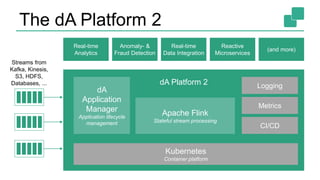
The dA Platform 2
dA Platform 2
Apache Flink
Stateful stream processing
Kubernetes
Container platform
Logging
Streams from
Kafka, Kinesis,
S3, HDFS,
Databases, ...
dA
Application
Manager
Application lifecycle
management
Metrics
CI/CD
Real-time
Analytics
Anomaly- &
Fraud Detection
Real-time
Data Integration
Reactive
Microservices
(and more)
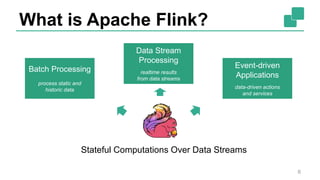
What is Apache Flink?
6
Batch Processing
process static and
historic data
Data Stream
Processing
realtime results
from data streams
Event-driven
Applications
data-driven actions
and services
Stateful Computations Over Data Streams
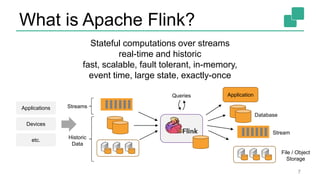
What is Apache Flink?
7
Queries
Applications
Devices
etc.
Database
Stream
File / Object
Storage
Stateful computations over streams
real-time and historic
fast, scalable, fault tolerant, in-memory,
event time, large state, exactly-once
Historic
Data
Streams
Application
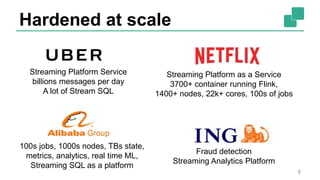
Hardened at scale
8
Streaming Platform Service
billions messages per day
A lot of Stream SQL
Streaming Platform as a Service
3700+ container running Flink,
1400+ nodes, 22k+ cores, 100s of jobs
Fraud detection
Streaming Analytics Platform
100s jobs, 1000s nodes, TBs state,
metrics, analytics, real time ML,
Streaming SQL as a platform
Powerful Abstractions
9
Process Function (events, state, time)
DataStream API (streams, windows)
SQL / Table API (dynamic tables)
Stream- & Batch
Data Processing
High-level
Analytics API
Stateful Event-
Driven Applications
val stats = stream
.keyBy("sensor")
.timeWindow(Time.seconds(5))
.sum((a, b) -> a.add(b))
def processElement(event: MyEvent, ctx: Context, out: Collector[Result]) = {
// work with event and state
(event, state.value) match { … }
out.collect(…) // emit events
state.update(…) // modify state
// schedule a timer callback
ctx.timerService.registerEventTimeTimer(event.timestamp + 500)
}
Layered abstractions to
navigate simple to complex use cases
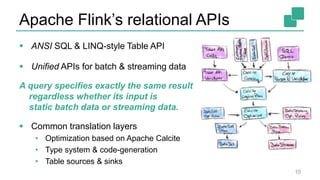
Apache Flink’s relational APIs
 ANSI SQL & LINQ-style Table API
 Unified APIs for batch & streaming data
A query specifies exactly the same result
regardless whether its input is
static batch data or streaming data.
 Common translation layers
• Optimization based on Apache Calcite
• Type system & code-generation
• Table sources & sinks
10
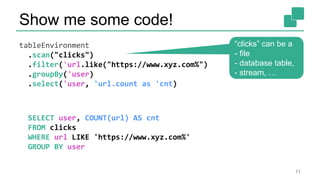
Show me some code!
tableEnvironment
.scan("clicks")
.filter('url.like("https://www.xyz.com%")
.groupBy('user)
.select('user, 'url.count as 'cnt)
SELECT user, COUNT(url) AS cnt
FROM clicks
WHERE url LIKE 'https://www.xyz.com%'
GROUP BY user
11
“clicks” can be a
- file
- database table,
- stream, …
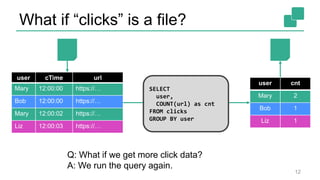
What if “clicks” is a file?
12
user cTime url
Mary 12:00:00 https://…
Bob 12:00:00 https://…
Mary 12:00:02 https://…
Liz 12:00:03 https://…
user cnt
Mary 2
Bob 1
Liz 1
Q: What if we get more click data?
A: We run the query again.
SELECT
user,
COUNT(url) as cnt
FROM clicks
GROUP BY user
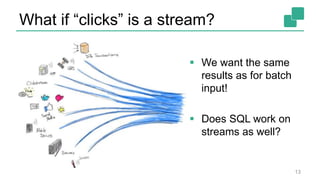
What if “clicks” is a stream?
13
 We want the same
results as for batch
input!
 Does SQL work on
streams as well?
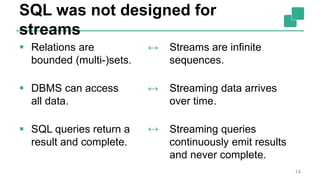
SQL was not designed for
streams
 Relations are
bounded (multi-)sets.
 DBMS can access
all data.
 SQL queries return a
result and complete.
14
Streams are infinite
sequences.
Streaming data arrives
over time.
Streaming queries
continuously emit results
and never complete.
↔
↔
↔
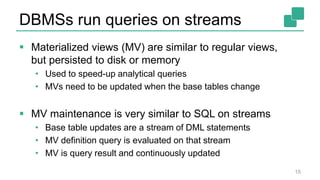
DBMSs run queries on streams
 Materialized views (MV) are similar to regular views,
but persisted to disk or memory
• Used to speed-up analytical queries
• MVs need to be updated when the base tables change
 MV maintenance is very similar to SQL on streams
• Base table updates are a stream of DML statements
• MV definition query is evaluated on that stream
• MV is query result and continuously updated
15
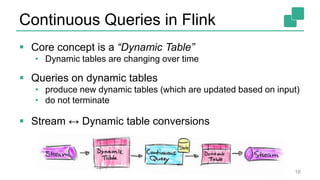
Continuous Queries in Flink
 Core concept is a “Dynamic Table”
• Dynamic tables are changing over time
 Queries on dynamic tables
• produce new dynamic tables (which are updated based on input)
• do not terminate
 Stream ↔ Dynamic table conversions
16
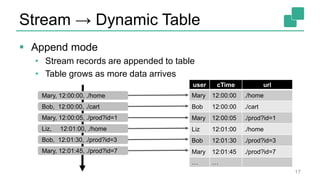
Stream → Dynamic Table
 Append mode
• Stream records are appended to table
• Table grows as more data arrives
17
user cTime url
Mary 12:00:00 ./home
Bob 12:00:00 ./cart
Mary 12:00:05 ./prod?id=1
Liz 12:01:00 ./home
Bob 12:01:30 ./prod?id=3
Mary 12:01:45 ./prod?id=7
… …
Mary, 12:00:00, ./home
Bob, 12:00:00, ./cart
Mary, 12:00:05, ./prod?id=1
Liz, 12:01:00, ./home
Bob, 12:01:30, ./prod?id=3
Mary, 12:01:45, ./prod?id=7
Stream → Dynamic Table
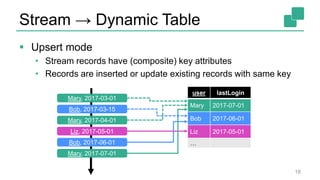
 Upsert mode
• Stream records have (composite) key attributes
• Records are inserted or update existing records with same key
18
user lastLogin
Mary 2017-07-01
Bob 2017-06-01
Liz 2017-05-01
…
Mary, 2017-03-01
Bob, 2017-03-15
Mary, 2017-04-01
Liz, 2017-05-01
Bob, 2017-06-01
Mary, 2017-07-01
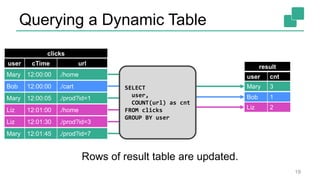
Querying a Dynamic Table
clicks
user cnt
Mary 1
result
Bob 1
Liz 1
Mary 2
Liz 2
Mary 3SELECT
user,
COUNT(url) as cnt
FROM clicks
GROUP BY user
Rows of result table are updated.
19
Mary 12:01:45 ./prod?id=7
Liz 12:01:30 ./prod?id=3
Liz 12:01:00 ./home
Mary 12:00:05 ./prod?id=1
Bob 12:00:00 ./cart
Mary 12:00:00 ./home
user cTime url
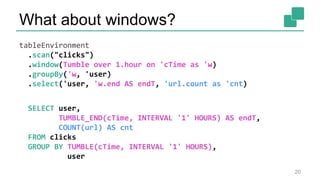
What about windows?
tableEnvironment
.scan("clicks")
.window(Tumble over 1.hour on 'cTime as 'w)
.groupBy('w, 'user)
.select('user, 'w.end AS endT, 'url.count as 'cnt)
SELECT user,
TUMBLE_END(cTime, INTERVAL '1' HOURS) AS endT,
COUNT(url) AS cnt
FROM clicks
GROUP BY TUMBLE(cTime, INTERVAL '1' HOURS),
user
20
clicks
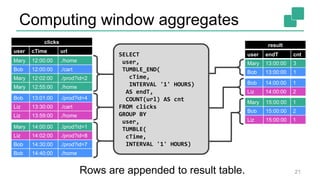
Computing window aggregates
user endT cnt
Mary 13:00:00 3
Bob 13:00:00 1
result
Bob 14:00:00 1
Liz 14:00:00 2
Mary 15:00:00 1
Bob 15:00:00 2
Liz 15:00:00 1
Mary 12:00:00 ./home
Bob 12:00:00 ./cart
Mary 12:02:00 ./prod?id=2
Mary 12:55:00 ./home
Mary 14:00:00 ./prod?id=1
Liz 14:02:00 ./prod?id=8
Bob 14:30:00 ./prod?id=7
Bob 14:40:00 ./home
Bob 13:01:00 ./prod?id=4
Liz 13:30:00 ./cart
Liz 13:59:00 ./home
SELECT
user,
TUMBLE_END(
cTime,
INTERVAL '1' HOURS)
AS endT,
COUNT(url) AS cnt
FROM clicks
GROUP BY
user,
TUMBLE(
cTime,
INTERVAL '1' HOURS)
Rows are appended to result table. 21
user cTime url
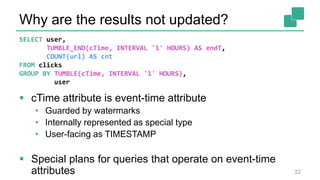
Why are the results not updated?
 cTime attribute is event-time attribute
• Guarded by watermarks
• Internally represented as special type
• User-facing as TIMESTAMP
 Special plans for queries that operate on event-time
attributes 22
SELECT user,
TUMBLE_END(cTime, INTERVAL '1' HOURS) AS endT,
COUNT(url) AS cnt
FROM clicks
GROUP BY TUMBLE(cTime, INTERVAL '1' HOURS),
user
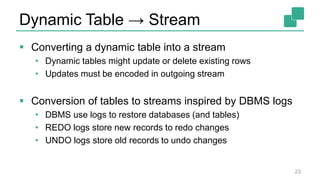
Dynamic Table → Stream
 Converting a dynamic table into a stream
• Dynamic tables might update or delete existing rows
• Updates must be encoded in outgoing stream
 Conversion of tables to streams inspired by DBMS logs
• DBMS use logs to restore databases (and tables)
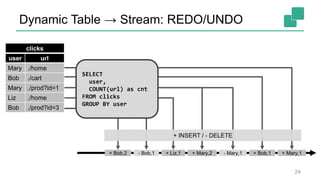
• REDO logs store new records to redo changes
• UNDO logs store old records to undo changes
23
Dynamic Table → Stream: REDO/UNDO
+ Bob,1+ Mary,2+ Liz,1+ Bob,2 + Mary,1- Mary,1- Bob,1
SELECT
user,
COUNT(url) as cnt
FROM clicks
GROUP BY user
+ INSERT / - DELETE
24
user url
clicks
Mary ./home
Bob ./cart
Mary ./prod?id=1
Liz ./home
Bob ./prod?id=3
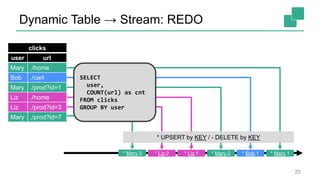
Dynamic Table → Stream: REDO
* Bob,1* Mary,2* Liz,1* Liz,2* Mary,3 * Mary,1
* UPSERT by KEY / - DELETE by KEY
SELECT
user,
COUNT(url) as cnt
FROM clicks
GROUP BY user
25
user url
clicks
Mary ./home
Bob ./cart
Mary ./prod?id=1
Liz ./home
Liz ./prod?id=3
Mary ./prod?id=7
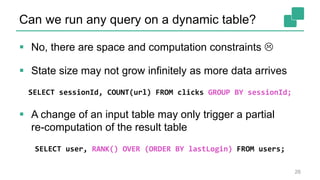
Can we run any query on a dynamic table?
 No, there are space and computation constraints 
 State size may not grow infinitely as more data arrives
SELECT sessionId, COUNT(url) FROM clicks GROUP BY sessionId;
 A change of an input table may only trigger a partial
re-computation of the result table
SELECT user, RANK() OVER (ORDER BY lastLogin) FROM users;
26
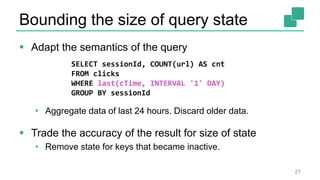
Bounding the size of query state
 Adapt the semantics of the query
• Aggregate data of last 24 hours. Discard older data.
 Trade the accuracy of the result for size of state
• Remove state for keys that became inactive.
27
SELECT sessionId, COUNT(url) AS cnt
FROM clicks
WHERE last(cTime, INTERVAL '1' DAY)
GROUP BY sessionId
Current state of SQL & Table API
 Flink’s relational APIs are rapidly evolving
• Lots of interest by community and many contributors
• Used in production at large scale by Alibaba, Uber, and others
 Features released in Flink 1.3
• GroupBy & Over windowed aggregates
• Non-windowed aggregates (with update changes)
• User-defined aggregation functions
 Features coming with Flink 1.4
• Windowed Joins
• Reworked connectors APIs
28
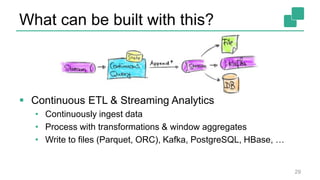
What can be built with this?
 Continuous ETL & Streaming Analytics
• Continuously ingest data
• Process with transformations & window aggregates
• Write to files (Parquet, ORC), Kafka, PostgreSQL, HBase, …
29
What can be built with this?
30
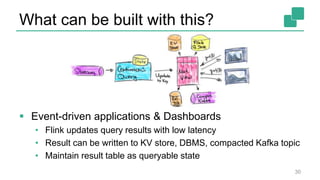
 Event-driven applications & Dashboards
• Flink updates query results with low latency
• Result can be written to KV store, DBMS, compacted Kafka topic
• Maintain result table as queryable state
Wrap up!
 Used in production heavily at Alibaba, Uber, and others
 Unified Batch and Stream Processing
 Lots of great features
• Continuously updating results like Materialized Views
• Sophisticated event-time model with retractions
• User-defined scalar, table & aggregation functions
 Check it out! 31
Thank you!
@fhueske
@ApacheFlink
@dataArtisans
Available on O’Reilly Early Release!

Stream Analytics with SQL on Apache Flink

  • 1.
    1 Fabian Hueske @fhueske Strata DataConference, New York September, 27th 2017 Stream Analytics with SQL on Apache Flink®
  • 2.
    About me  ApacheFlink PMC member • Contributing since day 1 at TU Berlin • Focusing on Flink’s relational APIs since 2 years  Co-author of “Stream Processing with Apache Flink” • Work in progress…  Co-founder & Software Engineer at data Artisans 2
  • 3.
    3 Original creators of ApacheFlink® dA Platform 2 Open Source Apache Flink + dA Application Manager
  • 4.
  • 5.
    The dA Platform2 dA Platform 2 Apache Flink Stateful stream processing Kubernetes Container platform Logging Streams from Kafka, Kinesis, S3, HDFS, Databases, ... dA Application Manager Application lifecycle management Metrics CI/CD Real-time Analytics Anomaly- & Fraud Detection Real-time Data Integration Reactive Microservices (and more)
  • 6.
    What is ApacheFlink? 6 Batch Processing process static and historic data Data Stream Processing realtime results from data streams Event-driven Applications data-driven actions and services Stateful Computations Over Data Streams
  • 7.
    What is ApacheFlink? 7 Queries Applications Devices etc. Database Stream File / Object Storage Stateful computations over streams real-time and historic fast, scalable, fault tolerant, in-memory, event time, large state, exactly-once Historic Data Streams Application
  • 8.
    Hardened at scale 8 StreamingPlatform Service billions messages per day A lot of Stream SQL Streaming Platform as a Service 3700+ container running Flink, 1400+ nodes, 22k+ cores, 100s of jobs Fraud detection Streaming Analytics Platform 100s jobs, 1000s nodes, TBs state, metrics, analytics, real time ML, Streaming SQL as a platform
  • 9.
    Powerful Abstractions 9 Process Function(events, state, time) DataStream API (streams, windows) SQL / Table API (dynamic tables) Stream- & Batch Data Processing High-level Analytics API Stateful Event- Driven Applications val stats = stream .keyBy("sensor") .timeWindow(Time.seconds(5)) .sum((a, b) -> a.add(b)) def processElement(event: MyEvent, ctx: Context, out: Collector[Result]) = { // work with event and state (event, state.value) match { … } out.collect(…) // emit events state.update(…) // modify state // schedule a timer callback ctx.timerService.registerEventTimeTimer(event.timestamp + 500) } Layered abstractions to navigate simple to complex use cases
  • 10.
    Apache Flink’s relationalAPIs  ANSI SQL & LINQ-style Table API  Unified APIs for batch & streaming data A query specifies exactly the same result regardless whether its input is static batch data or streaming data.  Common translation layers • Optimization based on Apache Calcite • Type system & code-generation • Table sources & sinks 10
  • 11.
    Show me somecode! tableEnvironment .scan("clicks") .filter('url.like("https://www.xyz.com%") .groupBy('user) .select('user, 'url.count as 'cnt) SELECT user, COUNT(url) AS cnt FROM clicks WHERE url LIKE 'https://www.xyz.com%' GROUP BY user 11 “clicks” can be a - file - database table, - stream, …
  • 12.
    What if “clicks”is a file? 12 user cTime url Mary 12:00:00 https://… Bob 12:00:00 https://… Mary 12:00:02 https://… Liz 12:00:03 https://… user cnt Mary 2 Bob 1 Liz 1 Q: What if we get more click data? A: We run the query again. SELECT user, COUNT(url) as cnt FROM clicks GROUP BY user
  • 13.
    What if “clicks”is a stream? 13  We want the same results as for batch input!  Does SQL work on streams as well?
  • 14.
    SQL was notdesigned for streams  Relations are bounded (multi-)sets.  DBMS can access all data.  SQL queries return a result and complete. 14 Streams are infinite sequences. Streaming data arrives over time. Streaming queries continuously emit results and never complete. ↔ ↔ ↔
  • 15.
    DBMSs run querieson streams  Materialized views (MV) are similar to regular views, but persisted to disk or memory • Used to speed-up analytical queries • MVs need to be updated when the base tables change  MV maintenance is very similar to SQL on streams • Base table updates are a stream of DML statements • MV definition query is evaluated on that stream • MV is query result and continuously updated 15
  • 16.
    Continuous Queries inFlink  Core concept is a “Dynamic Table” • Dynamic tables are changing over time  Queries on dynamic tables • produce new dynamic tables (which are updated based on input) • do not terminate  Stream ↔ Dynamic table conversions 16
  • 17.
    Stream → DynamicTable  Append mode • Stream records are appended to table • Table grows as more data arrives 17 user cTime url Mary 12:00:00 ./home Bob 12:00:00 ./cart Mary 12:00:05 ./prod?id=1 Liz 12:01:00 ./home Bob 12:01:30 ./prod?id=3 Mary 12:01:45 ./prod?id=7 … … Mary, 12:00:00, ./home Bob, 12:00:00, ./cart Mary, 12:00:05, ./prod?id=1 Liz, 12:01:00, ./home Bob, 12:01:30, ./prod?id=3 Mary, 12:01:45, ./prod?id=7
  • 18.
    Stream → DynamicTable  Upsert mode • Stream records have (composite) key attributes • Records are inserted or update existing records with same key 18 user lastLogin Mary 2017-07-01 Bob 2017-06-01 Liz 2017-05-01 … Mary, 2017-03-01 Bob, 2017-03-15 Mary, 2017-04-01 Liz, 2017-05-01 Bob, 2017-06-01 Mary, 2017-07-01
  • 19.
    Querying a DynamicTable clicks user cnt Mary 1 result Bob 1 Liz 1 Mary 2 Liz 2 Mary 3SELECT user, COUNT(url) as cnt FROM clicks GROUP BY user Rows of result table are updated. 19 Mary 12:01:45 ./prod?id=7 Liz 12:01:30 ./prod?id=3 Liz 12:01:00 ./home Mary 12:00:05 ./prod?id=1 Bob 12:00:00 ./cart Mary 12:00:00 ./home user cTime url
  • 20.
    What about windows? tableEnvironment .scan("clicks") .window(Tumbleover 1.hour on 'cTime as 'w) .groupBy('w, 'user) .select('user, 'w.end AS endT, 'url.count as 'cnt) SELECT user, TUMBLE_END(cTime, INTERVAL '1' HOURS) AS endT, COUNT(url) AS cnt FROM clicks GROUP BY TUMBLE(cTime, INTERVAL '1' HOURS), user 20
  • 21.
    clicks Computing window aggregates userendT cnt Mary 13:00:00 3 Bob 13:00:00 1 result Bob 14:00:00 1 Liz 14:00:00 2 Mary 15:00:00 1 Bob 15:00:00 2 Liz 15:00:00 1 Mary 12:00:00 ./home Bob 12:00:00 ./cart Mary 12:02:00 ./prod?id=2 Mary 12:55:00 ./home Mary 14:00:00 ./prod?id=1 Liz 14:02:00 ./prod?id=8 Bob 14:30:00 ./prod?id=7 Bob 14:40:00 ./home Bob 13:01:00 ./prod?id=4 Liz 13:30:00 ./cart Liz 13:59:00 ./home SELECT user, TUMBLE_END( cTime, INTERVAL '1' HOURS) AS endT, COUNT(url) AS cnt FROM clicks GROUP BY user, TUMBLE( cTime, INTERVAL '1' HOURS) Rows are appended to result table. 21 user cTime url
  • 22.
    Why are theresults not updated?  cTime attribute is event-time attribute • Guarded by watermarks • Internally represented as special type • User-facing as TIMESTAMP  Special plans for queries that operate on event-time attributes 22 SELECT user, TUMBLE_END(cTime, INTERVAL '1' HOURS) AS endT, COUNT(url) AS cnt FROM clicks GROUP BY TUMBLE(cTime, INTERVAL '1' HOURS), user
  • 23.
    Dynamic Table →Stream  Converting a dynamic table into a stream • Dynamic tables might update or delete existing rows • Updates must be encoded in outgoing stream  Conversion of tables to streams inspired by DBMS logs • DBMS use logs to restore databases (and tables) • REDO logs store new records to redo changes • UNDO logs store old records to undo changes 23
  • 24.
    Dynamic Table →Stream: REDO/UNDO + Bob,1+ Mary,2+ Liz,1+ Bob,2 + Mary,1- Mary,1- Bob,1 SELECT user, COUNT(url) as cnt FROM clicks GROUP BY user + INSERT / - DELETE 24 user url clicks Mary ./home Bob ./cart Mary ./prod?id=1 Liz ./home Bob ./prod?id=3
  • 25.
    Dynamic Table →Stream: REDO * Bob,1* Mary,2* Liz,1* Liz,2* Mary,3 * Mary,1 * UPSERT by KEY / - DELETE by KEY SELECT user, COUNT(url) as cnt FROM clicks GROUP BY user 25 user url clicks Mary ./home Bob ./cart Mary ./prod?id=1 Liz ./home Liz ./prod?id=3 Mary ./prod?id=7
  • 26.
    Can we runany query on a dynamic table?  No, there are space and computation constraints   State size may not grow infinitely as more data arrives SELECT sessionId, COUNT(url) FROM clicks GROUP BY sessionId;  A change of an input table may only trigger a partial re-computation of the result table SELECT user, RANK() OVER (ORDER BY lastLogin) FROM users; 26
  • 27.
    Bounding the sizeof query state  Adapt the semantics of the query • Aggregate data of last 24 hours. Discard older data.  Trade the accuracy of the result for size of state • Remove state for keys that became inactive. 27 SELECT sessionId, COUNT(url) AS cnt FROM clicks WHERE last(cTime, INTERVAL '1' DAY) GROUP BY sessionId
  • 28.
    Current state ofSQL & Table API  Flink’s relational APIs are rapidly evolving • Lots of interest by community and many contributors • Used in production at large scale by Alibaba, Uber, and others  Features released in Flink 1.3 • GroupBy & Over windowed aggregates • Non-windowed aggregates (with update changes) • User-defined aggregation functions  Features coming with Flink 1.4 • Windowed Joins • Reworked connectors APIs 28
  • 29.
    What can bebuilt with this?  Continuous ETL & Streaming Analytics • Continuously ingest data • Process with transformations & window aggregates • Write to files (Parquet, ORC), Kafka, PostgreSQL, HBase, … 29
  • 30.
    What can bebuilt with this? 30  Event-driven applications & Dashboards • Flink updates query results with low latency • Result can be written to KV store, DBMS, compacted Kafka topic • Maintain result table as queryable state
  • 31.
    Wrap up!  Usedin production heavily at Alibaba, Uber, and others  Unified Batch and Stream Processing  Lots of great features • Continuously updating results like Materialized Views • Sophisticated event-time model with retractions • User-defined scalar, table & aggregation functions  Check it out! 31
  • 32.