


1
Fabian Hueske
@fhueske
Berlin Buzzwords
June, 13th 2017
Stream Analytics with SQL
on Apache Flink®
Apache Flink
 Platform for scalable stream processing
 Fast
• Low latency and high throughput
 Accurate
• Stateful streaming processing in event time
• Exactly-once state guarantees
 Reliable
• Highly available cluster setup
• Snapshot and restart applications
2
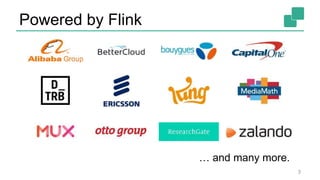
Powered by Flink
3
… and many more.
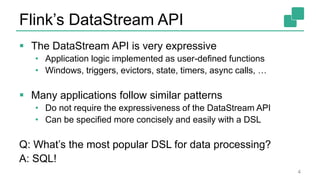
Flink’s DataStream API
 The DataStream API is very expressive
• Application logic implemented as user-defined functions
• Windows, triggers, evictors, state, timers, async calls, …
 Many applications follow similar patterns
• Do not require the expressiveness of the DataStream API
• Can be specified more concisely and easily with a DSL
Q: What’s the most popular DSL for data processing?
A: SQL!
4
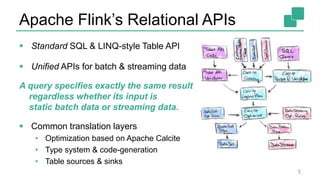
Apache Flink’s Relational APIs
 Standard SQL & LINQ-style Table API
 Unified APIs for batch & streaming data
A query specifies exactly the same result
regardless whether its input is
static batch data or streaming data.
 Common translation layers
• Optimization based on Apache Calcite
• Type system & code-generation
• Table sources & sinks
5
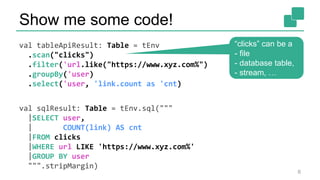
Show me some code!
val tableApiResult: Table = tEnv
.scan("clicks")
.filter('url.like("https://www.xyz.com%")
.groupBy('user)
.select('user, 'link.count as 'cnt)
val sqlResult: Table = tEnv.sql("""
|SELECT user,
| COUNT(link) AS cnt
|FROM clicks
|WHERE url LIKE 'https://www.xyz.com%'
|GROUP BY user
""".stripMargin)
6
“clicks” can be a
- file
- database table,
- stream, …
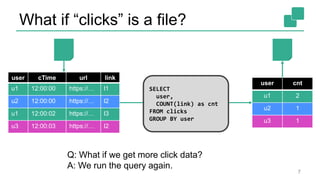
What if “clicks” is a file?
7
user cTime url link
u1 12:00:00 https://… l1
u2 12:00:00 https://… l2
u1 12:00:02 https://… l3
u3 12:00:03 https://… l2
user cnt
u1 2
u2 1
u3 1
Q: What if we get more click data?
A: We run the query again.
SELECT
user,
COUNT(link) as cnt
FROM clicks
GROUP BY user
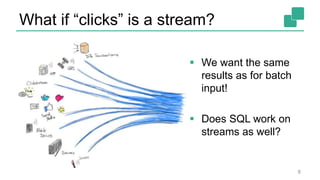
What if “clicks” is a stream?
8
 We want the same
results as for batch
input!
 Does SQL work on
streams as well?
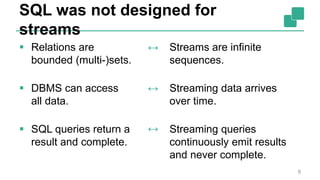
SQL was not designed for
streams
 Relations are
bounded (multi-)sets.
 DBMS can access
all data.
 SQL queries return a
result and complete.
9
Streams are infinite
sequences.
Streaming data arrives
over time.
Streaming queries
continuously emit results
and never complete.
↔
↔
↔
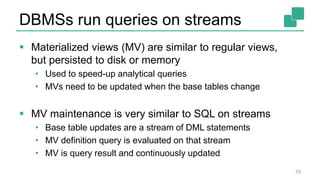
DBMSs run queries on streams
 Materialized views (MV) are similar to regular views,
but persisted to disk or memory
• Used to speed-up analytical queries
• MVs need to be updated when the base tables change
 MV maintenance is very similar to SQL on streams
• Base table updates are a stream of DML statements
• MV definition query is evaluated on that stream
• MV is query result and continuously updated
10
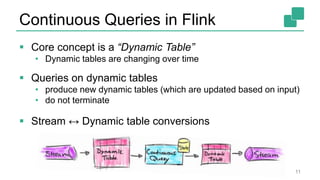
Continuous Queries in Flink
 Core concept is a “Dynamic Table”
• Dynamic tables are changing over time
 Queries on dynamic tables
• produce new dynamic tables (which are updated based on input)
• do not terminate
 Stream ↔ Dynamic table conversions
11
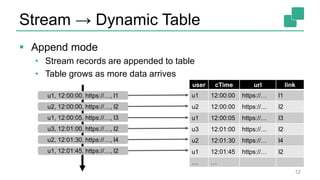
Stream → Dynamic Table
 Append mode
• Stream records are appended to table
• Table grows as more data arrives
12
user cTime url link
u1 12:00:00 https://… l1
u2 12:00:00 https://… l2
u1 12:00:05 https://… l3
u3 12:01:00 https://… l2
u2 12:01:30 https://… l4
u1 12:01:45 https://… l2
… …
u1, 12:00:00, https://…, l1
u2, 12:00:00, https://…, l2
u1, 12:00:05, https://…, l3
u3, 12:01:00, https://…, l2
u2, 12:01:30, https://…, l4
u1, 12:01:45, https://…, l2
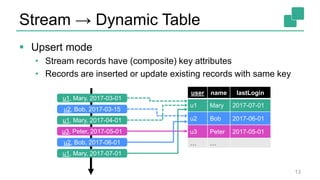
Stream → Dynamic Table
 Upsert mode
• Stream records have (composite) key attributes
• Records are inserted or update existing records with same key
13
user name lastLogin
u1 Mary 2017-07-01
u2 Bob 2017-06-01
u3 Peter 2017-05-01
… …
u1, Mary, 2017-03-01
u2, Bob, 2017-03-15
u1, Mary, 2017-04-01
u3, Peter, 2017-05-01
u2, Bob, 2017-06-01
u1, Mary, 2017-07-01
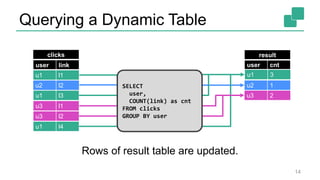
Querying a Dynamic Table
user link
u3 l2
u1 l4
clicks
u2 l2
u1 l1
u1 l3
u3 l1
user cnt
u1 1
result
u2 1
u3 1
u1 2
u3 2
u1 3
SELECT
user,
COUNT(link) as cnt
FROM clicks
GROUP BY user
Rows of result table are updated.
14
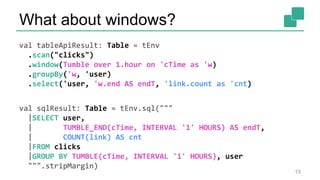
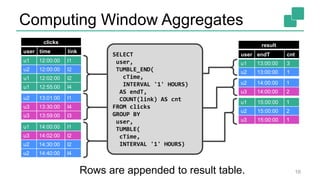
What about windows?
val tableApiResult: Table = tEnv
.scan("clicks")
.window(Tumble over 1.hour on 'cTime as 'w)
.groupBy('w, 'user)
.select('user, 'w.end AS endT, 'link.count as 'cnt)
val sqlResult: Table = tEnv.sql("""
|SELECT user,
| TUMBLE_END(cTime, INTERVAL '1' HOURS) AS endT,
| COUNT(link) AS cnt
|FROM clicks
|GROUP BY TUMBLE(cTime, INTERVAL '1' HOURS), user
""".stripMargin)
15
user time link
clicks
Computing Window Aggregates
user endT cnt
u1 13:00:00 3
u2 13:00:00 1
result
u2 14:00:00 1
u3 14:00:00 2
u1 15:00:00 1
u2 15:00:00 2
u3 15:00:00 1
u1 12:00:00 l1
u2 12:00:00 l2
u1 12:02:00 l2
u1 12:55:00 l4
u1 14:00:00 l1
u3 14:02:00 l2
u2 14:30:00 l2
u2 14:40:00 l4
u2 13:01:00 l1
u3 13:30:00 l4
u3 13:59:00 l3
SELECT
user,
TUMBLE_END(
cTime,
INTERVAL '1' HOURS)
AS endT,
COUNT(link) AS cnt
FROM clicks
GROUP BY
user,
TUMBLE(
cTime,
INTERVAL '1' HOURS)
Rows are appended to result table. 16
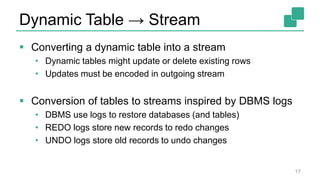
Dynamic Table → Stream
 Converting a dynamic table into a stream
• Dynamic tables might update or delete existing rows
• Updates must be encoded in outgoing stream
 Conversion of tables to streams inspired by DBMS logs
• DBMS use logs to restore databases (and tables)
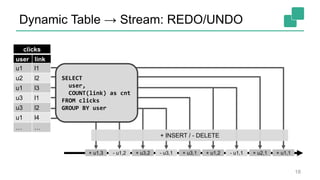
• REDO logs store new records to redo changes
• UNDO logs store old records to undo changes
17
Dynamic Table → Stream: REDO/UNDO
user link
clicks
+ u2,1+ u1,2+ u3,1+ u3,2+ u1,3 + u1,1- u1,1- u3,1- u1,2
u1 l1
u2 l2
u1 l3
u3 l1
u3 l2
u1 l4
… …
SELECT
user,
COUNT(link) as cnt
FROM clicks
GROUP BY user
+ INSERT / - DELETE
18
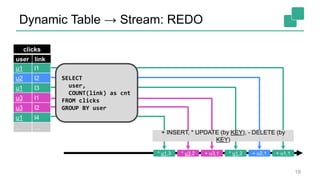
Dynamic Table → Stream: REDO
+ u2,1* u1,2+ u3,1* u3,2* u1,3 + u1,1
+ INSERT, * UPDATE (by KEY), - DELETE (by
KEY)
user link
clicks
u1 l1
u2 l2
u1 l3
u3 l1
u3 l2
u1 l4
… …
SELECT
user,
COUNT(link) as cnt
FROM clicks
GROUP BY user
19
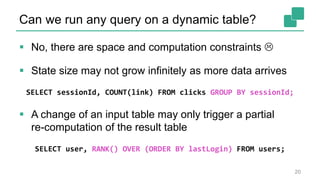
Can we run any query on a dynamic table?
 No, there are space and computation constraints 
 State size may not grow infinitely as more data arrives
SELECT sessionId, COUNT(link) FROM clicks GROUP BY sessionId;
 A change of an input table may only trigger a partial
re-computation of the result table
SELECT user, RANK() OVER (ORDER BY lastLogin) FROM users;
20
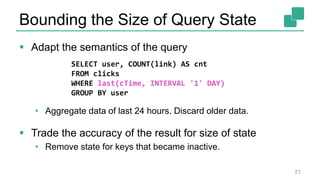
Bounding the Size of Query State
 Adapt the semantics of the query
• Aggregate data of last 24 hours. Discard older data.
 Trade the accuracy of the result for size of state
• Remove state for keys that became inactive.
21
SELECT user, COUNT(link) AS cnt
FROM clicks
WHERE last(cTime, INTERVAL '1' DAY)
GROUP BY user
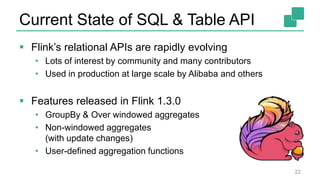
Current State of SQL & Table API
 Flink’s relational APIs are rapidly evolving
• Lots of interest by community and many contributors
• Used in production at large scale by Alibaba and others
 Features released in Flink 1.3.0
• GroupBy & Over windowed aggregates
• Non-windowed aggregates
(with update changes)
• User-defined aggregation functions
22
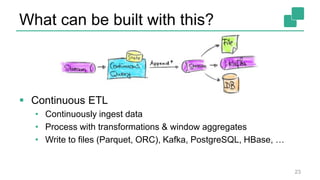
What can be built with this?
 Continuous ETL
• Continuously ingest data
• Process with transformations & window aggregates
• Write to files (Parquet, ORC), Kafka, PostgreSQL, HBase, …
23
What can be built with this?
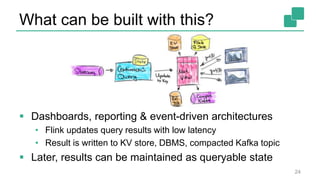
24
 Dashboards, reporting & event-driven architectures
• Flink updates query results with low latency
• Result is written to KV store, DBMS, compacted Kafka topic
 Later, results can be maintained as queryable state
Conclusion
 Table API & SQL support many streaming use cases
• High-level / declarative specification
• Automatic optimization and translation
• Efficient execution
• Scalar, table, aggregation UDFs for flexibility
 Updating results enable many exciting applications
 Check it out!
25
Thank you!
@fhueske
@ApacheFlink
@dataArtisans
Available on O’Reilly Early Release!
We are hiring!
data-artisans.com/careers
Fabian Hueske - Stream Analytics with SQL on Apache Flink

Fabian Hueske - Stream Analytics with SQL on Apache Flink

  • 1.
    1 Fabian Hueske @fhueske Berlin Buzzwords June,13th 2017 Stream Analytics with SQL on Apache Flink®
  • 2.
    Apache Flink  Platformfor scalable stream processing  Fast • Low latency and high throughput  Accurate • Stateful streaming processing in event time • Exactly-once state guarantees  Reliable • Highly available cluster setup • Snapshot and restart applications 2
  • 3.
    Powered by Flink 3 …and many more.
  • 4.
    Flink’s DataStream API The DataStream API is very expressive • Application logic implemented as user-defined functions • Windows, triggers, evictors, state, timers, async calls, …  Many applications follow similar patterns • Do not require the expressiveness of the DataStream API • Can be specified more concisely and easily with a DSL Q: What’s the most popular DSL for data processing? A: SQL! 4
  • 5.
    Apache Flink’s RelationalAPIs  Standard SQL & LINQ-style Table API  Unified APIs for batch & streaming data A query specifies exactly the same result regardless whether its input is static batch data or streaming data.  Common translation layers • Optimization based on Apache Calcite • Type system & code-generation • Table sources & sinks 5
  • 6.
    Show me somecode! val tableApiResult: Table = tEnv .scan("clicks") .filter('url.like("https://www.xyz.com%") .groupBy('user) .select('user, 'link.count as 'cnt) val sqlResult: Table = tEnv.sql(""" |SELECT user, | COUNT(link) AS cnt |FROM clicks |WHERE url LIKE 'https://www.xyz.com%' |GROUP BY user """.stripMargin) 6 “clicks” can be a - file - database table, - stream, …
  • 7.
    What if “clicks”is a file? 7 user cTime url link u1 12:00:00 https://… l1 u2 12:00:00 https://… l2 u1 12:00:02 https://… l3 u3 12:00:03 https://… l2 user cnt u1 2 u2 1 u3 1 Q: What if we get more click data? A: We run the query again. SELECT user, COUNT(link) as cnt FROM clicks GROUP BY user
  • 8.
    What if “clicks”is a stream? 8  We want the same results as for batch input!  Does SQL work on streams as well?
  • 9.
    SQL was notdesigned for streams  Relations are bounded (multi-)sets.  DBMS can access all data.  SQL queries return a result and complete. 9 Streams are infinite sequences. Streaming data arrives over time. Streaming queries continuously emit results and never complete. ↔ ↔ ↔
  • 10.
    DBMSs run querieson streams  Materialized views (MV) are similar to regular views, but persisted to disk or memory • Used to speed-up analytical queries • MVs need to be updated when the base tables change  MV maintenance is very similar to SQL on streams • Base table updates are a stream of DML statements • MV definition query is evaluated on that stream • MV is query result and continuously updated 10
  • 11.
    Continuous Queries inFlink  Core concept is a “Dynamic Table” • Dynamic tables are changing over time  Queries on dynamic tables • produce new dynamic tables (which are updated based on input) • do not terminate  Stream ↔ Dynamic table conversions 11
  • 12.
    Stream → DynamicTable  Append mode • Stream records are appended to table • Table grows as more data arrives 12 user cTime url link u1 12:00:00 https://… l1 u2 12:00:00 https://… l2 u1 12:00:05 https://… l3 u3 12:01:00 https://… l2 u2 12:01:30 https://… l4 u1 12:01:45 https://… l2 … … u1, 12:00:00, https://…, l1 u2, 12:00:00, https://…, l2 u1, 12:00:05, https://…, l3 u3, 12:01:00, https://…, l2 u2, 12:01:30, https://…, l4 u1, 12:01:45, https://…, l2
  • 13.
    Stream → DynamicTable  Upsert mode • Stream records have (composite) key attributes • Records are inserted or update existing records with same key 13 user name lastLogin u1 Mary 2017-07-01 u2 Bob 2017-06-01 u3 Peter 2017-05-01 … … u1, Mary, 2017-03-01 u2, Bob, 2017-03-15 u1, Mary, 2017-04-01 u3, Peter, 2017-05-01 u2, Bob, 2017-06-01 u1, Mary, 2017-07-01
  • 14.
    Querying a DynamicTable user link u3 l2 u1 l4 clicks u2 l2 u1 l1 u1 l3 u3 l1 user cnt u1 1 result u2 1 u3 1 u1 2 u3 2 u1 3 SELECT user, COUNT(link) as cnt FROM clicks GROUP BY user Rows of result table are updated. 14
  • 15.
    What about windows? valtableApiResult: Table = tEnv .scan("clicks") .window(Tumble over 1.hour on 'cTime as 'w) .groupBy('w, 'user) .select('user, 'w.end AS endT, 'link.count as 'cnt) val sqlResult: Table = tEnv.sql(""" |SELECT user, | TUMBLE_END(cTime, INTERVAL '1' HOURS) AS endT, | COUNT(link) AS cnt |FROM clicks |GROUP BY TUMBLE(cTime, INTERVAL '1' HOURS), user """.stripMargin) 15
  • 16.
    user time link clicks ComputingWindow Aggregates user endT cnt u1 13:00:00 3 u2 13:00:00 1 result u2 14:00:00 1 u3 14:00:00 2 u1 15:00:00 1 u2 15:00:00 2 u3 15:00:00 1 u1 12:00:00 l1 u2 12:00:00 l2 u1 12:02:00 l2 u1 12:55:00 l4 u1 14:00:00 l1 u3 14:02:00 l2 u2 14:30:00 l2 u2 14:40:00 l4 u2 13:01:00 l1 u3 13:30:00 l4 u3 13:59:00 l3 SELECT user, TUMBLE_END( cTime, INTERVAL '1' HOURS) AS endT, COUNT(link) AS cnt FROM clicks GROUP BY user, TUMBLE( cTime, INTERVAL '1' HOURS) Rows are appended to result table. 16
  • 17.
    Dynamic Table →Stream  Converting a dynamic table into a stream • Dynamic tables might update or delete existing rows • Updates must be encoded in outgoing stream  Conversion of tables to streams inspired by DBMS logs • DBMS use logs to restore databases (and tables) • REDO logs store new records to redo changes • UNDO logs store old records to undo changes 17
  • 18.
    Dynamic Table →Stream: REDO/UNDO user link clicks + u2,1+ u1,2+ u3,1+ u3,2+ u1,3 + u1,1- u1,1- u3,1- u1,2 u1 l1 u2 l2 u1 l3 u3 l1 u3 l2 u1 l4 … … SELECT user, COUNT(link) as cnt FROM clicks GROUP BY user + INSERT / - DELETE 18
  • 19.
    Dynamic Table →Stream: REDO + u2,1* u1,2+ u3,1* u3,2* u1,3 + u1,1 + INSERT, * UPDATE (by KEY), - DELETE (by KEY) user link clicks u1 l1 u2 l2 u1 l3 u3 l1 u3 l2 u1 l4 … … SELECT user, COUNT(link) as cnt FROM clicks GROUP BY user 19
  • 20.
    Can we runany query on a dynamic table?  No, there are space and computation constraints   State size may not grow infinitely as more data arrives SELECT sessionId, COUNT(link) FROM clicks GROUP BY sessionId;  A change of an input table may only trigger a partial re-computation of the result table SELECT user, RANK() OVER (ORDER BY lastLogin) FROM users; 20
  • 21.
    Bounding the Sizeof Query State  Adapt the semantics of the query • Aggregate data of last 24 hours. Discard older data.  Trade the accuracy of the result for size of state • Remove state for keys that became inactive. 21 SELECT user, COUNT(link) AS cnt FROM clicks WHERE last(cTime, INTERVAL '1' DAY) GROUP BY user
  • 22.
    Current State ofSQL & Table API  Flink’s relational APIs are rapidly evolving • Lots of interest by community and many contributors • Used in production at large scale by Alibaba and others  Features released in Flink 1.3.0 • GroupBy & Over windowed aggregates • Non-windowed aggregates (with update changes) • User-defined aggregation functions 22
  • 23.
    What can bebuilt with this?  Continuous ETL • Continuously ingest data • Process with transformations & window aggregates • Write to files (Parquet, ORC), Kafka, PostgreSQL, HBase, … 23
  • 24.
    What can bebuilt with this? 24  Dashboards, reporting & event-driven architectures • Flink updates query results with low latency • Result is written to KV store, DBMS, compacted Kafka topic  Later, results can be maintained as queryable state
  • 25.
    Conclusion  Table API& SQL support many streaming use cases • High-level / declarative specification • Automatic optimization and translation • Efficient execution • Scalar, table, aggregation UDFs for flexibility  Updating results enable many exciting applications  Check it out! 25
  • 27.
  • 28.

Editor's Notes

  • #4 Today Flink is used in production by companies of different industries: - Online retailers - Telcos - Finance - Social media & mobile games Some run Flink applications that - process many billions of events per day - at a scale of 1000s of cores - with Terabytes of exactly-once state