CCNP ENTERPRISE | WWW.NETWORKJOURNEY.COM || WWW.YOUTUBE.COM/C/NETWORKJOURNEY SAGAR (CISCO TRAINER)
CCNP ENTERPRISE | WWW.NETWORKJOURNEY.COM || WWW.YOUTUBE.COM/C/NETWORKJOURNEY
TOPICS COVERED:
- STP
CCNP ENTERPRISE | WWW.NETWORKJOURNEY.COM || WWW.YOUTUBE.COM/C/NETWORKJOURNEY SAGAR (CISCO TRAINER)
CCNP ENTERPRISE | WWW.NETWORKJOURNEY.COM || WWW.YOUTUBE.COM/C/NETWORKJOURNEY
SPANNING TREE PROTOCOL (STP)
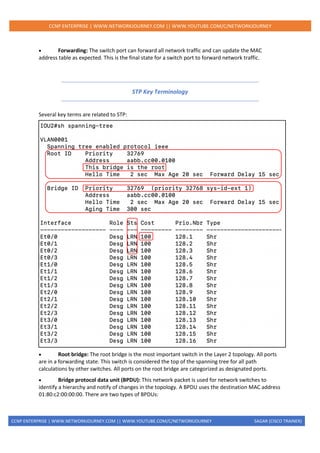
- Spanning Tree Protocol (STP) enables switches to become aware of other switches through the
advertisement and receipt of bridge protocol data units (BPDUs).
- STP builds a Layer 2 loop-free topology in an environment by temporarily blocking traffic on
redundant ports.
- STP operates by selecting a specific switch as the master switch and running a tree-based
algorithm to identify which redundant ports should not forward traffic.
STP has multiple flavours:
• 802.1D, which is the original specification
• Per-VLAN Spanning Tree (PVST) {Cisco Proprietary}
• Per-VLAN Spanning Tree Plus (PVST+) {Cisco Proprietary}
• 802.1W Rapid Spanning Tree Protocol (RSTP) {IEEE standard}
• 802.1S Multiple Spanning Tree Protocol (MST) {IEEE standard}
Catalyst switches now operate in PVST+, RSTP, and MST modes. All three of these modes are
backward compatible with 802.1D.
IEEE 802.1D STP
The original version of STP comes from the IEEE 802.1D standards and provides support for ensuring
a loop-free topology for one VLAN.
802.1D Port States
In the 802.1D STP protocol, every port transitions through the following states:
• Disabled: The port is in an administratively off position (that is, shut down).
• Blocking: The switch port is enabled, but the port is not forwarding any traffic to ensure that
a loop is not created. The switch does not modify the MAC address table. It can only receive BPDUs
from other switches. After 20 seconds, the switch port changes from the blocking state to the
listening state.
• Listening: The switch port has transitioned from a blocking state and can now send or
receive BPDUs. It cannot forward any other network traffic. The duration of the state correlates to
the STP forwarding time. The next port state is learning. After 15 seconds, the switch port moves
from the listening state to the learning state.
• Learning: The switch port can now modify the MAC address table with any network traffic
that it receives. The switch still does not forward any other network traffic besides BPDUs. The
duration of the state correlates to the STP forwarding time. The next port state is forwarding. After
15 seconds, the switch port moves from the learning state to the forwarding state.
CCNP ENTERPRISE | WWW.NETWORKJOURNEY.COM || WWW.YOUTUBE.COM/C/NETWORKJOURNEY SAGAR (CISCO TRAINER)
CCNP ENTERPRISE | WWW.NETWORKJOURNEY.COM || WWW.YOUTUBE.COM/C/NETWORKJOURNEY
• Forwarding: The switch port can forward all network traffic and can update the MAC
address table as expected. This is the final state for a switch port to forward network traffic.
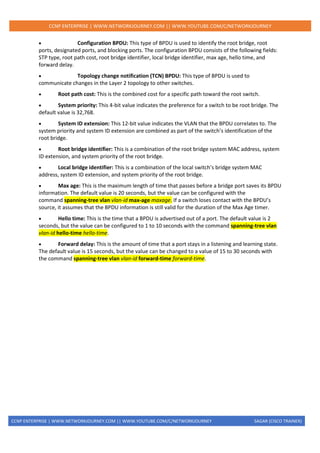
STP Key Terminology
Several key terms are related to STP:
• Root bridge: The root bridge is the most important switch in the Layer 2 topology. All ports
are in a forwarding state. This switch is considered the top of the spanning tree for all path
calculations by other switches. All ports on the root bridge are categorized as designated ports.
• Bridge protocol data unit (BPDU): This network packet is used for network switches to
identify a hierarchy and notify of changes in the topology. A BPDU uses the destination MAC address
01:80:c2:00:00:00. There are two types of BPDUs:
CCNP ENTERPRISE | WWW.NETWORKJOURNEY.COM || WWW.YOUTUBE.COM/C/NETWORKJOURNEY SAGAR (CISCO TRAINER)
CCNP ENTERPRISE | WWW.NETWORKJOURNEY.COM || WWW.YOUTUBE.COM/C/NETWORKJOURNEY
• Configuration BPDU: This type of BPDU is used to identify the root bridge, root
ports, designated ports, and blocking ports. The configuration BPDU consists of the following fields:
STP type, root path cost, root bridge identifier, local bridge identifier, max age, hello time, and
forward delay.
• Topology change notification (TCN) BPDU: This type of BPDU is used to
communicate changes in the Layer 2 topology to other switches.
• Root path cost: This is the combined cost for a specific path toward the root switch.
• System priority: This 4-bit value indicates the preference for a switch to be root bridge. The
default value is 32,768.
• System ID extension: This 12-bit value indicates the VLAN that the BPDU correlates to. The
system priority and system ID extension are combined as part of the switch’s identification of the
root bridge.
• Root bridge identifier: This is a combination of the root bridge system MAC address, system
ID extension, and system priority of the root bridge.
• Local bridge identifier: This is a combination of the local switch’s bridge system MAC
address, system ID extension, and system priority of the root bridge.
• Max age: This is the maximum length of time that passes before a bridge port saves its BPDU
information. The default value is 20 seconds, but the value can be configured with the
command spanning-tree vlan vlan-id max-age maxage. If a switch loses contact with the BPDU’s
source, it assumes that the BPDU information is still valid for the duration of the Max Age timer.
• Hello time: This is the time that a BPDU is advertised out of a port. The default value is 2
seconds, but the value can be configured to 1 to 10 seconds with the command spanning-tree vlan
vlan-id hello-time hello-time.
• Forward delay: This is the amount of time that a port stays in a listening and learning state.
The default value is 15 seconds, but the value can be changed to a value of 15 to 30 seconds with
the command spanning-tree vlan vlan-id forward-time forward-time.
CCNP ENTERPRISE | WWW.NETWORKJOURNEY.COM || WWW.YOUTUBE.COM/C/NETWORKJOURNEY SAGAR (CISCO TRAINER)
CCNP ENTERPRISE | WWW.NETWORKJOURNEY.COM || WWW.YOUTUBE.COM/C/NETWORKJOURNEY
BPDU
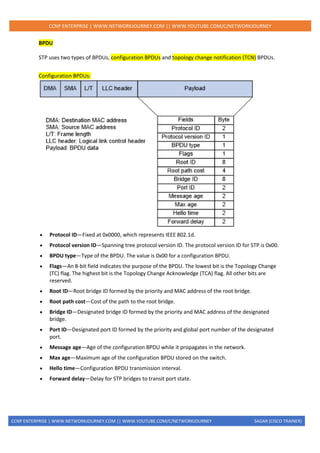
STP uses two types of BPDUs, configuration BPDUs and topology change notification (TCN) BPDUs.
Configuration BPDUs:
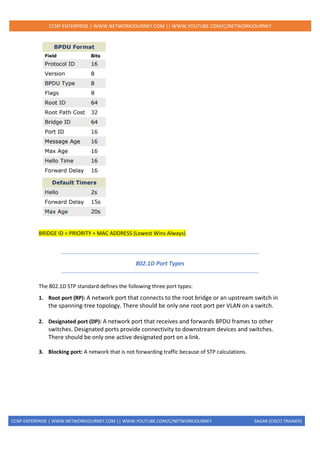
• Protocol ID—Fixed at 0x0000, which represents IEEE 802.1d.
• Protocol version ID—Spanning tree protocol version ID. The protocol version ID for STP is 0x00.
• BPDU type—Type of the BPDU. The value is 0x00 for a configuration BPDU.
• Flags—An 8-bit field indicates the purpose of the BPDU. The lowest bit is the Topology Change
(TC) flag. The highest bit is the Topology Change Acknowledge (TCA) flag. All other bits are
reserved.
• Root ID—Root bridge ID formed by the priority and MAC address of the root bridge.
• Root path cost—Cost of the path to the root bridge.
• Bridge ID—Designated bridge ID formed by the priority and MAC address of the designated
bridge.
• Port ID—Designated port ID formed by the priority and global port number of the designated
port.
• Message age—Age of the configuration BPDU while it propagates in the network.
• Max age—Maximum age of the configuration BPDU stored on the switch.
• Hello time—Configuration BPDU transmission interval.
• Forward delay—Delay for STP bridges to transit port state.
CCNP ENTERPRISE | WWW.NETWORKJOURNEY.COM || WWW.YOUTUBE.COM/C/NETWORKJOURNEY SAGAR (CISCO TRAINER)
CCNP ENTERPRISE | WWW.NETWORKJOURNEY.COM || WWW.YOUTUBE.COM/C/NETWORKJOURNEY
BRIDGE ID = PRIORITY + MAC ADDRESS (Lowest Wins Always)
802.1D Port Types
The 802.1D STP standard defines the following three port types:
1. Root port (RP): A network port that connects to the root bridge or an upstream switch in
the spanning-tree topology. There should be only one root port per VLAN on a switch.
2. Designated port (DP): A network port that receives and forwards BPDU frames to other
switches. Designated ports provide connectivity to downstream devices and switches.
There should be only one active designated port on a link.
3. Blocking port: A network that is not forwarding traffic because of STP calculations.
CCNP ENTERPRISE | WWW.NETWORKJOURNEY.COM || WWW.YOUTUBE.COM/C/NETWORKJOURNEY SAGAR (CISCO TRAINER)
CCNP ENTERPRISE | WWW.NETWORKJOURNEY.COM || WWW.YOUTUBE.COM/C/NETWORKJOURNEY
802.1D STP Port Election
STP PORT ELECTION
1. Selecting the Root Bridge
2. Selecting the Root Port
3. Selecting Designated port & Non Designated Port
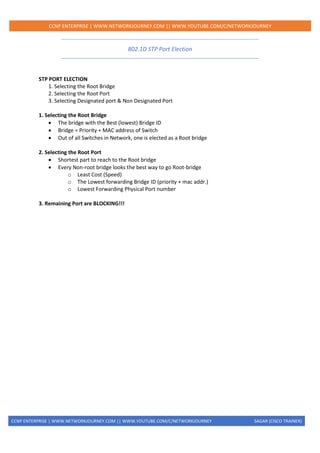
1. Selecting the Root Bridge
• The bridge with the Best (lowest) Bridge ID
• Bridge = Priority + MAC address of Switch
• Out of all Switches in Network, one is elected as a Root bridge
2. Selecting the Root Port
• Shortest part to reach to the Root bridge
• Every Non-root bridge looks the best way to go Root-bridge
o Least Cost (Speed)
o The Lowest forwarding Bridge ID (priority + mac addr.)
o Lowest Forwarding Physical Port number
3. Remaining Port are BLOCKING!!!
CCNP ENTERPRISE | WWW.NETWORKJOURNEY.COM || WWW.YOUTUBE.COM/C/NETWORKJOURNEY SAGAR (CISCO TRAINER)
CCNP ENTERPRISE | WWW.NETWORKJOURNEY.COM || WWW.YOUTUBE.COM/C/NETWORKJOURNEY
Spanning Tree Path Cost
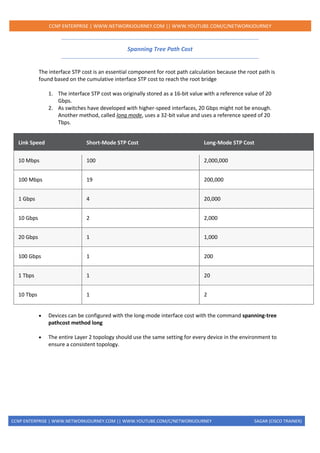
The interface STP cost is an essential component for root path calculation because the root path is
found based on the cumulative interface STP cost to reach the root bridge
1. The interface STP cost was originally stored as a 16-bit value with a reference value of 20
Gbps.
2. As switches have developed with higher-speed interfaces, 20 Gbps might not be enough.
Another method, called long mode, uses a 32-bit value and uses a reference speed of 20
Tbps.
Link Speed Short-Mode STP Cost Long-Mode STP Cost
10 Mbps 100 2,000,000
100 Mbps 19 200,000
1 Gbps 4 20,000
10 Gbps 2 2,000
20 Gbps 1 1,000
100 Gbps 1 200
1 Tbps 1 20
10 Tbps 1 2
• Devices can be configured with the long-mode interface cost with the command spanning-tree
pathcost method long
• The entire Layer 2 topology should use the same setting for every device in the environment to
ensure a consistent topology.
CCNP ENTERPRISE | WWW.NETWORKJOURNEY.COM || WWW.YOUTUBE.COM/C/NETWORKJOURNEY SAGAR (CISCO TRAINER)
CCNP ENTERPRISE | WWW.NETWORKJOURNEY.COM || WWW.YOUTUBE.COM/C/NETWORKJOURNEY
COMMAND REFERENCE
Task Command Syntax
Set the STP max age spanning-tree vlan vlan-id max-age
Set the STP hello interval spanning-tree vlan vlan-id hello-time hello-
time
Set the STP forwarding delay spanning-tree vlan vlan-id forward-
time forward-time
Display the STP root bridge and cost show spanning-tree root
Display the STP information (root bridge, local bridge, and interfaces) for
one or more VLANs
show spanning-tree [vlan vlan-id]
Identify when the last TCN occurred and which port was the reason for it. show spanning-tree [vlan vlan-id] detail
DEBUG Commands for STP Debug spanning-tree events
Debug spanning-tree bpdu
Debug spanning-tree config
QUIZ 1:
1. How many different BPDU types are there?
1. One
2. Two
3. Three
4. Four
2. What attributes are used to elect a root bridge?
1. Switch port priority
2. Bridge priority
3. Switch serial number
4. Path cost
3. The original 802.1D specification assigns what value to a 1 Gbps interface?
1. 1
2. 2
3. 4
4. 19
4. All of the ports on a root bridge are assigned what role?
CCNP ENTERPRISE | WWW.NETWORKJOURNEY.COM || WWW.YOUTUBE.COM/C/NETWORKJOURNEY SAGAR (CISCO TRAINER)
CCNP ENTERPRISE | WWW.NETWORKJOURNEY.COM || WWW.YOUTUBE.COM/C/NETWORKJOURNEY
1. Root port
2. Designated port
3. Superior port
4. Master port
5. Using default settings, how long does a port stay in the listening state?
1. 2 seconds
2. 5 seconds
3. 10 seconds
4. 15 seconds
6. Upon receipt of a configuration BPDU with the topology change flag set, how do the downstream
switches react?
1. By moving all ports to a blocking state on all switches
2. By flushing out all MAC addresses from the MAC address table
3. By temporarily moving all non-root ports to a listening state
4. By flushing out all old MAC addresses from the MAC address table
5. By updating the Topology Change version flag on the local switch database
7. Which of the following is not an RSTP port state?
1. Blocking
2. Listening
3. Learning
4. Forwarding
8. True or false: In a large Layer 2 switch topology, the infrastructure must fully converge before any
packets can be forwarded.
1. True
2. False
9. True or false: In a large Layer 2 switch topology that is running RSTP, the infrastructure must fully
converge before any packets can be forwarded.
1. True
2. False
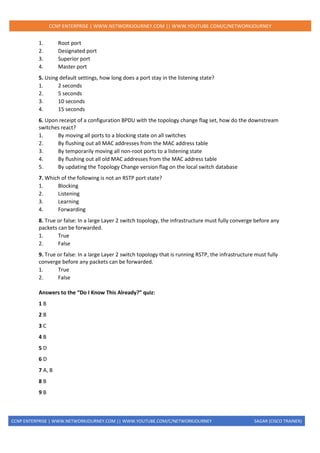
Answers to the “Do I Know This Already?” quiz:
1 B
2 B
3 C
4 B
5 D
6 D
7 A, B
8 B
9 B
CCNP ENTERPRISE | WWW.NETWORKJOURNEY.COM || WWW.YOUTUBE.COM/C/NETWORKJOURNEY SAGAR (CISCO TRAINER)
CCNP ENTERPRISE | WWW.NETWORKJOURNEY.COM || WWW.YOUTUBE.COM/C/NETWORKJOURNEY
QUIZ 2:
1. A switch’s STP priority can be configured in increments of ______.
1. 1
2. 256
3. 2048
4. 4096
2. True or false: The advertised path cost includes the advertising link’s port cost as part of the
configuration BPDU advertisement.
1. True
2. False
3. True or false: The switch port with the lower STP port priority is more preferred.
1. True
2. False
4. What happens to a switch port when a BPDU is received on it when BPDU guard is enabled on
that port?
1. A message syslog is generated, and the BPDU is filtered.
2. A syslog message is not generated, and the BPDU is filtered.
3. A syslog message is generated, and the port is sent back to a listening state.
4. A syslog message is generated, and the port is shut down.
5. Enabling root guard on a switch port does what?
1. Upon receipt of an inferior BPDU, the port is shut down.
2. Upon receipt of a superior BPDU, the port is shut down.
3. Upon receipt of an inferior BPDU, the BPDU is filtered.
4. When the root port is shut down, only authorized designated ports can become root ports.
6. UDLD solves the problem of ______.
1. time for Layer 2 convergence
2. a cable sending traffic in only one direction
3. corrupt BPDU packets
4. flapping network links
Answers to the “Do I Know This Already?” quiz:
1 D
2 B
3 A
4 D
5 B
6 B
CCNP ENTERPRISE | WWW.NETWORKJOURNEY.COM || WWW.YOUTUBE.COM/C/NETWORKJOURNEY SAGAR (CISCO TRAINER)
CCNP ENTERPRISE | WWW.NETWORKJOURNEY.COM || WWW.YOUTUBE.COM/C/NETWORKJOURNEY

Stp. cli command reference, quiz

  • 1.
    CCNP ENTERPRISE |WWW.NETWORKJOURNEY.COM || WWW.YOUTUBE.COM/C/NETWORKJOURNEY SAGAR (CISCO TRAINER) CCNP ENTERPRISE | WWW.NETWORKJOURNEY.COM || WWW.YOUTUBE.COM/C/NETWORKJOURNEY TOPICS COVERED: - STP
  • 2.
    CCNP ENTERPRISE |WWW.NETWORKJOURNEY.COM || WWW.YOUTUBE.COM/C/NETWORKJOURNEY SAGAR (CISCO TRAINER) CCNP ENTERPRISE | WWW.NETWORKJOURNEY.COM || WWW.YOUTUBE.COM/C/NETWORKJOURNEY SPANNING TREE PROTOCOL (STP) - Spanning Tree Protocol (STP) enables switches to become aware of other switches through the advertisement and receipt of bridge protocol data units (BPDUs). - STP builds a Layer 2 loop-free topology in an environment by temporarily blocking traffic on redundant ports. - STP operates by selecting a specific switch as the master switch and running a tree-based algorithm to identify which redundant ports should not forward traffic. STP has multiple flavours: • 802.1D, which is the original specification • Per-VLAN Spanning Tree (PVST) {Cisco Proprietary} • Per-VLAN Spanning Tree Plus (PVST+) {Cisco Proprietary} • 802.1W Rapid Spanning Tree Protocol (RSTP) {IEEE standard} • 802.1S Multiple Spanning Tree Protocol (MST) {IEEE standard} Catalyst switches now operate in PVST+, RSTP, and MST modes. All three of these modes are backward compatible with 802.1D. IEEE 802.1D STP The original version of STP comes from the IEEE 802.1D standards and provides support for ensuring a loop-free topology for one VLAN. 802.1D Port States In the 802.1D STP protocol, every port transitions through the following states: • Disabled: The port is in an administratively off position (that is, shut down). • Blocking: The switch port is enabled, but the port is not forwarding any traffic to ensure that a loop is not created. The switch does not modify the MAC address table. It can only receive BPDUs from other switches. After 20 seconds, the switch port changes from the blocking state to the listening state. • Listening: The switch port has transitioned from a blocking state and can now send or receive BPDUs. It cannot forward any other network traffic. The duration of the state correlates to the STP forwarding time. The next port state is learning. After 15 seconds, the switch port moves from the listening state to the learning state. • Learning: The switch port can now modify the MAC address table with any network traffic that it receives. The switch still does not forward any other network traffic besides BPDUs. The duration of the state correlates to the STP forwarding time. The next port state is forwarding. After 15 seconds, the switch port moves from the learning state to the forwarding state.
  • 3.
    CCNP ENTERPRISE |WWW.NETWORKJOURNEY.COM || WWW.YOUTUBE.COM/C/NETWORKJOURNEY SAGAR (CISCO TRAINER) CCNP ENTERPRISE | WWW.NETWORKJOURNEY.COM || WWW.YOUTUBE.COM/C/NETWORKJOURNEY • Forwarding: The switch port can forward all network traffic and can update the MAC address table as expected. This is the final state for a switch port to forward network traffic. STP Key Terminology Several key terms are related to STP: • Root bridge: The root bridge is the most important switch in the Layer 2 topology. All ports are in a forwarding state. This switch is considered the top of the spanning tree for all path calculations by other switches. All ports on the root bridge are categorized as designated ports. • Bridge protocol data unit (BPDU): This network packet is used for network switches to identify a hierarchy and notify of changes in the topology. A BPDU uses the destination MAC address 01:80:c2:00:00:00. There are two types of BPDUs:
  • 4.
    CCNP ENTERPRISE |WWW.NETWORKJOURNEY.COM || WWW.YOUTUBE.COM/C/NETWORKJOURNEY SAGAR (CISCO TRAINER) CCNP ENTERPRISE | WWW.NETWORKJOURNEY.COM || WWW.YOUTUBE.COM/C/NETWORKJOURNEY • Configuration BPDU: This type of BPDU is used to identify the root bridge, root ports, designated ports, and blocking ports. The configuration BPDU consists of the following fields: STP type, root path cost, root bridge identifier, local bridge identifier, max age, hello time, and forward delay. • Topology change notification (TCN) BPDU: This type of BPDU is used to communicate changes in the Layer 2 topology to other switches. • Root path cost: This is the combined cost for a specific path toward the root switch. • System priority: This 4-bit value indicates the preference for a switch to be root bridge. The default value is 32,768. • System ID extension: This 12-bit value indicates the VLAN that the BPDU correlates to. The system priority and system ID extension are combined as part of the switch’s identification of the root bridge. • Root bridge identifier: This is a combination of the root bridge system MAC address, system ID extension, and system priority of the root bridge. • Local bridge identifier: This is a combination of the local switch’s bridge system MAC address, system ID extension, and system priority of the root bridge. • Max age: This is the maximum length of time that passes before a bridge port saves its BPDU information. The default value is 20 seconds, but the value can be configured with the command spanning-tree vlan vlan-id max-age maxage. If a switch loses contact with the BPDU’s source, it assumes that the BPDU information is still valid for the duration of the Max Age timer. • Hello time: This is the time that a BPDU is advertised out of a port. The default value is 2 seconds, but the value can be configured to 1 to 10 seconds with the command spanning-tree vlan vlan-id hello-time hello-time. • Forward delay: This is the amount of time that a port stays in a listening and learning state. The default value is 15 seconds, but the value can be changed to a value of 15 to 30 seconds with the command spanning-tree vlan vlan-id forward-time forward-time.
  • 5.
    CCNP ENTERPRISE |WWW.NETWORKJOURNEY.COM || WWW.YOUTUBE.COM/C/NETWORKJOURNEY SAGAR (CISCO TRAINER) CCNP ENTERPRISE | WWW.NETWORKJOURNEY.COM || WWW.YOUTUBE.COM/C/NETWORKJOURNEY BPDU STP uses two types of BPDUs, configuration BPDUs and topology change notification (TCN) BPDUs. Configuration BPDUs: • Protocol ID—Fixed at 0x0000, which represents IEEE 802.1d. • Protocol version ID—Spanning tree protocol version ID. The protocol version ID for STP is 0x00. • BPDU type—Type of the BPDU. The value is 0x00 for a configuration BPDU. • Flags—An 8-bit field indicates the purpose of the BPDU. The lowest bit is the Topology Change (TC) flag. The highest bit is the Topology Change Acknowledge (TCA) flag. All other bits are reserved. • Root ID—Root bridge ID formed by the priority and MAC address of the root bridge. • Root path cost—Cost of the path to the root bridge. • Bridge ID—Designated bridge ID formed by the priority and MAC address of the designated bridge. • Port ID—Designated port ID formed by the priority and global port number of the designated port. • Message age—Age of the configuration BPDU while it propagates in the network. • Max age—Maximum age of the configuration BPDU stored on the switch. • Hello time—Configuration BPDU transmission interval. • Forward delay—Delay for STP bridges to transit port state.
  • 6.
    CCNP ENTERPRISE |WWW.NETWORKJOURNEY.COM || WWW.YOUTUBE.COM/C/NETWORKJOURNEY SAGAR (CISCO TRAINER) CCNP ENTERPRISE | WWW.NETWORKJOURNEY.COM || WWW.YOUTUBE.COM/C/NETWORKJOURNEY BRIDGE ID = PRIORITY + MAC ADDRESS (Lowest Wins Always) 802.1D Port Types The 802.1D STP standard defines the following three port types: 1. Root port (RP): A network port that connects to the root bridge or an upstream switch in the spanning-tree topology. There should be only one root port per VLAN on a switch. 2. Designated port (DP): A network port that receives and forwards BPDU frames to other switches. Designated ports provide connectivity to downstream devices and switches. There should be only one active designated port on a link. 3. Blocking port: A network that is not forwarding traffic because of STP calculations.
  • 7.
    CCNP ENTERPRISE |WWW.NETWORKJOURNEY.COM || WWW.YOUTUBE.COM/C/NETWORKJOURNEY SAGAR (CISCO TRAINER) CCNP ENTERPRISE | WWW.NETWORKJOURNEY.COM || WWW.YOUTUBE.COM/C/NETWORKJOURNEY 802.1D STP Port Election STP PORT ELECTION 1. Selecting the Root Bridge 2. Selecting the Root Port 3. Selecting Designated port & Non Designated Port 1. Selecting the Root Bridge • The bridge with the Best (lowest) Bridge ID • Bridge = Priority + MAC address of Switch • Out of all Switches in Network, one is elected as a Root bridge 2. Selecting the Root Port • Shortest part to reach to the Root bridge • Every Non-root bridge looks the best way to go Root-bridge o Least Cost (Speed) o The Lowest forwarding Bridge ID (priority + mac addr.) o Lowest Forwarding Physical Port number 3. Remaining Port are BLOCKING!!!
  • 8.
    CCNP ENTERPRISE |WWW.NETWORKJOURNEY.COM || WWW.YOUTUBE.COM/C/NETWORKJOURNEY SAGAR (CISCO TRAINER) CCNP ENTERPRISE | WWW.NETWORKJOURNEY.COM || WWW.YOUTUBE.COM/C/NETWORKJOURNEY Spanning Tree Path Cost The interface STP cost is an essential component for root path calculation because the root path is found based on the cumulative interface STP cost to reach the root bridge 1. The interface STP cost was originally stored as a 16-bit value with a reference value of 20 Gbps. 2. As switches have developed with higher-speed interfaces, 20 Gbps might not be enough. Another method, called long mode, uses a 32-bit value and uses a reference speed of 20 Tbps. Link Speed Short-Mode STP Cost Long-Mode STP Cost 10 Mbps 100 2,000,000 100 Mbps 19 200,000 1 Gbps 4 20,000 10 Gbps 2 2,000 20 Gbps 1 1,000 100 Gbps 1 200 1 Tbps 1 20 10 Tbps 1 2 • Devices can be configured with the long-mode interface cost with the command spanning-tree pathcost method long • The entire Layer 2 topology should use the same setting for every device in the environment to ensure a consistent topology.
  • 9.
    CCNP ENTERPRISE |WWW.NETWORKJOURNEY.COM || WWW.YOUTUBE.COM/C/NETWORKJOURNEY SAGAR (CISCO TRAINER) CCNP ENTERPRISE | WWW.NETWORKJOURNEY.COM || WWW.YOUTUBE.COM/C/NETWORKJOURNEY COMMAND REFERENCE Task Command Syntax Set the STP max age spanning-tree vlan vlan-id max-age Set the STP hello interval spanning-tree vlan vlan-id hello-time hello- time Set the STP forwarding delay spanning-tree vlan vlan-id forward- time forward-time Display the STP root bridge and cost show spanning-tree root Display the STP information (root bridge, local bridge, and interfaces) for one or more VLANs show spanning-tree [vlan vlan-id] Identify when the last TCN occurred and which port was the reason for it. show spanning-tree [vlan vlan-id] detail DEBUG Commands for STP Debug spanning-tree events Debug spanning-tree bpdu Debug spanning-tree config QUIZ 1: 1. How many different BPDU types are there? 1. One 2. Two 3. Three 4. Four 2. What attributes are used to elect a root bridge? 1. Switch port priority 2. Bridge priority 3. Switch serial number 4. Path cost 3. The original 802.1D specification assigns what value to a 1 Gbps interface? 1. 1 2. 2 3. 4 4. 19 4. All of the ports on a root bridge are assigned what role?
  • 10.
    CCNP ENTERPRISE |WWW.NETWORKJOURNEY.COM || WWW.YOUTUBE.COM/C/NETWORKJOURNEY SAGAR (CISCO TRAINER) CCNP ENTERPRISE | WWW.NETWORKJOURNEY.COM || WWW.YOUTUBE.COM/C/NETWORKJOURNEY 1. Root port 2. Designated port 3. Superior port 4. Master port 5. Using default settings, how long does a port stay in the listening state? 1. 2 seconds 2. 5 seconds 3. 10 seconds 4. 15 seconds 6. Upon receipt of a configuration BPDU with the topology change flag set, how do the downstream switches react? 1. By moving all ports to a blocking state on all switches 2. By flushing out all MAC addresses from the MAC address table 3. By temporarily moving all non-root ports to a listening state 4. By flushing out all old MAC addresses from the MAC address table 5. By updating the Topology Change version flag on the local switch database 7. Which of the following is not an RSTP port state? 1. Blocking 2. Listening 3. Learning 4. Forwarding 8. True or false: In a large Layer 2 switch topology, the infrastructure must fully converge before any packets can be forwarded. 1. True 2. False 9. True or false: In a large Layer 2 switch topology that is running RSTP, the infrastructure must fully converge before any packets can be forwarded. 1. True 2. False Answers to the “Do I Know This Already?” quiz: 1 B 2 B 3 C 4 B 5 D 6 D 7 A, B 8 B 9 B
  • 11.
    CCNP ENTERPRISE |WWW.NETWORKJOURNEY.COM || WWW.YOUTUBE.COM/C/NETWORKJOURNEY SAGAR (CISCO TRAINER) CCNP ENTERPRISE | WWW.NETWORKJOURNEY.COM || WWW.YOUTUBE.COM/C/NETWORKJOURNEY QUIZ 2: 1. A switch’s STP priority can be configured in increments of ______. 1. 1 2. 256 3. 2048 4. 4096 2. True or false: The advertised path cost includes the advertising link’s port cost as part of the configuration BPDU advertisement. 1. True 2. False 3. True or false: The switch port with the lower STP port priority is more preferred. 1. True 2. False 4. What happens to a switch port when a BPDU is received on it when BPDU guard is enabled on that port? 1. A message syslog is generated, and the BPDU is filtered. 2. A syslog message is not generated, and the BPDU is filtered. 3. A syslog message is generated, and the port is sent back to a listening state. 4. A syslog message is generated, and the port is shut down. 5. Enabling root guard on a switch port does what? 1. Upon receipt of an inferior BPDU, the port is shut down. 2. Upon receipt of a superior BPDU, the port is shut down. 3. Upon receipt of an inferior BPDU, the BPDU is filtered. 4. When the root port is shut down, only authorized designated ports can become root ports. 6. UDLD solves the problem of ______. 1. time for Layer 2 convergence 2. a cable sending traffic in only one direction 3. corrupt BPDU packets 4. flapping network links Answers to the “Do I Know This Already?” quiz: 1 D 2 B 3 A 4 D 5 B 6 B
  • 12.
    CCNP ENTERPRISE |WWW.NETWORKJOURNEY.COM || WWW.YOUTUBE.COM/C/NETWORKJOURNEY SAGAR (CISCO TRAINER) CCNP ENTERPRISE | WWW.NETWORKJOURNEY.COM || WWW.YOUTUBE.COM/C/NETWORKJOURNEY