www.professordkinney.com
09/06/13
Instructional Design-Computer Networking -
Bridges Educational Group
09/06/13
Instructional Design-Computer Networking -
Bridges Educational Group
Network Device Management
Lessons Summary:
Configuring Network Devices
Enterprise Network Security
Managing Cisco Devices
 Some Bonus Cheat Sheets
09/06/13
Instructional Design-Computer Networking -
Bridges Educational Group
Network Device Management
Configuring Network Devices
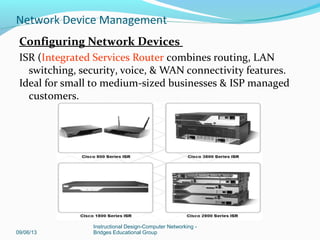
ISR (Integrated Services Router combines routing, LAN
switching, security, voice, & WAN connectivity features.
Ideal for small to medium-sized businesses & ISP managed
customers.
09/06/13
Instructional Design-Computer Networking -
Bridges Educational Group
Network Device Management
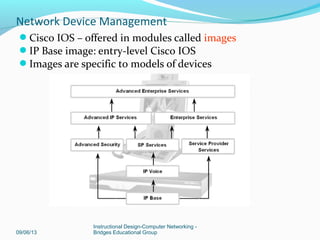
Cisco IOS – offered in modules called images
IP Base image: entry-level Cisco IOS
Images are specific to models of devices
09/06/13
Instructional Design-Computer Networking -
Bridges Educational Group
Network Device Management
CISCO IOS Image: Types of Images
Two main types of image your router may use:
System image - complete Cisco IOS software. This image is loaded when your
router boots and is used most of the time.
On most platforms, the image is located in Flash memory.
Boot image - A subset of the Cisco IOS software. This image is used to
perform network booting or to load Cisco IOS images onto the router.
This image is also used if the router cannot find a valid system image.
Depending on your platform, this image may be called xboot image, rxboot
image, bootstrap image, or boot loader/helper image.
On some platforms, the boot image is contained in ROM. In others, the boot
image can be stored in Flash memory. On these platforms, you can specify
which image should be used as the boot image using the boot bootldr global
configuration command. Refer to your hardware documentation for
information about the boot image used on your router.
09/06/13
Instructional Design-Computer Networking -
Bridges Educational Group
Network Device Management
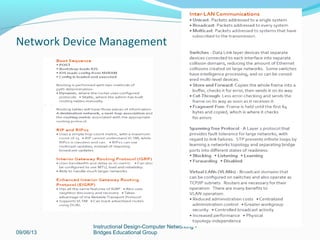
Image Naming Convention
You can identify the platform, features and image
location by the image name.
Naming convention is: platform – features – type
Example: c2600-js-l_121-3.bin
• c2600 - hardware platform
• js - features set (enterprise)
• l - file format (relocatable, not compressed)
• 121-3 - version & release # (version 12.1 release 3)
09/06/13
Instructional Design-Computer Networking -
Bridges Educational Group
Network Device Management
Platform – variable platform that can use image
For example c1700, c2600, c7000
Features –feature sets supported by image.
Type – can contain following characters
• f—The image runs from Flash memory.
• m—The image runs from RAM.
• r—The image runs from ROM.
• l—The image is relocatable.
• z—The image is zip compressed.
• x—The image is mzip compressed.
09/06/13
Instructional Design-Computer Networking -
Bridges Educational Group
Network Device Management
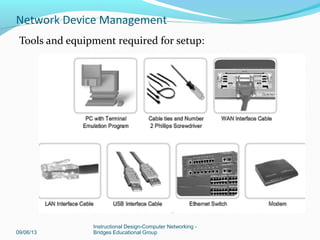
Tools and equipment required for setup:
09/06/13
Instructional Design-Computer Networking -
Bridges Educational Group
Network Device Management
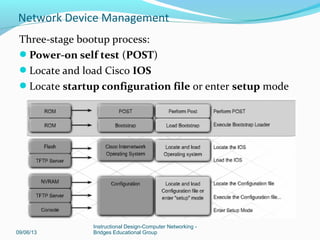
Three-stage bootup process:
Power-on self test (POST)
Locate and load Cisco IOS
Locate startup configuration file or enter setup mode
09/06/13
Instructional Design-Computer Networking -
Bridges Educational Group
Network Device Management
POST (Power On Self Test) – test hardware
After POST, the bootstrap program is loaded
Bootstrap locates IOS and loads it into RAM
– IOS can be located – flash memory, TFTP server, or
another location
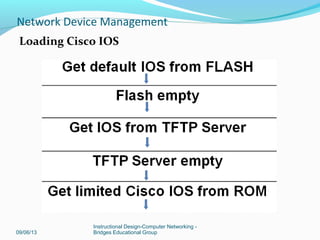
– By default, IOS loads from flash
After IOS is loaded, bootstrap locates startup
configuration file in NVRAM (non-volatile random
access memory)
Startup configuration – when loaded into RAM (working
memory), it become the “running” configuration.
09/06/13
Instructional Design-Computer Networking -
Bridges Educational Group
Network Device Management
Loading Cisco IOS
09/06/13
Instructional Design-Computer Networking -
Bridges Educational Group
Network Device Management
Show version command output
Router>show version
• IOS version
• Bootstrap program stored in ROM
• Complete filename of IOS
• Type of CPU; amount of RAM
• Number & type of interfaces
• Amount of NVRAM (used to store startup config)
• Amount of Flash (used to store IOS
• Configuration register in hex
09/06/13
Instructional Design-Computer Networking -
Bridges Educational Group
Network Device Management
Configuration register
Default setting – 0x2102 (remember this?)
– Loads IOS from flash
– Loads startup-config from NVRAM
Most common settings
• 0x2142 –ignores contents of
NVRAM/configuration
• 0x2120 – The router into ROMmon mode
09/06/13
Instructional Design-Computer Networking -
Bridges Educational Group
Network Device Management
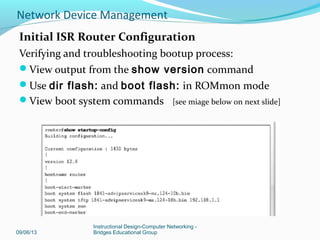
Initial ISR Router Configuration
Verifying and troubleshooting bootup process:
View output from the show version command
Use dir flash: and boot flash: in ROMmon mode
View boot system commands [see miage below on next slide]
09/06/13
Instructional Design-Computer Networking -
Bridges Educational Group
Network Device Management
Out-of-band management for initial configuration
In-band management over a network connection
09/06/13
Instructional Design-Computer Networking -
Bridges Educational Group
Network Device Management
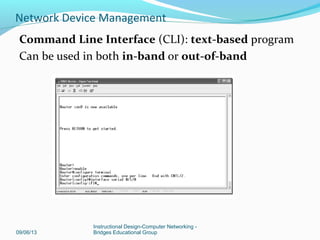
Command Line Interface (CLI): text-based program
Can be used in both in-band or out-of-band
09/06/13
Instructional Design-Computer Networking -
Bridges Educational Group
Network Device Management
SDM
Security Device Manager (SDM): web-based GUI
In-Band only
SDM Express (Basic) or Full package (Advanced
configuration)
Comes preinstalled in flash
09/06/13
Instructional Design-Computer Networking -
Bridges Educational Group
Network Device Management
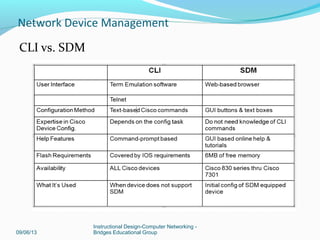
CLI vs. SDM
09/06/13
Instructional Design-Computer Networking -
Bridges Educational Group
Network Device Management
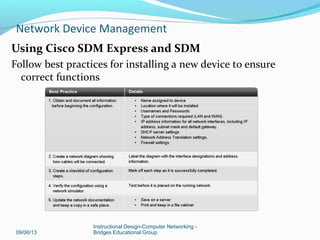
Using Cisco SDM Express and SDM
Follow best practices for installing a new device to ensure
correct functions
09/06/13
Instructional Design-Computer Networking -
Bridges Educational Group
Network Device Management
09/06/13
Instructional Design-Computer Networking -
Bridges Educational Group
Network Device Management
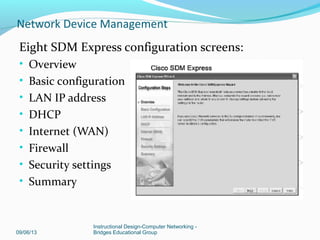
Eight SDM Express configuration screens:
• Overview
• Basic configuration
• LAN IP address
• DHCP
• Internet (WAN)
• Firewall
• Security settings
• Summary
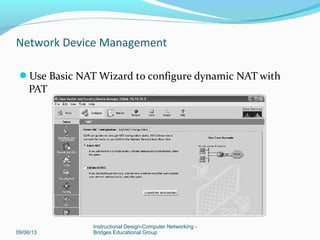
Use Basic NAT Wizard to configure dynamic NAT with
PAT
09/06/13
Instructional Design-Computer Networking -
Bridges Educational Group
Network Device Management
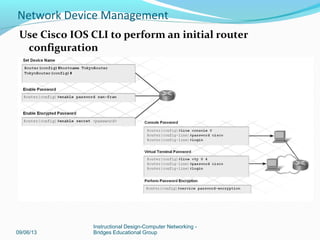
Use Cisco IOS CLI to perform an initial router
configuration
09/06/13
Instructional Design-Computer Networking -
Bridges Educational Group
Network Device Management
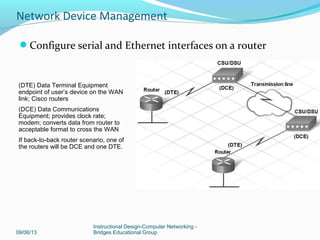
Configure serial and Ethernet interfaces on a router
09/06/13
Instructional Design-Computer Networking -
Bridges Educational Group
Network Device Management
(DTE) Data Terminal Equipment
endpoint of user’s device on the WAN
link; Cisco routers
(DCE) Data Communications
Equipment; provides clock rate;
modem; converts data from router to
acceptable format to cross the WAN
If back-to-back router scenario, one of
the routers will be DCE and one DTE.
09/06/13
Instructional Design-Computer Networking -
Bridges Educational Group
Network Device Management
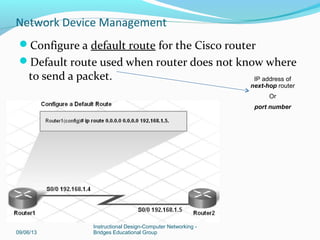
Configure a default route for the Cisco router
Default route used when router does not know where
to send a packet. IP address of
next-hop router
Or
port number
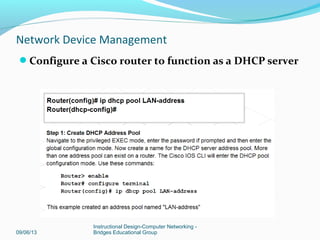
Configure a Cisco router to function as a DHCP server
09/06/13
Instructional Design-Computer Networking -
Bridges Educational Group
Network Device Management
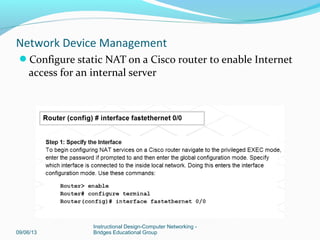
Configure static NAT on a Cisco router to enable Internet
access for an internal server
09/06/13
Instructional Design-Computer Networking -
Bridges Educational Group
Network Device Management
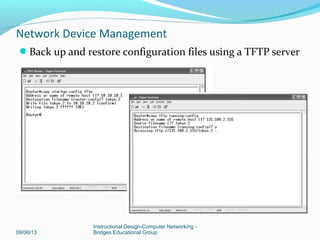
Back up and restore configuration files using a TFTP server
09/06/13
Instructional Design-Computer Networking -
Bridges Educational Group
Network Device Management
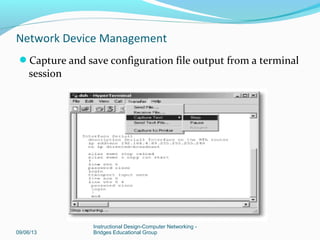
Capture and save configuration file output from a terminal
session
09/06/13
Instructional Design-Computer Networking -
Bridges Educational Group
Network Device Management
09/06/13
Instructional Design-Computer Networking -
Bridges Educational Group
Network Device Management
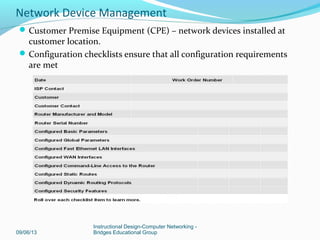
Customer Premise Equipment (CPE) – network devices installed at
customer location.
Configuration checklists ensure that all configuration requirements
are met
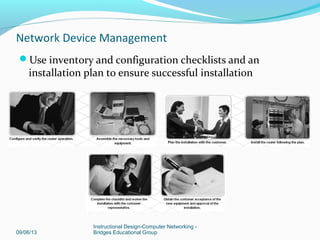
Use inventory and configuration checklists and an
installation plan to ensure successful installation
09/06/13
Instructional Design-Computer Networking -
Bridges Educational Group
Network Device Management
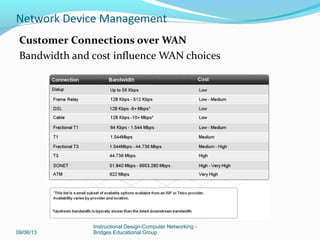
Types of customer connections over a WAN:
Point-to-point: often called leased lines; typically most
expensive; price based on bandwidth & distance between 2
points
Circuit-switched – similar to a phone call made over a
phone network; example is ISDN or dialup connection;
physical circuit reserved from source to destination
Packet-switched – each customer has a virtual circuit;
example is Frame Relay
09/06/13
Instructional Design-Computer Networking -
Bridges Educational Group
Network Device Management
Customer Connections over WAN
Bandwidth and cost influence WAN choices
09/06/13
Instructional Design-Computer Networking -
Bridges Educational Group
Network Device Management
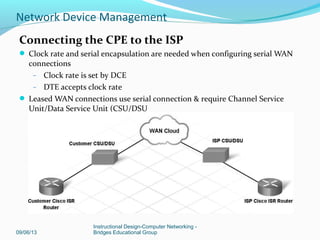
Connecting the CPE to the ISP
 Clock rate and serial encapsulation are needed when configuring serial WAN
connections
– Clock rate is set by DCE
– DTE accepts clock rate
 Leased WAN connections use serial connection & require Channel Service
Unit/Data Service Unit (CSU/DSU
09/06/13
Instructional Design-Computer Networking -
Bridges Educational Group
Network Device Management
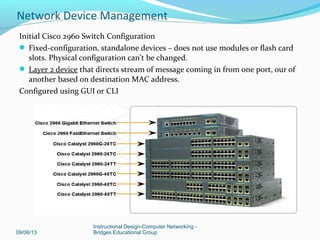
Initial Cisco 2960 Switch Configuration
 Fixed-configuration, standalone devices – does not use modules or flash card
slots. Physical configuration can’t be changed.
 Layer 2 device that directs stream of message coming in from one port, our of
another based on destination MAC address.
Configured using GUI or CLI
09/06/13
Instructional Design-Computer Networking -
Bridges Educational Group
Network Device Management
Cisco 2960 switch
Comes preconfigured
Needs to be assigned basic security info
Basic commands (ex: hostname, passwords) sames as
ISR switch.
Configure management IP address
One virtual local area network, VLAN 1 is
preconfigured to provide access to management
functions.
09/06/13
Instructional Design-Computer Networking -
Bridges Educational Group
Network Device Management
09/06/13
Instructional Design-Computer Networking -
Bridges Educational Group
Network Device Management
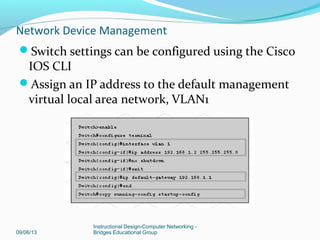
Switch settings can be configured using the Cisco
IOS CLI
Assign an IP address to the default management
virtual local area network, VLAN1
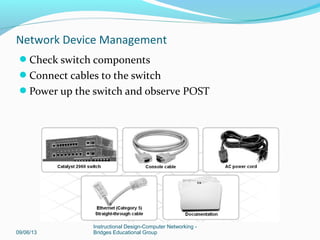
Check switch components
Connect cables to the switch
Power up the switch and observe POST
09/06/13
Instructional Design-Computer Networking -
Bridges Educational Group
Network Device Management
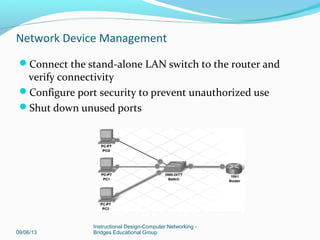
Connect the stand-alone LAN switch to the router and
verify connectivity
Configure port security to prevent unauthorized use
Shut down unused ports
09/06/13
Instructional Design-Computer Networking -
Bridges Educational Group
Network Device Management
Switch port security
Port security limits the # of MAC addresses allowed per port.
Set port to access mode using switchport mode access
command
3 ways to configure port security:
Static – MAC addresses are manually assigned using
switchport port-security mac-address [mac-address]
interface config command.
S1# configure terminal
S1(config-if)#interface fastethernet 0/20
S1(config-if)#switchport mode access
S1(config-if)#switchport port-security mac-address
1000.2000.3000
S1(config-if)#end
09/06/13
Instructional Design-Computer Networking -
Bridges Educational Group
Network Device Management
Dynamic MAC addresses are dynamically learned & stored in
address table
# of addresses stored can be controlled; default is one
address.
If port is shut down or switch is restarted, address learned
are cleared from the table
S1# configure terminal
 S1(config-if)#interface fastethernet 0/20
 S1(config-if)#switchport mode access
 S1(config-if)#switchport port-security
 S1(config-if)#end
09/06/13
Instructional Design-Computer Networking -
Bridges Educational Group
Network Device Management
Sticky – similar to dynamic
Addresses learned are saved to the running-config
 S1# configure terminal
 S1(config-if)#interface fastethernet 0/20
 S1(config-if)#switchport mode access
 S1(config-if)#switchport port-security
 S1(config-if)#switchport port-security maximum 50
 S1(config-if)#switchport port-security mac-address
sticky
 S1(config-if)#end
09/06/13
Instructional Design-Computer Networking -
Bridges Educational Group
Network Device Management
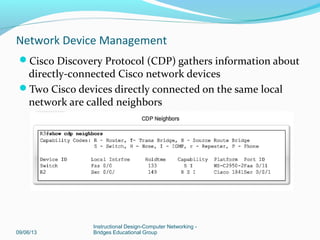
Cisco Discovery Protocol (CDP) gathers information about
directly-connected Cisco network devices
Two Cisco devices directly connected on the same local
network are called neighbors
09/06/13
Instructional Design-Computer Networking -
Bridges Educational Group
Network Device Management
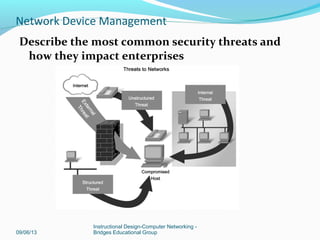
Describe the most common security threats and
how they impact enterprises
09/06/13
Instructional Design-Computer Networking -
Bridges Educational Group
Network Device Management
09/06/13
Instructional Design-Computer Networking -
Bridges Educational Group
Network Device Management
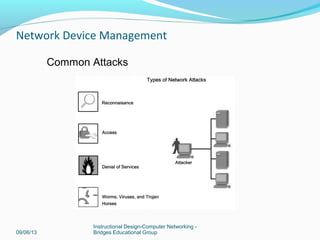
Common Attacks
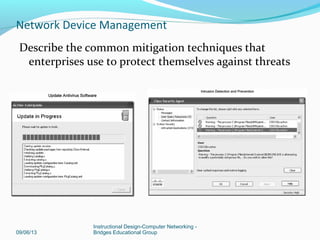
Describe the common mitigation techniques that
enterprises use to protect themselves against threats
09/06/13
Instructional Design-Computer Networking -
Bridges Educational Group
Network Device Management
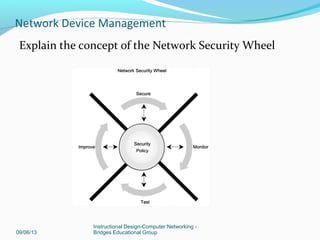
Explain the concept of the Network Security Wheel
09/06/13
Instructional Design-Computer Networking -
Bridges Educational Group
Network Device Management
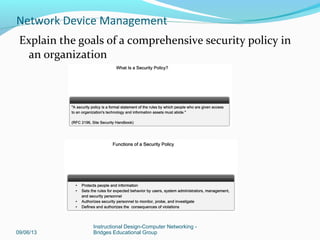
Explain the goals of a comprehensive security policy in
an organization
09/06/13
Instructional Design-Computer Networking -
Bridges Educational Group
Network Device Management
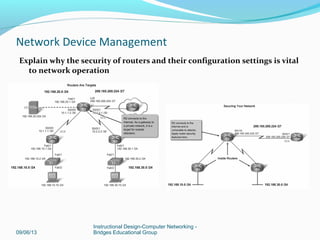
Explain why the security of routers and their configuration settings is vital
to network operation
09/06/13
Instructional Design-Computer Networking -
Bridges Educational Group
Network Device Management
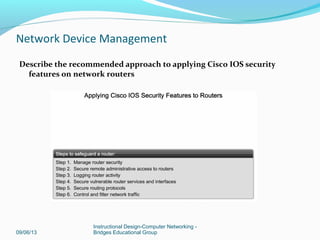
Describe the recommended approach to applying Cisco IOS security
features on network routers
09/06/13
Instructional Design-Computer Networking -
Bridges Educational Group
Network Device Management
09/06/13
Instructional Design-Computer Networking -
Bridges Educational Group
Network Device Management
09/06/13
Instructional Design-Computer Networking -
Bridges Educational Group
Network Device Management
09/06/13
Instructional Design-Computer Networking -
Bridges Educational Group
Network Device Management
09/06/13
Instructional Design-Computer Networking -
Bridges Educational Group
Network Device Management
09/06/13
Instructional Design-Computer Networking -
Bridges Educational Group
Network Device Management
Lessons Learned:
Cisco Device Management.
Enterprise Security
Some bonus Sheets and Tables
09/06/13
Instructional Design-Computer Networking -
Bridges Educational Group
Network Device Management

Network device management

  • 1.
  • 2.
    09/06/13 Instructional Design-Computer Networking- Bridges Educational Group Network Device Management
  • 3.
    Lessons Summary: Configuring NetworkDevices Enterprise Network Security Managing Cisco Devices  Some Bonus Cheat Sheets 09/06/13 Instructional Design-Computer Networking - Bridges Educational Group Network Device Management
  • 4.
    Configuring Network Devices ISR(Integrated Services Router combines routing, LAN switching, security, voice, & WAN connectivity features. Ideal for small to medium-sized businesses & ISP managed customers. 09/06/13 Instructional Design-Computer Networking - Bridges Educational Group Network Device Management
  • 5.
    Cisco IOS –offered in modules called images IP Base image: entry-level Cisco IOS Images are specific to models of devices 09/06/13 Instructional Design-Computer Networking - Bridges Educational Group Network Device Management
  • 6.
    CISCO IOS Image:Types of Images Two main types of image your router may use: System image - complete Cisco IOS software. This image is loaded when your router boots and is used most of the time. On most platforms, the image is located in Flash memory. Boot image - A subset of the Cisco IOS software. This image is used to perform network booting or to load Cisco IOS images onto the router. This image is also used if the router cannot find a valid system image. Depending on your platform, this image may be called xboot image, rxboot image, bootstrap image, or boot loader/helper image. On some platforms, the boot image is contained in ROM. In others, the boot image can be stored in Flash memory. On these platforms, you can specify which image should be used as the boot image using the boot bootldr global configuration command. Refer to your hardware documentation for information about the boot image used on your router. 09/06/13 Instructional Design-Computer Networking - Bridges Educational Group Network Device Management
  • 7.
    Image Naming Convention Youcan identify the platform, features and image location by the image name. Naming convention is: platform – features – type Example: c2600-js-l_121-3.bin • c2600 - hardware platform • js - features set (enterprise) • l - file format (relocatable, not compressed) • 121-3 - version & release # (version 12.1 release 3) 09/06/13 Instructional Design-Computer Networking - Bridges Educational Group Network Device Management
  • 8.
    Platform – variableplatform that can use image For example c1700, c2600, c7000 Features –feature sets supported by image. Type – can contain following characters • f—The image runs from Flash memory. • m—The image runs from RAM. • r—The image runs from ROM. • l—The image is relocatable. • z—The image is zip compressed. • x—The image is mzip compressed. 09/06/13 Instructional Design-Computer Networking - Bridges Educational Group Network Device Management
  • 9.
    Tools and equipmentrequired for setup: 09/06/13 Instructional Design-Computer Networking - Bridges Educational Group Network Device Management
  • 10.
    Three-stage bootup process: Power-onself test (POST) Locate and load Cisco IOS Locate startup configuration file or enter setup mode 09/06/13 Instructional Design-Computer Networking - Bridges Educational Group Network Device Management
  • 11.
    POST (Power OnSelf Test) – test hardware After POST, the bootstrap program is loaded Bootstrap locates IOS and loads it into RAM – IOS can be located – flash memory, TFTP server, or another location – By default, IOS loads from flash After IOS is loaded, bootstrap locates startup configuration file in NVRAM (non-volatile random access memory) Startup configuration – when loaded into RAM (working memory), it become the “running” configuration. 09/06/13 Instructional Design-Computer Networking - Bridges Educational Group Network Device Management
  • 12.
    Loading Cisco IOS 09/06/13 InstructionalDesign-Computer Networking - Bridges Educational Group Network Device Management
  • 13.
    Show version commandoutput Router>show version • IOS version • Bootstrap program stored in ROM • Complete filename of IOS • Type of CPU; amount of RAM • Number & type of interfaces • Amount of NVRAM (used to store startup config) • Amount of Flash (used to store IOS • Configuration register in hex 09/06/13 Instructional Design-Computer Networking - Bridges Educational Group Network Device Management
  • 14.
    Configuration register Default setting– 0x2102 (remember this?) – Loads IOS from flash – Loads startup-config from NVRAM Most common settings • 0x2142 –ignores contents of NVRAM/configuration • 0x2120 – The router into ROMmon mode 09/06/13 Instructional Design-Computer Networking - Bridges Educational Group Network Device Management
  • 15.
    Initial ISR RouterConfiguration Verifying and troubleshooting bootup process: View output from the show version command Use dir flash: and boot flash: in ROMmon mode View boot system commands [see miage below on next slide] 09/06/13 Instructional Design-Computer Networking - Bridges Educational Group Network Device Management
  • 16.
    Out-of-band management forinitial configuration In-band management over a network connection 09/06/13 Instructional Design-Computer Networking - Bridges Educational Group Network Device Management
  • 17.
    Command Line Interface(CLI): text-based program Can be used in both in-band or out-of-band 09/06/13 Instructional Design-Computer Networking - Bridges Educational Group Network Device Management
  • 18.
    SDM Security Device Manager(SDM): web-based GUI In-Band only SDM Express (Basic) or Full package (Advanced configuration) Comes preinstalled in flash 09/06/13 Instructional Design-Computer Networking - Bridges Educational Group Network Device Management
  • 19.
    CLI vs. SDM 09/06/13 InstructionalDesign-Computer Networking - Bridges Educational Group Network Device Management
  • 20.
    Using Cisco SDMExpress and SDM Follow best practices for installing a new device to ensure correct functions 09/06/13 Instructional Design-Computer Networking - Bridges Educational Group Network Device Management
  • 21.
    09/06/13 Instructional Design-Computer Networking- Bridges Educational Group Network Device Management Eight SDM Express configuration screens: • Overview • Basic configuration • LAN IP address • DHCP • Internet (WAN) • Firewall • Security settings • Summary
  • 22.
    Use Basic NATWizard to configure dynamic NAT with PAT 09/06/13 Instructional Design-Computer Networking - Bridges Educational Group Network Device Management
  • 23.
    Use Cisco IOSCLI to perform an initial router configuration 09/06/13 Instructional Design-Computer Networking - Bridges Educational Group Network Device Management
  • 24.
    Configure serial andEthernet interfaces on a router 09/06/13 Instructional Design-Computer Networking - Bridges Educational Group Network Device Management (DTE) Data Terminal Equipment endpoint of user’s device on the WAN link; Cisco routers (DCE) Data Communications Equipment; provides clock rate; modem; converts data from router to acceptable format to cross the WAN If back-to-back router scenario, one of the routers will be DCE and one DTE.
  • 25.
    09/06/13 Instructional Design-Computer Networking- Bridges Educational Group Network Device Management Configure a default route for the Cisco router Default route used when router does not know where to send a packet. IP address of next-hop router Or port number
  • 26.
    Configure a Ciscorouter to function as a DHCP server 09/06/13 Instructional Design-Computer Networking - Bridges Educational Group Network Device Management
  • 27.
    Configure static NATon a Cisco router to enable Internet access for an internal server 09/06/13 Instructional Design-Computer Networking - Bridges Educational Group Network Device Management
  • 28.
    Back up andrestore configuration files using a TFTP server 09/06/13 Instructional Design-Computer Networking - Bridges Educational Group Network Device Management
  • 29.
    Capture and saveconfiguration file output from a terminal session 09/06/13 Instructional Design-Computer Networking - Bridges Educational Group Network Device Management
  • 30.
    09/06/13 Instructional Design-Computer Networking- Bridges Educational Group Network Device Management Customer Premise Equipment (CPE) – network devices installed at customer location. Configuration checklists ensure that all configuration requirements are met
  • 31.
    Use inventory andconfiguration checklists and an installation plan to ensure successful installation 09/06/13 Instructional Design-Computer Networking - Bridges Educational Group Network Device Management
  • 32.
    Types of customerconnections over a WAN: Point-to-point: often called leased lines; typically most expensive; price based on bandwidth & distance between 2 points Circuit-switched – similar to a phone call made over a phone network; example is ISDN or dialup connection; physical circuit reserved from source to destination Packet-switched – each customer has a virtual circuit; example is Frame Relay 09/06/13 Instructional Design-Computer Networking - Bridges Educational Group Network Device Management
  • 33.
    Customer Connections overWAN Bandwidth and cost influence WAN choices 09/06/13 Instructional Design-Computer Networking - Bridges Educational Group Network Device Management
  • 34.
    Connecting the CPEto the ISP  Clock rate and serial encapsulation are needed when configuring serial WAN connections – Clock rate is set by DCE – DTE accepts clock rate  Leased WAN connections use serial connection & require Channel Service Unit/Data Service Unit (CSU/DSU 09/06/13 Instructional Design-Computer Networking - Bridges Educational Group Network Device Management
  • 35.
    Initial Cisco 2960Switch Configuration  Fixed-configuration, standalone devices – does not use modules or flash card slots. Physical configuration can’t be changed.  Layer 2 device that directs stream of message coming in from one port, our of another based on destination MAC address. Configured using GUI or CLI 09/06/13 Instructional Design-Computer Networking - Bridges Educational Group Network Device Management
  • 36.
    Cisco 2960 switch Comespreconfigured Needs to be assigned basic security info Basic commands (ex: hostname, passwords) sames as ISR switch. Configure management IP address One virtual local area network, VLAN 1 is preconfigured to provide access to management functions. 09/06/13 Instructional Design-Computer Networking - Bridges Educational Group Network Device Management
  • 37.
    09/06/13 Instructional Design-Computer Networking- Bridges Educational Group Network Device Management Switch settings can be configured using the Cisco IOS CLI Assign an IP address to the default management virtual local area network, VLAN1
  • 38.
    Check switch components Connectcables to the switch Power up the switch and observe POST 09/06/13 Instructional Design-Computer Networking - Bridges Educational Group Network Device Management
  • 39.
    Connect the stand-aloneLAN switch to the router and verify connectivity Configure port security to prevent unauthorized use Shut down unused ports 09/06/13 Instructional Design-Computer Networking - Bridges Educational Group Network Device Management
  • 40.
    Switch port security Portsecurity limits the # of MAC addresses allowed per port. Set port to access mode using switchport mode access command 3 ways to configure port security: Static – MAC addresses are manually assigned using switchport port-security mac-address [mac-address] interface config command. S1# configure terminal S1(config-if)#interface fastethernet 0/20 S1(config-if)#switchport mode access S1(config-if)#switchport port-security mac-address 1000.2000.3000 S1(config-if)#end 09/06/13 Instructional Design-Computer Networking - Bridges Educational Group Network Device Management
  • 41.
    Dynamic MAC addressesare dynamically learned & stored in address table # of addresses stored can be controlled; default is one address. If port is shut down or switch is restarted, address learned are cleared from the table S1# configure terminal  S1(config-if)#interface fastethernet 0/20  S1(config-if)#switchport mode access  S1(config-if)#switchport port-security  S1(config-if)#end 09/06/13 Instructional Design-Computer Networking - Bridges Educational Group Network Device Management
  • 42.
    Sticky – similarto dynamic Addresses learned are saved to the running-config  S1# configure terminal  S1(config-if)#interface fastethernet 0/20  S1(config-if)#switchport mode access  S1(config-if)#switchport port-security  S1(config-if)#switchport port-security maximum 50  S1(config-if)#switchport port-security mac-address sticky  S1(config-if)#end 09/06/13 Instructional Design-Computer Networking - Bridges Educational Group Network Device Management
  • 43.
    Cisco Discovery Protocol(CDP) gathers information about directly-connected Cisco network devices Two Cisco devices directly connected on the same local network are called neighbors 09/06/13 Instructional Design-Computer Networking - Bridges Educational Group Network Device Management
  • 44.
    Describe the mostcommon security threats and how they impact enterprises 09/06/13 Instructional Design-Computer Networking - Bridges Educational Group Network Device Management
  • 45.
    09/06/13 Instructional Design-Computer Networking- Bridges Educational Group Network Device Management Common Attacks
  • 46.
    Describe the commonmitigation techniques that enterprises use to protect themselves against threats 09/06/13 Instructional Design-Computer Networking - Bridges Educational Group Network Device Management
  • 47.
    Explain the conceptof the Network Security Wheel 09/06/13 Instructional Design-Computer Networking - Bridges Educational Group Network Device Management
  • 48.
    Explain the goalsof a comprehensive security policy in an organization 09/06/13 Instructional Design-Computer Networking - Bridges Educational Group Network Device Management
  • 49.
    Explain why thesecurity of routers and their configuration settings is vital to network operation 09/06/13 Instructional Design-Computer Networking - Bridges Educational Group Network Device Management
  • 50.
    Describe the recommendedapproach to applying Cisco IOS security features on network routers 09/06/13 Instructional Design-Computer Networking - Bridges Educational Group Network Device Management
  • 51.
    09/06/13 Instructional Design-Computer Networking- Bridges Educational Group Network Device Management
  • 52.
    09/06/13 Instructional Design-Computer Networking- Bridges Educational Group Network Device Management
  • 53.
    09/06/13 Instructional Design-Computer Networking- Bridges Educational Group Network Device Management
  • 54.
    09/06/13 Instructional Design-Computer Networking- Bridges Educational Group Network Device Management
  • 55.
    09/06/13 Instructional Design-Computer Networking- Bridges Educational Group Network Device Management
  • 56.
    Lessons Learned: Cisco DeviceManagement. Enterprise Security Some bonus Sheets and Tables 09/06/13 Instructional Design-Computer Networking - Bridges Educational Group Network Device Management

Editor's Notes

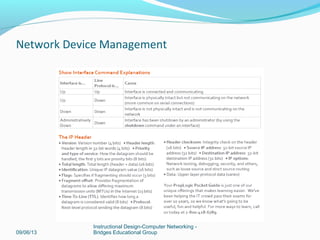
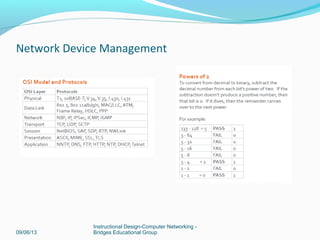
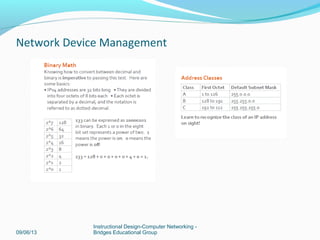
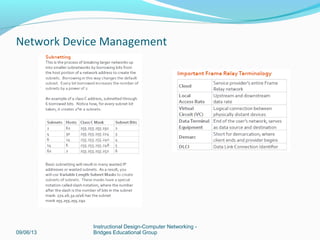
  • #52 Bonus cheat Sheets On CCNA Print it and keep it to yourself so quick referencing.