CCNA – Semester1


             Module 1
    Introduction to Networking


Objectives


• Network physical connection
• Basic computer components
• Network math and IP address concept
Connecting to the Internet


Requirements for Internet Connection

• Connection to the Internet can be broken down into the
  following:
   – Physical connection: used to transfer signals between PCs within the
     local network and to remote devices on the Internet
   – Logical connection: uses standards called protocols. A protocol is a
     formal description of a set of rules and conventions that govern how
     devices on a network communicate.
   – The application: interprets the data and displays the information in an
     understandable form
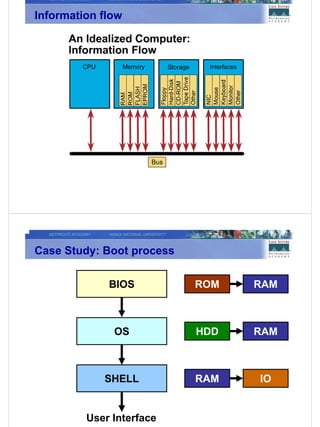
Information flow


Case Study: Boot process

             BIOS          ROM   RAM


              OS           HDD   RAM


            SHELL          RAM   IO


         User Interface
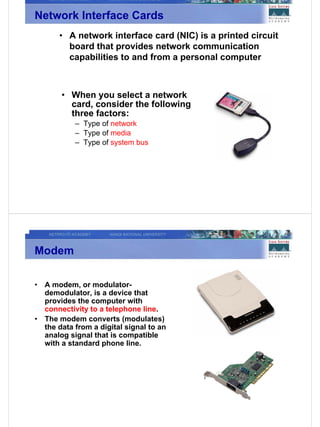
Network Interface Cards
        • A network interface card (NIC) is a printed circuit
          board that provides network communication
          capabilities to and from a personal computer


         • When you select a network
           card, consider the following
           three factors:
             – Type of network
             – Type of media
             – Type of system bus


Modem

•   A modem, or modulator-
    demodulator, is a device that
    provides the computer with
    connectivity to a telephone line.
•   The modem converts (modulates)
    the data from a digital signal to an
    analog signal that is compatible
    with a standard phone line.
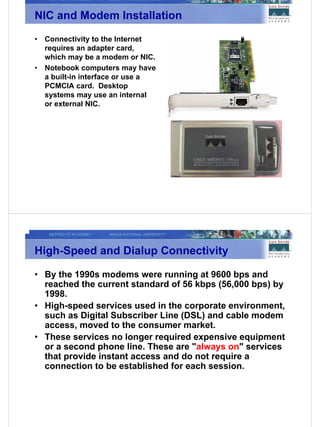
NIC and Modem Installation
•   Connectivity to the Internet
    requires an adapter card,
    which may be a modem or NIC.
•   Notebook computers may have
    a built-in interface or use a
    PCMCIA card. Desktop
    systems may use an internal
    or external NIC.


High-Speed and Dialup Connectivity

• By the 1990s modems were running at 9600 bps and
  reached the current standard of 56 kbps (56,000 bps) by
  1998.
• High-speed services used in the corporate environment,
  such as Digital Subscriber Line (DSL) and cable modem
  access, moved to the consumer market.
• These services no longer required expensive equipment
  or a second phone line. These are "always on" services
  that provide instant access and do not require a
  connection to be established for each session.
TCP/IP Description and Configuration

    •    Transmission Control
         Protocol/Internet Protocol (TCP/IP)
         is a set of protocols or rules
         developed to allow cooperating
         computers to share resources
         across a network.
    •    To enable TCP/IP on the
         workstation, it must be configured
         using the operating system tools.


Testing Connectivity with Ping

        • Ping is a program that is useful for verifying a
          successful TCP/IP installation.
        • It works by sending multiple packets to a
          specified destination requesting for replies.
Ping Command
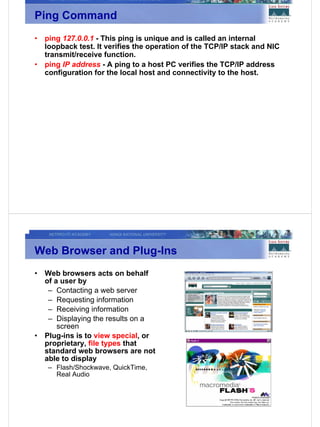
•   ping 127.0.0.1 - This ping is unique and is called an internal
    loopback test. It verifies the operation of the TCP/IP stack and NIC
    transmit/receive function.
•   ping IP address - A ping to a host PC verifies the TCP/IP address
    configuration for the local host and connectivity to the host.


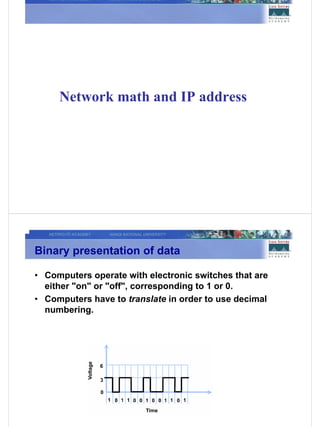
Web Browser and Plug-Ins
•   Web browsers acts on behalf
    of a user by
     – Contacting a web server
     – Requesting information
     – Receiving information
     – Displaying the results on a
        screen
•   Plug-ins is to view special, or
    proprietary, file types that
    standard web browsers are not
    able to display
    – Flash/Shockwave, QuickTime,
      Real Audio
Network math and IP address


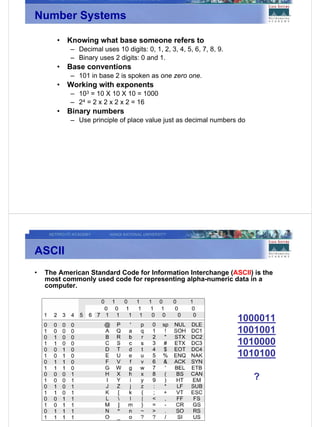
Binary presentation of data

• Computers operate with electronic switches that are
  either "on" or "off", corresponding to 1 or 0.
• Computers have to translate in order to use decimal
  numbering.
Number Systems

       •   Knowing what base someone refers to
           – Decimal uses 10 digits: 0, 1, 2, 3, 4, 5, 6, 7, 8, 9.
           – Binary uses 2 digits: 0 and 1.
       •   Base conventions
           – 101 in base 2 is spoken as one zero one.
       •   Working with exponents
           – 103 = 10 X 10 X 10 = 1000
           – 24 = 2 x 2 x 2 x 2 = 16
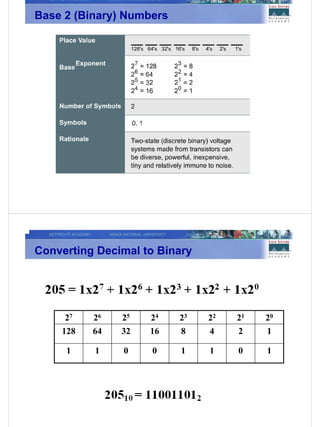
       •   Binary numbers
           – Use principle of place value just as decimal numbers do


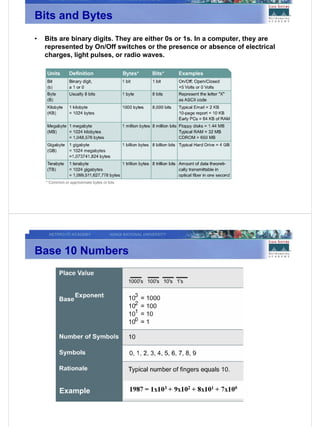
ASCII
•   The American Standard Code for Information Interchange (ASCII) is the
    most commonly used code for representing alpha-numeric data in a
    computer.


                                                                     1000011
                                                                     1001001
                                                                     1010000
                                                                     1010100

                                                                       ?
Bits and Bytes
•   Bits are binary digits. They are either 0s or 1s. In a computer, they are
    represented by On/Off switches or the presence or absence of electrical
    charges, light pulses, or radio waves.


Base 10 Numbers


        Example
Base 2 (Binary) Numbers


Converting Decimal to Binary


     27   26   25   24    23   22   21   20
    128   64   32   16    8    4    2    1

     1    1    0    0     1    1    0    1
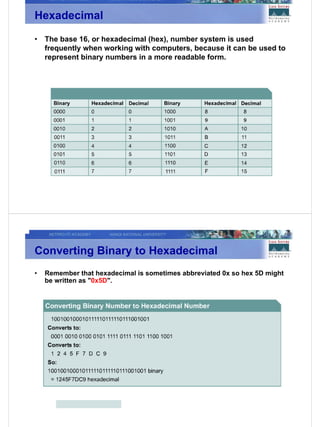
Hexadecimal
•   The base 16, or hexadecimal (hex), number system is used
    frequently when working with computers, because it can be used to
    represent binary numbers in a more readable form.


Converting Binary to Hexadecimal
•   Remember that hexadecimal is sometimes abbreviated 0x so hex 5D might
    be written as "0x5D".
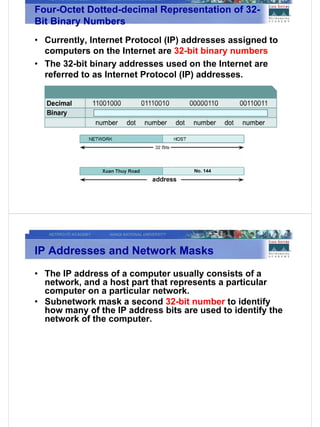
Four-Octet Dotted-decimal Representation of 32-
Bit Binary Numbers
• Currently, Internet Protocol (IP) addresses assigned to
  computers on the Internet are 32-bit binary numbers
• The 32-bit binary addresses used on the Internet are
  referred to as Internet Protocol (IP) addresses.


IP Addresses and Network Masks
• The IP address of a computer usually consists of a
  network, and a host part that represents a particular
  computer on a particular network.
• Subnetwork mask a second 32-bit number to identify
  how many of the IP address bits are used to identify the
  network of the computer.
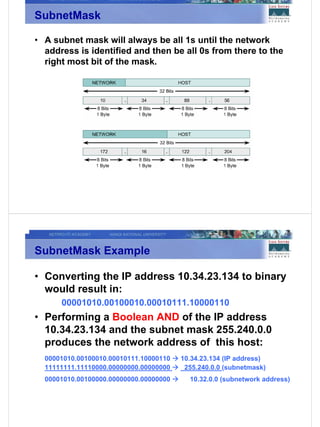
SubnetMask

• A subnet mask will always be all 1s until the network
  address is identified and then be all 0s from there to the
  right most bit of the mask.


SubnetMask Example

• Converting the IP address 10.34.23.134 to binary
  would result in:
      00001010.00100010.00010111.10000110
• Performing a Boolean AND of the IP address
  10.34.23.134 and the subnet mask 255.240.0.0
  produces the network address of this host:
  00001010.00100010.00010111.10000110   10.34.23.134 (IP address)
  11111111.11110000.00000000.00000000    255.240.0.0 (subnetmask)
  00001010.00100000.00000000.00000000     10.32.0.0 (subnetwork address)
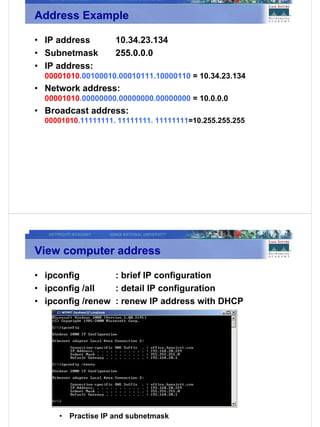
Address Example

• IP address         10.34.23.134
• Subnetmask         255.0.0.0
• IP address:
  00001010.00100010.00010111.10000110 = 10.34.23.134
• Network address:
  00001010.00000000.00000000.00000000 = 10.0.0.0
• Broadcast address:
  00001010.11111111. 11111111. 11111111=10.255.255.255


View computer address

• ipconfig        : brief IP configuration
• ipconfig /all   : detail IP configuration
• ipconfig /renew : renew IP address with DHCP


     •   Practise IP and subnetmask
Summary

• The physical connection that has to take place for a
  computer to connect to the Internet
• Network interface cards and/or modems
• Web browser selection and configuration
• The Base 2 number system
• Binary number conversion to decimal
• Representasion of IP addresses and network masks

CCNA 1 : introduction_to_networking

  • 1.
    CCNA – Semester1 Module 1 Introduction to Networking Objectives • Network physical connection • Basic computer components • Network math and IP address concept
  • 2.
    Connecting to theInternet Requirements for Internet Connection • Connection to the Internet can be broken down into the following: – Physical connection: used to transfer signals between PCs within the local network and to remote devices on the Internet – Logical connection: uses standards called protocols. A protocol is a formal description of a set of rules and conventions that govern how devices on a network communicate. – The application: interprets the data and displays the information in an understandable form
  • 3.
    Information flow Case Study:Boot process BIOS ROM RAM OS HDD RAM SHELL RAM IO User Interface
  • 4.
    Network Interface Cards • A network interface card (NIC) is a printed circuit board that provides network communication capabilities to and from a personal computer • When you select a network card, consider the following three factors: – Type of network – Type of media – Type of system bus Modem • A modem, or modulator- demodulator, is a device that provides the computer with connectivity to a telephone line. • The modem converts (modulates) the data from a digital signal to an analog signal that is compatible with a standard phone line.
  • 5.
    NIC and ModemInstallation • Connectivity to the Internet requires an adapter card, which may be a modem or NIC. • Notebook computers may have a built-in interface or use a PCMCIA card. Desktop systems may use an internal or external NIC. High-Speed and Dialup Connectivity • By the 1990s modems were running at 9600 bps and reached the current standard of 56 kbps (56,000 bps) by 1998. • High-speed services used in the corporate environment, such as Digital Subscriber Line (DSL) and cable modem access, moved to the consumer market. • These services no longer required expensive equipment or a second phone line. These are "always on" services that provide instant access and do not require a connection to be established for each session.
  • 6.
    TCP/IP Description andConfiguration • Transmission Control Protocol/Internet Protocol (TCP/IP) is a set of protocols or rules developed to allow cooperating computers to share resources across a network. • To enable TCP/IP on the workstation, it must be configured using the operating system tools. Testing Connectivity with Ping • Ping is a program that is useful for verifying a successful TCP/IP installation. • It works by sending multiple packets to a specified destination requesting for replies.
  • 7.
    Ping Command • ping 127.0.0.1 - This ping is unique and is called an internal loopback test. It verifies the operation of the TCP/IP stack and NIC transmit/receive function. • ping IP address - A ping to a host PC verifies the TCP/IP address configuration for the local host and connectivity to the host. Web Browser and Plug-Ins • Web browsers acts on behalf of a user by – Contacting a web server – Requesting information – Receiving information – Displaying the results on a screen • Plug-ins is to view special, or proprietary, file types that standard web browsers are not able to display – Flash/Shockwave, QuickTime, Real Audio
  • 8.
    Network math andIP address Binary presentation of data • Computers operate with electronic switches that are either "on" or "off", corresponding to 1 or 0. • Computers have to translate in order to use decimal numbering.
  • 9.
    Number Systems • Knowing what base someone refers to – Decimal uses 10 digits: 0, 1, 2, 3, 4, 5, 6, 7, 8, 9. – Binary uses 2 digits: 0 and 1. • Base conventions – 101 in base 2 is spoken as one zero one. • Working with exponents – 103 = 10 X 10 X 10 = 1000 – 24 = 2 x 2 x 2 x 2 = 16 • Binary numbers – Use principle of place value just as decimal numbers do ASCII • The American Standard Code for Information Interchange (ASCII) is the most commonly used code for representing alpha-numeric data in a computer. 1000011 1001001 1010000 1010100 ?
  • 10.
    Bits and Bytes • Bits are binary digits. They are either 0s or 1s. In a computer, they are represented by On/Off switches or the presence or absence of electrical charges, light pulses, or radio waves. Base 10 Numbers Example
  • 11.
    Base 2 (Binary)Numbers Converting Decimal to Binary 27 26 25 24 23 22 21 20 128 64 32 16 8 4 2 1 1 1 0 0 1 1 0 1
  • 12.
    Hexadecimal • The base 16, or hexadecimal (hex), number system is used frequently when working with computers, because it can be used to represent binary numbers in a more readable form. Converting Binary to Hexadecimal • Remember that hexadecimal is sometimes abbreviated 0x so hex 5D might be written as "0x5D".
  • 13.
    Four-Octet Dotted-decimal Representationof 32- Bit Binary Numbers • Currently, Internet Protocol (IP) addresses assigned to computers on the Internet are 32-bit binary numbers • The 32-bit binary addresses used on the Internet are referred to as Internet Protocol (IP) addresses. IP Addresses and Network Masks • The IP address of a computer usually consists of a network, and a host part that represents a particular computer on a particular network. • Subnetwork mask a second 32-bit number to identify how many of the IP address bits are used to identify the network of the computer.
  • 14.
    SubnetMask • A subnetmask will always be all 1s until the network address is identified and then be all 0s from there to the right most bit of the mask. SubnetMask Example • Converting the IP address 10.34.23.134 to binary would result in: 00001010.00100010.00010111.10000110 • Performing a Boolean AND of the IP address 10.34.23.134 and the subnet mask 255.240.0.0 produces the network address of this host: 00001010.00100010.00010111.10000110 10.34.23.134 (IP address) 11111111.11110000.00000000.00000000 255.240.0.0 (subnetmask) 00001010.00100000.00000000.00000000 10.32.0.0 (subnetwork address)
  • 15.
    Address Example • IPaddress 10.34.23.134 • Subnetmask 255.0.0.0 • IP address: 00001010.00100010.00010111.10000110 = 10.34.23.134 • Network address: 00001010.00000000.00000000.00000000 = 10.0.0.0 • Broadcast address: 00001010.11111111. 11111111. 11111111=10.255.255.255 View computer address • ipconfig : brief IP configuration • ipconfig /all : detail IP configuration • ipconfig /renew : renew IP address with DHCP • Practise IP and subnetmask
  • 16.
    Summary • The physicalconnection that has to take place for a computer to connect to the Internet • Network interface cards and/or modems • Web browser selection and configuration • The Base 2 number system • Binary number conversion to decimal • Representasion of IP addresses and network masks