Computers in Our
Daily Life
Prepared by: Jonalyn A. Angeles
Objectives
❑Familiarize themselves with the computer number systems
❑Discuss the rule of the ASCII code in computer systems and explain
how computers use it
❑Examine how computer’s system bus works
❑Identify the different computer network systems and the wired and
wireless connections
❑Distinguish between system software and application software
❑ Compare and contrast a desktop app and a mobile app in terms of
content, layout, and design.
❑ Explain the impact of computers on our daily life
01
How Computers
Work
The parts of a computer are the
central processing unit (CPU), memory, a
keyboard or other input device, and a screen or
other output device.
• How does a computer add or subtract?
• How can its memory remember the
answers it computes?
Meet us
The computer can understand
machine language. When a person types on
the computer’s keyboard, the human brain
identifies the letters, numbers, and
characters combined to create words and
sentences. But the computer does not
recognize letters as letters of the alphabet;
it sees the letters as a series of 0’s and 1’s
called the binary language.
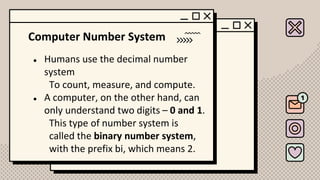
Computer Number System
● Humans use the decimal number
system
To count, measure, and compute.
● A computer, on the other hand, can
only understand two digits – 0 and 1.
This type of number system is
called the binary number system,
with the prefix bi, which means 2.
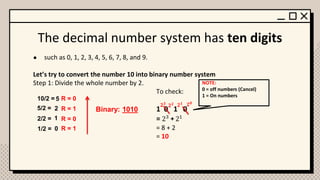
The decimal number system has ten digits
● such as 0, 1, 2, 3, 4, 5, 6, 7, 8, and 9.
Let’s try to convert the number 10 into binary number system
Step 1: Divide the whole number by 2.
To check:
1 0 1 0
= 23 21
= 8 + 2
= 10
R = 0
R = 1
R = 0
10/2 =
5/2 =
2/2 =
1/2 = R = 1
Binary: 1010
5
2
1
0
𝟐𝟎
𝟐𝟏
𝟐𝟐
𝟐𝟑
+
NOTE:
0 = off numbers (Cancel)
1 = On numbers
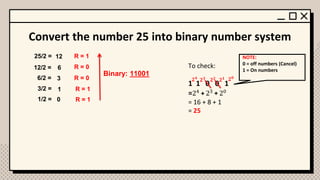
Convert the number 25 into binary number system
To check:
1 1 0 0 1
=24
23
20
= 16 + 8 + 1
= 25
R = 1
R = 0
R = 0
25/2 =
12/2 =
6/2 =
3/2 = R = 1
Binary: 11001
12
6
3
1
𝟐𝟎
𝟐𝟏
𝟐𝟐
𝟐𝟑
+
NOTE:
0 = off numbers (Cancel)
1 = On numbers
1/2 = 0 R = 1
𝟐𝟒
+
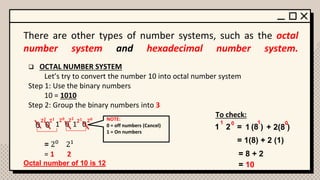
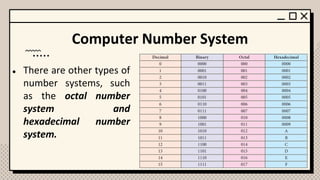
There are other types of number systems, such as the octal
number system and hexadecimal number system.
❑ OCTAL NUMBER SYSTEM
Let’s try to convert the number 10 into octal number system
Step 1: Use the binary numbers
10 = 1010
Step 2: Group the binary numbers into 3
To check:
1 0 1 0
= 20
21
= 1 2
0
0
𝟐𝟎
𝟐𝟏
𝟐𝟐
𝟐𝟎
𝟐𝟏
𝟐𝟐 NOTE:
0 = off numbers (Cancel)
1 = On numbers
1 2 =
0
1
1 (8 )
1
+ 2(8 )
0
= 1(8) + 2 (1)
= 8 + 2
= 10
Octal number of 10 is 12
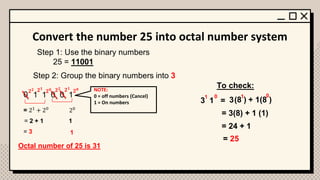
Convert the number 25 into octal number system
Step 1: Use the binary numbers
25 = 11001
Step 2: Group the binary numbers into 3
1 1 0 0 1
0
𝟐𝟎
𝟐𝟏
𝟐𝟐
𝟐𝟎
𝟐𝟏
𝟐𝟐 NOTE:
0 = off numbers (Cancel)
1 = On numbers
= 21
+ 20
20
= 2 + 1 1
= 3 1
Octal number of 25 is 31
To check:
3 1 =
0
1
3(8 )
1
+ 1(8 )
0
= 3(8) + 1 (1)
= 24 + 1
= 25
Hexadecimal number system.
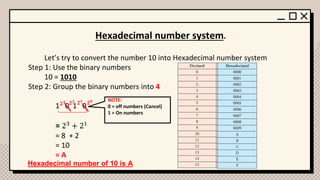
Let’s try to convert the number 10 into Hexadecimal number system
Step 1: Use the binary numbers
10 = 1010
Step 2: Group the binary numbers into 4
1 0 1 0
= 23 + 21
= 8 + 2
= 10
= A
𝟐𝟎
𝟐𝟏
𝟐𝟐
𝟐𝟑 NOTE:
0 = off numbers (Cancel)
1 = On numbers
Hexadecimal number of 10 is A
Computer Number System
● There are other types of
number systems, such
as the octal number
system and
hexadecimal number
system.
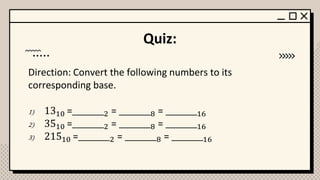
Quiz:
Direction: Convert the following numbers to its
corresponding base.
1) 1310 =________2 = ________8 = ________16
2) 3510 =________2 = ________8 = ________16
3) 21510 =________2 = ________8 = ________16
02
How Computers
Communicate with
One Another
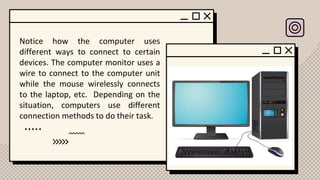
Notice how the computer uses
different ways to connect to certain
devices. The computer monitor uses a
wire to connect to the computer unit
while the mouse wirelessly connects
to the laptop, etc. Depending on the
situation, computers use different
connection methods to do their task.
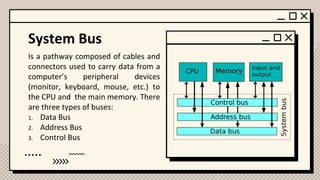
System Bus
Is a pathway composed of cables and
connectors used to carry data from a
computer’s peripheral devices
(monitor, keyboard, mouse, etc.) to
the CPU and the main memory. There
are three types of buses:
1. Data Bus
2. Address Bus
3. Control Bus
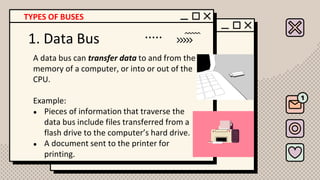
1. Data Bus
A data bus can transfer data to and from the
memory of a computer, or into or out of the
CPU.
Example:
● Pieces of information that traverse the
data bus include files transferred from a
flash drive to the computer’s hard drive.
● A document sent to the printer for
printing.
TYPES OF BUSES
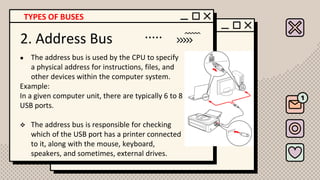
2. Address Bus
● The address bus is used by the CPU to specify
a physical address for instructions, files, and
other devices within the computer system.
Example:
In a given computer unit, there are typically 6 to 8
USB ports.
❖ The address bus is responsible for checking
which of the USB port has a printer connected
to it, along with the mouse, keyboard,
speakers, and sometimes, external drives.
TYPES OF BUSES
3. Control Bus
● A control bus is used by CPUs to communicate with
other devices within the computer system.
● It also sends status signals from the devices,
identifying if it is ready or not.
Example:
If one tries to save a file to a flash drive that is already
removed from the computer, the computer will notify
the user with an error message saying that the folder or
drive where the file is intended to be saved is no longer
existing.
TYPES OF BUSES
03
How Computers
Connect to Other
Computers
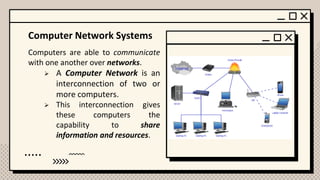
Computer Network Systems
Computers are able to communicate
with one another over networks.
➢ A Computer Network is an
interconnection of two or
more computers.
➢ This interconnection gives
these computers the
capability to share
information and resources.
TYPES OF NETWORKS
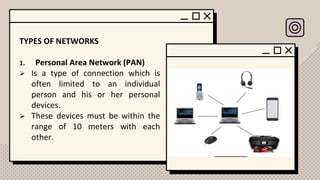
1. Personal Area Network (PAN)
➢ Is a type of connection which is
often limited to an individual
person and his or her personal
devices.
➢ These devices must be within the
range of 10 meters with each
other.
TYPES OF NETWORKS
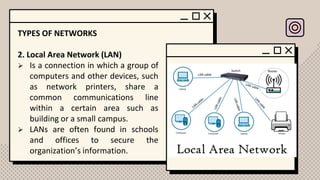
2. Local Area Network (LAN)
➢ Is a connection in which a group of
computers and other devices, such
as network printers, share a
common communications line
within a certain area such as
building or a small campus.
➢ LANs are often found in schools
and offices to secure the
organization’s information.
TYPES OF NETWORKS
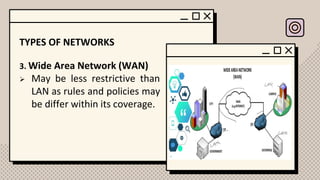
3. Wide Area Network (WAN)
➢ May be less restrictive than
LAN as rules and policies may
be differ within its coverage.
Methods of Communication
There are many different types of connection media
that are used in contemporary society to connect computer
networks to one another.
Categorized generally into two:
1. Wired communication
2. Wireless communication
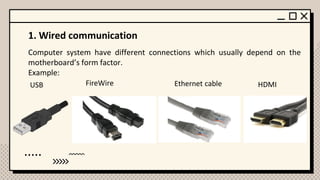
1. Wired communication
Computer system have different connections which usually depend on the
motherboard’s form factor.
Example:
USB FireWire Ethernet cable HDMI
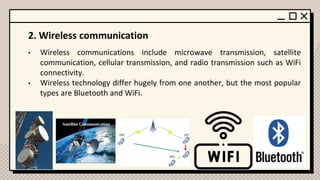
2. Wireless communication
• Wireless communications include microwave transmission, satellite
communication, cellular transmission, and radio transmission such as WiFi
connectivity.
• Wireless technology differ hugely from one another, but the most popular
types are Bluetooth and WiFi.
04
How Humans
Communicate with
Computers
Reading a long string of 0’s and 1’s can be
very confusing and taxing. As such, people who
invented the computer identified two areas in
computer systems- computer hardware and
computer software. Through computer software,
humans are able to “communicate” with the
computer.
Computer Software
• Is a combination of instructions, data,
and programs that the computer needs
in order to do a specific task.
• Everything the computer does can
basically be controlled through these
programs.
• Programs – are a set of
codes/instructions which are
usually designed or written by
computer programmers using a
specific programming language.
Most common type of programming
language used by programmers is
Object-oriented programming.
Example:
• Microsoft’s C#
• Sun Microsystem’s Java
• Open-source programming
language
• PHP (Hypertext Preprocessor
Computer Software
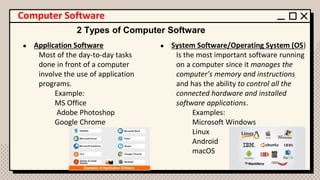
● Application Software
Most of the day-to-day tasks
done in front of a computer
involve the use of application
programs.
Example:
MS Office
Adobe Photoshop
Google Chrome
● System Software/Operating System (OS)
Is the most important software running
on a computer since it manages the
computer’s memory and instructions
and has the ability to control all the
connected hardware and installed
software applications.
Examples:
Microsoft Windows
Linux
Android
macOS
2 Types of Computer Software
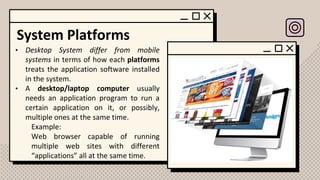
System Platforms
• Desktop System differ from mobile
systems in terms of how each platforms
treats the application software installed
in the system.
• A desktop/laptop computer usually
needs an application program to run a
certain application on it, or possibly,
multiple ones at the same time.
Example:
Web browser capable of running
multiple web sites with different
“applications” all at the same time.
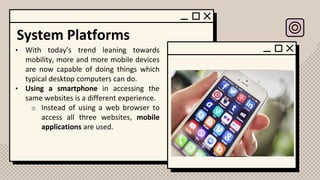
System Platforms
• With today’s trend leaning towards
mobility, more and more mobile devices
are now capable of doing things which
typical desktop computers can do.
• Using a smartphone in accessing the
same websites is a different experience.
o Instead of using a web browser to
access all three websites, mobile
applications are used.
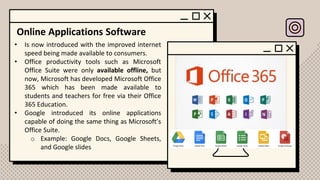
Online Applications Software
• Is now introduced with the improved internet
speed being made available to consumers.
• Office productivity tools such as Microsoft
Office Suite were only available offline, but
now, Microsoft has developed Microsoft Office
365 which has been made available to
students and teachers for free via their Office
365 Education.
• Google introduced its online applications
capable of doing the same thing as Microsoft’s
Office Suite.
o Example: Google Docs, Google Sheets,
and Google slides
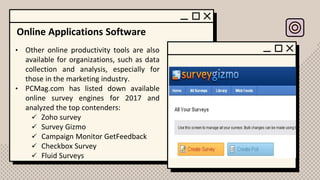
Online Applications Software
• Other online productivity tools are also
available for organizations, such as data
collection and analysis, especially for
those in the marketing industry.
• PCMag.com has listed down available
online survey engines for 2017 and
analyzed the top contenders:
✓ Zoho survey
✓ Survey Gizmo
✓ Campaign Monitor GetFeedback
✓ Checkbox Survey
✓ Fluid Surveys
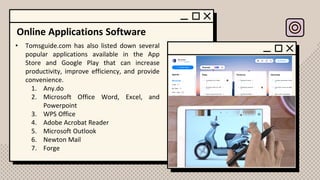
Online Applications Software
• Tomsguide.com has also listed down several
popular applications available in the App
Store and Google Play that can increase
productivity, improve efficiency, and provide
convenience.
1. Any.do
2. Microsoft Office Word, Excel, and
Powerpoint
3. WPS Office
4. Adobe Acrobat Reader
5. Microsoft Outlook
6. Newton Mail
7. Forge
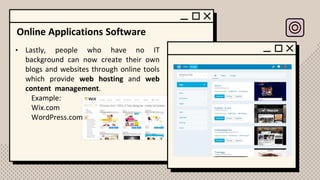
Online Applications Software
• Lastly, people who have no IT
background can now create their own
blogs and websites through online tools
which provide web hosting and web
content management.
Example:
Wix.com
WordPress.com
Reference
Tayuan, R., &Eleazar M. (2019). Living in the Information
Technology Era. C & E Publishing, Inc.

Computers in our daily life.pdf

  • 1.
    Computers in Our DailyLife Prepared by: Jonalyn A. Angeles
  • 2.
    Objectives ❑Familiarize themselves withthe computer number systems ❑Discuss the rule of the ASCII code in computer systems and explain how computers use it ❑Examine how computer’s system bus works ❑Identify the different computer network systems and the wired and wireless connections ❑Distinguish between system software and application software ❑ Compare and contrast a desktop app and a mobile app in terms of content, layout, and design. ❑ Explain the impact of computers on our daily life
  • 3.
  • 4.
    The parts ofa computer are the central processing unit (CPU), memory, a keyboard or other input device, and a screen or other output device. • How does a computer add or subtract? • How can its memory remember the answers it computes? Meet us
  • 5.
    The computer canunderstand machine language. When a person types on the computer’s keyboard, the human brain identifies the letters, numbers, and characters combined to create words and sentences. But the computer does not recognize letters as letters of the alphabet; it sees the letters as a series of 0’s and 1’s called the binary language.
  • 6.
    Computer Number System ●Humans use the decimal number system To count, measure, and compute. ● A computer, on the other hand, can only understand two digits – 0 and 1. This type of number system is called the binary number system, with the prefix bi, which means 2.
  • 7.
    The decimal numbersystem has ten digits ● such as 0, 1, 2, 3, 4, 5, 6, 7, 8, and 9. Let’s try to convert the number 10 into binary number system Step 1: Divide the whole number by 2. To check: 1 0 1 0 = 23 21 = 8 + 2 = 10 R = 0 R = 1 R = 0 10/2 = 5/2 = 2/2 = 1/2 = R = 1 Binary: 1010 5 2 1 0 𝟐𝟎 𝟐𝟏 𝟐𝟐 𝟐𝟑 + NOTE: 0 = off numbers (Cancel) 1 = On numbers
  • 8.
    Convert the number25 into binary number system To check: 1 1 0 0 1 =24 23 20 = 16 + 8 + 1 = 25 R = 1 R = 0 R = 0 25/2 = 12/2 = 6/2 = 3/2 = R = 1 Binary: 11001 12 6 3 1 𝟐𝟎 𝟐𝟏 𝟐𝟐 𝟐𝟑 + NOTE: 0 = off numbers (Cancel) 1 = On numbers 1/2 = 0 R = 1 𝟐𝟒 +
  • 9.
    There are othertypes of number systems, such as the octal number system and hexadecimal number system. ❑ OCTAL NUMBER SYSTEM Let’s try to convert the number 10 into octal number system Step 1: Use the binary numbers 10 = 1010 Step 2: Group the binary numbers into 3 To check: 1 0 1 0 = 20 21 = 1 2 0 0 𝟐𝟎 𝟐𝟏 𝟐𝟐 𝟐𝟎 𝟐𝟏 𝟐𝟐 NOTE: 0 = off numbers (Cancel) 1 = On numbers 1 2 = 0 1 1 (8 ) 1 + 2(8 ) 0 = 1(8) + 2 (1) = 8 + 2 = 10 Octal number of 10 is 12
  • 10.
    Convert the number25 into octal number system Step 1: Use the binary numbers 25 = 11001 Step 2: Group the binary numbers into 3 1 1 0 0 1 0 𝟐𝟎 𝟐𝟏 𝟐𝟐 𝟐𝟎 𝟐𝟏 𝟐𝟐 NOTE: 0 = off numbers (Cancel) 1 = On numbers = 21 + 20 20 = 2 + 1 1 = 3 1 Octal number of 25 is 31 To check: 3 1 = 0 1 3(8 ) 1 + 1(8 ) 0 = 3(8) + 1 (1) = 24 + 1 = 25
  • 11.
    Hexadecimal number system. Let’stry to convert the number 10 into Hexadecimal number system Step 1: Use the binary numbers 10 = 1010 Step 2: Group the binary numbers into 4 1 0 1 0 = 23 + 21 = 8 + 2 = 10 = A 𝟐𝟎 𝟐𝟏 𝟐𝟐 𝟐𝟑 NOTE: 0 = off numbers (Cancel) 1 = On numbers Hexadecimal number of 10 is A
  • 12.
    Computer Number System ●There are other types of number systems, such as the octal number system and hexadecimal number system.
  • 13.
    Quiz: Direction: Convert thefollowing numbers to its corresponding base. 1) 1310 =________2 = ________8 = ________16 2) 3510 =________2 = ________8 = ________16 3) 21510 =________2 = ________8 = ________16
  • 14.
  • 15.
    Notice how thecomputer uses different ways to connect to certain devices. The computer monitor uses a wire to connect to the computer unit while the mouse wirelessly connects to the laptop, etc. Depending on the situation, computers use different connection methods to do their task.
  • 16.
    System Bus Is apathway composed of cables and connectors used to carry data from a computer’s peripheral devices (monitor, keyboard, mouse, etc.) to the CPU and the main memory. There are three types of buses: 1. Data Bus 2. Address Bus 3. Control Bus
  • 17.
    1. Data Bus Adata bus can transfer data to and from the memory of a computer, or into or out of the CPU. Example: ● Pieces of information that traverse the data bus include files transferred from a flash drive to the computer’s hard drive. ● A document sent to the printer for printing. TYPES OF BUSES
  • 18.
    2. Address Bus ●The address bus is used by the CPU to specify a physical address for instructions, files, and other devices within the computer system. Example: In a given computer unit, there are typically 6 to 8 USB ports. ❖ The address bus is responsible for checking which of the USB port has a printer connected to it, along with the mouse, keyboard, speakers, and sometimes, external drives. TYPES OF BUSES
  • 19.
    3. Control Bus ●A control bus is used by CPUs to communicate with other devices within the computer system. ● It also sends status signals from the devices, identifying if it is ready or not. Example: If one tries to save a file to a flash drive that is already removed from the computer, the computer will notify the user with an error message saying that the folder or drive where the file is intended to be saved is no longer existing. TYPES OF BUSES
  • 20.
  • 21.
    Computer Network Systems Computersare able to communicate with one another over networks. ➢ A Computer Network is an interconnection of two or more computers. ➢ This interconnection gives these computers the capability to share information and resources.
  • 22.
    TYPES OF NETWORKS 1.Personal Area Network (PAN) ➢ Is a type of connection which is often limited to an individual person and his or her personal devices. ➢ These devices must be within the range of 10 meters with each other.
  • 23.
    TYPES OF NETWORKS 2.Local Area Network (LAN) ➢ Is a connection in which a group of computers and other devices, such as network printers, share a common communications line within a certain area such as building or a small campus. ➢ LANs are often found in schools and offices to secure the organization’s information.
  • 24.
    TYPES OF NETWORKS 3.Wide Area Network (WAN) ➢ May be less restrictive than LAN as rules and policies may be differ within its coverage.
  • 25.
    Methods of Communication Thereare many different types of connection media that are used in contemporary society to connect computer networks to one another. Categorized generally into two: 1. Wired communication 2. Wireless communication
  • 26.
    1. Wired communication Computersystem have different connections which usually depend on the motherboard’s form factor. Example: USB FireWire Ethernet cable HDMI
  • 27.
    2. Wireless communication •Wireless communications include microwave transmission, satellite communication, cellular transmission, and radio transmission such as WiFi connectivity. • Wireless technology differ hugely from one another, but the most popular types are Bluetooth and WiFi.
  • 28.
  • 29.
    Reading a longstring of 0’s and 1’s can be very confusing and taxing. As such, people who invented the computer identified two areas in computer systems- computer hardware and computer software. Through computer software, humans are able to “communicate” with the computer.
  • 30.
    Computer Software • Isa combination of instructions, data, and programs that the computer needs in order to do a specific task. • Everything the computer does can basically be controlled through these programs. • Programs – are a set of codes/instructions which are usually designed or written by computer programmers using a specific programming language. Most common type of programming language used by programmers is Object-oriented programming. Example: • Microsoft’s C# • Sun Microsystem’s Java • Open-source programming language • PHP (Hypertext Preprocessor
  • 31.
    Computer Software ● ApplicationSoftware Most of the day-to-day tasks done in front of a computer involve the use of application programs. Example: MS Office Adobe Photoshop Google Chrome ● System Software/Operating System (OS) Is the most important software running on a computer since it manages the computer’s memory and instructions and has the ability to control all the connected hardware and installed software applications. Examples: Microsoft Windows Linux Android macOS 2 Types of Computer Software
  • 32.
    System Platforms • DesktopSystem differ from mobile systems in terms of how each platforms treats the application software installed in the system. • A desktop/laptop computer usually needs an application program to run a certain application on it, or possibly, multiple ones at the same time. Example: Web browser capable of running multiple web sites with different “applications” all at the same time.
  • 33.
    System Platforms • Withtoday’s trend leaning towards mobility, more and more mobile devices are now capable of doing things which typical desktop computers can do. • Using a smartphone in accessing the same websites is a different experience. o Instead of using a web browser to access all three websites, mobile applications are used.
  • 34.
    Online Applications Software •Is now introduced with the improved internet speed being made available to consumers. • Office productivity tools such as Microsoft Office Suite were only available offline, but now, Microsoft has developed Microsoft Office 365 which has been made available to students and teachers for free via their Office 365 Education. • Google introduced its online applications capable of doing the same thing as Microsoft’s Office Suite. o Example: Google Docs, Google Sheets, and Google slides
  • 35.
    Online Applications Software •Other online productivity tools are also available for organizations, such as data collection and analysis, especially for those in the marketing industry. • PCMag.com has listed down available online survey engines for 2017 and analyzed the top contenders: ✓ Zoho survey ✓ Survey Gizmo ✓ Campaign Monitor GetFeedback ✓ Checkbox Survey ✓ Fluid Surveys
  • 36.
    Online Applications Software •Tomsguide.com has also listed down several popular applications available in the App Store and Google Play that can increase productivity, improve efficiency, and provide convenience. 1. Any.do 2. Microsoft Office Word, Excel, and Powerpoint 3. WPS Office 4. Adobe Acrobat Reader 5. Microsoft Outlook 6. Newton Mail 7. Forge
  • 37.
    Online Applications Software •Lastly, people who have no IT background can now create their own blogs and websites through online tools which provide web hosting and web content management. Example: Wix.com WordPress.com
  • 38.
    Reference Tayuan, R., &EleazarM. (2019). Living in the Information Technology Era. C & E Publishing, Inc.