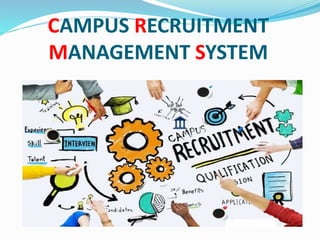
CAMPUS RECRUITMENT
MANAGEMENT SYSTEM
ABC UNIVERSITY
Guided By: Presented By:
 Prof. AAAAAAAAAAA BBBBBBBBB
CCCCCCCCC
DEVELOPERS
BBBBBBBBB
cccccccccccccc
Introduction
 Campus Selection System is a platform that provide
interface between students and company.
 System provides the list of suitable companies to the
students, according to their educational qualification,
experience and their preferences.
 System provides the list of eligible students from a
pool according to required skill for vacancy of
company.
Introduction(Continue)
 The aim is to provide services to both the Employer
and the Graduate by recruiting Graduates according to
the employer specifications. The main flow of the
project goes as follows.
 The three main users involved in this system are
 Student
 Employer
 Administrator
Existing System
 The company recruits graduates by maintaining
manual records which involves many loop holes.
 Drawbacks:
 1. Redundancy:
 Manual records tend to contain data which are
redundant. This is because Normalization followed is
consistent data base is missing feature in manual
records.
 2. Inconsistency:
 Because of redundant data, there is no consistency in
the data.
Existing System(Continue)
 3. Time Consuming:
 Maintaining each students and employees data with
much number of fields is a tedious process and takes
more time to retrieve back.
 4. Improper Validation:
 There are many cases where validation is to be
performed between the existing data and yet to be
entered data. Also, a graduate who appears for the
interview and fails to succeed should not be
reconsidered until a period of 3 months.
Existing System(Continue)
 5. Tedious:
 An organization data base goes through many
numbers of updates each day which is hard to
maintain in registers.
 6. More HR:
 In order to maintain the information of all the
employees and students who applied for different jobs
a special group of employees should be hired, which
ultimately tends to the waste of resources.
Proposed System
 The proposed system will affect or interface with the
activities of graduate, employer and administrator.
 The system works and fulfills all the functionalities as
per the proposed system.
 It will provide reduced response time against the
queries made by different users.
 The administrator will have a clear view of number of
vacancies for a particular job, number of candidates
applied and number of candidates selected.
Proposed System (Continue)
 The development of the new system contains the
following activities, which try to automate the entire
process keeping in view of the database integration
approach.
 User friendliness is provided in the application with
various controls.
 The system makes the overall project management
much easier and flexible.
 There is no risk of data mismanagement at any level
while the project development is under process.
 It provides high level of security with different level of
authentication.
Project Scope
 The project has a wide scope, as it is not intended to a
particular organization. This project is going to
develop generic software, which can be applied by any
businesses organization. More over it provides facility
to its users. Also the software is going to provide a
huge amount of summary data.
Admin Modules:
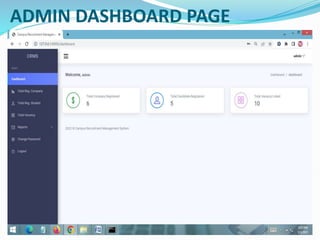
 Dashboard: In this section, admin can see all detail in
brief like Total Company Registered, Total User
(Candidates) Registered and Total Vacancy Listed.
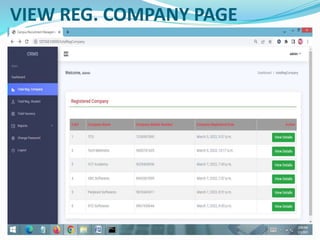
 Total Registered Company: In this section, admin can
view detail of registered company.
 Total Registered Users: In this section, admin can view
detail of users.
 Pages: In this section, the admin can manage about us
and contact us pages.
 Reports: In this section admin can view how many
company has been registered in particular period and
also view how many vacancy counts listed by particular
company in particular periods.
Company Modules:
 Dashboard: In this section, company can see all detail
in brief like Total Number of application received,
Total number of new applications, Total number
selected application, Total number of rejected
applications.
 Post Vacancy: In this section, company can manage job
posting(Add/Manage).
Company Modules (Continue):
 Job Application: In this section, company can view
total new applications receive, total sorted
applications and total rejected applications and
company also have right to sort application and reject
application and this selected and rejected message
send to candidates.
 Reports: In this section, company can view job posting
in a particular periods and also see how many
application has been received in a particular periods.
 Company can also update his/her company profile,
change the password, see the notifications of new
applications received and recover the password.
Reg. User Modules:
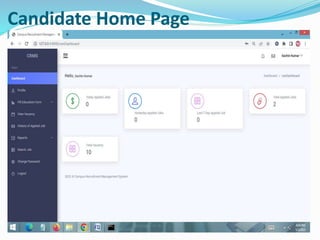
 Home Page: User can see latest job posted on home
page.
 About Us: User can view about us page.
 Listed Jobs: User can view total listed jobs.
 Contact us: User can view contact us page.
 User Dashboard: After click on this user can do
following activities
 View his/her applied(Today’s applied jobs, Yesterday
applied jobs, Last seven days applied jobs and total
applied jobs)
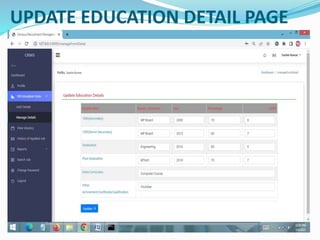
 Fill Educations forms: In this section, user can fill
his/her own education details.
Reg. User Modules:
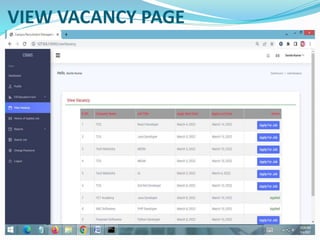
 View Vacancy: In this section, user view the vacancy of
companies and apply the jobs.
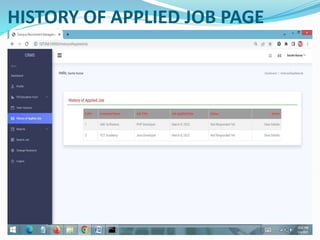
 History of Applied Jobs: In this section, user can view
his/her own applied job and see response of
companies.
 Reports: In this sections, user can view his/her applied
jobs in a particular periods.
 Search Jobs: In this section, user can search jobs
according to job titles.
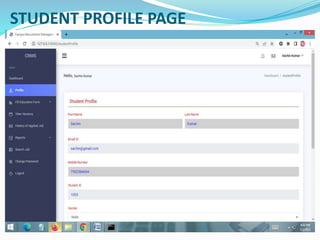
 User can also update his/her own profile, change the
password, see notification message of companies and
recover the password.
SOFTWARE USED
 PYTHON INTERPRETER
 PYCHARM IDE (INTEGRATED DEVELOPMENT ENVIRONMENT)
 DJANGO FRAMEWORK
 NOTEPAD++ OR ANY OTHER TEXT EDITOR
 CHROME OR ANY OTHER BROWSER
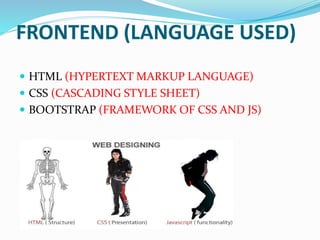
FRONTEND (LANGUAGE USED)
 HTML (HYPERTEXT MARKUP LANGUAGE)
 CSS (CASCADING STYLE SHEET)
 BOOTSTRAP (FRAMEWORK OF CSS AND JS)
BACKEND
 PYTHON DJANGO
 SQLITE (DATABASE)
SYSTEM DESIGN
Unified Modeling Language:
 UML stands for Unified Modeling Language. It is a third
generation method for specifying, visualizing and
documenting the artifacts of an object oriented system
under development. Object modeling is the process by
which the logical objects in the real world (problem space)
are represented (mapped) by the actual objects in the
program (logical or a mini world). This visual
representation of the objects, their relationships and their
structures is for the ease of understanding. This is a step
while developing any product after analysis.
 The Unified Modeling Language encompasses a
number of models.
 Use case diagrams
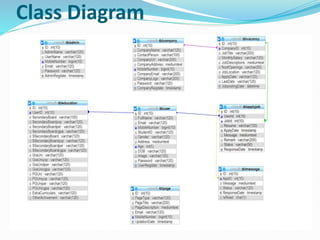
 Class diagrams
 Sequence diagrams
Use Case Diagram:
 Use case diagram consists of use cases and actors and
shows the interaction between them. The key points
are:
 The main purpose is to show the interaction between
the use cases and the actor.
 To represent the system requirement from user’s
perspective.
 The use cases are the functions that are to be
performed in the module.
 An actor could be the end-user of the system or an
external system.
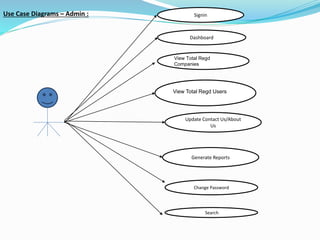
Use Case Diagrams – Admin :
View Total Regd
Companies
View Total Regd Users
Generate Reports
Change Password
Dashboard
Search
Signin
Update Contact Us/About
Us
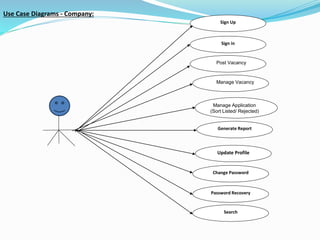
Use Case Diagrams - Company:
Post Vacancy
Manage Vacancy
Manage Application
(Sort Listed/ Rejected)
Generate Report
Update Profile
Change Password
Password Recovery
Search
Sign Up
Sign in
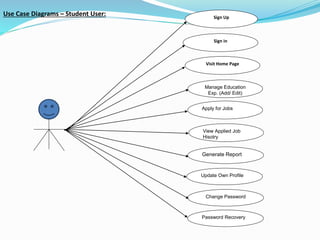
Use Case Diagrams – Student User: Sign Up
Sign in
Visit Home Page
Manage Education
Exp. (Add/ Edit)
Apply for Jobs
View Applied Job
Hisotry
Generate Report
Update Own Profile
Change Password
Password Recovery
Sequence Diagram:
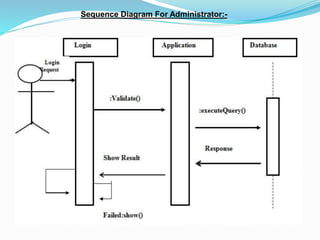
The purpose of sequence diagram is to show the flow of
functionality through a use case. In other words, we
call it a mapping process in terms of data transfers
from the actor through the corresponding objects.
SEQUENCE DIAGRAM
Sequence Diagram For Administrator:-
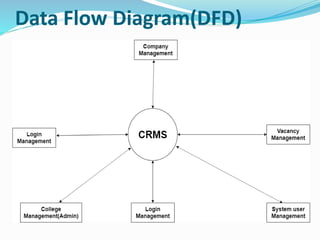
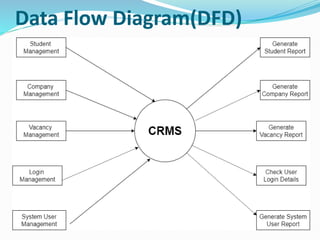
Data Flow Diagram(DFD)
Class Diagram
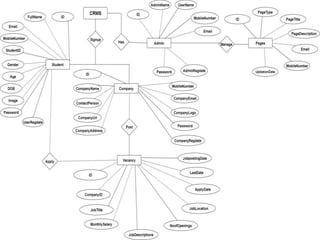
ER Diagram
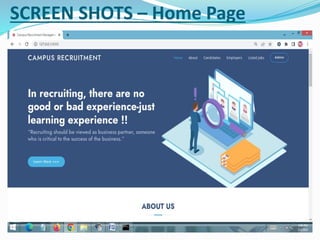
SCREEN SHOTS – Home Page
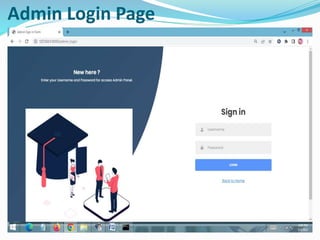
Admin Login Page
ADMIN DASHBOARD PAGE
VIEW REG. COMPANY PAGE
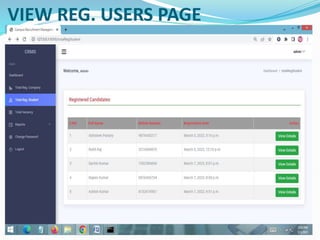
VIEW REG. USERS PAGE
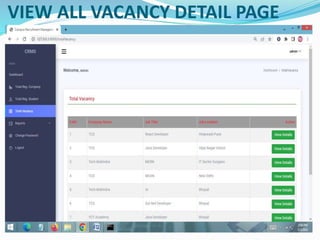
VIEW ALL VACANCY DETAIL PAGE
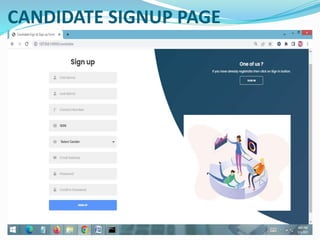
CANDIDATE SIGNUP PAGE
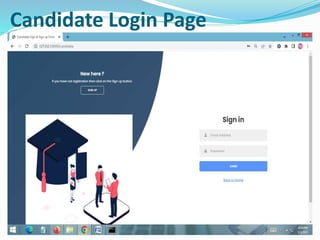
Candidate Login Page
Candidate Home Page
STUDENT PROFILE PAGE
STUDENT EDUCATION DETAIL PAGE
UPDATE EDUCATION DETAIL PAGE
VIEW VACANCY PAGE
HISTORY OF APPLIED JOB PAGE
FUTURE SCOPE
 This web application involves almost all the basic
features of the online campus recruitment
management system. The future implementation will
be online help for the users and chatting with website
administrator.
CONCLUSION
 It has been a great pleasure for me to work on this
exciting and challenging project. This project proved
good for me as it provided practical knowledge of not
only programming in Python and Sqlite web based
application. It also provides knowledge about the
latest technology used in developing web enabled
application and client server technology that will be
great demand in future. This will provide better
opportunities and guidance in future in developing
projects independently.
BIBLIOGRAPHY
 FOR PYTHON INSTALLATION
 https://www.python.org

 FOR HTML , CSS ANF PYTHON BASICS
 www.w3schools.com
 www.javatpoint.com
 https://www.geeksforgeeks.org/python-django/
 REFERENCE BOOKS
 Two scoops of Django for 1.11 by Daniel Greenfeld’s and
Audrey Greenfield
 Lightweight Django by Elman and Mark Lavin
THANKYOU

CampusRecruitment Django.pptx

  • 1.
  • 2.
    ABC UNIVERSITY Guided By:Presented By:  Prof. AAAAAAAAAAA BBBBBBBBB CCCCCCCCC
  • 3.
  • 4.
    Introduction  Campus SelectionSystem is a platform that provide interface between students and company.  System provides the list of suitable companies to the students, according to their educational qualification, experience and their preferences.  System provides the list of eligible students from a pool according to required skill for vacancy of company.
  • 5.
    Introduction(Continue)  The aimis to provide services to both the Employer and the Graduate by recruiting Graduates according to the employer specifications. The main flow of the project goes as follows.  The three main users involved in this system are  Student  Employer  Administrator
  • 6.
    Existing System  Thecompany recruits graduates by maintaining manual records which involves many loop holes.  Drawbacks:  1. Redundancy:  Manual records tend to contain data which are redundant. This is because Normalization followed is consistent data base is missing feature in manual records.  2. Inconsistency:  Because of redundant data, there is no consistency in the data.
  • 7.
    Existing System(Continue)  3.Time Consuming:  Maintaining each students and employees data with much number of fields is a tedious process and takes more time to retrieve back.  4. Improper Validation:  There are many cases where validation is to be performed between the existing data and yet to be entered data. Also, a graduate who appears for the interview and fails to succeed should not be reconsidered until a period of 3 months.
  • 8.
    Existing System(Continue)  5.Tedious:  An organization data base goes through many numbers of updates each day which is hard to maintain in registers.  6. More HR:  In order to maintain the information of all the employees and students who applied for different jobs a special group of employees should be hired, which ultimately tends to the waste of resources.
  • 9.
    Proposed System  Theproposed system will affect or interface with the activities of graduate, employer and administrator.  The system works and fulfills all the functionalities as per the proposed system.  It will provide reduced response time against the queries made by different users.  The administrator will have a clear view of number of vacancies for a particular job, number of candidates applied and number of candidates selected.
  • 10.
    Proposed System (Continue) The development of the new system contains the following activities, which try to automate the entire process keeping in view of the database integration approach.  User friendliness is provided in the application with various controls.  The system makes the overall project management much easier and flexible.  There is no risk of data mismanagement at any level while the project development is under process.  It provides high level of security with different level of authentication.
  • 11.
    Project Scope  Theproject has a wide scope, as it is not intended to a particular organization. This project is going to develop generic software, which can be applied by any businesses organization. More over it provides facility to its users. Also the software is going to provide a huge amount of summary data.
  • 12.
    Admin Modules:  Dashboard:In this section, admin can see all detail in brief like Total Company Registered, Total User (Candidates) Registered and Total Vacancy Listed.  Total Registered Company: In this section, admin can view detail of registered company.  Total Registered Users: In this section, admin can view detail of users.  Pages: In this section, the admin can manage about us and contact us pages.  Reports: In this section admin can view how many company has been registered in particular period and also view how many vacancy counts listed by particular company in particular periods.
  • 13.
    Company Modules:  Dashboard:In this section, company can see all detail in brief like Total Number of application received, Total number of new applications, Total number selected application, Total number of rejected applications.  Post Vacancy: In this section, company can manage job posting(Add/Manage).
  • 14.
    Company Modules (Continue): Job Application: In this section, company can view total new applications receive, total sorted applications and total rejected applications and company also have right to sort application and reject application and this selected and rejected message send to candidates.  Reports: In this section, company can view job posting in a particular periods and also see how many application has been received in a particular periods.  Company can also update his/her company profile, change the password, see the notifications of new applications received and recover the password.
  • 15.
    Reg. User Modules: Home Page: User can see latest job posted on home page.  About Us: User can view about us page.  Listed Jobs: User can view total listed jobs.  Contact us: User can view contact us page.  User Dashboard: After click on this user can do following activities  View his/her applied(Today’s applied jobs, Yesterday applied jobs, Last seven days applied jobs and total applied jobs)  Fill Educations forms: In this section, user can fill his/her own education details.
  • 16.
    Reg. User Modules: View Vacancy: In this section, user view the vacancy of companies and apply the jobs.  History of Applied Jobs: In this section, user can view his/her own applied job and see response of companies.  Reports: In this sections, user can view his/her applied jobs in a particular periods.  Search Jobs: In this section, user can search jobs according to job titles.  User can also update his/her own profile, change the password, see notification message of companies and recover the password.
  • 17.
    SOFTWARE USED  PYTHONINTERPRETER  PYCHARM IDE (INTEGRATED DEVELOPMENT ENVIRONMENT)  DJANGO FRAMEWORK  NOTEPAD++ OR ANY OTHER TEXT EDITOR  CHROME OR ANY OTHER BROWSER
  • 18.
    FRONTEND (LANGUAGE USED) HTML (HYPERTEXT MARKUP LANGUAGE)  CSS (CASCADING STYLE SHEET)  BOOTSTRAP (FRAMEWORK OF CSS AND JS)
  • 19.
  • 20.
    SYSTEM DESIGN Unified ModelingLanguage:  UML stands for Unified Modeling Language. It is a third generation method for specifying, visualizing and documenting the artifacts of an object oriented system under development. Object modeling is the process by which the logical objects in the real world (problem space) are represented (mapped) by the actual objects in the program (logical or a mini world). This visual representation of the objects, their relationships and their structures is for the ease of understanding. This is a step while developing any product after analysis.
  • 21.
     The UnifiedModeling Language encompasses a number of models.  Use case diagrams  Class diagrams  Sequence diagrams
  • 22.
    Use Case Diagram: Use case diagram consists of use cases and actors and shows the interaction between them. The key points are:  The main purpose is to show the interaction between the use cases and the actor.  To represent the system requirement from user’s perspective.  The use cases are the functions that are to be performed in the module.  An actor could be the end-user of the system or an external system.
  • 23.
    Use Case Diagrams– Admin : View Total Regd Companies View Total Regd Users Generate Reports Change Password Dashboard Search Signin Update Contact Us/About Us
  • 24.
    Use Case Diagrams- Company: Post Vacancy Manage Vacancy Manage Application (Sort Listed/ Rejected) Generate Report Update Profile Change Password Password Recovery Search Sign Up Sign in
  • 25.
    Use Case Diagrams– Student User: Sign Up Sign in Visit Home Page Manage Education Exp. (Add/ Edit) Apply for Jobs View Applied Job Hisotry Generate Report Update Own Profile Change Password Password Recovery
  • 26.
    Sequence Diagram: The purposeof sequence diagram is to show the flow of functionality through a use case. In other words, we call it a mapping process in terms of data transfers from the actor through the corresponding objects.
  • 27.
  • 28.
    Sequence Diagram ForAdministrator:-
  • 29.
  • 30.
  • 31.
  • 32.
  • 34.
  • 35.
  • 36.
  • 37.
  • 38.
  • 39.
    VIEW ALL VACANCYDETAIL PAGE
  • 40.
  • 41.
  • 42.
  • 43.
  • 44.
  • 45.
  • 46.
  • 47.
  • 48.
    FUTURE SCOPE  Thisweb application involves almost all the basic features of the online campus recruitment management system. The future implementation will be online help for the users and chatting with website administrator.
  • 49.
    CONCLUSION  It hasbeen a great pleasure for me to work on this exciting and challenging project. This project proved good for me as it provided practical knowledge of not only programming in Python and Sqlite web based application. It also provides knowledge about the latest technology used in developing web enabled application and client server technology that will be great demand in future. This will provide better opportunities and guidance in future in developing projects independently.
  • 50.
    BIBLIOGRAPHY  FOR PYTHONINSTALLATION  https://www.python.org   FOR HTML , CSS ANF PYTHON BASICS  www.w3schools.com  www.javatpoint.com  https://www.geeksforgeeks.org/python-django/  REFERENCE BOOKS  Two scoops of Django for 1.11 by Daniel Greenfeld’s and Audrey Greenfield  Lightweight Django by Elman and Mark Lavin
  • 51.