Recruitment Manager
1
Submiited To:
Rubal Gill (Senior Lecturer)
Submitted By:
Gaurav Soni
Overview of the Project
 Recruitment Manager is online web based software
which provides a complete online Resume Management
to make the process easy for all common HR needs of
any kind of company.
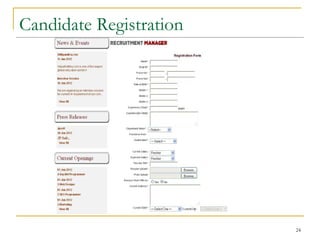
 Candidates can provide their complete detail like
Qualification, Total work experience, Resume document
file, Photo etc. according to the basic requirements of
different departments in a company. Another important
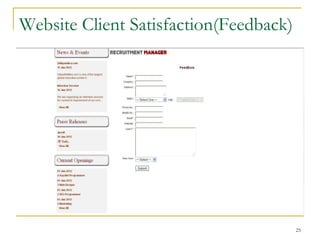
feature of this software is feedback form, where user can
easily register their complaints/suggestion any time, if
they found any difficulties in using this software.
2
Hardware Specifications
 Processor : CORE-i3
 RAM : 1GB
 Hard Disk : 20GB
 System Type : 32-bit Operating System
Server side requires Localhost
3
Software Specifications
 Operating System : Windows 7,Windows XP
 Language : ASP.NET(C#)
 Database : MS SQL 2005
 Server : IIS
 Softwares :Dreamweaver,Visual Studio
 Designing :HTML, CSS
4
Language: ASP.NET
 ASP.NET is a Web Application Framework developed
and marketed by Microsoft to allow programmers to build
dynamic Web sites, Web applications and Web services.
 It was first released in January 2002 with version 1.0 of
the .NET Framework.
 ASP stands for Active Server Pages.
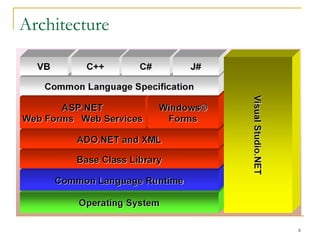
 ASP.NET is built on the Common Language
Runtime (CLR), allowing programmers to write ASP.NET
code using any supported .NET language.
 Latest version of ASP.NET is 4.5.
 ASP.NET has been designed to handle the memory
leaks efficiently.
5
Architecture
6
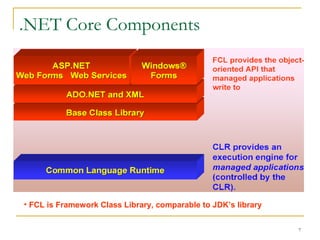
.NET Core Components
7
• FCL is Framework Class Library, comparable to JDK’s library
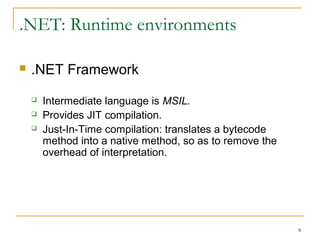
.NET: Runtime environments
 .NET Framework
 Intermediate language is MSIL.
 Provides JIT compilation.
 Just-In-Time compilation: translates a bytecode
method into a native method on the fly, so as to
remove the overhead of interpretation.
8
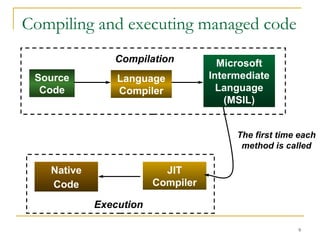
Compiling and executing managed code
9
Source
Code
Language
Compiler
Microsoft
Intermediate
Language
(MSIL)
Compilation
JIT
Compiler
Native
Code
The first time each
method is called
Execution
Common Language Runtime
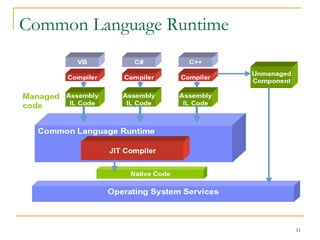
 CLR sits on top of OS to provide a virtual
environment for hosting managed applications.
 CLR loads modules containing executable and
executes their code.
 Code might be managed or unmanaged.
 In either case the CLR determines what to do with it.
 Managed Code consists of instructions written in a
pseudo-machine language called common
intermediate language, or IL.
 IL instructions are just-in-time (JIT) compiled into
native machine code at run time.
10
Common Language Runtime
11
.NET Class Library
 IO
 GUI Programming
 System Information
 Collections
 Components
 Application Configuration
 Connecting to Databases (ADO.NET)
 Tracing and Logging
 Manipulating Images/Graphics
12
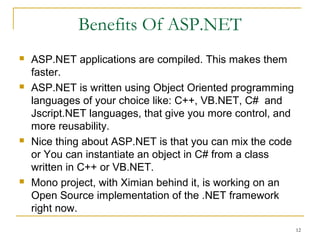
Benefits Of ASP.NET
 ASP.NET applications are compiled. This makes them
faster.
 ASP.NET is written using Object Oriented programming
languages of your choice like: C++, VB.NET, C# and
Jscript.NET languages, that give you more control, and
more reusability.
 Nice thing about ASP.NET is that you can mix the code
or You can instantiate an object in C# from a class
written in C++ or VB.NET.
 Mono project, with Ximian behind it, is working on an
Open Source implementation of the .NET framework
right now.
13
Scope Of The Project
 A complete online Resume Management Software will
make the process easy for all common HR needs of any
kind of company.
 Online Recruitment manager will make easy to
customize and integrate with existing websites of any
company/organization.
 This will make the recruitment process easy &
comfortable for a Candidate and to save the huge
amount of time and cost of companies and candidates
both.
 Using this, any candidate easily apply online for current
hr needs in a company and company easily access the
same resumes without wasting time and money to
collect the quality resume from other sources.
14
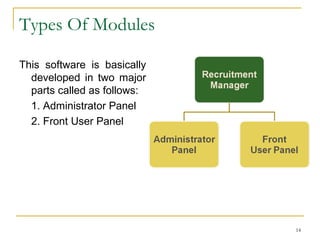
Types Of Modules
This software is basically
developed in two major
parts called as follows:
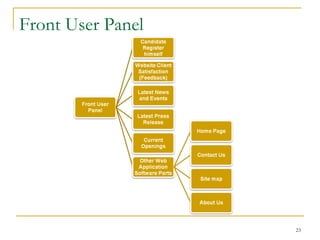
1. Admin Details Panel
2. Front User Panel
15
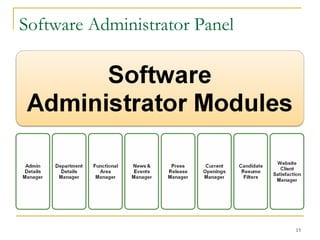
Software Administrator Panel
16
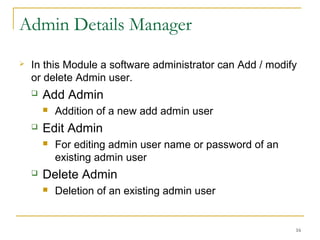
Admin Details Manager
 In this Module a software administrator can Add / modify
or delete Admin user.
 Add Admin
 Addition of a new add admin user
 Edit Admin
 For editing admin user name or password of an
existing admin user
 Delete Admin
 Deletion of an existing admin user
17
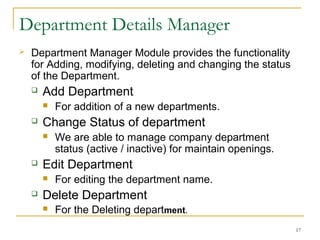
Department Details Manager
 Department Manager Module provides the functionality
for Adding, modifying, deleting and changing the status
of the Department.
 Add Department
 For addition of a new departments.
 Change Status of department
 We are able to manage company department
status (active / inactive) for maintain openings.
 Edit Department
 For editing the department name.
 Delete Department
 For the Deleting department.
18
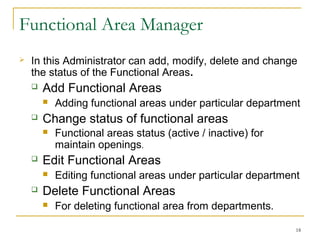
Functional Area Manager
 In this Administrator can add, modify, delete and change
the status of the Functional Areas.
 Add Functional Areas
 Adding functional areas under particular department
 Change status of functional areas
 Functional areas status (active / inactive) for
maintain openings.
 Edit Functional Areas
 Editing functional areas under particular department
 Delete Functional Areas
 For deleting functional area from departments.
19
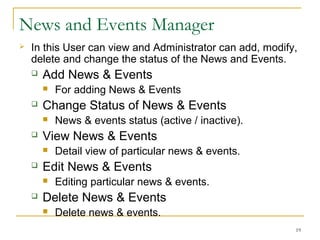
News and Events Manager
 In this User can view and Administrator can add, modify,
delete and change the status of the News and Events.
 Add News & Events
 For adding News & Events
 Change Status of News & Events
 News & events status (active / inactive).
 View News & Events
 Detail view of particular news & events.
 Edit News & Events
 Editing particular news & events.
 Delete News & Events
 Delete news & events.
20
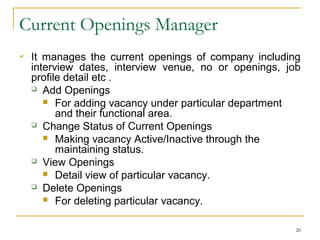
Current Openings Manager
 It manages the current openings of company including
interview dates, interview venue, no or openings, job
profile detail etc . Current openings able to filter each
candidate’s resume according to different types of areas
like : serial no, date, City wise, current salary etc.
 Add Openings
 For adding vacancy under particular department
and their functional area.
 Change Status of Current Openings
 Making vacancy Active/Inactive through the
maintaining status.
 View Openings
 Detail view of particular vacancy.
 Delete Openings
 For deleting particular vacancy.
21
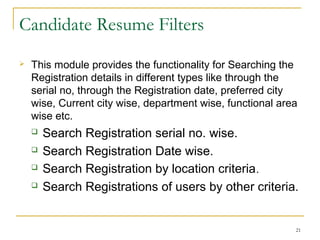
Candidate Resume Filters
 This module provides the functionality for Searching the
Registration details in different types like through the
serial no, through the Registration date, preferred city
wise, Current city wise, department wise, functional area
wise etc.
 Search Registration serial no. wise.
 Search Registration Date wise.
 Search Registration by location criteria.
 Search Registrations of users by other criteria.
22
Website Client Satisfaction Manager
 In Client Satisfaction Manager (Feedback manager),
administrator can view all the feedbacks which are given
by clients, and if administrator found any garbage value
in a feedback form, then administrator can remove that
feedback.
 Detail view of Client Satisfaction
 Delete Client Satisfaction
23
Front User Panel
24
Candidate Registration
25
Website Client Satisfaction(Feedback)
26
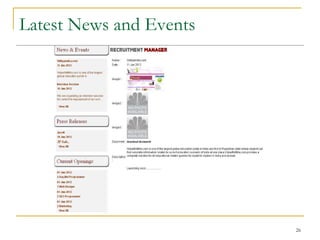
Latest News and Events
27
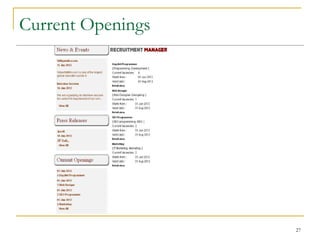
Current Openings
28
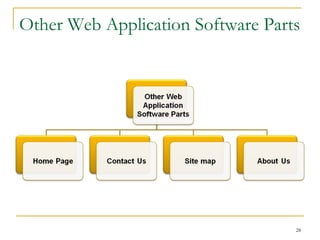
Other Web Application Software Parts
29
Bibliography
30
 www.rm.jpsoft.com
 www.asp.net
 www.w3schools.com
Thank You
31
Any Queries??
32

Gaurav_Project

  • 1.
    Recruitment Manager 1 Submiited To: RubalGill (Senior Lecturer) Submitted By: Gaurav Soni
  • 2.
    Overview of theProject  Recruitment Manager is online web based software which provides a complete online Resume Management to make the process easy for all common HR needs of any kind of company.  Candidates can provide their complete detail like Qualification, Total work experience, Resume document file, Photo etc. according to the basic requirements of different departments in a company. Another important feature of this software is feedback form, where user can easily register their complaints/suggestion any time, if they found any difficulties in using this software. 2
  • 3.
    Hardware Specifications  Processor: CORE-i3  RAM : 1GB  Hard Disk : 20GB  System Type : 32-bit Operating System Server side requires Localhost 3
  • 4.
    Software Specifications  OperatingSystem : Windows 7,Windows XP  Language : ASP.NET(C#)  Database : MS SQL 2005  Server : IIS  Softwares :Dreamweaver,Visual Studio  Designing :HTML, CSS 4
  • 5.
    Language: ASP.NET  ASP.NETis a Web Application Framework developed and marketed by Microsoft to allow programmers to build dynamic Web sites, Web applications and Web services.  It was first released in January 2002 with version 1.0 of the .NET Framework.  ASP stands for Active Server Pages.  ASP.NET is built on the Common Language Runtime (CLR), allowing programmers to write ASP.NET code using any supported .NET language.  Latest version of ASP.NET is 4.5.  ASP.NET has been designed to handle the memory leaks efficiently. 5
  • 6.
  • 7.
    .NET Core Components 7 •FCL is Framework Class Library, comparable to JDK’s library
  • 8.
    .NET: Runtime environments .NET Framework  Intermediate language is MSIL.  Provides JIT compilation.  Just-In-Time compilation: translates a bytecode method into a native method on the fly, so as to remove the overhead of interpretation. 8
  • 9.
    Compiling and executingmanaged code 9 Source Code Language Compiler Microsoft Intermediate Language (MSIL) Compilation JIT Compiler Native Code The first time each method is called Execution
  • 10.
    Common Language Runtime CLR sits on top of OS to provide a virtual environment for hosting managed applications.  CLR loads modules containing executable and executes their code.  Code might be managed or unmanaged.  In either case the CLR determines what to do with it.  Managed Code consists of instructions written in a pseudo-machine language called common intermediate language, or IL.  IL instructions are just-in-time (JIT) compiled into native machine code at run time. 10
  • 11.
  • 12.
    .NET Class Library IO  GUI Programming  System Information  Collections  Components  Application Configuration  Connecting to Databases (ADO.NET)  Tracing and Logging  Manipulating Images/Graphics 12
  • 13.
    Benefits Of ASP.NET ASP.NET applications are compiled. This makes them faster.  ASP.NET is written using Object Oriented programming languages of your choice like: C++, VB.NET, C# and Jscript.NET languages, that give you more control, and more reusability.  Nice thing about ASP.NET is that you can mix the code or You can instantiate an object in C# from a class written in C++ or VB.NET.  Mono project, with Ximian behind it, is working on an Open Source implementation of the .NET framework right now. 13
  • 14.
    Scope Of TheProject  A complete online Resume Management Software will make the process easy for all common HR needs of any kind of company.  Online Recruitment manager will make easy to customize and integrate with existing websites of any company/organization.  This will make the recruitment process easy & comfortable for a Candidate and to save the huge amount of time and cost of companies and candidates both.  Using this, any candidate easily apply online for current hr needs in a company and company easily access the same resumes without wasting time and money to collect the quality resume from other sources. 14
  • 15.
    Types Of Modules Thissoftware is basically developed in two major parts called as follows: 1. Admin Details Panel 2. Front User Panel 15
  • 16.
  • 17.
    Admin Details Manager In this Module a software administrator can Add / modify or delete Admin user.  Add Admin  Addition of a new add admin user  Edit Admin  For editing admin user name or password of an existing admin user  Delete Admin  Deletion of an existing admin user 17
  • 18.
    Department Details Manager Department Manager Module provides the functionality for Adding, modifying, deleting and changing the status of the Department.  Add Department  For addition of a new departments.  Change Status of department  We are able to manage company department status (active / inactive) for maintain openings.  Edit Department  For editing the department name.  Delete Department  For the Deleting department. 18
  • 19.
    Functional Area Manager In this Administrator can add, modify, delete and change the status of the Functional Areas.  Add Functional Areas  Adding functional areas under particular department  Change status of functional areas  Functional areas status (active / inactive) for maintain openings.  Edit Functional Areas  Editing functional areas under particular department  Delete Functional Areas  For deleting functional area from departments. 19
  • 20.
    News and EventsManager  In this User can view and Administrator can add, modify, delete and change the status of the News and Events.  Add News & Events  For adding News & Events  Change Status of News & Events  News & events status (active / inactive).  View News & Events  Detail view of particular news & events.  Edit News & Events  Editing particular news & events.  Delete News & Events  Delete news & events. 20
  • 21.
    Current Openings Manager It manages the current openings of company including interview dates, interview venue, no or openings, job profile detail etc . Current openings able to filter each candidate’s resume according to different types of areas like : serial no, date, City wise, current salary etc.  Add Openings  For adding vacancy under particular department and their functional area.  Change Status of Current Openings  Making vacancy Active/Inactive through the maintaining status.  View Openings  Detail view of particular vacancy.  Delete Openings  For deleting particular vacancy. 21
  • 22.
    Candidate Resume Filters This module provides the functionality for Searching the Registration details in different types like through the serial no, through the Registration date, preferred city wise, Current city wise, department wise, functional area wise etc.  Search Registration serial no. wise.  Search Registration Date wise.  Search Registration by location criteria.  Search Registrations of users by other criteria. 22
  • 23.
    Website Client SatisfactionManager  In Client Satisfaction Manager (Feedback manager), administrator can view all the feedbacks which are given by clients, and if administrator found any garbage value in a feedback form, then administrator can remove that feedback.  Detail view of Client Satisfaction  Delete Client Satisfaction 23
  • 24.
  • 25.
  • 26.
  • 27.
    Latest News andEvents 27
  • 28.
  • 29.
    Other Web ApplicationSoftware Parts 29
  • 30.
  • 31.
  • 32.