Computer application in business
UNIT – I
 Computer
 Characteristics of computer
 Areas of application
 IPO cycle
 Components of computer
 Memory unit
 Input and Output devices
 Hardware and Software
 Operating System
 A computer is a machine that can
store and process information.
 Most computers rely on a binary
system, which uses two variables, 0
and 1, to complete tasks such as
storing data, calculating algorithms,
and displaying information.
WHAT IS COMPUTER?
 Input, Process, Output, Storage
is the correct order of the four
major functions of a computer.
Characteristics of computers
Accuracy
Speed
Storage
Versatility
Automation
Diligence
• This is an incredible characteristic of computers, which is
their high level of accuracy.
• It is capable of performing 100% accurate calculations.
• Nothing in this world is perfect or accurate, but the computer
proves these statements false with its precise results, logic.
Accuracy
Speed
• A computer device’s speed is extremely fast, as it can
perform any calculation in seconds.
• This is one of the key characteristics of computers.
• This computer characteristic also enhances the versatility of
the computer.
Storage
• Computer memory is the storage space on the computer
where data to be processed and processing instructions are
stored.
• It has both primary and secondary memories.
Versatility
• Because computers are so versatile, they can perform almost
any task that can be reduced to a series of logical steps.
• It refers to the ability or adaptation to quickly switch from one
task to another.
Diligence
• A computer is free of fatigue, lack of concentration, and so on.
• It can work for hours without making any mistakes.
• It’s like a superman who can fly and fight for hours and hours
without tiring.
Areas Of Application
• In the banking sector, computers are used to store details of
customers and conduct transactions, such as withdrawal and
deposit of money through ATMs.
• Banks have reduced manual errors and expenses to a great
extent through extensive use of computers.
•Nowadays, computers are totally integrated into business.
• The main objective of business is transaction processing, which
involves transactions with suppliers, employees or customers.
Banking
Business
Hospital
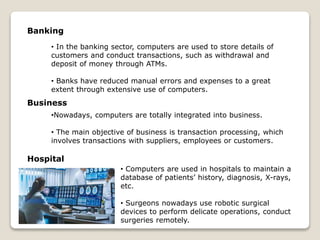
• Computers are used in hospitals to maintain a
database of patients’ history, diagnosis, X-rays,
etc.
• Surgeons nowadays use robotic surgical
devices to perform delicate operations, conduct
surgeries remotely.
Home
• Computers are used at homes for several purposes
like online bill payment, watching movies or shows at
home, internet access, etc.
• They provide communication through electronic
mail.
Entertainment
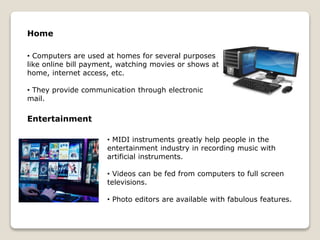
• MIDI instruments greatly help people in the
entertainment industry in recording music with
artificial instruments.
• Videos can be fed from computers to full screen
televisions.
• Photo editors are available with fabulous features.
• IPO is a short form for – Input - Process
– Output model
• IPO is the output and input after the
processing of information.
• Input is given first to get the desired
output. This input is processed before the
output is released.
• It is a critical process for users in
computation. An IPO cycle is a procedure
for processing the information.
IPO Cycle
Input Unit
Computer Input unit means the device of the input and a part
of the computer hardware which is used for the transport of
the data processing system.
Process
A central processing unit, also called a central processor, main
processor or just processor, is the electronic circuitry that
executes instructions comprising a computer program.
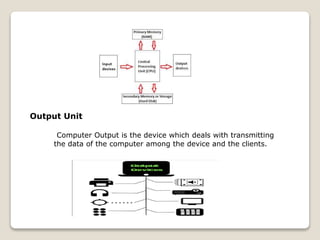
Output Unit
Computer Output is the device which deals with transmitting
the data of the computer among the device and the clients.
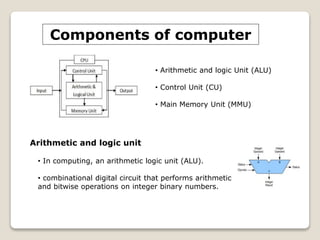
Components of computer
• Arithmetic and logic Unit (ALU)
• Control Unit (CU)
• Main Memory Unit (MMU)
Arithmetic and logic unit
• In computing, an arithmetic logic unit (ALU).
• combinational digital circuit that performs arithmetic
and bitwise operations on integer binary numbers.
• Registers
It is used for temporary storage. Some of the
registers are instruction registers, address registers, etc.
• Program Counter
It is used to store the address of the instruction, that
is to be executed.
• Adders
It is used to perform arithmetic and logical operations
Control Unit
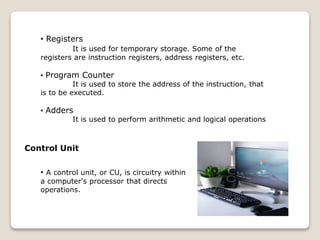
• A control unit, or CU, is circuitry within
a computer's processor that directs
operations.
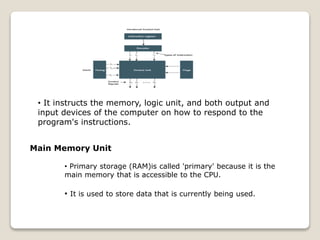
• It instructs the memory, logic unit, and both output and
input devices of the computer on how to respond to the
program's instructions.
Main Memory Unit
• Primary storage (RAM)is called 'primary' because it is the
main memory that is accessible to the CPU.
• It is used to store data that is currently being used.
•Random-Access Memory(RAM)
•Read-Only Memory(ROM)
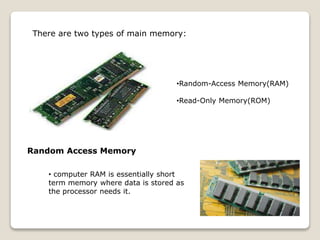
There are two types of main memory:
Random Access Memory
• computer RAM is essentially short
term memory where data is stored as
the processor needs it.
• This isn't to be confused with long-term data that's stored on your
hard drive, which stays there even when your computer is turned
off.
Read Only Memory
• Read-only memory, or ROM, is a type of
computer storage containing non-volatile,
permanent data.
• Normally, can only be read, not written to.
• ROM contains the programming that
allows a computer to start up or
regenerate each time it is turned on.
The other types of ROM are
PROM
• PROM is a blank version of ROM.
• It is manufactured as blank memory
and programmed after manufacturing.
• We can say that it is kept blank at the
time of manufacturing.
• You can purchase and then program it
once using a special tool called a
programmer.
EPROM
• EPROM is a type of ROM that can be reprogrammed and
erased many times.
• It comes with a quartz window through which
a specific frequency of ultraviolet light is
passed for around 40 minutes to erase the
data.
• So, it retains its content until it is exposed to
the ultraviolet light.
EEPROM
• ROM is a type of read only memory that can be
erased and reprogrammed repeatedly, up to
10000 times.
• It is also known as Flash EEPROM as it is similar
to flash memory.
• It is erased and reprogrammed electrically
without using ultraviolet light.
• Access time is between 45 and 200.
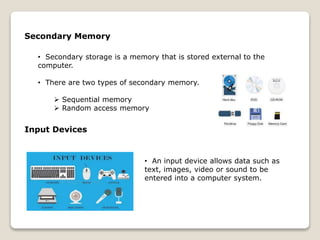
Secondary Memory
• Secondary storage is a memory that is stored external to the
computer.
• There are two types of secondary memory.
 Sequential memory
 Random access memory
Input Devices
• An input device allows data such as
text, images, video or sound to be
entered into a computer system.
• The most common input device used for
entering text.
• Includes keys for word processing and data
inputting, and for performing specific
functions
• Keyboard.
• Mouse.
• Joy Stick.
• Light pen.
• Track Ball.
• Scanner.
keyboard
Mouse
Computer graphics
• A mouse is a small device that a computer
user pushes across a desk surface.
• In order to point to a place on a display
screen and to select one or more actions to
take from that position.
Output Devices
• An output device allows data to be
transmitted by the computer in a human
friendly form.
• For example, sound being played
through a speaker.
Printer
• In computing, a printer is a peripheral
machine.
• Which makes a persistent representation
of graphics or text, usually on paper.
• While most output is human-readable,
bar code printers
Plotter
• A plotter is a machine that produces vector
graphics drawings.
• Plotters draw lines on paper using a pen, or in
some applications, use a knife to cut a material
like vinyl or leather.
• In the latter case, they are sometimes
known as a cutting plotter.
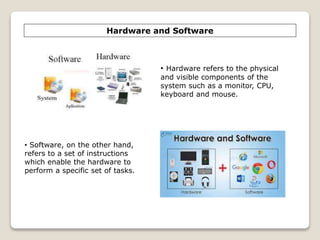
Hardware and Software
• Software, on the other hand,
refers to a set of instructions
which enable the hardware to
perform a specific set of tasks.
• Hardware refers to the physical
and visible components of the
system such as a monitor, CPU,
keyboard and mouse.
OPERATING SYSTEM
• An operating system (OS) is the program
that, after being initially loaded into the
computer by a boot program.
• Manages all of the other application
programs in a computer.
Types of Operating System
• Batch OS.
• Distributed OS.
• Multitasking OS.
• Network OS.
• Real-OS.
• Mobile OS.
Batch operating system
• This type of operating system does not
interact with the computer directly.
• There is an operator which takes similar
jobs having the same requirement and
group them into batches.
Distributed operating system
• These types of the operating system is a
recent advancement in the world of computer
technology.
• Being widely accepted all over the world
and, that too, with a great pace.
• Various autonomous interconnected
computers communicate with each other.
Real time operating system
• These types of OSs serve real-time systems.
• The time interval required to process and
respond to inputs is very small.
• This time interval is called response time.
Network operation system
• These systems run on a server and provide the
capability to manage data, users, groups, security,
applications, and other networking functions.
• These types of operating systems allow shared
access of files, printers, security, applications, and
other networking functions over a small private
network.

CAB UNIT 1.pptx

  • 1.
  • 2.
    UNIT – I Computer  Characteristics of computer  Areas of application  IPO cycle  Components of computer  Memory unit  Input and Output devices  Hardware and Software  Operating System
  • 3.
     A computeris a machine that can store and process information.  Most computers rely on a binary system, which uses two variables, 0 and 1, to complete tasks such as storing data, calculating algorithms, and displaying information. WHAT IS COMPUTER?  Input, Process, Output, Storage is the correct order of the four major functions of a computer.
  • 4.
    Characteristics of computers Accuracy Speed Storage Versatility Automation Diligence •This is an incredible characteristic of computers, which is their high level of accuracy. • It is capable of performing 100% accurate calculations. • Nothing in this world is perfect or accurate, but the computer proves these statements false with its precise results, logic. Accuracy
  • 5.
    Speed • A computerdevice’s speed is extremely fast, as it can perform any calculation in seconds. • This is one of the key characteristics of computers. • This computer characteristic also enhances the versatility of the computer. Storage • Computer memory is the storage space on the computer where data to be processed and processing instructions are stored. • It has both primary and secondary memories.
  • 6.
    Versatility • Because computersare so versatile, they can perform almost any task that can be reduced to a series of logical steps. • It refers to the ability or adaptation to quickly switch from one task to another. Diligence • A computer is free of fatigue, lack of concentration, and so on. • It can work for hours without making any mistakes. • It’s like a superman who can fly and fight for hours and hours without tiring.
  • 7.
  • 8.
    • In thebanking sector, computers are used to store details of customers and conduct transactions, such as withdrawal and deposit of money through ATMs. • Banks have reduced manual errors and expenses to a great extent through extensive use of computers. •Nowadays, computers are totally integrated into business. • The main objective of business is transaction processing, which involves transactions with suppliers, employees or customers. Banking Business Hospital • Computers are used in hospitals to maintain a database of patients’ history, diagnosis, X-rays, etc. • Surgeons nowadays use robotic surgical devices to perform delicate operations, conduct surgeries remotely.
  • 9.
    Home • Computers areused at homes for several purposes like online bill payment, watching movies or shows at home, internet access, etc. • They provide communication through electronic mail. Entertainment • MIDI instruments greatly help people in the entertainment industry in recording music with artificial instruments. • Videos can be fed from computers to full screen televisions. • Photo editors are available with fabulous features.
  • 10.
    • IPO isa short form for – Input - Process – Output model • IPO is the output and input after the processing of information. • Input is given first to get the desired output. This input is processed before the output is released. • It is a critical process for users in computation. An IPO cycle is a procedure for processing the information. IPO Cycle
  • 11.
    Input Unit Computer Inputunit means the device of the input and a part of the computer hardware which is used for the transport of the data processing system. Process A central processing unit, also called a central processor, main processor or just processor, is the electronic circuitry that executes instructions comprising a computer program.
  • 12.
    Output Unit Computer Outputis the device which deals with transmitting the data of the computer among the device and the clients.
  • 13.
    Components of computer •Arithmetic and logic Unit (ALU) • Control Unit (CU) • Main Memory Unit (MMU) Arithmetic and logic unit • In computing, an arithmetic logic unit (ALU). • combinational digital circuit that performs arithmetic and bitwise operations on integer binary numbers.
  • 14.
    • Registers It isused for temporary storage. Some of the registers are instruction registers, address registers, etc. • Program Counter It is used to store the address of the instruction, that is to be executed. • Adders It is used to perform arithmetic and logical operations Control Unit • A control unit, or CU, is circuitry within a computer's processor that directs operations.
  • 15.
    • It instructsthe memory, logic unit, and both output and input devices of the computer on how to respond to the program's instructions. Main Memory Unit • Primary storage (RAM)is called 'primary' because it is the main memory that is accessible to the CPU. • It is used to store data that is currently being used.
  • 16.
    •Random-Access Memory(RAM) •Read-Only Memory(ROM) Thereare two types of main memory: Random Access Memory • computer RAM is essentially short term memory where data is stored as the processor needs it.
  • 17.
    • This isn'tto be confused with long-term data that's stored on your hard drive, which stays there even when your computer is turned off. Read Only Memory • Read-only memory, or ROM, is a type of computer storage containing non-volatile, permanent data. • Normally, can only be read, not written to. • ROM contains the programming that allows a computer to start up or regenerate each time it is turned on.
  • 18.
    The other typesof ROM are PROM • PROM is a blank version of ROM. • It is manufactured as blank memory and programmed after manufacturing. • We can say that it is kept blank at the time of manufacturing. • You can purchase and then program it once using a special tool called a programmer. EPROM • EPROM is a type of ROM that can be reprogrammed and erased many times.
  • 19.
    • It comeswith a quartz window through which a specific frequency of ultraviolet light is passed for around 40 minutes to erase the data. • So, it retains its content until it is exposed to the ultraviolet light. EEPROM • ROM is a type of read only memory that can be erased and reprogrammed repeatedly, up to 10000 times. • It is also known as Flash EEPROM as it is similar to flash memory. • It is erased and reprogrammed electrically without using ultraviolet light. • Access time is between 45 and 200.
  • 20.
    Secondary Memory • Secondarystorage is a memory that is stored external to the computer. • There are two types of secondary memory.  Sequential memory  Random access memory Input Devices • An input device allows data such as text, images, video or sound to be entered into a computer system.
  • 21.
    • The mostcommon input device used for entering text. • Includes keys for word processing and data inputting, and for performing specific functions • Keyboard. • Mouse. • Joy Stick. • Light pen. • Track Ball. • Scanner. keyboard Mouse Computer graphics • A mouse is a small device that a computer user pushes across a desk surface. • In order to point to a place on a display screen and to select one or more actions to take from that position.
  • 22.
    Output Devices • Anoutput device allows data to be transmitted by the computer in a human friendly form. • For example, sound being played through a speaker. Printer • In computing, a printer is a peripheral machine. • Which makes a persistent representation of graphics or text, usually on paper. • While most output is human-readable, bar code printers
  • 23.
    Plotter • A plotteris a machine that produces vector graphics drawings. • Plotters draw lines on paper using a pen, or in some applications, use a knife to cut a material like vinyl or leather. • In the latter case, they are sometimes known as a cutting plotter.
  • 24.
    Hardware and Software •Software, on the other hand, refers to a set of instructions which enable the hardware to perform a specific set of tasks. • Hardware refers to the physical and visible components of the system such as a monitor, CPU, keyboard and mouse.
  • 25.
    OPERATING SYSTEM • Anoperating system (OS) is the program that, after being initially loaded into the computer by a boot program. • Manages all of the other application programs in a computer. Types of Operating System • Batch OS. • Distributed OS. • Multitasking OS. • Network OS. • Real-OS. • Mobile OS.
  • 26.
    Batch operating system •This type of operating system does not interact with the computer directly. • There is an operator which takes similar jobs having the same requirement and group them into batches. Distributed operating system • These types of the operating system is a recent advancement in the world of computer technology. • Being widely accepted all over the world and, that too, with a great pace. • Various autonomous interconnected computers communicate with each other.
  • 27.
    Real time operatingsystem • These types of OSs serve real-time systems. • The time interval required to process and respond to inputs is very small. • This time interval is called response time. Network operation system • These systems run on a server and provide the capability to manage data, users, groups, security, applications, and other networking functions. • These types of operating systems allow shared access of files, printers, security, applications, and other networking functions over a small private network.