PC Hardware Servicing
Chapter 30: Optimizing and
Troubleshooting Windows
Chapter 30 Objectives
• Understand how to identify and avoid
viruses
• Become familiar with the major Windows
system utilities
Types of Virus Infections
• Trojan horse
• Worm
• @m mailer
• @mm mass mailer
• Back door
• Blended threat
How Viruses Spread
• Booting from an infected disk
• Running an infected program or macro
• Worms can spread from PC to PC via e-
mail or P2P file sharing
Symptoms of Infection
• Degradation in system performance
• Spontaneous reboots
• odd e-mails
• Word saves in DOT format only
• Double-extension on recently opened file
• Antivirus application will not install, or disabled
• New users with full security permissions
• File sizes/dates changed
• Files disappear
• System will not boot normally
Virus Definitions
• Definition file contains tell-tale code strings
for known viruses and worms
• Keep definitions up to date
Avoid Future Infections
• Do not open unexpected attachments
• Keep Windows and IE patched
• Disable extra services that are unused
• Do not boot from an unknown floppy
• Use strong passwords
• Update virus definitions frequently
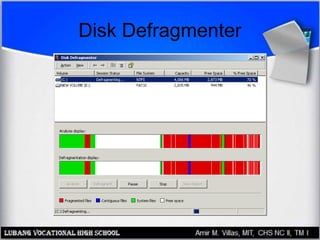
Disk Defragmenter
• Increases performance by decreasing
fragmentation
• Fragmentation makes files take longer to
load
• Disable background applications before
defragmenting
• Run from Start, Programs, Accessories,
System Tools menu
Disk Defragmenter
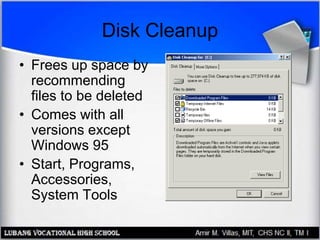
Disk Cleanup
• Frees up space by
recommending
files to be deleted
• Comes with all
versions except
Windows 95
• Start, Programs,
Accessories,
System Tools
FAT32 Converter
• Comes only with Windows 98
• Converts FAT16 to FAT32
DriveSpace
• Comes only with DOS, Win95, and Win98
• Compresses FAT16 drives to save disk
space
• Does not work with FAT32 or NTFS
• Drives take longer to defragment
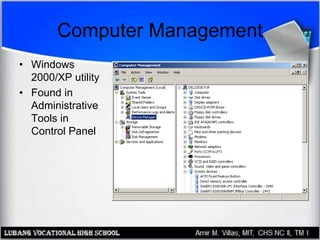
Computer Management
• Windows
2000/XP utility
• Found in
Administrative
Tools in
Control Panel
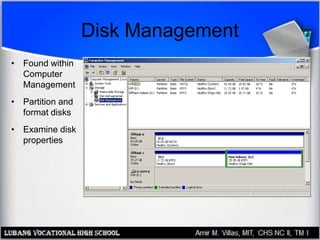
Disk Management
• Found within
Computer
Management
• Partition and
format disks
• Examine disk
properties
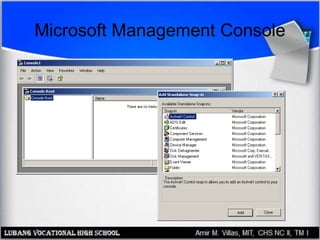
Microsoft Management Console (MMC)
• Customizable version of Computer
Management
• Can access other computers on the
network
• Starts out blank
• Snap-ins add functionality
Microsoft Management Console
Hardware Diagnostic Tool
(HWINFO)
• Windows 98 and Windows Me only
• Different view of same information as
System Information
• Run with the /UI switch from the Run
command: HWINFO /UI
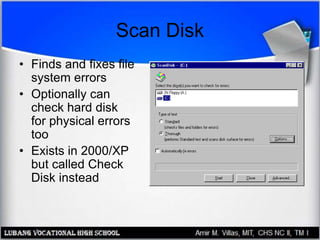
Scan Disk
• Finds and fixes file
system errors
• Optionally can
check hard disk
for physical errors
too
• Exists in 2000/XP
but called Check
Disk instead
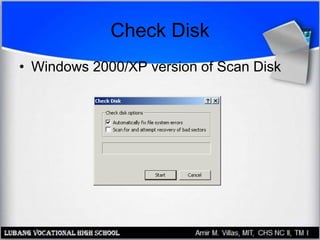
Check Disk
• Windows 2000/XP version of Scan Disk
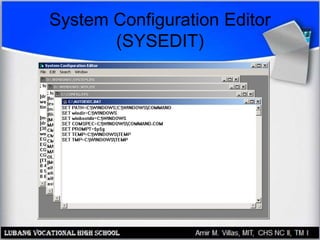
System Configuration Editor
(SYSEDIT)
Registry Editor
• REGEDIT
– Primary Registry editor utility, in all versions
• REGEDT32
– Different version in most Windows versions
– In Windows XP, running REGEDT32 redirects
you to REGEDIT
• SCANREG
– Registry checker, available in 98 and Me only
Other Utilities
• Dr. Watson
• Automatic Skip Driver (ASD)
• Task Scheduler
• Windows Scripting Host (WSCRIPT)

Optimizing and Troubleshooting Windows

  • 1.
    PC Hardware Servicing Chapter30: Optimizing and Troubleshooting Windows
  • 2.
    Chapter 30 Objectives •Understand how to identify and avoid viruses • Become familiar with the major Windows system utilities
  • 3.
    Types of VirusInfections • Trojan horse • Worm • @m mailer • @mm mass mailer • Back door • Blended threat
  • 4.
    How Viruses Spread •Booting from an infected disk • Running an infected program or macro • Worms can spread from PC to PC via e- mail or P2P file sharing
  • 5.
    Symptoms of Infection •Degradation in system performance • Spontaneous reboots • odd e-mails • Word saves in DOT format only • Double-extension on recently opened file • Antivirus application will not install, or disabled • New users with full security permissions • File sizes/dates changed • Files disappear • System will not boot normally
  • 6.
    Virus Definitions • Definitionfile contains tell-tale code strings for known viruses and worms • Keep definitions up to date
  • 7.
    Avoid Future Infections •Do not open unexpected attachments • Keep Windows and IE patched • Disable extra services that are unused • Do not boot from an unknown floppy • Use strong passwords • Update virus definitions frequently
  • 8.
    Disk Defragmenter • Increasesperformance by decreasing fragmentation • Fragmentation makes files take longer to load • Disable background applications before defragmenting • Run from Start, Programs, Accessories, System Tools menu
  • 9.
  • 10.
    Disk Cleanup • Freesup space by recommending files to be deleted • Comes with all versions except Windows 95 • Start, Programs, Accessories, System Tools
  • 11.
    FAT32 Converter • Comesonly with Windows 98 • Converts FAT16 to FAT32
  • 12.
    DriveSpace • Comes onlywith DOS, Win95, and Win98 • Compresses FAT16 drives to save disk space • Does not work with FAT32 or NTFS • Drives take longer to defragment
  • 13.
    Computer Management • Windows 2000/XPutility • Found in Administrative Tools in Control Panel
  • 14.
    Disk Management • Foundwithin Computer Management • Partition and format disks • Examine disk properties
  • 15.
    Microsoft Management Console(MMC) • Customizable version of Computer Management • Can access other computers on the network • Starts out blank • Snap-ins add functionality
  • 16.
  • 17.
    Hardware Diagnostic Tool (HWINFO) •Windows 98 and Windows Me only • Different view of same information as System Information • Run with the /UI switch from the Run command: HWINFO /UI
  • 18.
    Scan Disk • Findsand fixes file system errors • Optionally can check hard disk for physical errors too • Exists in 2000/XP but called Check Disk instead
  • 19.
    Check Disk • Windows2000/XP version of Scan Disk
  • 20.
  • 21.
    Registry Editor • REGEDIT –Primary Registry editor utility, in all versions • REGEDT32 – Different version in most Windows versions – In Windows XP, running REGEDT32 redirects you to REGEDIT • SCANREG – Registry checker, available in 98 and Me only
  • 22.
    Other Utilities • Dr.Watson • Automatic Skip Driver (ASD) • Task Scheduler • Windows Scripting Host (WSCRIPT)