The Best Free Tools for Windows Server Administration Greg Shields, MVP, vExpert Head Geek, Concentrated Technology www.ConcentratedTech.com
This slide deck was used in one of our many conference presentations. We hope you enjoy it, and invite you to use it within your own organization however you like. For more information on our company, including information on private classes and upcoming conference appearances, please visit our Web site,  www.ConcentratedTech.com .  For links to newly-posted decks, follow us on Twitter: @concentrateddon or @concentratdgreg This work is copyright ©Concentrated Technology, LLC
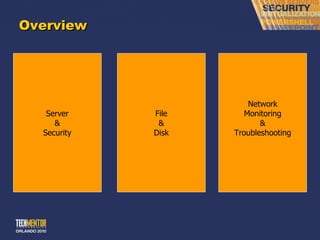
Overview Server & Security File & Disk Network Monitoring & Troubleshooting
Agenda Topics Part I: Server & Security Tools Part II: File & Disk Tools Part III: Network Monitoring & Troubleshooting Part IV: Additional Resources The intent of this session is to dump on you as many  FREE  tips and tool that I can in a short 75 minutes.
Where am I Gonna ’ Get all this Stuff? Process Explorer is freeware.  Download from:  http://www.sysinternals.com/Utilities/ProcessExplorer.html Memtest86 is shareware.  Download it from:  http://www.memtest86.com/ WSName.exe is freeware (though the author begs you to click a few of his Google ads if you like it) and can be downloaded from:  http://mystuff.clarke.co.nz/wsname.asp Systenance Index.dat Analyzer is freeware and can be downloaded from  http://www.systenance.com/indexdat.php    Although Diskeeper ’s flagship products are not freeware, Diskeeper Disk Performance Analyzer is.  You can get a copy of it from:  http://downloads.diskeeper.com/DiskPerformanceAnalyzer.exe   SafePasswd.com is an on-line resource accessible at  www.safepasswd.com .  KeePass is an open-source tool that can be downloaded from:  http://www.keepass.info/ LookInMyPC is advertising-driven, but freeware and can be downloaded from:  http://www.lookinmypc.com   NewSID is a freeware Sysinternals tool (man, they ’ve got lots of tools…).  Download NewSID at:  http://www.microsoft.com/technet/sysinternals/utilities/NewSid.mspx PSTools are freeware.  Download from:  http://www.microsoft.com/technet/sysinternals/utilities/PsTools.mspx SetAcl is freeware.  Download it from:  http://setacl.sourceforge.net AccessEnum is a SysInternals tool and is freeware.  Download it at:  http://www.microsoft.com/technet/sysinternals/utilities/AccessEnum.mspx You can access easyVMX from  http://www.easyvmx.com/easyvmx.shtml . OpenFiler is an open source tool that can be downloaded from:  http://www.openfiler.com WinSCP is a freeware tool and can be downloaded from:  http://winscp.net/eng/download.php WinDirStat  or  “Windows Directory Statistics” is a freeware tool and can be downloaded from:  http://windirstat.info/ DiskPart is part of the Windows Resource Kit. Daemon Tools appears to be freeware and available from:  http://www.daemon-tools.cc JDiskReport is freeware.  Download at:  http://www.jgoodies.com/freeware/jdiskreport/
Where am I Gonna ’ Get all this Stuff? Notepad++ supports 44 languages, including some other useful ones like shell, SQL, batch, KIXtart, and XML formats.  It can be downloaded from:  http://notepad-plus.sourceforge.net FPort is a freeware Foundstone tool that can be downloaded from:  http://www.foundstone.com/index.htm?subnav=resources/navigation.htm&subcontent=/resources/proddesc/fport.htm TCPView is freeware.  Download it from Sysinternals at:  http://www.microsoft.com/technet/sysinternals/utilities/TcpView.mspx SpiceWorks is ad-driven but freeware and can be downloaded from:  http://www.spiceworks.com The Dude is freeware, has potentially one of the best names of any tool in this session, and can be downloaded from:  http://www.mikrotik.com/thedude.php   Visionapp is a freeware product and can be downloaded from:  http://www.visionapp.com   Angry IP Scanner is a freeware tool and can be downloaded from:  http://www.angryziber.com   Wireshark is licensed as open source and can be downloaded from:  http://www.ethereal.com/ HowNetWorks is freeware available from the VMware site.  As it runs in a VMware virtual machine, it requires a version of VMware installed to host the virtual machine.  You can download it from:  http://www.vmware.com/vmtn/appliances/ M0n0wall can be downloaded either as a binary or as a pre-built VMware Appliance.  Either are easy to set up and use, though the appliance is a little easier/faster.  Download the binaries and documentation from:  http://m0n0.ch   Download the VMware appliance from:  http://www.vmware.com/vmtn/appliances/ Iometer  http://www.iometer.org/ Hyper-V Monitor Gadget  http://mindre.net/post/Hyper-V-Monitor-Gadget-for-Windows-Sidebar.aspx EventSentry Light  http://www.netikus.net/products_downloads.html SpecOps Software Gpupdate  http://www.specopssoft.com/products/specopsgpupdate/ ShellRunAs  http://technet.microsoft.com/en-us/sysinternals/cc300361.aspx Recuva  http://www.recuva.com/
Part I: Server & Security
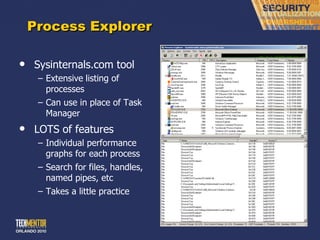
Process Explorer Sysinternals.com tool Extensive   listing of processes Can use in place of Task Manager LOTS of features Individual performance graphs for each process Search for files, handles, named pipes, etc Takes a little practice
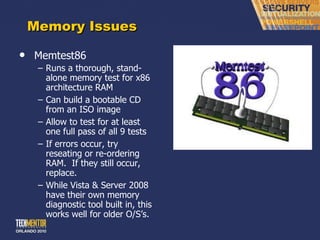
Memory Issues Memtest86 Runs a thorough, stand-alone memory test for x86 architecture RAM Can build a bootable CD from an ISO image Allow to test for at least one full pass of all 9 tests If errors occur, try reseating or re-ordering RAM.  If they still occur, replace. While Vista & Server 2008 have their own memory diagnostic tool built in, this works well for older O/S ’s.
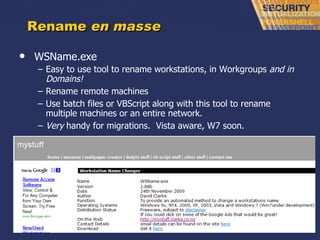
Rename  en masse WSName.exe Easy to use tool to rename workstations, in Workgroups  and in Domains! Rename remote machines Use batch files or VBScript along with this tool to rename multiple machines or an entire network. Very  handy for migrations.  Vista aware, W7 soon.
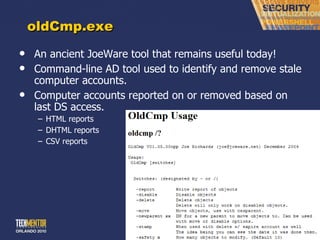
oldCmp.exe An ancient JoeWare tool that remains useful today! Command-line AD tool used to identify and remove stale computer accounts. Computer accounts reported on or removed based on last DS access. HTML reports DHTML reports CSV reports
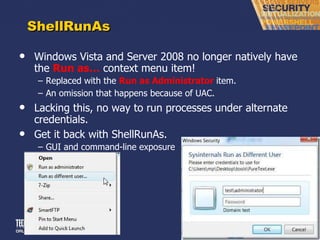
ShellRunAs Windows Vista and Server 2008 no longer natively have the  Run as…  context menu item! Replaced with the  Run as Administrator  item. An omission that happens because of UAC. Lacking this, no way to run processes under alternate credentials. Get it back with ShellRunAs. GUI and command-line exposure
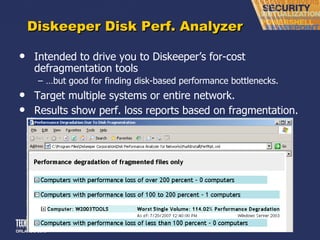
Diskeeper Disk Perf. Analyzer Intended to drive you to Diskeeper ’s for-cost defragmentation tools … but good for finding disk-based performance bottlenecks. Target multiple systems or entire network. Results show perf. loss reports based on fragmentation.
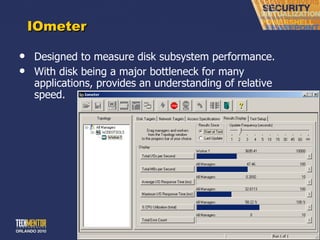
IOmeter Designed to measure disk subsystem performance. With disk being a major bottleneck for many applications, provides an understanding of relative speed.
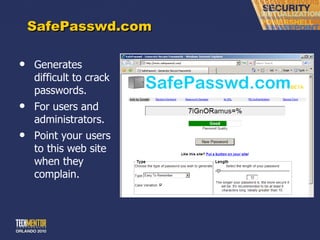
SafePasswd.com Generates difficult to crack passwords. For users and administrators. Point your users to this web site when they complain.
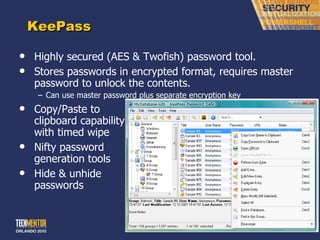
KeePass Highly secured (AES & Twofish) password tool. Stores passwords in encrypted format, requires master password to unlock the contents. Can use master password plus separate encryption key Copy/Paste to clipboard capability with timed wipe Nifty password generation tools Hide & unhide passwords
Completely Disable UAC UAC had great intentions, but let ’s be honest – it is truly annoying. Not that I ’m recommending you ever do this.  But if you wanted to completely disable UAC, split tokens, virtualization, and all the other new security features… Computer Configuration | Windows Settings | Security Settings | Local Policies | Security Options | User Account Control User Account Control:  Admin Approval Mode for the Built-in Administrator account (Disabled) User Account Control:  Behavior of the elevation prompt for administrators in Admin Approval Mode (Elevate without prompting) User Account Control:  Detect application installations and prompt for elevation (Disabled) User Account Control:  Only elevate executables that are signed and validated (Disabled) User Account Control:  Run all administrators in Admin Approval Mode (Disabled) User Account Control:  Switch to the secure desktop when prompting for elevation (Disabled) [This is under  “other”] User Account Control:  Only elevate UIAccess applications that are installed in secure locations (Disabled)
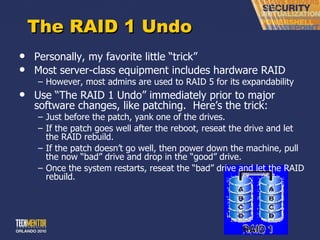
The RAID 1 Undo Personally, my favorite little  “trick” Most server-class equipment includes hardware RAID However, most admins are used to RAID 5 for its expandability Use  “The RAID 1 Undo” immediately prior to major software changes, like patching.  Here’s the trick: Just before the patch, yank one of the drives. If the patch goes well after the reboot, reseat the drive and let the RAID rebuild. If the patch doesn ’t go well, then power down the machine, pull the now “bad” drive and drop in the “good” drive. Once the system restarts, reseat the  “bad” drive and let the RAID rebuild.
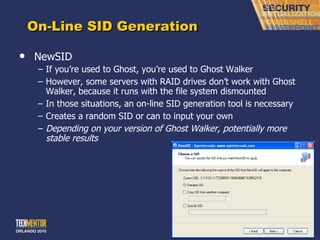
On-Line SID Generation NewSID If you ’re used to Ghost, you’re used to Ghost Walker However, some servers with RAID drives don ’t work with Ghost Walker, because it runs with the file system dismounted In those situations, an on-line SID generation tool is necessary Creates a random SID or can to input your own Depending on your version of Ghost Walker, potentially more stable results
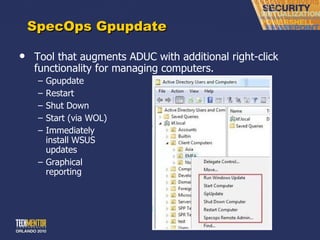
SpecOps Gpupdate Tool that augments ADUC with additional right-click functionality for managing computers. Gpupdate Restart Shut Down Start (via WOL) Immediately install WSUS updates Graphical reporting
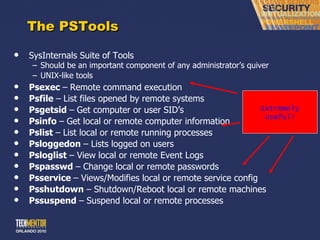
The PSTools SysInternals Suite of Tools Should be an important component of any administrator ’s quiver UNIX-like tools Psexec  –   Remote command execution Psfile  –   List files opened by remote systems Psgetsid  –   Get computer or user SID ’s Psinfo  –   Get local or remote computer information Pslist  –   List local or remote running processes Psloggedon  – Lists logged on users Psloglist  – View local or remote Event Logs Pspasswd  – Change local or remote passwords Psservice  – Views/Modifies local or remote service config Psshutdown  – Shutdown/Reboot local or remote machines Pssuspend  – Suspend local or remote processes Extremely Useful!
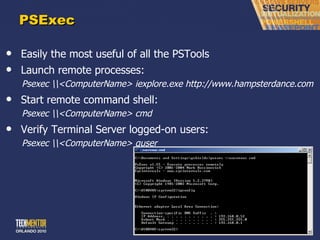
PSExec Easily the most useful of all the PSTools Launch remote processes: Psexec \\<ComputerName> iexplore.exe http://www.hampsterdance.com Start remote command shell: Psexec \\<ComputerName> cmd Verify Terminal Server logged-on users: Psexec \\<ComputerName> quser
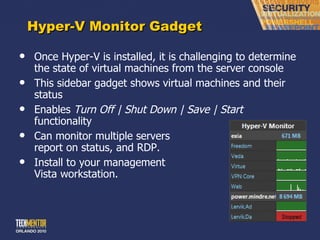
Hyper-V Monitor Gadget Once Hyper-V is installed, it is challenging to determine the state of virtual machines from the server console This sidebar gadget shows virtual machines and their status Enables  Turn Off | Shut Down | Save | Start  functionality Can monitor multiple servers report on status, and RDP. Install to your management Vista workstation.
Part II: File & Disk
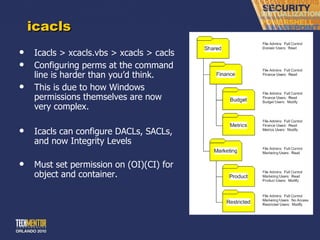
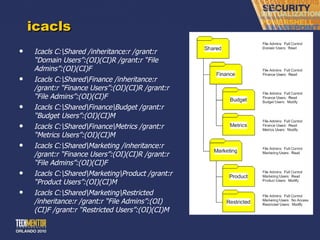
icacls Icacls > xcacls.vbs > xcacls > cacls Configuring perms at the command line is harder than you ’d think. This is due to how Windows permissions themselves are now very complex. Icacls can configure DACLs, SACLs, and now Integrity Levels Must set permission on (OI)(CI) for object and container.
icacls Icacls C:\Shared /inheritance:r /grant:r  “Domain Users”:(OI)(CI)R /grant:r “File Admins”:(OI)(CI)F Icacls C:\Shared\Finance /inheritance:r /grant:r  “Finance Users”:(OI)(CI)R /grant:r “File Admins”:(OI)(CI)F Icacls C:\Shared\Finance\Budget /grant:r  “Budget Users”:(OI)(CI)M Icacls C:\Shared\Finance\Metrics /grant:r  “Metrics Users”:(OI)(CI)M Icacls C:\Shared\Marketing /inheritance:r /grant:r  “Finance Users”:(OI)(CI)R /grant:r “File Admins”:(OI)(CI)F Icacls C:\Shared\Marketing\Product /grant:r  “Product Users”:(OI)(CI)M Icacls C:\Shared\Marketing\Restricted /inheritance:r /grant:r  “File Admins”:(OI)(CI)F /grant:r “Restricted Users”:(OI)(CI)M
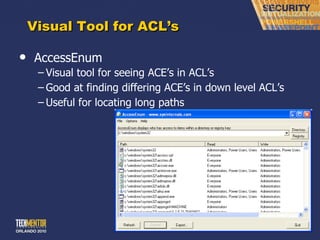
Visual Tool for ACL ’s AccessEnum Visual tool for seeing ACE ’s in ACL’s Good at finding differing ACE ’s in down level ACL’s Useful for locating long paths
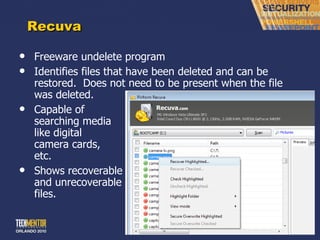
Recuva Freeware undelete program Identifies files that have been deleted and can be restored.  Does not need to be present when the file was deleted. Capable of searching media like digital camera cards, etc. Shows recoverable and unrecoverable files.
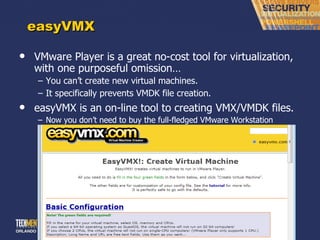
easyVMX VMware Player is a great no-cost tool for virtualization, with one purposeful omission… You can ’t create new virtual machines. It specifically prevents VMDK file creation. easyVMX is an on-line tool to creating VMX/VMDK files. Now you don ’t need to buy the full-fledged VMware Workstation product.
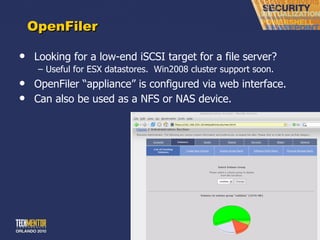
OpenFiler Looking for a low-end iSCSI target for a file server? Useful for ESX datastores.  Win2008 cluster support soon. OpenFiler  “appliance” is configured via web interface. Can also be used as a NFS or NAS device.
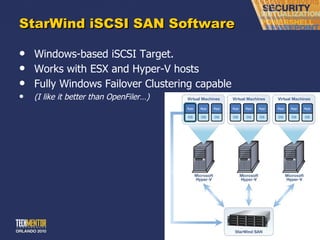
StarWind iSCSI SAN Software Windows-based iSCSI Target. Works with ESX and Hyper-V hosts Fully Windows Failover Clustering capable (I like it better than OpenFiler…)
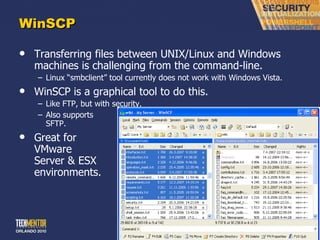
WinSCP Transferring files between UNIX/Linux and Windows machines is challenging from the command-line. Linux  “smbclient” tool currently does not work with Windows Vista. WinSCP is a graphical tool to do this. Like FTP, but with security. Also supports SFTP. Great for VMware Server & ESX environments.
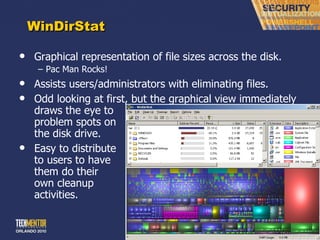
WinDirStat Graphical representation of file sizes across the disk. Pac Man Rocks! Assists users/administrators with eliminating files. Odd looking at first, but the graphical view immediately draws the eye to problem spots on the disk drive. Easy to distribute to users to have them do their own cleanup activities.
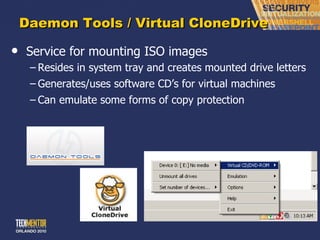
Daemon Tools / Virtual CloneDrive Service for mounting ISO images Resides in system tray and creates mounted drive letters Generates/uses software CD ’s for virtual machines Can emulate some forms of copy protection
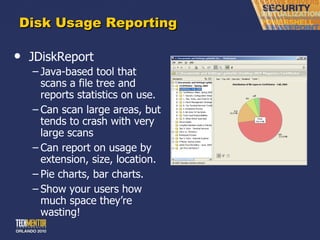
Disk Usage Reporting JDiskReport Java-based tool that scans a file tree and reports statistics on use. Can scan large areas, but tends to crash with very large scans Can report on usage by extension, size, location. Pie charts, bar charts. Show your users how much space they ’re wasting!
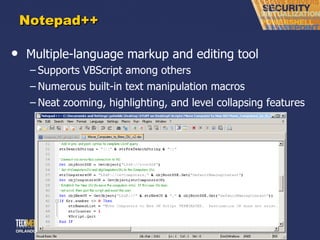
Notepad++ Multiple-language markup and editing tool Supports VBScript among others Numerous built-in text manipulation macros Neat zooming, highlighting, and level collapsing features
Part III: Network Monitoring & Troubleshooting
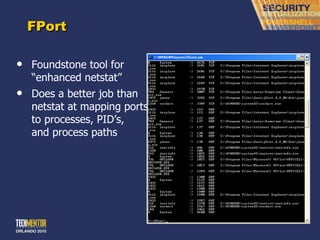
FPort Foundstone tool for  “enhanced netstat” Does a better job than netstat at mapping ports to processes, PID ’s,  and process paths
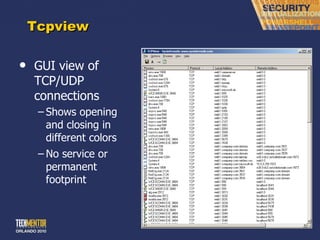
Tcpview GUI view of  TCP/UDP connections Shows opening and closing in different colors No service or permanent footprint
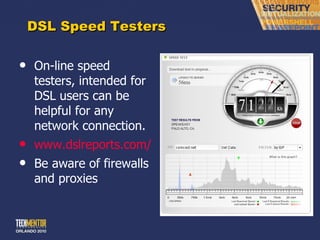
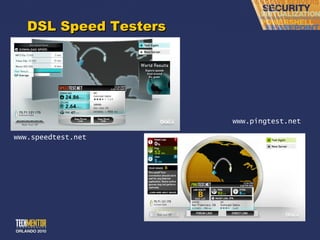
DSL Speed Testers On-line speed testers, intended for DSL users can be helpful for any network connection. www.dslreports.com/ stest Be aware of firewalls and proxies
DSL Speed Testers www.pingtest.net www.speedtest.net
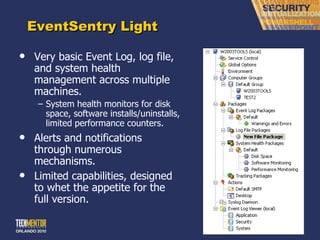
EventSentry Light Very basic Event Log, log file, and system health management across multiple machines. System health monitors for disk space, software installs/uninstalls, limited performance counters. Alerts and notifications through numerous mechanisms. Limited capabilities, designed to whet the appetite for the full version.
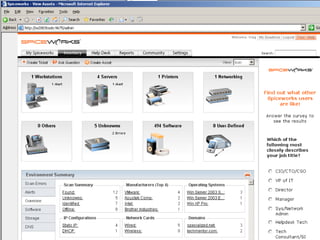
SpiceWorks Surprisingly full-featured multi-platform help desk/ management utility in a small 6M footprint. Ad-driven. Designed for the < 250 machine networks. Built-in help desk ticketing system. Built-in over-the-network automated inventory system. Built-in reporting system with canned and administrator-created reports with smartly-designed reports. Built-in remote control. Built-in SMS/email/alerting. Scanning can be resource intensive.
 
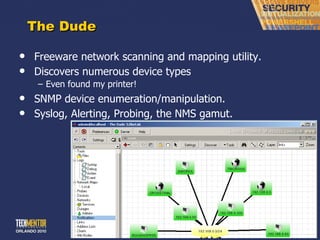
The Dude Freeware network scanning and mapping utility. Discovers numerous device types Even found my printer! SNMP device enumeration/manipulation. Syslog, Alerting, Probing, the NMS gamut.
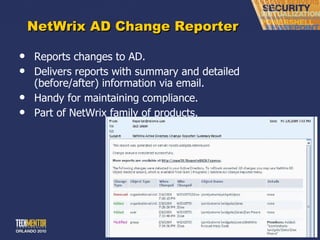
NetWrix AD Change Reporter Reports changes to AD. Delivers reports with summary and detailed (before/after) information via email. Handy for maintaining compliance. Part of NetWrix family of products.
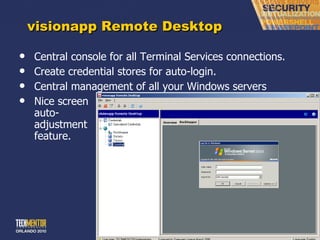
visionapp Remote Desktop Central console for all Terminal Services connections. Create credential stores for auto-login. Central management of all your Windows servers Nice screen auto- adjustment feature.
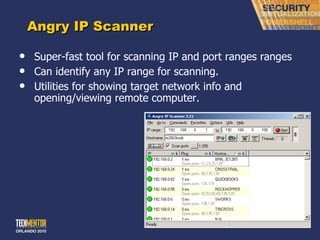
Angry IP Scanner Super-fast tool for scanning IP and port ranges ranges Can identify any IP range for scanning. Utilities for showing target network info and opening/viewing remote computer.
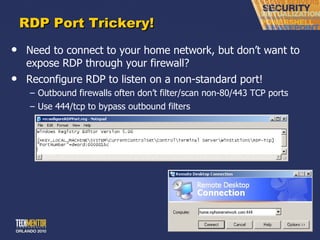
RDP Port Trickery! Need to connect to your home network, but don ’t want to expose RDP through your firewall? Reconfigure RDP to listen on a non-standard port! Outbound firewalls often don ’t filter/scan non-80/443 TCP ports Use 444/tcp to bypass outbound filters
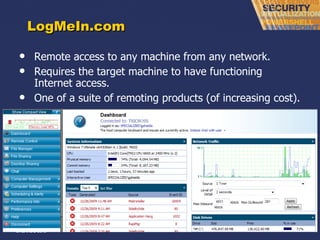
LogMeIn.com Remote access to any machine from any network. Requires the target machine to have functioning Internet access. One of a suite of remoting products (of increasing cost).
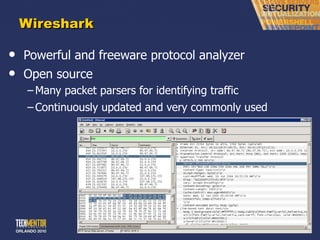
Wireshark Powerful and freeware protocol analyzer Open source Many packet parsers for identifying traffic Continuously updated and very commonly used
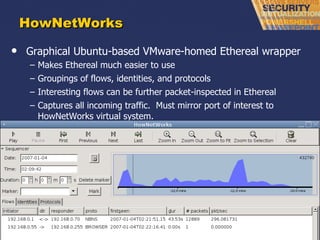
HowNetWorks Graphical Ubuntu-based VMware-homed Ethereal wrapper Makes Ethereal much easier to use Groupings of flows, identities, and protocols Interesting flows can be further packet-inspected in Ethereal Captures all incoming traffic.  Must mirror port of interest to HowNetWorks virtual system.
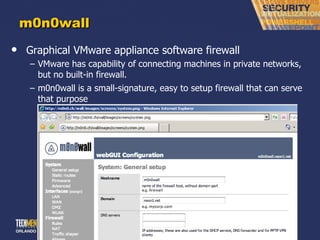
m0n0wall Graphical VMware appliance software firewall VMware has capability of connecting machines in private networks, but no built-in firewall. m0n0wall is a small-signature, easy to setup firewall that can serve that purpose
Part IV: Additional Resources
Forums for Help! http://www.realtime-windowsserver.com http://4sysops.com/archives/category/free-tools http://www.mvps.org http://www.appdeploy.com http://www.redmondmag.com http://www.ConcentratedTech.com
 
This slide deck was used in one of our many conference presentations. We hope you enjoy it, and invite you to use it within your own organization however you like. For more information on our company, including information on private classes and upcoming conference appearances, please visit our Web site,  www.ConcentratedTech.com .  For links to newly-posted decks, follow us on Twitter: @concentrateddon or @concentratdgreg This work is copyright ©Concentrated Technology, LLC

Free tools for win server administration

  • 1.
    The Best FreeTools for Windows Server Administration Greg Shields, MVP, vExpert Head Geek, Concentrated Technology www.ConcentratedTech.com
  • 2.
    This slide deckwas used in one of our many conference presentations. We hope you enjoy it, and invite you to use it within your own organization however you like. For more information on our company, including information on private classes and upcoming conference appearances, please visit our Web site, www.ConcentratedTech.com . For links to newly-posted decks, follow us on Twitter: @concentrateddon or @concentratdgreg This work is copyright ©Concentrated Technology, LLC
  • 3.
    Overview Server &Security File & Disk Network Monitoring & Troubleshooting
  • 4.
    Agenda Topics PartI: Server & Security Tools Part II: File & Disk Tools Part III: Network Monitoring & Troubleshooting Part IV: Additional Resources The intent of this session is to dump on you as many FREE tips and tool that I can in a short 75 minutes.
  • 5.
    Where am IGonna ’ Get all this Stuff? Process Explorer is freeware. Download from: http://www.sysinternals.com/Utilities/ProcessExplorer.html Memtest86 is shareware. Download it from: http://www.memtest86.com/ WSName.exe is freeware (though the author begs you to click a few of his Google ads if you like it) and can be downloaded from: http://mystuff.clarke.co.nz/wsname.asp Systenance Index.dat Analyzer is freeware and can be downloaded from http://www.systenance.com/indexdat.php  Although Diskeeper ’s flagship products are not freeware, Diskeeper Disk Performance Analyzer is. You can get a copy of it from: http://downloads.diskeeper.com/DiskPerformanceAnalyzer.exe SafePasswd.com is an on-line resource accessible at www.safepasswd.com . KeePass is an open-source tool that can be downloaded from: http://www.keepass.info/ LookInMyPC is advertising-driven, but freeware and can be downloaded from: http://www.lookinmypc.com NewSID is a freeware Sysinternals tool (man, they ’ve got lots of tools…). Download NewSID at: http://www.microsoft.com/technet/sysinternals/utilities/NewSid.mspx PSTools are freeware. Download from: http://www.microsoft.com/technet/sysinternals/utilities/PsTools.mspx SetAcl is freeware. Download it from: http://setacl.sourceforge.net AccessEnum is a SysInternals tool and is freeware. Download it at: http://www.microsoft.com/technet/sysinternals/utilities/AccessEnum.mspx You can access easyVMX from http://www.easyvmx.com/easyvmx.shtml . OpenFiler is an open source tool that can be downloaded from: http://www.openfiler.com WinSCP is a freeware tool and can be downloaded from: http://winscp.net/eng/download.php WinDirStat or “Windows Directory Statistics” is a freeware tool and can be downloaded from: http://windirstat.info/ DiskPart is part of the Windows Resource Kit. Daemon Tools appears to be freeware and available from: http://www.daemon-tools.cc JDiskReport is freeware. Download at: http://www.jgoodies.com/freeware/jdiskreport/
  • 6.
    Where am IGonna ’ Get all this Stuff? Notepad++ supports 44 languages, including some other useful ones like shell, SQL, batch, KIXtart, and XML formats. It can be downloaded from: http://notepad-plus.sourceforge.net FPort is a freeware Foundstone tool that can be downloaded from: http://www.foundstone.com/index.htm?subnav=resources/navigation.htm&subcontent=/resources/proddesc/fport.htm TCPView is freeware. Download it from Sysinternals at: http://www.microsoft.com/technet/sysinternals/utilities/TcpView.mspx SpiceWorks is ad-driven but freeware and can be downloaded from: http://www.spiceworks.com The Dude is freeware, has potentially one of the best names of any tool in this session, and can be downloaded from: http://www.mikrotik.com/thedude.php Visionapp is a freeware product and can be downloaded from: http://www.visionapp.com Angry IP Scanner is a freeware tool and can be downloaded from: http://www.angryziber.com Wireshark is licensed as open source and can be downloaded from: http://www.ethereal.com/ HowNetWorks is freeware available from the VMware site. As it runs in a VMware virtual machine, it requires a version of VMware installed to host the virtual machine. You can download it from: http://www.vmware.com/vmtn/appliances/ M0n0wall can be downloaded either as a binary or as a pre-built VMware Appliance. Either are easy to set up and use, though the appliance is a little easier/faster. Download the binaries and documentation from: http://m0n0.ch Download the VMware appliance from: http://www.vmware.com/vmtn/appliances/ Iometer http://www.iometer.org/ Hyper-V Monitor Gadget http://mindre.net/post/Hyper-V-Monitor-Gadget-for-Windows-Sidebar.aspx EventSentry Light http://www.netikus.net/products_downloads.html SpecOps Software Gpupdate http://www.specopssoft.com/products/specopsgpupdate/ ShellRunAs http://technet.microsoft.com/en-us/sysinternals/cc300361.aspx Recuva http://www.recuva.com/
  • 7.
    Part I: Server& Security
  • 8.
    Process Explorer Sysinternals.comtool Extensive listing of processes Can use in place of Task Manager LOTS of features Individual performance graphs for each process Search for files, handles, named pipes, etc Takes a little practice
  • 9.
    Memory Issues Memtest86Runs a thorough, stand-alone memory test for x86 architecture RAM Can build a bootable CD from an ISO image Allow to test for at least one full pass of all 9 tests If errors occur, try reseating or re-ordering RAM. If they still occur, replace. While Vista & Server 2008 have their own memory diagnostic tool built in, this works well for older O/S ’s.
  • 10.
    Rename enmasse WSName.exe Easy to use tool to rename workstations, in Workgroups and in Domains! Rename remote machines Use batch files or VBScript along with this tool to rename multiple machines or an entire network. Very handy for migrations. Vista aware, W7 soon.
  • 11.
    oldCmp.exe An ancientJoeWare tool that remains useful today! Command-line AD tool used to identify and remove stale computer accounts. Computer accounts reported on or removed based on last DS access. HTML reports DHTML reports CSV reports
  • 12.
    ShellRunAs Windows Vistaand Server 2008 no longer natively have the Run as… context menu item! Replaced with the Run as Administrator item. An omission that happens because of UAC. Lacking this, no way to run processes under alternate credentials. Get it back with ShellRunAs. GUI and command-line exposure
  • 13.
    Diskeeper Disk Perf.Analyzer Intended to drive you to Diskeeper ’s for-cost defragmentation tools … but good for finding disk-based performance bottlenecks. Target multiple systems or entire network. Results show perf. loss reports based on fragmentation.
  • 14.
    IOmeter Designed tomeasure disk subsystem performance. With disk being a major bottleneck for many applications, provides an understanding of relative speed.
  • 15.
    SafePasswd.com Generates difficultto crack passwords. For users and administrators. Point your users to this web site when they complain.
  • 16.
    KeePass Highly secured(AES & Twofish) password tool. Stores passwords in encrypted format, requires master password to unlock the contents. Can use master password plus separate encryption key Copy/Paste to clipboard capability with timed wipe Nifty password generation tools Hide & unhide passwords
  • 17.
    Completely Disable UACUAC had great intentions, but let ’s be honest – it is truly annoying. Not that I ’m recommending you ever do this. But if you wanted to completely disable UAC, split tokens, virtualization, and all the other new security features… Computer Configuration | Windows Settings | Security Settings | Local Policies | Security Options | User Account Control User Account Control: Admin Approval Mode for the Built-in Administrator account (Disabled) User Account Control: Behavior of the elevation prompt for administrators in Admin Approval Mode (Elevate without prompting) User Account Control: Detect application installations and prompt for elevation (Disabled) User Account Control: Only elevate executables that are signed and validated (Disabled) User Account Control: Run all administrators in Admin Approval Mode (Disabled) User Account Control: Switch to the secure desktop when prompting for elevation (Disabled) [This is under “other”] User Account Control: Only elevate UIAccess applications that are installed in secure locations (Disabled)
  • 18.
    The RAID 1Undo Personally, my favorite little “trick” Most server-class equipment includes hardware RAID However, most admins are used to RAID 5 for its expandability Use “The RAID 1 Undo” immediately prior to major software changes, like patching. Here’s the trick: Just before the patch, yank one of the drives. If the patch goes well after the reboot, reseat the drive and let the RAID rebuild. If the patch doesn ’t go well, then power down the machine, pull the now “bad” drive and drop in the “good” drive. Once the system restarts, reseat the “bad” drive and let the RAID rebuild.
  • 19.
    On-Line SID GenerationNewSID If you ’re used to Ghost, you’re used to Ghost Walker However, some servers with RAID drives don ’t work with Ghost Walker, because it runs with the file system dismounted In those situations, an on-line SID generation tool is necessary Creates a random SID or can to input your own Depending on your version of Ghost Walker, potentially more stable results
  • 20.
    SpecOps Gpupdate Toolthat augments ADUC with additional right-click functionality for managing computers. Gpupdate Restart Shut Down Start (via WOL) Immediately install WSUS updates Graphical reporting
  • 21.
    The PSTools SysInternalsSuite of Tools Should be an important component of any administrator ’s quiver UNIX-like tools Psexec – Remote command execution Psfile – List files opened by remote systems Psgetsid – Get computer or user SID ’s Psinfo – Get local or remote computer information Pslist – List local or remote running processes Psloggedon – Lists logged on users Psloglist – View local or remote Event Logs Pspasswd – Change local or remote passwords Psservice – Views/Modifies local or remote service config Psshutdown – Shutdown/Reboot local or remote machines Pssuspend – Suspend local or remote processes Extremely Useful!
  • 22.
    PSExec Easily themost useful of all the PSTools Launch remote processes: Psexec \\<ComputerName> iexplore.exe http://www.hampsterdance.com Start remote command shell: Psexec \\<ComputerName> cmd Verify Terminal Server logged-on users: Psexec \\<ComputerName> quser
  • 23.
    Hyper-V Monitor GadgetOnce Hyper-V is installed, it is challenging to determine the state of virtual machines from the server console This sidebar gadget shows virtual machines and their status Enables Turn Off | Shut Down | Save | Start functionality Can monitor multiple servers report on status, and RDP. Install to your management Vista workstation.
  • 24.
  • 25.
    icacls Icacls >xcacls.vbs > xcacls > cacls Configuring perms at the command line is harder than you ’d think. This is due to how Windows permissions themselves are now very complex. Icacls can configure DACLs, SACLs, and now Integrity Levels Must set permission on (OI)(CI) for object and container.
  • 26.
    icacls Icacls C:\Shared/inheritance:r /grant:r “Domain Users”:(OI)(CI)R /grant:r “File Admins”:(OI)(CI)F Icacls C:\Shared\Finance /inheritance:r /grant:r “Finance Users”:(OI)(CI)R /grant:r “File Admins”:(OI)(CI)F Icacls C:\Shared\Finance\Budget /grant:r “Budget Users”:(OI)(CI)M Icacls C:\Shared\Finance\Metrics /grant:r “Metrics Users”:(OI)(CI)M Icacls C:\Shared\Marketing /inheritance:r /grant:r “Finance Users”:(OI)(CI)R /grant:r “File Admins”:(OI)(CI)F Icacls C:\Shared\Marketing\Product /grant:r “Product Users”:(OI)(CI)M Icacls C:\Shared\Marketing\Restricted /inheritance:r /grant:r “File Admins”:(OI)(CI)F /grant:r “Restricted Users”:(OI)(CI)M
  • 27.
    Visual Tool forACL ’s AccessEnum Visual tool for seeing ACE ’s in ACL’s Good at finding differing ACE ’s in down level ACL’s Useful for locating long paths
  • 28.
    Recuva Freeware undeleteprogram Identifies files that have been deleted and can be restored. Does not need to be present when the file was deleted. Capable of searching media like digital camera cards, etc. Shows recoverable and unrecoverable files.
  • 29.
    easyVMX VMware Playeris a great no-cost tool for virtualization, with one purposeful omission… You can ’t create new virtual machines. It specifically prevents VMDK file creation. easyVMX is an on-line tool to creating VMX/VMDK files. Now you don ’t need to buy the full-fledged VMware Workstation product.
  • 30.
    OpenFiler Looking fora low-end iSCSI target for a file server? Useful for ESX datastores. Win2008 cluster support soon. OpenFiler “appliance” is configured via web interface. Can also be used as a NFS or NAS device.
  • 31.
    StarWind iSCSI SANSoftware Windows-based iSCSI Target. Works with ESX and Hyper-V hosts Fully Windows Failover Clustering capable (I like it better than OpenFiler…)
  • 32.
    WinSCP Transferring filesbetween UNIX/Linux and Windows machines is challenging from the command-line. Linux “smbclient” tool currently does not work with Windows Vista. WinSCP is a graphical tool to do this. Like FTP, but with security. Also supports SFTP. Great for VMware Server & ESX environments.
  • 33.
    WinDirStat Graphical representationof file sizes across the disk. Pac Man Rocks! Assists users/administrators with eliminating files. Odd looking at first, but the graphical view immediately draws the eye to problem spots on the disk drive. Easy to distribute to users to have them do their own cleanup activities.
  • 34.
    Daemon Tools /Virtual CloneDrive Service for mounting ISO images Resides in system tray and creates mounted drive letters Generates/uses software CD ’s for virtual machines Can emulate some forms of copy protection
  • 35.
    Disk Usage ReportingJDiskReport Java-based tool that scans a file tree and reports statistics on use. Can scan large areas, but tends to crash with very large scans Can report on usage by extension, size, location. Pie charts, bar charts. Show your users how much space they ’re wasting!
  • 36.
    Notepad++ Multiple-language markupand editing tool Supports VBScript among others Numerous built-in text manipulation macros Neat zooming, highlighting, and level collapsing features
  • 37.
    Part III: NetworkMonitoring & Troubleshooting
  • 38.
    FPort Foundstone toolfor “enhanced netstat” Does a better job than netstat at mapping ports to processes, PID ’s, and process paths
  • 39.
    Tcpview GUI viewof TCP/UDP connections Shows opening and closing in different colors No service or permanent footprint
  • 40.
    DSL Speed TestersOn-line speed testers, intended for DSL users can be helpful for any network connection. www.dslreports.com/ stest Be aware of firewalls and proxies
  • 41.
    DSL Speed Testerswww.pingtest.net www.speedtest.net
  • 42.
    EventSentry Light Verybasic Event Log, log file, and system health management across multiple machines. System health monitors for disk space, software installs/uninstalls, limited performance counters. Alerts and notifications through numerous mechanisms. Limited capabilities, designed to whet the appetite for the full version.
  • 43.
    SpiceWorks Surprisingly full-featuredmulti-platform help desk/ management utility in a small 6M footprint. Ad-driven. Designed for the < 250 machine networks. Built-in help desk ticketing system. Built-in over-the-network automated inventory system. Built-in reporting system with canned and administrator-created reports with smartly-designed reports. Built-in remote control. Built-in SMS/email/alerting. Scanning can be resource intensive.
  • 44.
  • 45.
    The Dude Freewarenetwork scanning and mapping utility. Discovers numerous device types Even found my printer! SNMP device enumeration/manipulation. Syslog, Alerting, Probing, the NMS gamut.
  • 46.
    NetWrix AD ChangeReporter Reports changes to AD. Delivers reports with summary and detailed (before/after) information via email. Handy for maintaining compliance. Part of NetWrix family of products.
  • 47.
    visionapp Remote DesktopCentral console for all Terminal Services connections. Create credential stores for auto-login. Central management of all your Windows servers Nice screen auto- adjustment feature.
  • 48.
    Angry IP ScannerSuper-fast tool for scanning IP and port ranges ranges Can identify any IP range for scanning. Utilities for showing target network info and opening/viewing remote computer.
  • 49.
    RDP Port Trickery!Need to connect to your home network, but don ’t want to expose RDP through your firewall? Reconfigure RDP to listen on a non-standard port! Outbound firewalls often don ’t filter/scan non-80/443 TCP ports Use 444/tcp to bypass outbound filters
  • 50.
    LogMeIn.com Remote accessto any machine from any network. Requires the target machine to have functioning Internet access. One of a suite of remoting products (of increasing cost).
  • 51.
    Wireshark Powerful andfreeware protocol analyzer Open source Many packet parsers for identifying traffic Continuously updated and very commonly used
  • 52.
    HowNetWorks Graphical Ubuntu-basedVMware-homed Ethereal wrapper Makes Ethereal much easier to use Groupings of flows, identities, and protocols Interesting flows can be further packet-inspected in Ethereal Captures all incoming traffic. Must mirror port of interest to HowNetWorks virtual system.
  • 53.
    m0n0wall Graphical VMwareappliance software firewall VMware has capability of connecting machines in private networks, but no built-in firewall. m0n0wall is a small-signature, easy to setup firewall that can serve that purpose
  • 54.
  • 55.
    Forums for Help!http://www.realtime-windowsserver.com http://4sysops.com/archives/category/free-tools http://www.mvps.org http://www.appdeploy.com http://www.redmondmag.com http://www.ConcentratedTech.com
  • 56.
  • 57.
    This slide deckwas used in one of our many conference presentations. We hope you enjoy it, and invite you to use it within your own organization however you like. For more information on our company, including information on private classes and upcoming conference appearances, please visit our Web site, www.ConcentratedTech.com . For links to newly-posted decks, follow us on Twitter: @concentrateddon or @concentratdgreg This work is copyright ©Concentrated Technology, LLC

Editor's Notes

  • #2 MGB 2003 © 2003 Microsoft Corporation. All rights reserved. This presentation is for informational purposes only. Microsoft makes no warranties, express or implied, in this summary.
  • #9 Process Explorer is freeware. Download from: http://www.sysinternals.com/Utilities/ProcessExplorer.html
  • #10 Memtest86 is shareware. Download it from: http://www.memtest86.com/
  • #11 WSName.exe is freeware (though the author begs you to click a few of his Google ads if you like it) and can be downloaded from: http://mystuff.clarke.co.nz/wsname.asp
  • #14 Although Diskeeper ’s flagship products are not freeware, Diskeeper Disk Performance Analyzer is. You can get a copy of it from: http://downloads.diskeeper.com/DiskPerformanceAnalyzer.exe
  • #16 SafePasswd.com is an on-line resource accessible at www.safepasswd.com .
  • #17 KeePass is an open-source tool that can be downloaded from: http://www.keepass.info/ Password: Mtn password
  • #18 The only one you really need to disable is the User Account Control: Behavior of the elevation prompt for administrators in Admin Approval Mode (Elevate without prompting) The others are just gravy.
  • #20 NewSID is a freeware Sysinternals tool (man, they ’ve got lots of tools…). Download NewSID at: http://www.microsoft.com/technet/sysinternals/utilities/NewSid.mspx
  • #22 PSTools are freeware. Download from: http://www.microsoft.com/technet/sysinternals/utilities/PsTools.mspx
  • #23 PSTools are freeware. Download from: http://www.microsoft.com/technet/sysinternals/utilities/PsTools.mspx
  • #26 SetAcl is freeware. Download it from: http://setacl.sourceforge.net
  • #27 SetAcl is freeware. Download it from: http://setacl.sourceforge.net
  • #28 AccessEnum is a SysInternals tool and is freeware. Download it at: http://www.microsoft.com/technet/sysinternals/utilities/AccessEnum.mspx
  • #30 You can access easyVMX from http://www.easyvmx.com/easyvmx.shtml .
  • #31 OpenFiler is an open source tool that can be downloaded from: http://www.openfiler.com Doesn ’t do Windows clusters.
  • #33 WinSCP is a freeware tool and can be downloaded from: http://winscp.net/eng/download.php
  • #34 WinDirStat or “Windows Directory Statistics” is a freeware tool and can be downloaded from: http://windirstat.info/
  • #35 Daemon Tools appears to be freeware and available from: http://www.daemon-tools.cc The current version comes with some nasty bundling.
  • #36 JDiskReport is freeware. Download at: http://www.jgoodies.com/freeware/jdiskreport/
  • #37 Notepad++ supports 44 languages, including some other useful ones like shell, SQL, batch, KIXtart, and XML formats. It can be downloaded from: http://notepad-plus.sourceforge.net Mention VBSEdit &amp; Primalscript
  • #39 FPort is a freeware Foundstone tool that can be downloaded from: http://www.foundstone.com/index.htm?subnav=resources/navigation.htm&amp;subcontent=/resources/proddesc/fport.htm Personally, I really like the layout of this tool better than some of the other port scanners. Cannot demo because this doesn ’t like domain controllers.
  • #40 TCPView is freeware. Download it from Sysinternals at: http://www.microsoft.com/technet/sysinternals/utilities/TcpView.mspx
  • #41 The DSL Reports speed tester is an on-line freeware tool. Limited numbers of users can simultaneously connect at www.dslreports.com/stest .
  • #42 The DSL Reports speed tester is an on-line freeware tool. Limited numbers of users can simultaneously connect at www.dslreports.com/stest .
  • #44 Compliments: Matthew Hall et al SpiceWorks is ad-driven but freeware and can be downloaded from: http://www.spiceworks.com Click on icon in system tray. gshields@redmondmag.com / paige3
  • #45 Compliments: Matthew Hall et al SpiceWorks is ad-driven but freeware and can be downloaded from: http://www.spiceworks.com
  • #46 Compliments: Bruce Brown The Dude is freeware, has potentially one of the best names of any tool in this session, and can be downloaded from: http://www.mikrotik.com/thedude.php If you ’re interested in learning more about the benefits of proactive network management and what you need in a good NMS, check out my free e-book “The Shortcut Guide to Network Management for the Mid-Market”. You can download your copy at: http://nexus.realtimepublishers.com/SGNMM.htm
  • #48 Compliments: Alan Kass et al (there were lots of people who recommended this product) Visionapp is a freeware product and can be downloaded from: http://www.visionapp.com
  • #49 Compliments: Dave Oliver Angry IP Scanner is a freeware tool and can be downloaded from: http://www.angryziber.com
  • #51 LogMeIn is a tool that can be downloaded from LogMeIn.com. It is one of several tools they have. The Free version of LogMeIn has the fewest features, but for small networks it will do what you need. To consolidate or centrally manage remote desktops, consider one of their other tools.
  • #52 We could do an entire class on just this one tool. The parsers for delving into each packet are useful. Make sure when you ’re using tools like this that all unnecessary network services are disabled or filtered out. Just a few seconds of capture can generate a log of dozens or hundreds of pages. It gets difficult to drill down into exactly what you want through all that mess. Ethereal is licensed as open source and can be downloaded from: http://www.ethereal.com/
  • #53 HowNetWorks was the winner of last year ’s $100,000 VMware Appliance Challenge. It is freeware available from the VMware site. As it runs in a VMware virtual machine, it requires a version of VMware installed to host the virtual machine. You can download it from: http://www.vmware.com/vmtn/appliances/
  • #54 M0n0wall can be downloaded either as a binary or as a pre-built VMware Appliance. Either are easy to set up and use, though the appliance is a little easier/faster. Download the binaries and documentation from: http://m0n0.ch Download the VMware appliance from: http://www.vmware.com/vmtn/appliances/