Content
1. Decision Making
2. Loops
3. Break and Continue Statement
4. Switch… case Statement
5. goto and label Statement
1.Decision Making
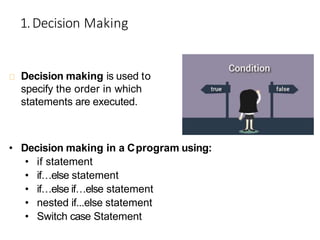
Decision making is used to
specify the order in which
statements are executed.
• Decision making in a Cprogram using:
• if statement
• if…else statement
• if…else if…else statement
• nested if...else statement
• Switch case Statement
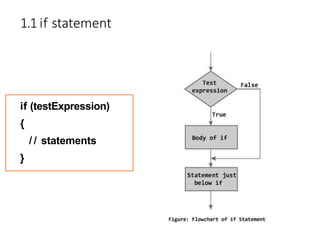
1.1 if statement
if (testExpression)
{
/ / statements
}
Example:if statement
/ / Program to display a number if user enters negativenumber
/ / If user enters positive number, that number won't be displayed
#include <stdio.h>
int main()
{
int number;
printf("Enter an integer: ");
scanf("%d", &number);
/ / Test expression is true if number is lessthan 0
if (number < 0){
}
printf("You entered %d.n", number);
printf("The if statement is easy.");
}
return 0;
1.2 if...else statement
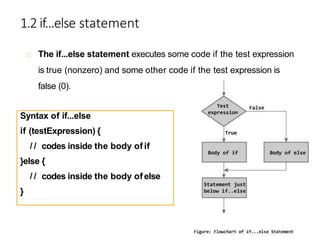
The if...else statement executes some code if the test expression
is true (nonzero) and some other code if the test expression is
false (0).
Syntax of if...else
if (testExpression) {
/ / codes inside the body of if
}else {
/ / codes inside the body of else
}
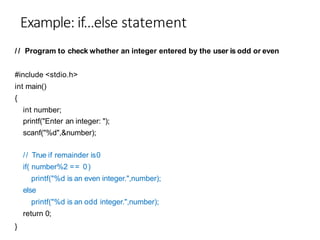
Example: if...else statement
/ / Program to check whether an integer entered by the user is odd or even
#include <stdio.h>
int main()
{
int number;
printf("Enter an integer: ");
scanf("%d",&number);
// True if remainder is0
if( number%2 == 0)
printf("%d is an even integer.",number);
else
printf("%d is an odd integer.",number);
return 0;
}
1.3 if...else if....else Statement
The if...else statement executes two different codes
depending upon whether the test expression is true or false.
Sometimes, a choice has to be made from more than 2
possibilities.
The if...else if…else statement allows you to check for
multiple test expressions and execute different codes for
more than two conditions.
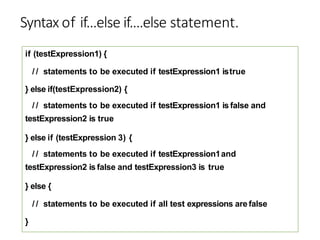
Syntax of if...else if....else statement.
if (testExpression1) {
/ / statements to be executed if testExpression1 istrue
} else if(testExpression2) {
/ / statements to be executed if testExpression1 is false and
testExpression2 is true
} else if (testExpression 3) {
/ / statements to be executed if testExpression1and
testExpression2 is false and testExpression3 is true
} else {
/ / statements to be executed if all test expressions are false
}
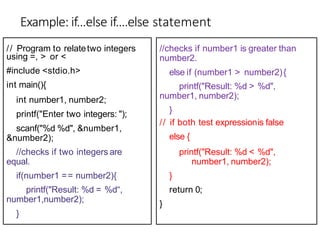
Example: if...else if....else statement
using =, > or <
#include <stdio.h>
int main(){
int number1, number2;
printf("Enter two integers: ");
scanf("%d %d", &number1,
&number2);
//checks if two integers are
equal.
if(number1 == number2){
printf("Result: %d = %d“,
number1,number2);
}
// Program to relatetwo integers //checks if number1 is greater than
number2.
else if (number1 > number2){
printf("Result: %d > %d",
number1, number2);
}
// if both test expressionis false
else {
printf("Result: %d < %d",
number1, number2);
}
return 0;
}
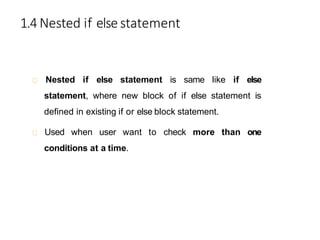
1.4 Nested if elsestatement
Nested if else statement is same like if else
statement, where new block of if else statement is
defined in existing if or else block statement.
Used when user want to check more than one
conditions at a time.
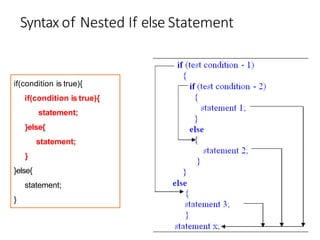
Syntax of Nested If else Statement
if(condition is true){
statement;
}else{
statement;
}
}else{
statement;
}
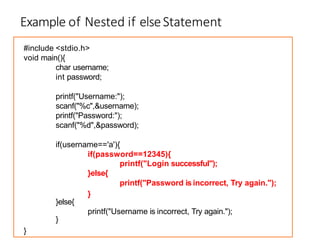
Example of Nested if elseStatement
#include <stdio.h>
void main(){
char username;
int password;
printf("Username:");
scanf("%c",&username);
printf("Password:");
scanf("%d",&password);
if(username=='a'){
if(password==12345){
}else{
printf("Login successful");
printf("Password is incorrect, Try again.");
}else{
}
}
printf("Username is incorrect, Try again.");
}
2.Loops
Loops are used in programming to repeat a specific block until some end
condition is met.
There are three loops in C programming:
o for loop
o while loop
o do...while loop
o Nested loops
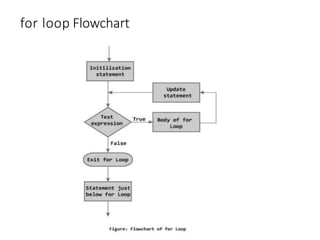
2.1 for Loop
The syntax of a for loop is:
for (initializationStatement; testExpression; updateStatement)
{
/ / codes
}
for loop Flowchart
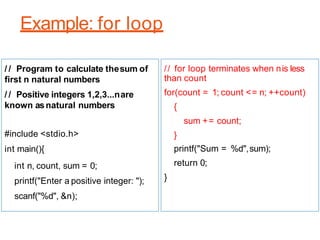
Example: for loop
/ / Program to calculate thesum of
first n natural numbers
/ / Positive integers 1,2,3...nare
known asnatural numbers
#include <stdio.h>
int main(){
int n, count, sum = 0;
printf("Enter a positive integer: ");
scanf("%d", &n);
// for loop terminates when nis less
than count
for(count = 1; count <= n; ++count)
{
sum += count;
}
printf("Sum = %d",sum);
return 0;
}
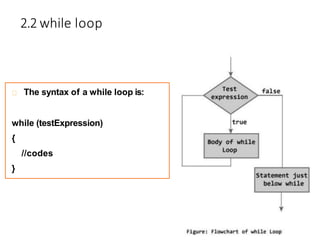
2.2 while loop
The syntax of a while loop is:
while (testExpression)
{
//codes
}
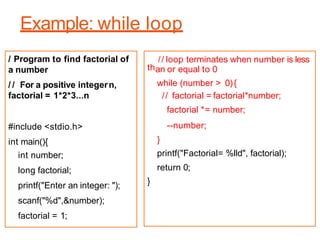
Example: while loop
/ Program to find factorial of
a number
/ / For a positive integern,
factorial = 1*2*3...n
#include <stdio.h>
int main(){
int number;
long factorial;
printf("Enter an integer: ");
scanf("%d",&number);
factorial = 1;
th
// loop terminates when number is less
an or equal to 0
while (number > 0){
// factorial = factorial*number;
factorial *= number;
--number;
}
printf("Factorial= %lld", factorial);
return 0;
}
2.3 do...while loop
The do..while loop is similar to the while loop with one
important difference.
The body of do...while loop is executed once, before
checking the test expression.
The do...while loop is executed at least once.
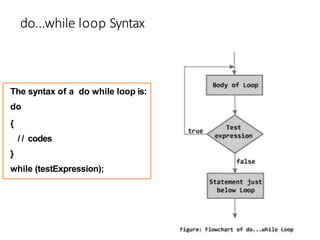
do...while loop Syntax
The syntax of a do while loop is:
do
{
/ / codes
}
while (testExpression);
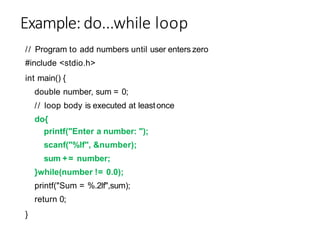
Example: do...while loop
// Program to add numbers until user enters zero
#include <stdio.h>
int main() {
double number, sum = 0;
// loop body is executed at leastonce
do{
printf("Enter a number: ");
scanf("%lf", &number);
sum += number;
}while(number != 0.0);
printf("Sum = %.2lf",sum);
return 0;
}
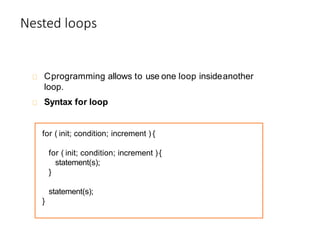
Nested loops
Cprogramming allows to use one loop insideanother
loop.
Syntax for loop
for ( init; condition; increment ) {
statement(s);
}
statement(s);
}
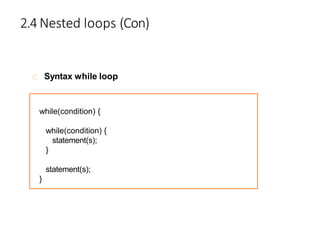
2.4 Nested loops (Con)
Syntax while loop
while(condition) {
while(condition) {
statement(s);
}
statement(s);
}
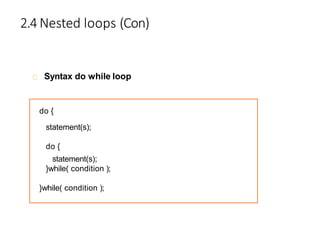
2.4 Nested loops (Con)
Syntax do while loop
do {
statement(s);
do {
statement(s);
}while( condition );
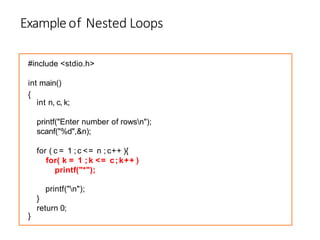
Exampleof Nested Loops
#include <stdio.h>
int main()
{
int n, c, k;
printf("Enter number of rowsn");
scanf("%d",&n);
for ( c = 1 ; c <= n ; c++ ){
for( k = 1 ; k <= c;k++ )
printf("*");
printf("n");
}
}
return 0;
3.Break And Continue Statement
What is BREAK meant?
What is CONTINUE meant?
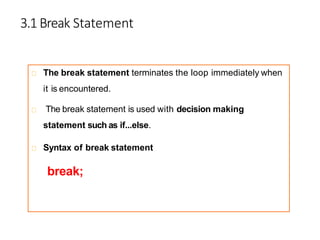
3.1 Break Statement
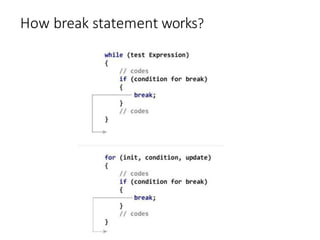
The break statement terminates the loop immediately when
it is encountered.
The break statement is used with decision making
statement such as if...else.
Syntax of break statement
break;
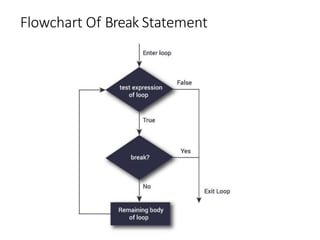
Flowchart Of Break Statement
How break statement works?
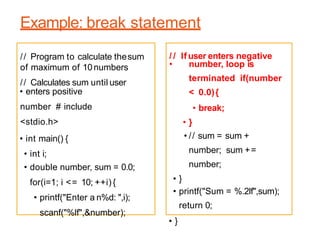
Example: break statement
• enters positive
number # include
<stdio.h>
• int main() {
• int i;
• double number, sum = 0.0;
for(i=1; i <= 10; ++i) {
• printf("Enter a n%d: ",i);
scanf("%lf",&number);
• number, loop is
terminated if(number
< 0.0){
• break;
• }
• // sum = sum +
number; sum +=
number;
• }
• printf("Sum = %.2lf",sum);
return 0;
• }
// Program to calculate thesum
of maximum of 10numbers
// Calculates sum until user
/ / If user enters negative
3.2 Continue Statement
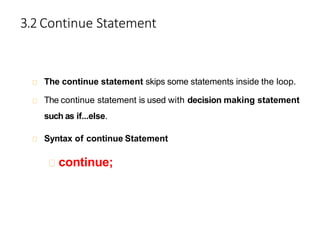
The continue statement skips some statements inside the loop.
The continue statement is used with decision making statement
such as if...else.
Syntax of continue Statement
continue;
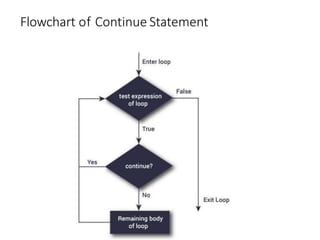
Flowchart of Continue Statement
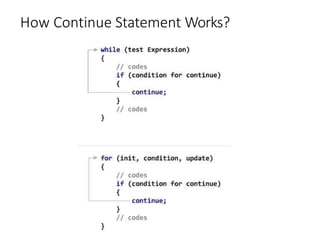
How Continue Statement Works?
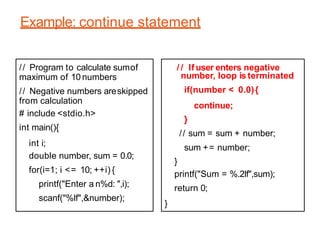
Example: continue statement
// Program to calculate sumof
maximum of 10 numbers
// Negative numbers areskipped
from calculation
# include <stdio.h>
int main(){
int i;
double number, sum = 0.0;
for(i=1; i <= 10; ++i) {
printf("Enter a n%d: ",i);
scanf("%lf",&number);
/ / If user enters negative
number, loop is terminated
if(number < 0.0){
continue;
}
// sum = sum + number;
sum += number;
}
printf("Sum = %.2lf",sum);
return 0;
}
4. Switch...Case Statement
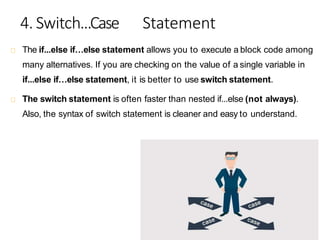
The if...else if…else statement allows you to execute a block code among
many alternatives. If you are checking on the value of a single variable in
if...else if…else statement, it is better to use switch statement.
The switch statement is often faster than nested if...else (not always).
Also, the syntax of switch statement is cleaner and easy to understand.
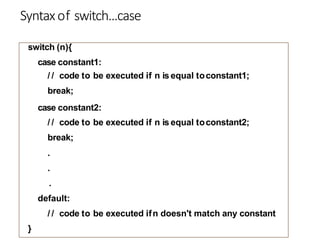
Syntaxof switch...case
switch (n){
case constant1:
/ / code to be executed if n is equal toconstant1;
break;
case constant2:
/ / code to be executed if n is equal toconstant2;
break;
.
.
.
default:
/ / code to be executed ifn doesn't match any constant
}
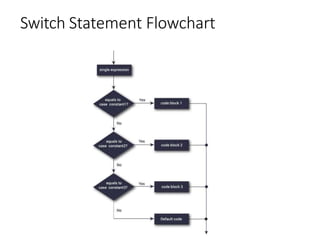
Switch Statement Flowchart
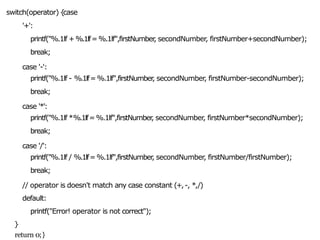
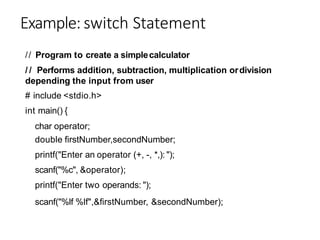
Example: switch Statement
// Program to create a simplecalculator
/ / Performs addition, subtraction, multiplication ordivision
depending the input from user
# include <stdio.h>
int main() {
char operator;
double firstNumber,secondNumber;
printf("Enter an operator (+, -, *,): ");
scanf("%c", &operator);
printf("Enter two operands: ");
scanf("%lf %lf",&firstNumber, &secondNumber);
switch(operator) {
case
'+':
printf("%.1lf +%.1lf=%.1lf",firstNumber
, secondNumber, firstNumber+secondNumber);
break;
case '-':
printf("%.1lf - %.1lf=%.1lf",firstNumber
, secondNumber, firstNumber-secondNumber);
break;
case '*':
printf("%.1lf *%.1lf=%.1lf",firstNumber
, secondNumber, firstNumber*secondNumber);
break;
case '/':
printf("%.1lf / %.1lf=%.1lf",firstNumber
, secondNumber, firstNumber/firstNumber);
break;
// operator is doesn't match any case constant (+,-, *,/)
default:
printf("Error! operator is not correct");
}
return 0;}
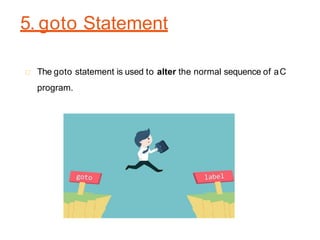
5. goto Statement
The goto statement is used to alter the normal sequence of aC
program.
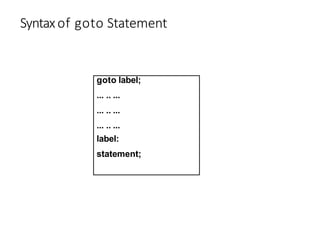
Syntaxof goto Statement
goto label;
... .. ...
... .. ...
... .. ...
label:
statement;
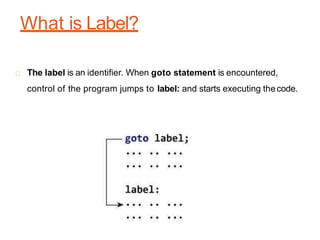
What is Label?
The label is an identifier. When goto statement is encountered,
control of the program jumps to label: and starts executing thecode.
Example:goto Statement
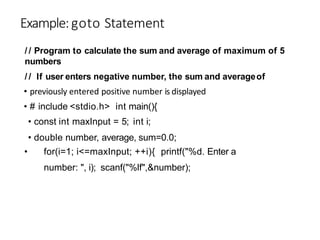
• previously entered positive number is displayed
• # include <stdio.h> int main(){
• const int maxInput = 5; int i;
• double number, average, sum=0.0;
• for(i=1; i<=maxInput; ++i){ printf("%d. Enter a
number: ", i); scanf("%lf",&number);
/ / Program to calculate the sum and average of maximum of 5
numbers
/ / If user enters negative number, the sum and averageof
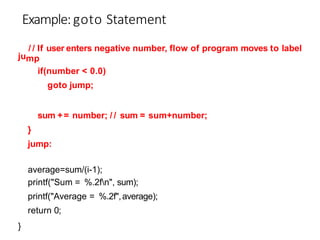
ju
/ / If user enters negative number, flow of program moves to label
mp
if(number < 0.0)
goto jump;
sum += number; / / sum = sum+number;
}
jump:
average=sum/(i-1);
printf("Sum = %.2fn", sum);
printf("Average = %.2f",average);
return 0;
}
Example:goto Statement
C programming Control Structure.pptx

C programming Control Structure.pptx

  • 1.
    Content 1. Decision Making 2.Loops 3. Break and Continue Statement 4. Switch… case Statement 5. goto and label Statement
  • 2.
    1.Decision Making Decision makingis used to specify the order in which statements are executed. • Decision making in a Cprogram using: • if statement • if…else statement • if…else if…else statement • nested if...else statement • Switch case Statement
  • 3.
    1.1 if statement if(testExpression) { / / statements }
  • 4.
    Example:if statement / /Program to display a number if user enters negativenumber / / If user enters positive number, that number won't be displayed #include <stdio.h> int main() { int number; printf("Enter an integer: "); scanf("%d", &number); / / Test expression is true if number is lessthan 0 if (number < 0){ } printf("You entered %d.n", number); printf("The if statement is easy."); } return 0;
  • 5.
    1.2 if...else statement Theif...else statement executes some code if the test expression is true (nonzero) and some other code if the test expression is false (0). Syntax of if...else if (testExpression) { / / codes inside the body of if }else { / / codes inside the body of else }
  • 6.
    Example: if...else statement // Program to check whether an integer entered by the user is odd or even #include <stdio.h> int main() { int number; printf("Enter an integer: "); scanf("%d",&number); // True if remainder is0 if( number%2 == 0) printf("%d is an even integer.",number); else printf("%d is an odd integer.",number); return 0; }
  • 7.
    1.3 if...else if....elseStatement The if...else statement executes two different codes depending upon whether the test expression is true or false. Sometimes, a choice has to be made from more than 2 possibilities. The if...else if…else statement allows you to check for multiple test expressions and execute different codes for more than two conditions.
  • 8.
    Syntax of if...elseif....else statement. if (testExpression1) { / / statements to be executed if testExpression1 istrue } else if(testExpression2) { / / statements to be executed if testExpression1 is false and testExpression2 is true } else if (testExpression 3) { / / statements to be executed if testExpression1and testExpression2 is false and testExpression3 is true } else { / / statements to be executed if all test expressions are false }
  • 9.
    Example: if...else if....elsestatement using =, > or < #include <stdio.h> int main(){ int number1, number2; printf("Enter two integers: "); scanf("%d %d", &number1, &number2); //checks if two integers are equal. if(number1 == number2){ printf("Result: %d = %d“, number1,number2); } // Program to relatetwo integers //checks if number1 is greater than number2. else if (number1 > number2){ printf("Result: %d > %d", number1, number2); } // if both test expressionis false else { printf("Result: %d < %d", number1, number2); } return 0; }
  • 10.
    1.4 Nested ifelsestatement Nested if else statement is same like if else statement, where new block of if else statement is defined in existing if or else block statement. Used when user want to check more than one conditions at a time.
  • 11.
    Syntax of NestedIf else Statement if(condition is true){ if(condition is true){ statement; }else{ statement; } }else{ statement; }
  • 12.
    Example of Nestedif elseStatement #include <stdio.h> void main(){ char username; int password; printf("Username:"); scanf("%c",&username); printf("Password:"); scanf("%d",&password); if(username=='a'){ if(password==12345){ }else{ printf("Login successful"); printf("Password is incorrect, Try again."); }else{ } } printf("Username is incorrect, Try again."); }
  • 13.
    2.Loops Loops are usedin programming to repeat a specific block until some end condition is met. There are three loops in C programming: o for loop o while loop o do...while loop o Nested loops
  • 14.
    2.1 for Loop Thesyntax of a for loop is: for (initializationStatement; testExpression; updateStatement) { / / codes }
  • 15.
  • 16.
    Example: for loop // Program to calculate thesum of first n natural numbers / / Positive integers 1,2,3...nare known asnatural numbers #include <stdio.h> int main(){ int n, count, sum = 0; printf("Enter a positive integer: "); scanf("%d", &n); // for loop terminates when nis less than count for(count = 1; count <= n; ++count) { sum += count; } printf("Sum = %d",sum); return 0; }
  • 17.
    2.2 while loop Thesyntax of a while loop is: while (testExpression) { //codes }
  • 18.
    Example: while loop /Program to find factorial of a number / / For a positive integern, factorial = 1*2*3...n #include <stdio.h> int main(){ int number; long factorial; printf("Enter an integer: "); scanf("%d",&number); factorial = 1; th // loop terminates when number is less an or equal to 0 while (number > 0){ // factorial = factorial*number; factorial *= number; --number; } printf("Factorial= %lld", factorial); return 0; }
  • 19.
    2.3 do...while loop Thedo..while loop is similar to the while loop with one important difference. The body of do...while loop is executed once, before checking the test expression. The do...while loop is executed at least once.
  • 20.
    do...while loop Syntax Thesyntax of a do while loop is: do { / / codes } while (testExpression);
  • 21.
    Example: do...while loop //Program to add numbers until user enters zero #include <stdio.h> int main() { double number, sum = 0; // loop body is executed at leastonce do{ printf("Enter a number: "); scanf("%lf", &number); sum += number; }while(number != 0.0); printf("Sum = %.2lf",sum); return 0; }
  • 22.
    Nested loops Cprogramming allowsto use one loop insideanother loop. Syntax for loop for ( init; condition; increment ) { for ( init; condition; increment ) { statement(s); } statement(s); }
  • 23.
    2.4 Nested loops(Con) Syntax while loop while(condition) { while(condition) { statement(s); } statement(s); }
  • 24.
    2.4 Nested loops(Con) Syntax do while loop do { statement(s); do { statement(s); }while( condition ); }while( condition );
  • 25.
    Exampleof Nested Loops #include<stdio.h> int main() { int n, c, k; printf("Enter number of rowsn"); scanf("%d",&n); for ( c = 1 ; c <= n ; c++ ){ for( k = 1 ; k <= c;k++ ) printf("*"); printf("n"); } } return 0;
  • 26.
    3.Break And ContinueStatement What is BREAK meant? What is CONTINUE meant?
  • 27.
    3.1 Break Statement Thebreak statement terminates the loop immediately when it is encountered. The break statement is used with decision making statement such as if...else. Syntax of break statement break;
  • 28.
  • 29.
  • 30.
    Example: break statement •enters positive number # include <stdio.h> • int main() { • int i; • double number, sum = 0.0; for(i=1; i <= 10; ++i) { • printf("Enter a n%d: ",i); scanf("%lf",&number); • number, loop is terminated if(number < 0.0){ • break; • } • // sum = sum + number; sum += number; • } • printf("Sum = %.2lf",sum); return 0; • } // Program to calculate thesum of maximum of 10numbers // Calculates sum until user / / If user enters negative
  • 31.
    3.2 Continue Statement Thecontinue statement skips some statements inside the loop. The continue statement is used with decision making statement such as if...else. Syntax of continue Statement continue;
  • 32.
  • 33.
  • 34.
    Example: continue statement //Program to calculate sumof maximum of 10 numbers // Negative numbers areskipped from calculation # include <stdio.h> int main(){ int i; double number, sum = 0.0; for(i=1; i <= 10; ++i) { printf("Enter a n%d: ",i); scanf("%lf",&number); / / If user enters negative number, loop is terminated if(number < 0.0){ continue; } // sum = sum + number; sum += number; } printf("Sum = %.2lf",sum); return 0; }
  • 35.
    4. Switch...Case Statement Theif...else if…else statement allows you to execute a block code among many alternatives. If you are checking on the value of a single variable in if...else if…else statement, it is better to use switch statement. The switch statement is often faster than nested if...else (not always). Also, the syntax of switch statement is cleaner and easy to understand.
  • 36.
    Syntaxof switch...case switch (n){ caseconstant1: / / code to be executed if n is equal toconstant1; break; case constant2: / / code to be executed if n is equal toconstant2; break; . . . default: / / code to be executed ifn doesn't match any constant }
  • 37.
  • 38.
    Example: switch Statement //Program to create a simplecalculator / / Performs addition, subtraction, multiplication ordivision depending the input from user # include <stdio.h> int main() { char operator; double firstNumber,secondNumber; printf("Enter an operator (+, -, *,): "); scanf("%c", &operator); printf("Enter two operands: "); scanf("%lf %lf",&firstNumber, &secondNumber);
  • 39.
    switch(operator) { case '+': printf("%.1lf +%.1lf=%.1lf",firstNumber ,secondNumber, firstNumber+secondNumber); break; case '-': printf("%.1lf - %.1lf=%.1lf",firstNumber , secondNumber, firstNumber-secondNumber); break; case '*': printf("%.1lf *%.1lf=%.1lf",firstNumber , secondNumber, firstNumber*secondNumber); break; case '/': printf("%.1lf / %.1lf=%.1lf",firstNumber , secondNumber, firstNumber/firstNumber); break; // operator is doesn't match any case constant (+,-, *,/) default: printf("Error! operator is not correct"); } return 0;}
  • 40.
    5. goto Statement Thegoto statement is used to alter the normal sequence of aC program.
  • 41.
    Syntaxof goto Statement gotolabel; ... .. ... ... .. ... ... .. ... label: statement;
  • 42.
    What is Label? Thelabel is an identifier. When goto statement is encountered, control of the program jumps to label: and starts executing thecode.
  • 43.
    Example:goto Statement • previouslyentered positive number is displayed • # include <stdio.h> int main(){ • const int maxInput = 5; int i; • double number, average, sum=0.0; • for(i=1; i<=maxInput; ++i){ printf("%d. Enter a number: ", i); scanf("%lf",&number); / / Program to calculate the sum and average of maximum of 5 numbers / / If user enters negative number, the sum and averageof
  • 44.
    ju / / Ifuser enters negative number, flow of program moves to label mp if(number < 0.0) goto jump; sum += number; / / sum = sum+number; } jump: average=sum/(i-1); printf("Sum = %.2fn", sum); printf("Average = %.2f",average); return 0; } Example:goto Statement