Control statements in C
Control statements control the flow of execution of the statements of a program. The various
types of control statements in C language are as under:-
I.
II
.
III
.
Sequential
Condition
al
Iteration
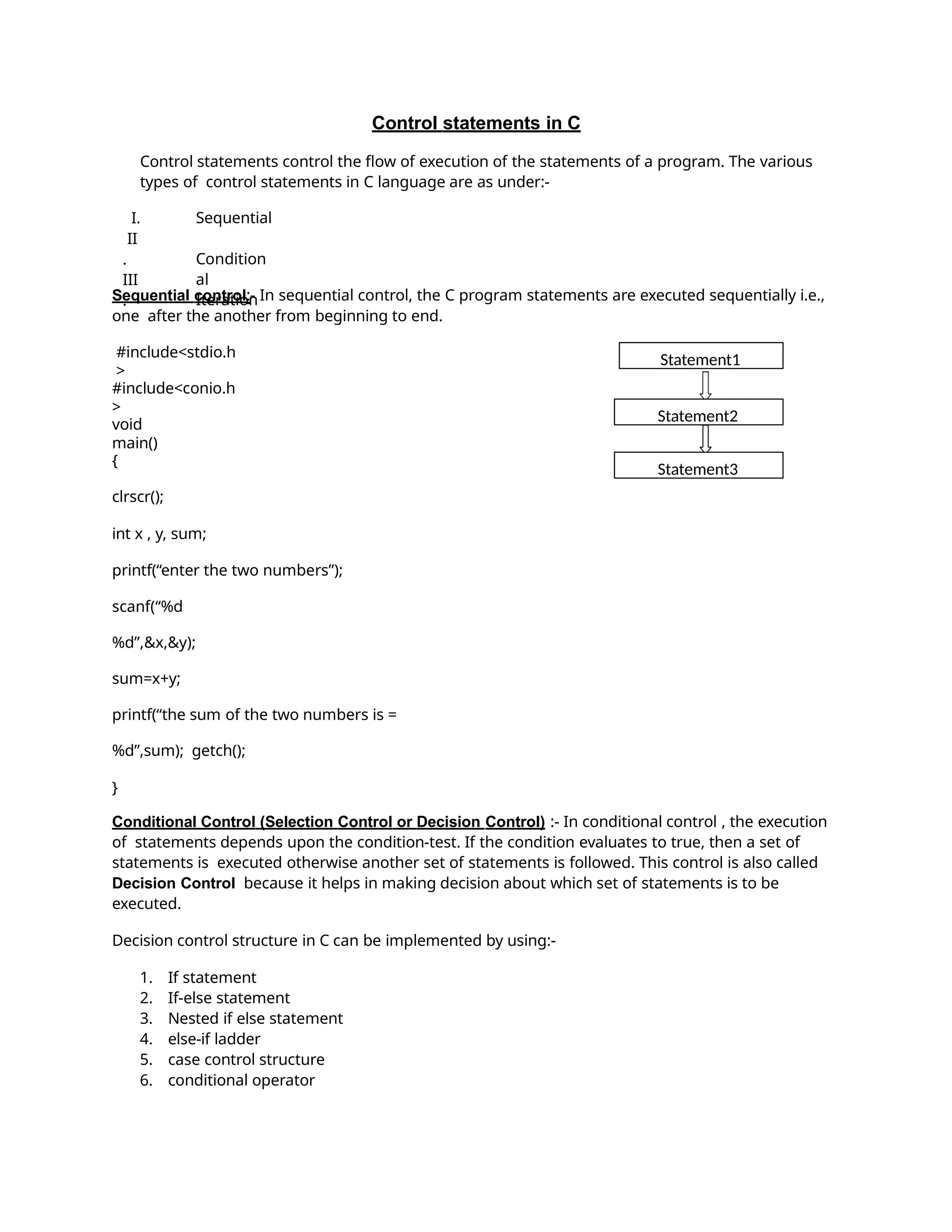
Sequential control:- In sequential control, the C program statements are executed sequentially i.e.,
one after the another from beginning to end.
#include<stdio.h
>
#include<conio.h
>
void
main()
{
clrscr();
int x , y, sum;
printf(“enter the two numbers”);
scanf(“%d
%d”,&x,&y);
sum=x+y;
printf(“the sum of the two numbers is =
%d”,sum); getch();
}
Conditional Control (Selection Control or Decision Control) :- In conditional control , the execution
of statements depends upon the condition-test. If the condition evaluates to true, then a set of
statements is executed otherwise another set of statements is followed. This control is also called
Decision Control because it helps in making decision about which set of statements is to be
executed.
Decision control structure in C can be implemented by using:-
1. If statement
2. If-else statement
3. Nested if else statement
4. else-if ladder
5. case control structure
6. conditional operator
Statement1
Statement2
Statement3
Iteration Control ( Loops )
Iterations or loops are used when we want to execute a statement or block of statements several
times. The repetition of loops is controlled with the help of a test condition. The statements in the
loop keep on executing repetitively until the test condition becomes false.
There are the following three types of loops:-
1. While loop
2. Do-while loop
3. For loop
Decision control
Conditional Control (Selection Control or Decision Control) :- In conditional control , the execution
of statements depends upon the condition-test. If the condition evaluates to true, then a set of
statements is executed otherwise another set of statements is followed. This control is also called
Decision Control because it helps in making decision about which set of statements is to be
executed.
Decision control structure in C can be implemented by using:-
4. If statement
5. If-else statement
6. Nested if else statement
7. else-if ladder
8. case control structure
9. conditional operator
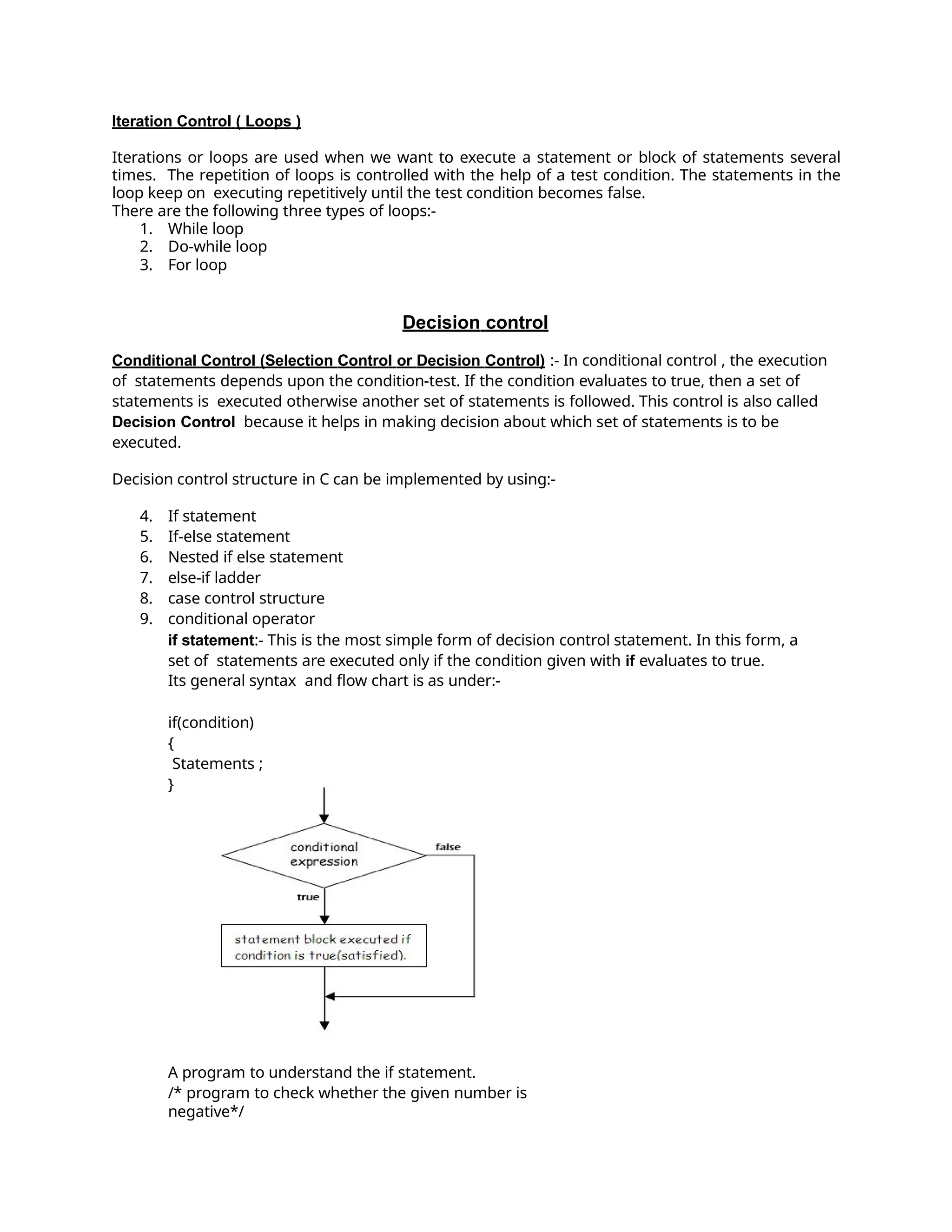
if statement:- This is the most simple form of decision control statement. In this form, a
set of statements are executed only if the condition given with if evaluates to true.
Its general syntax and flow chart is as under:-
if(condition)
{
Statements ;
}
A program to understand the if statement.
/* program to check whether the given number is
negative*/
#include<stdio.h
>
#include<conio.h
> void main()
{
int
num;
clrscr();
printf(“enter the
number”);
scanf(“%d”,&num);
if(num<0)
{
printf(“the entered
number is negative”);
}
getch();
}
}
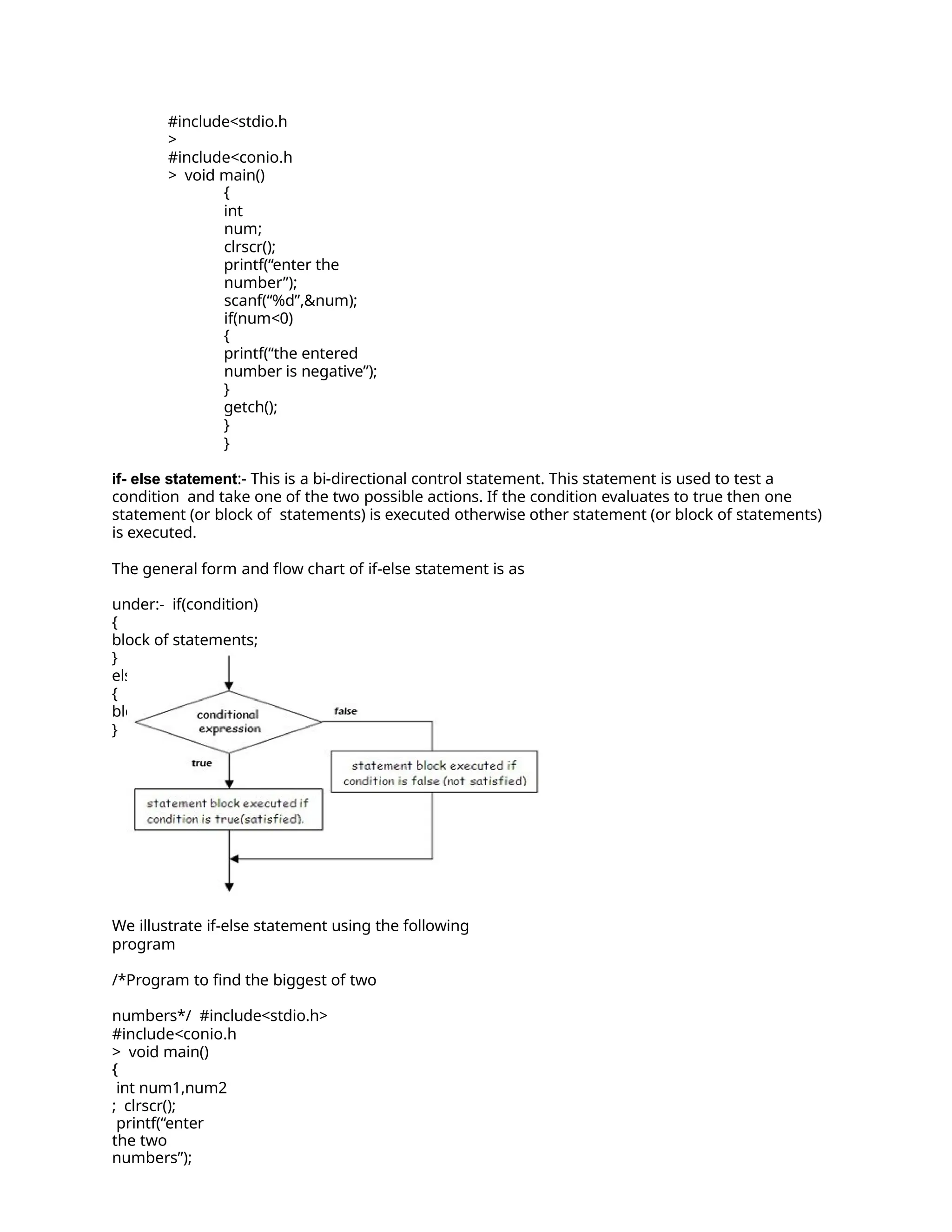
if- else statement:- This is a bi-directional control statement. This statement is used to test a
condition and take one of the two possible actions. If the condition evaluates to true then one
statement (or block of statements) is executed otherwise other statement (or block of statements)
is executed.
The general form and flow chart of if-else statement is as
under:- if(condition)
{
block of statements;
}
else
{
block of statements;
}
We illustrate if-else statement using the following
program
/*Program to find the biggest of two
numbers*/ #include<stdio.h>
#include<conio.h
> void main()
{
int num1,num2
; clrscr();
printf(“enter
the two
numbers”);
scanf(“%d
%d”,&num1,&num2);
if(num1>num2)
{
printf(“the number %d is
big”,num1);
}
else
{
printf(“the number %d is
big”,num2);
}
getch();
}
Nested if-else:- If we have if-
else statement within either
the body of an if statement or
the body of else
statement or in the body of both if and else, then this is known as nesting of if else
statement. The general form of nested if-else statement is as follows:-
if(condition1)
{
if(condition2)
statements;
else
statements;
}
else
{
if(condition3)
Statements;
else
Statements;
}
We give the following program to explain nesting of if else:-
/*program to find the largest of three
numbers*/ #include<stdio.h>
#include<conio.h
> void main()
{
int a,
b,c,large;
printf(“enter the three
numbers”); scanf(“%d%d
%d”,&a,&b,&c);
if(a>b)
{
if(a>c)
large=a
; else
large=c
;
}
else
else
large=c
;
}
printf(“largest number is
%d”,large); getch();
}
Else if ladder:- This is a type of nesting in which there is an if-else statement in every else part
except the last else part. This type of nesting is called else if ladder.
The general syntax and flow chart of else if ladder is as follows:-
If(condition1)
statement
A; else
if(condition2)
statement
B; else
if(condition3)
stat
ementC;
else
stat
ementD;
A program to illustrate the else if ladder:-
/*program to find the grade of the
student*/ #include<stdio.h>
#include<conio.h
> void main()
{
int
marks;
printf(“enter the percentage of the
student”); scanf(“%d”,&marks);
if(marks>=80)
printf(“your grade is
a”); else if(marks>=70)
printf(“your grade is
b”); else if(marks>=60)
printf(“your grade is
c”); else if(marks>=50)
printf(“your
grade is d”);
else
printf(“you are
fail”);
getch();
}
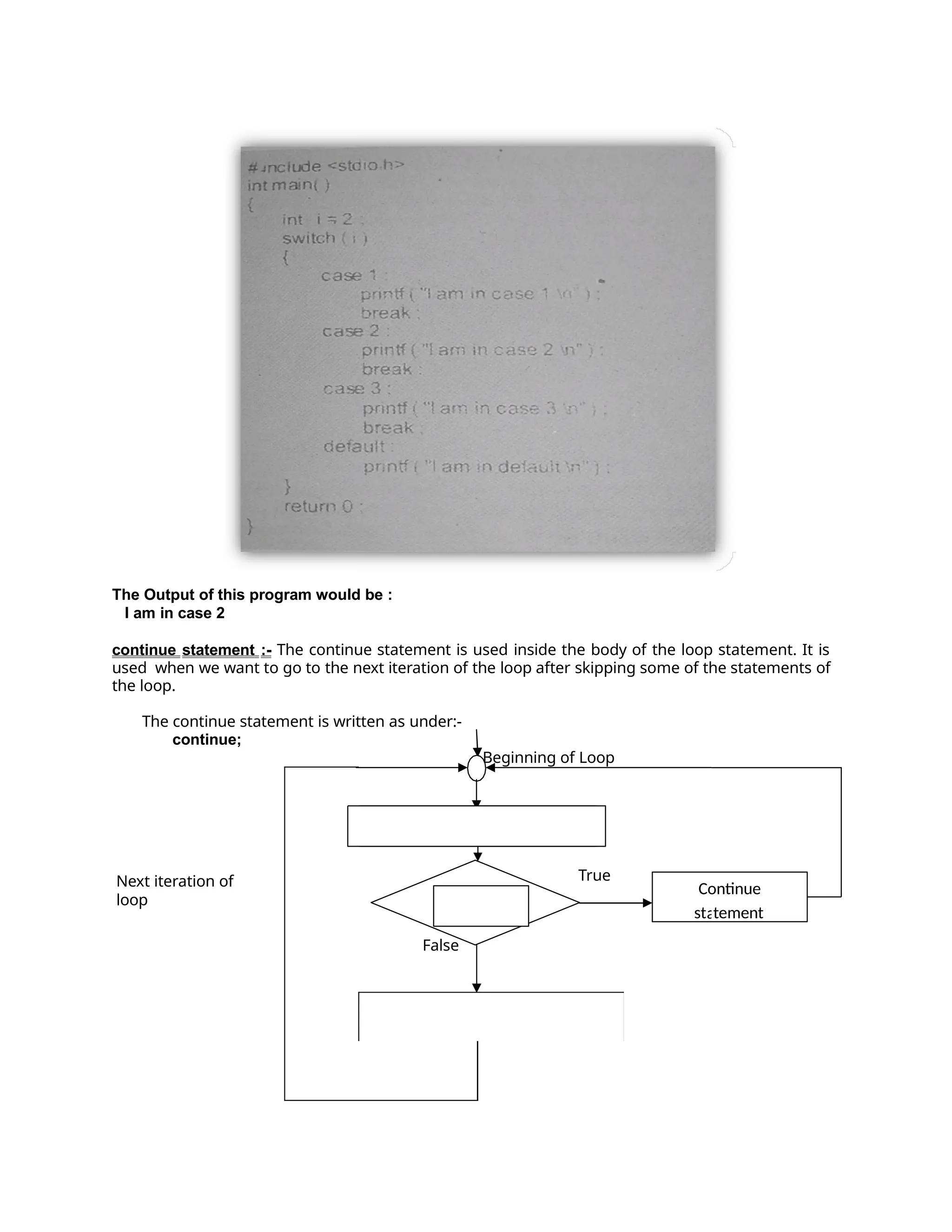
Switch case statement :- Switch case statements are a substitute for long if statements
and has more flexibility and a clearer format than else-if ladder.
This statement is used to select one out of the several numbers of alternatives present in
a block. This selection statement successively tests the value of an expression against a list of
integer or character constants. When a match is found, the statements associated with that
constant are executed.
The general syntax of switch case statement is
as follows:- switch(expression)
{
case constant1:
statements; case
constant2: statements;
case constant3:
statements;
………………………
………………………
case constantN:
statements; default :
statement;
}
Here switch, case
and default are keywords.
The expression following the switch keyword must give an integer value. This expression
can be any integer or character variable, or a function call that returns an integer. It can also be
arithmetic, relational, logical or bitwise expression yielding an integer. It can be integer or
character constant also. Data types long int and short int are also allowed.
The constant following the case keyword should be of integer or character type. We
cannot use floating point or string constant.
A program to explain switch case statement
/*program to print day of the week*/
#include<
stdio.h>
#include<conio.h
> void main()
{
i
nt day;
clrscr();
printf(“enter the day number
case 1: printf(“monday”);
break;
case
2:printf(“tuesday”);
b
reak;
case 3:
printf(“wednesday”);
break;
case
4:printf(“thursday”);
break
; case 5:
printf(“friday”);
b
reak;
case
6:printf(“saturday”);
break;
case 7:
printf(“sunday”);
break;
default:printf(“wrong
input”);
}
getch();
}
NOTE:- In switch case statement, if we do not associate a break statement with every
case then from the case for which the expression matches with the constant, all the statements are
executed until the switch case block ends. This situation is referred to as Fall Through.
Conditional operator:- It is a ternary operator and is used to perform simple
conditional operations. It is used to do operations similar to if-else statement.
The general syntax of conditional operator is as under:-
Test expression?
expression1:expression2 Here firstly the
test expression is evaluated.
If the test expression evaluates to true then the expression1 is evaluated and it
becomes the value of the whole expression.
If the test expression evaluates to false then the expression2 is evaluated and it
becomes the value of the whole expression.
For eg., a>b ? a : b
Here firstly the expression a>b is evaluated. If it evaluates to true then the value of
a becomes the value of the whole expression otherwise value of b becomes the value of whole
expression.
Iterations/Loops
Iterations or loops are used when we want to execute a statement or block of
statements several times. The repetition of loops is controlled with the help of a test condition. The
statements in the loop keep on executing repetitively until the test condition becomes false.
There are the following three types of loops:-
1. While loop
2. Do-while loop
While(condition)
{
Statement(s);
}
We explain the working of while loop with the
help of flow chart as under:-
false
Firstly the condition given with while is evaluated. If the condition evaluates to true then the
statements given in the body of the loop are executed. After the execution of all the statements the
condition is again checked and if it again evaluates to true then the statements given in the body of
the loop are again executed. In this way the statements are executed again and again until the
condition given evaluates to false.
For terminating the loop, a termination condition is given in the loop body which makes the
condition false at some point of time and as a result of which the loop terminates. If we do not give
the termination condition then the loop goes on repeating again and again infinite times. Such
loops are referred to as infinite loops.
We explain the while loop with the help of following program.
/*program to find the sum of digits of the
given number.*/ #include<stdio.h>
#include
<conio.h> void
main()
{
int
n,num,rem,sum=0;
printf(“Enter the
number”);
scanf(“%d”,&num);
n=num;
while(num>0)
{
rem=nu
m%10; sum
=sum+rem;
num=num/10;
}
printf(“the sum of the digits of %d is =
%d”,n,sum); getch();
}
While(conditio
n)
true
Body of loop
Next
statement
after the loop
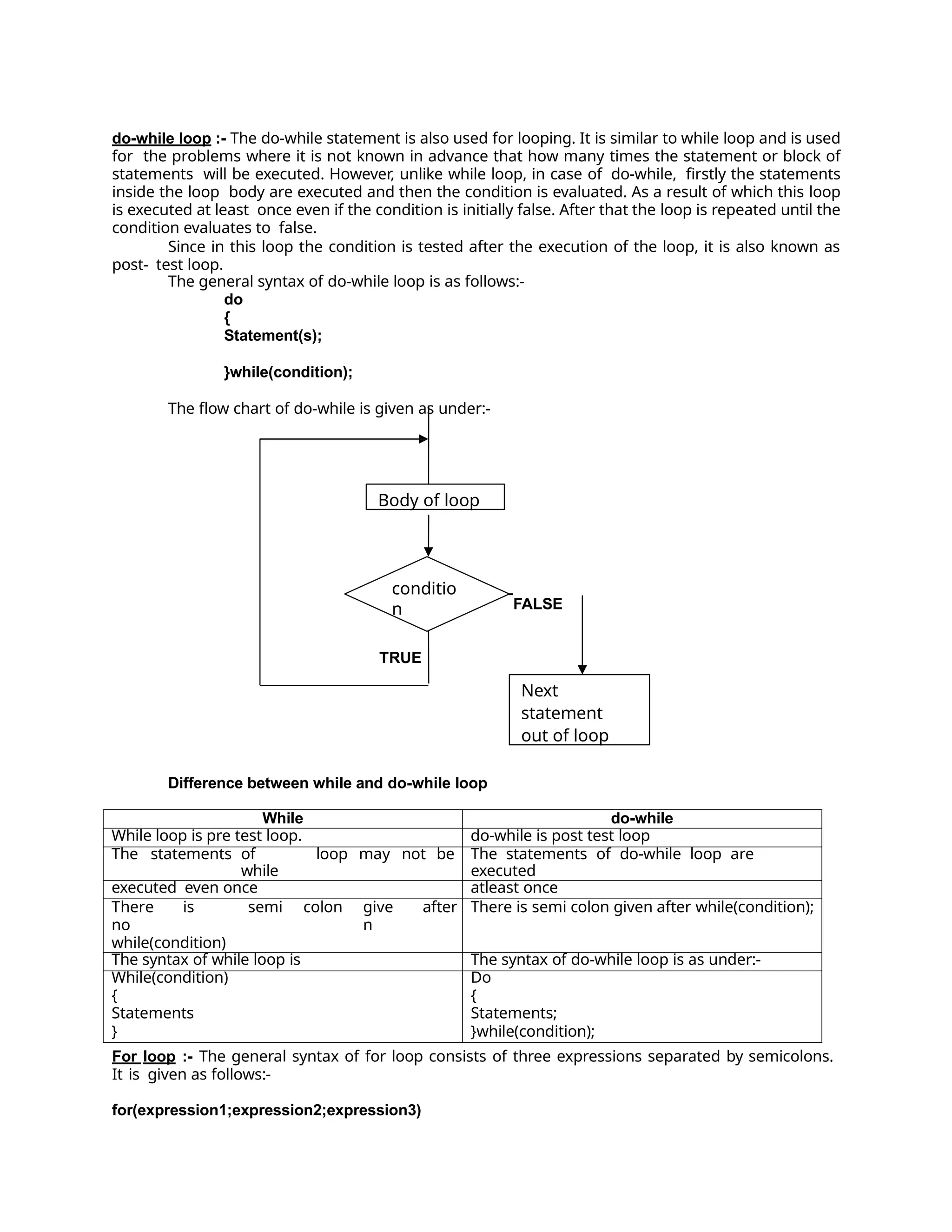
do-while loop :- The do-while statement is also used for looping. It is similar to while loop and is used
for the problems where it is not known in advance that how many times the statement or block of
statements will be executed. However, unlike while loop, in case of do-while, firstly the statements
inside the loop body are executed and then the condition is evaluated. As a result of which this loop
is executed at least once even if the condition is initially false. After that the loop is repeated until the
condition evaluates to false.
Since in this loop the condition is tested after the execution of the loop, it is also known as
post- test loop.
The general syntax of do-while loop is as follows:-
do
{
Statement(s);
}while(condition);
The flow chart of do-while is given as under:-
TRUE
Difference between while and do-while loop
While do-while
While loop is pre test loop. do-while is post test loop
The statements of
while
loop may not be The statements of do-while loop are
executed
executed even once atleast once
There is
no
while(condition)
semi colon give
n
after There is semi colon given after while(condition);
The syntax of while loop is The syntax of do-while loop is as under:-
While(condition) Do
{ {
Statements Statements;
} }while(condition);
For loop :- The general syntax of for loop consists of three expressions separated by semicolons.
It is given as follows:-
for(expression1;expression2;expression3)
Body of loop
conditio
n FALSE
Next
statement
out of loop
{
Statement(s);
}
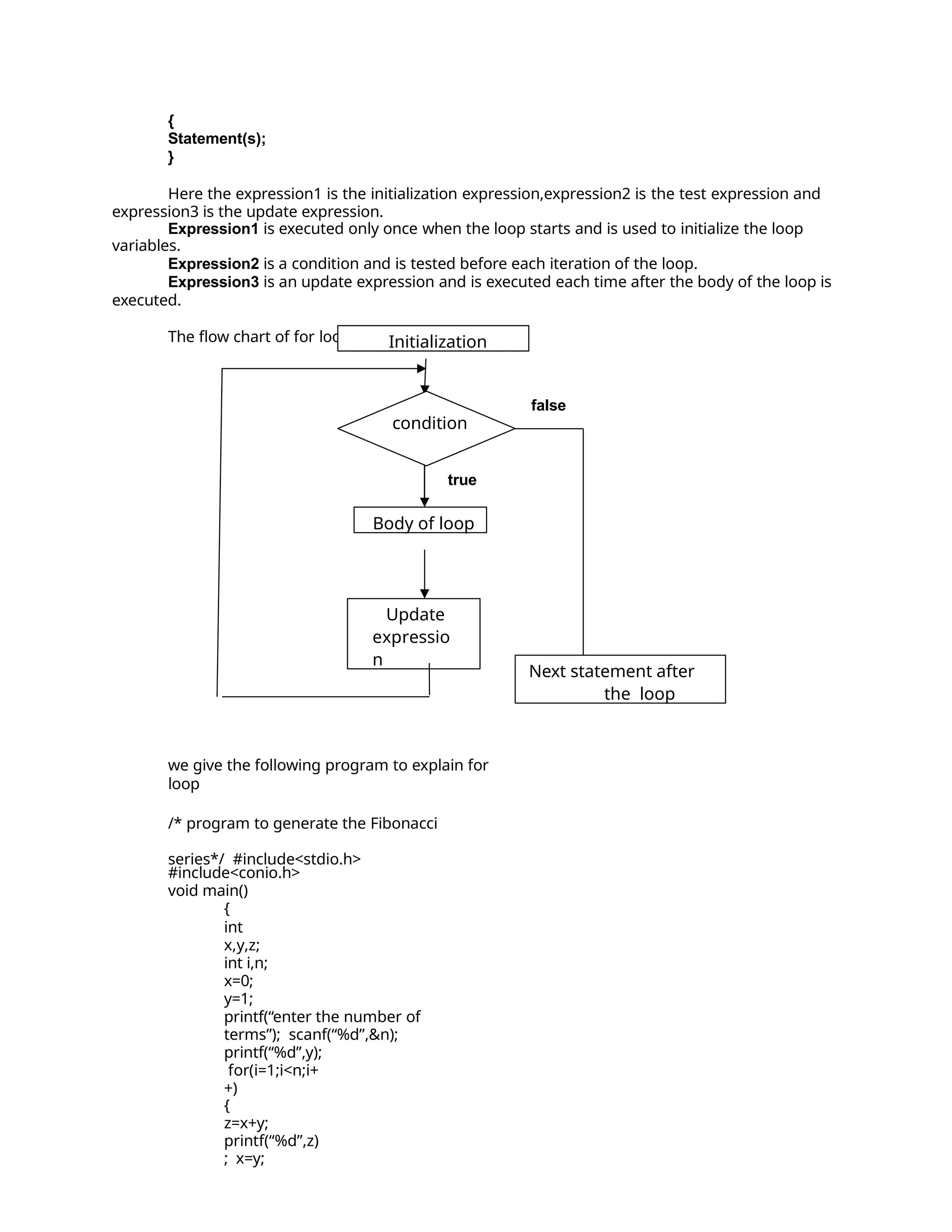
Here the expression1 is the initialization expression,expression2 is the test expression and
expression3 is the update expression.
Expression1 is executed only once when the loop starts and is used to initialize the loop
variables.
Expression2 is a condition and is tested before each iteration of the loop.
Expression3 is an update expression and is executed each time after the body of the loop is
executed.
The flow chart of for loop is given as follows:-
we give the following program to explain for
loop
/* program to generate the Fibonacci
series*/ #include<stdio.h>
#include<conio.h>
void main()
{
int
x,y,z;
int i,n;
x=0;
y=1;
printf(“enter the number of
terms”); scanf(“%d”,&n);
printf(“%d”,y);
for(i=1;i<n;i+
+)
{
z=x+y;
printf(“%d”,z)
; x=y;
Initialization
false
condition
true
Body of loop
Update
expressio
n
Next statement after
the loop
y=z;
}
printf(“
n”);
getch();
}
All the three expressions in the for loop are optional and therefore we can omit any or all the
three expressions but in any case the two separating semi colons should always be present.
If we omit the test expression then it is always assumed to be true and therefore the loop
never terminates and becomes an infinite loop.
If we want to make such loops a finite loop then a separate terminate condition is given within
the loop body
Jump statements
Jump statements are used to transfer the control from one part of the program to
another part. The various jump statements in C are as under:-
1. break statement
2. continue statement
3. goto statement
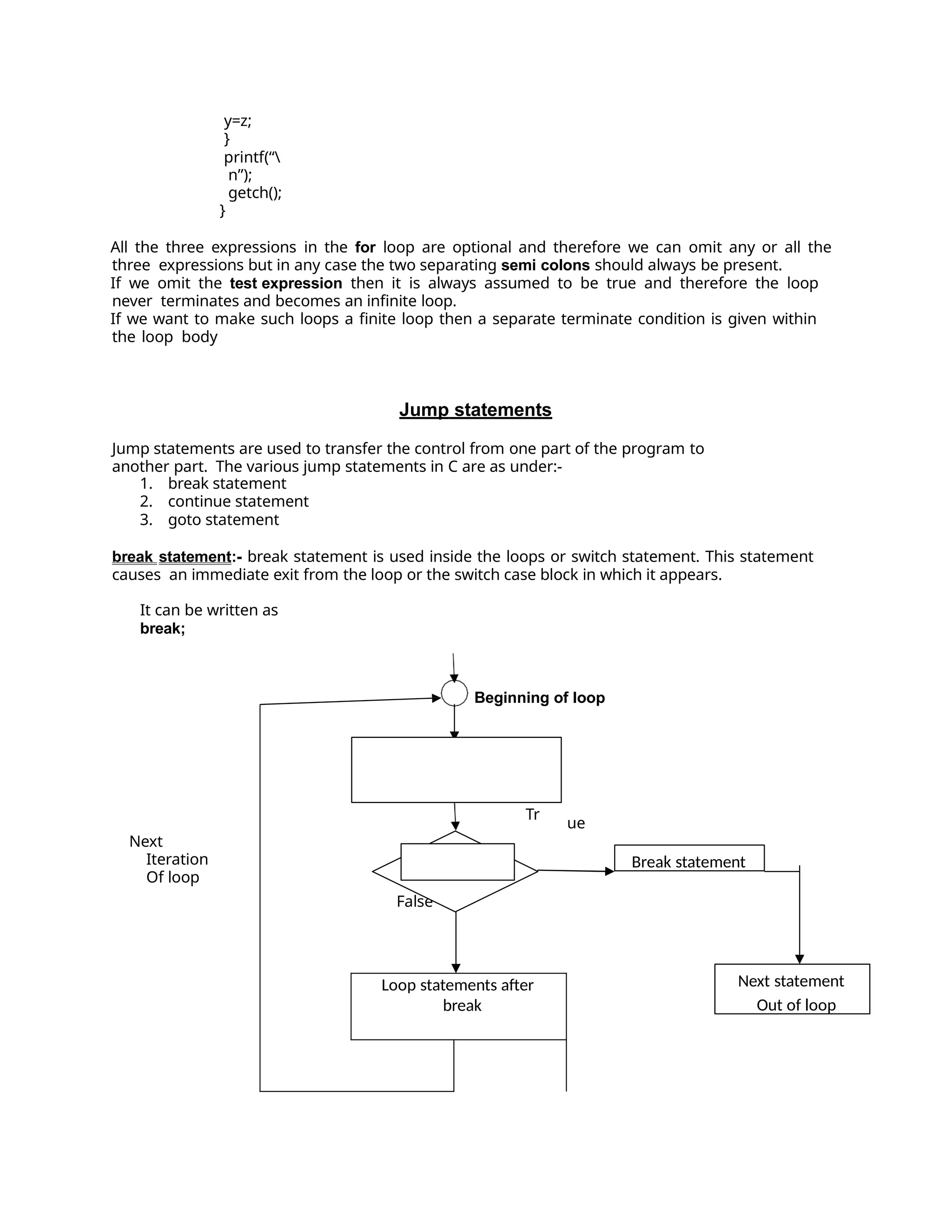
break statement:- break statement is used inside the loops or switch statement. This statement
causes an immediate exit from the loop or the switch case block in which it appears.
It can be written as
break;
Beginning of loop
ue
Loop statements before
break
Tr
condition
False
Loop statements after
break
Next
Iteration
Of loop
Break statement
Next statement
Out of loop
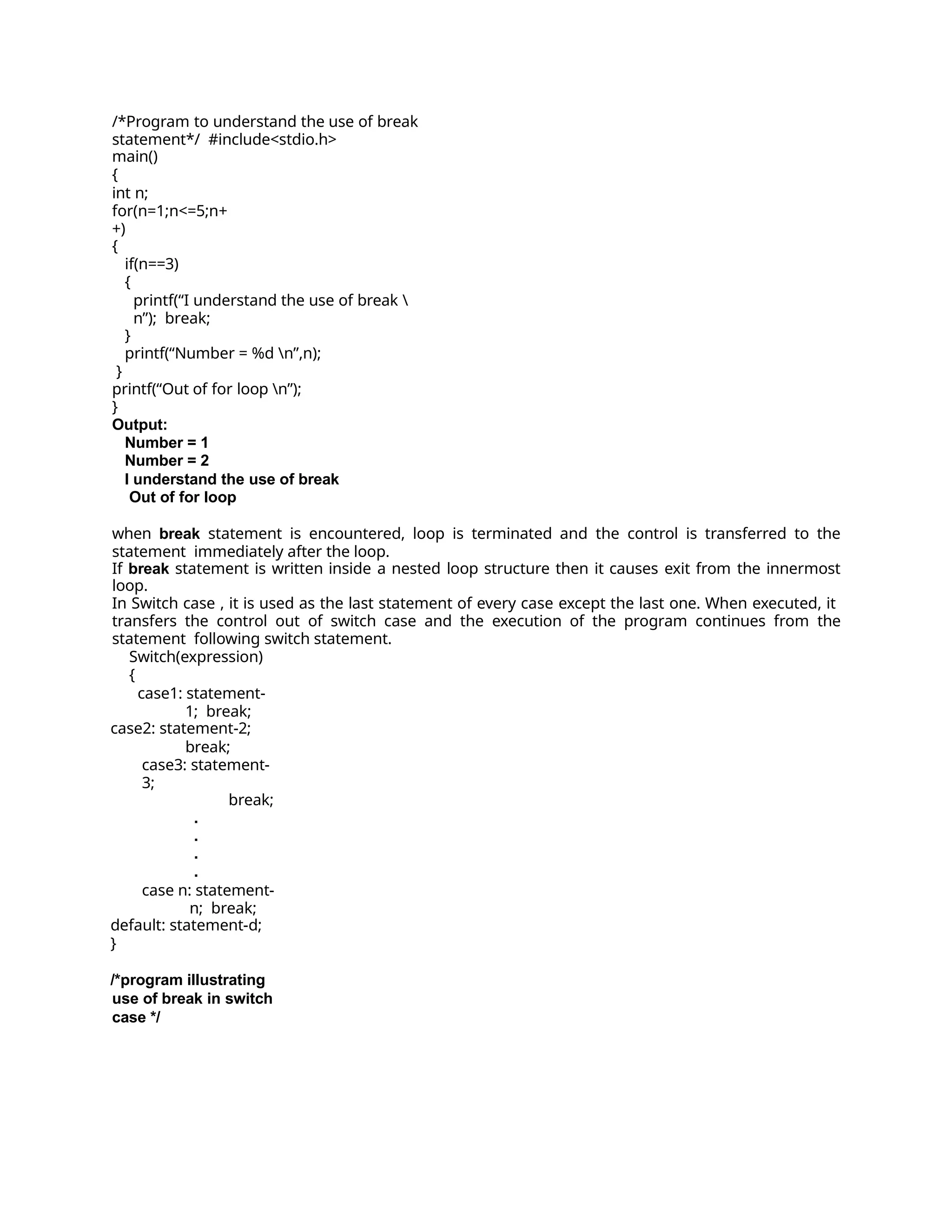
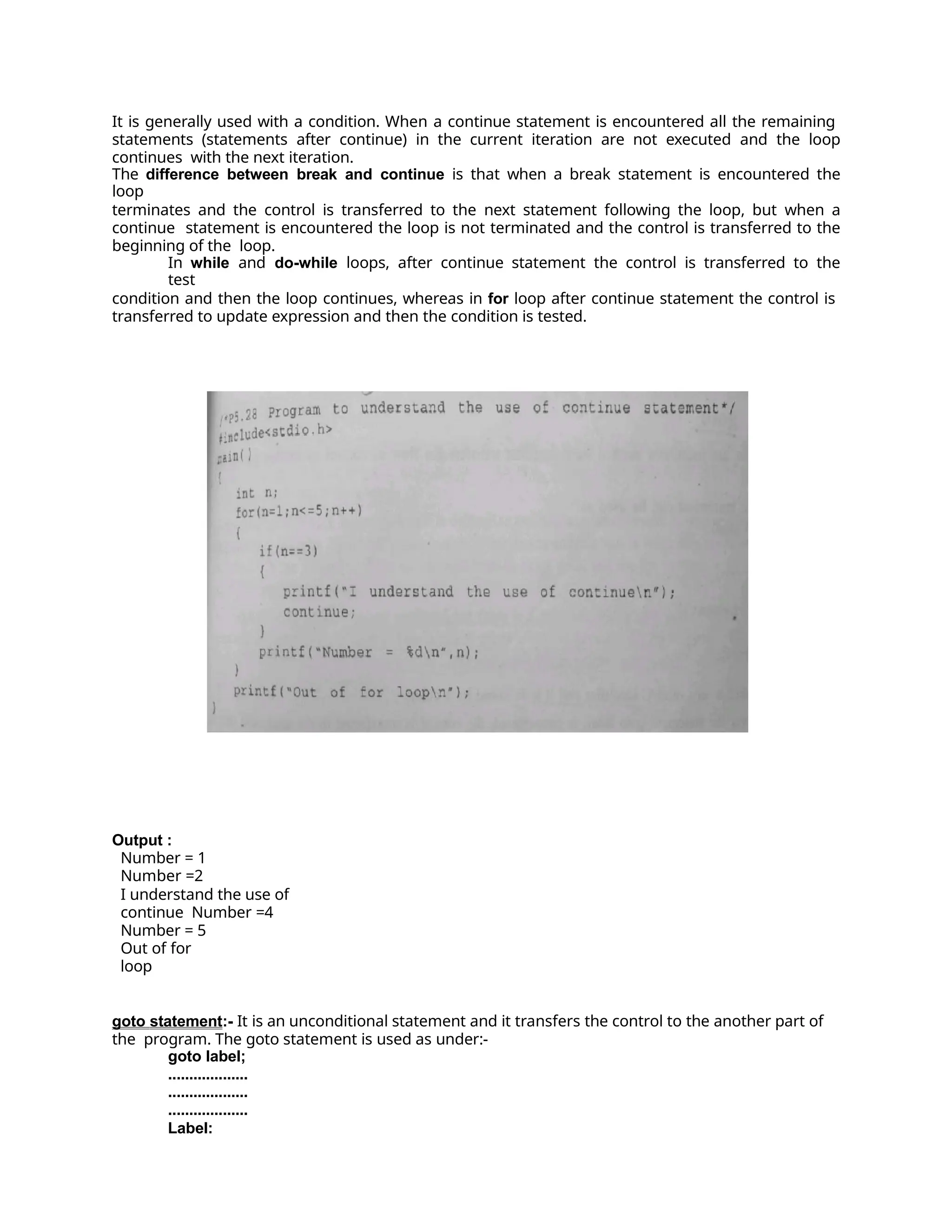
/*Program to understand the use of break
statement*/ #include<stdio.h>
main()
{
int n;
for(n=1;n<=5;n+
+)
{
if(n==3)
{
printf(“I understand the use of break 
n”); break;
}
printf(“Number = %d n”,n);
}
printf(“Out of for loop n”);
}
Output:
Number = 1
Number = 2
I understand the use of break
Out of for loop
when break statement is encountered, loop is terminated and the control is transferred to the
statement immediately after the loop.
If break statement is written inside a nested loop structure then it causes exit from the innermost
loop.
In Switch case , it is used as the last statement of every case except the last one. When executed, it
transfers the control out of switch case and the execution of the program continues from the
statement following switch statement.
Switch(expression)
{
case1: statement-
1; break;
case2: statement-2;
break;
case3: statement-
3;
break;
.
.
.
.
case n: statement-
n; break;
default: statement-d;
}
/*program illustrating
use of break in switch
case */
Next iteration of
loop
Loop statements before continue
True
Condition
False
Loop statements after continue
a
The Output of this program would be :
I am in case 2
continue statement :- The continue statement is used inside the body of the loop statement. It is
used when we want to go to the next iteration of the loop after skipping some of the statements of
the loop.
The continue statement is written as under:-
continue;
Beginning of Loop
Continue
st tement
It is generally used with a condition. When a continue statement is encountered all the remaining
statements (statements after continue) in the current iteration are not executed and the loop
continues with the next iteration.
The difference between break and continue is that when a break statement is encountered the
loop
terminates and the control is transferred to the next statement following the loop, but when a
continue statement is encountered the loop is not terminated and the control is transferred to the
beginning of the loop.
In while and do-while loops, after continue statement the control is transferred to the
test
condition and then the loop continues, whereas in for loop after continue statement the control is
transferred to update expression and then the condition is tested.
Output :
Number = 1
Number =2
I understand the use of
continue Number =4
Number = 5
Out of for
loop
goto statement:- It is an unconditional statement and it transfers the control to the another part of
the program. The goto statement is used as under:-
goto label;
...................
...................
...................
Label:
Statement;
....................
....................
Here label is any valid C identifier and is followed by colon.
The goto statement transfers the control to the statement after the label.
If the label is placed after the goto statement then the control is transferred forward and it is known
as forward jump. If the label is placed before the goto statement then the control is transferred
backward and the jump is called backward jump.
In the forward jump all the statements between the goto statement and the label are
skipped .
In case of backward jump all the statement between the goto statement and the label are
executed.
There should always be a statement after any label.

control_structures_c_language_regarding how to represent the loop in languages.pptx

  • 1.
    Control statements inC Control statements control the flow of execution of the statements of a program. The various types of control statements in C language are as under:- I. II . III . Sequential Condition al Iteration Sequential control:- In sequential control, the C program statements are executed sequentially i.e., one after the another from beginning to end. #include<stdio.h > #include<conio.h > void main() { clrscr(); int x , y, sum; printf(“enter the two numbers”); scanf(“%d %d”,&x,&y); sum=x+y; printf(“the sum of the two numbers is = %d”,sum); getch(); } Conditional Control (Selection Control or Decision Control) :- In conditional control , the execution of statements depends upon the condition-test. If the condition evaluates to true, then a set of statements is executed otherwise another set of statements is followed. This control is also called Decision Control because it helps in making decision about which set of statements is to be executed. Decision control structure in C can be implemented by using:- 1. If statement 2. If-else statement 3. Nested if else statement 4. else-if ladder 5. case control structure 6. conditional operator Statement1 Statement2 Statement3
  • 2.
    Iteration Control (Loops ) Iterations or loops are used when we want to execute a statement or block of statements several times. The repetition of loops is controlled with the help of a test condition. The statements in the loop keep on executing repetitively until the test condition becomes false. There are the following three types of loops:- 1. While loop 2. Do-while loop 3. For loop Decision control Conditional Control (Selection Control or Decision Control) :- In conditional control , the execution of statements depends upon the condition-test. If the condition evaluates to true, then a set of statements is executed otherwise another set of statements is followed. This control is also called Decision Control because it helps in making decision about which set of statements is to be executed. Decision control structure in C can be implemented by using:- 4. If statement 5. If-else statement 6. Nested if else statement 7. else-if ladder 8. case control structure 9. conditional operator if statement:- This is the most simple form of decision control statement. In this form, a set of statements are executed only if the condition given with if evaluates to true. Its general syntax and flow chart is as under:- if(condition) { Statements ; } A program to understand the if statement. /* program to check whether the given number is negative*/
  • 3.
    #include<stdio.h > #include<conio.h > void main() { int num; clrscr(); printf(“enterthe number”); scanf(“%d”,&num); if(num<0) { printf(“the entered number is negative”); } getch(); } } if- else statement:- This is a bi-directional control statement. This statement is used to test a condition and take one of the two possible actions. If the condition evaluates to true then one statement (or block of statements) is executed otherwise other statement (or block of statements) is executed. The general form and flow chart of if-else statement is as under:- if(condition) { block of statements; } else { block of statements; } We illustrate if-else statement using the following program /*Program to find the biggest of two numbers*/ #include<stdio.h> #include<conio.h > void main() { int num1,num2 ; clrscr(); printf(“enter the two numbers”);
  • 4.
    scanf(“%d %d”,&num1,&num2); if(num1>num2) { printf(“the number %dis big”,num1); } else { printf(“the number %d is big”,num2); } getch(); } Nested if-else:- If we have if- else statement within either the body of an if statement or the body of else statement or in the body of both if and else, then this is known as nesting of if else statement. The general form of nested if-else statement is as follows:- if(condition1) { if(condition2) statements; else statements; } else { if(condition3) Statements; else Statements; } We give the following program to explain nesting of if else:- /*program to find the largest of three numbers*/ #include<stdio.h> #include<conio.h > void main() { int a, b,c,large; printf(“enter the three numbers”); scanf(“%d%d %d”,&a,&b,&c); if(a>b) { if(a>c) large=a ; else large=c ; } else
  • 5.
    else large=c ; } printf(“largest number is %d”,large);getch(); } Else if ladder:- This is a type of nesting in which there is an if-else statement in every else part except the last else part. This type of nesting is called else if ladder. The general syntax and flow chart of else if ladder is as follows:- If(condition1) statement A; else if(condition2) statement B; else if(condition3) stat ementC; else stat ementD; A program to illustrate the else if ladder:- /*program to find the grade of the student*/ #include<stdio.h> #include<conio.h > void main() { int marks; printf(“enter the percentage of the student”); scanf(“%d”,&marks); if(marks>=80)
  • 6.
    printf(“your grade is a”);else if(marks>=70) printf(“your grade is b”); else if(marks>=60) printf(“your grade is c”); else if(marks>=50) printf(“your grade is d”); else printf(“you are fail”); getch(); } Switch case statement :- Switch case statements are a substitute for long if statements and has more flexibility and a clearer format than else-if ladder. This statement is used to select one out of the several numbers of alternatives present in a block. This selection statement successively tests the value of an expression against a list of integer or character constants. When a match is found, the statements associated with that constant are executed. The general syntax of switch case statement is as follows:- switch(expression) { case constant1: statements; case constant2: statements; case constant3: statements; ……………………… ……………………… case constantN: statements; default : statement; } Here switch, case and default are keywords. The expression following the switch keyword must give an integer value. This expression can be any integer or character variable, or a function call that returns an integer. It can also be arithmetic, relational, logical or bitwise expression yielding an integer. It can be integer or character constant also. Data types long int and short int are also allowed. The constant following the case keyword should be of integer or character type. We cannot use floating point or string constant. A program to explain switch case statement /*program to print day of the week*/ #include< stdio.h> #include<conio.h > void main() { i nt day; clrscr(); printf(“enter the day number
  • 7.
    case 1: printf(“monday”); break; case 2:printf(“tuesday”); b reak; case3: printf(“wednesday”); break; case 4:printf(“thursday”); break ; case 5: printf(“friday”); b reak; case 6:printf(“saturday”); break; case 7: printf(“sunday”); break; default:printf(“wrong input”); } getch(); } NOTE:- In switch case statement, if we do not associate a break statement with every case then from the case for which the expression matches with the constant, all the statements are executed until the switch case block ends. This situation is referred to as Fall Through. Conditional operator:- It is a ternary operator and is used to perform simple conditional operations. It is used to do operations similar to if-else statement. The general syntax of conditional operator is as under:- Test expression? expression1:expression2 Here firstly the test expression is evaluated. If the test expression evaluates to true then the expression1 is evaluated and it becomes the value of the whole expression. If the test expression evaluates to false then the expression2 is evaluated and it becomes the value of the whole expression. For eg., a>b ? a : b Here firstly the expression a>b is evaluated. If it evaluates to true then the value of a becomes the value of the whole expression otherwise value of b becomes the value of whole expression. Iterations/Loops Iterations or loops are used when we want to execute a statement or block of statements several times. The repetition of loops is controlled with the help of a test condition. The statements in the loop keep on executing repetitively until the test condition becomes false. There are the following three types of loops:- 1. While loop 2. Do-while loop
  • 8.
    While(condition) { Statement(s); } We explain theworking of while loop with the help of flow chart as under:- false Firstly the condition given with while is evaluated. If the condition evaluates to true then the statements given in the body of the loop are executed. After the execution of all the statements the condition is again checked and if it again evaluates to true then the statements given in the body of the loop are again executed. In this way the statements are executed again and again until the condition given evaluates to false. For terminating the loop, a termination condition is given in the loop body which makes the condition false at some point of time and as a result of which the loop terminates. If we do not give the termination condition then the loop goes on repeating again and again infinite times. Such loops are referred to as infinite loops. We explain the while loop with the help of following program. /*program to find the sum of digits of the given number.*/ #include<stdio.h> #include <conio.h> void main() { int n,num,rem,sum=0; printf(“Enter the number”); scanf(“%d”,&num); n=num; while(num>0) { rem=nu m%10; sum =sum+rem; num=num/10; } printf(“the sum of the digits of %d is = %d”,n,sum); getch(); } While(conditio n) true Body of loop Next statement after the loop
  • 9.
    do-while loop :-The do-while statement is also used for looping. It is similar to while loop and is used for the problems where it is not known in advance that how many times the statement or block of statements will be executed. However, unlike while loop, in case of do-while, firstly the statements inside the loop body are executed and then the condition is evaluated. As a result of which this loop is executed at least once even if the condition is initially false. After that the loop is repeated until the condition evaluates to false. Since in this loop the condition is tested after the execution of the loop, it is also known as post- test loop. The general syntax of do-while loop is as follows:- do { Statement(s); }while(condition); The flow chart of do-while is given as under:- TRUE Difference between while and do-while loop While do-while While loop is pre test loop. do-while is post test loop The statements of while loop may not be The statements of do-while loop are executed executed even once atleast once There is no while(condition) semi colon give n after There is semi colon given after while(condition); The syntax of while loop is The syntax of do-while loop is as under:- While(condition) Do { { Statements Statements; } }while(condition); For loop :- The general syntax of for loop consists of three expressions separated by semicolons. It is given as follows:- for(expression1;expression2;expression3) Body of loop conditio n FALSE Next statement out of loop
  • 10.
    { Statement(s); } Here the expression1is the initialization expression,expression2 is the test expression and expression3 is the update expression. Expression1 is executed only once when the loop starts and is used to initialize the loop variables. Expression2 is a condition and is tested before each iteration of the loop. Expression3 is an update expression and is executed each time after the body of the loop is executed. The flow chart of for loop is given as follows:- we give the following program to explain for loop /* program to generate the Fibonacci series*/ #include<stdio.h> #include<conio.h> void main() { int x,y,z; int i,n; x=0; y=1; printf(“enter the number of terms”); scanf(“%d”,&n); printf(“%d”,y); for(i=1;i<n;i+ +) { z=x+y; printf(“%d”,z) ; x=y; Initialization false condition true Body of loop Update expressio n Next statement after the loop
  • 11.
    y=z; } printf(“ n”); getch(); } All the threeexpressions in the for loop are optional and therefore we can omit any or all the three expressions but in any case the two separating semi colons should always be present. If we omit the test expression then it is always assumed to be true and therefore the loop never terminates and becomes an infinite loop. If we want to make such loops a finite loop then a separate terminate condition is given within the loop body Jump statements Jump statements are used to transfer the control from one part of the program to another part. The various jump statements in C are as under:- 1. break statement 2. continue statement 3. goto statement break statement:- break statement is used inside the loops or switch statement. This statement causes an immediate exit from the loop or the switch case block in which it appears. It can be written as break; Beginning of loop ue Loop statements before break Tr condition False Loop statements after break Next Iteration Of loop Break statement Next statement Out of loop
  • 12.
    /*Program to understandthe use of break statement*/ #include<stdio.h> main() { int n; for(n=1;n<=5;n+ +) { if(n==3) { printf(“I understand the use of break n”); break; } printf(“Number = %d n”,n); } printf(“Out of for loop n”); } Output: Number = 1 Number = 2 I understand the use of break Out of for loop when break statement is encountered, loop is terminated and the control is transferred to the statement immediately after the loop. If break statement is written inside a nested loop structure then it causes exit from the innermost loop. In Switch case , it is used as the last statement of every case except the last one. When executed, it transfers the control out of switch case and the execution of the program continues from the statement following switch statement. Switch(expression) { case1: statement- 1; break; case2: statement-2; break; case3: statement- 3; break; . . . . case n: statement- n; break; default: statement-d; } /*program illustrating use of break in switch case */
  • 13.
    Next iteration of loop Loopstatements before continue True Condition False Loop statements after continue a The Output of this program would be : I am in case 2 continue statement :- The continue statement is used inside the body of the loop statement. It is used when we want to go to the next iteration of the loop after skipping some of the statements of the loop. The continue statement is written as under:- continue; Beginning of Loop Continue st tement
  • 14.
    It is generallyused with a condition. When a continue statement is encountered all the remaining statements (statements after continue) in the current iteration are not executed and the loop continues with the next iteration. The difference between break and continue is that when a break statement is encountered the loop terminates and the control is transferred to the next statement following the loop, but when a continue statement is encountered the loop is not terminated and the control is transferred to the beginning of the loop. In while and do-while loops, after continue statement the control is transferred to the test condition and then the loop continues, whereas in for loop after continue statement the control is transferred to update expression and then the condition is tested. Output : Number = 1 Number =2 I understand the use of continue Number =4 Number = 5 Out of for loop goto statement:- It is an unconditional statement and it transfers the control to the another part of the program. The goto statement is used as under:- goto label; ................... ................... ................... Label:
  • 15.
    Statement; .................... .................... Here label isany valid C identifier and is followed by colon. The goto statement transfers the control to the statement after the label. If the label is placed after the goto statement then the control is transferred forward and it is known as forward jump. If the label is placed before the goto statement then the control is transferred backward and the jump is called backward jump. In the forward jump all the statements between the goto statement and the label are skipped . In case of backward jump all the statement between the goto statement and the label are executed. There should always be a statement after any label.